system one server and test bench for typed decisions
See the codeDecida is a local runtime for System One models: models that read a state and a set of typed questions and answer all of them in one forward pass, with no generated text. Every answer is a probability distribution, so it is fast, cheap and always valid, and your code can act on the numbers.
It loads models from Hugging Face, serves them over one REST API and an MCP server, and comes with a testbench of small games and tools for seeing how a model really behaves.
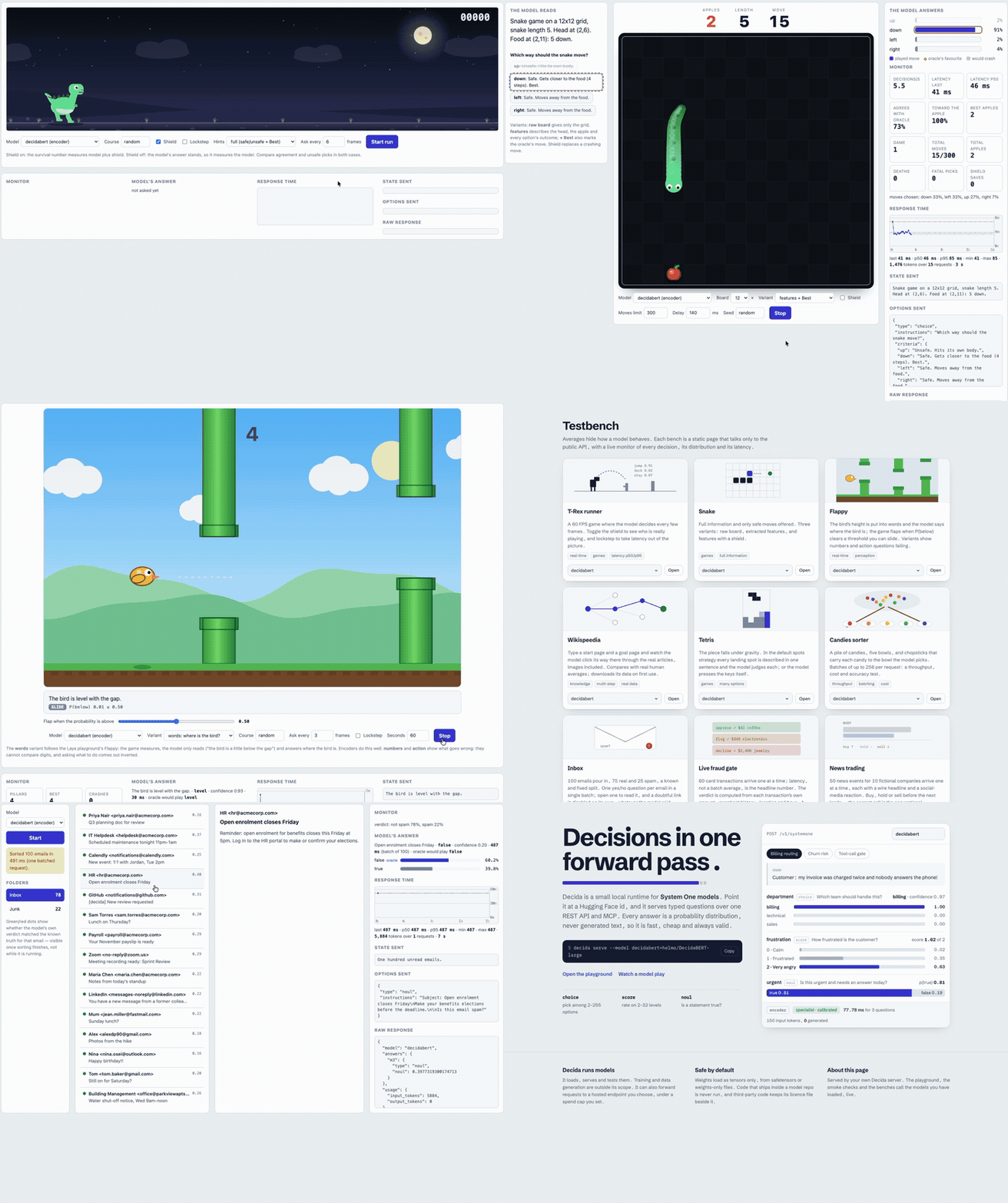
A real local Decida server on Apple GPU.
| question type | you give | you get back |
|---|---|---|
choice | 2 to 255 options, each with a description | a probability for every option |
score | an ordered list of levels, lowest first | a probability for every level, and the expected level |
noul | a yes/no question about the state | the probability that the statement is true |
uv tool install git+https://github.com/heldernoid/decida     # a global `decida` command
decida serve                                                # then open http://127.0.0.1:8000
Works out of the box on Apple Silicon (Apple GPU through MPS) and NVIDIA GPUs (CUDA), with no extra steps.
AMD GPU (ROCm): one extra install step, since the standard torch wheel is CUDA-only:
uv pip install --no-config --python "$(uv tool dir)/decida/bin/python" \
  --index-url https://stable.repo.amd.com/rocm/whl-next/ \
  "torch==2.12.0+rocm10.0.0" "amd-torch-device-gfx1151"
Replace gfx1151 with your GPU's architecture (rocminfo | grep "Name:.*gfx"). Full AMD details (development install from a clone, the --no-sync gotcha, tested hardware) are in DOCS.md.
From a clone of this repository, use uv sync and uv run decida serve instead.
The first run creates ~/.decida/settings.json with a default set of models. By default each model is only downloaded, and then loaded into RAM or VRAM, on its first request (a curl, a bench, decida check), so a plain decida serve returns instantly and touches nothing until you actually use a model.
decida setup                          # add or remove models, or restore the defaults
decida pull                           # download every configured model, without loading any of them
decida list                           # configured models and whether each is downloaded (no server needed)
decida serve --model decidabert=helmo/DecidaBERT-large --model qwen=helmo/Qwen3-0.6B    # or serve exactly these
decida ps                             # what a running server has loaded, and on which device
decida mcp                            # tools for a coding agent (needs a running `decida serve`)
curl -s localhost:8000/v1/systemone -H 'content-type: application/json' -d '{
  "model": "decidabert",
  "state": "Customer: I was billed twice for March and want my money back.",
  "questions": {
    "team": {"type": "choice", "instructions": "Which team should handle this?",
             "criteria": {"billing": "Charges, invoices, refunds",
                          "technical": "Bugs and outages",
                          "sales": "Pricing, demos, new seats"}},
    "urgent": {"type": "noul", "instructions": "Is this urgent?"}
  }}'
DOCS.md has every command in depth with examples, the full model list, the REST API, the testbench, benchmark results, hosted models, settings/data/devices, and how to write questions that work well. MCP.md covers the MCP server, including a browser UI to try its tools with no client config.
Apache-2.0, see LICENSE. Third-party code, ideas and data are credited in THIRD_PARTY.md, with their licence texts in third_party/licenses/.
system one server and test bench for typed decisions
See the codeDecida is a local runtime for System One models: models that read a state and a set of typed questions and answer all of them in one forward pass, with no generated text. Every answer is a probability distribution, so it is fast, cheap and always valid, and your code can act on the numbers.
It loads models from Hugging Face, serves them over one REST API and an MCP server, and comes with a testbench of small games and tools for seeing how a model really behaves.
A real local Decida server on Apple GPU.
| question type | you give | you get back |
|---|---|---|
choice | 2 to 255 options, each with a description | a probability for every option |
score | an ordered list of levels, lowest first | a probability for every level, and the expected level |
noul | a yes/no question about the state | the probability that the statement is true |
uv tool install git+https://github.com/heldernoid/decida     # a global `decida` command
decida serve                                                # then open http://127.0.0.1:8000
Works out of the box on Apple Silicon (Apple GPU through MPS) and NVIDIA GPUs (CUDA), with no extra steps.
AMD GPU (ROCm): one extra install step, since the standard torch wheel is CUDA-only:
uv pip install --no-config --python "$(uv tool dir)/decida/bin/python" \
  --index-url https://stable.repo.amd.com/rocm/whl-next/ \
  "torch==2.12.0+rocm10.0.0" "amd-torch-device-gfx1151"
Replace gfx1151 with your GPU's architecture (rocminfo | grep "Name:.*gfx"). Full AMD details (development install from a clone, the --no-sync gotcha, tested hardware) are in DOCS.md.
From a clone of this repository, use uv sync and uv run decida serve instead.
The first run creates ~/.decida/settings.json with a default set of models. By default each model is only downloaded, and then loaded into RAM or VRAM, on its first request (a curl, a bench, decida check), so a plain decida serve returns instantly and touches nothing until you actually use a model.
decida setup                          # add or remove models, or restore the defaults
decida pull                           # download every configured model, without loading any of them
decida list                           # configured models and whether each is downloaded (no server needed)
decida serve --model decidabert=helmo/DecidaBERT-large --model qwen=helmo/Qwen3-0.6B    # or serve exactly these
decida ps                             # what a running server has loaded, and on which device
decida mcp                            # tools for a coding agent (needs a running `decida serve`)
curl -s localhost:8000/v1/systemone -H 'content-type: application/json' -d '{
  "model": "decidabert",
  "state": "Customer: I was billed twice for March and want my money back.",
  "questions": {
    "team": {"type": "choice", "instructions": "Which team should handle this?",
             "criteria": {"billing": "Charges, invoices, refunds",
                          "technical": "Bugs and outages",
                          "sales": "Pricing, demos, new seats"}},
    "urgent": {"type": "noul", "instructions": "Is this urgent?"}
  }}'
DOCS.md has every command in depth with examples, the full model list, the REST API, the testbench, benchmark results, hosted models, settings/data/devices, and how to write questions that work well. MCP.md covers the MCP server, including a browser UI to try its tools with no client config.
Apache-2.0, see LICENSE. Third-party code, ideas and data are credited in THIRD_PARTY.md, with their licence texts in third_party/licenses/.



