harshjv/github-repo-size

šŸš€ Chrome extension to display repository size on GitHub

JavaScript

1,302

75 commits

updated Aug 17, 2025

See the code

README

šŸš€ Chrome extension to display repository size on GitHub JavaScript Style Guide

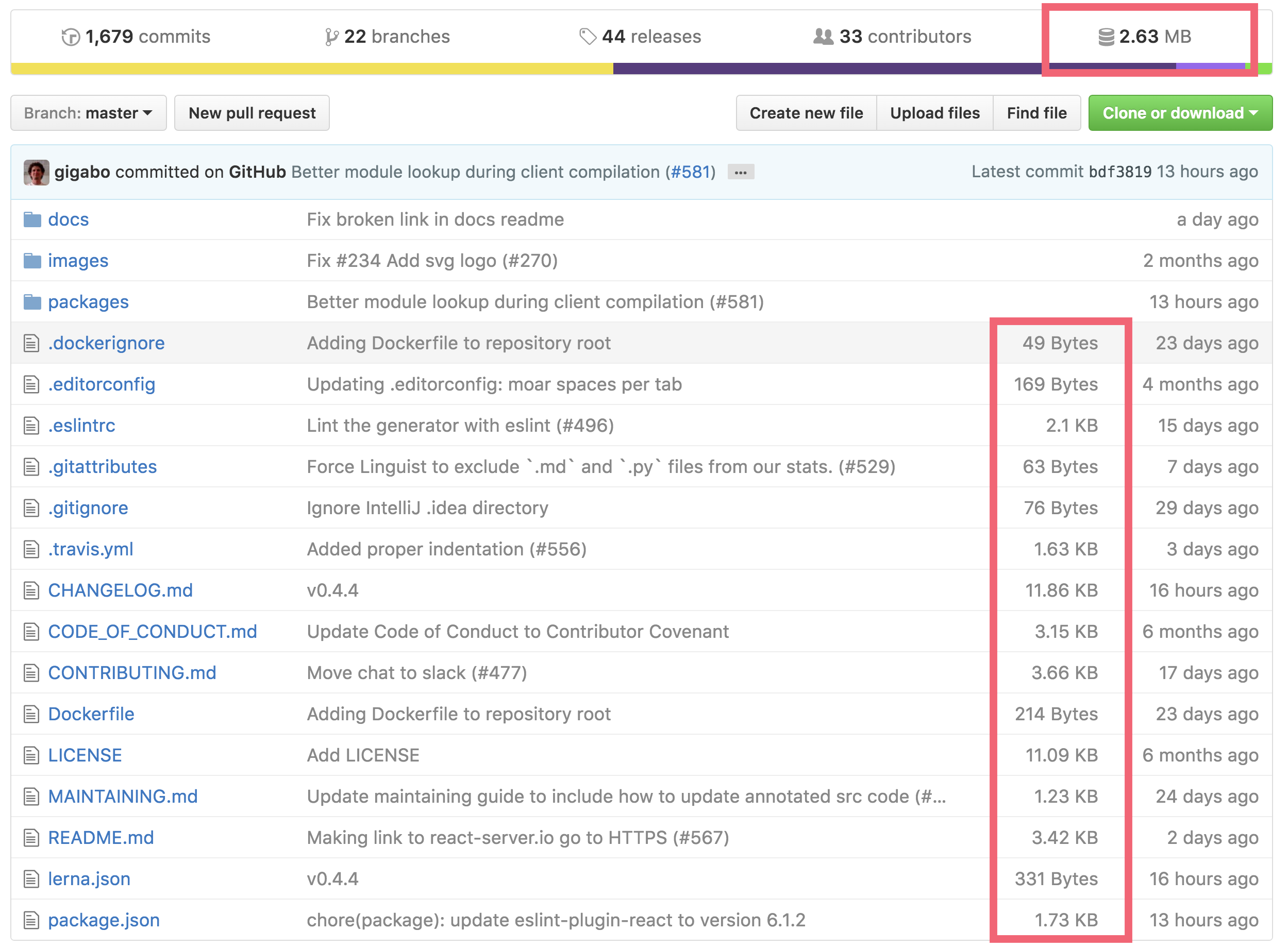
Automatically adds repository size to GitHub's repository summary.

Featured on Product Hunt

Screenshot

Screenshot of repository size on GitHub

Private Repository

To enable viewing size of private repositories;

  1. Install extension from chrome webstore, if you haven't.
  2. Go to https://github.com/settings/tokens to generate your personal access token.
  • Check repo scope to enable this extension on private repo.
  1. Click on the Github Repo Size extension (this extension)'s icon aside the address bar.
  2. Paste your access token there in the prompt box.

Temporarily override the token

You can set x-github-token in localStorage to your access token, and the extension will use this value even if you've previously set token.

localStorage.setItem('x-github-token', <YOUR-PERSONAL-ACCESS-TOKEN>)

and then remove it to use previously set token;

localStorage.removeItem('x-github-token')

Development

  1. Clone this repo
  2. Go to chrome extensions chrome://extensions
  3. Enable developer mode
  4. Click on load unpacked extension and select this cloned repo

License

MIT

chrome
chrome-extension
chrome-extensions
github
github-api
repository-management
repository-tools
repository-utilities
statistics

harshjv/github-repo-size

šŸš€ Chrome extension to display repository size on GitHub

JavaScript

1,302

75 commits

updated Aug 17, 2025

See the code

README

šŸš€ Chrome extension to display repository size on GitHub JavaScript Style Guide

Automatically adds repository size to GitHub's repository summary.
Featured on Product Hunt

Screenshot

Screenshot of repository size on GitHub

Private Repository

To enable viewing size of private repositories;

  1. Install extension from chrome webstore, if you haven't.
  2. Go to https://github.com/settings/tokens to generate your personal access token.
  • Check repo scope to enable this extension on private repo.
  1. Click on the Github Repo Size extension (this extension)'s icon aside the address bar.
  2. Paste your access token there in the prompt box.

Temporarily override the token

You can set x-github-token in localStorage to your access token, and the extension will use this value even if you've previously set token.

localStorage.setItem('x-github-token', <YOUR-PERSONAL-ACCESS-TOKEN>)

and then remove it to use previously set token;

localStorage.removeItem('x-github-token')

Development

  1. Clone this repo
  2. Go to chrome extensions chrome://extensions
  3. Enable developer mode
  4. Click on load unpacked extension and select this cloned repo

License

MIT

chrome
chrome-extension
chrome-extensions
github
github-api
repository-management
repository-tools
repository-utilities
statistics

Project health

Overall

2.1/10

Maintained

0/10

Code review

1/10
OpenSSF Scorecard

Significant stargazers

Veronika Romashkina

706 followers Ā· starred Jul 2019

Rick

986 followers Ā· starred Mar 2022

Jean-Christophe Fillion-Robin

324 followers Ā· starred Oct 2017

Nathan Cahill

266 followers Ā· starred Apr 2017