CharlieGroves/review-load

See each teammate's pending review requests right in GitHub's reviewer picker. Browser extension, no server.

TypeScript

5

12 commits

updated Oct 12, 2026

See the code

See what people are saying

SourceMessageScoreDate

ReviewLoad: see how many reviews each person already has, in GitHub's reviewer picker (r/opensource)

[https://github.com/CharlieGroves/review-load](https://github.com/CharlieGroves/review-load) ReviewLoad is a small browser extension that puts the number of reviews a GitHub user has assigned to them next to each person in the Reviewers menu on a pull request, and next to reviewers already on the…

1

Oct 12, 2026

ReviewLoad: see how many reviews each person already has, in GitHub's reviewer picker (r/typescript)

[https://github.com/CharlieGroves/review-load](https://github.com/CharlieGroves/review-load) ReviewLoad is a small browser extension that puts the number of reviews a GitHub user has assigned to them next to each person in the Reviewers menu on a pull request, and next to reviewers already on the…

1

Oct 12, 2026

ReviewLoad: see how many reviews each person already has, in GitHub's reviewer picker (r/github)

[https://github.com/CharlieGroves/review-load](https://github.com/CharlieGroves/review-load) ReviewLoad is a small browser extension that puts the number of reviews a GitHub user has assigned to them next to each person in the Reviewers menu on a pull request, and next to reviewers already on the…

5

Oct 12, 2026

ReviewLoad: see how many reviews each person already has, in GitHub's reviewer picker (r/coolgithubprojects)

ReviewLoad is a small browser extension that puts the number of reviews a GitHub user has assigned to them next to each person in the Reviewers menu on a pull request, and next to reviewers already on the PR. How it works: \- Each count is one GitHub search: \`is:pr is:open draft:false…

1

Oct 12, 2026

Show HN: ReviewLoad – Pending review counts in GitHub's reviewer picker

1

Oct 12, 2026

README

ReviewLoad logo

ReviewLoad

Install from the Chrome Web Store Release v0.2.1 No tracking MIT licence

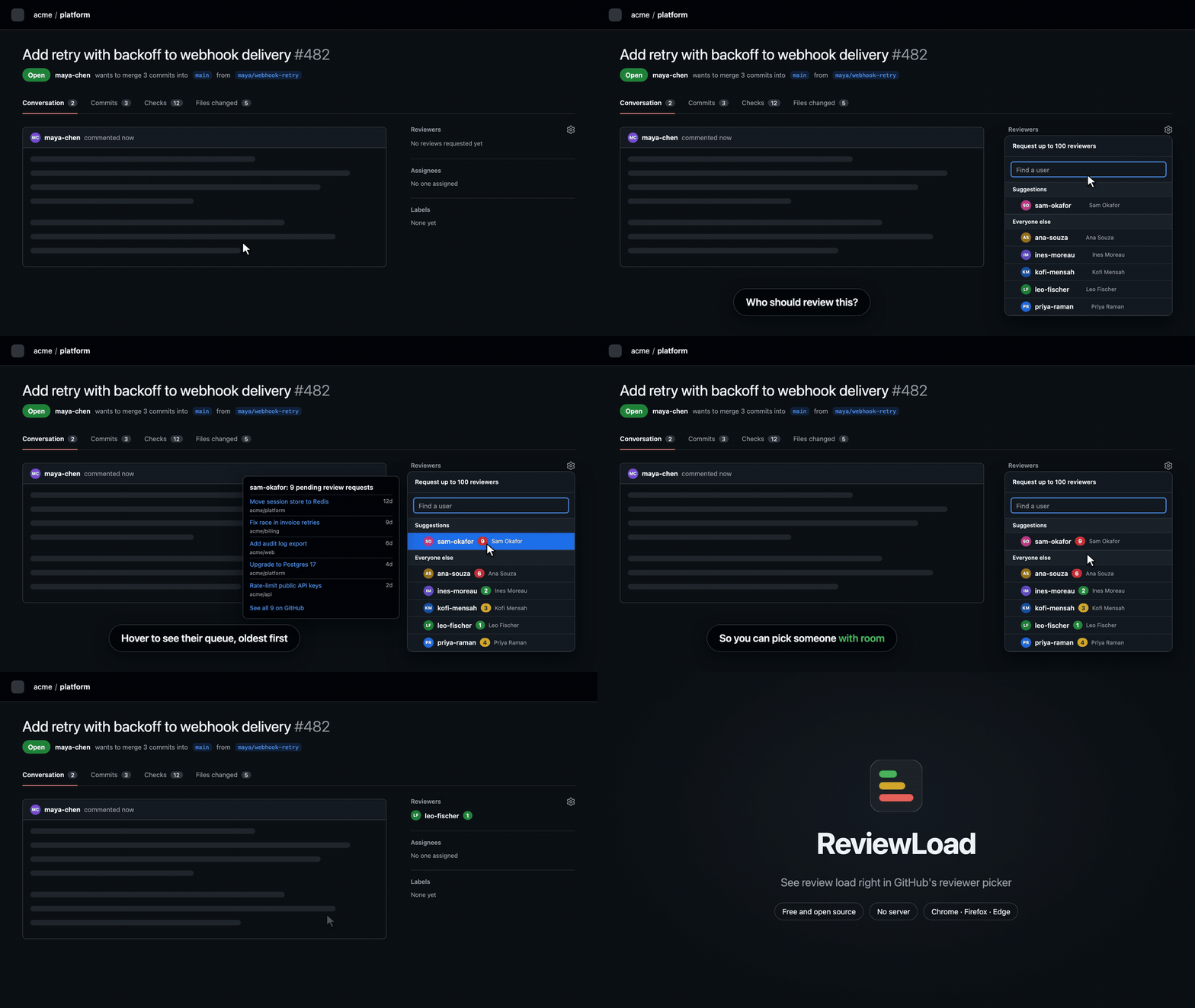
See how many reviews each teammate is already waiting on, right in GitHub's Reviewers menu, before you add one more.

Demo: on a pull request, the Reviewers menu opens and a coloured count appears next to each person. The suggested reviewer, sam-okafor, shows a red 9; hovering it lists their nine waiting reviews, the oldest 12 days old. The user picks leo-fischer, who has 1, instead.
▶️ Watch in full resolution · names and numbers are illustrative


Open the Reviewers gear on any pull request and each person gets a small pill:

  • The number is how many open pull requests are waiting on their review right now, including the one you're looking at.
  • The colour goes green → amber → red as that number rises (thresholds are yours to change).
  • Hover to see the oldest five, with links, and a link to the full list on GitHub.

The same pill appears next to reviewers already on the PR, so you can tell when the person you just added is snowed under.

ReviewLoad only adds information. It never requests reviews, assigns anyone, or changes anything on GitHub.

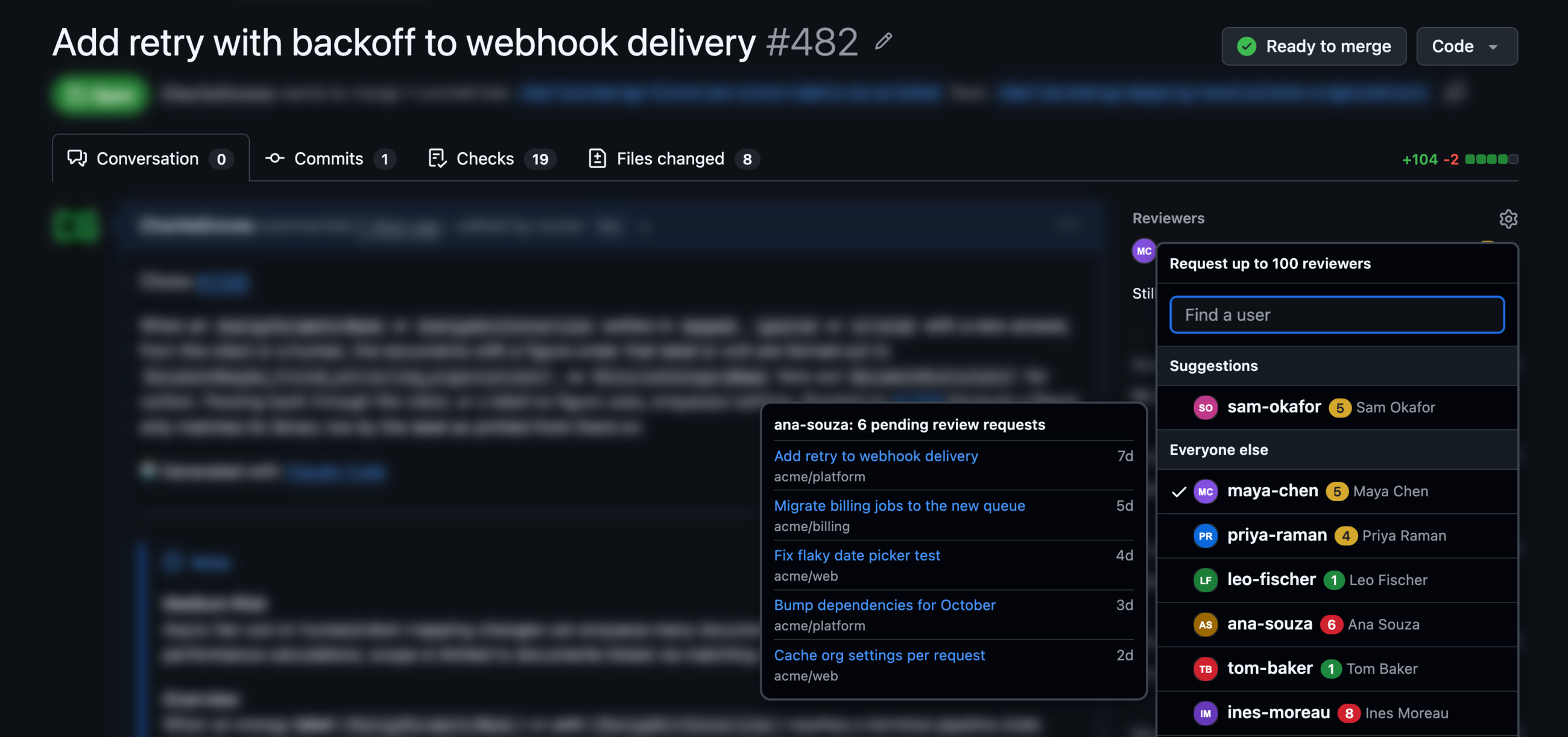
ReviewLoad on a real GitHub pull request: counts next to each person in the Reviewers menu, and the hover card listing one person's waiting reviews
On a real pull request (names, avatars and numbers changed)

Install

Want to see it before creating a token? Click the ReviewLoad icon in your toolbar and turn on Demo mode: every pill shows clearly labelled sample numbers and nothing is sent anywhere.

Set up a token (two minutes)

ReviewLoad reads GitHub's search API with your own read-only token. There's no ReviewLoad server.

  1. Open this pre-filled token form. It already sets the name, a 90-day expiry, and Pull requests: Read-only (Metadata: Read is added automatically).
  2. Set Resource owner to your organisation and Repository access to All repositories.
  3. Click Generate token and copy it.
  4. Click the ReviewLoad icon in your toolbar, paste the token and click Save. You should see Connected as <you>.

The same pop-up switches between organisation and repository scope, team requests and demo mode. Colour thresholds and removing the token live under All settings.

Things that can get in the way:

  • Organisation approval. Many organisations require an owner to approve fine-grained tokens. Until then, counts will be zero or missing for that organisation.
  • SAML single sign-on. If your organisation uses SSO, the options page will say so and link to the page where you authorise the token.
  • One owner per token. A fine-grained token covers one organisation (or your personal account). If you work across several, a classic token with the repo scope covers them all, but it also grants write access, so prefer fine-grained where you can.

What gets counted

A person's number is the count of pull requests that are:

  • open and not a draft,
  • in the same organisation as the PR you're on (or only the same repository, if you choose that in options),
  • with a review requested from that person directly, which GitHub clears once they submit a review.

That is exactly this GitHub search, which the "See all" link opens:

is:pr is:open draft:false user-review-requested:<login> user:<owner>

Known limits:

  • You only see what your token can see. Two people with access to different repositories can see different numbers for the same teammate.
  • Team requests are off by default, because a request to a 12-person team would add one to all 12 people. Turn on "Include review requests made to a team" if your team uses them deliberately.
  • Re-reviews. Once someone reviews a PR, it drops off their count until a review is requested from them again.
  • Search lag. Right after you add a reviewer, GitHub's search can take a few seconds to catch up. ReviewLoad re-checks shortly after the sidebar changes.
  • Numbers are cached for 5 minutes. Older numbers are shown faded, for example while GitHub is asking ReviewLoad to slow down.

People, not metrics

These numbers exist to protect busy reviewers at the moment someone is choosing who to ask. ReviewLoad deliberately has no leaderboards, no history, no charts and no export. Everything it shows is already visible to anyone with repository access through GitHub search; it just puts it where the decision is made.

Privacy

  • Your token is stored in your browser's local extension storage. It isn't synced between devices and it isn't encrypted at rest, so use a read-only token with an expiry.
  • ReviewLoad talks only to api.github.com. No analytics, no error reporting, no third-party servers.
  • Permissions: storage, plus access to github.com (to draw the pills) and api.github.com (to count).

Full details in PRIVACY.md.

FAQ

Why does it need a token at all? The counts come from GitHub's search API, which needs authentication to see private repositories and to get a usable rate limit.

How is this different from GitHub's team auto-assignment? Auto-assignment only kicks in when you request a whole team, needs an organisation admin to set it up, and shows nobody the numbers. ReviewLoad helps with the reviewers you pick by hand, needs no admin, and works alongside auto-assignment.

How many API calls does it make? Opening the picker sends a handful of small GraphQL requests (up to five people each), costing about one point per request against GitHub's 5,000-points-per-hour budget. Results are cached for 5 minutes, so opening it again costs nothing.

Does it work on GitHub Enterprise Server? Not yet. It's the first thing planned after v1.

Development

npm install
npm run dev        # builds .output/chrome-mv3-dev; load it unpacked and it reloads on change
npm test           # unit and DOM-fixture tests
npm run compile    # type-check
npm run build && npm run build:firefox
npm run zip && npm run zip:firefox   # store-ready zips (Firefox also gets a sources zip)
npm run demo       # re-render docs/demo.mp4 and docs/demo.gif from assets/video/demo.html (needs ffmpeg)

Every GitHub selector lives in lib/selectors.ts, and fixtures/pr-sidebar.html mirrors the markup it expects. When GitHub changes the picker, those two files are usually the whole fix.

Firefox reviewers: npm ci && npm run zip:firefox reproduces the submitted build exactly (Node 24, npm 11).

Licence

MIT

browser-extension
chrome-extension
code-review
firefox-addon
github
pull-requests

CharlieGroves/review-load

See each teammate's pending review requests right in GitHub's reviewer picker. Browser extension, no server.

TypeScript

5

12 commits

updated Oct 12, 2026

See the code

See what people are saying

SourceMessageScoreDate

ReviewLoad: see how many reviews each person already has, in GitHub's reviewer picker (r/opensource)

[https://github.com/CharlieGroves/review-load](https://github.com/CharlieGroves/review-load) ReviewLoad is a small browser extension that puts the number of reviews a GitHub user has assigned to them next to each person in the Reviewers menu on a pull request, and next to reviewers already on the…

1

Oct 12, 2026

ReviewLoad: see how many reviews each person already has, in GitHub's reviewer picker (r/typescript)

[https://github.com/CharlieGroves/review-load](https://github.com/CharlieGroves/review-load) ReviewLoad is a small browser extension that puts the number of reviews a GitHub user has assigned to them next to each person in the Reviewers menu on a pull request, and next to reviewers already on the…

1

Oct 12, 2026

ReviewLoad: see how many reviews each person already has, in GitHub's reviewer picker (r/github)

[https://github.com/CharlieGroves/review-load](https://github.com/CharlieGroves/review-load) ReviewLoad is a small browser extension that puts the number of reviews a GitHub user has assigned to them next to each person in the Reviewers menu on a pull request, and next to reviewers already on the…

5

Oct 12, 2026

ReviewLoad: see how many reviews each person already has, in GitHub's reviewer picker (r/coolgithubprojects)

ReviewLoad is a small browser extension that puts the number of reviews a GitHub user has assigned to them next to each person in the Reviewers menu on a pull request, and next to reviewers already on the PR. How it works: \- Each count is one GitHub search: \`is:pr is:open draft:false…

1

Oct 12, 2026

Show HN: ReviewLoad – Pending review counts in GitHub's reviewer picker

1

Oct 12, 2026

README

ReviewLoad logo

ReviewLoad

Install from the Chrome Web Store Release v0.2.1 No tracking MIT licence

See how many reviews each teammate is already waiting on, right in GitHub's Reviewers menu, before you add one more.
Demo: on a pull request, the Reviewers menu opens and a coloured count appears next to each person. The suggested reviewer, sam-okafor, shows a red 9; hovering it lists their nine waiting reviews, the oldest 12 days old. The user picks leo-fischer, who has 1, instead.
▶️ Watch in full resolution · names and numbers are illustrative


Open the Reviewers gear on any pull request and each person gets a small pill:

  • The number is how many open pull requests are waiting on their review right now, including the one you're looking at.
  • The colour goes green → amber → red as that number rises (thresholds are yours to change).
  • Hover to see the oldest five, with links, and a link to the full list on GitHub.

The same pill appears next to reviewers already on the PR, so you can tell when the person you just added is snowed under.

ReviewLoad only adds information. It never requests reviews, assigns anyone, or changes anything on GitHub.
ReviewLoad on a real GitHub pull request: counts next to each person in the Reviewers menu, and the hover card listing one person's waiting reviews
On a real pull request (names, avatars and numbers changed)

Install

Want to see it before creating a token? Click the ReviewLoad icon in your toolbar and turn on Demo mode: every pill shows clearly labelled sample numbers and nothing is sent anywhere.

Set up a token (two minutes)

ReviewLoad reads GitHub's search API with your own read-only token. There's no ReviewLoad server.

  1. Open this pre-filled token form. It already sets the name, a 90-day expiry, and Pull requests: Read-only (Metadata: Read is added automatically).
  2. Set Resource owner to your organisation and Repository access to All repositories.
  3. Click Generate token and copy it.
  4. Click the ReviewLoad icon in your toolbar, paste the token and click Save. You should see Connected as <you>.

The same pop-up switches between organisation and repository scope, team requests and demo mode. Colour thresholds and removing the token live under All settings.

Things that can get in the way:

  • Organisation approval. Many organisations require an owner to approve fine-grained tokens. Until then, counts will be zero or missing for that organisation.
  • SAML single sign-on. If your organisation uses SSO, the options page will say so and link to the page where you authorise the token.
  • One owner per token. A fine-grained token covers one organisation (or your personal account). If you work across several, a classic token with the repo scope covers them all, but it also grants write access, so prefer fine-grained where you can.

What gets counted

A person's number is the count of pull requests that are:

  • open and not a draft,
  • in the same organisation as the PR you're on (or only the same repository, if you choose that in options),
  • with a review requested from that person directly, which GitHub clears once they submit a review.

That is exactly this GitHub search, which the "See all" link opens:

is:pr is:open draft:false user-review-requested:<login> user:<owner>

Known limits:

  • You only see what your token can see. Two people with access to different repositories can see different numbers for the same teammate.
  • Team requests are off by default, because a request to a 12-person team would add one to all 12 people. Turn on "Include review requests made to a team" if your team uses them deliberately.
  • Re-reviews. Once someone reviews a PR, it drops off their count until a review is requested from them again.
  • Search lag. Right after you add a reviewer, GitHub's search can take a few seconds to catch up. ReviewLoad re-checks shortly after the sidebar changes.
  • Numbers are cached for 5 minutes. Older numbers are shown faded, for example while GitHub is asking ReviewLoad to slow down.

People, not metrics

These numbers exist to protect busy reviewers at the moment someone is choosing who to ask. ReviewLoad deliberately has no leaderboards, no history, no charts and no export. Everything it shows is already visible to anyone with repository access through GitHub search; it just puts it where the decision is made.

Privacy

  • Your token is stored in your browser's local extension storage. It isn't synced between devices and it isn't encrypted at rest, so use a read-only token with an expiry.
  • ReviewLoad talks only to api.github.com. No analytics, no error reporting, no third-party servers.
  • Permissions: storage, plus access to github.com (to draw the pills) and api.github.com (to count).

Full details in PRIVACY.md.

FAQ

Why does it need a token at all? The counts come from GitHub's search API, which needs authentication to see private repositories and to get a usable rate limit.

How is this different from GitHub's team auto-assignment? Auto-assignment only kicks in when you request a whole team, needs an organisation admin to set it up, and shows nobody the numbers. ReviewLoad helps with the reviewers you pick by hand, needs no admin, and works alongside auto-assignment.

How many API calls does it make? Opening the picker sends a handful of small GraphQL requests (up to five people each), costing about one point per request against GitHub's 5,000-points-per-hour budget. Results are cached for 5 minutes, so opening it again costs nothing.

Does it work on GitHub Enterprise Server? Not yet. It's the first thing planned after v1.

Development

npm install
npm run dev        # builds .output/chrome-mv3-dev; load it unpacked and it reloads on change
npm test           # unit and DOM-fixture tests
npm run compile    # type-check
npm run build && npm run build:firefox
npm run zip && npm run zip:firefox   # store-ready zips (Firefox also gets a sources zip)
npm run demo       # re-render docs/demo.mp4 and docs/demo.gif from assets/video/demo.html (needs ffmpeg)

Every GitHub selector lives in lib/selectors.ts, and fixtures/pr-sidebar.html mirrors the markup it expects. When GitHub changes the picker, those two files are usually the whole fix.

Firefox reviewers: npm ci && npm run zip:firefox reproduces the submitted build exactly (Node 24, npm 11).

Licence

MIT

browser-extension
chrome-extension
code-review
firefox-addon
github
pull-requests