
Hanzo AI native inference engine - Rust-based LLM & embedding engine for foundational models
Rust
0
5,415 commits
updated Sep 18, 2026
README
Hanzo Engine
The native, multimodal inference engine — text, vision, audio, speech, image, and embeddings in one fast Rust binary.
| Documentation | Rust SDK | Python SDK | Discord |

Hanzo Engine runs any Hugging Face model with zero config, quantizes it for your hardware, and serves it over the OpenAI and Anthropic wire formats plus a built-in web UI — one binary, from your laptop to a GPU cluster. It is the native inference layer of the Open AI Cloud.
Latest
- NVFP4, natively: packed 4-bit weights go straight into the GEMM, with a register-resident E2M1 codebook for decode and tensor cores for prefill, so a 27B NVFP4 checkpoint loads in 31 GB instead of the 104 GB a dequantize-at-load path asks for. Quantization docs
- Qwen3-Omni: native end-to-end omni-modal model (understand → think → speak) — text/image/video/audio in, text + 24kHz speech out, through one extensible modality pipeline. Validated against the reference weights.
- New frontier models: MiniMax-M2 (sparse-MoE) and DeepSeek-V3.2, alongside the existing DeepSeek-V3, Kimi-K2, GLM-4, and Qwen3 families. Supported models
- Paged-attention serving for the omni Thinker, plus a disk-first KV cache (cross-restart sessions + agent prefix reuse) for cheap long-context serving.
- Anthropic Messages API:
hanzo-engine servenow exposes an Anthropic-compatiblePOST /v1/messagesendpoint (streaming, tool use, and Claude Code harness support) alongside the OpenAI-compatible/v1API. Examples - Agentic runtime: web search, local Python code execution with model feedback, session management, and custom tool hooks. Guide
- Gemma 4: full multimodal: text, image, video, and audio input. Guide | Video setup
- MXFP4 ISQ quantization: MXFP4 with optimized decode kernels for faster, smaller models. Quantization docs
Why Hanzo Engine?
- Any Hugging Face model, zero config: Just
hanzo-engine run -m user/model. Architecture, quantization format, and chat template are auto-detected. - True multimodality: Text, vision, video, and audio, speech generation, image generation, and embeddings in one engine.
- Smart quantization:
--quantautomatically selects the best quantization format at that level: using a prebuilt UQFF if one is published, otherwise applying ISQ. Docs - OpenAI + Anthropic wire formats: The same
hanzo-engine serveprocess exposes OpenAI-compatible/v1endpoints and an Anthropic-compatible Messages endpoint. - Built-in web UI: Served at
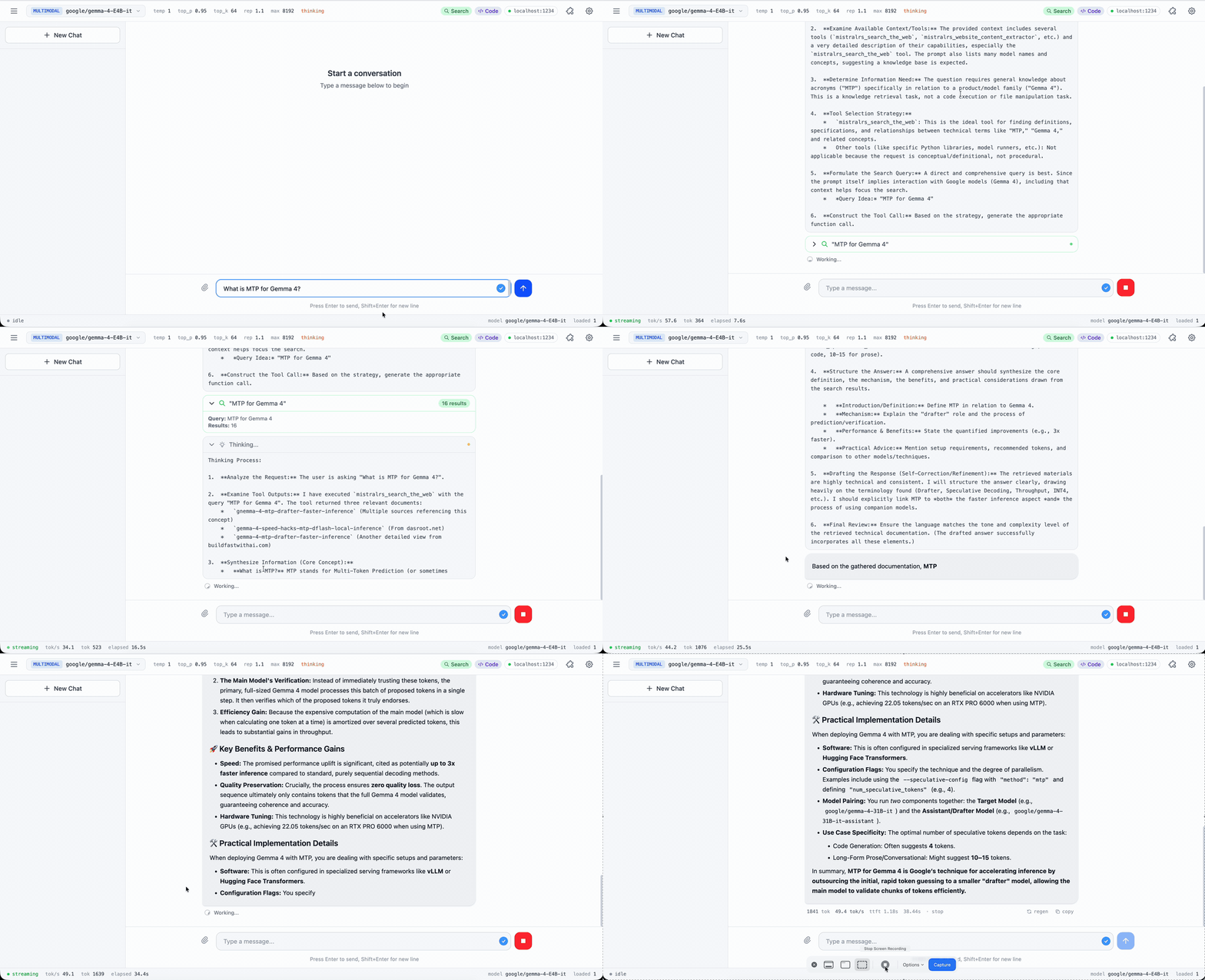
/uiby default. Shows reasoning, code execution, plots, and files inline. Edit any message and the new branch runs with its own Python state. Pass--no-uito disable. - Hardware-aware:
hanzo-engine tunebenchmarks your system and picks optimal quantization + device mapping. - Flexible SDKs: Python package and Rust crate to build your projects.
- Native agentic support: built-in agentic loop with web search, local Python code execution with model feedback, session management, and custom tool hooks.
Quick Start
Binaries
This repository builds two programs, and neither is called hanzo:
| binary | crate | how to get it |
|---|---|---|
hanzoai | hanzo-server | prebuilt, attached to each release |
hanzo-engine | hanzo-cli | built from source by install.sh |
The hanzo on your PATH is the Hanzo CLI; its hanzo engine serve MODEL runs hanzo-engine serve -m MODEL. hanzoai logs a deprecation warning that names hanzo serve from hanzo-cli, which is the hanzo-engine binary.
Each release attaches hanzoai-macos-arm64.tar.gz and hanzoai-macos-amd64.tar.gz (Metal), and hanzoai-linux-amd64.tar.gz and hanzoai-linux-arm64.tar.gz (CPU only, with cosign .sig and .pem). Each tarball holds the one hanzoai binary.
install.sh needs Rust 1.88 or newer. It runs cargo install --git https://github.com/hanzoai/engine --locked hanzo-cli with the features it detects, which puts hanzo-engine in ~/.cargo/bin:
curl --proto '=https' --tlsv1.2 -sSf https://raw.githubusercontent.com/hanzoai/engine/main/install.sh | sh
Windows (PowerShell):
irm https://raw.githubusercontent.com/hanzoai/engine/main/install.ps1 | iex
Manual installation & other platforms
Serve a model
curl -L https://github.com/hanzoai/engine/releases/latest/download/hanzoai-macos-arm64.tar.gz | tar xz
./hanzoai --serve-ip 127.0.0.1 --port 1234 run -m zenlm/zen-nano-0.6b
From another shell:
curl 127.0.0.1:1234/v1/models
hanzoai has no default port: give it --port, or -i for an interactive session. --serve-ip defaults to 0.0.0.0, every interface. OpenAI-compatible clients use http://127.0.0.1:1234/v1.
hanzo-engine serve -m <model> listens on 0.0.0.0:1234 unless given -p and --host, serves a web UI at /ui, and advertises itself over mDNS unless given --no-advertise. LM Studio also defaults to port 1234. hanzo-engine tune -m <model> --emit-config config.toml recommends a quantization and device map for the machine, and hanzo-engine from-config -f config.toml runs it.
Chat and embeddings on one port
multi-model serves several models on one port, and each request names one by alias. With this models.json:
{
  "chat": { "alias": "chat", "Plain": { "model_id": "zenlm/zen-nano-0.6b" } },
  "embed": { "alias": "embed", "Embedding": { "model_id": "zenlm/zen-embedding-0.6B" } }
}
./hanzoai --serve-ip 127.0.0.1 --port 1234 multi-model --config models.json
curl 127.0.0.1:1234/v1/embeddings -H 'Content-Type: application/json' \
  -d '{"model":"embed","input":"hello"}'
curl 127.0.0.1:1234/v1/chat/completions -H 'Content-Type: application/json' \
  -d '{"model":"chat","messages":[{"role":"user","content":"hello"}]}'
Memory
Weights take about their file size in memory. Weight files of Zen models in GB (10^9 bytes), as the Hugging Face API lists them (/api/models/<repo>?blobs=true). The 16-bit column is the safetensors release; Q8_0 and Q4_K_M are GGUF files, from the -GGUF repos for the embedding models.
| model | parameters | 16-bit | Q8_0 | Q4_K_M |
|---|---|---|---|---|
zenlm/zen-nano-0.6b | 0.60 B | 1.19 | 0.64 | 0.40 |
zenlm/zen-embedding-0.6B | 0.60 B | 1.19 | 0.64 | |
zenlm/zen-eco-4b-instruct | 4.02 B | 8.04 | ||
zenlm/zen-embedding-8B | 7.57 B | 15.13 | 4.68 | |
zenlm/zen-vl-8b-instruct | 8.77 B | 17.53 |
That is about 2.0 GB per billion parameters at 16 bits, 1.07 GB at Q8_0 and 0.62 GB at Q4_K_M, so a 14B model needs roughly 28, 15 or 8.7 GB for weights. hanzoai --isq q8_0 or --isq q4k quantizes a 16-bit model as it loads.
The KV cache comes on top: 2 × layers × KV heads × head dim × 2 bytes per token at 16 bits. With the values in each config.json, zen-nano-0.6b (28 × 8 × 128) takes 0.11 MB per token and zen-eco-4b-instruct (36 × 8 × 128) 0.15 MB, so a 32,768-token context adds 3.8 or 4.8 GB. The automatic device map plans for --max-seq-len, 4096 tokens unless set.
Measured on a 64 GB M1 Max with vmmap -summary: zen-nano-0.6b at 16 bits served with a 2.0 GB physical footprint, and 3.6 GB with zen-embedding-0.6B loaded beside it.
On Apple Silicon the GPU budget is the larger of Metal's recommended working set and 2/3 of RAM (3/4 above 36 GB), or sysctl iogpu.wired_limit_mb when that is set (hanzo-engine/src/utils/memory_usage.rs). For the 64 GB M1 Max above the device map reported 52 GB. On a 24 GB Mac the budget starts at 16 GB, about what a 14B model at Q8_0 needs for weights alone.
UI Demo
What Makes It Fast
Performance
- Continuous batching support by default on all devices.
- CUDA with FlashAttention V2/V3, Metal, multi-GPU tensor parallelism
- PagedAttention for high throughput continuous batching on CUDA or Apple Silicon, prefix caching (including multimodal)
Quantization (full docs)
- In-situ quantization (ISQ) of any Hugging Face model
- GGUF (2-8 bit), GPTQ, AWQ, HQQ, FP8, BNB support
- ⭐ Per-layer topology: Fine-tune quantization per layer for optimal quality/speed
- ⭐ Auto-select fastest quant method for your hardware
Flexibility
- LoRA & X-LoRA with weight merging
- AnyMoE: Create mixture-of-experts on any base model
- Multiple models: Load/unload at runtime
Agentic Features
- Integrated tool calling with grammar enforcement and strict schema mode
- ⭐ Server-side agentic loop: auto-execute tools and feed results back
- ⭐ Python code execution: persistent Jupyter-like sessions with matplotlib capture and multimodal feedback
- ⭐ Web search integration with embedding-based ranking
- ⭐ Tool dispatch URL: POST tool calls to your own endpoint
- ⭐ MCP client: Connect to external tools via Process, HTTP, or WebSocket
- Python/Rust tool callbacks for custom execution
Supported Models
Text Models
- Granite 4.0
- SmolLM 3
- DeepSeek V3
- GPT-OSS
- DeepSeek V2
- Qwen 3 Next
- Qwen 3 MoE
- Phi 3.5 MoE
- Qwen 3
- GLM 4
- GLM-4.7-Flash
- GLM-4.7 (MoE)
- Gemma 2
- Qwen 2
- Starcoder 2
- Phi 3
- Mixtral
- Phi 2
- Gemma
- Llama
- Mistral
Multimodal Models
- Qwen 3.5
- Qwen 3.5 MoE
- Qwen 3-VL
- Qwen 3-VL MoE
- Gemma 3n
- Llama 4
- Gemma 3
- Mistral 3
- Phi 4 multimodal
- Qwen 2.5-VL
- MiniCPM-O
- Llama 3.2 Vision
- Qwen 2-VL
- Idefics 3
- Idefics 2
- LLaVA Next
- LLaVA
- Phi 3V
Speech Models
- Voxtral (ASR/speech-to-text)
- Dia
Image Generation Models
- FLUX
Embedding Models
- Embedding Gemma
- Qwen 3 Embedding
Request a new model | Full compatibility tables
Python SDK
pip install hanzo # or hanzo-cuda, hanzo-metal, hanzo-mkl, hanzo-accelerate
from hanzo import Runner, Which, ChatCompletionRequest

runner = Runner(
    which=Which.Plain(model_id="Qwen/Qwen3-4B"),
    in_situ_quant="4",
)

res = runner.send_chat_completion_request(
    ChatCompletionRequest(
        model="default",
        messages=[{"role": "user", "content": "Hello!"}],
        max_tokens=256,
    )
)
print(res.choices[0].message.content)
Python SDK | Installation | Examples | Cookbook
Rust SDK
cargo add hanzo
use anyhow::Result;
use hanzo::{IsqType, TextMessageRole, TextMessages, MultimodalModelBuilder};

#[tokio::main]
async fn main() -> Result<()> {
    let model = MultimodalModelBuilder::new("google/gemma-4-E4B-it")
        .with_isq(IsqType::Q4K)
        .with_logging()
        .build()
        .await?;

    let messages = TextMessages::new().add_message(
        TextMessageRole::User,
        "Hello!",
    );

    let response = model.send_chat_request(messages).await?;

    println!("{:?}", response.choices[0].message.content);

    Ok(())
}
Docker
For quick containerized deployment:
docker pull ghcr.io/hanzoai/engine:latest
docker run --gpus all -p 1234:1234 ghcr.io/hanzoai/engine:latest \
  serve -m Qwen/Qwen3-4B
For production use, we recommend installing the CLI directly for maximum flexibility.
Documentation
For complete documentation, see the Documentation.
Quick Links:
- CLI Reference - All commands and options
- HTTP API - OpenAI-compatible
/v1endpoints - Quantization - ISQ, GGUF, GPTQ, and more
- Device Mapping - Multi-GPU and CPU offloading
- MCP Integration - MCP integration documentation
- Troubleshooting - Common issues and solutions
- Configuration - Environment variables for configuration
Contributing
Contributions welcome! Please open an issue to discuss new features or report bugs. If you want to add a new model, please contact us via an issue and we can coordinate.
Credits
Tensors, kernels, and autodiff come from hanzoai/ml, the Rust compute core underneath this engine. Thank you to all contributors.
Hanzo Engine is MIT licensed. LICENSE carries the full text and every copyright line it names;
NOTICE carries the Apache-2.0 attributions that ship with the vendored GPU kernels, and both
travel with any binary or crate we distribute.
Hanzo — the Open AI Cloud
Open source · every language · on-chain settlement. hanzo.ai · docs.hanzo.ai
SDKs in every language — Python (flagship) · TypeScript · Go · Rust · C++ · Swift · Kotlin · umbrella
Contributors
(top 30 of 83)


Similar repos


Languages
Rust
81.1%
Cuda
11.1%
Metal
3.2%
Python
1.2%
Hanzo AI native inference engine - Rust-based LLM & embedding engine for foundational models
Rust
0
5,415 commits
updated Sep 18, 2026
README
Hanzo Engine
The native, multimodal inference engine — text, vision, audio, speech, image, and embeddings in one fast Rust binary.
| Documentation | Rust SDK | Python SDK | Discord |
Hanzo Engine runs any Hugging Face model with zero config, quantizes it for your hardware, and serves it over the OpenAI and Anthropic wire formats plus a built-in web UI — one binary, from your laptop to a GPU cluster. It is the native inference layer of the Open AI Cloud.
Latest
- NVFP4, natively: packed 4-bit weights go straight into the GEMM, with a register-resident E2M1 codebook for decode and tensor cores for prefill, so a 27B NVFP4 checkpoint loads in 31 GB instead of the 104 GB a dequantize-at-load path asks for. Quantization docs
- Qwen3-Omni: native end-to-end omni-modal model (understand → think → speak) — text/image/video/audio in, text + 24kHz speech out, through one extensible modality pipeline. Validated against the reference weights.
- New frontier models: MiniMax-M2 (sparse-MoE) and DeepSeek-V3.2, alongside the existing DeepSeek-V3, Kimi-K2, GLM-4, and Qwen3 families. Supported models
- Paged-attention serving for the omni Thinker, plus a disk-first KV cache (cross-restart sessions + agent prefix reuse) for cheap long-context serving.
- Anthropic Messages API:
hanzo-engine servenow exposes an Anthropic-compatiblePOST /v1/messagesendpoint (streaming, tool use, and Claude Code harness support) alongside the OpenAI-compatible/v1API. Examples - Agentic runtime: web search, local Python code execution with model feedback, session management, and custom tool hooks. Guide
- Gemma 4: full multimodal: text, image, video, and audio input. Guide | Video setup
- MXFP4 ISQ quantization: MXFP4 with optimized decode kernels for faster, smaller models. Quantization docs
Why Hanzo Engine?
- Any Hugging Face model, zero config: Just
hanzo-engine run -m user/model. Architecture, quantization format, and chat template are auto-detected. - True multimodality: Text, vision, video, and audio, speech generation, image generation, and embeddings in one engine.
- Smart quantization:
--quantautomatically selects the best quantization format at that level: using a prebuilt UQFF if one is published, otherwise applying ISQ. Docs - OpenAI + Anthropic wire formats: The same
hanzo-engine serveprocess exposes OpenAI-compatible/v1endpoints and an Anthropic-compatible Messages endpoint. - Built-in web UI: Served at
/uiby default. Shows reasoning, code execution, plots, and files inline. Edit any message and the new branch runs with its own Python state. Pass--no-uito disable. - Hardware-aware:
hanzo-engine tunebenchmarks your system and picks optimal quantization + device mapping. - Flexible SDKs: Python package and Rust crate to build your projects.
- Native agentic support: built-in agentic loop with web search, local Python code execution with model feedback, session management, and custom tool hooks.
Quick Start
Binaries
This repository builds two programs, and neither is called hanzo:
| binary | crate | how to get it |
|---|---|---|
hanzoai | hanzo-server | prebuilt, attached to each release |
hanzo-engine | hanzo-cli | built from source by install.sh |
The hanzo on your PATH is the Hanzo CLI; its hanzo engine serve MODEL runs hanzo-engine serve -m MODEL. hanzoai logs a deprecation warning that names hanzo serve from hanzo-cli, which is the hanzo-engine binary.
Each release attaches hanzoai-macos-arm64.tar.gz and hanzoai-macos-amd64.tar.gz (Metal), and hanzoai-linux-amd64.tar.gz and hanzoai-linux-arm64.tar.gz (CPU only, with cosign .sig and .pem). Each tarball holds the one hanzoai binary.
install.sh needs Rust 1.88 or newer. It runs cargo install --git https://github.com/hanzoai/engine --locked hanzo-cli with the features it detects, which puts hanzo-engine in ~/.cargo/bin:
curl --proto '=https' --tlsv1.2 -sSf https://raw.githubusercontent.com/hanzoai/engine/main/install.sh | sh
Windows (PowerShell):
irm https://raw.githubusercontent.com/hanzoai/engine/main/install.ps1 | iex
Manual installation & other platforms
Serve a model
curl -L https://github.com/hanzoai/engine/releases/latest/download/hanzoai-macos-arm64.tar.gz | tar xz
./hanzoai --serve-ip 127.0.0.1 --port 1234 run -m zenlm/zen-nano-0.6b
From another shell:
curl 127.0.0.1:1234/v1/models
hanzoai has no default port: give it --port, or -i for an interactive session. --serve-ip defaults to 0.0.0.0, every interface. OpenAI-compatible clients use http://127.0.0.1:1234/v1.
hanzo-engine serve -m <model> listens on 0.0.0.0:1234 unless given -p and --host, serves a web UI at /ui, and advertises itself over mDNS unless given --no-advertise. LM Studio also defaults to port 1234. hanzo-engine tune -m <model> --emit-config config.toml recommends a quantization and device map for the machine, and hanzo-engine from-config -f config.toml runs it.
Chat and embeddings on one port
multi-model serves several models on one port, and each request names one by alias. With this models.json:
{
  "chat": { "alias": "chat", "Plain": { "model_id": "zenlm/zen-nano-0.6b" } },
  "embed": { "alias": "embed", "Embedding": { "model_id": "zenlm/zen-embedding-0.6B" } }
}
./hanzoai --serve-ip 127.0.0.1 --port 1234 multi-model --config models.json
curl 127.0.0.1:1234/v1/embeddings -H 'Content-Type: application/json' \
  -d '{"model":"embed","input":"hello"}'
curl 127.0.0.1:1234/v1/chat/completions -H 'Content-Type: application/json' \
  -d '{"model":"chat","messages":[{"role":"user","content":"hello"}]}'
Memory
Weights take about their file size in memory. Weight files of Zen models in GB (10^9 bytes), as the Hugging Face API lists them (/api/models/<repo>?blobs=true). The 16-bit column is the safetensors release; Q8_0 and Q4_K_M are GGUF files, from the -GGUF repos for the embedding models.
| model | parameters | 16-bit | Q8_0 | Q4_K_M |
|---|---|---|---|---|
zenlm/zen-nano-0.6b | 0.60 B | 1.19 | 0.64 | 0.40 |
zenlm/zen-embedding-0.6B | 0.60 B | 1.19 | 0.64 | |
zenlm/zen-eco-4b-instruct | 4.02 B | 8.04 | ||
zenlm/zen-embedding-8B | 7.57 B | 15.13 | 4.68 | |
zenlm/zen-vl-8b-instruct | 8.77 B | 17.53 |
That is about 2.0 GB per billion parameters at 16 bits, 1.07 GB at Q8_0 and 0.62 GB at Q4_K_M, so a 14B model needs roughly 28, 15 or 8.7 GB for weights. hanzoai --isq q8_0 or --isq q4k quantizes a 16-bit model as it loads.
The KV cache comes on top: 2 × layers × KV heads × head dim × 2 bytes per token at 16 bits. With the values in each config.json, zen-nano-0.6b (28 × 8 × 128) takes 0.11 MB per token and zen-eco-4b-instruct (36 × 8 × 128) 0.15 MB, so a 32,768-token context adds 3.8 or 4.8 GB. The automatic device map plans for --max-seq-len, 4096 tokens unless set.
Measured on a 64 GB M1 Max with vmmap -summary: zen-nano-0.6b at 16 bits served with a 2.0 GB physical footprint, and 3.6 GB with zen-embedding-0.6B loaded beside it.
On Apple Silicon the GPU budget is the larger of Metal's recommended working set and 2/3 of RAM (3/4 above 36 GB), or sysctl iogpu.wired_limit_mb when that is set (hanzo-engine/src/utils/memory_usage.rs). For the 64 GB M1 Max above the device map reported 52 GB. On a 24 GB Mac the budget starts at 16 GB, about what a 14B model at Q8_0 needs for weights alone.
UI Demo
What Makes It Fast
Performance
- Continuous batching support by default on all devices.
- CUDA with FlashAttention V2/V3, Metal, multi-GPU tensor parallelism
- PagedAttention for high throughput continuous batching on CUDA or Apple Silicon, prefix caching (including multimodal)
Quantization (full docs)
- In-situ quantization (ISQ) of any Hugging Face model
- GGUF (2-8 bit), GPTQ, AWQ, HQQ, FP8, BNB support
- ⭐ Per-layer topology: Fine-tune quantization per layer for optimal quality/speed
- ⭐ Auto-select fastest quant method for your hardware
Flexibility
- LoRA & X-LoRA with weight merging
- AnyMoE: Create mixture-of-experts on any base model
- Multiple models: Load/unload at runtime
Agentic Features
- Integrated tool calling with grammar enforcement and strict schema mode
- ⭐ Server-side agentic loop: auto-execute tools and feed results back
- ⭐ Python code execution: persistent Jupyter-like sessions with matplotlib capture and multimodal feedback
- ⭐ Web search integration with embedding-based ranking
- ⭐ Tool dispatch URL: POST tool calls to your own endpoint
- ⭐ MCP client: Connect to external tools via Process, HTTP, or WebSocket
- Python/Rust tool callbacks for custom execution
Supported Models
Text Models
- Granite 4.0
- SmolLM 3
- DeepSeek V3
- GPT-OSS
- DeepSeek V2
- Qwen 3 Next
- Qwen 3 MoE
- Phi 3.5 MoE
- Qwen 3
- GLM 4
- GLM-4.7-Flash
- GLM-4.7 (MoE)
- Gemma 2
- Qwen 2
- Starcoder 2
- Phi 3
- Mixtral
- Phi 2
- Gemma
- Llama
- Mistral
Multimodal Models
- Qwen 3.5
- Qwen 3.5 MoE
- Qwen 3-VL
- Qwen 3-VL MoE
- Gemma 3n
- Llama 4
- Gemma 3
- Mistral 3
- Phi 4 multimodal
- Qwen 2.5-VL
- MiniCPM-O
- Llama 3.2 Vision
- Qwen 2-VL
- Idefics 3
- Idefics 2
- LLaVA Next
- LLaVA
- Phi 3V
Speech Models
- Voxtral (ASR/speech-to-text)
- Dia
Image Generation Models
- FLUX
Embedding Models
- Embedding Gemma
- Qwen 3 Embedding
Request a new model | Full compatibility tables
Python SDK
pip install hanzo # or hanzo-cuda, hanzo-metal, hanzo-mkl, hanzo-accelerate
from hanzo import Runner, Which, ChatCompletionRequest

runner = Runner(
    which=Which.Plain(model_id="Qwen/Qwen3-4B"),
    in_situ_quant="4",
)

res = runner.send_chat_completion_request(
    ChatCompletionRequest(
        model="default",
        messages=[{"role": "user", "content": "Hello!"}],
        max_tokens=256,
    )
)
print(res.choices[0].message.content)
Python SDK | Installation | Examples | Cookbook
Rust SDK
cargo add hanzo
use anyhow::Result;
use hanzo::{IsqType, TextMessageRole, TextMessages, MultimodalModelBuilder};

#[tokio::main]
async fn main() -> Result<()> {
    let model = MultimodalModelBuilder::new("google/gemma-4-E4B-it")
        .with_isq(IsqType::Q4K)
        .with_logging()
        .build()
        .await?;

    let messages = TextMessages::new().add_message(
        TextMessageRole::User,
        "Hello!",
    );

    let response = model.send_chat_request(messages).await?;

    println!("{:?}", response.choices[0].message.content);

    Ok(())
}
Docker
For quick containerized deployment:
docker pull ghcr.io/hanzoai/engine:latest
docker run --gpus all -p 1234:1234 ghcr.io/hanzoai/engine:latest \
  serve -m Qwen/Qwen3-4B
For production use, we recommend installing the CLI directly for maximum flexibility.
Documentation
For complete documentation, see the Documentation.
Quick Links:
- CLI Reference - All commands and options
- HTTP API - OpenAI-compatible
/v1endpoints - Quantization - ISQ, GGUF, GPTQ, and more
- Device Mapping - Multi-GPU and CPU offloading
- MCP Integration - MCP integration documentation
- Troubleshooting - Common issues and solutions
- Configuration - Environment variables for configuration
Contributing
Contributions welcome! Please open an issue to discuss new features or report bugs. If you want to add a new model, please contact us via an issue and we can coordinate.
Credits
Tensors, kernels, and autodiff come from hanzoai/ml, the Rust compute core underneath this engine. Thank you to all contributors.
Hanzo Engine is MIT licensed. LICENSE carries the full text and every copyright line it names;
NOTICE carries the Apache-2.0 attributions that ship with the vendored GPU kernels, and both
travel with any binary or crate we distribute.
Hanzo — the Open AI Cloud
Open source · every language · on-chain settlement. hanzo.ai · docs.hanzo.ai
SDKs in every language — Python (flagship) · TypeScript · Go · Rust · C++ · Swift · Kotlin · umbrella
Similar repos
Contributors
(top 30 of 83)
Languages
Rust
81.1%
Cuda
11.1%
Metal
3.2%
Python
1.2%