
A free, local-first open source password manager.
TypeScript
0
53 commits
updated Sep 27, 2026
See what people are saying
README
Mountain
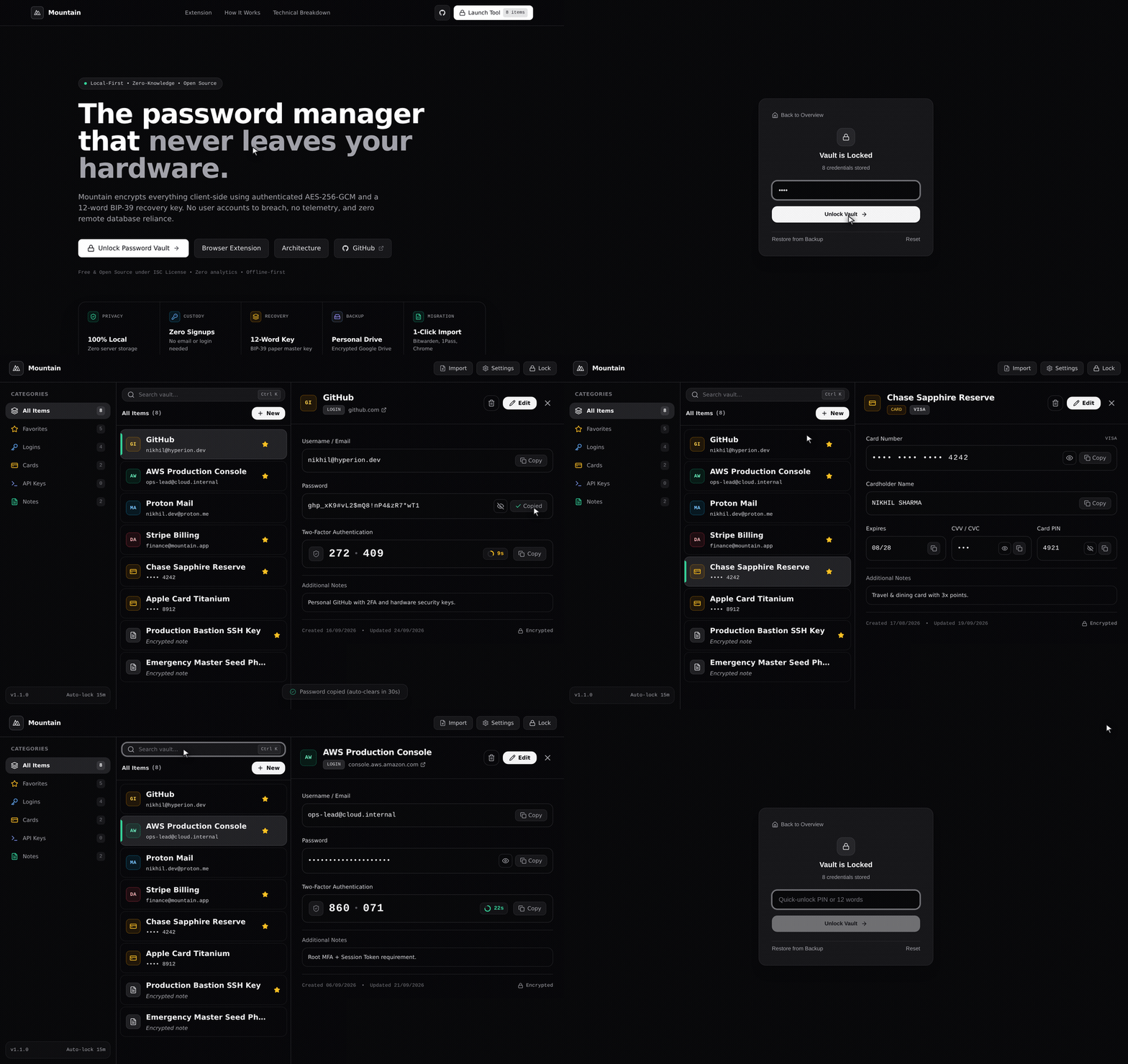
A free, local-first, open-source password manager. Encrypted client-side, optionally backed up to your personal Google Drive, and completely free of company-hosted databases.
🚀 Live Web App: https://h4r0015k.github.io/Mountain/
The Core Concept
Most password managers store your encrypted vault on corporate cloud servers. Mountain shifts total custody back to the user:
- Local-First Architecture: Runs entirely as an origin-isolated Single Page Application (SPA) in your browser. All data is persisted locally in your browser's IndexedDB.
- Deterministic Master Identity (BIP-39): Uses a standardized 12-word recovery phrase as the permanent root master key—eliminating weak or forgotten master passwords.
- Quick-Unlock PIN: An optional local daily PIN unlocks a protected client envelope without exposing or re-entering your 12 recovery words on daily devices.
- User-Owned Backups: Export encrypted
.jsonbackup files directly, or optionally sync snapshots to your personal Google Drive (appDataFolder) using client-side OAuth 2.0 PKCE. No intermediary servers ever touch your ciphertext. - Zero Data Leakage: Built-in offline favicon mode, customizable inactivity auto-lock (1m–60m), 30-second clipboard wipe, and zero analytics or telemetry scripts.
- Browser Companion Extension: Manifest V3 extension with secure postMessage handshake (
window.location.originvalidation) for seamless autofill and credential capture. - Client-Side Vault Migration: Import passwords directly from Bitwarden, 1Password, Google Chrome, Apple Passwords, or LastPass CSV/JSON exports with duplicate detection and zero network transmission.
Roadmap & Progress
- Concept & architecture planning
- Initial post: Building a Free Open-Source Password Manager
- Core cryptographic engine:
- BIP-39 12-word mnemonic phrase generation & validation (
@scure/bip39) - PBKDF2-HMAC-SHA256 key derivation (600,000 iterations for root key, 100,000 iterations for local PIN envelope)
- AES-256-GCM authenticated encryption with unique 12-byte IVs per record
- Secure in-memory TOTP two-factor code generator
- BIP-39 12-word mnemonic phrase generation & validation (
- Local vault storage (IndexedDB async storage layer with auth-check integrity canary)
- Google Drive sync integration (Direct REST API client with hidden
appDataFolderbackup/restore) - UI / Web Application (React, Tailwind CSS, Lucide icons, responsive drawer navigation)
- Security & privacy controls (Inactivity auto-lock, clipboard auto-clear, zero-leakage offline mode)
- Mountain Companion Extension (Chrome / Edge / Brave MV3 extension with secure pairing)
- Client-side vault migration & import (Bitwarden, 1Password, Google Chrome, Apple Passwords, LastPass)
- Vault recycle bin / soft-delete with undo
Development & Testing
Prerequisites
- Node.js (v18+)
- npm
Installation
git clone https://github.com/h4r0015k/Mountain.git
cd Mountain
npm install
Local Development Server
npm run dev
Run Test Suite
npm test
Production Build
npm run build
Browser Companion Extension
The companion-extension/ directory contains an unpacked Manifest V3 browser extension for Chromium browsers:
- Open
chrome://extensionsin Chrome, Brave, or Edge. - Enable Developer mode in the top right.
- Click Load unpacked and select the
companion-extensiondirectory. - Connect to Mountain via the pairing modal under Companion Pairing in the vault dashboard.
Tech Stack & Architecture
- Frontend: TypeScript, React 18, Tailwind CSS, Lucide Icons, Vite
- Cryptography: Web Crypto API (SubtleCrypto: AES-256-GCM, PBKDF2),
@scure/bip39 - Storage: Browser IndexedDB (Local-First)
- Development: Developed with AI pair-programming assistance from Google Gemini.
License
MIT
Contributors

53 commits
Similar repos


Languages
TypeScript
87.5%
JavaScript
9.6%
HTML
2.5%
A free, local-first open source password manager.
TypeScript
0
53 commits
updated Sep 27, 2026
See what people are saying
README
Mountain
A free, local-first, open-source password manager. Encrypted client-side, optionally backed up to your personal Google Drive, and completely free of company-hosted databases.
🚀 Live Web App: https://h4r0015k.github.io/Mountain/
The Core Concept
Most password managers store your encrypted vault on corporate cloud servers. Mountain shifts total custody back to the user:
- Local-First Architecture: Runs entirely as an origin-isolated Single Page Application (SPA) in your browser. All data is persisted locally in your browser's IndexedDB.
- Deterministic Master Identity (BIP-39): Uses a standardized 12-word recovery phrase as the permanent root master key—eliminating weak or forgotten master passwords.
- Quick-Unlock PIN: An optional local daily PIN unlocks a protected client envelope without exposing or re-entering your 12 recovery words on daily devices.
- User-Owned Backups: Export encrypted
.jsonbackup files directly, or optionally sync snapshots to your personal Google Drive (appDataFolder) using client-side OAuth 2.0 PKCE. No intermediary servers ever touch your ciphertext. - Zero Data Leakage: Built-in offline favicon mode, customizable inactivity auto-lock (1m–60m), 30-second clipboard wipe, and zero analytics or telemetry scripts.
- Browser Companion Extension: Manifest V3 extension with secure postMessage handshake (
window.location.originvalidation) for seamless autofill and credential capture. - Client-Side Vault Migration: Import passwords directly from Bitwarden, 1Password, Google Chrome, Apple Passwords, or LastPass CSV/JSON exports with duplicate detection and zero network transmission.
Roadmap & Progress
- Concept & architecture planning
- Initial post: Building a Free Open-Source Password Manager
- Core cryptographic engine:
- BIP-39 12-word mnemonic phrase generation & validation (
@scure/bip39) - PBKDF2-HMAC-SHA256 key derivation (600,000 iterations for root key, 100,000 iterations for local PIN envelope)
- AES-256-GCM authenticated encryption with unique 12-byte IVs per record
- Secure in-memory TOTP two-factor code generator
- BIP-39 12-word mnemonic phrase generation & validation (
- Local vault storage (IndexedDB async storage layer with auth-check integrity canary)
- Google Drive sync integration (Direct REST API client with hidden
appDataFolderbackup/restore) - UI / Web Application (React, Tailwind CSS, Lucide icons, responsive drawer navigation)
- Security & privacy controls (Inactivity auto-lock, clipboard auto-clear, zero-leakage offline mode)
- Mountain Companion Extension (Chrome / Edge / Brave MV3 extension with secure pairing)
- Client-side vault migration & import (Bitwarden, 1Password, Google Chrome, Apple Passwords, LastPass)
- Vault recycle bin / soft-delete with undo
Development & Testing
Prerequisites
- Node.js (v18+)
- npm
Installation
git clone https://github.com/h4r0015k/Mountain.git
cd Mountain
npm install
Local Development Server
npm run dev
Run Test Suite
npm test
Production Build
npm run build
Browser Companion Extension
The companion-extension/ directory contains an unpacked Manifest V3 browser extension for Chromium browsers:
- Open
chrome://extensionsin Chrome, Brave, or Edge. - Enable Developer mode in the top right.
- Click Load unpacked and select the
companion-extensiondirectory. - Connect to Mountain via the pairing modal under Companion Pairing in the vault dashboard.
Tech Stack & Architecture
- Frontend: TypeScript, React 18, Tailwind CSS, Lucide Icons, Vite
- Cryptography: Web Crypto API (SubtleCrypto: AES-256-GCM, PBKDF2),
@scure/bip39 - Storage: Browser IndexedDB (Local-First)
- Development: Developed with AI pair-programming assistance from Google Gemini.
License
MIT
Similar repos
Contributors
53 commits
Languages
TypeScript
87.5%
JavaScript
9.6%
HTML
2.5%