A minimal native macOS focus utility built with SwiftUI and AppKit. macOS 14 or later. MIT licensed, fully offline, no dependencies, accounts, analytics, network clients, web views, or resident helper processes.
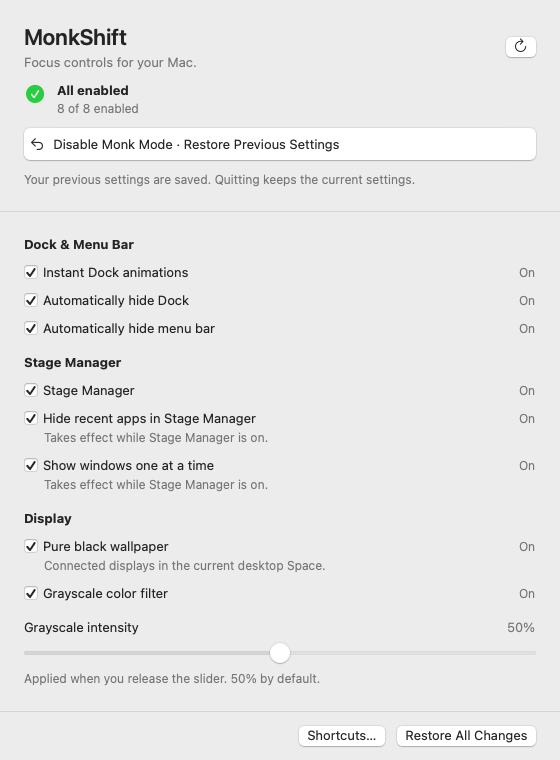
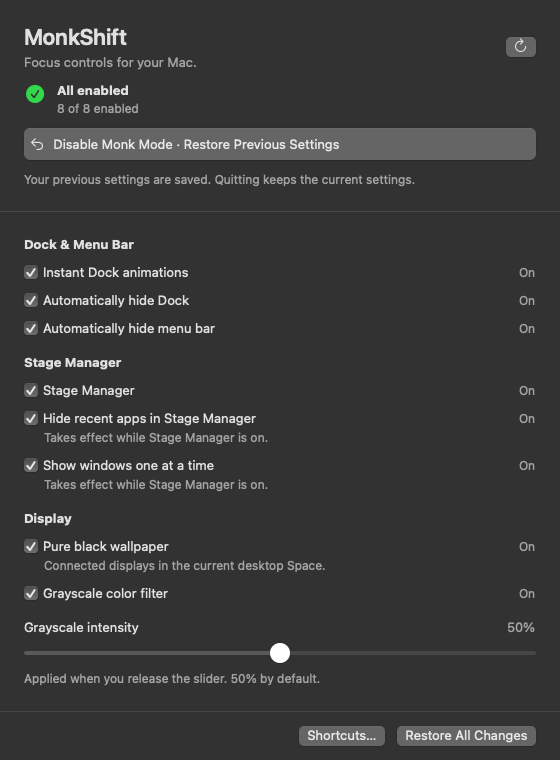
Fixture previews of the real UI, rendered without changing system settings. They show layout and example states, not proof of OS effects. Automation onboarding.
Attention is finite. What fills the screen also occupies the mind. MonkShift reduces visual distractions so one application, and one task, can take the foreground.
Muted colors bring the screen closer to a newspaper than a glossy magazine. The intention is simple: to make the computer feel like a tool for deliberate work, with fewer invitations to consume and more room to think.
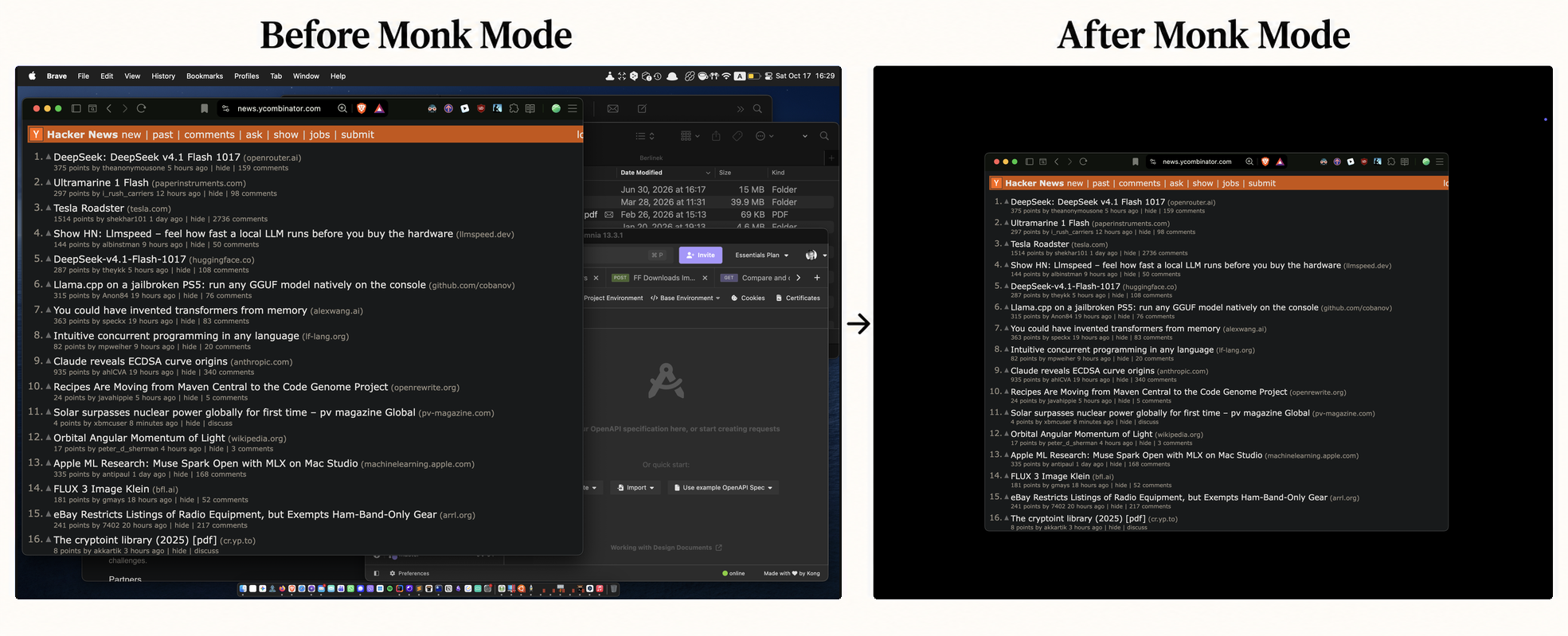
Real desktop screenshots before and after Monk Mode.
Once the first matching GitHub release and cask are published:
brew tap gslava/monkshift https://github.com/gslava/MonkShift.git
brew install --cask gslava/monkshift/monkshift
This repository is its own custom tap. The app is ad-hoc signed without an Apple Developer ID or notarization; macOS may require per-app approval through System Settings → Privacy & Security on first launch. See distribution and first-launch instructions. Homebrew installs the bundle but does not launch it or grant Automation permission.
Requires Apple's Command Line Tools (xcode-select --install) or Xcode. From the project directory:
bash scripts/check.sh
bash scripts/build-app.sh
open build/MonkShift.app
The build produces an ad-hoc signed Universal app for Apple Silicon and Intel. Use bash scripts/build-app.sh --native for a faster local-only development build. Move the final app to /Applications before granting permission to keep its path stable. To edit in Xcode, open Package.swift; use the build script to produce an app bundle with the required privacy metadata and generated ICNS. No full Xcode installation is needed for the scripts.
bash scripts/package-release.sh prepares a Universal ZIP, SHA-256 checksum, release metadata and matching Homebrew cask. bash scripts/verify-release.sh verifies the extracted bundle without launching it. These commands do not publish anything. See DISTRIBUTION.md for the GitHub release and custom-tap workflow. Developer ID, notarization and App Store distribution are outside this project's workflow.
The first-launch screen explains the permission and displays the open-source/offline labels. Click Grant Automation Permission, then allow System Events in the macOS prompt. All system controls and global shortcut actions remain gated until this permission is granted. After denial, open System Settings → Privacy & Security → Automation → MonkShift and enable System Events, then click Check Again.
Only Automation is requested. Dock/menu-bar control sends typed Apple Events against System Events' preferences dictionary; it does not automate mouse clicks in System Settings. Requests have a five-second timeout and run on a serial background queue. Preferences and color-filter operations run on a background actor; AppKit wallpaper/UI access stays on the main actor. Global shortcuts use Carbon registration, so Accessibility, Screen Recording and Input Monitoring permissions are not requested. Privacy state is checked again before every mutation. Revocation blocks later actions; a restore record remains available once permission is granted again.
System Events can exit while idle. If a permission check reports that its target is not running, MonkShift starts it in the background and checks again without prompting. The menu updates when the check completes; consent is requested only through the onboarding button.
Rebuilding an ad-hoc signed app can invalidate macOS's stored permission identity. Reopen the final app from its stable location and regrant permission if necessary.
Only one MonkShift process may access a user's saved settings at a time. A file lock is acquired before opening the restore journal or installing shortcuts. A second launch asks the running instance to show its window and exits. The OS releases the lock on exit or a crash; an old PID file alone cannot block startup.
Every setting has a checkbox in the window and in the native menu bar menu. Status is refreshed when opening the menu/window, returning to MonkShift, changing the desktop Space while the window is visible, waking the Mac, and after applying settings. Use Refresh for changes made elsewhere. No repeating background polling is used.
The top of the window and menu shows All enabled, Partially enabled, Off, or Status unknown, together with the number of confirmed enabled settings out of eight. This reflects observed settings, independently of the saved Monk Mode session. Unknown and unavailable settings are counted separately and never count as confirmed enabled. The summary stays visible during background work. A small activity indicator appears in a fixed space in the window only if work lasts longer than half a second. Operation errors appear separately. The menu bar uses a monochrome template icon of a monk in the lotus pose, adapting to light and dark menu bars.
| Setting | Implementation and scope |
|---|---|
| Instant Dock | com.apple.dock → autohide-delay = 0, autohide-time-modifier = 0; Dock reloads after applying the group. |
| Hide Dock | System Events → autohide of dock preferences. Auto-hides; reveal by moving to its screen edge. |
| Hide menu bar | System Events → autohide menu bar of dock preferences. Auto-hides; reveal by moving to the top edge. |
| Stage Manager | com.apple.WindowManager → GloballyEnabled. Requires “Displays have separate Spaces”; if disabled, MonkShift explains the prerequisite. |
| Hide recent apps | com.apple.WindowManager → AutoHide = true. Only affects Stage Manager while it is enabled. |
| One window at a time | com.apple.WindowManager → AppWindowGroupingBehavior = 1. Only affects Stage Manager. |
| Black wallpaper | An 8 × 8 opaque black PNG generated locally, applied through NSWorkspace to each connected display in the current desktop Space. |
| Grayscale | System display color filter category 1, type 1, through dynamically resolved MADisplayFilterPref* APIs and the system Universal Access daemon. |
The grayscale slider is available in the window and directly below the grayscale checkbox in the menu bar menu. It shows the current percentage while dragging and applies once on release. Both controls share the same value, default to 50%, and store the preference locally. The menu slider is disabled when grayscale is off; the window slider can still save a preferred amount for the next enable. Use the window slider for keyboard adjustment. Controls stay available during routine reads and changes; permission, storage errors and unknown/unavailable filter state still block unsafe changes. Each slider release queues its chosen intensity. The slider normalizes the native exported minimum/maximum intensity range to 0–100% (on the development Mac, native 0.25–1.0). 0% is the lowest supported filter intensity; switch the checkbox off to remove the filter completely. While grayscale is on, refresh reads its current intensity from macOS without replacing an active drag or a newer queued value.
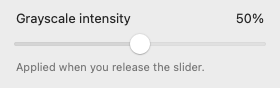
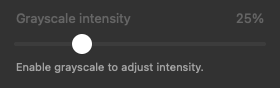
Menu control fixtures, shown separately from the surrounding native menu.
Compatibility: Dock and Stage Manager preference keys and the color filter symbols are not stable public configuration APIs. Their actual visual effects require manual checks on each supported macOS version. Checkboxes read system preferences/API state, not screen pixels. A preference read-back confirms the stored value; it cannot prove the corresponding daemon rendered the effect. Missing symbols, failed writes and unknown states are shown explicitly. No SIP changes or administrator privileges are used.
Monk Mode (Enable All) first captures every available setting and writes the restore file atomically before making changes. It then applies the supported settings. Failures appear individually; an error does not count as successful application.
Disable Monk Mode restores exactly the saved state from immediately before that session, including prior filter type/enabled state/intensity and wallpaper URL/options. Quitting keeps the current system settings and the restore record. Opening MonkShift again lets you disable/restore the saved session.
Individual checkbox changes also save their first baseline. Unchecking restores that feature's saved configuration and ensures the feature is off. Restore All Changes restores the Monk session first, then the earlier individual baselines. This means a previously enabled system feature can be restored to enabled. Individual edits during a Monk session do not replace the session baseline.
Changes run in a sequential queue. Checkboxes immediately show the requested value, while the summary counts only confirmed macOS state. Further clicks and slider releases remain available and execute in order after any current read or change. Failed changes return to the observed value and retain their error and restore record. Automation permission is checked before each queued change; revocation cancels the remaining queue. Native menu items and the slider update in place. Snapshots still reach durable storage before the first OS change, and a failed finalization retains the relevant restore records. Quit MonkShift stays active with the same appearance during changes. If clicked while changes are pending, it finishes accepted changes before exiting and accepts no new ones.
If restoration fails, the corresponding record stays on disk for retry. For a disconnected display, reconnect it and retry Restore All Changes. An unreadable/corrupted restore file blocks modifications rather than replacing the file. A missing file on a first launch is normal.
Local data:
~/Library/Application Support/MonkShift/restore.json
~/Library/Application Support/MonkShift/black.png
Shortcuts and the preferred slider position live in the app's UserDefaults domain app.monkshift.MonkShift. Wallpaper restoration is limited to saved connected displays and their current desktop Space. Other Spaces, rotating wallpaper schedules, live/video wallpaper state, and displays attached after a snapshot are not managed. Keep original wallpaper files available until restoration. Independent system-setting edits made during a Monk session are overwritten when restoring that session, as expected from restoring its saved baseline.
| Action | Default |
|---|---|
| Monk Mode / restore previous session | Control + Option + Command + M |
| Stage Manager | Control + Option + Command + S |
| Color Filter | Control + Option + Command + C |
| Hide / show menu bar | Control + Option + Command + B |
Click Shortcuts… and then Edit… to choose modifiers and a letter. The app validates duplicates and OS registration errors, retaining the previous working shortcut on a failed edit. Keys use physical ANSI positions so the same combination works across input languages. As with other Carbon shortcuts, secure input/system-reserved combinations may prevent delivery. Shortcuts work while MonkShift is running, even with its window closed or menu bar auto-hidden.
The idle process retains one small model, native NSStatusItem/NSMenu, and Carbon shortcut registrations. Closing the window releases its SwiftUI hosting tree. There are no repeated timers, live previews, third-party frameworks, web views or helper daemons. macOS system processes such as Dock and universalaccessd are managed by macOS, not resident MonkShift helpers.
No fixed RAM claim is made until the release build is measured. To measure, launch the release app, grant permission, close the window, let it idle, then inspect Memory for MonkShift in Activity Monitor. Compare open-window and closed-window states. Shared framework pages and OS caches mean RSS and Activity Monitor's memory figure differ.
bash scripts/check.sh runs 20 core checks against observed-state fixtures, a fake backend and temporary storage: aggregate status including unknown/unavailable settings, write-before-mutate, failed writes, repeated enables, partial apply/restore failures, restoration after restart, baseline ordering, edits during a session, pre-existing enabled features, file corruption/version handling, suspension/concurrent-operation guards, and failed finalization recovery. It does not request privacy permissions or change macOS settings. A dependency-free Foundation runner is used because Command Line Tools do not include XCTest.
The same script compiles the app's actual permission manager with a fake client and runs 8 additional checks: idle-target recovery, denied/missing/revoked consent, unavailable targets, launch failures, concurrent refreshes, and explicit request completion. No real services are started or privacy prompts requested by these checks.
Nine isolated system checks cover cross-process file locking, normal/crash release, lock-file errors, typed Apple Event requests, background serialization, main-actor responsiveness during a slow fake reply, and unknown/denied/unhandled/timed-out replies. Command codes are compared with macOS's installed scripting dictionary for both Dock and menu bar reads/writes, including true and false values. Only permission failures suggest changing Automation access. These checks use temporary files, short-lived test subprocesses and a fake event transport; no real Apple Events are sent.
Fourteen UI checks use the actual app model and native menu with fake settings and permissions, isolated preferences/storage, and global shortcuts disabled. They cover input during refresh, rapid toggles, failed-change recovery, captured slider values, in-flight intensity reads, finalization errors, permission revocation, native menu/slider identity, stable Quit availability, queued restoration and deferred shutdown while changes or a refresh are pending. No real Apple Events, privacy prompts or system-setting writes are performed.
bash scripts/render-previews.sh renders light/dark window and onboarding PNGs into build/previews using fixture state. Controls cover off, all enabled with/without a saved session, partially enabled, unknown, unavailable, failed-operation, applying and refreshing states, plus the minimum window size and the menu bar icon at native and enlarged sizes. The direct native intensity view is rendered with grayscale on/off, disabled, and at the 0%/100% endpoints. Add --readme to refresh the tracked examples in docs/images. The renderer is compiled only with MONKSHIFT_PREVIEW; it is absent from release builds. These images verify layout, not real OS behavior.
Manual acceptance checks on both macOS 14 and macOS 15:
The build scripts do not launch MonkShift or change system settings. Real permission prompts, visual OS effects, macOS 14 behavior, global shortcut delivery and idle RAM remain manual verification gates until tested in an intentional app session.
A minimal native macOS focus utility built with SwiftUI and AppKit. macOS 14 or later. MIT licensed, fully offline, no dependencies, accounts, analytics, network clients, web views, or resident helper processes.
Fixture previews of the real UI, rendered without changing system settings. They show layout and example states, not proof of OS effects. Automation onboarding.
Attention is finite. What fills the screen also occupies the mind. MonkShift reduces visual distractions so one application, and one task, can take the foreground.
Muted colors bring the screen closer to a newspaper than a glossy magazine. The intention is simple: to make the computer feel like a tool for deliberate work, with fewer invitations to consume and more room to think.
Real desktop screenshots before and after Monk Mode.
Once the first matching GitHub release and cask are published:
brew tap gslava/monkshift https://github.com/gslava/MonkShift.git
brew install --cask gslava/monkshift/monkshift
This repository is its own custom tap. The app is ad-hoc signed without an Apple Developer ID or notarization; macOS may require per-app approval through System Settings → Privacy & Security on first launch. See distribution and first-launch instructions. Homebrew installs the bundle but does not launch it or grant Automation permission.
Requires Apple's Command Line Tools (xcode-select --install) or Xcode. From the project directory:
bash scripts/check.sh
bash scripts/build-app.sh
open build/MonkShift.app
The build produces an ad-hoc signed Universal app for Apple Silicon and Intel. Use bash scripts/build-app.sh --native for a faster local-only development build. Move the final app to /Applications before granting permission to keep its path stable. To edit in Xcode, open Package.swift; use the build script to produce an app bundle with the required privacy metadata and generated ICNS. No full Xcode installation is needed for the scripts.
bash scripts/package-release.sh prepares a Universal ZIP, SHA-256 checksum, release metadata and matching Homebrew cask. bash scripts/verify-release.sh verifies the extracted bundle without launching it. These commands do not publish anything. See DISTRIBUTION.md for the GitHub release and custom-tap workflow. Developer ID, notarization and App Store distribution are outside this project's workflow.
The first-launch screen explains the permission and displays the open-source/offline labels. Click Grant Automation Permission, then allow System Events in the macOS prompt. All system controls and global shortcut actions remain gated until this permission is granted. After denial, open System Settings → Privacy & Security → Automation → MonkShift and enable System Events, then click Check Again.
Only Automation is requested. Dock/menu-bar control sends typed Apple Events against System Events' preferences dictionary; it does not automate mouse clicks in System Settings. Requests have a five-second timeout and run on a serial background queue. Preferences and color-filter operations run on a background actor; AppKit wallpaper/UI access stays on the main actor. Global shortcuts use Carbon registration, so Accessibility, Screen Recording and Input Monitoring permissions are not requested. Privacy state is checked again before every mutation. Revocation blocks later actions; a restore record remains available once permission is granted again.
System Events can exit while idle. If a permission check reports that its target is not running, MonkShift starts it in the background and checks again without prompting. The menu updates when the check completes; consent is requested only through the onboarding button.
Rebuilding an ad-hoc signed app can invalidate macOS's stored permission identity. Reopen the final app from its stable location and regrant permission if necessary.
Only one MonkShift process may access a user's saved settings at a time. A file lock is acquired before opening the restore journal or installing shortcuts. A second launch asks the running instance to show its window and exits. The OS releases the lock on exit or a crash; an old PID file alone cannot block startup.
Every setting has a checkbox in the window and in the native menu bar menu. Status is refreshed when opening the menu/window, returning to MonkShift, changing the desktop Space while the window is visible, waking the Mac, and after applying settings. Use Refresh for changes made elsewhere. No repeating background polling is used.
The top of the window and menu shows All enabled, Partially enabled, Off, or Status unknown, together with the number of confirmed enabled settings out of eight. This reflects observed settings, independently of the saved Monk Mode session. Unknown and unavailable settings are counted separately and never count as confirmed enabled. The summary stays visible during background work. A small activity indicator appears in a fixed space in the window only if work lasts longer than half a second. Operation errors appear separately. The menu bar uses a monochrome template icon of a monk in the lotus pose, adapting to light and dark menu bars.
| Setting | Implementation and scope |
|---|---|
| Instant Dock | com.apple.dock → autohide-delay = 0, autohide-time-modifier = 0; Dock reloads after applying the group. |
| Hide Dock | System Events → autohide of dock preferences. Auto-hides; reveal by moving to its screen edge. |
| Hide menu bar | System Events → autohide menu bar of dock preferences. Auto-hides; reveal by moving to the top edge. |
| Stage Manager | com.apple.WindowManager → GloballyEnabled. Requires “Displays have separate Spaces”; if disabled, MonkShift explains the prerequisite. |
| Hide recent apps | com.apple.WindowManager → AutoHide = true. Only affects Stage Manager while it is enabled. |
| One window at a time | com.apple.WindowManager → AppWindowGroupingBehavior = 1. Only affects Stage Manager. |
| Black wallpaper | An 8 × 8 opaque black PNG generated locally, applied through NSWorkspace to each connected display in the current desktop Space. |
| Grayscale | System display color filter category 1, type 1, through dynamically resolved MADisplayFilterPref* APIs and the system Universal Access daemon. |
The grayscale slider is available in the window and directly below the grayscale checkbox in the menu bar menu. It shows the current percentage while dragging and applies once on release. Both controls share the same value, default to 50%, and store the preference locally. The menu slider is disabled when grayscale is off; the window slider can still save a preferred amount for the next enable. Use the window slider for keyboard adjustment. Controls stay available during routine reads and changes; permission, storage errors and unknown/unavailable filter state still block unsafe changes. Each slider release queues its chosen intensity. The slider normalizes the native exported minimum/maximum intensity range to 0–100% (on the development Mac, native 0.25–1.0). 0% is the lowest supported filter intensity; switch the checkbox off to remove the filter completely. While grayscale is on, refresh reads its current intensity from macOS without replacing an active drag or a newer queued value.
Menu control fixtures, shown separately from the surrounding native menu.
Compatibility: Dock and Stage Manager preference keys and the color filter symbols are not stable public configuration APIs. Their actual visual effects require manual checks on each supported macOS version. Checkboxes read system preferences/API state, not screen pixels. A preference read-back confirms the stored value; it cannot prove the corresponding daemon rendered the effect. Missing symbols, failed writes and unknown states are shown explicitly. No SIP changes or administrator privileges are used.
Monk Mode (Enable All) first captures every available setting and writes the restore file atomically before making changes. It then applies the supported settings. Failures appear individually; an error does not count as successful application.
Disable Monk Mode restores exactly the saved state from immediately before that session, including prior filter type/enabled state/intensity and wallpaper URL/options. Quitting keeps the current system settings and the restore record. Opening MonkShift again lets you disable/restore the saved session.
Individual checkbox changes also save their first baseline. Unchecking restores that feature's saved configuration and ensures the feature is off. Restore All Changes restores the Monk session first, then the earlier individual baselines. This means a previously enabled system feature can be restored to enabled. Individual edits during a Monk session do not replace the session baseline.
Changes run in a sequential queue. Checkboxes immediately show the requested value, while the summary counts only confirmed macOS state. Further clicks and slider releases remain available and execute in order after any current read or change. Failed changes return to the observed value and retain their error and restore record. Automation permission is checked before each queued change; revocation cancels the remaining queue. Native menu items and the slider update in place. Snapshots still reach durable storage before the first OS change, and a failed finalization retains the relevant restore records. Quit MonkShift stays active with the same appearance during changes. If clicked while changes are pending, it finishes accepted changes before exiting and accepts no new ones.
If restoration fails, the corresponding record stays on disk for retry. For a disconnected display, reconnect it and retry Restore All Changes. An unreadable/corrupted restore file blocks modifications rather than replacing the file. A missing file on a first launch is normal.
Local data:
~/Library/Application Support/MonkShift/restore.json
~/Library/Application Support/MonkShift/black.png
Shortcuts and the preferred slider position live in the app's UserDefaults domain app.monkshift.MonkShift. Wallpaper restoration is limited to saved connected displays and their current desktop Space. Other Spaces, rotating wallpaper schedules, live/video wallpaper state, and displays attached after a snapshot are not managed. Keep original wallpaper files available until restoration. Independent system-setting edits made during a Monk session are overwritten when restoring that session, as expected from restoring its saved baseline.
| Action | Default |
|---|---|
| Monk Mode / restore previous session | Control + Option + Command + M |
| Stage Manager | Control + Option + Command + S |
| Color Filter | Control + Option + Command + C |
| Hide / show menu bar | Control + Option + Command + B |
Click Shortcuts… and then Edit… to choose modifiers and a letter. The app validates duplicates and OS registration errors, retaining the previous working shortcut on a failed edit. Keys use physical ANSI positions so the same combination works across input languages. As with other Carbon shortcuts, secure input/system-reserved combinations may prevent delivery. Shortcuts work while MonkShift is running, even with its window closed or menu bar auto-hidden.
The idle process retains one small model, native NSStatusItem/NSMenu, and Carbon shortcut registrations. Closing the window releases its SwiftUI hosting tree. There are no repeated timers, live previews, third-party frameworks, web views or helper daemons. macOS system processes such as Dock and universalaccessd are managed by macOS, not resident MonkShift helpers.
No fixed RAM claim is made until the release build is measured. To measure, launch the release app, grant permission, close the window, let it idle, then inspect Memory for MonkShift in Activity Monitor. Compare open-window and closed-window states. Shared framework pages and OS caches mean RSS and Activity Monitor's memory figure differ.
bash scripts/check.sh runs 20 core checks against observed-state fixtures, a fake backend and temporary storage: aggregate status including unknown/unavailable settings, write-before-mutate, failed writes, repeated enables, partial apply/restore failures, restoration after restart, baseline ordering, edits during a session, pre-existing enabled features, file corruption/version handling, suspension/concurrent-operation guards, and failed finalization recovery. It does not request privacy permissions or change macOS settings. A dependency-free Foundation runner is used because Command Line Tools do not include XCTest.
The same script compiles the app's actual permission manager with a fake client and runs 8 additional checks: idle-target recovery, denied/missing/revoked consent, unavailable targets, launch failures, concurrent refreshes, and explicit request completion. No real services are started or privacy prompts requested by these checks.
Nine isolated system checks cover cross-process file locking, normal/crash release, lock-file errors, typed Apple Event requests, background serialization, main-actor responsiveness during a slow fake reply, and unknown/denied/unhandled/timed-out replies. Command codes are compared with macOS's installed scripting dictionary for both Dock and menu bar reads/writes, including true and false values. Only permission failures suggest changing Automation access. These checks use temporary files, short-lived test subprocesses and a fake event transport; no real Apple Events are sent.
Fourteen UI checks use the actual app model and native menu with fake settings and permissions, isolated preferences/storage, and global shortcuts disabled. They cover input during refresh, rapid toggles, failed-change recovery, captured slider values, in-flight intensity reads, finalization errors, permission revocation, native menu/slider identity, stable Quit availability, queued restoration and deferred shutdown while changes or a refresh are pending. No real Apple Events, privacy prompts or system-setting writes are performed.
bash scripts/render-previews.sh renders light/dark window and onboarding PNGs into build/previews using fixture state. Controls cover off, all enabled with/without a saved session, partially enabled, unknown, unavailable, failed-operation, applying and refreshing states, plus the minimum window size and the menu bar icon at native and enlarged sizes. The direct native intensity view is rendered with grayscale on/off, disabled, and at the 0%/100% endpoints. Add --readme to refresh the tracked examples in docs/images. The renderer is compiled only with MONKSHIFT_PREVIEW; it is absent from release builds. These images verify layout, not real OS behavior.
Manual acceptance checks on both macOS 14 and macOS 15:
The build scripts do not launch MonkShift or change system settings. Real permission prompts, visual OS effects, macOS 14 behavior, global shortcut delivery and idle RAM remain manual verification gates until tested in an intentional app session.



