Turn any website into an API your agent can call. Learns from the site's own frontend, heals itself when the site changes.
TypeScript
754
38 commits
updated Oct 12, 2026
Teach your agent a website once. After that, it calls the site like an API instead of driving a browser.
API Anything watches a site's own page make a request and learns which parts of it are your inputs. It saves the result as an operation. Your agent calls that operation with new inputs over MCP, the CLI or TypeScript, and gets JSON back over plain HTTP.
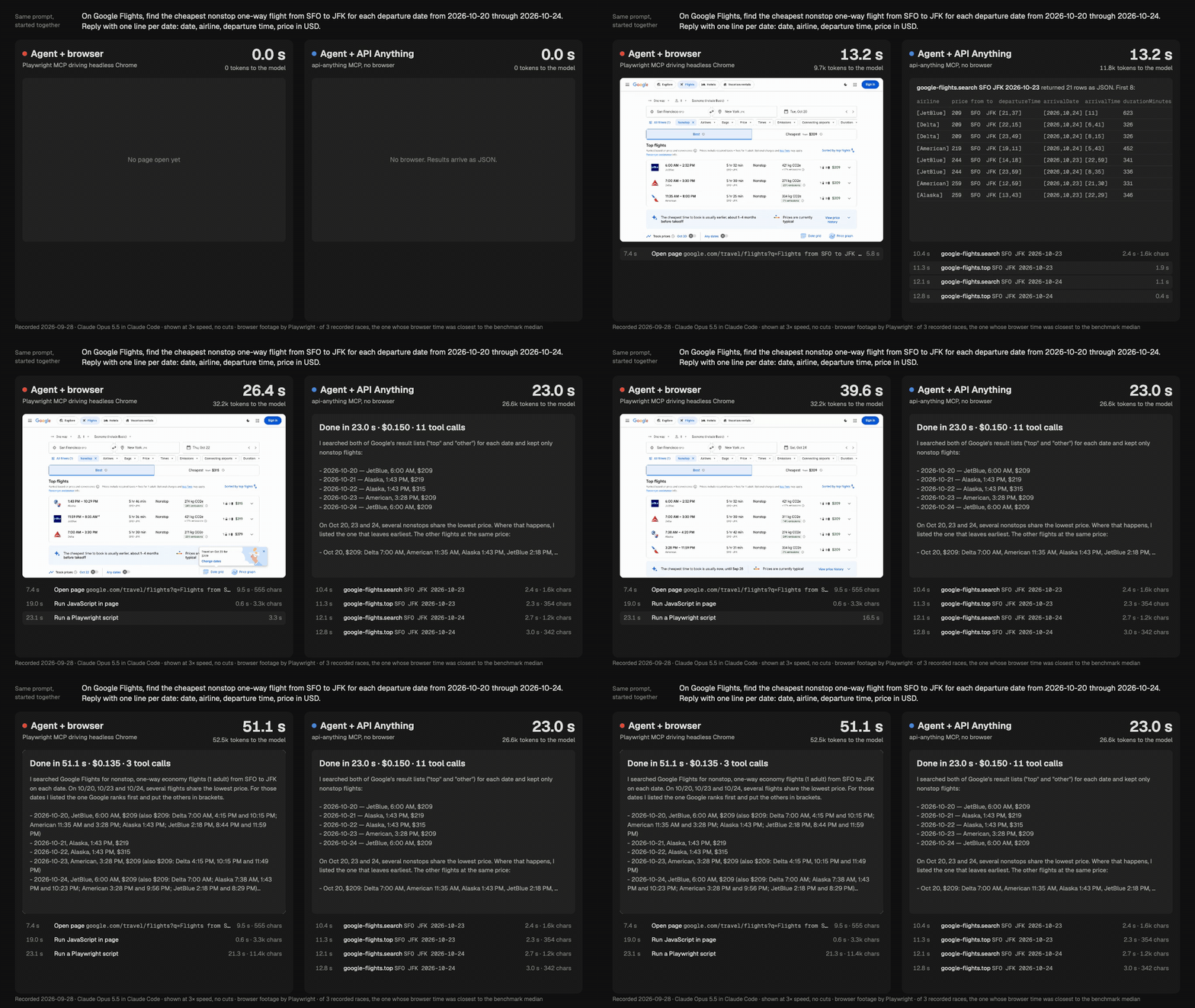
Same agent (Claude Opus 5.5), same prompt, started together. Left: it drives headless Chrome through Playwright MCP. Right: it calls API Anything's Google Flights operation. Shown at 3× speed with no cuts; the timers show real elapsed time. Recorded 2026-09-28. MP4 · how it was recorded

Across 5 runs of each task, the agent using API Anything answered 1.5 to 2× sooner, read about half as many tokens, and cost the same or less. All 20 answers were correct. Method, raw numbers and limits.
Paste this into Claude Code, Codex or another coding agent:
Set up API Anything for me: https://github.com/goodnight000/api-anything/blob/main/INSTALL.md
The agent checks Node 22.13+, builds and installs the api-anything command, confirms that a
call works, then connects the MCP server and the skill to itself. Restart the agent, then ask it
something like "What does Goodreads rate Piranesi?"
The package isn't on npm yet. Don't use npm install -g github:..., because it fails under npm 11.
git clone https://github.com/goodnight000/api-anything.git && cd api-anything
npm ci && npm install -g "$(npm pack --silent)"
api-anything call hacker-news search query=sqlite
{"ok":true,"class":"ok","tier":1,"data":[{"title":"Hosting SQLite databases on GitHub Pages or any static file hoster","url":"https://phiresky.github.io/blog/2021/hosting-sqlite-databases-on-github-pages/", ...}, ...],"ms":111}
tier: 1 means plain HTTP with no browser. A failure returns ok: false with a class, a
reason and a next step. Connect an agent with codex mcp add api-anything -- api-anything mcp,
claude mcp add --scope user api-anything -- api-anything mcp, or this MCP entry:
{ "mcpServers": { "api-anything": { "command": "api-anything", "args": ["mcp"] } } }
Over MCP an agent calls operations, using four tools: list_sites, list_operations,
call_operation and login. To create operations, an agent needs a shell and the
skill. Google Chrome is needed only for creating operations and
for browser fallback. Setup details.
Give it the page URL with a placeholder, and two example inputs:
api-anything add hn-demo links \
  --trigger 'https://news.ycombinator.com/from?site={domain}' \
  --example domain=github.com --example2 domain=github.io --match path=/from \
  --html '{"items":"tr.athing","fields":{"title":".titleline > a","url":".titleline > a@href"}}'

api-anything call hn-demo links domain=arxiv.org      # 30 arxiv.org stories, tier 1
Headless Chrome loads the page once for each example. The part of the request that changed with the input becomes a parameter, and the rest is stored as a template. The agent (or you) picks the request and the fields. API Anything builds the template without an LLM. Recorded demos.
Tell an agent what you need from a site. The skill makes it do this, in order:
capture --outline. This is a summary of what each request returns, so
the agent doesn't have to read full responses.Goodreads has had no public API since 2020. One run took 6.3 minutes and $1.19. It produced search, book details, an author's books and reviews:
api-anything call goodreads searchBooks q=piranesi
api-anything call goodreads getBook bookId=50202953

examples/reading-list.mjs)
builds the same five-book table in 16 s with no model.How it was explored, tested and compared.
22 read operations across 9 sites:
google-flights: search, top flights, price calendarhacker-newsx and instagram profilesyoutube, airbnb and amazonlinkedin: profiles, companies and search, with your own logingoodreads: search, books, author lists and reviews, built by the explorer aboveThey cover selected features, not whole sites. api-anything ops <site> lists parameters and
caveats.
fetch. If the site blocks that,
fetch from inside a Chrome page. As a last resort for reads, run the page itself and read its
own response.--allow-writes. An HTTP 2xx doesn't prove a message was delivered.~/.api-anything, and specs hold references, never values. Read each
site's terms: you are responsible for how you use it.Benchmark · Demos · Setup for agents · Reference · Design · Release checks · Contributing
MIT licensed.
Turn any website into an API your agent can call. Learns from the site's own frontend, heals itself when the site changes.
TypeScript
754
38 commits
updated Oct 12, 2026
Teach your agent a website once. After that, it calls the site like an API instead of driving a browser.
API Anything watches a site's own page make a request and learns which parts of it are your inputs. It saves the result as an operation. Your agent calls that operation with new inputs over MCP, the CLI or TypeScript, and gets JSON back over plain HTTP.
Same agent (Claude Opus 5.5), same prompt, started together. Left: it drives headless Chrome through Playwright MCP. Right: it calls API Anything's Google Flights operation. Shown at 3× speed with no cuts; the timers show real elapsed time. Recorded 2026-09-28. MP4 · how it was recorded
Across 5 runs of each task, the agent using API Anything answered 1.5 to 2× sooner, read about half as many tokens, and cost the same or less. All 20 answers were correct. Method, raw numbers and limits.
Paste this into Claude Code, Codex or another coding agent:
Set up API Anything for me: https://github.com/goodnight000/api-anything/blob/main/INSTALL.md
The agent checks Node 22.13+, builds and installs the api-anything command, confirms that a
call works, then connects the MCP server and the skill to itself. Restart the agent, then ask it
something like "What does Goodreads rate Piranesi?"
The package isn't on npm yet. Don't use npm install -g github:..., because it fails under npm 11.
git clone https://github.com/goodnight000/api-anything.git && cd api-anything
npm ci && npm install -g "$(npm pack --silent)"
api-anything call hacker-news search query=sqlite
{"ok":true,"class":"ok","tier":1,"data":[{"title":"Hosting SQLite databases on GitHub Pages or any static file hoster","url":"https://phiresky.github.io/blog/2021/hosting-sqlite-databases-on-github-pages/", ...}, ...],"ms":111}
tier: 1 means plain HTTP with no browser. A failure returns ok: false with a class, a
reason and a next step. Connect an agent with codex mcp add api-anything -- api-anything mcp,
claude mcp add --scope user api-anything -- api-anything mcp, or this MCP entry:
{ "mcpServers": { "api-anything": { "command": "api-anything", "args": ["mcp"] } } }
Over MCP an agent calls operations, using four tools: list_sites, list_operations,
call_operation and login. To create operations, an agent needs a shell and the
skill. Google Chrome is needed only for creating operations and
for browser fallback. Setup details.
Give it the page URL with a placeholder, and two example inputs:
api-anything add hn-demo links \
  --trigger 'https://news.ycombinator.com/from?site={domain}' \
  --example domain=github.com --example2 domain=github.io --match path=/from \
  --html '{"items":"tr.athing","fields":{"title":".titleline > a","url":".titleline > a@href"}}'

api-anything call hn-demo links domain=arxiv.org      # 30 arxiv.org stories, tier 1
Headless Chrome loads the page once for each example. The part of the request that changed with the input becomes a parameter, and the rest is stored as a template. The agent (or you) picks the request and the fields. API Anything builds the template without an LLM. Recorded demos.
Tell an agent what you need from a site. The skill makes it do this, in order:
capture --outline. This is a summary of what each request returns, so
the agent doesn't have to read full responses.Goodreads has had no public API since 2020. One run took 6.3 minutes and $1.19. It produced search, book details, an author's books and reviews:
api-anything call goodreads searchBooks q=piranesi
api-anything call goodreads getBook bookId=50202953
examples/reading-list.mjs)
builds the same five-book table in 16 s with no model.How it was explored, tested and compared.
22 read operations across 9 sites:
google-flights: search, top flights, price calendarhacker-newsx and instagram profilesyoutube, airbnb and amazonlinkedin: profiles, companies and search, with your own logingoodreads: search, books, author lists and reviews, built by the explorer aboveThey cover selected features, not whole sites. api-anything ops <site> lists parameters and
caveats.
fetch. If the site blocks that,
fetch from inside a Chrome page. As a last resort for reads, run the page itself and read its
own response.--allow-writes. An HTTP 2xx doesn't prove a message was delivered.~/.api-anything, and specs hold references, never values. Read each
site's terms: you are responsible for how you use it.Benchmark · Demos · Setup for agents · Reference · Design · Release checks · Contributing
MIT licensed.



