Build agent connectors for web apps — capture your browser session, describe the app's API as OpenAPI 3.1, drive it from the terminal.
See the codeTurn your browser session into a CLI for any web app — so your agent can use it through the app's own API instead of clicking.
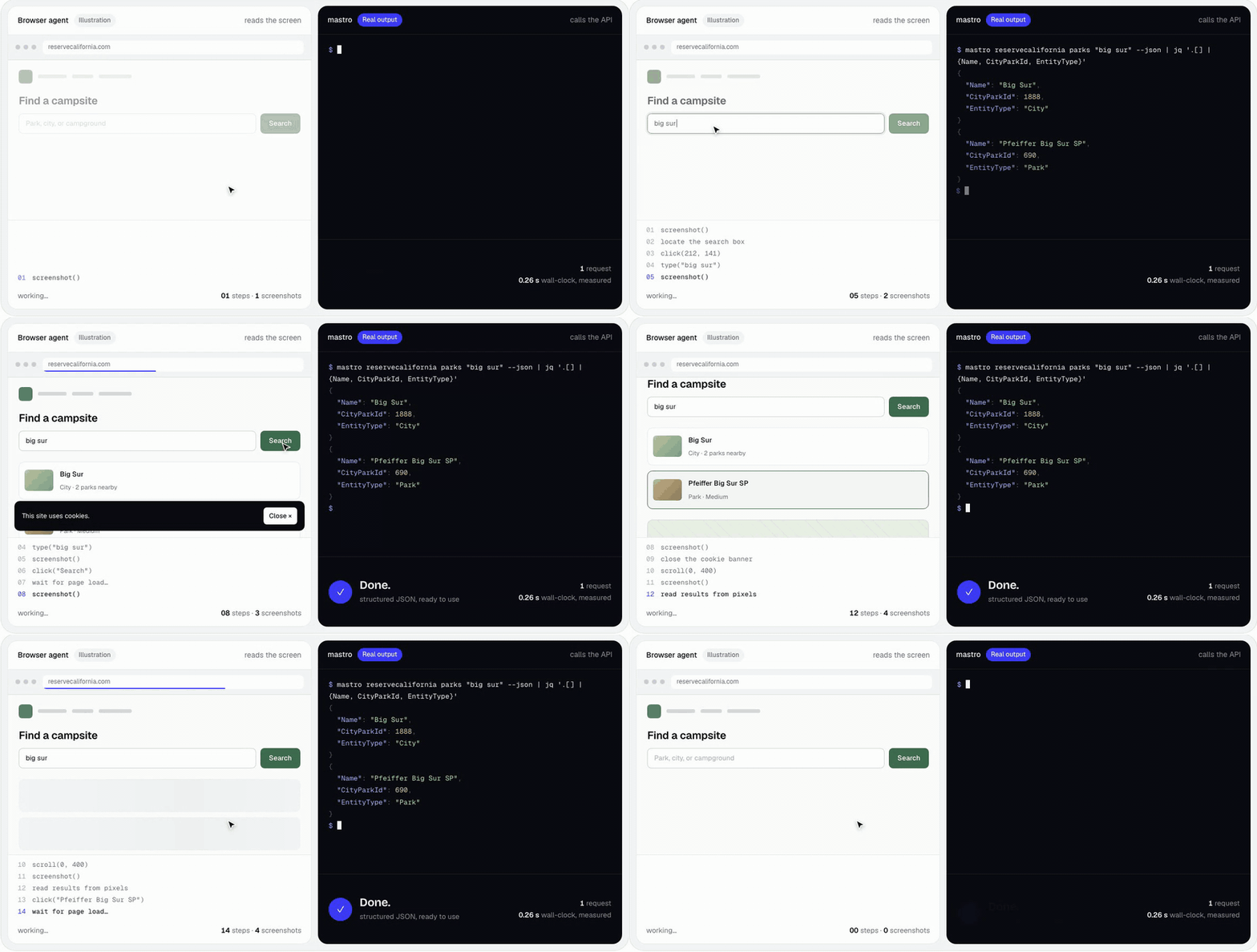
Same task, same clock. The browser agent is an illustration; the mastro command and output are real.
npx mastro-connect hackernews top --limit 5            # no install, no login
npx mastro-connect reservecalifornia parks "big sur"   # campsite search
npx mastro-connect setup                               # pick connectors, extension, agent skills
trymastro.com · Give it to your agent · Try it · How it works · Security · Build a connector · Agent skills · Why a CLI · Docs


Agents increasingly act on the web for their users, mostly by driving a browser click by click: slow, brittle, and expensive. But the web app you're logged into already talks to its own backend through a perfectly good API. mastro lets you describe that API once and turn your existing session into clean, agent-ready commands — JSON in, JSON out, from your own machine.
mastro <app> <command> with flags,
help, and --json, sent from your machine or through your own browser tab.The key design choice: a connector is data, not code. It's a standard
OpenAPI 3.1 document (plus a few x-mastro-* extensions for what OpenAPI
can't express) and a capture manifest. The same rails handle login, flags,
filters, pagination and multi-step flows — and because it's data, an agent
can write one: the mastro-author skill walks it from "watch me do this in
the browser" to a validated connector.
Paste this into Claude Code, Codex, Gemini CLI, Cursor — any agent that runs shell commands on your machine:
Set up mastro for me (https://github.com/mastro-hq/mastro-connect). It turns
web apps I use into CLI commands you can call, using my own browser session.

1. Run `npx -y mastro-connect --version` to check it works (it only needs Node).
2. Install its skills where you load skills from:
   `npx -y mastro-connect skills add mastro mastro-author --global` for Claude Code,
   or add `--dir <your skills folder>` instead of `--global`. Read them.
3. Run `npx -y mastro-connect hackernews top --limit 5 --json` and summarize it,
   so we know it works.
4. Run `npx -y mastro-connect providers available` and ask me which of those
   apps I use. Install their skills too (`skills add <id>`).
5. For any that need a login, run `npx -y mastro-connect extension install` and
   walk me through loading it in Chrome, then I'll run `mastro login <id>`.
   Never type my passwords.
6. Ask me which other apps I wish you could use. For those, offer to build a
   connector with the mastro-author skill.

Always use --json, and run --dry-run and ask me before anything that changes
state (posting, buying, booking).
And to build a connector for an app that isn't in the catalog yet:
Use mastro's mastro-author skill to build a connector for <app> so you can
<what you want to do>. Install it with
`npx -y mastro-connect skills add mastro-author --global` if you don't have it.
Start read-only. I'll do the task once in my browser so you can capture the
requests (or I'll export a HAR for you), and dry-run anything that changes
state before asking me.
All you need is Node 18+. mastro runs on Bun, which npm installs for you alongside it.
npm install -g mastro-connect # or prefix every command with: npx -y mastro-connect
Connectors live in the community catalog, mastro-hq/connectors, and install themselves the first time you call one:
mastro hackernews top --limit 5 --json
mastro reservecalifornia parks "pfeiffer" --json
mastro reservecalifornia availability --facility 518 --start 2026-11-06 --end 2026-11-09 --json
mastro hackernews item --id 8863 --dry-run     # any command: print the request, send nothing
| Connector | What it does | Login |
|---|---|---|
hackernews | Front page, items, users (the example, over HN's official API) | — |
reservecalifornia | California State Parks campsite search and night-by-night availability; your reservations | optional |
depop | Search listings, your profile, list your own items for sale | yes |
mastro providers available shows the current catalog. Prefer a guided start?
mastro setup lists it, installs what you pick, and offers the browser
extension and agent skills if you need them.
Load the capture extension once:
mastro extension install # copies it to ~/.mastro/extension, opens chrome://extensions
Toggle Developer mode, click Load unpacked, and paste (the path is on your clipboard). Then, signed in to the app in Chrome:
mastro login depop           # a localhost tab opens, then the app's; mastro verifies the session
mastro depop search "carhartt jacket" --json
mastro status                # what's logged in, and whether it verified
Give your agent the skills, then just ask:
mastro skills add reservecalifornia --global # into ~/.claude/skills (or --dir for other agents)
"Is anything open at Julia Pfeiffer Burns next weekend?"
Any agent that can run shell commands works — Claude Code, Codex, Gemini CLI, Cursor — as long as it runs on your machine (that's where your session lives).
        ┌──────────┐   login    ┌──────────────┐   manifest   ┌────────────────┐
        │  mastro  │──────────▶ │  Auth Broker │────────────▶ │  Chrome ext    │
        │   CLI    │            │  + Receiver  │ ◀──capture── │  (MV3, generic)│
        └────┬─────┘            └──────┬───────┘   bundle     └───────┬────────┘
             │                         │                              │ observes
             │ <provider> <command>    ▼                              ▼
             │                  ┌──────────────┐               ┌────────────────┐
             └────────────────▶ │  Mastro SDK  │               │   the web app  │
                                │  • auth load │               │  (your session)│
                                │  • replay    │◀──────────────┤                │
                                │  • workflows │  browser-proxy └────────────────┘
                                └──────┬───────┘  (your own tab)
                                       │ reads
                                ┌──────▼────────┐
                                │ providers/<p> │  openapi.yaml + auth.manifest.json
                                └───────────────┘
extension/) is generic — no per-app code.
During mastro login it follows the connector's manifest to see when you're
signed in, captures only what the manifest names (cookies, headers, storage
keys), and posts it to a loopback receiver. Outside a login, it only runs
proxied requests for sites you've logged in to.@mastro/core) runs captures, validates
credentials, and stores them in ~/.mastro/ (mode 0600).@mastro/sdk) turns an OpenAPI operation plus
your flags into a request, applies the auth binding, resolves human-friendly
filter values, and runs multi-step workflows.@mastro/cli) generates each connector's
commands, flags and help straight from its spec.Some apps only answer a real browser session. For those, mastro runs the
request inside your logged-in tab — the same way the app's own frontend
calls its API — and relays the response. No headless browser, no challenge
solving. → docs/BROWSER-PROXY.md
Multi-step flows (upload each photo → poll → create the listing; fill a
cart → hand it to your browser to pay) are declared in the spec, and
--dry-run prints every planned request first. → docs/WORKFLOWS.md
mastro holds your sessions, so it's built to keep them yours:
mastro validate checks every catalog
connector in CI — including that it never sends your session to a host its
manifest doesn't name, and that it contains no captured secrets.Details: docs/BROWSER-PROXY.md#security-model.
A connector is a folder — no code:
providers/<name>/
  auth.manifest.json   # what the extension captures in the browser
  openapi.yaml         # the API surface — OpenAPI 3.1 + x-mastro-* extensions
  README.md            # how it works, endpoints, drift symptoms
  skills/<skill>/      # agent playbooks (SKILL.md)
With an agent: mastro skills add mastro-author, then ask it to "make a
mastro connector for <app>". It watches you do the task once in the
browser, finds the minimal auth, writes the manifest and spec, validates, and
tests — read-only first, with anything that changes state behind --dry-run
and your confirmation.
By hand: watch the app's requests in DevTools → Network, then describe them. Check your work as you go:
mastro validate providers/<name>   # schema, references, credential hosts, no committed secrets
mastro <name> --help               # the generated commands
Full walkthrough: docs/AUTHORING.md. Smallest complete
example: hackernews.
Contributions to the catalog are welcome:
mastro-hq/connectors.
x-mastro-* extensionsOpenAPI covers what every API shares (paths, methods, enums, array params, an
auth inventory). What it can't express lives in spec-legal x- keys, so the
document stays valid OpenAPI:
| Extension | Solves |
|---|---|
x-mastro-auth | How a captured credential becomes a live request: header/cookie templates, per-request generated values (${uuid}, ${now}), a post-login verify call. |
x-mastro-replay | Transport: run in the user's tab, retry and re-login status codes, rate limits. |
x-mastro-resolve | Dynamic enums whose values come from another endpoint (an app's sizes or brands) or bundled reference data. |
x-mastro-extract | Structured objects out of server-rendered HTML or React Server Components streams. |
x-mastro-workflow | Multi-step flows, with foreach, poll, uploads, and a browser handoff. |
x-mastro-command / -result / -hidden | CLI projection: command names, what to print, helper endpoints. |
mastro searches $MASTRO_PROVIDERS (colon-separated directories), then
~/.mastro/providers; the package itself ships none. Calling a connector that
isn't installed fetches it from the catalog, pinned to a commit. Any GitHub repo
with providers/<id>/ at its root works through --repo, including private
ones (via GITHUB_TOKEN / GH_TOKEN or your gh login):
mastro providers available --repo you/connectors
mastro providers add myapp --repo you/connectors
mastro providers update                            # re-fetch everything you've added
Connectors ship agent skills — SKILL.md playbooks that teach an agent
when and how to drive them: preconditions, --json shapes, rate limits, and
safety rules like "dry-run before spending money". They live next to the spec,
so a fix to a drifting API and its playbook travel together.
mastro skills list                       # what's available
mastro skills add depop                  # ./.claude/skills (this project)
mastro skills add depop/search --global  # ~/.claude/skills (everywhere)
mastro skills add depop --dir .agents/skills
mastro skills update                     # refresh everything installed here
Every install includes the root mastro skill (sessions, exit codes,
conventions) that the connector skills build on.
Early (0.2) and moving fast. Developed and tested on macOS with Chrome; Linux
should work, and Windows and other Chromium browsers are untested. Unofficial connectors break when apps
change — each connector's README lists its drift symptoms, and mastro login
again fixes most of them.
mastro is for personal automation: an agent acting for you, in apps you're logged into, doing what you could do by hand — not scraping other people's data, not bulk collection, not defeating bot defenses. Connectors run at a human pace (every spec carries a rate limit) and anything that changes state is dry-run first. Prefer official APIs where they exist. Catalog connectors are unofficial and not affiliated with the services they talk to; any is removed on request from the service's operator. You're responsible for how you use them and for each service's terms.
bun install
bun test            # run the test suite
bun run typecheck   # TypeScript + the extension's checkJs
bun run mastro …    # the CLI from source
bun run build       # bundle dist/ for npm
packages/core/   schemas, OpenAPI loader, registry, credential store, broker, proxy server
packages/sdk/    connector, transports, credential guard, resolver, workflow runner, templating
packages/cli/    the `mastro` binary
extension/       generic MV3 capture + browser-proxy runtime
skills/          the root `mastro` skill and `mastro-author`
docs/            AUTHORING · BROWSER-PROXY · WORKFLOWS
Framework contributions are welcome — run bun test and bun run typecheck
before opening a PR. Connectors go to
mastro-hq/connectors.
| Doc | What it covers |
|---|---|
docs/AUTHORING.md | Build a connector: manifest, OpenAPI, the x-mastro-* reference |
docs/BROWSER-PROXY.md | Running requests in your tab, and the security model |
docs/WORKFLOWS.md | Multi-step flows: steps, foreach, poll, handoff, dry-run |
extension/README.md | The capture extension internals |
skills/mastro-author | The agent playbook for building a connector |
Why "mastro"? In Italian a mastro is the master of a craft — the mastro falegname, the master carpenter. Give people the right tools and they become the master of any app they use, instead of waiting on an official API.
MIT © Giulio Colleluori
Build agent connectors for web apps — capture your browser session, describe the app's API as OpenAPI 3.1, drive it from the terminal.
See the codeTurn your browser session into a CLI for any web app — so your agent can use it through the app's own API instead of clicking.
Same task, same clock. The browser agent is an illustration; the mastro command and output are real.
npx mastro-connect hackernews top --limit 5            # no install, no login
npx mastro-connect reservecalifornia parks "big sur"   # campsite search
npx mastro-connect setup                               # pick connectors, extension, agent skills
trymastro.com · Give it to your agent · Try it · How it works · Security · Build a connector · Agent skills · Why a CLI · Docs
Agents increasingly act on the web for their users, mostly by driving a browser click by click: slow, brittle, and expensive. But the web app you're logged into already talks to its own backend through a perfectly good API. mastro lets you describe that API once and turn your existing session into clean, agent-ready commands — JSON in, JSON out, from your own machine.
mastro <app> <command> with flags,
help, and --json, sent from your machine or through your own browser tab.The key design choice: a connector is data, not code. It's a standard
OpenAPI 3.1 document (plus a few x-mastro-* extensions for what OpenAPI
can't express) and a capture manifest. The same rails handle login, flags,
filters, pagination and multi-step flows — and because it's data, an agent
can write one: the mastro-author skill walks it from "watch me do this in
the browser" to a validated connector.
Paste this into Claude Code, Codex, Gemini CLI, Cursor — any agent that runs shell commands on your machine:
Set up mastro for me (https://github.com/mastro-hq/mastro-connect). It turns
web apps I use into CLI commands you can call, using my own browser session.

1. Run `npx -y mastro-connect --version` to check it works (it only needs Node).
2. Install its skills where you load skills from:
   `npx -y mastro-connect skills add mastro mastro-author --global` for Claude Code,
   or add `--dir <your skills folder>` instead of `--global`. Read them.
3. Run `npx -y mastro-connect hackernews top --limit 5 --json` and summarize it,
   so we know it works.
4. Run `npx -y mastro-connect providers available` and ask me which of those
   apps I use. Install their skills too (`skills add <id>`).
5. For any that need a login, run `npx -y mastro-connect extension install` and
   walk me through loading it in Chrome, then I'll run `mastro login <id>`.
   Never type my passwords.
6. Ask me which other apps I wish you could use. For those, offer to build a
   connector with the mastro-author skill.

Always use --json, and run --dry-run and ask me before anything that changes
state (posting, buying, booking).
And to build a connector for an app that isn't in the catalog yet:
Use mastro's mastro-author skill to build a connector for <app> so you can
<what you want to do>. Install it with
`npx -y mastro-connect skills add mastro-author --global` if you don't have it.
Start read-only. I'll do the task once in my browser so you can capture the
requests (or I'll export a HAR for you), and dry-run anything that changes
state before asking me.
All you need is Node 18+. mastro runs on Bun, which npm installs for you alongside it.
npm install -g mastro-connect # or prefix every command with: npx -y mastro-connect
Connectors live in the community catalog, mastro-hq/connectors, and install themselves the first time you call one:
mastro hackernews top --limit 5 --json
mastro reservecalifornia parks "pfeiffer" --json
mastro reservecalifornia availability --facility 518 --start 2026-11-06 --end 2026-11-09 --json
mastro hackernews item --id 8863 --dry-run     # any command: print the request, send nothing
| Connector | What it does | Login |
|---|---|---|
hackernews | Front page, items, users (the example, over HN's official API) | — |
reservecalifornia | California State Parks campsite search and night-by-night availability; your reservations | optional |
depop | Search listings, your profile, list your own items for sale | yes |
mastro providers available shows the current catalog. Prefer a guided start?
mastro setup lists it, installs what you pick, and offers the browser
extension and agent skills if you need them.
Load the capture extension once:
mastro extension install # copies it to ~/.mastro/extension, opens chrome://extensions
Toggle Developer mode, click Load unpacked, and paste (the path is on your clipboard). Then, signed in to the app in Chrome:
mastro login depop           # a localhost tab opens, then the app's; mastro verifies the session
mastro depop search "carhartt jacket" --json
mastro status                # what's logged in, and whether it verified
Give your agent the skills, then just ask:
mastro skills add reservecalifornia --global # into ~/.claude/skills (or --dir for other agents)
"Is anything open at Julia Pfeiffer Burns next weekend?"
Any agent that can run shell commands works — Claude Code, Codex, Gemini CLI, Cursor — as long as it runs on your machine (that's where your session lives).
        ┌──────────┐   login    ┌──────────────┐   manifest   ┌────────────────┐
        │  mastro  │──────────▶ │  Auth Broker │────────────▶ │  Chrome ext    │
        │   CLI    │            │  + Receiver  │ ◀──capture── │  (MV3, generic)│
        └────┬─────┘            └──────┬───────┘   bundle     └───────┬────────┘
             │                         │                              │ observes
             │ <provider> <command>    ▼                              ▼
             │                  ┌──────────────┐               ┌────────────────┐
             └────────────────▶ │  Mastro SDK  │               │   the web app  │
                                │  • auth load │               │  (your session)│
                                │  • replay    │◀──────────────┤                │
                                │  • workflows │  browser-proxy └────────────────┘
                                └──────┬───────┘  (your own tab)
                                       │ reads
                                ┌──────▼────────┐
                                │ providers/<p> │  openapi.yaml + auth.manifest.json
                                └───────────────┘
extension/) is generic — no per-app code.
During mastro login it follows the connector's manifest to see when you're
signed in, captures only what the manifest names (cookies, headers, storage
keys), and posts it to a loopback receiver. Outside a login, it only runs
proxied requests for sites you've logged in to.@mastro/core) runs captures, validates
credentials, and stores them in ~/.mastro/ (mode 0600).@mastro/sdk) turns an OpenAPI operation plus
your flags into a request, applies the auth binding, resolves human-friendly
filter values, and runs multi-step workflows.@mastro/cli) generates each connector's
commands, flags and help straight from its spec.Some apps only answer a real browser session. For those, mastro runs the
request inside your logged-in tab — the same way the app's own frontend
calls its API — and relays the response. No headless browser, no challenge
solving. → docs/BROWSER-PROXY.md
Multi-step flows (upload each photo → poll → create the listing; fill a
cart → hand it to your browser to pay) are declared in the spec, and
--dry-run prints every planned request first. → docs/WORKFLOWS.md
mastro holds your sessions, so it's built to keep them yours:
mastro validate checks every catalog
connector in CI — including that it never sends your session to a host its
manifest doesn't name, and that it contains no captured secrets.Details: docs/BROWSER-PROXY.md#security-model.
A connector is a folder — no code:
providers/<name>/
  auth.manifest.json   # what the extension captures in the browser
  openapi.yaml         # the API surface — OpenAPI 3.1 + x-mastro-* extensions
  README.md            # how it works, endpoints, drift symptoms
  skills/<skill>/      # agent playbooks (SKILL.md)
With an agent: mastro skills add mastro-author, then ask it to "make a
mastro connector for <app>". It watches you do the task once in the
browser, finds the minimal auth, writes the manifest and spec, validates, and
tests — read-only first, with anything that changes state behind --dry-run
and your confirmation.
By hand: watch the app's requests in DevTools → Network, then describe them. Check your work as you go:
mastro validate providers/<name>   # schema, references, credential hosts, no committed secrets
mastro <name> --help               # the generated commands
Full walkthrough: docs/AUTHORING.md. Smallest complete
example: hackernews.
Contributions to the catalog are welcome:
mastro-hq/connectors.
x-mastro-* extensionsOpenAPI covers what every API shares (paths, methods, enums, array params, an
auth inventory). What it can't express lives in spec-legal x- keys, so the
document stays valid OpenAPI:
| Extension | Solves |
|---|---|
x-mastro-auth | How a captured credential becomes a live request: header/cookie templates, per-request generated values (${uuid}, ${now}), a post-login verify call. |
x-mastro-replay | Transport: run in the user's tab, retry and re-login status codes, rate limits. |
x-mastro-resolve | Dynamic enums whose values come from another endpoint (an app's sizes or brands) or bundled reference data. |
x-mastro-extract | Structured objects out of server-rendered HTML or React Server Components streams. |
x-mastro-workflow | Multi-step flows, with foreach, poll, uploads, and a browser handoff. |
x-mastro-command / -result / -hidden | CLI projection: command names, what to print, helper endpoints. |
mastro searches $MASTRO_PROVIDERS (colon-separated directories), then
~/.mastro/providers; the package itself ships none. Calling a connector that
isn't installed fetches it from the catalog, pinned to a commit. Any GitHub repo
with providers/<id>/ at its root works through --repo, including private
ones (via GITHUB_TOKEN / GH_TOKEN or your gh login):
mastro providers available --repo you/connectors
mastro providers add myapp --repo you/connectors
mastro providers update                            # re-fetch everything you've added
Connectors ship agent skills — SKILL.md playbooks that teach an agent
when and how to drive them: preconditions, --json shapes, rate limits, and
safety rules like "dry-run before spending money". They live next to the spec,
so a fix to a drifting API and its playbook travel together.
mastro skills list                       # what's available
mastro skills add depop                  # ./.claude/skills (this project)
mastro skills add depop/search --global  # ~/.claude/skills (everywhere)
mastro skills add depop --dir .agents/skills
mastro skills update                     # refresh everything installed here
Every install includes the root mastro skill (sessions, exit codes,
conventions) that the connector skills build on.
Early (0.2) and moving fast. Developed and tested on macOS with Chrome; Linux
should work, and Windows and other Chromium browsers are untested. Unofficial connectors break when apps
change — each connector's README lists its drift symptoms, and mastro login
again fixes most of them.
mastro is for personal automation: an agent acting for you, in apps you're logged into, doing what you could do by hand — not scraping other people's data, not bulk collection, not defeating bot defenses. Connectors run at a human pace (every spec carries a rate limit) and anything that changes state is dry-run first. Prefer official APIs where they exist. Catalog connectors are unofficial and not affiliated with the services they talk to; any is removed on request from the service's operator. You're responsible for how you use them and for each service's terms.
bun install
bun test            # run the test suite
bun run typecheck   # TypeScript + the extension's checkJs
bun run mastro …    # the CLI from source
bun run build       # bundle dist/ for npm
packages/core/   schemas, OpenAPI loader, registry, credential store, broker, proxy server
packages/sdk/    connector, transports, credential guard, resolver, workflow runner, templating
packages/cli/    the `mastro` binary
extension/       generic MV3 capture + browser-proxy runtime
skills/          the root `mastro` skill and `mastro-author`
docs/            AUTHORING · BROWSER-PROXY · WORKFLOWS
Framework contributions are welcome — run bun test and bun run typecheck
before opening a PR. Connectors go to
mastro-hq/connectors.
| Doc | What it covers |
|---|---|
docs/AUTHORING.md | Build a connector: manifest, OpenAPI, the x-mastro-* reference |
docs/BROWSER-PROXY.md | Running requests in your tab, and the security model |
docs/WORKFLOWS.md | Multi-step flows: steps, foreach, poll, handoff, dry-run |
extension/README.md | The capture extension internals |
skills/mastro-author | The agent playbook for building a connector |
Why "mastro"? In Italian a mastro is the master of a craft — the mastro falegname, the master carpenter. Give people the right tools and they become the master of any app they use, instead of waiting on an official API.
MIT © Giulio Colleluori





