Script to get your site indexed on Google in less than 48 hours
See the codeUse this script to get your entire site indexed on Google in less than 48 hours. No tricks, no hacks, just a simple script and a Google API.
[!IMPORTANT]
- This script uses Google Indexing API and it only works on pages with either
JobPostingorBroadcastEventstructured data.- Indexing != Ranking. This will not help your page rank on Google, it'll just let Google know about the existence of your pages.
Owner permission on your sites.Google Search Console API and Web Search Indexing API on your Google Project ➤ API Services ➤ Enabled API & Services.service_account.jsonInstall the cli globally on your machine.
npm i -g google-indexing-script
Clone the repository to your machine.
git clone https://github.com/goenning/google-indexing-script.git
cd google-indexing-script
Install and build the project.
npm install
npm run build
npm i -g .
[!NOTE] Ensure you are using an up-to-date Node.js version, with a preference for v20 or later. Check your current version with
node -v.
service_account.json (recommended)Create a .gis directory in your home folder and move the service_account.json file there.
mkdir ~/.gis
mv service_account.json ~/.gis
Run the script with the domain or url you want to index.
gis <domain or url>
# example
gis seogets.com
Here are some other ways to run the script:
# custom path to service_account.json
gis seogets.com --path /path/to/service_account.json
# long version command
google-indexing-script seogets.com
# cloned repository
npm run index seogets.com
Open service_account.json and copy the client_email and private_key values.
Run the script with the domain or url you want to index.
GIS_CLIENT_EMAIL=your-client-email GIS_PRIVATE_KEY=your-private-key gis seogets.com
Open service_account.json and copy the client_email and private_key values.
Once you have the values, run the script with the domain or url you want to index, the client email and the private key.
gis seogets.com --client-email your-client-email --private-key your-private-key
You can also use the script as a npm module in your own project.
npm i google-indexing-script
import { index } from "google-indexing-script";
import serviceAccount from "./service_account.json";

index("seogets.com", {
  client_email: serviceAccount.client_email,
  private_key: serviceAccount.private_key,
})
  .then(console.log)
  .catch(console.error);
Read the API documentation for more details.
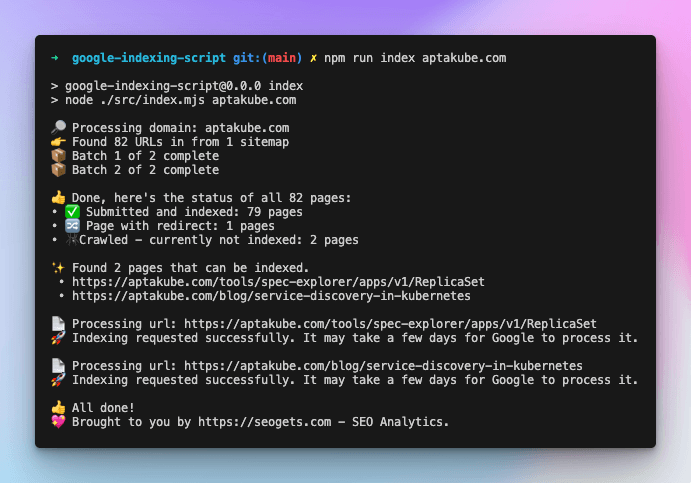
Here's an example of what you should expect:
[!IMPORTANT]
- Your site must have 1 or more sitemaps submitted to Google Search Console. Otherwise, the script will not be able to find the pages to index.
- You can run the script as many times as you want. It will only index the pages that are not already indexed.
- Sites with a large number of pages might take a while to index, be patient.
Depending on your account several quotas are configured for the API (see docs). By default the script exits as soon as the rate limit is exceeded. You can configure a retry mechanism for the read requests that apply on a per minute time frame.
export GIS_QUOTA_RPM_RETRY=true
import { index } from 'google-indexing-script'
import serviceAccount from './service_account.json'

index('seogets.com', {
  client_email: serviceAccount.client_email,
  private_key: serviceAccount.private_key
  quota: {
    rpmRetry: true
  }
})
  .then(console.log)
  .catch(console.error)
MIT License
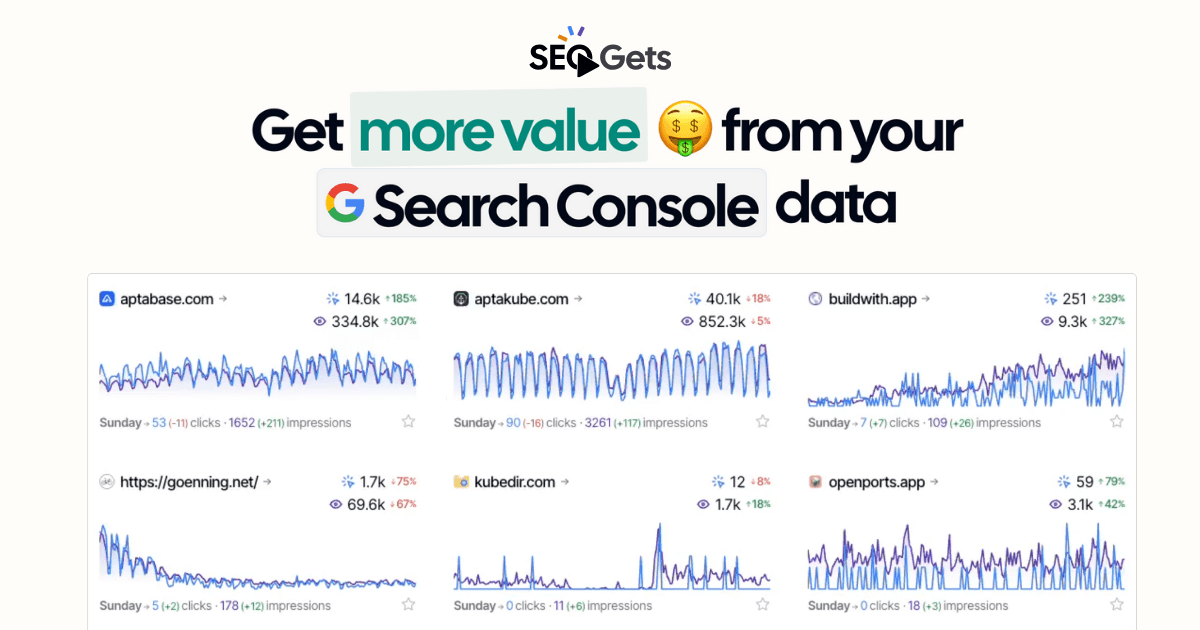
This project is sponsored by SEO Gets
(top 24 of 69)
673 followers · starred Feb 2024
568 followers · starred Feb 2024
6,711 followers · starred Jan 2024
661 followers · starred Jan 2024
Script to get your site indexed on Google in less than 48 hours
See the codeUse this script to get your entire site indexed on Google in less than 48 hours. No tricks, no hacks, just a simple script and a Google API.
[!IMPORTANT]
- This script uses Google Indexing API and it only works on pages with either
JobPostingorBroadcastEventstructured data.- Indexing != Ranking. This will not help your page rank on Google, it'll just let Google know about the existence of your pages.
Owner permission on your sites.Google Search Console API and Web Search Indexing API on your Google Project ➤ API Services ➤ Enabled API & Services.service_account.jsonInstall the cli globally on your machine.
npm i -g google-indexing-script
Clone the repository to your machine.
git clone https://github.com/goenning/google-indexing-script.git
cd google-indexing-script
Install and build the project.
npm install
npm run build
npm i -g .
[!NOTE] Ensure you are using an up-to-date Node.js version, with a preference for v20 or later. Check your current version with
node -v.
service_account.json (recommended)Create a .gis directory in your home folder and move the service_account.json file there.
mkdir ~/.gis
mv service_account.json ~/.gis
Run the script with the domain or url you want to index.
gis <domain or url>
# example
gis seogets.com
Here are some other ways to run the script:
# custom path to service_account.json
gis seogets.com --path /path/to/service_account.json
# long version command
google-indexing-script seogets.com
# cloned repository
npm run index seogets.com
Open service_account.json and copy the client_email and private_key values.
Run the script with the domain or url you want to index.
GIS_CLIENT_EMAIL=your-client-email GIS_PRIVATE_KEY=your-private-key gis seogets.com
Open service_account.json and copy the client_email and private_key values.
Once you have the values, run the script with the domain or url you want to index, the client email and the private key.
gis seogets.com --client-email your-client-email --private-key your-private-key
You can also use the script as a npm module in your own project.
npm i google-indexing-script
import { index } from "google-indexing-script";
import serviceAccount from "./service_account.json";

index("seogets.com", {
  client_email: serviceAccount.client_email,
  private_key: serviceAccount.private_key,
})
  .then(console.log)
  .catch(console.error);
Read the API documentation for more details.
Here's an example of what you should expect:
[!IMPORTANT]
- Your site must have 1 or more sitemaps submitted to Google Search Console. Otherwise, the script will not be able to find the pages to index.
- You can run the script as many times as you want. It will only index the pages that are not already indexed.
- Sites with a large number of pages might take a while to index, be patient.
Depending on your account several quotas are configured for the API (see docs). By default the script exits as soon as the rate limit is exceeded. You can configure a retry mechanism for the read requests that apply on a per minute time frame.
export GIS_QUOTA_RPM_RETRY=true
import { index } from 'google-indexing-script'
import serviceAccount from './service_account.json'

index('seogets.com', {
  client_email: serviceAccount.client_email,
  private_key: serviceAccount.private_key
  quota: {
    rpmRetry: true
  }
})
  .then(console.log)
  .catch(console.error)
MIT License
This project is sponsored by SEO Gets
(top 24 of 69)
673 followers · starred Feb 2024
568 followers · starred Feb 2024
6,711 followers · starred Jan 2024
661 followers · starred Jan 2024



