
MCP server for Google Search Console, Bing Webmaster Tools, GA4, CrUX, IndexNow, technical SEO, and guarded cross-engine workflows
See the codeSee what people are saying
README
Search Console MCP
Google Search Console, Bing Webmaster Tools, GA4, CrUX and guarded SEO workflows for AI assistants.

|
Florian BRUNIAUX · AI Founding Engineer @ Méthode Aristote 13 years from developer to CTO / VP Eng · Blog ↗ · Projects ↗ |






Website · Documentation · Documentation FR · Start here · How it works · Quick start · Tools · Safety
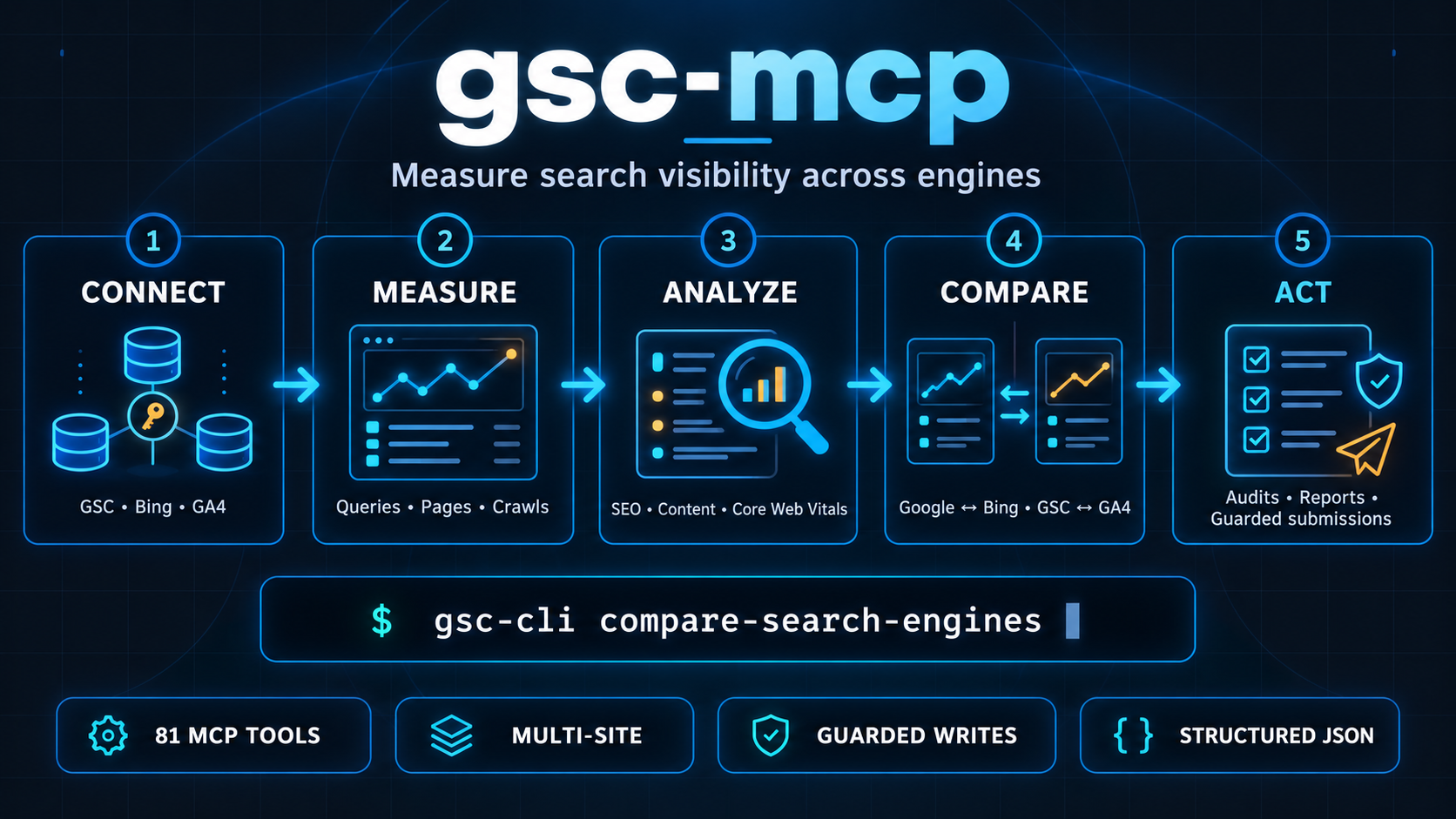
Search Console MCP gives Claude, Codex and other MCP clients access to private search and analytics data plus public-page SEO audits. Version 1.2.0 exposes 81 FastMCP tools for measuring performance, diagnosing pages, comparing Google and Bing, and submitting bounded changes.
Ask questions such as "why did traffic drop?", "which queries are close to page one?" or "compare this site's Google and Bing visibility". The server handles authentication, API calls, validation, retries and structured JSON output.
[!IMPORTANT]
gsc-mcp-tools==1.2.0is the first published version with Bing support. It includes 19 Bing tools, cross-engine comparison and Bing support in three SEO analyses.
[!NOTE] An API submission reported as accepted proves neither crawl nor indexation. Search Console MCP keeps observed facts, derived metrics and recommendations separate.
Start here
| Goal | Command or guide | Result |
|---|---|---|
| Run the published package | uvx gsc-mcp-tools | Starts all 81 Google, Bing, GA4, CrUX, IndexNow and technical SEO tools over stdio |
| Install for Codex or Claude Desktop | Installation guide | Persistent executable, upgrades, client configuration and verification |
| Develop from the source checkout | Install from source | Editable install for unreleased changes and local development |
| Configure Google access | Google setup guide | Service Account or OAuth access to the selected properties |
| Configure Bing access | Bing setup guide | One account-level key for the verified sites visible to that account |
| Run a first audit | Starter prompts | Full audit, health check, page inspection or GA4 analysis prompt |
| Use the shell instead of MCP | CLI usage | Commands generated from the same 81-tool registry |
What it covers
| Need | Main capabilities |
|---|---|
| Search performance | Queries, pages, dates, search types, anomalies, quick wins and traffic drops |
| Google and Bing comparison | Side-by-side query or page metrics without merging incompatible position semantics |
| Site health | GSC, GA4, CrUX, schema and public-page signals with graceful degradation |
| Technical and content SEO | Metadata, headings, hreflang, internal links, structured data, preload and content quality |
| Indexing and feeds | Google indexing requests, sitemaps, IndexNow and guarded Bing URL or feed submissions |
| Automation | MCP tools, gsc-cli, Claude agents, reusable skills and machine-readable architecture docs |
How it works
flowchart TD
    C[Claude, Codex<br/>or another MCP client] --> S[FastMCP server]
    S --> R[Shared registry<br/>81 tools]
    R --> A[Read and analysis tools]
    R --> W[Guarded write tools]
    A --> G[Google APIs<br/>GSC, GA4, CrUX]
    A --> B[Bing Webmaster API]
    A --> P[Public pages<br/>robots, sitemaps, HTML]
    A --> L[(Local drift baselines)]
    W --> V[Validate target, scope<br/>and explicit confirmation]
    V --> M[Google indexing and sitemaps<br/>Bing submissions and IndexNow]
    G --> O[Structured JSON<br/>facts, derived values and _meta]
    B --> O
    P --> O
    L --> O
    M --> O
    O --> C
Google and Bing share clicks, impressions and derived CTR where those fields exist. Provider-specific values remain separate, and cross-engine deltas appear only when both observed windows are exact and equal.
Tools (81)
Show all 81 tools
| Category | Tool | Description |
|---|---|---|
| Meta | get_capabilities | List all available tools |
| Properties | list_properties | List all GSC properties |
| Properties | get_site_details | Get details for a specific property |
| Analytics | get_search_analytics | Query search performance data |
| Analytics | get_performance_overview | Aggregate totals + top queries |
| Analytics | compare_search_periods | Compare two consecutive periods |
| Analytics | get_search_by_page_query | Performance broken down by page and query |
| Analytics | get_advanced_search_analytics | Flexible query with custom dimensions and filters |
| Analytics | analytics_anomalies | Z-score anomaly detection on daily clicks |
| Analytics | discover_performance | Top pages by impressions in Google Discover |
| Analytics | news_performance | Top pages by impressions in Google News |
| Analytics | search_type_breakdown | Clicks and impressions split across web, Discover, News, image, video |
| Analytics | ai_overviews_impact | Queries with searchAppearance data, graceful 400/403 fallback |
| SEO | quick_wins | Pages in positions 4-15 with CTR below benchmark |
| SEO | traffic_drops | Queries with declining clicks, with diagnosis |
| SEO | check_alerts | Traffic concentration risks and ranking opportunities |
| SEO | seo_striking_distance | Queries in positions 8-15, one push away from page 1 |
| SEO | seo_cannibalization | Queries split across multiple pages (HHI conflict score) |
| SEO | seo_lost_queries | Queries with a click drop >= 80% vs the previous period |
| Inspection | inspect_url | URL indexing status via URL Inspection API |
| Inspection | batch_url_inspection | Inspect up to 10 URLs at once |
| Inspection | check_indexing_issues | Inspect URLs and categorize by issue type |
| Indexing | submit_url | Request indexing for a single URL |
| Indexing | submit_batch | Request indexing for multiple URLs (true HTTP batch) |
| Sitemaps | list_sitemaps | List submitted sitemaps |
| Sitemaps | submit_sitemap | Submit a sitemap URL |
| Sitemaps | sitemaps_get | Fetch details for a single sitemap |
| Sitemaps | sitemaps_delete | Delete a submitted sitemap (with safety check) |
| Sitemaps | sitemap_audit | Fetch a sitemap and compare its URLs with 90 days of Search Analytics page rows; does not measure indexation |
| GA4 | ga4_organic_landing_pages | Sessions and engagement for organic landing pages |
| GA4 | ga4_traffic_sources | Sessions and conversions by channel, source and medium |
| GA4 | ga4_page_performance | 7 metrics per page path, optional CONTAINS filter |
| GA4 | ga4_realtime | Active users right now by screen, country and device |
| GA4 | ga4_user_behavior | Device, country and user-type breakdowns in one batch call |
| GA4 | ga4_conversion_funnel | Converting pages and event counts, optional event filter |
| GA4 | ga4_funnel | Multi-step funnel report via GA4 v1alpha RunFunnelReport, conversion rate per step |
| Cross | traffic_health_check | GSC clicks vs GA4 organic sessions ratio, flags tracking gaps and filter issues |
| Cross | page_analysis | GSC+GA4 join per page with opportunity score, sorted by priority |
| Cross | page_health_score | Composite 0-100 score (GSC 30 pts, GA4 25 pts, CrUX 25 pts, schema 20 pts), graceful degradation per component |
| Cross | content_brief | Per-page top queries, question queries, and GA4 session data for content planning |
| CrUX | crux_page_vitals | Real-user Core Web Vitals (LCP, INP, CLS, FCP, TTFB) for a URL from the Chrome UX Report API |
| CrUX | crux_history | Historical Core Web Vitals trend (weekly data points) for a URL |
| Technical | schema_validate | Fetch any public URL and validate its JSON-LD schemas; suggests missing schemas by URL pattern |
| Technical | schema_generate | Generate a Schema.org JSON-LD block for Reservation, OrderAction, DiscussionForumPosting, or ProfilePage |
| Drift | drift_baseline | Capture a baseline snapshot of a page (title, H1-H3, schema, canonical, CWV) stored locally in SQLite |
| Drift | drift_compare | Diff a live fetch against the stored baseline and apply 17 rules (8 CRITICAL, 6 WARNING, 3 INFO) |
| Drift | drift_history | List previous comparison runs for a URL with triggered findings per run |
| Content | content_quality | Fetch a URL and score visible text against E-E-A-T heuristics: filler phrases, information density, repetition, thin content |
| Content | hreflang_audit | Fetch a URL and validate its hreflang implementation: x-default, ISO 639-1 codes, region codes, self-ref, protocol consistency |
| Content | page_technical_audit | Fetch a URL and audit meta tags (title, description, canonical, robots), viewport, HTML lang, security headers, robots.txt Googlebot access |
| Content | preload_audit | Audit Speculation Rules, bfcache eligibility, and LCP preload signals: inline speculationrules blocks, Speculation-Rules header, link preload tags, deprecated prerender, cache-control blockers |
| CrUX | crux_lcp_subparts | Decompose LCP into four subparts (TTFB, resource load delay, duration, render delay) with dominant phase identification for targeted CWV remediation |
| Indexing | indexnow_submit | Submit URLs to IndexNow (Bing, Yandex, Seznam, Naver) via one POST; SSRF-safe URL validation, skipped-invalid count, ok/partial/error verdict |
| SEO | parasite_risk | Scan URL paths for parasite SEO patterns matching Google's 2024-11-19 site-reputation policy: sponsored/affiliate sections, Forbes Advisor, CNN Underscored patterns, affiliate query params |
| Technical | ai_visibility_audit | Check robots.txt AI crawler access (GPTBot, Anthropic-ai, PerplexityBot, Google-Extended, CCBot, 9 agents) and llms.txt presence for an origin |
| Technical | gbp_deprecation_lint | Scan a page for deprecated Google Business Profile features: .business.site links, Reserve with Google, GBP appointment widgets |
| Technical | pagespeed_audit | Run a PageSpeed Insights API v5 audit: Lighthouse performance score, Core Web Vitals, top 3 improvement opportunities (requires GOOGLE_API_KEY) |
| Content | heading_audit | Audit heading structure: H1 uniqueness, level jumps (H2 to H4), title vs H1 word-for-word duplication, headings carrying no information, words per H2 |
| Links | internal_links_audit | Audit a page's internal links weighted by zone (body, nav, footer, header, aside): targets linked only from footer/nav, generic and empty anchors, internal nofollow, self-links |
| Links | link_equity_map | Crawl the top pages by impressions, build the internal link graph, cross it with GSC: pages at position 11-20 with no body inbound link, orphan candidates, footer-only targets, hubs |
| SEO | prune_candidates | Classify pages by measured traffic (has_traffic, impressions_no_clicks, low_impressions, zero_impressions) before any pruning call; a page with clicks is never a candidate |
| Bing read | bing_sites_list | List sites visible to the Bing account and their observed verified state |
| Bing read | bing_query_stats | Query performance in Bing's observed rolling window |
| Bing read | bing_page_stats | Page performance in Bing's observed rolling window |
| Bing read | bing_page_query_stats | Query performance for one page |
| Bing read | bing_rank_traffic_stats | Daily clicks and impressions; no rank field is inferred |
| Bing read | bing_crawl_stats | Dated crawl counters in the requested local window |
| Bing read | bing_crawl_issues | Crawl issue flags; non-empty live item shape remains unverified |
| Bing read | bing_crawl_settings_get | Observed crawl-rate setting from the partial contract |
| Bing read | bing_url_info | Observed URL fields and last crawl date, without an indexation verdict |
| Bing read | bing_url_traffic | URL clicks, impressions and derived CTR |
| Bing read | bing_feeds_list | List registered Bing feeds |
| Bing read | bing_feed_details | Return every observed feed-detail row |
| Bing read | bing_url_submission_quota | Return quota integers with total-versus-remaining semantics marked unknown |
| Bing read | bing_link_counts | Backlink count page; nested runtime shape remains unverified |
| Bing read | bing_url_links | Backlinks for one URL; nested runtime shape remains unverified |
| Bing write | bing_url_submit | Submit one same-origin URL; acceptance does not prove indexation |
| Bing write | bing_urls_submit_batch | Validate a batch, then refuse it while quota semantics remain unknown |
| Bing write | bing_feed_submit | Submit one same-origin feed without claiming crawl or indexation |
| Bing write | bing_feed_remove | Remove a registered same-origin feed after explicit confirm=true; runtime contract unverified |
| Cross-engine | compare_search_engines | Compare query or page metrics; deltas require equal exact observed windows and positions stay side by side |
Quick start
- Python 3.11+
- For Google tools: a Google Cloud project with the Search Console API, Web Search Indexing API and Google Analytics Data API enabled, plus a Service Account JSON key or OAuth Desktop credentials
- For Bing tools: a Bing Webmaster Tools account, at least one verified site and a Bing Webmaster API key
Published package
Use the published package for the complete 81-tool registry, including Bing:
uvx gsc-mcp-tools
For a persistent MCP client, install the latest stable package once and configure the absolute executable path. This avoids keeping an extra uvx launcher process beside every running server:
uv tool install gsc-mcp-tools
command -v gsc-mcp-tools
gsc-cli list
Upgrade that installation when a new release is available:
uv tool upgrade gsc-mcp-tools
To reproduce this release exactly, use uv tool install --force gsc-mcp-tools==1.2.0. A version-pinned installation remains pinned; install a newer explicit version or reinstall without ==... before using uv tool upgrade.
Release 1.2.0 was built and published by GitHub Actions through PyPI Trusted Publishing. The workflow checks that the tag matches pyproject.toml, runs the full test suite, validates and smoke-tests the built wheel, then publishes that same artifact with a short-lived OIDC credential. See the GitHub release and PyPI files.
Install with pip instead of uvx
pip install gsc-mcp-tools
Source checkout for development
git clone https://github.com/FlorianBruniaux/google-search-console-mcp
cd google-search-console-mcp
python3 -m venv .venv && source .venv/bin/activate
pip install -e .
gsc-cli list
The final command reads the shared registry and lists the 81 commands available in this checkout. Use this installation when developing or testing unreleased changes.
Configure the providers you use
Installation guide: docs/installation.md covers persistent and one-time installs, upgrades, Codex project scoping, Claude Desktop, provider variants and verification.
Provider setup: docs/google-setup.md covers Google credentials and GA4. docs/bing-setup.md covers the Bing Webmaster API key, verified sites and the separate IndexNow key.
First audit prompts: docs/starter-prompt.md contains ready-to-use prompts for Google, Bing, cross-engine comparison, single-page inspection, eligible Indexing API submissions and GA4 analysis.
Use only the variables required by the provider families you enable:
export GSC_SERVICE_ACCOUNT_PATH=/absolute/path/to/service-account.json
export GSC_SKIP_OAUTH=true
export GA4_PROPERTY_ID=123456789   # only needed for GA4 tools
export CRUX_API_KEY=AIza...        # only needed for crux_page_vitals, crux_history
export BING_WEBMASTER_API_KEY='<from-your-secret-store>'  # only needed for bing_* tools
gsc-mcp
CRUX_API_KEY is a Google API key (not a service account) with the Chrome UX Report API enabled in your GCP Console. It is separate from GSC auth and only required for CrUX tools.
Claude Desktop configuration
Claude Desktop
Install the latest stable package once with uv tool install gsc-mcp-tools, then copy the absolute path returned by command -v gsc-mcp-tools into the configuration:
Add to ~/Library/Application Support/Claude/claude_desktop_config.json:
{
  "mcpServers": {
    "gsc-mcp": {
      "command": "/absolute/path/to/gsc-mcp-tools",
      "env": {
        "GSC_SERVICE_ACCOUNT_PATH": "/absolute/path/to/service-account.json",
        "GSC_SKIP_OAUTH": "true",
        "GA4_PROPERTY_ID": "123456789",
        "CRUX_API_KEY": "AIza...",
        "BING_WEBMASTER_API_KEY": "<from-your-secret-store>"
      }
    }
  }
}
Remove credentials for tool families you do not use, then restart Claude Desktop. Saving the file does not restart the MCP process.
For local development, set command to the checkout's absolute executable path, for example /absolute/path/to/google-search-console-mcp/.venv/bin/gsc-mcp. Both installations expose the same 81-tool registry.
Codex configuration without process proliferation
Codex
Codex starts a dedicated stdio MCP server for each task that loads it. A declaration in the user-level ~/.codex/config.toml therefore applies to every project and can leave many legitimate server processes alive while tasks remain active. Running through uvx adds a launcher process to each server.
Install the package once:
uv tool install gsc-mcp-tools
command -v gsc-mcp-tools
Then add the server only to trusted projects that need search data by creating .codex/config.toml in the project root:
[mcp_servers.gsc-mcp]
command = "/absolute/path/to/gsc-mcp-tools"
startup_timeout_sec = 60

[mcp_servers.gsc-mcp.env]
GSC_SERVICE_ACCOUNT_PATH = "/absolute/path/to/service-account.json"
GSC_SKIP_OAUTH = "true"
BING_WEBMASTER_API_KEY = "<from-your-secret-store>"
Keep this file untracked when it contains credentials. Remove provider variables you do not use. Codex loads project .codex/config.toml only for trusted projects; project configuration and precedence are documented in the official Codex configuration guide.
Do not add a global single-instance lock to a stdio server. Each client owns a separate stdin/stdout channel, so blocking later instances would break concurrent tasks instead of sharing one server safely. A shared deployment would require the streamable HTTP transport and its own authentication boundary.
Bing Webmaster API key
- Sign in to Bing Webmaster Tools and verify every site you want the account to access.
- Open the API access settings and generate an API key.
- Store the key in your secret manager or local environment as
BING_WEBMASTER_API_KEY. Never pass it as a tool argument or commit it to a file. - Call each Bing tool with its
siteargument, for examplehttps://example.com/. One user-level key can access every verified site visible to that account.
The Bing Webmaster API key and the IndexNow key have different scopes:
- Bing Webmaster API reads private account data and manages verified sites. The server reads its user-level key from
BING_WEBMASTER_API_KEY. - IndexNow notifies participating engines about changed URLs. Its key must be verifiable on each target host or subdomain, and
indexnow_submitcurrently receives that key as an explicit argument. - The Bing Webmaster Tools web interface exposes features that the public API does not. Full URL Inspection and AI Performance are not available through the public API used here.
Do not reuse the Bing Webmaster API key as an IndexNow key.
Bing from the CLI
# Load BING_WEBMASTER_API_KEY from your local secret store before this command.
gsc-cli bing-sites-list
gsc-cli bing-query-stats --site https://example.com/ --days 28 --limit 100
gsc-cli compare-search-engines \
  --google-site sc-domain:example.com \
  --bing-site https://example.com/ \
  --days 28 \
  --dimension query
BING_WEBMASTER_API_KEY is process configuration. It never appears in the CLI flags, tool parameters, result metadata or sanitized Bing errors.
Evidence and safety
Every tool returns structured JSON. The _meta block records diagnostics such as the provider and observed window where the tool can establish them. Search Console MCP does not turn an unavailable field into a negative result or merge Google and Bing ranking semantics into one number.
Remote writes require the agent to identify the exact target and volume, read current state where available, and obtain explicit confirmation before calling the tool. The returned API status is reported without extrapolating crawl, indexation or ranking effects.
Search engine coverage
Compare Google and Bing analysis support
| Analysis | Bing | |
|---|---|---|
| Raw query, page and date metrics | Supported | Supported within Bing's observed window |
quick_wins | Supported | Supported with engine="bing" when position is present |
seo_striking_distance | Supported | Supported with engine="bing" when position is present |
prune_candidates | Supported | Supported with engine="bing"; indexation must be checked separately |
traffic_drops, seo_lost_queries | Supported | Explicit refusal: exact period comparison unavailable |
check_alerts, seo_cannibalization | Supported | Explicit refusal: bulk page-query dimension unavailable |
| Cross-engine query or page comparison | Supported through compare_search_engines | Deltas are omitted unless both observed windows are exact and equal |
Bing keyword-research endpoints are not exposed. GetKeywordStats and GetRelatedKeywords returned HTTP 400 in the redacted live canary, so their contract remains UNKNOWN.
Submission workflow, confirmation rules and current Bing limits
Submission workflow and confirmation
There are nine tools that mutate remote state: five existing tools (submit_url, submit_batch, submit_sitemap, sitemaps_delete, indexnow_submit) and four Bing tools (bing_url_submit, bing_urls_submit_batch, bing_feed_submit, bing_feed_remove). Before any call, the agent must read the current state, name the exact target and volume, obtain explicit confirmation, call the tool once, then report its returned status without extrapolation.
Use this sequence for search changes:
- Analyse measured data and state its observed window.
- Recommend a change, separating measured facts, derived metrics and recommendations.
- Correct the page or feed outside this MCP server.
- Submit only after explicit confirmation and same-origin validation.
- Verify the returned API status. An accepted request proves neither crawl nor indexation.
- Measure a later comparable window before attributing an effect.
Current Bing runtime limits are explicit: data freshness is unknown; quota integers are not known to represent totals or remaining capacity; non-empty crawl issues, nested backlink rows and RemoveFeed remain unverified against live production data. No Bing write was executed against a production site during validation. Batch URL submission is therefore refused before mutation. bing_url_info can report a last crawl date, but it cannot provide a complete public URL Inspection verdict.
Use multiple GA4 properties
Multi-property support
To query a different GA4 property without changing the config, pass property_id directly to any GA4 or cross tool:
ga4_traffic_sources(property_id="987654321")
traffic_health_check(site="sc-domain:example.com", property_id="987654321")
CLI usage
After installation, gsc-cli is available as a standalone shell command. It derives its commands from the same registry as the MCP server. Version 1.2.0 and the source checkout both expose 81 commands, including Bing.
# List the commands in the installed build
gsc-cli list

# Run Google or Bing tools with flags
gsc-cli get-search-analytics --site https://example.com/ --days 28
gsc-cli bing-query-stats --site https://example.com/ --days 28 --limit 100
Advanced CLI arguments, authentication, metadata and exit codes
# Run another registered tool
gsc-cli get-performance-overview --site https://example.com/

# Multi-value flags for list parameters
gsc-cli batch-url-inspection \
  --urls https://example.com/page-1/ \
  --urls https://example.com/page-2/ \
  --site https://example.com/

# GA4 funnel with a JSON steps array
gsc-cli ga4-funnel \
  --steps '[{"name":"Visit","event":"page_view"},{"name":"Convert","event":"purchase"}]' \
  --start-date 28daysAgo \
  --end-date today

# Keep the _meta diagnostic block in output
gsc-cli list-properties --meta

# Pipe to jq
gsc-cli get-search-analytics --site https://example.com/ | jq '.rows[:5]'
Set GSC_SERVICE_ACCOUNT_PATH for non-interactive use (same as the MCP server). To cache OAuth credentials interactively, run:
gsc-cli auth login --allow-browser
Exit codes: 0 success, 1 Google API error, 2 credential/config error or invalid arguments.
Quota note:
submit-batchandsubmit-urluse the Google Indexing API (200 req/day limit). Eachgsc-clicall starts a fresh process, so cross-invocation quota tracking is not implemented. The@with_retrydecorator still catches 429s, but the in-process counter resets every call.
Claude agents and skills
The .claude/ directory ships 12 Claude Code agents, 14 skills and 2 development commands. The nine SEO workflow agents below each reference a focused skill. Three additional specialist agents cover Python implementation, pytest and security review.
Agents
Show 9 GSC agents
| Agent | Skill | When to use |
|---|---|---|
gsc-seo-reporter | seo-weekly-report | Weekly traffic recap, period-over-period summary |
gsc-traffic-doctor | traffic-drop-diagnosis | Sudden or sustained drop in clicks or impressions |
gsc-content-optimizer | content-opportunities | Pages close to page 1 (positions 4-20) worth a push |
gsc-cannibalization-checker | cannibalization-check | Multiple pages competing for the same query |
gsc-indexing-auditor | indexing-audit | Crawl errors, pages not indexed, coverage gaps |
gsc-sitemap-auditor | sitemap-audit | Sitemap health and declared-vs-indexed coverage |
gsc-schema-auditor | schema-audit | JSON-LD errors blocking rich results |
gsc-page-analyst | page-deep-dive | Full diagnostic for a single URL |
gsc-ai-overviews-analyst | ai-overviews-impact | Available query and searchAppearance rows for AI Overview analysis |
To use an agent from Claude Code, ask naturally ("why did traffic drop?") or invoke it by name. Each agent loads its skill at runtime and returns a structured answer, not a narration of what it did.
Skills
Skills live in .claude/skills/ and are invokable directly via slash command. They define the exact steps, tool call sequence, and output format. Agents reference them; skills run standalone when you want to drive the workflow yourself without delegating to an agent.
Show 14 skills + 2 development commands
| Skill | Command | When to use |
|---|---|---|
seo-weekly-report | /seo-weekly-report | Weekly traffic recap, period-over-period summary |
traffic-drop-diagnosis | /traffic-drop-diagnosis | Sudden or sustained drop in clicks or impressions |
content-opportunities | /content-opportunities | Pages close to page 1 (positions 4-20) worth a push |
cannibalization-check | /cannibalization-check | Multiple pages competing for the same query |
indexing-audit | /indexing-audit | Crawl errors, pages not indexed, coverage gaps |
sitemap-audit | /sitemap-audit | Sitemap health and declared-vs-indexed coverage |
schema-audit | /schema-audit | JSON-LD errors blocking rich results |
page-deep-dive | /page-deep-dive | Full diagnostic for a single URL |
ai-overviews-impact | /ai-overviews-impact | Inspect available query and searchAppearance rows |
heading-audit | /heading-audit | Heading hierarchy, H1 uniqueness, title overlap and section density |
internal-linking-audit | /internal-linking-audit | Link placement by page zone, anchors and footer-only targets |
link-equity-map | /link-equity-map | Site-wide link flow crossed with Search Console positions |
onpage-audit | /onpage-audit | One-page audit combining technical, content, link, schema and search data |
python-clean-code | /python-clean-code | Review a module for clean code violations before PR |
add-tool | /add-tool | Step-by-step workflow to add a new MCP tool |
run-tests | /run-tests | Run the pytest suite with automatic failure diagnosis |
Documentation
| Need | Document |
|---|---|
| Install, upgrade and configure an MCP client | Installation guide |
| Configure Google APIs and authentication | Google setup guide |
| Configure Bing Webmaster Tools | Bing setup guide |
| Run the first audit | Starter prompts and examples/ |
| Understand the modules and data flow | Architecture |
| Review Bing evidence and runtime limits | Bing API contract |
| Review product designs and implementation plans | Product design records |
| Track releases and current changes | Changelog |
| Give the repository to an AI assistant | Machine-readable project index |
Machine-readable architecture for AI assistants
The docs/machine-readable/ directory contains structured architecture docs designed to give any AI agent (Claude, Cursor, Copilot...) an accurate picture of the project without reading the full codebase:
llms.txt: quick reference covering all 81 tools, module map, security rules, test patterns, and a decision tree for common tasksadr-index.yaml: 16 Architecture Decision Records reconstructed from git historycode-map.yaml: full module/test/dependency mapconstraints.yaml: forbidden patterns (no stdlib XML on external input, no pickle for tokens, no unvalidated URLs in sitemap fetch...) and required patternstech-decisions.yaml: stack decisions by domain (auth, retry, output contract, packaging...)
Load llms.txt via your AI context or reference it in your CLAUDE.md with @docs/machine-readable/llms.txt.
Development setup
Development
python3 -m venv .venv && source .venv/bin/activate
pip install -e ".[dev]"
pytest tests/ -v
851 tests at this branch baseline, all mocked with no real external API calls.
Troubleshooting common setup and API errors
Troubleshooting
uvx gsc-mcp-tools launches but no tools appear in Claude Desktop
Fully quit Claude Desktop (Cmd+Q) and reopen it. Saving the config file is not enough; the MCP process is only started on launch.
Codex keeps many gsc-mcp-tools processes alive
Check whether gsc-mcp is declared in user-level ~/.codex/config.toml. Move it to project-level .codex/config.toml when it is not needed in every task, and configure the executable installed by uv tool install instead of uvx. Restart Codex after changing the configuration; already-running tasks keep the server configuration they loaded at startup.
GSC_SERVICE_ACCOUNT_PATH is set but auth fails
Use an absolute path. Relative paths and ~/ tilde expansion are not resolved. Check with echo $GSC_SERVICE_ACCOUNT_PATH that the value is a full /Users/... path.
GA4 tools return "property_id required"
Either set GA4_PROPERTY_ID in your config env block, or pass property_id directly to the tool call. The env var is the default; the parameter overrides it per call.
crux_page_vitals or crux_history returns "CRUX_API_KEY not set"
CrUX tools require a separate Google API key (not the service account) with the Chrome UX Report API enabled. Create one in Google Cloud Console under Credentials, enable the API, then set CRUX_API_KEY=AIza... in your config.
Indexing API returns 403 on submit_url
The service account needs Owner-level access on the GSC property, not just Full access. Go to Search Console Settings > Users and permissions, find the service account email, and upgrade its role to Owner.
submit_batch quota warning at 180/200
The Indexing API default quota is 200 requests per day per GCP project. The tool warns at 180. To increase it, request a quota increase in Google Cloud Console under APIs & Services > Quotas.
Why private search data needs MCP
Public web search cannot answer questions tied to private Search Console, Bing Webmaster Tools or GA4 properties. Search Console MCP lets an assistant analyse those measured values while preserving provider boundaries and uncertainty.
Read the concrete example and API rationale
GSC data is private. No web search agent can read it.
Given "which of my pages are wasting impressions with zero clicks?", an AI without API access has two honest options: admit it cannot answer, or guess from publicly visible signals. Neither is a diagnosis.
With this server, Claude pulls the actual numbers: /projects/ at position 10.1 with 87 impressions and 0 clicks, CTR benchmark 2.3% at that rank. That is the concrete gap between "you should optimize your meta titles" (available from any AI with internet access) and "your /projects/ page has 87 impressions and 0 clicks, rewrite the title" (requires your numbers).
Some tasks work without private data: checking indexation with site:, parsing sitemap structure, reading robots.txt. For those, any web-capable agent gets you there. But for anything that requires private GSC metrics (traffic drops, striking-distance queries, CTR anomalies, Indexing API submissions), there is no substitute for API access.
The server also handles Google and Bing API mechanics: isolated credentials, bounded retries, same-origin checks for Bing writes, true HTTP batch for Google indexing requests, and structured JSON output across all 81 tools. The two providers keep distinct position semantics and expose uncertainty instead of forcing incomparable data into one claim.
Project origins and feature comparison
Why this implementation exists
Two projects shaped the approach here. AminForou/mcp-gsc (Python, 1k+ stars) has strong search analytics and handles OAuth and Service Account auth cleanly, but does not include the Google Indexing API at all. Suganthan-Mohanadasan/Suganthans-GSC-MCP (Node.js) adds the Indexing API but implements submit_batch as a sequential loop with a 100ms delay between requests, not a real HTTP batch, and mixes plain-text and JSON outputs with no retry logic.
This project takes the auth and SEO patterns from the first, the Indexing API scope from the second, and closes the gaps in both. Python was the natural choice: google-api-python-client ships service.new_batch_http_request() natively, which makes true HTTP multipart batching possible without reimplementing the wire format by hand.
| Feature | AminForou/mcp-gsc | Suganthan | gsc-mcp |
|---|---|---|---|
| Google Indexing API | No | Yes (fake batch) | Yes (true HTTP batch) |
| submit_batch | N/A | Sequential loop | new_batch_http_request(), 100/chunk |
| Token storage | pickle | pickle | JSON (creds.to_json()) |
| Retry on 429/5xx | No | No | Yes, exponential backoff |
| Quota tracking | No | No | Yes, warns at 180/200 |
| Output format | Mixed text+JSON | Mixed | 100% JSON + _meta block |
Credits
This project took inspiration from claude-seo (MIT, agricidaniel). Four components were adapted:
- SSRF protection (
src/gsc_mcp/url_safety.py): the URL safety module with DNS-rebinding mitigation, IPv4 obfuscation normalization, and multi-cloud metadata endpoint blocklist, ported fromrequeststohttpx. - JSON-LD generators (
schema_generatetool): the four high-leverage schema types (Reservation, OrderAction, DiscussionForumPosting, ProfilePage) adapted fromscripts/schema_generate.py. - Schema templates (
src/gsc_mcp/data/schema_templates.json): 11 JSON-LD placeholder templates (VideoObject, ProductGroup, ItemList, Certification, etc.) fromschema/templates.json. - SEO drift monitoring (
src/gsc_mcp/tools/drift.py): the 17-rule diff methodology fromscripts/drift_baseline.pyandscripts/drift_compare.py, credited to Dan Colta in the original CONTRIBUTORS.md.
Assets with incompatible licenses (CC BY-SA 4.0, CC BY 4.0) were excluded. See NOTICE for full attribution.
Explore the ecosystem
These projects extend the workflow without duplicating this tool:
- Research with yt-insights: connect corpus building to post-publication performance measurement.
- Learn with Claude Code Ultimate Guide: frame MCP choice, permissions, and research workflows.
Browse the complete open-source galaxy
License
MIT
Significant stargazers

342 followers · starred Jun 2026
Similar repos


MCP server for Google Search Console, Bing Webmaster Tools, GA4, CrUX, IndexNow, technical SEO, and guarded cross-engine workflows
See the codeSee what people are saying
README
Search Console MCP
Google Search Console, Bing Webmaster Tools, GA4, CrUX and guarded SEO workflows for AI assistants.
|
|
Florian BRUNIAUX · AI Founding Engineer @ Méthode Aristote 13 years from developer to CTO / VP Eng · Blog ↗ · Projects ↗ |
Website · Documentation · Documentation FR · Start here · How it works · Quick start · Tools · Safety
Search Console MCP gives Claude, Codex and other MCP clients access to private search and analytics data plus public-page SEO audits. Version 1.2.0 exposes 81 FastMCP tools for measuring performance, diagnosing pages, comparing Google and Bing, and submitting bounded changes.
Ask questions such as "why did traffic drop?", "which queries are close to page one?" or "compare this site's Google and Bing visibility". The server handles authentication, API calls, validation, retries and structured JSON output.
[!IMPORTANT]
gsc-mcp-tools==1.2.0is the first published version with Bing support. It includes 19 Bing tools, cross-engine comparison and Bing support in three SEO analyses.
[!NOTE] An API submission reported as accepted proves neither crawl nor indexation. Search Console MCP keeps observed facts, derived metrics and recommendations separate.
Start here
| Goal | Command or guide | Result |
|---|---|---|
| Run the published package | uvx gsc-mcp-tools | Starts all 81 Google, Bing, GA4, CrUX, IndexNow and technical SEO tools over stdio |
| Install for Codex or Claude Desktop | Installation guide | Persistent executable, upgrades, client configuration and verification |
| Develop from the source checkout | Install from source | Editable install for unreleased changes and local development |
| Configure Google access | Google setup guide | Service Account or OAuth access to the selected properties |
| Configure Bing access | Bing setup guide | One account-level key for the verified sites visible to that account |
| Run a first audit | Starter prompts | Full audit, health check, page inspection or GA4 analysis prompt |
| Use the shell instead of MCP | CLI usage | Commands generated from the same 81-tool registry |
What it covers
| Need | Main capabilities |
|---|---|
| Search performance | Queries, pages, dates, search types, anomalies, quick wins and traffic drops |
| Google and Bing comparison | Side-by-side query or page metrics without merging incompatible position semantics |
| Site health | GSC, GA4, CrUX, schema and public-page signals with graceful degradation |
| Technical and content SEO | Metadata, headings, hreflang, internal links, structured data, preload and content quality |
| Indexing and feeds | Google indexing requests, sitemaps, IndexNow and guarded Bing URL or feed submissions |
| Automation | MCP tools, gsc-cli, Claude agents, reusable skills and machine-readable architecture docs |
How it works
flowchart TD
    C[Claude, Codex<br/>or another MCP client] --> S[FastMCP server]
    S --> R[Shared registry<br/>81 tools]
    R --> A[Read and analysis tools]
    R --> W[Guarded write tools]
    A --> G[Google APIs<br/>GSC, GA4, CrUX]
    A --> B[Bing Webmaster API]
    A --> P[Public pages<br/>robots, sitemaps, HTML]
    A --> L[(Local drift baselines)]
    W --> V[Validate target, scope<br/>and explicit confirmation]
    V --> M[Google indexing and sitemaps<br/>Bing submissions and IndexNow]
    G --> O[Structured JSON<br/>facts, derived values and _meta]
    B --> O
    P --> O
    L --> O
    M --> O
    O --> C
Google and Bing share clicks, impressions and derived CTR where those fields exist. Provider-specific values remain separate, and cross-engine deltas appear only when both observed windows are exact and equal.
Tools (81)
Show all 81 tools
| Category | Tool | Description |
|---|---|---|
| Meta | get_capabilities | List all available tools |
| Properties | list_properties | List all GSC properties |
| Properties | get_site_details | Get details for a specific property |
| Analytics | get_search_analytics | Query search performance data |
| Analytics | get_performance_overview | Aggregate totals + top queries |
| Analytics | compare_search_periods | Compare two consecutive periods |
| Analytics | get_search_by_page_query | Performance broken down by page and query |
| Analytics | get_advanced_search_analytics | Flexible query with custom dimensions and filters |
| Analytics | analytics_anomalies | Z-score anomaly detection on daily clicks |
| Analytics | discover_performance | Top pages by impressions in Google Discover |
| Analytics | news_performance | Top pages by impressions in Google News |
| Analytics | search_type_breakdown | Clicks and impressions split across web, Discover, News, image, video |
| Analytics | ai_overviews_impact | Queries with searchAppearance data, graceful 400/403 fallback |
| SEO | quick_wins | Pages in positions 4-15 with CTR below benchmark |
| SEO | traffic_drops | Queries with declining clicks, with diagnosis |
| SEO | check_alerts | Traffic concentration risks and ranking opportunities |
| SEO | seo_striking_distance | Queries in positions 8-15, one push away from page 1 |
| SEO | seo_cannibalization | Queries split across multiple pages (HHI conflict score) |
| SEO | seo_lost_queries | Queries with a click drop >= 80% vs the previous period |
| Inspection | inspect_url | URL indexing status via URL Inspection API |
| Inspection | batch_url_inspection | Inspect up to 10 URLs at once |
| Inspection | check_indexing_issues | Inspect URLs and categorize by issue type |
| Indexing | submit_url | Request indexing for a single URL |
| Indexing | submit_batch | Request indexing for multiple URLs (true HTTP batch) |
| Sitemaps | list_sitemaps | List submitted sitemaps |
| Sitemaps | submit_sitemap | Submit a sitemap URL |
| Sitemaps | sitemaps_get | Fetch details for a single sitemap |
| Sitemaps | sitemaps_delete | Delete a submitted sitemap (with safety check) |
| Sitemaps | sitemap_audit | Fetch a sitemap and compare its URLs with 90 days of Search Analytics page rows; does not measure indexation |
| GA4 | ga4_organic_landing_pages | Sessions and engagement for organic landing pages |
| GA4 | ga4_traffic_sources | Sessions and conversions by channel, source and medium |
| GA4 | ga4_page_performance | 7 metrics per page path, optional CONTAINS filter |
| GA4 | ga4_realtime | Active users right now by screen, country and device |
| GA4 | ga4_user_behavior | Device, country and user-type breakdowns in one batch call |
| GA4 | ga4_conversion_funnel | Converting pages and event counts, optional event filter |
| GA4 | ga4_funnel | Multi-step funnel report via GA4 v1alpha RunFunnelReport, conversion rate per step |
| Cross | traffic_health_check | GSC clicks vs GA4 organic sessions ratio, flags tracking gaps and filter issues |
| Cross | page_analysis | GSC+GA4 join per page with opportunity score, sorted by priority |
| Cross | page_health_score | Composite 0-100 score (GSC 30 pts, GA4 25 pts, CrUX 25 pts, schema 20 pts), graceful degradation per component |
| Cross | content_brief | Per-page top queries, question queries, and GA4 session data for content planning |
| CrUX | crux_page_vitals | Real-user Core Web Vitals (LCP, INP, CLS, FCP, TTFB) for a URL from the Chrome UX Report API |
| CrUX | crux_history | Historical Core Web Vitals trend (weekly data points) for a URL |
| Technical | schema_validate | Fetch any public URL and validate its JSON-LD schemas; suggests missing schemas by URL pattern |
| Technical | schema_generate | Generate a Schema.org JSON-LD block for Reservation, OrderAction, DiscussionForumPosting, or ProfilePage |
| Drift | drift_baseline | Capture a baseline snapshot of a page (title, H1-H3, schema, canonical, CWV) stored locally in SQLite |
| Drift | drift_compare | Diff a live fetch against the stored baseline and apply 17 rules (8 CRITICAL, 6 WARNING, 3 INFO) |
| Drift | drift_history | List previous comparison runs for a URL with triggered findings per run |
| Content | content_quality | Fetch a URL and score visible text against E-E-A-T heuristics: filler phrases, information density, repetition, thin content |
| Content | hreflang_audit | Fetch a URL and validate its hreflang implementation: x-default, ISO 639-1 codes, region codes, self-ref, protocol consistency |
| Content | page_technical_audit | Fetch a URL and audit meta tags (title, description, canonical, robots), viewport, HTML lang, security headers, robots.txt Googlebot access |
| Content | preload_audit | Audit Speculation Rules, bfcache eligibility, and LCP preload signals: inline speculationrules blocks, Speculation-Rules header, link preload tags, deprecated prerender, cache-control blockers |
| CrUX | crux_lcp_subparts | Decompose LCP into four subparts (TTFB, resource load delay, duration, render delay) with dominant phase identification for targeted CWV remediation |
| Indexing | indexnow_submit | Submit URLs to IndexNow (Bing, Yandex, Seznam, Naver) via one POST; SSRF-safe URL validation, skipped-invalid count, ok/partial/error verdict |
| SEO | parasite_risk | Scan URL paths for parasite SEO patterns matching Google's 2024-11-19 site-reputation policy: sponsored/affiliate sections, Forbes Advisor, CNN Underscored patterns, affiliate query params |
| Technical | ai_visibility_audit | Check robots.txt AI crawler access (GPTBot, Anthropic-ai, PerplexityBot, Google-Extended, CCBot, 9 agents) and llms.txt presence for an origin |
| Technical | gbp_deprecation_lint | Scan a page for deprecated Google Business Profile features: .business.site links, Reserve with Google, GBP appointment widgets |
| Technical | pagespeed_audit | Run a PageSpeed Insights API v5 audit: Lighthouse performance score, Core Web Vitals, top 3 improvement opportunities (requires GOOGLE_API_KEY) |
| Content | heading_audit | Audit heading structure: H1 uniqueness, level jumps (H2 to H4), title vs H1 word-for-word duplication, headings carrying no information, words per H2 |
| Links | internal_links_audit | Audit a page's internal links weighted by zone (body, nav, footer, header, aside): targets linked only from footer/nav, generic and empty anchors, internal nofollow, self-links |
| Links | link_equity_map | Crawl the top pages by impressions, build the internal link graph, cross it with GSC: pages at position 11-20 with no body inbound link, orphan candidates, footer-only targets, hubs |
| SEO | prune_candidates | Classify pages by measured traffic (has_traffic, impressions_no_clicks, low_impressions, zero_impressions) before any pruning call; a page with clicks is never a candidate |
| Bing read | bing_sites_list | List sites visible to the Bing account and their observed verified state |
| Bing read | bing_query_stats | Query performance in Bing's observed rolling window |
| Bing read | bing_page_stats | Page performance in Bing's observed rolling window |
| Bing read | bing_page_query_stats | Query performance for one page |
| Bing read | bing_rank_traffic_stats | Daily clicks and impressions; no rank field is inferred |
| Bing read | bing_crawl_stats | Dated crawl counters in the requested local window |
| Bing read | bing_crawl_issues | Crawl issue flags; non-empty live item shape remains unverified |
| Bing read | bing_crawl_settings_get | Observed crawl-rate setting from the partial contract |
| Bing read | bing_url_info | Observed URL fields and last crawl date, without an indexation verdict |
| Bing read | bing_url_traffic | URL clicks, impressions and derived CTR |
| Bing read | bing_feeds_list | List registered Bing feeds |
| Bing read | bing_feed_details | Return every observed feed-detail row |
| Bing read | bing_url_submission_quota | Return quota integers with total-versus-remaining semantics marked unknown |
| Bing read | bing_link_counts | Backlink count page; nested runtime shape remains unverified |
| Bing read | bing_url_links | Backlinks for one URL; nested runtime shape remains unverified |
| Bing write | bing_url_submit | Submit one same-origin URL; acceptance does not prove indexation |
| Bing write | bing_urls_submit_batch | Validate a batch, then refuse it while quota semantics remain unknown |
| Bing write | bing_feed_submit | Submit one same-origin feed without claiming crawl or indexation |
| Bing write | bing_feed_remove | Remove a registered same-origin feed after explicit confirm=true; runtime contract unverified |
| Cross-engine | compare_search_engines | Compare query or page metrics; deltas require equal exact observed windows and positions stay side by side |
Quick start
- Python 3.11+
- For Google tools: a Google Cloud project with the Search Console API, Web Search Indexing API and Google Analytics Data API enabled, plus a Service Account JSON key or OAuth Desktop credentials
- For Bing tools: a Bing Webmaster Tools account, at least one verified site and a Bing Webmaster API key
Published package
Use the published package for the complete 81-tool registry, including Bing:
uvx gsc-mcp-tools
For a persistent MCP client, install the latest stable package once and configure the absolute executable path. This avoids keeping an extra uvx launcher process beside every running server:
uv tool install gsc-mcp-tools
command -v gsc-mcp-tools
gsc-cli list
Upgrade that installation when a new release is available:
uv tool upgrade gsc-mcp-tools
To reproduce this release exactly, use uv tool install --force gsc-mcp-tools==1.2.0. A version-pinned installation remains pinned; install a newer explicit version or reinstall without ==... before using uv tool upgrade.
Release 1.2.0 was built and published by GitHub Actions through PyPI Trusted Publishing. The workflow checks that the tag matches pyproject.toml, runs the full test suite, validates and smoke-tests the built wheel, then publishes that same artifact with a short-lived OIDC credential. See the GitHub release and PyPI files.
Install with pip instead of uvx
pip install gsc-mcp-tools
Source checkout for development
git clone https://github.com/FlorianBruniaux/google-search-console-mcp
cd google-search-console-mcp
python3 -m venv .venv && source .venv/bin/activate
pip install -e .
gsc-cli list
The final command reads the shared registry and lists the 81 commands available in this checkout. Use this installation when developing or testing unreleased changes.
Configure the providers you use
Installation guide: docs/installation.md covers persistent and one-time installs, upgrades, Codex project scoping, Claude Desktop, provider variants and verification.
Provider setup: docs/google-setup.md covers Google credentials and GA4. docs/bing-setup.md covers the Bing Webmaster API key, verified sites and the separate IndexNow key.
First audit prompts: docs/starter-prompt.md contains ready-to-use prompts for Google, Bing, cross-engine comparison, single-page inspection, eligible Indexing API submissions and GA4 analysis.
Use only the variables required by the provider families you enable:
export GSC_SERVICE_ACCOUNT_PATH=/absolute/path/to/service-account.json
export GSC_SKIP_OAUTH=true
export GA4_PROPERTY_ID=123456789   # only needed for GA4 tools
export CRUX_API_KEY=AIza...        # only needed for crux_page_vitals, crux_history
export BING_WEBMASTER_API_KEY='<from-your-secret-store>'  # only needed for bing_* tools
gsc-mcp
CRUX_API_KEY is a Google API key (not a service account) with the Chrome UX Report API enabled in your GCP Console. It is separate from GSC auth and only required for CrUX tools.
Claude Desktop configuration
Claude Desktop
Install the latest stable package once with uv tool install gsc-mcp-tools, then copy the absolute path returned by command -v gsc-mcp-tools into the configuration:
Add to ~/Library/Application Support/Claude/claude_desktop_config.json:
{
  "mcpServers": {
    "gsc-mcp": {
      "command": "/absolute/path/to/gsc-mcp-tools",
      "env": {
        "GSC_SERVICE_ACCOUNT_PATH": "/absolute/path/to/service-account.json",
        "GSC_SKIP_OAUTH": "true",
        "GA4_PROPERTY_ID": "123456789",
        "CRUX_API_KEY": "AIza...",
        "BING_WEBMASTER_API_KEY": "<from-your-secret-store>"
      }
    }
  }
}
Remove credentials for tool families you do not use, then restart Claude Desktop. Saving the file does not restart the MCP process.
For local development, set command to the checkout's absolute executable path, for example /absolute/path/to/google-search-console-mcp/.venv/bin/gsc-mcp. Both installations expose the same 81-tool registry.
Codex configuration without process proliferation
Codex
Codex starts a dedicated stdio MCP server for each task that loads it. A declaration in the user-level ~/.codex/config.toml therefore applies to every project and can leave many legitimate server processes alive while tasks remain active. Running through uvx adds a launcher process to each server.
Install the package once:
uv tool install gsc-mcp-tools
command -v gsc-mcp-tools
Then add the server only to trusted projects that need search data by creating .codex/config.toml in the project root:
[mcp_servers.gsc-mcp]
command = "/absolute/path/to/gsc-mcp-tools"
startup_timeout_sec = 60

[mcp_servers.gsc-mcp.env]
GSC_SERVICE_ACCOUNT_PATH = "/absolute/path/to/service-account.json"
GSC_SKIP_OAUTH = "true"
BING_WEBMASTER_API_KEY = "<from-your-secret-store>"
Keep this file untracked when it contains credentials. Remove provider variables you do not use. Codex loads project .codex/config.toml only for trusted projects; project configuration and precedence are documented in the official Codex configuration guide.
Do not add a global single-instance lock to a stdio server. Each client owns a separate stdin/stdout channel, so blocking later instances would break concurrent tasks instead of sharing one server safely. A shared deployment would require the streamable HTTP transport and its own authentication boundary.
Bing Webmaster API key
- Sign in to Bing Webmaster Tools and verify every site you want the account to access.
- Open the API access settings and generate an API key.
- Store the key in your secret manager or local environment as
BING_WEBMASTER_API_KEY. Never pass it as a tool argument or commit it to a file. - Call each Bing tool with its
siteargument, for examplehttps://example.com/. One user-level key can access every verified site visible to that account.
The Bing Webmaster API key and the IndexNow key have different scopes:
- Bing Webmaster API reads private account data and manages verified sites. The server reads its user-level key from
BING_WEBMASTER_API_KEY. - IndexNow notifies participating engines about changed URLs. Its key must be verifiable on each target host or subdomain, and
indexnow_submitcurrently receives that key as an explicit argument. - The Bing Webmaster Tools web interface exposes features that the public API does not. Full URL Inspection and AI Performance are not available through the public API used here.
Do not reuse the Bing Webmaster API key as an IndexNow key.
Bing from the CLI
# Load BING_WEBMASTER_API_KEY from your local secret store before this command.
gsc-cli bing-sites-list
gsc-cli bing-query-stats --site https://example.com/ --days 28 --limit 100
gsc-cli compare-search-engines \
  --google-site sc-domain:example.com \
  --bing-site https://example.com/ \
  --days 28 \
  --dimension query
BING_WEBMASTER_API_KEY is process configuration. It never appears in the CLI flags, tool parameters, result metadata or sanitized Bing errors.
Evidence and safety
Every tool returns structured JSON. The _meta block records diagnostics such as the provider and observed window where the tool can establish them. Search Console MCP does not turn an unavailable field into a negative result or merge Google and Bing ranking semantics into one number.
Remote writes require the agent to identify the exact target and volume, read current state where available, and obtain explicit confirmation before calling the tool. The returned API status is reported without extrapolating crawl, indexation or ranking effects.
Search engine coverage
Compare Google and Bing analysis support
| Analysis | Bing | |
|---|---|---|
| Raw query, page and date metrics | Supported | Supported within Bing's observed window |
quick_wins | Supported | Supported with engine="bing" when position is present |
seo_striking_distance | Supported | Supported with engine="bing" when position is present |
prune_candidates | Supported | Supported with engine="bing"; indexation must be checked separately |
traffic_drops, seo_lost_queries | Supported | Explicit refusal: exact period comparison unavailable |
check_alerts, seo_cannibalization | Supported | Explicit refusal: bulk page-query dimension unavailable |
| Cross-engine query or page comparison | Supported through compare_search_engines | Deltas are omitted unless both observed windows are exact and equal |
Bing keyword-research endpoints are not exposed. GetKeywordStats and GetRelatedKeywords returned HTTP 400 in the redacted live canary, so their contract remains UNKNOWN.
Submission workflow, confirmation rules and current Bing limits
Submission workflow and confirmation
There are nine tools that mutate remote state: five existing tools (submit_url, submit_batch, submit_sitemap, sitemaps_delete, indexnow_submit) and four Bing tools (bing_url_submit, bing_urls_submit_batch, bing_feed_submit, bing_feed_remove). Before any call, the agent must read the current state, name the exact target and volume, obtain explicit confirmation, call the tool once, then report its returned status without extrapolation.
Use this sequence for search changes:
- Analyse measured data and state its observed window.
- Recommend a change, separating measured facts, derived metrics and recommendations.
- Correct the page or feed outside this MCP server.
- Submit only after explicit confirmation and same-origin validation.
- Verify the returned API status. An accepted request proves neither crawl nor indexation.
- Measure a later comparable window before attributing an effect.
Current Bing runtime limits are explicit: data freshness is unknown; quota integers are not known to represent totals or remaining capacity; non-empty crawl issues, nested backlink rows and RemoveFeed remain unverified against live production data. No Bing write was executed against a production site during validation. Batch URL submission is therefore refused before mutation. bing_url_info can report a last crawl date, but it cannot provide a complete public URL Inspection verdict.
Use multiple GA4 properties
Multi-property support
To query a different GA4 property without changing the config, pass property_id directly to any GA4 or cross tool:
ga4_traffic_sources(property_id="987654321")
traffic_health_check(site="sc-domain:example.com", property_id="987654321")
CLI usage
After installation, gsc-cli is available as a standalone shell command. It derives its commands from the same registry as the MCP server. Version 1.2.0 and the source checkout both expose 81 commands, including Bing.
# List the commands in the installed build
gsc-cli list

# Run Google or Bing tools with flags
gsc-cli get-search-analytics --site https://example.com/ --days 28
gsc-cli bing-query-stats --site https://example.com/ --days 28 --limit 100
Advanced CLI arguments, authentication, metadata and exit codes
# Run another registered tool
gsc-cli get-performance-overview --site https://example.com/

# Multi-value flags for list parameters
gsc-cli batch-url-inspection \
  --urls https://example.com/page-1/ \
  --urls https://example.com/page-2/ \
  --site https://example.com/

# GA4 funnel with a JSON steps array
gsc-cli ga4-funnel \
  --steps '[{"name":"Visit","event":"page_view"},{"name":"Convert","event":"purchase"}]' \
  --start-date 28daysAgo \
  --end-date today

# Keep the _meta diagnostic block in output
gsc-cli list-properties --meta

# Pipe to jq
gsc-cli get-search-analytics --site https://example.com/ | jq '.rows[:5]'
Set GSC_SERVICE_ACCOUNT_PATH for non-interactive use (same as the MCP server). To cache OAuth credentials interactively, run:
gsc-cli auth login --allow-browser
Exit codes: 0 success, 1 Google API error, 2 credential/config error or invalid arguments.
Quota note:
submit-batchandsubmit-urluse the Google Indexing API (200 req/day limit). Eachgsc-clicall starts a fresh process, so cross-invocation quota tracking is not implemented. The@with_retrydecorator still catches 429s, but the in-process counter resets every call.
Claude agents and skills
The .claude/ directory ships 12 Claude Code agents, 14 skills and 2 development commands. The nine SEO workflow agents below each reference a focused skill. Three additional specialist agents cover Python implementation, pytest and security review.
Agents
Show 9 GSC agents
| Agent | Skill | When to use |
|---|---|---|
gsc-seo-reporter | seo-weekly-report | Weekly traffic recap, period-over-period summary |
gsc-traffic-doctor | traffic-drop-diagnosis | Sudden or sustained drop in clicks or impressions |
gsc-content-optimizer | content-opportunities | Pages close to page 1 (positions 4-20) worth a push |
gsc-cannibalization-checker | cannibalization-check | Multiple pages competing for the same query |
gsc-indexing-auditor | indexing-audit | Crawl errors, pages not indexed, coverage gaps |
gsc-sitemap-auditor | sitemap-audit | Sitemap health and declared-vs-indexed coverage |
gsc-schema-auditor | schema-audit | JSON-LD errors blocking rich results |
gsc-page-analyst | page-deep-dive | Full diagnostic for a single URL |
gsc-ai-overviews-analyst | ai-overviews-impact | Available query and searchAppearance rows for AI Overview analysis |
To use an agent from Claude Code, ask naturally ("why did traffic drop?") or invoke it by name. Each agent loads its skill at runtime and returns a structured answer, not a narration of what it did.
Skills
Skills live in .claude/skills/ and are invokable directly via slash command. They define the exact steps, tool call sequence, and output format. Agents reference them; skills run standalone when you want to drive the workflow yourself without delegating to an agent.
Show 14 skills + 2 development commands
| Skill | Command | When to use |
|---|---|---|
seo-weekly-report | /seo-weekly-report | Weekly traffic recap, period-over-period summary |
traffic-drop-diagnosis | /traffic-drop-diagnosis | Sudden or sustained drop in clicks or impressions |
content-opportunities | /content-opportunities | Pages close to page 1 (positions 4-20) worth a push |
cannibalization-check | /cannibalization-check | Multiple pages competing for the same query |
indexing-audit | /indexing-audit | Crawl errors, pages not indexed, coverage gaps |
sitemap-audit | /sitemap-audit | Sitemap health and declared-vs-indexed coverage |
schema-audit | /schema-audit | JSON-LD errors blocking rich results |
page-deep-dive | /page-deep-dive | Full diagnostic for a single URL |
ai-overviews-impact | /ai-overviews-impact | Inspect available query and searchAppearance rows |
heading-audit | /heading-audit | Heading hierarchy, H1 uniqueness, title overlap and section density |
internal-linking-audit | /internal-linking-audit | Link placement by page zone, anchors and footer-only targets |
link-equity-map | /link-equity-map | Site-wide link flow crossed with Search Console positions |
onpage-audit | /onpage-audit | One-page audit combining technical, content, link, schema and search data |
python-clean-code | /python-clean-code | Review a module for clean code violations before PR |
add-tool | /add-tool | Step-by-step workflow to add a new MCP tool |
run-tests | /run-tests | Run the pytest suite with automatic failure diagnosis |
Documentation
| Need | Document |
|---|---|
| Install, upgrade and configure an MCP client | Installation guide |
| Configure Google APIs and authentication | Google setup guide |
| Configure Bing Webmaster Tools | Bing setup guide |
| Run the first audit | Starter prompts and examples/ |
| Understand the modules and data flow | Architecture |
| Review Bing evidence and runtime limits | Bing API contract |
| Review product designs and implementation plans | Product design records |
| Track releases and current changes | Changelog |
| Give the repository to an AI assistant | Machine-readable project index |
Machine-readable architecture for AI assistants
The docs/machine-readable/ directory contains structured architecture docs designed to give any AI agent (Claude, Cursor, Copilot...) an accurate picture of the project without reading the full codebase:
llms.txt: quick reference covering all 81 tools, module map, security rules, test patterns, and a decision tree for common tasksadr-index.yaml: 16 Architecture Decision Records reconstructed from git historycode-map.yaml: full module/test/dependency mapconstraints.yaml: forbidden patterns (no stdlib XML on external input, no pickle for tokens, no unvalidated URLs in sitemap fetch...) and required patternstech-decisions.yaml: stack decisions by domain (auth, retry, output contract, packaging...)
Load llms.txt via your AI context or reference it in your CLAUDE.md with @docs/machine-readable/llms.txt.
Development setup
Development
python3 -m venv .venv && source .venv/bin/activate
pip install -e ".[dev]"
pytest tests/ -v
851 tests at this branch baseline, all mocked with no real external API calls.
Troubleshooting common setup and API errors
Troubleshooting
uvx gsc-mcp-tools launches but no tools appear in Claude Desktop
Fully quit Claude Desktop (Cmd+Q) and reopen it. Saving the config file is not enough; the MCP process is only started on launch.
Codex keeps many gsc-mcp-tools processes alive
Check whether gsc-mcp is declared in user-level ~/.codex/config.toml. Move it to project-level .codex/config.toml when it is not needed in every task, and configure the executable installed by uv tool install instead of uvx. Restart Codex after changing the configuration; already-running tasks keep the server configuration they loaded at startup.
GSC_SERVICE_ACCOUNT_PATH is set but auth fails
Use an absolute path. Relative paths and ~/ tilde expansion are not resolved. Check with echo $GSC_SERVICE_ACCOUNT_PATH that the value is a full /Users/... path.
GA4 tools return "property_id required"
Either set GA4_PROPERTY_ID in your config env block, or pass property_id directly to the tool call. The env var is the default; the parameter overrides it per call.
crux_page_vitals or crux_history returns "CRUX_API_KEY not set"
CrUX tools require a separate Google API key (not the service account) with the Chrome UX Report API enabled. Create one in Google Cloud Console under Credentials, enable the API, then set CRUX_API_KEY=AIza... in your config.
Indexing API returns 403 on submit_url
The service account needs Owner-level access on the GSC property, not just Full access. Go to Search Console Settings > Users and permissions, find the service account email, and upgrade its role to Owner.
submit_batch quota warning at 180/200
The Indexing API default quota is 200 requests per day per GCP project. The tool warns at 180. To increase it, request a quota increase in Google Cloud Console under APIs & Services > Quotas.
Why private search data needs MCP
Public web search cannot answer questions tied to private Search Console, Bing Webmaster Tools or GA4 properties. Search Console MCP lets an assistant analyse those measured values while preserving provider boundaries and uncertainty.
Read the concrete example and API rationale
GSC data is private. No web search agent can read it.
Given "which of my pages are wasting impressions with zero clicks?", an AI without API access has two honest options: admit it cannot answer, or guess from publicly visible signals. Neither is a diagnosis.
With this server, Claude pulls the actual numbers: /projects/ at position 10.1 with 87 impressions and 0 clicks, CTR benchmark 2.3% at that rank. That is the concrete gap between "you should optimize your meta titles" (available from any AI with internet access) and "your /projects/ page has 87 impressions and 0 clicks, rewrite the title" (requires your numbers).
Some tasks work without private data: checking indexation with site:, parsing sitemap structure, reading robots.txt. For those, any web-capable agent gets you there. But for anything that requires private GSC metrics (traffic drops, striking-distance queries, CTR anomalies, Indexing API submissions), there is no substitute for API access.
The server also handles Google and Bing API mechanics: isolated credentials, bounded retries, same-origin checks for Bing writes, true HTTP batch for Google indexing requests, and structured JSON output across all 81 tools. The two providers keep distinct position semantics and expose uncertainty instead of forcing incomparable data into one claim.
Project origins and feature comparison
Why this implementation exists
Two projects shaped the approach here. AminForou/mcp-gsc (Python, 1k+ stars) has strong search analytics and handles OAuth and Service Account auth cleanly, but does not include the Google Indexing API at all. Suganthan-Mohanadasan/Suganthans-GSC-MCP (Node.js) adds the Indexing API but implements submit_batch as a sequential loop with a 100ms delay between requests, not a real HTTP batch, and mixes plain-text and JSON outputs with no retry logic.
This project takes the auth and SEO patterns from the first, the Indexing API scope from the second, and closes the gaps in both. Python was the natural choice: google-api-python-client ships service.new_batch_http_request() natively, which makes true HTTP multipart batching possible without reimplementing the wire format by hand.
| Feature | AminForou/mcp-gsc | Suganthan | gsc-mcp |
|---|---|---|---|
| Google Indexing API | No | Yes (fake batch) | Yes (true HTTP batch) |
| submit_batch | N/A | Sequential loop | new_batch_http_request(), 100/chunk |
| Token storage | pickle | pickle | JSON (creds.to_json()) |
| Retry on 429/5xx | No | No | Yes, exponential backoff |
| Quota tracking | No | No | Yes, warns at 180/200 |
| Output format | Mixed text+JSON | Mixed | 100% JSON + _meta block |
Credits
This project took inspiration from claude-seo (MIT, agricidaniel). Four components were adapted:
- SSRF protection (
src/gsc_mcp/url_safety.py): the URL safety module with DNS-rebinding mitigation, IPv4 obfuscation normalization, and multi-cloud metadata endpoint blocklist, ported fromrequeststohttpx. - JSON-LD generators (
schema_generatetool): the four high-leverage schema types (Reservation, OrderAction, DiscussionForumPosting, ProfilePage) adapted fromscripts/schema_generate.py. - Schema templates (
src/gsc_mcp/data/schema_templates.json): 11 JSON-LD placeholder templates (VideoObject, ProductGroup, ItemList, Certification, etc.) fromschema/templates.json. - SEO drift monitoring (
src/gsc_mcp/tools/drift.py): the 17-rule diff methodology fromscripts/drift_baseline.pyandscripts/drift_compare.py, credited to Dan Colta in the original CONTRIBUTORS.md.
Assets with incompatible licenses (CC BY-SA 4.0, CC BY 4.0) were excluded. See NOTICE for full attribution.
Explore the ecosystem
These projects extend the workflow without duplicating this tool:
- Research with yt-insights: connect corpus building to post-publication performance measurement.
- Learn with Claude Code Ultimate Guide: frame MCP choice, permissions, and research workflows.
Browse the complete open-source galaxy
License
MIT
Significant stargazers
342 followers · starred Jun 2026