A cross-platform SSH client with end-to-end-encrypted vaults that sync through a server you host.
See the codeA cross-platform SSH client with end-to-end-encrypted vaults — local-first, and optionally synced through a server you host.
Your keys, your hosts, your machine. The client is complete on its own — no account, no cloud, no server required. Run one only when you want the same vault on a second device or in a team, and even then it can't read a single byte of your data.








⬇ Download the client — macOS · Windows · Linux · Android · iOS
Quick Start · Do I need the server?
(A) is the whole install. Download the client and open it: the first run creates a local vault, and your hosts and keys are encrypted on that device. No account to create, no backend to stand up, and nothing of ours between you and the machines you connect to. (Do write down the Secret Key it shows you — it is what recovers the vault.)
(B) and (C) exist only if you want the same vault on a second device or shared with a team. Everything the client does over SSH — sessions, SFTP, tunnels, fleet commands — behaves identically either way: SSH traffic goes straight from your device to your hosts and never through the sync server.
Download (recommended). Grab the latest build for your OS from the Releases page:
| OS | Architecture | Artifact |
|---|---|---|
| macOS | Apple Silicon and Intel | UniSSH_<version>_universal.dmg (drag to Applications) |
| Windows | x86-64 | UniSSH_<version>_x64-setup.exe or .msi |
| Windows | ARM64 | UniSSH_<version>_arm64-setup.exe or _arm64_en-US.msi |
| Linux | x86-64 | UniSSH_<version>_amd64.AppImage (portable) or .deb / .rpm |
| Linux | ARM64 | UniSSH_<version>_aarch64.AppImage or _arm64.deb / .rpm |
| Android | any (universal) | UniSSH_<version>_universal.apk — sideload |
| Android | pick your own | _arm64 / _armv7 / _x86_64 / _x86 .apk — smaller |
| iOS | Apple Silicon | UniSSH_<version>_ios-sideload.ipa — unsigned, sideload |
Every desktop platform here covers both architectures, so take the ARM file on an ARM machine instead of letting it emulate the x86-64 one — Windows on ARM will happily run the x64 build, and the emulation tax lands squarely on vault crypto and terminal I/O. What is not built, so you know before you look: nothing here ships 32-bit for desktop; build from source if you need one that is missing. The ARM builds exist because that is where an SSH client actually gets used on ARM: Asahi, ARM laptops, Snapdragon Windows machines, a Raspberry Pi on a desk. ARM servers are served by the container images, which are multi-arch.
Release builds are unsigned. On desktop that means a one-time warning and a ten-second "open anyway" — on Android it means a permanent Play Protect warning, and on iOS it means re-signing the .ipa with your own Apple ID before it will run at all. The steps for all five platforms are in Installing unsigned builds. Always verify the download against the published checksum first.
Desktop (Tauri — macOS / Windows / Linux):
cd client
npm install
npm run tauri dev        # dev run (Vite + the Rust app)   — or: just dev-client
npm run tauri build      # production bundle: .app/.dmg/.deb/.AppImage/.msi
Mobile (run init once):
npm run tauri ios init      && npm run tauri ios dev
npm run tauri android init  && npm run tauri android dev
Prerequisites (clients): Node 20.19+ / 22.12+ and Rust 1.95+. Linux desktop also needs the WebKitGTK stack: libwebkit2gtk-4.1-dev libgtk-3-dev libsoup-3.0-dev libjavascriptcoregtk-4.1-dev librsvg2-dev libssl-dev libxdo-dev libayatana-appindicator3-dev. iOS needs Xcode + CocoaPods; Android needs Android Studio + SDK + NDK.
On first launch you pick a Local or Cloud vault. Local needs nothing else — you're done. For Cloud sync across devices or a team, stand up a server next. Starting Local doesn't lock you in: once you're signed in to a server, Settings → Vaults → Move to server… turns that vault into a Cloud vault.
Stop here if one device is all you need — a local vault is fully functional without any of this, and standing a server up later takes nothing away: the client keeps working exactly as it does now, and a portable encrypted backup carries the vault to another machine.
When the server is up, an existing local vault moves onto it without re-typing anything: sign in to the server, then Settings → Vaults → Move to server… on that vault. You pick the server (and the space, if it has more than one), see what moves, and confirm; the vault becomes a Cloud vault with the same name, groups, items and host identities, and the first sync pushes it — only ciphertext, as for any Cloud vault. Under the hood it is a re-keyed copy into a new vault id, in one transaction: the local copy is replaced rather than kept beside it, host jumps and Personal-identity bindings that pointed at it follow it (one held in another Cloud vault is an ordinary edit to that vault and syncs from it), a vault that was your Personal vault stays your Personal vault, and item version history starts fresh on the server. The confirmation offers Export backup first if you want a way back. Vault format and server protocol are unchanged. A restored backup, by contrast, still lands as a local vault wherever it goes — move it the same way afterwards.
Running one buys you exactly four things: the same vault unlocked on your laptop, phone and tablet; hosts and secrets shared with a team, with membership, roles and revocation; a lost device cut off from the vault without re-keying everything; and a server-side audit trail. What it does not buy the server is the ability to read any of it — it holds ciphertext and routing metadata, and the keys never leave your devices.
Docker (recommended). The top-level compose.yml brings up the server (plain HTTP, internal-only) behind a bundled Caddy reverse proxy that does TLS 1.3 + automatic HTTPS for you. The Docker build context is the repo root (so the server image can reach rust-core/ for its byte-compatibility tests).
# from the repository root
cp deploy/.env.example .env        # then edit: set UNISSH_DOMAIN (+ a TLS directive)
docker compose up -d --build
Edit .env before first boot — the only required value is:
UNISSH_DOMAIN — your public domain (→ automatic Let's Encrypt ACME), or a *.local/IP host together with UNISSH_TLS_DIRECTIVE="tls internal" for a Caddy-issued self-signed cert on a LAN.There is no bootstrap token. On first boot, while the instance is still unclaimed, the server prints a one-time SETUP CODE to its log. Grab it:
docker compose logs server 2>&1 | grep -i "setup code"
Then open the client (or the admin panel), point it at your instance URL, and claim the instance with that code — the first user to claim becomes the owner. (For IaC/automation you can pin a deterministic code with UNISSH__SETUP__CODE=… instead of the random one.) After that, teammates join via a space-scoped invite link or SSO — no code needed.
Lost that line? The code is printed once and only its hash is stored, so a restart with the scrollback gone leaves nothing to read — but nothing is broken either. Issue a fresh one, no data touched, effective immediately:
docker compose exec server /usr/local/bin/unissh-server setup-code --rotate --config /app/config.toml
Without --rotate the same command only reports where the code stands. If the container will not stay up — which is how this usually happens, since a bad port or a bad certificate is what sent you looking — run it on the stopped stack instead:
docker compose run --rm server setup-code --rotate --config /app/config.toml
Dropping the volumes to get a new code is never necessary.
Caddy publishes :80 / :443 (and :443/udp for HTTP/3); the server (:8443) and metrics (:9090) stay internal to the compose network. SQLite is the default (data persisted in a named Docker volume); the server runs as a non-root user on a read-only rootfs.
Check it's alive (through Caddy):
curl -k https://localhost/healthz # liveness; /readyz also checks the DB
Switching to Postgres is a small .env change — enable the postgres compose profile and set POSTGRES_PASSWORD, UNISSH__DB__BACKEND=postgres, and UNISSH__DB__URL. The full deployment guide (TLS modes, profiles, backups) is in deploy/README.md.
# from the repository root
just build-server                                     # → target/release/unissh-server
cp server/config.example.toml server/config.toml      # then edit
./target/release/unissh-server migrate --config server/config.toml   # also auto-applied on serve
./target/release/unissh-server --config server/config.toml
Requires Rust 1.95+ (rust-toolchain.toml) and a C toolchain (for bundled SQLCipher in the dev/test path). Without the bundled Caddy you must terminate TLS yourself — set tls_cert/tls_key for in-process rustls, or put your own reverse proxy in front and set trust_proxy=true.
The admin panel (server-ui/) is a zero-knowledge SPA that talks to your live server. It needs the wasm crypto bundle built once:
cd server-ui
rustup target add wasm32-unknown-unknown    # one-time
cargo install wasm-pack                      # one-time
npm run build:wasm                           # → crypto-wasm/pkg/
npm install
npm run dev                                  # http://localhost:5180
(Or from the repo root: just build-ui then just dev-ui.) On the login screen, point it at your instance URL and sign in as the owner (or a space admin) — the same account you claimed the instance with:
.keyset file to import and no ops-token to enter first. A brand-new browser that isn't linked yet is onboarded by QR-approve from an already-trusted device.[oidc] enabled, "Sign in with SSO" runs the browser OIDC flow instead.If the instance is still unclaimed, the login screen offers to claim it with the setup code from the server log (see above).
The panel's screens include the instance Overview, Spaces, and the member Directory, plus devices/sessions/invites, vaults/grants, objects, and audit. An optional server-trusted ops break-glass token ([ops] token) unlocks only the infrastructure surface (overview / instance / seq-bump) and grants no decryption.
For production, build it (npm run build) and serve dist/ behind your reverse proxy.
Most polished SSH clients with sync (think Termius) make a trade you can't undo: your hosts, keys, and connection metadata live on someone else's servers, under their account system, readable under their terms.
And "can't undo" is often literal. These products compete on how much they can import — SSH config, PuTTY, a rival's export, a dozen paths in — while the way back out goes undocumented or unbuilt. Check before you commit a fleet to one: if there is no export, the data is only nominally yours, and leaving means retyping every host by hand. UniSSH's answer is a portable encrypted backup of the whole vault, restorable into any instance, including one that isn't ours.
UniSSH flips that. It's an open-source SSH client whose sync backend is a small server you run yourself, and the data it syncs is end-to-end encrypted on your devices before it ever leaves them. The server is deliberately "honest-but-curious": it stores ciphertext and a bit of routing metadata, coordinates your devices and team, and never holds the keys to decrypt anything.
For developers, sysadmins, and small teams who want a modern multi-host SSH client without renting their secrets to a SaaS vendor.
And it's built to be one of the best-looking SSH clients around — a considered, modern interface with a unified light/dark Theme picker, hand-tuned accent palettes and the pink Barbie theme, crisp terminals with linked color schemes, and a drag-first SFTP experience. Self-hosted and zero-knowledge doesn't have to mean spartan.
| UniSSH | Typical SaaS SSH client | Plain ssh + dotfiles | |
|---|---|---|---|
| Vault encryption | Zero-knowledge, E2E | Provider-managed | Up to you |
| Sync backend | Self-hosted (Docker, SQLite/PG) | Vendor cloud | None / DIY |
| Account/lock-in | None — you own the server | Vendor account | None |
| Multi-device & team | Yes (membership, roles, revocation) | Yes | Manual |
| Fleet ops, tunnels, SFTP | Yes | Varies | Manual |
| Design & polish | First-class — themeable modern UI | Varies | Terminal-only |
| Source | Open (MIT OR Apache-2.0) | Closed | Open |
Unsigned release builds. UniSSH release builds currently ship without a paid Developer-ID / code-signing certificate, so your OS will show a one-time warning on first launch — see Installing unsigned builds for the 10-second "open anyway" steps per OS, and Build from source if you'd rather trust nothing but your own compiler.
Everything below is implemented in the shared Rust core and exposed to the clients. The crypto and SSH stack are not re-implemented per platform — every client calls the same core, so there is one implementation to review rather than four. That core has not been audited by a third party; see Independent review status for exactly what is and isn't verified.
Vaults & secrets (zero-knowledge)
Connectivity
keyboard-interactive prompts that no stored secret can answer — a one-time code, a push confirmation — are put to you.ssh-add -c, rather than the silent ForwardAgent yes that made the feature notorious.exec with separate stdout/stderr; auto-reconnect with backoff (and a hard stop on MITM/host-key change).HostKeyMismatch is always surfaced to you, never trusted silently.mlkem768x25519-sha256 (ML-KEM-768 + X25519, NIST FIPS 203) ahead of classical curve25519, and falls back cleanly on servers that don't offer it. Hybrid means a future quantum adversary must break both halves — and it defeats "harvest now, decrypt later" against traffic recorded today.Terminal & workflow
git status should not be what breaks your context. A local pane is always marked as local — icon, machine name, and the word — because running the right command on the wrong machine is the failure mode this exists to avoid. Not on iOS (the sandbox forbids fork/exec and there is no shell in the bundle) or Android.asciinema, because a recording only its own tool can read is not evidence anyone else can check. Capped at 8 MB per session, and a recording that reaches the cap says so instead of ending quietly.Fleet operations
exec with a concurrency limit and per-host timeout; target by group, by tags, by hand-picked hosts (an in-grid multi-select target picker), or dry-run first.Desktop MCP automation
SFTP & tunnels
[email protected]. See transfer integrity and limitations.Interop & portability
~/.ssh/config — applying HostName, Port, User, IdentityFile, ProxyJump, all three forward directives, SetEnv, ServerAliveInterval, ConnectTimeout and Compression, following Include, and naming every directive it could not apply, with its line number. A real config is mostly directives UniSSH does not implement (Match and ProxyCommand among them); importing in silence left people believing otherwise.~/.ssh/known_hosts; import PuTTY sessions (.reg).Integrity & audit (local)
verify_chain (checks signatures across all versions, including history and tombstones) and check_consistency (structural DB check) — neither leaks secrets into its report.Sync & team (server-backed)
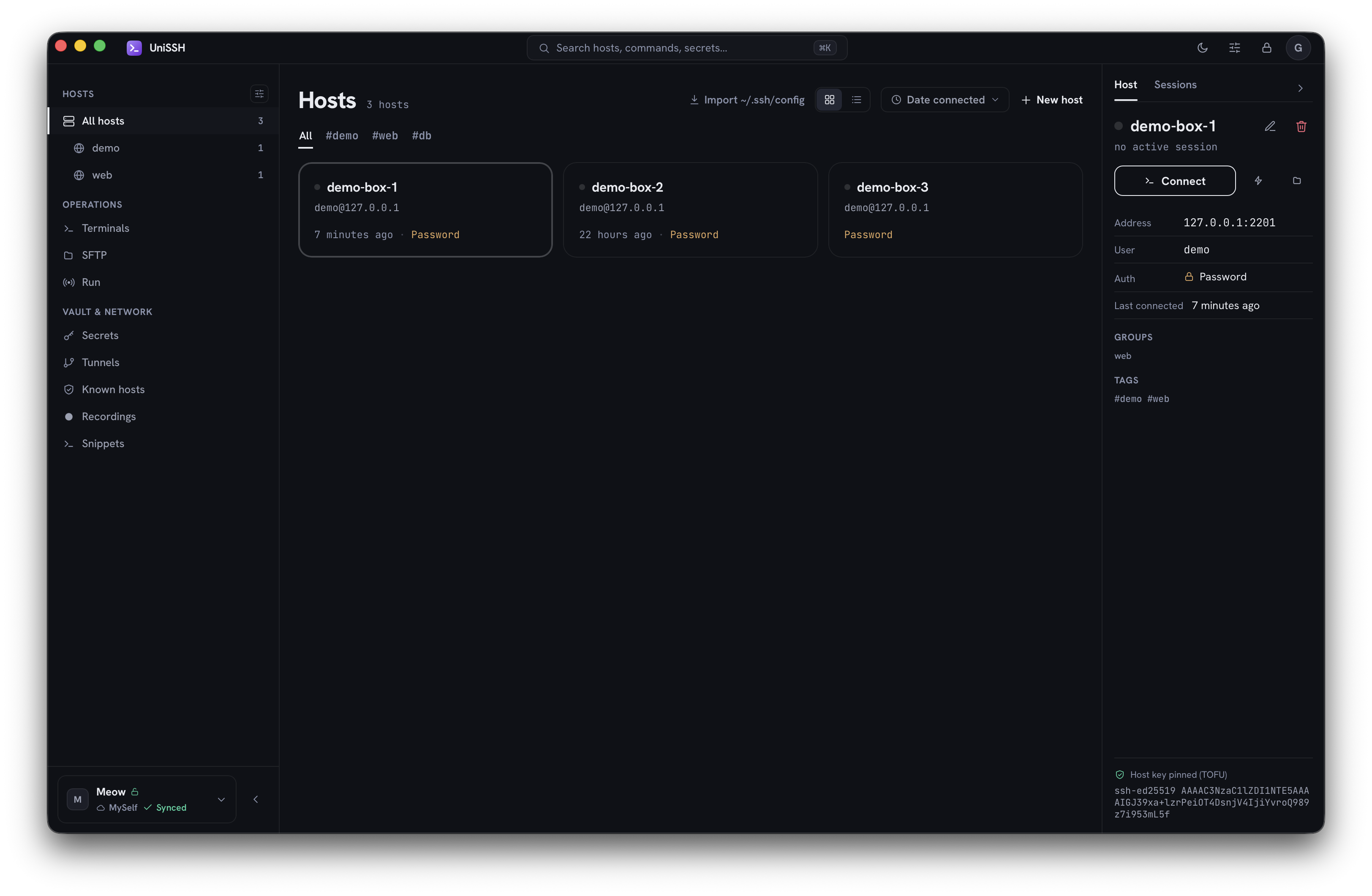
The host library is shown at the top — dark mode, with the operations rail (terminals, SFTP, run) and the vault & network group (secrets, tunnels, known hosts) on the left, and the selected host's connection, auth, and host-key status on the right.
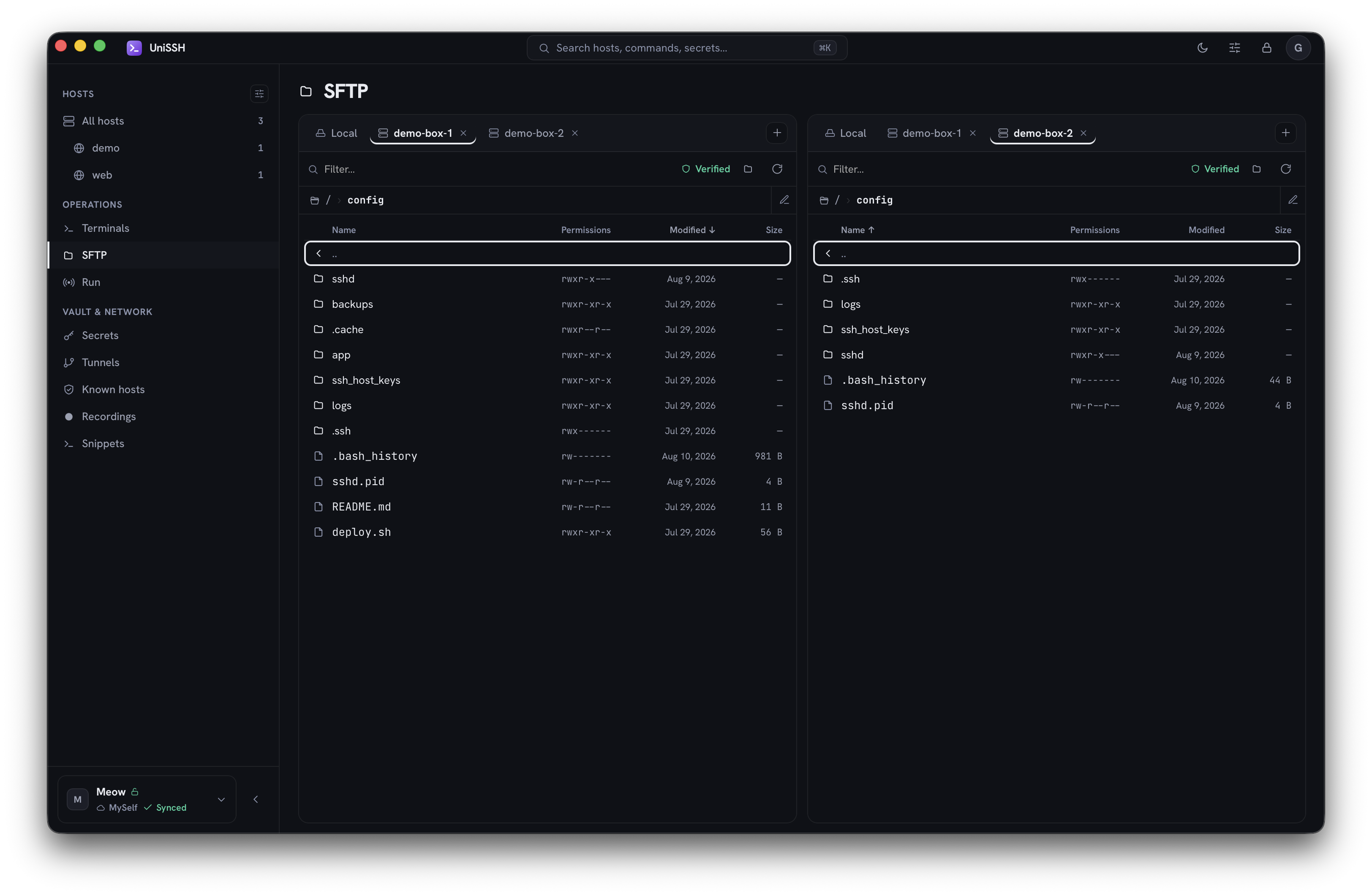
SFTP, two panes. Any pane can hold any location — a different host in each, or your own machine alongside a remote one. Permissions and modification times are shown for what they are: read-only facts about the file, not fields to edit here.
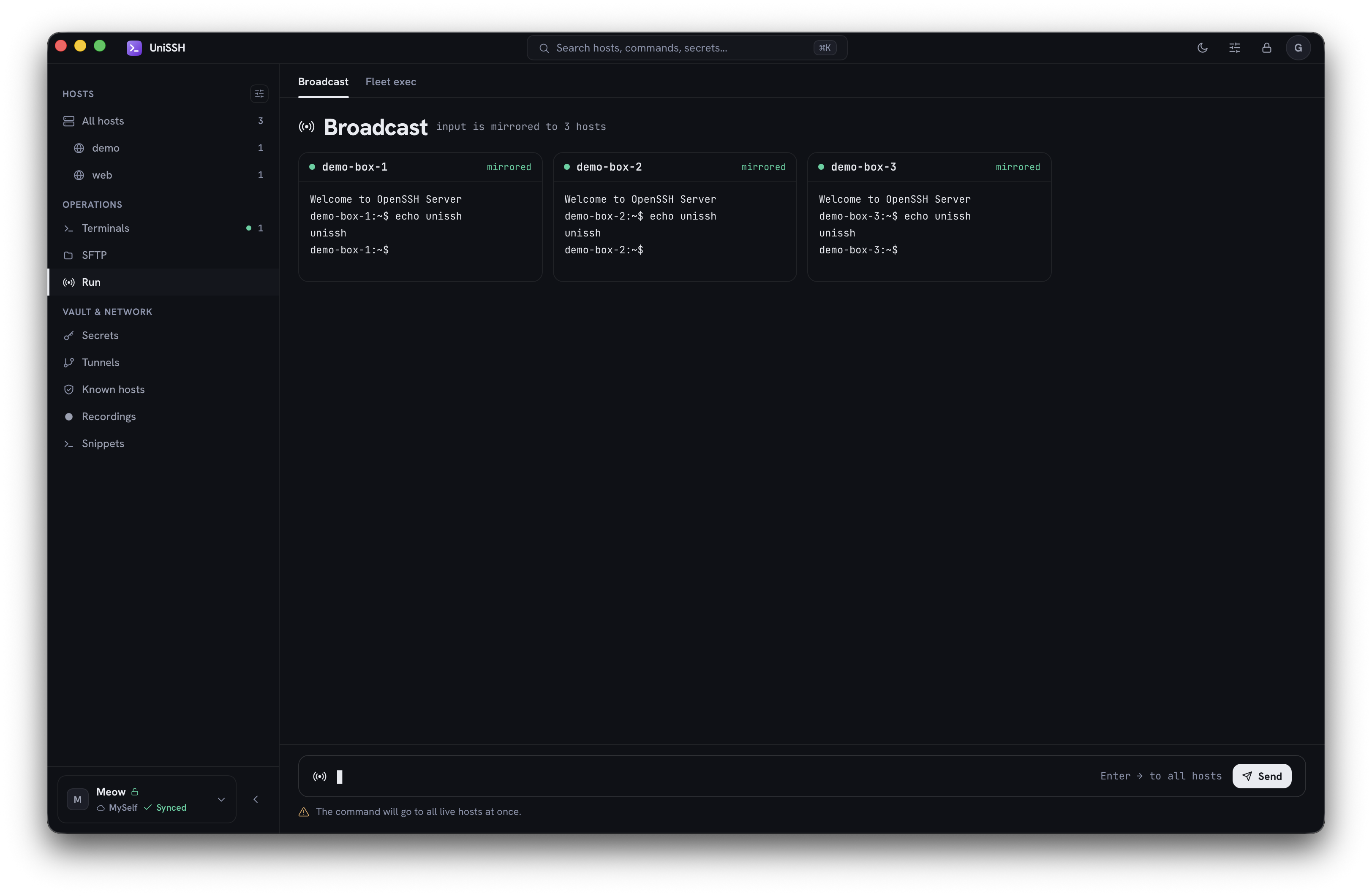
Broadcast. One synchronized input mirrored to every live host at once, each tile showing that host's own output. Destructive commands re-confirm before they fan out.
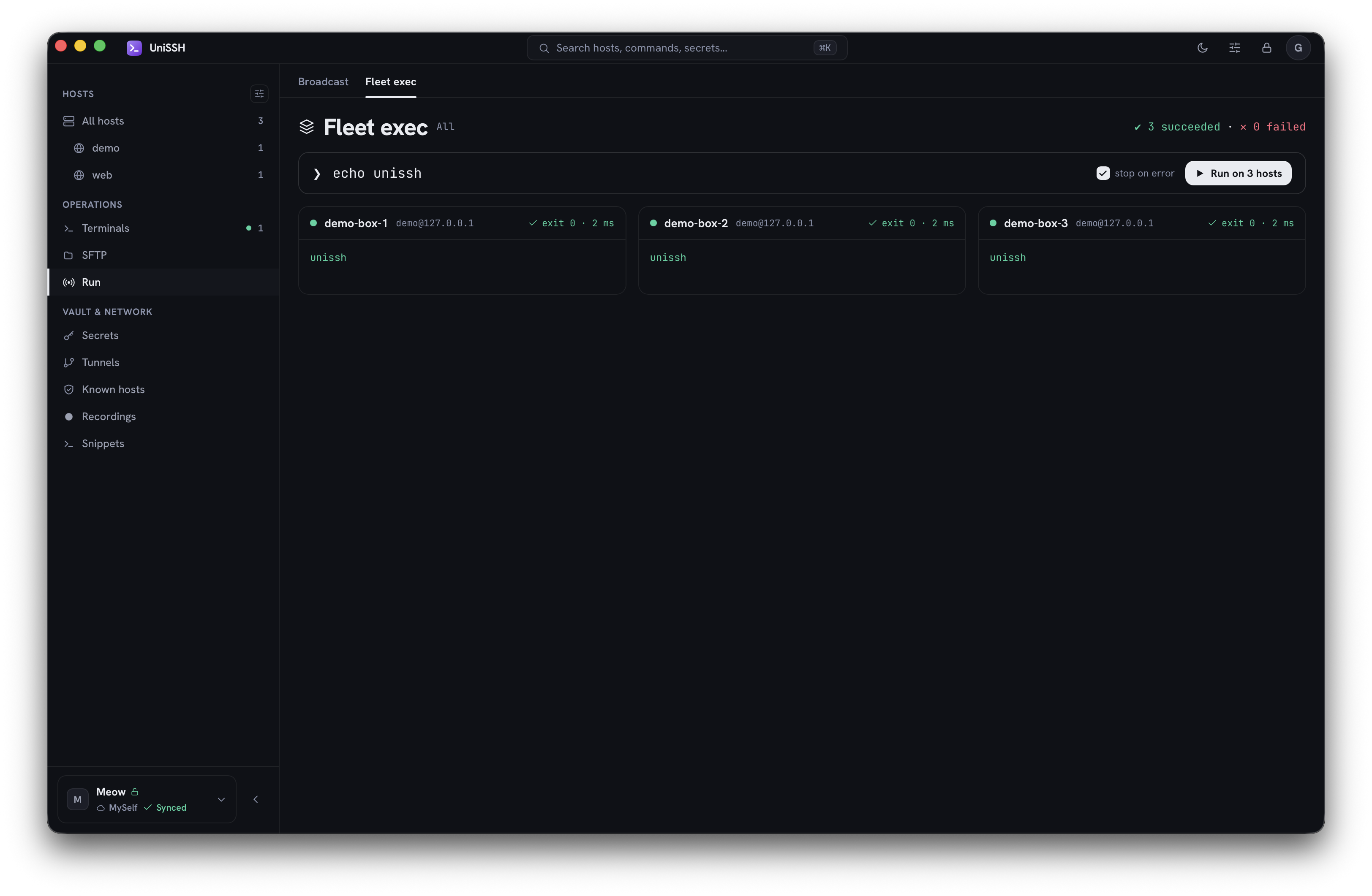
Fleet exec. The same command run across a selection, with each host's exit code and timing reported separately — bounded concurrency, and a stop that actually skips hosts that have not started.
The rest of the client — terminal, secrets, tunnels, known hosts, recordings, snippets — and the
server's admin panel are captured in docs/screenshots/, viewable in the browser
without cloning anything.
UniSSH is split into a shared core, thin clients, and an optional self-hosted server. SSH traffic always goes straight from your device to your hosts — it never tunnels through the sync server. The server only ever sees encrypted blobs and open routing metadata.
flowchart LR
    subgraph yours["Your devices"]
        D1["Desktop client<br/>(macOS · Windows · Linux)"]
        D2["Mobile client<br/>(iOS · Android)"]
        CLI["CLI"]
    end

    core["unissh-core (shared Rust)<br/>crypto · vault (SQLCipher) · SSH · agent"]

    server[("Self-hosted server<br/>ciphertext store + delta sync<br/>membership · roles · audit")]
    admin["Admin web panel<br/>(zero-knowledge SPA)"]
    hosts[["Your SSH hosts / fleet"]]

    D1 --- core
    D2 --- core
    CLI --- core

    core -- "encrypted blobs + signed versions<br/>(TLS 1.3)" --> server
    server -- "delta sync" --> core
    admin -. "escrow/SSO sign-in · admin" .-> server

    core == "direct SSH — never via the server" ==> hosts
The trust boundary in one paragraph. Your devices derive keys from a Secret Key (your Emergency Kit) plus a password (Argon2id). Vault contents are encrypted client-side; the server stores those ciphertext blobs keyed by signed, monotonically-versioned records. Authentication and registration use Ed25519 signatures the server verifies, but the server performs no payload crypto — it cannot decrypt vaults, mint access, or forge records. A malicious server can withhold or delay data, but it cannot read it. (Full threat model and the metadata that is visible by design are in Security & Privacy.)
One account, many spaces. An instance is a single server that hosts many spaces (teams — Backend, Security, …). A person has one account across every space they belong to; there are no tenants and no separate logins per team.
This is a single monorepo. The four primary components share one rust-core foundation:
| Path | What it is | Stack |
|---|---|---|
rust-core/ | Shared SSH + crypto + vault core | Rust (12 crates), UniFFI, SQLCipher, russh, desktop MCP |
client/ | Cross-platform GUI client | Tauri v2 + React 18 + TypeScript + xterm.js |
server/ | Self-hosted zero-knowledge server | Rust, axum 0.8, sqlx (SQLite/Postgres), rustls (TLS 1.3) |
server-ui/ | Self-hosted admin web panel | React 18 + Vite SPA + real rust-core crypto compiled to wasm |
Supporting directories: deploy/ (the Docker/Caddy/Prometheus deployment stack), website/ (the Astro + Starlight docs/landing site), and rust-core/crates/cli (the unissh CLI, for scripting and "feel-the-core" use).
Cargo layout. The root Cargo.toml is a virtual workspace over rust-core/crates/* + server (one Cargo.lock). client/src-tauri and server-ui/crypto-wasm are separate, excluded workspace roots with their own Cargo.lock (a Tauri requirement / a dedicated wasm release profile).
Client platforms: the Tauri client targets macOS, Windows, Linux (desktop) and iOS, Android (mobile) from one codebase.
UniSSH release binaries currently ship without a paid developer certificate — no Apple Developer-ID signature/notarization, no Windows Authenticode, no Play Store listing. The code is fully open; if you'd rather not run an unsigned binary at all, build from source and you trust only your own toolchain.
This is a deliberate trade, not an oversight. Obtaining those certificates means attaching a legal identity to an anonymously maintained project. What replaces them is verifiable provenance — proof that this repo's public CI built these exact bytes from this exact public commit, which a certificate does not prove.
Your OS will show a scary-looking warning the first time. Here's how to get past it safely — desktop first, then the two mobile platforms, which are sideload-only and need genuinely different steps.
The app is ad-hoc signed (no Developer ID), so a downloaded build is quarantined. Any one of these works:
xattr -dr com.apple.quarantine /Applications/UniSSH.app
A locally-built app (via
npm run tauri build) is not quarantined and needs none of this. Neither are auto-updates: quarantine is applied by the browser that downloaded a file, and the updater fetches the new version itself — so this is a one-time step at first install, not a per-release chore.
The installer/.exe is unsigned, so SmartScreen may say "Windows protected your PC":
chmod +x UniSSH-*.AppImage
./UniSSH-*.AppImage
.deb: sudo apt install ./unissh_*.deb (or sudo dpkg -i). No code-signing prompt applies.Sideload only — UniSSH is not on the Play Store. Take
UniSSH_<version>_universal.apk unless you specifically know your device's ABI;
it installs on any of them. The per-ABI files are the same app, just smaller.
.apk (from your browser's downloads or a file manager).Why that warning appears, in plain terms. An installable APK must carry a
signature, but nothing requires it to carry an identity. UniSSH's release APK is
signed by a self-signed key whose certificate subject is just CN=UniSSH Release
— no name, no email, no organization. Play Protect flags any signer it cannot
match against the Play catalogue, so it flags this one. That warning is the
expected, permanent cost of an anonymously distributed app; it is not evidence of
anything about the file, and it will not go away in a later release.
What is evidence about the file is the checksum and the provenance attestation
— check them before you install, see
Verifying release integrity. If you have the
Android SDK, apksigner verify --print-certs UniSSH_*.apk prints the signing
certificate, which should be that same identity-free subject on every release.
Mobile does not auto-update. No updater is compiled into the mobile builds, so nothing on your phone will offer you a new version. Watch Releases or the Telegram channel and reinstall by hand — installing a newer APK over an older one keeps your data, as long as it is signed by the same key, which every official release is.
The .ipa ships completely unsigned, and stock iOS refuses to run unsigned
code. There is no way around that from this side — so instead of the project
signing it, you re-sign it with your own Apple ID. The only identity ever
attached to the app on your phone is yours, and it never leaves your device.
You need a computer and one of the usual sideloading tools:
.ipa through it. In the EU, AltStore PAL is
the notarized alternative-marketplace version..ipa, sign in with your Apple ID.Then trust the profile on the device: Settings → General → VPN & Device Management → your Apple ID → Trust. The app will not launch until you do.
Know the limits before you start — they are Apple's, not this project's:
| Free Apple ID | Paid Apple Developer ($99/yr) | |
|---|---|---|
| App stops working after | 7 days | 1 year |
| Sideloaded apps at once | 3 | unlimited |
| Refreshing | reconnect to the tool and re-sign | once a year |
A free account is fine for trying UniSSH out; if it becomes something you rely on, the weekly refresh is the part that gets old. As with Android, there is no auto-update — a new release means sideloading again.
Verify what you downloaded before trusting it, on every platform above — see Verifying release integrity.
Config is layered: built-in defaults → config.toml → environment (UNISSH__SECTION__KEY=..., double-underscore = nesting). Start from server/config.example.toml; the Docker stack is driven by deploy/.env.example. Highlights:
| Setting | Env | Default | Notes |
|---|---|---|---|
| Bind address | UNISSH__SERVER__BIND | 0.0.0.0:8443 | plain HTTP behind Caddy in the bundled stack |
| In-process TLS | UNISSH__SERVER__TLS_CERT / ..__TLS_KEY | (empty) | rustls, TLS 1.3 only. Empty + trust_proxy=true → terminate at the proxy (the default; Caddy does TLS). |
| Caddy domain | UNISSH_DOMAIN | (required in .env) | real domain → automatic ACME; *.local/IP + UNISSH_TLS_DIRECTIVE="tls internal" → self-signed |
| DB backend | UNISSH__DB__BACKEND | sqlite | sqlite | postgres |
| DB URL | UNISSH__DB__URL | /app/data/unissh.db | sqlite path (or :memory:); or postgres://… |
| Setup code | UNISSH__SETUP__CODE | (empty → random) | first-user claim code. Empty → a random one is printed to the log on first boot; set a value to pin it for IaC. |
| Ops token | UNISSH__OPS__TOKEN | (empty → ops disabled) | optional server-trusted break-glass for /v1/ops/* (overview / instance / seq-bump); X-UniSSH-Ops-Token header. Not a keyset — grants no decryption. |
| SSO (OIDC) | UNISSH__OIDC__ENABLED + [oidc] | false | enable "Sign in with your IdP"; set issuer / client_id / audience / jwks_url / groups_claim and [[oidc.group_map]] (IdP group → space). |
| Metrics bind | UNISSH__OBS__METRICS_BIND | 127.0.0.1:9090 | Prometheus /metrics (internal-only in the stack) |
| Signature validation | UNISSH__SYNC__VALIDATE_SIGNATURES | true | server re-verifies record signatures on write (defense-in-depth) |
| Anti-rollback floor | UNISSH__SYNC__MIN_INSTANCE_GENERATION | 0 (off) | refuse to boot if a restored snapshot is below this operator-anchored floor |
Ports at a glance: public :80 / :443 (Caddy, +:443/udp HTTP/3) → server :8443 (internal HTTP/API); metrics :9090 (internal); admin-UI dev server :5180; desktop-client dev server :1420.
There's a thorough, honest backup & restore guide (crash vs. disk-loss, the seq-bump anti-rollback dance, why a stale restore can resurrect a deleted item, and why full re-push is safe) in server/README.md — read it before you design your backups.
THREAT_MODEL.md.client/README.md.UniSSH does not roll its own crypto — it builds on RustCrypto, hpke, SQLCipher, and Argon2id, with Ed25519 (verify_strict) for signatures.
What is protected
export_ssh_key returns your own key when you ask for it, because you own it. Everything else revealable is a password or a note, strictly type-gated.mlock'd where possible.verify_chain).Threat model (honest-but-curious server). A malicious server can deny, withhold, delay, or replay — but it cannot decrypt, mint access, or forge records. Some properties are server-trusted (enforced by the server's good behavior), not cryptographic — notably access-deny/revocation and live-grant expiry. Cryptographic revocation is via VK rotation + client-side epoch floors.
Metadata visible by design (never the content): vault/item ids and versions, tombstones, author/member public keys, roles, key epochs, sync targets, cache policy, sequence numbers, the signed member-set, and blob sizes / sync timings. The server never sees names, content, the vault key, per-item keys, audit bodies, or private keys. The full list and every honest limitation are documented in server/README.md — please read it before trusting a deployment.
Found a security issue? Please report it privately to [email protected] instead of opening a public issue, and allow a reasonable window for a fix before disclosure.
The full policy — including the project's age public key for end-to-end-encrypted reports — is in
SECURITY.md.
Every release ships a SHA256SUMS file, a SHA256SUMS.minisig signature over it, and a GitHub build-provenance (SLSA) attestation — all produced by CI on the tag build:
# 1) Checksums — download SHA256SUMS next to your artifact, then:
sha256sum -c SHA256SUMS --ignore-missing          # Linux
shasum -a 256 -c SHA256SUMS --ignore-missing      # macOS
Get-FileHash .\UniSSH_<version>_x64-setup.exe -Algorithm SHA256   # Windows: compare by eye

# 2) Signature — proves SHA256SUMS itself wasn't swapped on the release page.
#    The key is a bare Ed25519 public key; it carries no identity by design.
minisign -Vm SHA256SUMS -P 'RWQvV7DIid665aUPiJiN5NXimAehmWEjgRS9uLgi2nSWIUiiBY7ZKCAs'

# 3) Provenance — proves the artifact was built by this repo's CI from the tagged commit.
#    Needs GitHub CLI >= 2.49 (`gh --version`); the subcommand does not exist before
#    that, and older gh answers with a bare help dump rather than saying so. Distro
#    packages are often behind — Ubuntu still ships 2.45.
gh attestation verify UniSSH_<version>_amd64.AppImage --repo goduni/unissh

# The self-hosted server and admin-panel container images carry the same provenance:
gh attestation verify oci://ghcr.io/goduni/unissh-server:latest --repo goduni/unissh
The binaries themselves are deliberately unsigned (no notarization / Authenticode) — the reasoning is in SECURITY.md.
Desktop builds keep themselves current. UniSSH checks the release feed (at most hourly), verifies the download against a signing key compiled into the app, and installs when you click — never silently. Turn it off in Settings → About; what the check does and doesn't reveal is spelled out in THREAT_MODEL.md.
On macOS this also means the quarantine dance is a one-time cost of the first install rather than something you repeat every release.
.deb and .rpm update themselves too, but the install runs dpkg -i / rpm -U and so needs root: you get a polkit prompt, or a graphical password dialog, and on a machine with neither it falls back to terminal sudo and will not succeed from a desktop launcher. If that happens UniSSH opens the release page instead of failing silently.
Not covered, and updated by hand: Android / iOS sideloads, and anything installed from v0.1.1 or earlier — those predate the updater, so install the current release once by hand.
Building it all yourself is also the strongest trust check for the unsigned releases. The repo uses just as the task runner — run just with no args to list every target.
# 1) Core + server — one virtual Cargo workspace (builds & tests offline)
just build            # cargo build --workspace (rust-core crates + server)
just test             # core unit/bin tests + server integration tests
#   (the transport/ffi integration tests spin up a local sshd — needs sshd + ssh-keygen on PATH)

# 2) Admin web panel (wasm crypto + SPA)
just build-ui         # wasm-pack build + server-ui production build → server-ui/dist/

# 3) Desktop / mobile client
just build-client     # client production web build
cd client && npm install && npm run tauri build   # full desktop bundles
Prefer raw cargo? cargo build --workspace / cargo test --workspace from the repo root do the core+server build directly.
Toolchain: Rust 1.95+ (rust-toolchain.toml), a C toolchain + system OpenSSL (for bundled SQLCipher), Node 20.19+/22.12+, and wasm-pack + the wasm32-unknown-unknown target for the admin panel. Each component has its own README with platform specifics.
The core's per-crate map (crypto, keychain, storage, vault, ssh-agent, ssh-transport, ffi, cli, sync) and architecture are in rust-core/README.md.
Contributions are welcome. A good first pass:
rust-core only), and never route plaintext private keys across the FFI boundary.Full guidelines are in CONTRIBUTING.md and the CODE_OF_CONDUCT.md. Security issues go to [email protected] — see Reporting a vulnerability.
Three places, on purpose:
Bugs belong in issues; security
reports go privately to [email protected] — see SECURITY.md.
UniSSH is free, open source, and has no company behind it. The things that help most cost nothing: star the repo, file a good bug report, fix a doc typo, or translate the client.
If you'd rather send something, the project takes crypto:
| Network | Address |
|---|---|
| BTC | bc1qc683mf2rh63ng4eegv0emzejrhy6uux5k0zg2y |
| BEP20 | 0x63E3e9E690f64f149A4F920396E47328cACa6aA7 |
| ERC20 | 0x63E3e9E690f64f149A4F920396E47328cACa6aA7 |
| TRC20 | TSzgPmq6LQXijuistHFFCdeTZsYZXPSfEJ |
| TON | UQCA3uYaDrMTc7cPR_DUxvqCZeAgg-2skRCLOpNrKfdg7_3d |
| SOL | jSsCcdS8Vaw1qvzUSioQ63r4niw9h914WqwmsfFA7eM |
The same addresses are in the app under Settings → Support and on unissh.dev/support — compare two before you send anything. Donations don't buy priority support or private builds. For anything else, write to [email protected].
Do I need the server? Can I run the client on its own? No, and yes. The first run creates a local vault and the client is complete from there: hosts, keys, terminals, SFTP, tunnels and fleet commands all work with the vault encrypted on that device, with no account and no service of ours listening for anything. The server is a sync backend and nothing else — you only want one to share the same vault across your devices or with a team. Starting local costs you nothing later: a portable encrypted backup moves the vault to any instance, including a server-linked one (where it restores as a local vault). To put a local vault behind sync, use Settings → Vaults → Move to server…: it becomes a Cloud vault with the same items and hosts, nothing re-typed. SSH connections never route through the server either way.
macOS: "UniSSH can't be opened because the developer cannot be verified."
Expected — the build is unsigned. Right-click → Open, or System Settings → Privacy & Security → Open Anyway, or xattr -dr com.apple.quarantine /Applications/UniSSH.app. See Installing unsigned builds.
Windows: "Windows protected your PC" / SmartScreen blocked it. Click More info → Run anyway. The binary is unsigned.
A client can't reach my server.
Check, in order: the server is up (curl -k https://YOUR_DOMAIN/healthz); TLS is resolving (with the bundled Caddy, a real UNISSH_DOMAIN gets an automatic Let's Encrypt cert, while a *.local/IP needs UNISSH_TLS_DIRECTIVE="tls internal"); the instance URL in the client/admin-panel login is correct; firewall allows :80/:443. Running the server without the bundled Caddy? Then you terminate TLS yourself — in-process rustls needs tls_cert/tls_key, or front it with your own proxy and set trust_proxy=true.
I can't find the setup code / I can't claim the instance.
There is no bootstrap token. On first boot the server prints a one-time SETUP CODE to its log while the instance is unclaimed — read it with docker compose logs server 2>&1 | grep -i "setup code" (or your process manager's log), then enter it in the client/admin-panel to claim the instance and become the owner. Pinned a code via UNISSH__SETUP__CODE? Use that value. Log gone after a restart? Only the code's hash is stored, so it cannot be printed again — issue a new one with docker compose exec server /usr/local/bin/unissh-server setup-code --rotate --config /app/config.toml (bare binary: unissh-server setup-code --rotate --config <the config you serve with> — point it at the same config/database, or it will helpfully create an empty one somewhere else and hand you a code for it). It invalidates the old code, works immediately without a restart, and leaves your data alone; you never need to drop the volumes for this. "Already claimed" means someone (or a previous run) has already taken it — sign in with that account, or join via an invite link / SSO; if every owner device is lost, unissh-server reclaim unclaims the instance and gives you a code to claim with (a fresh one, or your pinned one applied — pinned codes are never echoed).
The admin panel says "wasm not loaded" on unlock/claim.
The crypto bundle wasn't built. Run npm run build:wasm in server-ui/ (needs rustup + wasm-pack + the wasm32-unknown-unknown target).
After a server restore, clients refuse to sync (TransportRollback).
That's the anti-rollback guard doing its job after a stale restore. Run unissh-server seq-bump --config server/config.toml --by <N> (it only ever raises the counter); clients then resume and re-push their state. Full procedure in server/README.md.
Linux desktop build fails on missing libraries. Install the WebKitGTK stack listed under Get the client.
Dual-licensed at your option:
LICENSE-MIT)LICENSE-APACHE)SPDX-License-Identifier: MIT OR Apache-2.0
Built with Claude Code and Codex
36 followers · starred Oct 2026
314 followers · starred Aug 2026
114 followers · starred Aug 2026
9 followers · starred Jul 2026
A cross-platform SSH client with end-to-end-encrypted vaults that sync through a server you host.
See the codeA cross-platform SSH client with end-to-end-encrypted vaults — local-first, and optionally synced through a server you host.
Your keys, your hosts, your machine. The client is complete on its own — no account, no cloud, no server required. Run one only when you want the same vault on a second device or in a team, and even then it can't read a single byte of your data.
⬇ Download the client — macOS · Windows · Linux · Android · iOS
Quick Start · Do I need the server?
(A) is the whole install. Download the client and open it: the first run creates a local vault, and your hosts and keys are encrypted on that device. No account to create, no backend to stand up, and nothing of ours between you and the machines you connect to. (Do write down the Secret Key it shows you — it is what recovers the vault.)
(B) and (C) exist only if you want the same vault on a second device or shared with a team. Everything the client does over SSH — sessions, SFTP, tunnels, fleet commands — behaves identically either way: SSH traffic goes straight from your device to your hosts and never through the sync server.
Download (recommended). Grab the latest build for your OS from the Releases page:
| OS | Architecture | Artifact |
|---|---|---|
| macOS | Apple Silicon and Intel | UniSSH_<version>_universal.dmg (drag to Applications) |
| Windows | x86-64 | UniSSH_<version>_x64-setup.exe or .msi |
| Windows | ARM64 | UniSSH_<version>_arm64-setup.exe or _arm64_en-US.msi |
| Linux | x86-64 | UniSSH_<version>_amd64.AppImage (portable) or .deb / .rpm |
| Linux | ARM64 | UniSSH_<version>_aarch64.AppImage or _arm64.deb / .rpm |
| Android | any (universal) | UniSSH_<version>_universal.apk — sideload |
| Android | pick your own | _arm64 / _armv7 / _x86_64 / _x86 .apk — smaller |
| iOS | Apple Silicon | UniSSH_<version>_ios-sideload.ipa — unsigned, sideload |
Every desktop platform here covers both architectures, so take the ARM file on an ARM machine instead of letting it emulate the x86-64 one — Windows on ARM will happily run the x64 build, and the emulation tax lands squarely on vault crypto and terminal I/O. What is not built, so you know before you look: nothing here ships 32-bit for desktop; build from source if you need one that is missing. The ARM builds exist because that is where an SSH client actually gets used on ARM: Asahi, ARM laptops, Snapdragon Windows machines, a Raspberry Pi on a desk. ARM servers are served by the container images, which are multi-arch.
Release builds are unsigned. On desktop that means a one-time warning and a ten-second "open anyway" — on Android it means a permanent Play Protect warning, and on iOS it means re-signing the .ipa with your own Apple ID before it will run at all. The steps for all five platforms are in Installing unsigned builds. Always verify the download against the published checksum first.
Desktop (Tauri — macOS / Windows / Linux):
cd client
npm install
npm run tauri dev        # dev run (Vite + the Rust app)   — or: just dev-client
npm run tauri build      # production bundle: .app/.dmg/.deb/.AppImage/.msi
Mobile (run init once):
npm run tauri ios init      && npm run tauri ios dev
npm run tauri android init  && npm run tauri android dev
Prerequisites (clients): Node 20.19+ / 22.12+ and Rust 1.95+. Linux desktop also needs the WebKitGTK stack: libwebkit2gtk-4.1-dev libgtk-3-dev libsoup-3.0-dev libjavascriptcoregtk-4.1-dev librsvg2-dev libssl-dev libxdo-dev libayatana-appindicator3-dev. iOS needs Xcode + CocoaPods; Android needs Android Studio + SDK + NDK.
On first launch you pick a Local or Cloud vault. Local needs nothing else — you're done. For Cloud sync across devices or a team, stand up a server next. Starting Local doesn't lock you in: once you're signed in to a server, Settings → Vaults → Move to server… turns that vault into a Cloud vault.
Stop here if one device is all you need — a local vault is fully functional without any of this, and standing a server up later takes nothing away: the client keeps working exactly as it does now, and a portable encrypted backup carries the vault to another machine.
When the server is up, an existing local vault moves onto it without re-typing anything: sign in to the server, then Settings → Vaults → Move to server… on that vault. You pick the server (and the space, if it has more than one), see what moves, and confirm; the vault becomes a Cloud vault with the same name, groups, items and host identities, and the first sync pushes it — only ciphertext, as for any Cloud vault. Under the hood it is a re-keyed copy into a new vault id, in one transaction: the local copy is replaced rather than kept beside it, host jumps and Personal-identity bindings that pointed at it follow it (one held in another Cloud vault is an ordinary edit to that vault and syncs from it), a vault that was your Personal vault stays your Personal vault, and item version history starts fresh on the server. The confirmation offers Export backup first if you want a way back. Vault format and server protocol are unchanged. A restored backup, by contrast, still lands as a local vault wherever it goes — move it the same way afterwards.
Running one buys you exactly four things: the same vault unlocked on your laptop, phone and tablet; hosts and secrets shared with a team, with membership, roles and revocation; a lost device cut off from the vault without re-keying everything; and a server-side audit trail. What it does not buy the server is the ability to read any of it — it holds ciphertext and routing metadata, and the keys never leave your devices.
Docker (recommended). The top-level compose.yml brings up the server (plain HTTP, internal-only) behind a bundled Caddy reverse proxy that does TLS 1.3 + automatic HTTPS for you. The Docker build context is the repo root (so the server image can reach rust-core/ for its byte-compatibility tests).
# from the repository root
cp deploy/.env.example .env        # then edit: set UNISSH_DOMAIN (+ a TLS directive)
docker compose up -d --build
Edit .env before first boot — the only required value is:
UNISSH_DOMAIN — your public domain (→ automatic Let's Encrypt ACME), or a *.local/IP host together with UNISSH_TLS_DIRECTIVE="tls internal" for a Caddy-issued self-signed cert on a LAN.There is no bootstrap token. On first boot, while the instance is still unclaimed, the server prints a one-time SETUP CODE to its log. Grab it:
docker compose logs server 2>&1 | grep -i "setup code"
Then open the client (or the admin panel), point it at your instance URL, and claim the instance with that code — the first user to claim becomes the owner. (For IaC/automation you can pin a deterministic code with UNISSH__SETUP__CODE=… instead of the random one.) After that, teammates join via a space-scoped invite link or SSO — no code needed.
Lost that line? The code is printed once and only its hash is stored, so a restart with the scrollback gone leaves nothing to read — but nothing is broken either. Issue a fresh one, no data touched, effective immediately:
docker compose exec server /usr/local/bin/unissh-server setup-code --rotate --config /app/config.toml
Without --rotate the same command only reports where the code stands. If the container will not stay up — which is how this usually happens, since a bad port or a bad certificate is what sent you looking — run it on the stopped stack instead:
docker compose run --rm server setup-code --rotate --config /app/config.toml
Dropping the volumes to get a new code is never necessary.
Caddy publishes :80 / :443 (and :443/udp for HTTP/3); the server (:8443) and metrics (:9090) stay internal to the compose network. SQLite is the default (data persisted in a named Docker volume); the server runs as a non-root user on a read-only rootfs.
Check it's alive (through Caddy):
curl -k https://localhost/healthz # liveness; /readyz also checks the DB
Switching to Postgres is a small .env change — enable the postgres compose profile and set POSTGRES_PASSWORD, UNISSH__DB__BACKEND=postgres, and UNISSH__DB__URL. The full deployment guide (TLS modes, profiles, backups) is in deploy/README.md.
# from the repository root
just build-server                                     # → target/release/unissh-server
cp server/config.example.toml server/config.toml      # then edit
./target/release/unissh-server migrate --config server/config.toml   # also auto-applied on serve
./target/release/unissh-server --config server/config.toml
Requires Rust 1.95+ (rust-toolchain.toml) and a C toolchain (for bundled SQLCipher in the dev/test path). Without the bundled Caddy you must terminate TLS yourself — set tls_cert/tls_key for in-process rustls, or put your own reverse proxy in front and set trust_proxy=true.
The admin panel (server-ui/) is a zero-knowledge SPA that talks to your live server. It needs the wasm crypto bundle built once:
cd server-ui
rustup target add wasm32-unknown-unknown    # one-time
cargo install wasm-pack                      # one-time
npm run build:wasm                           # → crypto-wasm/pkg/
npm install
npm run dev                                  # http://localhost:5180
(Or from the repo root: just build-ui then just dev-ui.) On the login screen, point it at your instance URL and sign in as the owner (or a space admin) — the same account you claimed the instance with:
.keyset file to import and no ops-token to enter first. A brand-new browser that isn't linked yet is onboarded by QR-approve from an already-trusted device.[oidc] enabled, "Sign in with SSO" runs the browser OIDC flow instead.If the instance is still unclaimed, the login screen offers to claim it with the setup code from the server log (see above).
The panel's screens include the instance Overview, Spaces, and the member Directory, plus devices/sessions/invites, vaults/grants, objects, and audit. An optional server-trusted ops break-glass token ([ops] token) unlocks only the infrastructure surface (overview / instance / seq-bump) and grants no decryption.
For production, build it (npm run build) and serve dist/ behind your reverse proxy.
Most polished SSH clients with sync (think Termius) make a trade you can't undo: your hosts, keys, and connection metadata live on someone else's servers, under their account system, readable under their terms.
And "can't undo" is often literal. These products compete on how much they can import — SSH config, PuTTY, a rival's export, a dozen paths in — while the way back out goes undocumented or unbuilt. Check before you commit a fleet to one: if there is no export, the data is only nominally yours, and leaving means retyping every host by hand. UniSSH's answer is a portable encrypted backup of the whole vault, restorable into any instance, including one that isn't ours.
UniSSH flips that. It's an open-source SSH client whose sync backend is a small server you run yourself, and the data it syncs is end-to-end encrypted on your devices before it ever leaves them. The server is deliberately "honest-but-curious": it stores ciphertext and a bit of routing metadata, coordinates your devices and team, and never holds the keys to decrypt anything.
For developers, sysadmins, and small teams who want a modern multi-host SSH client without renting their secrets to a SaaS vendor.
And it's built to be one of the best-looking SSH clients around — a considered, modern interface with a unified light/dark Theme picker, hand-tuned accent palettes and the pink Barbie theme, crisp terminals with linked color schemes, and a drag-first SFTP experience. Self-hosted and zero-knowledge doesn't have to mean spartan.
| UniSSH | Typical SaaS SSH client | Plain ssh + dotfiles | |
|---|---|---|---|
| Vault encryption | Zero-knowledge, E2E | Provider-managed | Up to you |
| Sync backend | Self-hosted (Docker, SQLite/PG) | Vendor cloud | None / DIY |
| Account/lock-in | None — you own the server | Vendor account | None |
| Multi-device & team | Yes (membership, roles, revocation) | Yes | Manual |
| Fleet ops, tunnels, SFTP | Yes | Varies | Manual |
| Design & polish | First-class — themeable modern UI | Varies | Terminal-only |
| Source | Open (MIT OR Apache-2.0) | Closed | Open |
Unsigned release builds. UniSSH release builds currently ship without a paid Developer-ID / code-signing certificate, so your OS will show a one-time warning on first launch — see Installing unsigned builds for the 10-second "open anyway" steps per OS, and Build from source if you'd rather trust nothing but your own compiler.
Everything below is implemented in the shared Rust core and exposed to the clients. The crypto and SSH stack are not re-implemented per platform — every client calls the same core, so there is one implementation to review rather than four. That core has not been audited by a third party; see Independent review status for exactly what is and isn't verified.
Vaults & secrets (zero-knowledge)
Connectivity
keyboard-interactive prompts that no stored secret can answer — a one-time code, a push confirmation — are put to you.ssh-add -c, rather than the silent ForwardAgent yes that made the feature notorious.exec with separate stdout/stderr; auto-reconnect with backoff (and a hard stop on MITM/host-key change).HostKeyMismatch is always surfaced to you, never trusted silently.mlkem768x25519-sha256 (ML-KEM-768 + X25519, NIST FIPS 203) ahead of classical curve25519, and falls back cleanly on servers that don't offer it. Hybrid means a future quantum adversary must break both halves — and it defeats "harvest now, decrypt later" against traffic recorded today.Terminal & workflow
git status should not be what breaks your context. A local pane is always marked as local — icon, machine name, and the word — because running the right command on the wrong machine is the failure mode this exists to avoid. Not on iOS (the sandbox forbids fork/exec and there is no shell in the bundle) or Android.asciinema, because a recording only its own tool can read is not evidence anyone else can check. Capped at 8 MB per session, and a recording that reaches the cap says so instead of ending quietly.Fleet operations
exec with a concurrency limit and per-host timeout; target by group, by tags, by hand-picked hosts (an in-grid multi-select target picker), or dry-run first.Desktop MCP automation
SFTP & tunnels
[email protected]. See transfer integrity and limitations.Interop & portability
~/.ssh/config — applying HostName, Port, User, IdentityFile, ProxyJump, all three forward directives, SetEnv, ServerAliveInterval, ConnectTimeout and Compression, following Include, and naming every directive it could not apply, with its line number. A real config is mostly directives UniSSH does not implement (Match and ProxyCommand among them); importing in silence left people believing otherwise.~/.ssh/known_hosts; import PuTTY sessions (.reg).Integrity & audit (local)
verify_chain (checks signatures across all versions, including history and tombstones) and check_consistency (structural DB check) — neither leaks secrets into its report.Sync & team (server-backed)
The host library is shown at the top — dark mode, with the operations rail (terminals, SFTP, run) and the vault & network group (secrets, tunnels, known hosts) on the left, and the selected host's connection, auth, and host-key status on the right.
SFTP, two panes. Any pane can hold any location — a different host in each, or your own machine alongside a remote one. Permissions and modification times are shown for what they are: read-only facts about the file, not fields to edit here.
Broadcast. One synchronized input mirrored to every live host at once, each tile showing that host's own output. Destructive commands re-confirm before they fan out.
Fleet exec. The same command run across a selection, with each host's exit code and timing reported separately — bounded concurrency, and a stop that actually skips hosts that have not started.
The rest of the client — terminal, secrets, tunnels, known hosts, recordings, snippets — and the
server's admin panel are captured in docs/screenshots/, viewable in the browser
without cloning anything.
UniSSH is split into a shared core, thin clients, and an optional self-hosted server. SSH traffic always goes straight from your device to your hosts — it never tunnels through the sync server. The server only ever sees encrypted blobs and open routing metadata.
flowchart LR
    subgraph yours["Your devices"]
        D1["Desktop client<br/>(macOS · Windows · Linux)"]
        D2["Mobile client<br/>(iOS · Android)"]
        CLI["CLI"]
    end

    core["unissh-core (shared Rust)<br/>crypto · vault (SQLCipher) · SSH · agent"]

    server[("Self-hosted server<br/>ciphertext store + delta sync<br/>membership · roles · audit")]
    admin["Admin web panel<br/>(zero-knowledge SPA)"]
    hosts[["Your SSH hosts / fleet"]]

    D1 --- core
    D2 --- core
    CLI --- core

    core -- "encrypted blobs + signed versions<br/>(TLS 1.3)" --> server
    server -- "delta sync" --> core
    admin -. "escrow/SSO sign-in · admin" .-> server

    core == "direct SSH — never via the server" ==> hosts
The trust boundary in one paragraph. Your devices derive keys from a Secret Key (your Emergency Kit) plus a password (Argon2id). Vault contents are encrypted client-side; the server stores those ciphertext blobs keyed by signed, monotonically-versioned records. Authentication and registration use Ed25519 signatures the server verifies, but the server performs no payload crypto — it cannot decrypt vaults, mint access, or forge records. A malicious server can withhold or delay data, but it cannot read it. (Full threat model and the metadata that is visible by design are in Security & Privacy.)
One account, many spaces. An instance is a single server that hosts many spaces (teams — Backend, Security, …). A person has one account across every space they belong to; there are no tenants and no separate logins per team.
This is a single monorepo. The four primary components share one rust-core foundation:
| Path | What it is | Stack |
|---|---|---|
rust-core/ | Shared SSH + crypto + vault core | Rust (12 crates), UniFFI, SQLCipher, russh, desktop MCP |
client/ | Cross-platform GUI client | Tauri v2 + React 18 + TypeScript + xterm.js |
server/ | Self-hosted zero-knowledge server | Rust, axum 0.8, sqlx (SQLite/Postgres), rustls (TLS 1.3) |
server-ui/ | Self-hosted admin web panel | React 18 + Vite SPA + real rust-core crypto compiled to wasm |
Supporting directories: deploy/ (the Docker/Caddy/Prometheus deployment stack), website/ (the Astro + Starlight docs/landing site), and rust-core/crates/cli (the unissh CLI, for scripting and "feel-the-core" use).
Cargo layout. The root Cargo.toml is a virtual workspace over rust-core/crates/* + server (one Cargo.lock). client/src-tauri and server-ui/crypto-wasm are separate, excluded workspace roots with their own Cargo.lock (a Tauri requirement / a dedicated wasm release profile).
Client platforms: the Tauri client targets macOS, Windows, Linux (desktop) and iOS, Android (mobile) from one codebase.
UniSSH release binaries currently ship without a paid developer certificate — no Apple Developer-ID signature/notarization, no Windows Authenticode, no Play Store listing. The code is fully open; if you'd rather not run an unsigned binary at all, build from source and you trust only your own toolchain.
This is a deliberate trade, not an oversight. Obtaining those certificates means attaching a legal identity to an anonymously maintained project. What replaces them is verifiable provenance — proof that this repo's public CI built these exact bytes from this exact public commit, which a certificate does not prove.
Your OS will show a scary-looking warning the first time. Here's how to get past it safely — desktop first, then the two mobile platforms, which are sideload-only and need genuinely different steps.
The app is ad-hoc signed (no Developer ID), so a downloaded build is quarantined. Any one of these works:
xattr -dr com.apple.quarantine /Applications/UniSSH.app
A locally-built app (via
npm run tauri build) is not quarantined and needs none of this. Neither are auto-updates: quarantine is applied by the browser that downloaded a file, and the updater fetches the new version itself — so this is a one-time step at first install, not a per-release chore.
The installer/.exe is unsigned, so SmartScreen may say "Windows protected your PC":
chmod +x UniSSH-*.AppImage
./UniSSH-*.AppImage
.deb: sudo apt install ./unissh_*.deb (or sudo dpkg -i). No code-signing prompt applies.Sideload only — UniSSH is not on the Play Store. Take
UniSSH_<version>_universal.apk unless you specifically know your device's ABI;
it installs on any of them. The per-ABI files are the same app, just smaller.
.apk (from your browser's downloads or a file manager).Why that warning appears, in plain terms. An installable APK must carry a
signature, but nothing requires it to carry an identity. UniSSH's release APK is
signed by a self-signed key whose certificate subject is just CN=UniSSH Release
— no name, no email, no organization. Play Protect flags any signer it cannot
match against the Play catalogue, so it flags this one. That warning is the
expected, permanent cost of an anonymously distributed app; it is not evidence of
anything about the file, and it will not go away in a later release.
What is evidence about the file is the checksum and the provenance attestation
— check them before you install, see
Verifying release integrity. If you have the
Android SDK, apksigner verify --print-certs UniSSH_*.apk prints the signing
certificate, which should be that same identity-free subject on every release.
Mobile does not auto-update. No updater is compiled into the mobile builds, so nothing on your phone will offer you a new version. Watch Releases or the Telegram channel and reinstall by hand — installing a newer APK over an older one keeps your data, as long as it is signed by the same key, which every official release is.
The .ipa ships completely unsigned, and stock iOS refuses to run unsigned
code. There is no way around that from this side — so instead of the project
signing it, you re-sign it with your own Apple ID. The only identity ever
attached to the app on your phone is yours, and it never leaves your device.
You need a computer and one of the usual sideloading tools:
.ipa through it. In the EU, AltStore PAL is
the notarized alternative-marketplace version..ipa, sign in with your Apple ID.Then trust the profile on the device: Settings → General → VPN & Device Management → your Apple ID → Trust. The app will not launch until you do.
Know the limits before you start — they are Apple's, not this project's:
| Free Apple ID | Paid Apple Developer ($99/yr) | |
|---|---|---|
| App stops working after | 7 days | 1 year |
| Sideloaded apps at once | 3 | unlimited |
| Refreshing | reconnect to the tool and re-sign | once a year |
A free account is fine for trying UniSSH out; if it becomes something you rely on, the weekly refresh is the part that gets old. As with Android, there is no auto-update — a new release means sideloading again.
Verify what you downloaded before trusting it, on every platform above — see Verifying release integrity.
Config is layered: built-in defaults → config.toml → environment (UNISSH__SECTION__KEY=..., double-underscore = nesting). Start from server/config.example.toml; the Docker stack is driven by deploy/.env.example. Highlights:
| Setting | Env | Default | Notes |
|---|---|---|---|
| Bind address | UNISSH__SERVER__BIND | 0.0.0.0:8443 | plain HTTP behind Caddy in the bundled stack |
| In-process TLS | UNISSH__SERVER__TLS_CERT / ..__TLS_KEY | (empty) | rustls, TLS 1.3 only. Empty + trust_proxy=true → terminate at the proxy (the default; Caddy does TLS). |
| Caddy domain | UNISSH_DOMAIN | (required in .env) | real domain → automatic ACME; *.local/IP + UNISSH_TLS_DIRECTIVE="tls internal" → self-signed |
| DB backend | UNISSH__DB__BACKEND | sqlite | sqlite | postgres |
| DB URL | UNISSH__DB__URL | /app/data/unissh.db | sqlite path (or :memory:); or postgres://… |
| Setup code | UNISSH__SETUP__CODE | (empty → random) | first-user claim code. Empty → a random one is printed to the log on first boot; set a value to pin it for IaC. |
| Ops token | UNISSH__OPS__TOKEN | (empty → ops disabled) | optional server-trusted break-glass for /v1/ops/* (overview / instance / seq-bump); X-UniSSH-Ops-Token header. Not a keyset — grants no decryption. |
| SSO (OIDC) | UNISSH__OIDC__ENABLED + [oidc] | false | enable "Sign in with your IdP"; set issuer / client_id / audience / jwks_url / groups_claim and [[oidc.group_map]] (IdP group → space). |
| Metrics bind | UNISSH__OBS__METRICS_BIND | 127.0.0.1:9090 | Prometheus /metrics (internal-only in the stack) |
| Signature validation | UNISSH__SYNC__VALIDATE_SIGNATURES | true | server re-verifies record signatures on write (defense-in-depth) |
| Anti-rollback floor | UNISSH__SYNC__MIN_INSTANCE_GENERATION | 0 (off) | refuse to boot if a restored snapshot is below this operator-anchored floor |
Ports at a glance: public :80 / :443 (Caddy, +:443/udp HTTP/3) → server :8443 (internal HTTP/API); metrics :9090 (internal); admin-UI dev server :5180; desktop-client dev server :1420.
There's a thorough, honest backup & restore guide (crash vs. disk-loss, the seq-bump anti-rollback dance, why a stale restore can resurrect a deleted item, and why full re-push is safe) in server/README.md — read it before you design your backups.
THREAT_MODEL.md.client/README.md.UniSSH does not roll its own crypto — it builds on RustCrypto, hpke, SQLCipher, and Argon2id, with Ed25519 (verify_strict) for signatures.
What is protected
export_ssh_key returns your own key when you ask for it, because you own it. Everything else revealable is a password or a note, strictly type-gated.mlock'd where possible.verify_chain).Threat model (honest-but-curious server). A malicious server can deny, withhold, delay, or replay — but it cannot decrypt, mint access, or forge records. Some properties are server-trusted (enforced by the server's good behavior), not cryptographic — notably access-deny/revocation and live-grant expiry. Cryptographic revocation is via VK rotation + client-side epoch floors.
Metadata visible by design (never the content): vault/item ids and versions, tombstones, author/member public keys, roles, key epochs, sync targets, cache policy, sequence numbers, the signed member-set, and blob sizes / sync timings. The server never sees names, content, the vault key, per-item keys, audit bodies, or private keys. The full list and every honest limitation are documented in server/README.md — please read it before trusting a deployment.
Found a security issue? Please report it privately to [email protected] instead of opening a public issue, and allow a reasonable window for a fix before disclosure.
The full policy — including the project's age public key for end-to-end-encrypted reports — is in
SECURITY.md.
Every release ships a SHA256SUMS file, a SHA256SUMS.minisig signature over it, and a GitHub build-provenance (SLSA) attestation — all produced by CI on the tag build:
# 1) Checksums — download SHA256SUMS next to your artifact, then:
sha256sum -c SHA256SUMS --ignore-missing          # Linux
shasum -a 256 -c SHA256SUMS --ignore-missing      # macOS
Get-FileHash .\UniSSH_<version>_x64-setup.exe -Algorithm SHA256   # Windows: compare by eye

# 2) Signature — proves SHA256SUMS itself wasn't swapped on the release page.
#    The key is a bare Ed25519 public key; it carries no identity by design.
minisign -Vm SHA256SUMS -P 'RWQvV7DIid665aUPiJiN5NXimAehmWEjgRS9uLgi2nSWIUiiBY7ZKCAs'

# 3) Provenance — proves the artifact was built by this repo's CI from the tagged commit.
#    Needs GitHub CLI >= 2.49 (`gh --version`); the subcommand does not exist before
#    that, and older gh answers with a bare help dump rather than saying so. Distro
#    packages are often behind — Ubuntu still ships 2.45.
gh attestation verify UniSSH_<version>_amd64.AppImage --repo goduni/unissh

# The self-hosted server and admin-panel container images carry the same provenance:
gh attestation verify oci://ghcr.io/goduni/unissh-server:latest --repo goduni/unissh
The binaries themselves are deliberately unsigned (no notarization / Authenticode) — the reasoning is in SECURITY.md.
Desktop builds keep themselves current. UniSSH checks the release feed (at most hourly), verifies the download against a signing key compiled into the app, and installs when you click — never silently. Turn it off in Settings → About; what the check does and doesn't reveal is spelled out in THREAT_MODEL.md.
On macOS this also means the quarantine dance is a one-time cost of the first install rather than something you repeat every release.
.deb and .rpm update themselves too, but the install runs dpkg -i / rpm -U and so needs root: you get a polkit prompt, or a graphical password dialog, and on a machine with neither it falls back to terminal sudo and will not succeed from a desktop launcher. If that happens UniSSH opens the release page instead of failing silently.
Not covered, and updated by hand: Android / iOS sideloads, and anything installed from v0.1.1 or earlier — those predate the updater, so install the current release once by hand.
Building it all yourself is also the strongest trust check for the unsigned releases. The repo uses just as the task runner — run just with no args to list every target.
# 1) Core + server — one virtual Cargo workspace (builds & tests offline)
just build            # cargo build --workspace (rust-core crates + server)
just test             # core unit/bin tests + server integration tests
#   (the transport/ffi integration tests spin up a local sshd — needs sshd + ssh-keygen on PATH)

# 2) Admin web panel (wasm crypto + SPA)
just build-ui         # wasm-pack build + server-ui production build → server-ui/dist/

# 3) Desktop / mobile client
just build-client     # client production web build
cd client && npm install && npm run tauri build   # full desktop bundles
Prefer raw cargo? cargo build --workspace / cargo test --workspace from the repo root do the core+server build directly.
Toolchain: Rust 1.95+ (rust-toolchain.toml), a C toolchain + system OpenSSL (for bundled SQLCipher), Node 20.19+/22.12+, and wasm-pack + the wasm32-unknown-unknown target for the admin panel. Each component has its own README with platform specifics.
The core's per-crate map (crypto, keychain, storage, vault, ssh-agent, ssh-transport, ffi, cli, sync) and architecture are in rust-core/README.md.
Contributions are welcome. A good first pass:
rust-core only), and never route plaintext private keys across the FFI boundary.Full guidelines are in CONTRIBUTING.md and the CODE_OF_CONDUCT.md. Security issues go to [email protected] — see Reporting a vulnerability.
Three places, on purpose:
Bugs belong in issues; security
reports go privately to [email protected] — see SECURITY.md.
UniSSH is free, open source, and has no company behind it. The things that help most cost nothing: star the repo, file a good bug report, fix a doc typo, or translate the client.
If you'd rather send something, the project takes crypto:
| Network | Address |
|---|---|
| BTC | bc1qc683mf2rh63ng4eegv0emzejrhy6uux5k0zg2y |
| BEP20 | 0x63E3e9E690f64f149A4F920396E47328cACa6aA7 |
| ERC20 | 0x63E3e9E690f64f149A4F920396E47328cACa6aA7 |
| TRC20 | TSzgPmq6LQXijuistHFFCdeTZsYZXPSfEJ |
| TON | UQCA3uYaDrMTc7cPR_DUxvqCZeAgg-2skRCLOpNrKfdg7_3d |
| SOL | jSsCcdS8Vaw1qvzUSioQ63r4niw9h914WqwmsfFA7eM |
The same addresses are in the app under Settings → Support and on unissh.dev/support — compare two before you send anything. Donations don't buy priority support or private builds. For anything else, write to [email protected].
Do I need the server? Can I run the client on its own? No, and yes. The first run creates a local vault and the client is complete from there: hosts, keys, terminals, SFTP, tunnels and fleet commands all work with the vault encrypted on that device, with no account and no service of ours listening for anything. The server is a sync backend and nothing else — you only want one to share the same vault across your devices or with a team. Starting local costs you nothing later: a portable encrypted backup moves the vault to any instance, including a server-linked one (where it restores as a local vault). To put a local vault behind sync, use Settings → Vaults → Move to server…: it becomes a Cloud vault with the same items and hosts, nothing re-typed. SSH connections never route through the server either way.
macOS: "UniSSH can't be opened because the developer cannot be verified."
Expected — the build is unsigned. Right-click → Open, or System Settings → Privacy & Security → Open Anyway, or xattr -dr com.apple.quarantine /Applications/UniSSH.app. See Installing unsigned builds.
Windows: "Windows protected your PC" / SmartScreen blocked it. Click More info → Run anyway. The binary is unsigned.
A client can't reach my server.
Check, in order: the server is up (curl -k https://YOUR_DOMAIN/healthz); TLS is resolving (with the bundled Caddy, a real UNISSH_DOMAIN gets an automatic Let's Encrypt cert, while a *.local/IP needs UNISSH_TLS_DIRECTIVE="tls internal"); the instance URL in the client/admin-panel login is correct; firewall allows :80/:443. Running the server without the bundled Caddy? Then you terminate TLS yourself — in-process rustls needs tls_cert/tls_key, or front it with your own proxy and set trust_proxy=true.
I can't find the setup code / I can't claim the instance.
There is no bootstrap token. On first boot the server prints a one-time SETUP CODE to its log while the instance is unclaimed — read it with docker compose logs server 2>&1 | grep -i "setup code" (or your process manager's log), then enter it in the client/admin-panel to claim the instance and become the owner. Pinned a code via UNISSH__SETUP__CODE? Use that value. Log gone after a restart? Only the code's hash is stored, so it cannot be printed again — issue a new one with docker compose exec server /usr/local/bin/unissh-server setup-code --rotate --config /app/config.toml (bare binary: unissh-server setup-code --rotate --config <the config you serve with> — point it at the same config/database, or it will helpfully create an empty one somewhere else and hand you a code for it). It invalidates the old code, works immediately without a restart, and leaves your data alone; you never need to drop the volumes for this. "Already claimed" means someone (or a previous run) has already taken it — sign in with that account, or join via an invite link / SSO; if every owner device is lost, unissh-server reclaim unclaims the instance and gives you a code to claim with (a fresh one, or your pinned one applied — pinned codes are never echoed).
The admin panel says "wasm not loaded" on unlock/claim.
The crypto bundle wasn't built. Run npm run build:wasm in server-ui/ (needs rustup + wasm-pack + the wasm32-unknown-unknown target).
After a server restore, clients refuse to sync (TransportRollback).
That's the anti-rollback guard doing its job after a stale restore. Run unissh-server seq-bump --config server/config.toml --by <N> (it only ever raises the counter); clients then resume and re-push their state. Full procedure in server/README.md.
Linux desktop build fails on missing libraries. Install the WebKitGTK stack listed under Get the client.
Dual-licensed at your option:
LICENSE-MIT)LICENSE-APACHE)SPDX-License-Identifier: MIT OR Apache-2.0
Built with Claude Code and Codex
36 followers · starred Oct 2026
314 followers · starred Aug 2026
114 followers · starred Aug 2026
9 followers · starred Jul 2026



