
Modern, secure cross-platform SSH/SFTP client & server manager with live telemetry, matrix splits, self-hosted E2EE sync, and native MCP AI Gateway.
Dart
0
19 commits
updated Sep 19, 2026
See what people are saying (1)
README
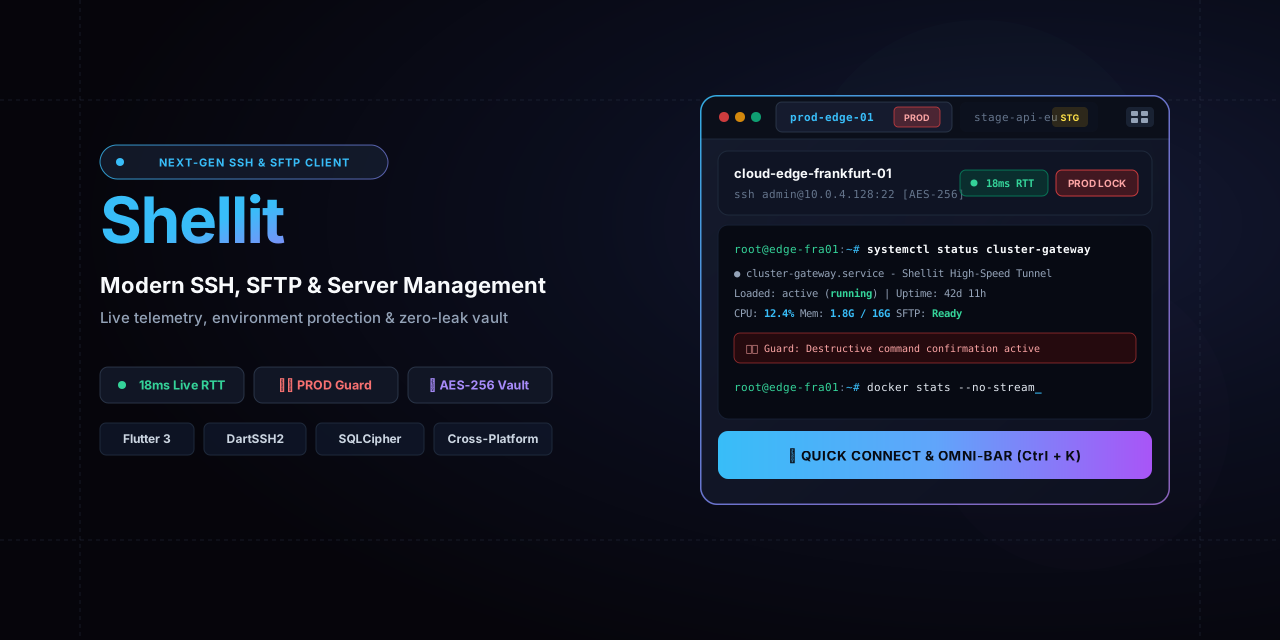

Shellit
A modern, secure, and cross-platform SSH client, SFTP manager, and next-generation server hub built with Flutter & Dart.
English | Русский





📖 About the Project
Shellit combines the ergonomics of premier infrastructure management tools with uncompromising security. Engineered as an independent developer and sysadmin power tool, it emphasizes blazing-fast performance, strict architectural isolation, and transparent connection control.
Unlike traditional terminal emulators, Shellit delivers live server telemetry before connecting, built-in protection against accidental destructive commands in production, and an open, extensible plugin ecosystem.
⚡ Development Velocity: From Zero to Release in 24 Hours
Shellit was designed, engineered, and tested from scratch in under 24 hours (~19 hours of active vibe-coding with autonomous AI agents): from an empty folder to a production-grade cross-platform application with self-hosted E2EE sync, an MCP AI Gateway, and a Gemini assistant.
⏱️ View Development Timeline & Milestone Breakdown
| Elapsed Time | Milestone | Key Deliverables |
|---|---|---|
| 0h 00m | Inception | Concept, monorepo architecture, package isolation, agent contracts |
| +1h 40m | Core Foundation | 4 isolated packages (core, vault, network, plugins), 105 tests |
| +2h 00m | Terminal UI | Obsidian Dark theme, live RTT ping dot, 126 unit & widget tests |
| +5h 17m | v0.1.0 | Matrix 2x2 splits, tabs, two-pane SFTP, Windows Inno Setup installer |
| +6h 03m | v0.2.0 | Self-hosted E2EE cloud sync on VPS, zero-knowledge Go relay server |
| +7h 46m | v0.3.0 | Keychain manager, Ed25519/RSA key generator, integrated ssh-copy-id |
| +9h 11m | v0.4.0 | Desktop Plugin SDK, sandboxed WebView2 IPC, Docker Monitor plugin |
| +11h 31m | v0.5.0 | 100% i18n-ready (Zero Hardcoded Strings) & official Russian language pack |
| +14h 35m | v0.6.0 | Mobile-first Android client with touch accessory bar & haptic feedback |
| +20h 52m | v0.7.0 | Model Context Protocol (MCP) server for Cursor, Claude & Windsurf |
| +24h 15m | v0.7.3 | Built-in Gemini AI snippets assistant, dynamic models, pop-out log windows |
| +24h 45m | Phase 14 | 1-click ConPTY local terminal with shell discovery (PowerShell, WSL, cmd) |
⏱️ Total Active Time: ~19 hours (including a 4-hour night rest).
🛡️ Quality Metrics: 34 completed stages, 24 reported & resolved bugs, 133+ passing tests, 0 analyzer errors.
📖 Read the unfiltered developer log:docs/CHRONICLE.en.md.
✨ Key Features (Shellit Identity)
-
🔄 Self-Hosted Zero-Knowledge E2EE Sync: Seamlessly synchronize hosts, SSH keys, command snippets, and folders across all your devices (Windows, macOS, Linux, Android, iOS) using your own ultra-lightweight VPS relay server. All data is end-to-end encrypted client-side using Argon2id and AES-256-GCM. The server never sees your passwords, private keys, or host metadata. Supports plain HTTP (ideal for WireGuard, Tailscale, or LANs without domain/SSL hassles) as well as HTTPS (including self-signed certificates).
-
🟢 Live Host Telemetry (Real-time Ping): Instant RTT latency indicator displayed directly on host cards (
<50msgreen,<200msyellow, offline grey). Inspect server reachability and response times before opening a connection. -
🛡️ Environment Protection & PROD Guard: Distinct color badges for every server (
PRODalert red,STAGEcautionary yellow,DEVcalm blue). On servers marked with thePRODtag, a glowing red border activates around the terminal, and potentially destructive commands (rm -rf,DROP,reboot, fork bombs) trigger an interactive confirmation modal. -
⚡ Omni-Bar (
Ctrl+K/Cmd+K): Universal command palette inspired by Raycast and Spotlight: lightning-fast fuzzy search across hosts, one-key snippet execution, instant theme switching, and split management without taking your hands off the keyboard. -
🪟 Matrix Tiling Splits & Drag & Drop: Flexible terminal workspace layouts (horizontal, vertical, 2x2 grid) within tabs. Drag and drop open session tabs into empty split slots, or use Broadcast Input to send keystrokes simultaneously to all active panes.
-
📂 Two-Pane SFTP Manager: Full-featured file manager integrated right into the session tab: local filesystem on the left, remote server on the right, drag-and-drop transfers, context menus, interactive visual chmod permissions editor, and background transfer queue.
-
📜 Asciinema Session Recording & Audit: Built-in terminal session recording following the asciinema v2 (
.cast) standard and raw text logs (.log). Automatic recording policy for PROD servers, live● RECtimer badge in the toolbar, and a two-tab audit log inspector. -
⚡ Command Snippets: Curated library of frequently used shell commands with tag search, 1-click execution into the active shell, and instant lookup via Omni-Bar (
Ctrl+K). -
🗂️ Multi-View Catalog: Instantly switch between catalog view modes: responsive tile Grid, dense high-capacity List (for 50+ servers), and hierarchical Folder Tree.
-
🔐 Zero Credentials Leakage & SQLCipher Vault: Local database encrypted with AES-256 (SQLCipher). Master password secured with Argon2id key derivation. Strict memory hygiene (Zeroize) clears plaintext secrets upon session closure, coupled with comprehensive log sanitization.
-
🤖 Model Context Protocol (MCP Server Plugin): Built-in MCP Gateway (specification 2024-11-05, Server-Sent Events / SSE) to securely connect modern AI assistants (Cursor, Claude Desktop, Windsurf, Antigravity) directly to your servers and terminal sessions. Exposes standardized tools to run commands, fetch terminal buffers, and inspect remote SFTP files under PROD Guard protection with a dedicated AI audit trail.
-
🧩 Open Desktop Plugin SDK: Extend the application's capabilities with custom sandboxed plugins (
.shellit) communicating via an isolated WebView IPC bridge on desktop platforms. -
🌐 Community Language Packs: 100% internationalization-ready UI (Zero Hardcoded Strings). English is the native default, with an official Russian language pack readily available: Download
russian_lang_pack.shellit.
🧩 Plugins & Extensions
Shellit supports dynamic installation of custom plugins and language packages (.shellit) on the fly without restarting the application.
📦 Extensions Catalog:
- 🤖 MCP Server Plugin (
plugins/mcp_server.shellit) — built-in AI Gateway for Cursor, Claude, and Windsurf with PROD Guard security gate (bundled out of the box). - 🐳 Docker Monitor (
plugins/docker_monitor.shellit) — real-time container management and log inspector (bundled out of the box). - 🌐 Russian Language Pack (
plugins/russian_lang_pack.shellit) — 100% Russian translation of the user interface (527+ keys).
Installation Instructions:
- Download the desired
.shellitpackage from theplugins/directory. - In the Shellit application, open the Plugins sidebar.
- Click the Install .shellit button in the top-right corner and select the file.
- For language packs: navigate to Settings → Language & Localization and select your preferred language!
Learn more about the plugin ecosystem:
plugins/README.md.
Translation authoring guide:docs/LOCALIZATION_AND_I18N_GUIDE.md.
🏛 Monorepo Architecture
The project is structured as a modular monorepo following contract-first design and strict package isolation:
Shellit/
├── apps/
│   └── shellit/                    # Main Flutter application (DI, Riverpod, Routing, Run)
├── packages/
│   ├── core_foundation/            # Domain entities, Result/Failure, interfaces/contracts
│   ├── storage_vault/              # Encrypted storage (Drift + SQLCipher, Argon2id, SyncCrypto)
│   ├── ssh_network_core/           # Network core (dartssh2, PTY streams, SFTP client, tunnels, recorder)
│   ├── terminal_ui/                # Terminal emulator (xterm.dart, tabs, matrix splits, mobile panel)
│   └── desktop_plugin_sdk/         # Plugin manifest specs, validator, and IPC sandbox
├── plugins/                        # Bundled plugins and language packs (.shellit)
├── servers/
│   └── sync_server/                # Lightweight sync relay server (Dart + SQLite, Docker, <20MB RAM)
└── docs/                           # Central coordination and documentation hub
Isolation Rule: Feature packages depend strictly on abstractions from
packages/core_foundation/. Direct cross-dependencies between feature packages are prohibited.
🚀 Quick Start
Requirements
- Flutter SDK:
>= 3.12.0 - Dart SDK:
>= 3.12.0 - Supported desktop environments: Windows 10/11, macOS (12+), Linux (Ubuntu 22.04+ / Debian / Fedora)
1. Clone & Fetch Dependencies
# Clone the repository
git clone https://github.com/kobaltgit/Shellit.git
cd Shellit

# Fetch dependencies for the main app
cd apps/shellit
flutter pub get
2. Run Application
# Windows
flutter run -d windows

# macOS
flutter run -d macos

# Linux
flutter run -d linux
3. Run Tests & Static Analysis
# Analyze code across all packages
flutter analyze

# Run unit and widget tests
flutter test
☁️ Self-Hosted Sync Server
Shellit frees you from expensive proprietary clouds. You can deploy your own lightweight synchronization relay server on any home server or VPS in under 60 seconds.
🛡️ Zero-Knowledge Architecture
- Client-Side Encryption: All hosts, private keys, snippets, and folders are encrypted using AES-256-GCM. Encryption keys are derived client-side from your Passphrase via Argon2id.
- Blind Server: The server only receives blind authentication tokens (
authHash) and encrypted binary payloads. The server owner cannot read hostnames or any metadata. - Tombstones & LWW: Deletions are tracked via tombstones, and conflicts are resolved via Last-Write-Wins (Pull-Then-Push).
- Transport Freedom: Works over plain
http://(inside WireGuard, Tailscale, or private LANs without domain or certificate overhead) as well ashttps://(including self-signed certificates).
🚀 Running on Server via Docker Compose
- Copy the server directory or create
docker-compose.ymlon your VPS:
version: "3.8"

services:
  shellit-sync:
    build: ./servers/sync_server
    container_name: shellit-sync
    restart: unless-stopped
    ports:
      - "8080:8080"
    volumes:
      - ./data:/data
    environment:
      - PORT=8080
      - HOST=0.0.0.0
      - DATA_PATH=/data/shellit-sync.db
      - REGISTRATION_TOKEN=super-secret-invite-token # Optional: protect against unauthorized registrations
- Start the service:
docker compose up -d
📱 Connecting in the Shellit App
- Open Settings → Sync & Cloud.
- Configure:
- Server URL:
http://<your-vps-ip>:8080orhttps://sync.your-domain.com. - Vault ID: Storage vault identifier (e.g.
my-servers). - Sync Passphrase: Encryption passphrase (remember it for your other devices).
- Registration Token: Registration token (if configured in
REGISTRATION_TOKENon the server). - When using self-signed certificates, enable "Allow self-signed SSL / insecure HTTP".
- Server URL:
- Click Test Connection, then Sync Now.
- Repeat on your phone or secondary computer — and your infrastructure is synchronized!
Comprehensive server documentation: servers/sync_server/README.md.
📚 Documentation & Development
All development processes, technical specifications, and tasks are cataloged in the docs/ directory:
docs/AGENTS_MASTER_GUIDE.md— Master architectural guide and engineering standards.docs/ROADMAP.md— Milestone roadmap and progress timeline.docs/CHECKLIST.md— Interactive task tracker across packages.docs/BUGS_AND_ISSUES.md— Realtime bug registry and incident log.docs/CHRONICLE.en.md— Project development devlog and chronicle.GEMINI.md— System operating guide for AI agents.
🔒 Security
- Zero Hardcoded Secrets: Never store credentials or private keys in the codebase.
- Master Vault: Passwords and private keys are encrypted locally with SQLCipher. Without the master password, decrypting the database is mathematically impossible.
- Memory Hygiene: Sensitive decrypted credentials are wiped from memory (
zeroize) immediately after use.
📄 License
This project is licensed under the copyleft GNU General Public License v3.0 (GPLv3).
What This Means (Freedom with Responsibilities):
- ✅ Freedom of Use: You may freely run and use Shellit for personal and commercial server administration.
- ✅ Freedom to Study & Modify: Full source code is open, inspectable, and extensible.
- ⚠️ Strict Copyleft Requirements:
- Reciprocal Freedom: Any forks, modifications, or derivative products must also be distributed under GPLv3 with full source code made available.
- No Closed-Source Redistribution: Proprietary commercial wrapping of core components without source disclosure is strictly prohibited.
- Attribution: Original copyright notices and license texts must remain intact.
Contributors

19 commits
Similar repos


Languages
Dart
93.3%
HTML
1.9%
JavaScript
1.8%
C++
1.4%
CMake
1.1%
Modern, secure cross-platform SSH/SFTP client & server manager with live telemetry, matrix splits, self-hosted E2EE sync, and native MCP AI Gateway.
Dart
0
19 commits
updated Sep 19, 2026
See what people are saying (1)
README
Shellit
A modern, secure, and cross-platform SSH client, SFTP manager, and next-generation server hub built with Flutter & Dart.
English | Русский
📖 About the Project
Shellit combines the ergonomics of premier infrastructure management tools with uncompromising security. Engineered as an independent developer and sysadmin power tool, it emphasizes blazing-fast performance, strict architectural isolation, and transparent connection control.
Unlike traditional terminal emulators, Shellit delivers live server telemetry before connecting, built-in protection against accidental destructive commands in production, and an open, extensible plugin ecosystem.
⚡ Development Velocity: From Zero to Release in 24 Hours
Shellit was designed, engineered, and tested from scratch in under 24 hours (~19 hours of active vibe-coding with autonomous AI agents): from an empty folder to a production-grade cross-platform application with self-hosted E2EE sync, an MCP AI Gateway, and a Gemini assistant.
⏱️ View Development Timeline & Milestone Breakdown
| Elapsed Time | Milestone | Key Deliverables |
|---|---|---|
| 0h 00m | Inception | Concept, monorepo architecture, package isolation, agent contracts |
| +1h 40m | Core Foundation | 4 isolated packages (core, vault, network, plugins), 105 tests |
| +2h 00m | Terminal UI | Obsidian Dark theme, live RTT ping dot, 126 unit & widget tests |
| +5h 17m | v0.1.0 | Matrix 2x2 splits, tabs, two-pane SFTP, Windows Inno Setup installer |
| +6h 03m | v0.2.0 | Self-hosted E2EE cloud sync on VPS, zero-knowledge Go relay server |
| +7h 46m | v0.3.0 | Keychain manager, Ed25519/RSA key generator, integrated ssh-copy-id |
| +9h 11m | v0.4.0 | Desktop Plugin SDK, sandboxed WebView2 IPC, Docker Monitor plugin |
| +11h 31m | v0.5.0 | 100% i18n-ready (Zero Hardcoded Strings) & official Russian language pack |
| +14h 35m | v0.6.0 | Mobile-first Android client with touch accessory bar & haptic feedback |
| +20h 52m | v0.7.0 | Model Context Protocol (MCP) server for Cursor, Claude & Windsurf |
| +24h 15m | v0.7.3 | Built-in Gemini AI snippets assistant, dynamic models, pop-out log windows |
| +24h 45m | Phase 14 | 1-click ConPTY local terminal with shell discovery (PowerShell, WSL, cmd) |
⏱️ Total Active Time: ~19 hours (including a 4-hour night rest).
🛡️ Quality Metrics: 34 completed stages, 24 reported & resolved bugs, 133+ passing tests, 0 analyzer errors.
📖 Read the unfiltered developer log:docs/CHRONICLE.en.md.
✨ Key Features (Shellit Identity)
-
🔄 Self-Hosted Zero-Knowledge E2EE Sync: Seamlessly synchronize hosts, SSH keys, command snippets, and folders across all your devices (Windows, macOS, Linux, Android, iOS) using your own ultra-lightweight VPS relay server. All data is end-to-end encrypted client-side using Argon2id and AES-256-GCM. The server never sees your passwords, private keys, or host metadata. Supports plain HTTP (ideal for WireGuard, Tailscale, or LANs without domain/SSL hassles) as well as HTTPS (including self-signed certificates).
-
🟢 Live Host Telemetry (Real-time Ping): Instant RTT latency indicator displayed directly on host cards (
<50msgreen,<200msyellow, offline grey). Inspect server reachability and response times before opening a connection. -
🛡️ Environment Protection & PROD Guard: Distinct color badges for every server (
PRODalert red,STAGEcautionary yellow,DEVcalm blue). On servers marked with thePRODtag, a glowing red border activates around the terminal, and potentially destructive commands (rm -rf,DROP,reboot, fork bombs) trigger an interactive confirmation modal. -
⚡ Omni-Bar (
Ctrl+K/Cmd+K): Universal command palette inspired by Raycast and Spotlight: lightning-fast fuzzy search across hosts, one-key snippet execution, instant theme switching, and split management without taking your hands off the keyboard. -
🪟 Matrix Tiling Splits & Drag & Drop: Flexible terminal workspace layouts (horizontal, vertical, 2x2 grid) within tabs. Drag and drop open session tabs into empty split slots, or use Broadcast Input to send keystrokes simultaneously to all active panes.
-
📂 Two-Pane SFTP Manager: Full-featured file manager integrated right into the session tab: local filesystem on the left, remote server on the right, drag-and-drop transfers, context menus, interactive visual chmod permissions editor, and background transfer queue.
-
📜 Asciinema Session Recording & Audit: Built-in terminal session recording following the asciinema v2 (
.cast) standard and raw text logs (.log). Automatic recording policy for PROD servers, live● RECtimer badge in the toolbar, and a two-tab audit log inspector. -
⚡ Command Snippets: Curated library of frequently used shell commands with tag search, 1-click execution into the active shell, and instant lookup via Omni-Bar (
Ctrl+K). -
🗂️ Multi-View Catalog: Instantly switch between catalog view modes: responsive tile Grid, dense high-capacity List (for 50+ servers), and hierarchical Folder Tree.
-
🔐 Zero Credentials Leakage & SQLCipher Vault: Local database encrypted with AES-256 (SQLCipher). Master password secured with Argon2id key derivation. Strict memory hygiene (Zeroize) clears plaintext secrets upon session closure, coupled with comprehensive log sanitization.
-
🤖 Model Context Protocol (MCP Server Plugin): Built-in MCP Gateway (specification 2024-11-05, Server-Sent Events / SSE) to securely connect modern AI assistants (Cursor, Claude Desktop, Windsurf, Antigravity) directly to your servers and terminal sessions. Exposes standardized tools to run commands, fetch terminal buffers, and inspect remote SFTP files under PROD Guard protection with a dedicated AI audit trail.
-
🧩 Open Desktop Plugin SDK: Extend the application's capabilities with custom sandboxed plugins (
.shellit) communicating via an isolated WebView IPC bridge on desktop platforms. -
🌐 Community Language Packs: 100% internationalization-ready UI (Zero Hardcoded Strings). English is the native default, with an official Russian language pack readily available: Download
russian_lang_pack.shellit.
🧩 Plugins & Extensions
Shellit supports dynamic installation of custom plugins and language packages (.shellit) on the fly without restarting the application.
📦 Extensions Catalog:
- 🤖 MCP Server Plugin (
plugins/mcp_server.shellit) — built-in AI Gateway for Cursor, Claude, and Windsurf with PROD Guard security gate (bundled out of the box). - 🐳 Docker Monitor (
plugins/docker_monitor.shellit) — real-time container management and log inspector (bundled out of the box). - 🌐 Russian Language Pack (
plugins/russian_lang_pack.shellit) — 100% Russian translation of the user interface (527+ keys).
Installation Instructions:
- Download the desired
.shellitpackage from theplugins/directory. - In the Shellit application, open the Plugins sidebar.
- Click the Install .shellit button in the top-right corner and select the file.
- For language packs: navigate to Settings → Language & Localization and select your preferred language!
Learn more about the plugin ecosystem:
plugins/README.md.
Translation authoring guide:docs/LOCALIZATION_AND_I18N_GUIDE.md.
🏛 Monorepo Architecture
The project is structured as a modular monorepo following contract-first design and strict package isolation:
Shellit/
├── apps/
│   └── shellit/                    # Main Flutter application (DI, Riverpod, Routing, Run)
├── packages/
│   ├── core_foundation/            # Domain entities, Result/Failure, interfaces/contracts
│   ├── storage_vault/              # Encrypted storage (Drift + SQLCipher, Argon2id, SyncCrypto)
│   ├── ssh_network_core/           # Network core (dartssh2, PTY streams, SFTP client, tunnels, recorder)
│   ├── terminal_ui/                # Terminal emulator (xterm.dart, tabs, matrix splits, mobile panel)
│   └── desktop_plugin_sdk/         # Plugin manifest specs, validator, and IPC sandbox
├── plugins/                        # Bundled plugins and language packs (.shellit)
├── servers/
│   └── sync_server/                # Lightweight sync relay server (Dart + SQLite, Docker, <20MB RAM)
└── docs/                           # Central coordination and documentation hub
Isolation Rule: Feature packages depend strictly on abstractions from
packages/core_foundation/. Direct cross-dependencies between feature packages are prohibited.
🚀 Quick Start
Requirements
- Flutter SDK:
>= 3.12.0 - Dart SDK:
>= 3.12.0 - Supported desktop environments: Windows 10/11, macOS (12+), Linux (Ubuntu 22.04+ / Debian / Fedora)
1. Clone & Fetch Dependencies
# Clone the repository
git clone https://github.com/kobaltgit/Shellit.git
cd Shellit

# Fetch dependencies for the main app
cd apps/shellit
flutter pub get
2. Run Application
# Windows
flutter run -d windows

# macOS
flutter run -d macos

# Linux
flutter run -d linux
3. Run Tests & Static Analysis
# Analyze code across all packages
flutter analyze

# Run unit and widget tests
flutter test
☁️ Self-Hosted Sync Server
Shellit frees you from expensive proprietary clouds. You can deploy your own lightweight synchronization relay server on any home server or VPS in under 60 seconds.
🛡️ Zero-Knowledge Architecture
- Client-Side Encryption: All hosts, private keys, snippets, and folders are encrypted using AES-256-GCM. Encryption keys are derived client-side from your Passphrase via Argon2id.
- Blind Server: The server only receives blind authentication tokens (
authHash) and encrypted binary payloads. The server owner cannot read hostnames or any metadata. - Tombstones & LWW: Deletions are tracked via tombstones, and conflicts are resolved via Last-Write-Wins (Pull-Then-Push).
- Transport Freedom: Works over plain
http://(inside WireGuard, Tailscale, or private LANs without domain or certificate overhead) as well ashttps://(including self-signed certificates).
🚀 Running on Server via Docker Compose
- Copy the server directory or create
docker-compose.ymlon your VPS:
version: "3.8"

services:
  shellit-sync:
    build: ./servers/sync_server
    container_name: shellit-sync
    restart: unless-stopped
    ports:
      - "8080:8080"
    volumes:
      - ./data:/data
    environment:
      - PORT=8080
      - HOST=0.0.0.0
      - DATA_PATH=/data/shellit-sync.db
      - REGISTRATION_TOKEN=super-secret-invite-token # Optional: protect against unauthorized registrations
- Start the service:
docker compose up -d
📱 Connecting in the Shellit App
- Open Settings → Sync & Cloud.
- Configure:
- Server URL:
http://<your-vps-ip>:8080orhttps://sync.your-domain.com. - Vault ID: Storage vault identifier (e.g.
my-servers). - Sync Passphrase: Encryption passphrase (remember it for your other devices).
- Registration Token: Registration token (if configured in
REGISTRATION_TOKENon the server). - When using self-signed certificates, enable "Allow self-signed SSL / insecure HTTP".
- Server URL:
- Click Test Connection, then Sync Now.
- Repeat on your phone or secondary computer — and your infrastructure is synchronized!
Comprehensive server documentation: servers/sync_server/README.md.
📚 Documentation & Development
All development processes, technical specifications, and tasks are cataloged in the docs/ directory:
docs/AGENTS_MASTER_GUIDE.md— Master architectural guide and engineering standards.docs/ROADMAP.md— Milestone roadmap and progress timeline.docs/CHECKLIST.md— Interactive task tracker across packages.docs/BUGS_AND_ISSUES.md— Realtime bug registry and incident log.docs/CHRONICLE.en.md— Project development devlog and chronicle.GEMINI.md— System operating guide for AI agents.
🔒 Security
- Zero Hardcoded Secrets: Never store credentials or private keys in the codebase.
- Master Vault: Passwords and private keys are encrypted locally with SQLCipher. Without the master password, decrypting the database is mathematically impossible.
- Memory Hygiene: Sensitive decrypted credentials are wiped from memory (
zeroize) immediately after use.
📄 License
This project is licensed under the copyleft GNU General Public License v3.0 (GPLv3).
What This Means (Freedom with Responsibilities):
- ✅ Freedom of Use: You may freely run and use Shellit for personal and commercial server administration.
- ✅ Freedom to Study & Modify: Full source code is open, inspectable, and extensible.
- ⚠️ Strict Copyleft Requirements:
- Reciprocal Freedom: Any forks, modifications, or derivative products must also be distributed under GPLv3 with full source code made available.
- No Closed-Source Redistribution: Proprietary commercial wrapping of core components without source disclosure is strictly prohibited.
- Attribution: Original copyright notices and license texts must remain intact.
Similar repos
Contributors
19 commits
Languages
Dart
93.3%
HTML
1.9%
JavaScript
1.8%
C++
1.4%
CMake
1.1%