Decentralize, Self-host Cloud Gaming/Application
Python
1,182
135 commits
updated Feb 26, 2026
Decentralized, Self-hosted Cloud Gaming service on WebBrowser.
Video Demo: https://youtu.be/eFR7fLy9z6E
Technical Document: https://github.com/giongto35/cloud-morph/wiki
Landing Page: https://cloudmorph.io
CloudRetro: https://github.com/giongto35/cloud-game: Sister project, Cloud Gaming Service For Retro Games
CloudMorph is a decentralized, self-hosted cloud gaming/cloud application platform. Users can quickly spawn up a cloud gaming service with minimal configuration. By leveraging the ease of deployment, CloudMorph goal is to build a decentralized cloud application network with app providers and consumers.
CloudMorph copes with different technical challenges from OS to Cloud, such as Low-Latency Streaming, Video/Audio encoding pipeline and optimization, Windows application Virtualization in headless server, OS event simulation, NAT traversal, P2P network structurization, etc.
Unlike CloudRetro, a completed Cloud Gaming solution for Retro Game run on its dedicated cloud infrastructure, CloudMorph decentralized hosting works to users with any Windows Games/Applications by a generic and modularized solution.
CloudMorph now ships an OpenEnv-compatible Wine environment, allowing RL agents to interact with Windows applications through the standard OpenEnv HTTP API, based on CloudMorph virtualization architecture.
Discord: Join Us
Video Demo: https://www.youtube.com/watch?v=fkOpOQ-HwFY
| Screenshot | Screenshot |
|---|---|
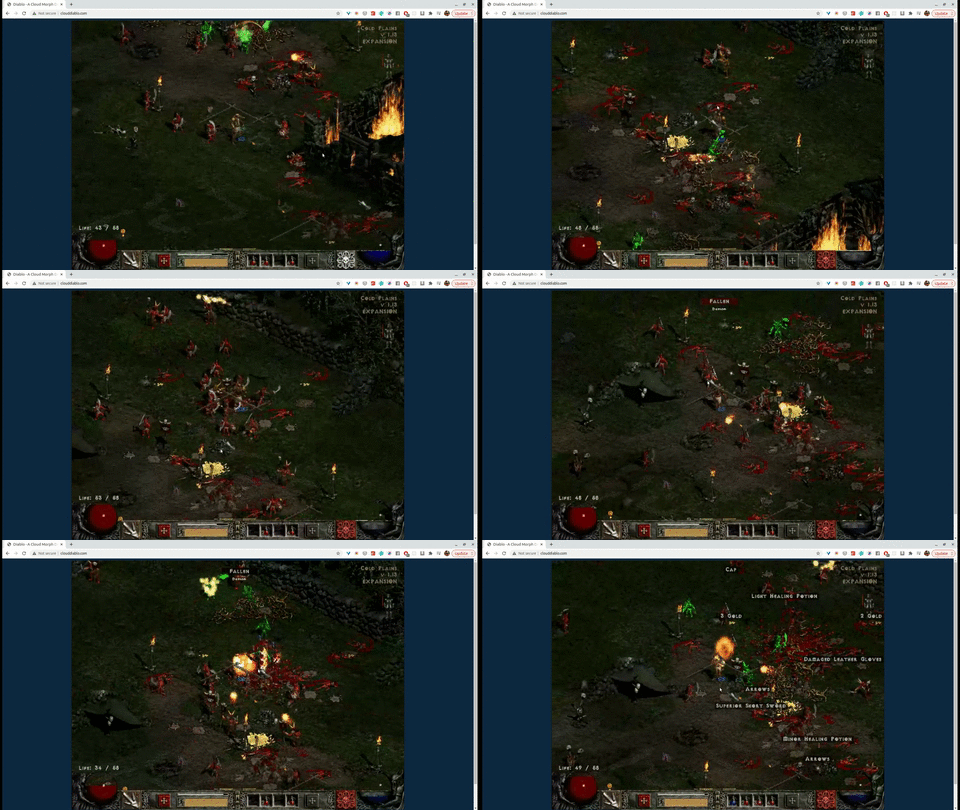 Diablo II-US Diablo II-US | 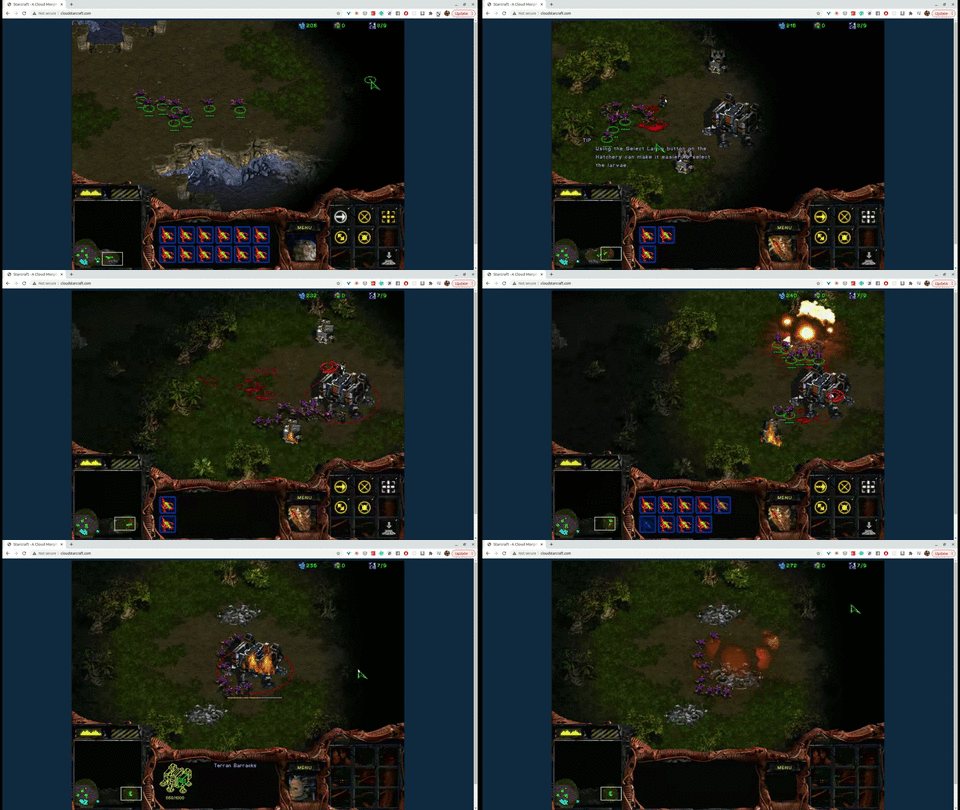 Starcraft Starcraft |
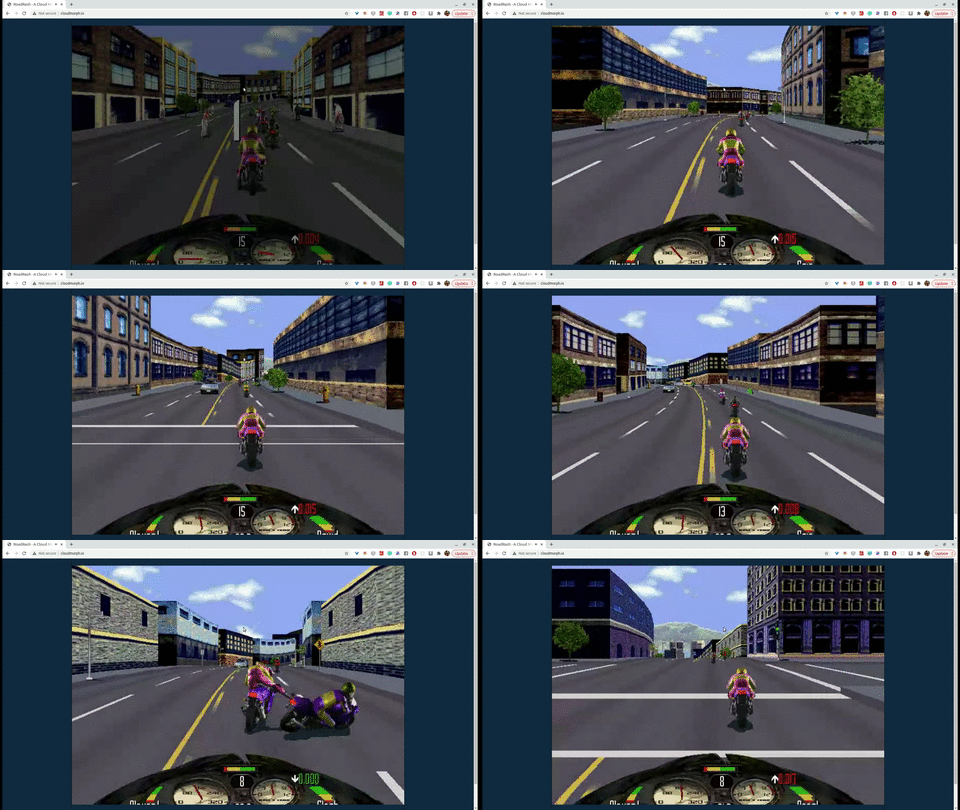 RoadRash RoadRash | 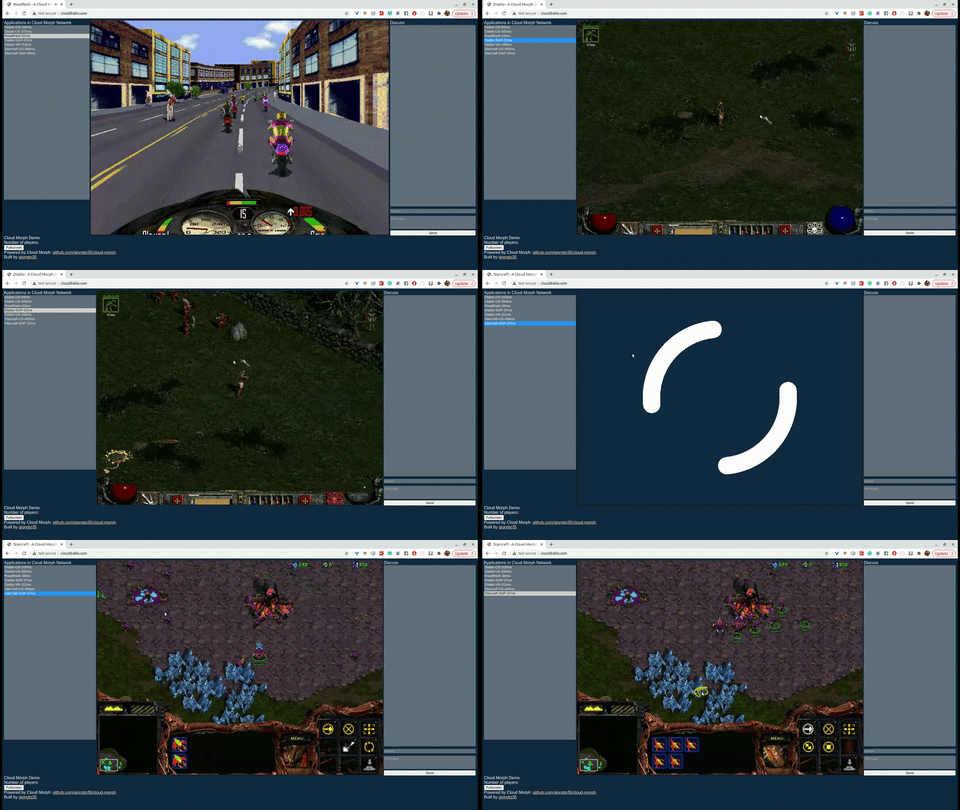 Browse and Switch games Browse and Switch games |
To setup Window Sandbox, Turn on Virtualization in Bios and Enable Windows Sandbox Feature. Tutorial https://techgenix.com/install-configure-and-use-windows-sandbox/
setup-sandbox.ps1 to download and install necessary packages (FFMPEG) in sandbox image (winvm/pkg)go run server.goWithout Sandbox, environment is not isolated, so mouse + keyboard simulation will target your main mouse + keyboard. If you play on the same machine, so you will experience your mouse is moving away.
go run server.gosetup.shgo run server.gosetup_remote.sh 111.111.111.111 inside ./script, 111.111.111.111 is the address of your host. What you will get your application hosted on your remote machine. More details are in Deployment section below.
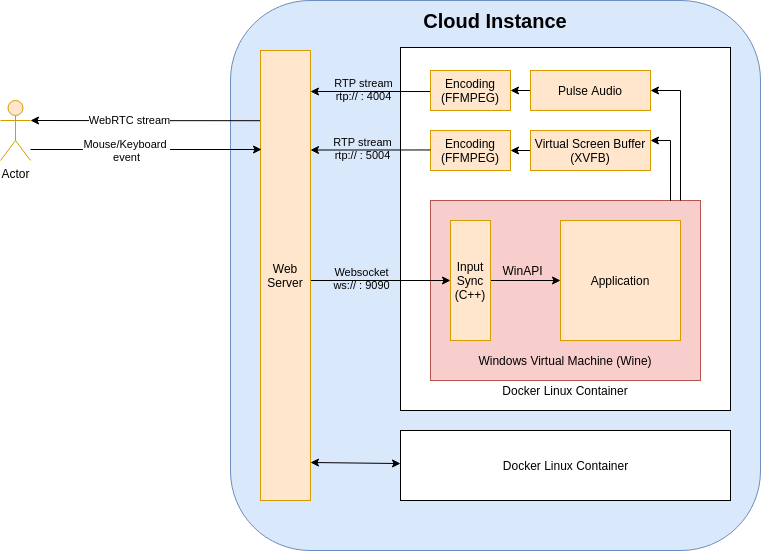
core/go/cloudapp.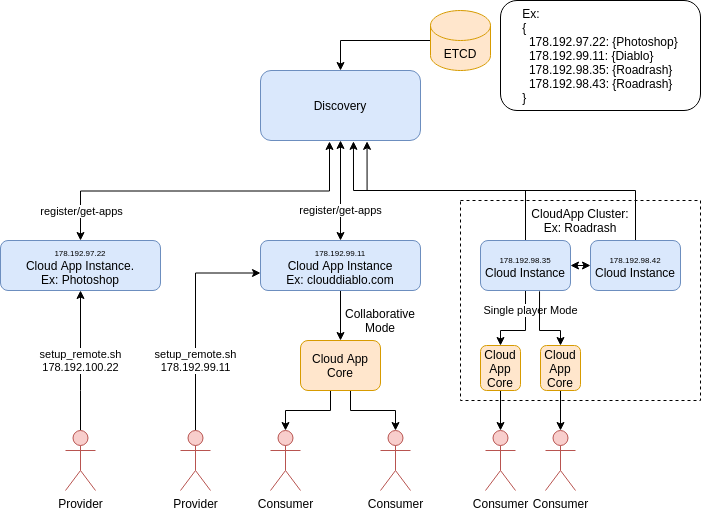
config.yaml includes discoveryHost attribute, application will be discoverable to user.The service is built using Golang, C++, and Linux X11 utility tools (Xvfb, ffmpeg).
You can set up all dependencies with setup.sh. After that, you can run the go server with
go run server.goAccess to your local at
localhost:8080Note: the wine application runs inside Docker. You can run it without docker by changing run-wine.sh to run-wine-nodocker.sh in server.go for easier debugging.
First, we need an Ubuntu instance with a public network firewall (No firewall rule for P2P communication NAT traversal). You can get a VPS from any provider (like AWS, DigitalOcean) We prepare below in the same directory
Required:
config.yaml: app config, the app configuration.apps: the folder contains the app we will deploy. It is later mapped to winvn/apps in the remote instances. For example, DiabloII. If your application is already inside the synced wine environment at 2, ex "Program Files", we can skip it. We need to configure config.yaml, apppath to point to the correct app path.setup_remote.sh: a copy of the script in winvm/script to deploy your application to server.Optional:
4. wine: whole wine folder from .wine. If there is no wine folder, the deployment uses the default .wine from installation.
After that, we run setup_remote from inside the folder:
setup_remote.sh $ip. Ex: ./setup_remote.sh 159.89.146.77Deployment Example
script/example contains example applications configuration. Note: /apps is left empty due to copyright.Deployment with Lutris
1,275 followers · starred Sep 2020
1,536 followers · starred Mar 2021
687 followers · starred May 2023
15 followers · starred Oct 2021
Decentralize, Self-host Cloud Gaming/Application
Python
1,182
135 commits
updated Feb 26, 2026
Decentralized, Self-hosted Cloud Gaming service on WebBrowser.
Video Demo: https://youtu.be/eFR7fLy9z6E
Technical Document: https://github.com/giongto35/cloud-morph/wiki
Landing Page: https://cloudmorph.io
CloudRetro: https://github.com/giongto35/cloud-game: Sister project, Cloud Gaming Service For Retro Games
CloudMorph is a decentralized, self-hosted cloud gaming/cloud application platform. Users can quickly spawn up a cloud gaming service with minimal configuration. By leveraging the ease of deployment, CloudMorph goal is to build a decentralized cloud application network with app providers and consumers.
CloudMorph copes with different technical challenges from OS to Cloud, such as Low-Latency Streaming, Video/Audio encoding pipeline and optimization, Windows application Virtualization in headless server, OS event simulation, NAT traversal, P2P network structurization, etc.
Unlike CloudRetro, a completed Cloud Gaming solution for Retro Game run on its dedicated cloud infrastructure, CloudMorph decentralized hosting works to users with any Windows Games/Applications by a generic and modularized solution.
CloudMorph now ships an OpenEnv-compatible Wine environment, allowing RL agents to interact with Windows applications through the standard OpenEnv HTTP API, based on CloudMorph virtualization architecture.
Discord: Join Us
Video Demo: https://www.youtube.com/watch?v=fkOpOQ-HwFY
| Screenshot | Screenshot |
|---|---|
| Diablo II-US | Starcraft |
| RoadRash | Browse and Switch games |
To setup Window Sandbox, Turn on Virtualization in Bios and Enable Windows Sandbox Feature. Tutorial https://techgenix.com/install-configure-and-use-windows-sandbox/
setup-sandbox.ps1 to download and install necessary packages (FFMPEG) in sandbox image (winvm/pkg)go run server.goWithout Sandbox, environment is not isolated, so mouse + keyboard simulation will target your main mouse + keyboard. If you play on the same machine, so you will experience your mouse is moving away.
go run server.gosetup.shgo run server.gosetup_remote.sh 111.111.111.111 inside ./script, 111.111.111.111 is the address of your host. What you will get your application hosted on your remote machine. More details are in Deployment section below.
core/go/cloudapp.
config.yaml includes discoveryHost attribute, application will be discoverable to user.The service is built using Golang, C++, and Linux X11 utility tools (Xvfb, ffmpeg).
You can set up all dependencies with setup.sh. After that, you can run the go server with
go run server.goAccess to your local at
localhost:8080Note: the wine application runs inside Docker. You can run it without docker by changing run-wine.sh to run-wine-nodocker.sh in server.go for easier debugging.
First, we need an Ubuntu instance with a public network firewall (No firewall rule for P2P communication NAT traversal). You can get a VPS from any provider (like AWS, DigitalOcean) We prepare below in the same directory
Required:
config.yaml: app config, the app configuration.apps: the folder contains the app we will deploy. It is later mapped to winvn/apps in the remote instances. For example, DiabloII. If your application is already inside the synced wine environment at 2, ex "Program Files", we can skip it. We need to configure config.yaml, apppath to point to the correct app path.setup_remote.sh: a copy of the script in winvm/script to deploy your application to server.Optional:
4. wine: whole wine folder from .wine. If there is no wine folder, the deployment uses the default .wine from installation.
After that, we run setup_remote from inside the folder:
setup_remote.sh $ip. Ex: ./setup_remote.sh 159.89.146.77Deployment Example
script/example contains example applications configuration. Note: /apps is left empty due to copyright.Deployment with Lutris
1,275 followers · starred Sep 2020
1,536 followers · starred Mar 2021
687 followers · starred May 2023
15 followers · starred Oct 2021



