
Keybo: my first computer, for children aged 5 to 7. Mouse, keyboard and staying safe. Offline, private by design.
JavaScript
0
5 commits
updated Sep 30, 2026
See what people are saying
README
Keybo
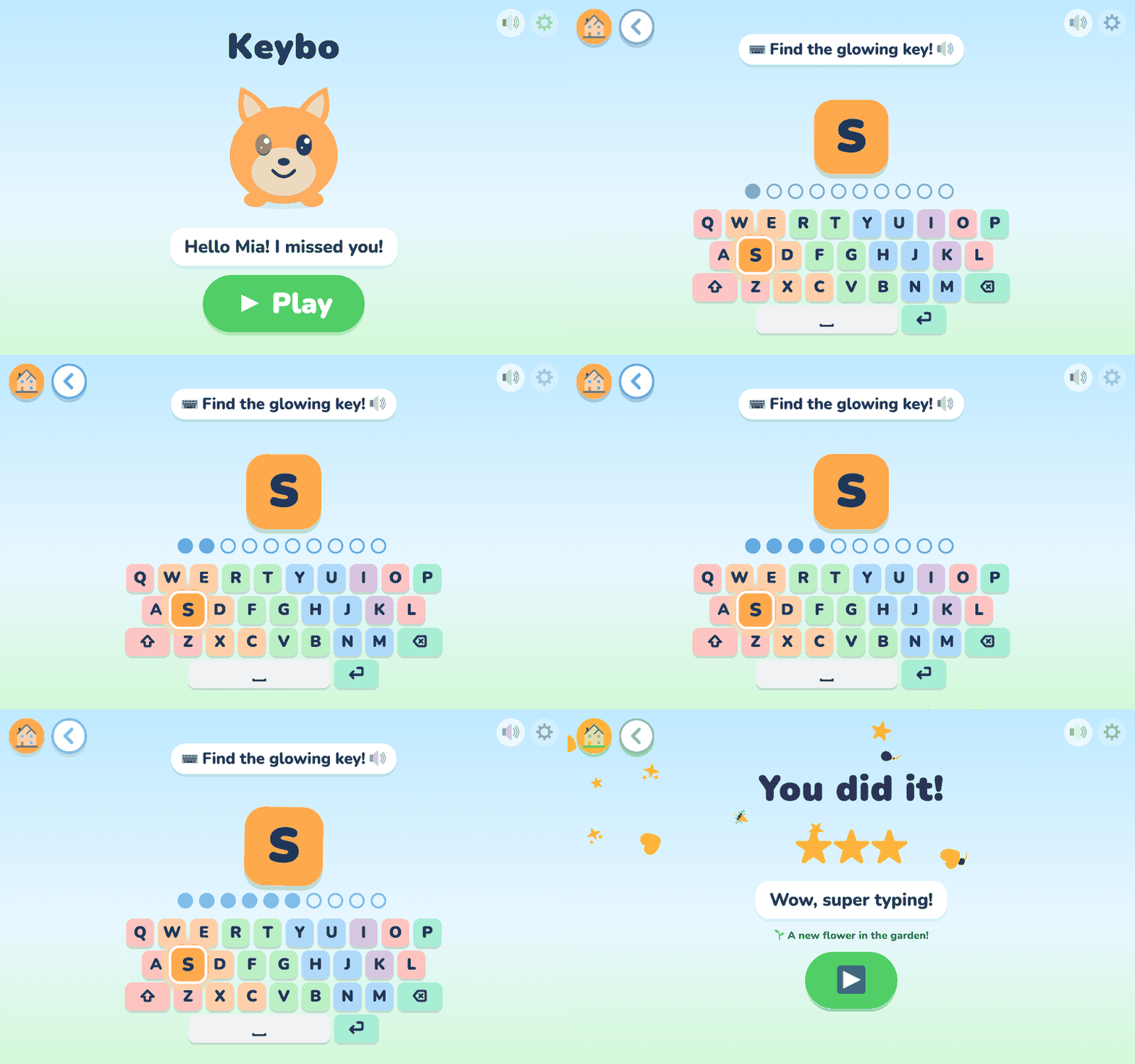
My first computer, for children aged 5 to 7. Keybo teaches the mouse, the keyboard, first typing and staying safe online, in short playful levels with a friendly mascot. It works offline, has no ads and no accounts, and keeps everything on your computer. In English, German and Spanish.
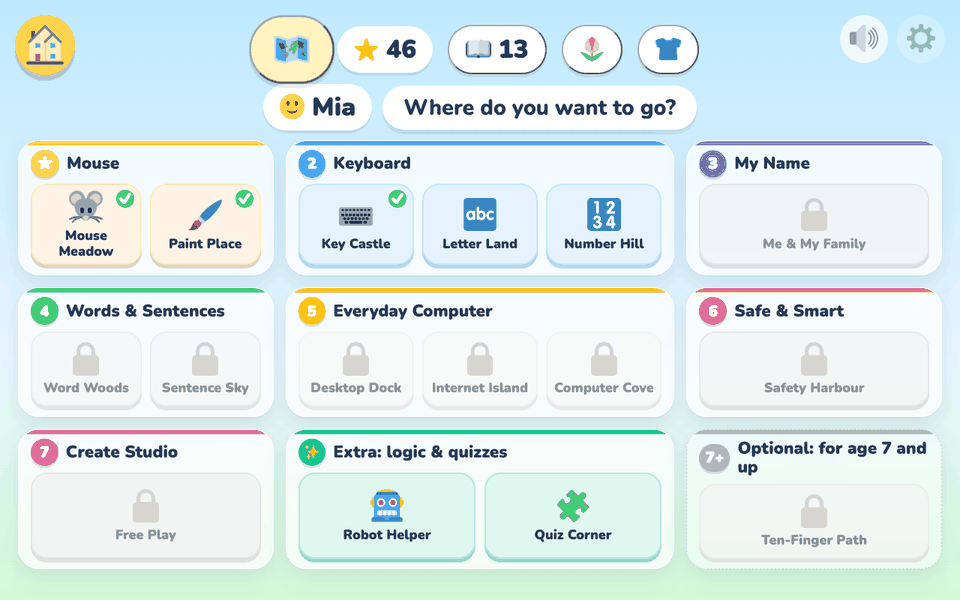 | 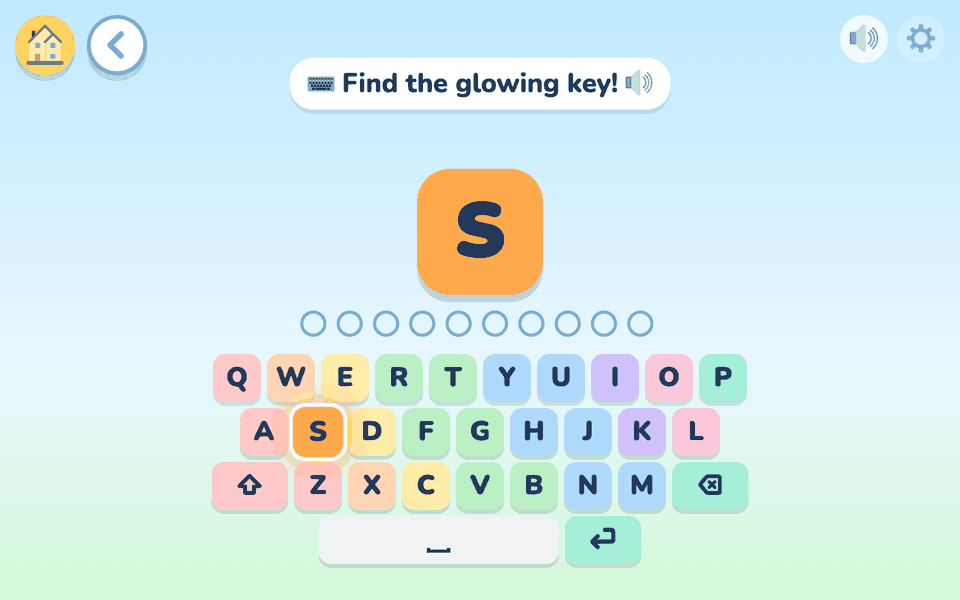 | 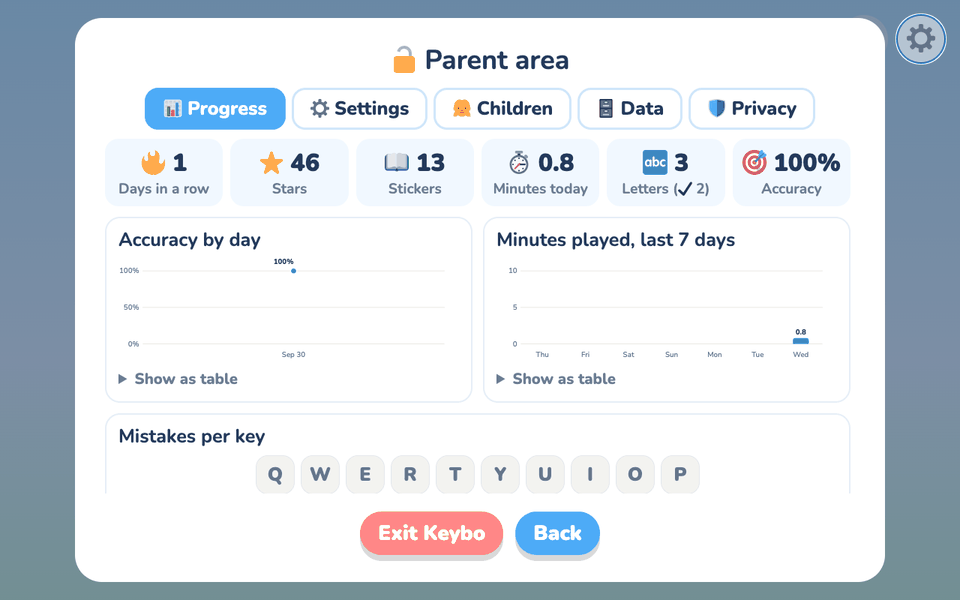 |
| Seven steps, one skill each | Find the glowing key | Progress for parents |
For parents and teachers
Install
Download the latest version from the Releases page.
| Computer | Download | Then |
|---|---|---|
| Windows | Keybo-Setup-….exe | Run it. If Windows says it "protected your PC", click More info, then Run anyway. |
| Windows, without installing | …-windows-portable.zip | Unzip it and double-click Keybo.exe. |
| Mac with Apple silicon (M1 or newer) | …-macos-arm64.zip | Unzip it and open Keybo.app. The first time, allow it in System Settings → Privacy & Security → Open Anyway. |
| Mac with an Intel chip (older Macs) | …-macos-x86_64.zip | Unzip it and open Keybo.app. The first time, allow it in System Settings → Privacy & Security → Open Anyway. |
| Linux | …-linux-x86_64.tar.gz | Unpack it and start Keybo. Full screen works best with Google Chrome or Edge installed. |
Not sure which Mac you have? Apple menu → About This Mac: "Chip: Apple M…" means Apple silicon, "Processor: Intel…" means an Intel chip.
Why Windows or your Mac shows a warning
Keybo is a small free project and is not code-signed yet. Signing costs money every year, and the plan is to add it later. Until then, Windows ("protected your PC") and macOS ("cannot be opened") show a warning the first time, for every app that is not signed, however harmless. The steps in the table above let you continue.
You do not have to take our word for it. To check that a download is the file built from this source code:
- Checksum (easy): download
SHA256SUMS.txtfrom the same release page and compare. On a Mac or Linux runshasum -a 256 <file>, on Windows runcertutil -hashfile <file> SHA256. The number must match the line for your file. (The Intel Mac file is built separately: its line is inSHA256SUMS-macos-x86_64.txt.) - Build proof (for the technical): every file built on GitHub carries a signed build provenance (not the Intel Mac file, which is built by hand). With the
GitHub CLI run
gh attestation verify <file> --repo ggulati2/my-first-computer. - Build it yourself: the whole source is here, see Run from source.
Keybo works offline and has no accounts. A quick look at your firewall or network monitor will show it talking to nothing (the only exceptions are the Check for updates button, which works only when pressed, and the optional online helper, which is off unless a parent switches it on).
First start
A grown-up picks the language, sets a PIN (it protects the parent area and closing the app), and types the child's first name and a daily play limit. Everything can be changed later.
What your child learns
Seven steps, one skill each. Each step opens when the one before it is learned; a parent can open any of them.
| Step | Worlds | Your child learns |
|---|---|---|
| 1 Mouse | Mouse Meadow, Paint Place | pointing, clicking, dragging, double-clicking, scrolling |
| 2 Keyboard | Key Castle, Letter Land, Number Hill | finding keys and letters, Space, Enter, Shift, numbers |
| 3 My Name | Me & My Family | typing their own name and family words |
| 4 Words & Sentences | Word Woods, Sentence Sky | typing short words and sentences |
| 5 Everyday Computer | Desktop Dock, Internet Island, Computer Cove | windows, folders, saving, links, searching |
| 6 Safe & Smart | Safety Harbour | secrets, strangers, pop-ups, asking a grown-up |
| 7 Create | Free Play | typing words that turn into pictures |
| Extras | Robot Helper, Quiz Corner, Ten-Finger Path (7+) | first coding, general knowledge, touch typing |
Mistakes are never punished: a wrong answer just gets a friendly hint. Coming back brings new questions and pictures, and stars fill up Keybo's garden, a wardrobe of outfits and a sticker album. A short daily adventure mixes three worlds.
The parent area
Tap the small grey ⚙️ and enter your PIN to:
- see progress in plain language (and which keys are still tricky),
- change the language, keyboard, voice, play limits and allowed play times,
- add up to 6 children (or up to 30 in classroom mode),
- print certificates and a keyboard to colour in,
- save a backup, restore it, or delete everything.
Privacy
- Nothing leaves your computer. No accounts, no tracking, no ads. Everything is stored only on this computer.
- Two optional exceptions. A parent-area button, Check for updates, asks GitHub for the newest version number, but only when pressed. And an online helper that suggests fresh practice words. It is off unless a parent sets it up with their own key and agrees on a consent screen. Even then it never receives your child's name or anything your child typed.
- Keybo's voice is recorded in advance (AI-generated) and works without internet.
Full details (German and English): docs/PRIVACY.md, also in the parent area under Datenschutz.
Help
- Keybo does not open: with Keybo running, open http://127.0.0.1:8765 in a web browser.
- No sound: check that the 🔊 button in the corner is not crossed out, then the parent area's Voice and Sounds.
- The keyboard seems wrong (Z and Y swapped): choose the right keyboard in the parent area's settings.
- Where Keybo keeps its files: Windows
%APPDATA%\Keybo, Mac~/Library/Application Support/Keybo, Linux~/.local/share/keybo. Thelogsfolder there helps when reporting a problem. - Classroom, USB stick, backups and the online helper: see docs/ADVANCED.md.
- Found a problem? Open an issue. For anything that could affect a child's safety or privacy, please report it privately instead (see SECURITY.md).
Good to know: keyboards QWERTY, QWERTZ and Spanish QWERTY. The German and Spanish texts have not yet been checked by a native-speaker teacher.
For developers
Keybo is a small Python server (FastAPI, SQLite) with a plain HTML, CSS and JavaScript frontend (no build step). It
listens only on 127.0.0.1. The packaged apps show it in the computer's own window (Mac, Windows) or a browser
window (Linux).
Run from source
Needs Python 3.11 or newer. Double-click start.command (Mac) or start.bat (Windows), or run ./start.sh
(Linux). The first start downloads the packages (a minute); after that it works offline.
Set up for development
python3 -m venv .venv && .venv/bin/pip install -r requirements-dev.txt pre-commit
.venv/bin/pre-commit install            # every commit is checked for secrets (gitleaks) and simple mistakes (ruff)
.venv/bin/python -m pytest              # quick tests
.venv/bin/python -m pytest -m browser   # plays the whole app in headless Chrome (a few minutes)
The online helper key
There is no built-in key. Use your own OpenRouter key (set a spending limit), either in
your computer's keychain with python scripts/set_api_key.py, or in .env (copy .env.example; git ignores .env).
Then set LLM_MODE=openrouter in .env. Never commit a key.
Where things are
| Folder | What |
|---|---|
backend/ | the server: progress, settings, content, the optional online helper |
frontend/ | the screens: one JavaScript file per world, texts in js/i18n*.js, recorded voice in voice/ |
content/ | built-in words, sentences and stickers (content packs) |
tests/ | unit tests, browser tests (tests/browser), speed tests (tests/perf) |
scripts/ | launcher, voice recording, lockfile and other tools |
packaging/, windows/ | the Mac, Windows and Linux app builds |
branding.json | the app's name and colours: the one file to change to rebrand |
More
- CONTRIBUTING.md: workflow, commit messages, tests, the lockfile
- docs/DESIGN.md: what the app is for and the rules it follows
- docs/BUILD.md: building the Mac, Windows and Linux apps, and releases
- SECURITY.md · CODE_OF_CONDUCT.md · TEST-CHECKLIST.md
License
Apache License 2.0: free to use, change and share, including with other families and schools. It gives no rights to the name Keybo or its logo. The Nunito font, Twemoji pictures and the recorded voice have their own notices: THIRD-PARTY-NOTICES.md and frontend/voice/LICENSE.md.
Similar repos


Languages
JavaScript
47.1%
Python
45.7%
CSS
5.2%
Shell
1.1%
Keybo: my first computer, for children aged 5 to 7. Mouse, keyboard and staying safe. Offline, private by design.
JavaScript
0
5 commits
updated Sep 30, 2026
See what people are saying
README
Keybo
My first computer, for children aged 5 to 7. Keybo teaches the mouse, the keyboard, first typing and staying safe online, in short playful levels with a friendly mascot. It works offline, has no ads and no accounts, and keeps everything on your computer. In English, German and Spanish.
| | |
| Seven steps, one skill each | Find the glowing key | Progress for parents |
For parents and teachers
Install
Download the latest version from the Releases page.
| Computer | Download | Then |
|---|---|---|
| Windows | Keybo-Setup-….exe | Run it. If Windows says it "protected your PC", click More info, then Run anyway. |
| Windows, without installing | …-windows-portable.zip | Unzip it and double-click Keybo.exe. |
| Mac with Apple silicon (M1 or newer) | …-macos-arm64.zip | Unzip it and open Keybo.app. The first time, allow it in System Settings → Privacy & Security → Open Anyway. |
| Mac with an Intel chip (older Macs) | …-macos-x86_64.zip | Unzip it and open Keybo.app. The first time, allow it in System Settings → Privacy & Security → Open Anyway. |
| Linux | …-linux-x86_64.tar.gz | Unpack it and start Keybo. Full screen works best with Google Chrome or Edge installed. |
Not sure which Mac you have? Apple menu → About This Mac: "Chip: Apple M…" means Apple silicon, "Processor: Intel…" means an Intel chip.
Why Windows or your Mac shows a warning
Keybo is a small free project and is not code-signed yet. Signing costs money every year, and the plan is to add it later. Until then, Windows ("protected your PC") and macOS ("cannot be opened") show a warning the first time, for every app that is not signed, however harmless. The steps in the table above let you continue.
You do not have to take our word for it. To check that a download is the file built from this source code:
- Checksum (easy): download
SHA256SUMS.txtfrom the same release page and compare. On a Mac or Linux runshasum -a 256 <file>, on Windows runcertutil -hashfile <file> SHA256. The number must match the line for your file. (The Intel Mac file is built separately: its line is inSHA256SUMS-macos-x86_64.txt.) - Build proof (for the technical): every file built on GitHub carries a signed build provenance (not the Intel Mac file, which is built by hand). With the
GitHub CLI run
gh attestation verify <file> --repo ggulati2/my-first-computer. - Build it yourself: the whole source is here, see Run from source.
Keybo works offline and has no accounts. A quick look at your firewall or network monitor will show it talking to nothing (the only exceptions are the Check for updates button, which works only when pressed, and the optional online helper, which is off unless a parent switches it on).
First start
A grown-up picks the language, sets a PIN (it protects the parent area and closing the app), and types the child's first name and a daily play limit. Everything can be changed later.
What your child learns
Seven steps, one skill each. Each step opens when the one before it is learned; a parent can open any of them.
| Step | Worlds | Your child learns |
|---|---|---|
| 1 Mouse | Mouse Meadow, Paint Place | pointing, clicking, dragging, double-clicking, scrolling |
| 2 Keyboard | Key Castle, Letter Land, Number Hill | finding keys and letters, Space, Enter, Shift, numbers |
| 3 My Name | Me & My Family | typing their own name and family words |
| 4 Words & Sentences | Word Woods, Sentence Sky | typing short words and sentences |
| 5 Everyday Computer | Desktop Dock, Internet Island, Computer Cove | windows, folders, saving, links, searching |
| 6 Safe & Smart | Safety Harbour | secrets, strangers, pop-ups, asking a grown-up |
| 7 Create | Free Play | typing words that turn into pictures |
| Extras | Robot Helper, Quiz Corner, Ten-Finger Path (7+) | first coding, general knowledge, touch typing |
Mistakes are never punished: a wrong answer just gets a friendly hint. Coming back brings new questions and pictures, and stars fill up Keybo's garden, a wardrobe of outfits and a sticker album. A short daily adventure mixes three worlds.
The parent area
Tap the small grey ⚙️ and enter your PIN to:
- see progress in plain language (and which keys are still tricky),
- change the language, keyboard, voice, play limits and allowed play times,
- add up to 6 children (or up to 30 in classroom mode),
- print certificates and a keyboard to colour in,
- save a backup, restore it, or delete everything.
Privacy
- Nothing leaves your computer. No accounts, no tracking, no ads. Everything is stored only on this computer.
- Two optional exceptions. A parent-area button, Check for updates, asks GitHub for the newest version number, but only when pressed. And an online helper that suggests fresh practice words. It is off unless a parent sets it up with their own key and agrees on a consent screen. Even then it never receives your child's name or anything your child typed.
- Keybo's voice is recorded in advance (AI-generated) and works without internet.
Full details (German and English): docs/PRIVACY.md, also in the parent area under Datenschutz.
Help
- Keybo does not open: with Keybo running, open http://127.0.0.1:8765 in a web browser.
- No sound: check that the 🔊 button in the corner is not crossed out, then the parent area's Voice and Sounds.
- The keyboard seems wrong (Z and Y swapped): choose the right keyboard in the parent area's settings.
- Where Keybo keeps its files: Windows
%APPDATA%\Keybo, Mac~/Library/Application Support/Keybo, Linux~/.local/share/keybo. Thelogsfolder there helps when reporting a problem. - Classroom, USB stick, backups and the online helper: see docs/ADVANCED.md.
- Found a problem? Open an issue. For anything that could affect a child's safety or privacy, please report it privately instead (see SECURITY.md).
Good to know: keyboards QWERTY, QWERTZ and Spanish QWERTY. The German and Spanish texts have not yet been checked by a native-speaker teacher.
For developers
Keybo is a small Python server (FastAPI, SQLite) with a plain HTML, CSS and JavaScript frontend (no build step). It
listens only on 127.0.0.1. The packaged apps show it in the computer's own window (Mac, Windows) or a browser
window (Linux).
Run from source
Needs Python 3.11 or newer. Double-click start.command (Mac) or start.bat (Windows), or run ./start.sh
(Linux). The first start downloads the packages (a minute); after that it works offline.
Set up for development
python3 -m venv .venv && .venv/bin/pip install -r requirements-dev.txt pre-commit
.venv/bin/pre-commit install            # every commit is checked for secrets (gitleaks) and simple mistakes (ruff)
.venv/bin/python -m pytest              # quick tests
.venv/bin/python -m pytest -m browser   # plays the whole app in headless Chrome (a few minutes)
The online helper key
There is no built-in key. Use your own OpenRouter key (set a spending limit), either in
your computer's keychain with python scripts/set_api_key.py, or in .env (copy .env.example; git ignores .env).
Then set LLM_MODE=openrouter in .env. Never commit a key.
Where things are
| Folder | What |
|---|---|
backend/ | the server: progress, settings, content, the optional online helper |
frontend/ | the screens: one JavaScript file per world, texts in js/i18n*.js, recorded voice in voice/ |
content/ | built-in words, sentences and stickers (content packs) |
tests/ | unit tests, browser tests (tests/browser), speed tests (tests/perf) |
scripts/ | launcher, voice recording, lockfile and other tools |
packaging/, windows/ | the Mac, Windows and Linux app builds |
branding.json | the app's name and colours: the one file to change to rebrand |
More
- CONTRIBUTING.md: workflow, commit messages, tests, the lockfile
- docs/DESIGN.md: what the app is for and the rules it follows
- docs/BUILD.md: building the Mac, Windows and Linux apps, and releases
- SECURITY.md · CODE_OF_CONDUCT.md · TEST-CHECKLIST.md
License
Apache License 2.0: free to use, change and share, including with other families and schools. It gives no rights to the name Keybo or its logo. The Nunito font, Twemoji pictures and the recorded voice have their own notices: THIRD-PARTY-NOTICES.md and frontend/voice/LICENSE.md.
Similar repos
Languages
JavaScript
47.1%
Python
45.7%
CSS
5.2%
Shell
1.1%