
Interactive desktop course for the most useful keyboard shortcuts on Windows, macOS and Linux. Not another cheatsheet.
2
stars
57
commits
TypeScript
primary language
Sep 14, 2026
updated
README
Shortcut Express
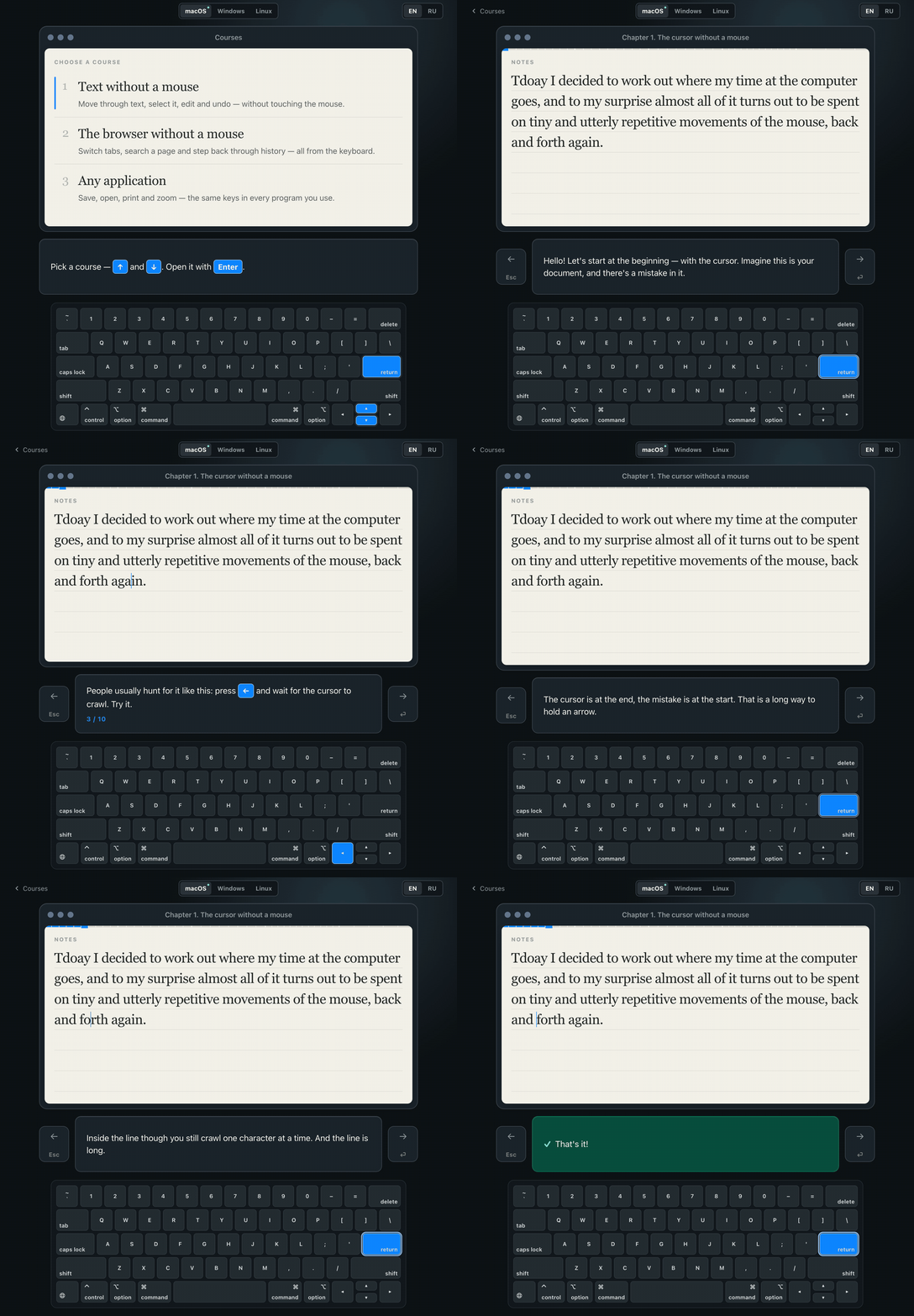
Shortcut Express is a desktop course that teaches keyboard shortcuts to people who still do most things with a mouse. Not a reference sheet and not a quiz: an interactive textbook. Each lesson names a familiar problem, shows the faster way, guides the learner through it with the keys lit up, and only then asks them to repeat it without help.
The problem
Most people know two or three shortcuts — copy, paste, maybe undo — and do everything else with the mouse: reaching for it to move the caret three words back, to select a line, to close a tab. It works, but it is slow, and by the end of the day it is tiring. The reason it stays that way is not laziness. Shortcuts are genuinely hard to remember: a list of forty combinations read once is forgotten by the afternoon, because nothing in it was ever attached to a moment when you needed it.
The solution
Shortcut Express does not try to teach every shortcut. It covers the handful that come up dozens of times a day, and teaches each one at the moment the problem it solves is on the screen. That is a small set, and it pays off immediately — the first chapter alone removes most of the reaching for the mouse.
Shortcut Express seamlessly supports Windows, macOS and Linux.
Course structure
Course one: text without a mouse
A five-chapter foundation course, useful in almost every application — text editors, browsers, office suites, design tools. Every chapter types out its own practice document, and a new shortcut is drilled until the hand has it rather than shown once and dropped.
Chapter 1 — The cursor without a mouse
- recognise the caret and understand where typed text will appear;
- move one character at a time, and jump whole lines with the up and down arrows;
- jump word by word in both directions with
Option+Arrowon macOS,Ctrl+Arrowon Windows and Linux; - close the chapter by reaching a typo in the first word and correcting it.
Chapter 2 — Edges of the line and the document
- move to the beginning and end of a line, and drill both;
- move to the beginning and end of the whole document, and drill both;
- meet the first genuinely different technique rather than a swapped modifier: a combination on macOS, a dedicated
Home/Endkey on Windows and Linux.
Chapter 3 — Selecting text
- learn the one rule — Shift turns any movement already known into a selection;
- select by character, by word, and out to either end of the line;
- erase a selection with one key;
- select the whole document at once, and clear it in the same two moves.
Chapter 4 — Editing and undoing
- swap two words that sit in the wrong order: select, copy, cut, tidy the space left behind, move, paste;
- meet copying before cutting, since cutting is copying that also removes;
- undo and redo, including the one place the platforms genuinely disagree —
Shift+Cmd+ZagainstCtrl+Y; - erase whole words without selecting them first.
Chapter 5 — The workshop
- three faults in one short note and no keys lit up: the learner recalls rather than follows;
- fix a typo, put two words back in order, delete a line that does not belong;
- every task is judged by what the document became, not by which key was pressed.
Course two: the browser without a mouse
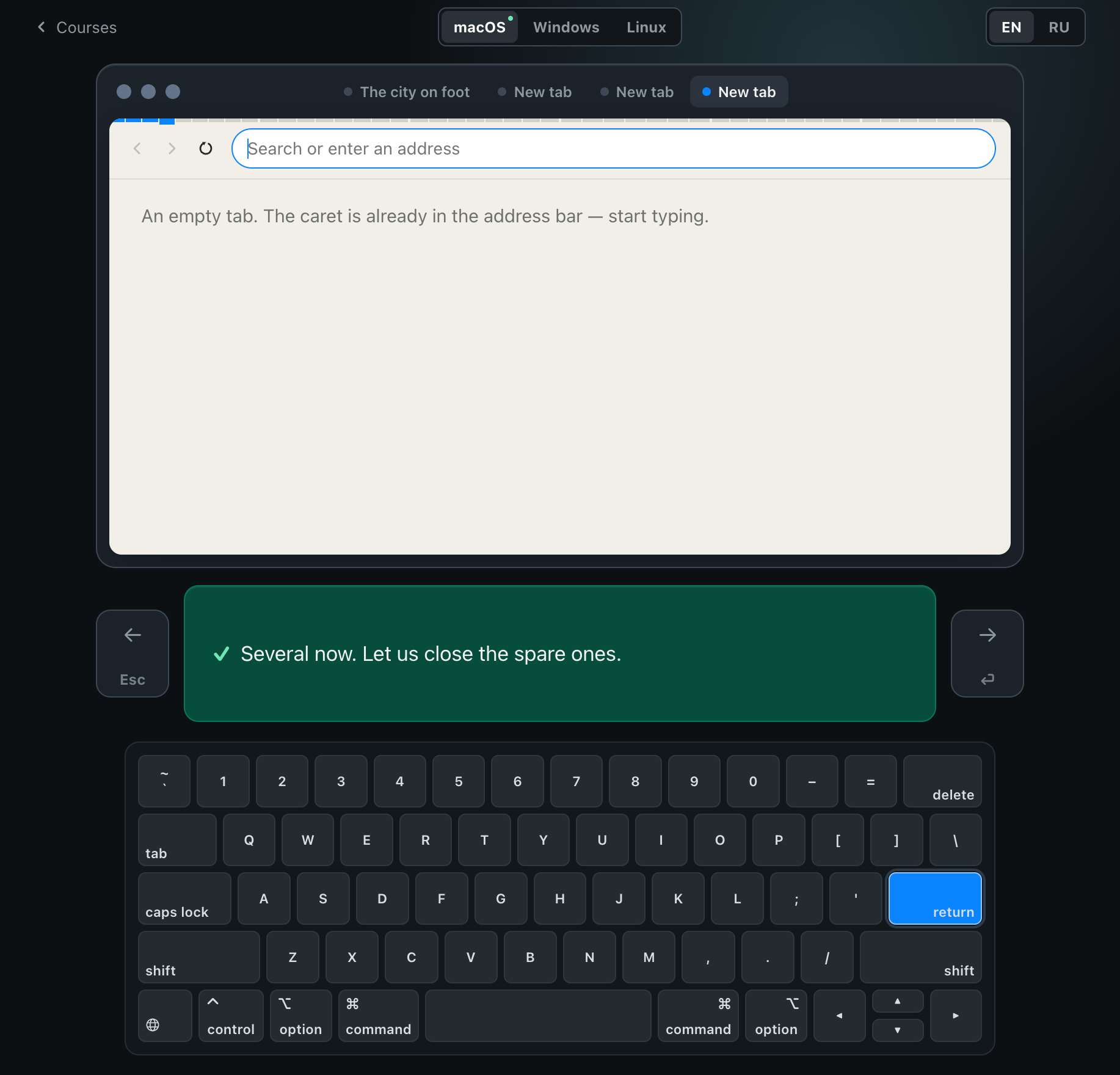
Six chapters, taught on a browser the application draws rather than embeds. A real browser inside the window would answer the shortcuts itself and the learner would never find out which key did it; here every tab that opens and every jump the find bar makes happens because the lesson recognised the keystroke.
Chapter 1 — Tabs
- open a tab, close a tab, and — the one nobody knows — bring back the tab you closed by accident;
- drill opening and closing until the pair is automatic.
Chapter 2 — Moving between tabs
Ctrl+TabandCtrl+Shift+Tab, which are the same on every browser and every system, drilled far enough round the ring to see it wrap;- jump straight to a tab by its number, and to the last tab whatever its number.
Chapter 3 — The address bar
- put the caret in the address bar and find it already selected, so everything the first course taught about typing over a selection applies unchanged;
- open a site by address, and learn the same box searches when you have none.
Chapter 4 — Find on the page
- open find-on-page, watch every match light up and get counted;
- walk forward and back through the matches, then put the bar away.
Chapter 5 — The page and history
- turn the page a screen at a time instead of reaching for the wheel;
- reach the top and the bottom with the very shortcuts the first course used for the ends of a text;
- step back and forward through history, and reload.
Chapter 6 — The workshop
- five tasks, no keys named and no keys lit;
- close a tab and bring it back, find a word, tidy up after yourself, step back through history, jump to the last tab.
Course three: any application
Four chapters on the keys that mean the same thing whatever program is in front of you. Taught on the first course's sheet of paper, inside an application that can save it, open another one and print it — all of it drawn, so every dialog that opens does so because the lesson recognised the keystroke.
Chapter 1 — Saving
- the dot in the title bar, and what it means that it is there;
- save the document, name it, and meet the four keys every dialog is driven by: Tab between fields, Space on a checkbox, Enter to accept, Escape to cancel;
- save again and watch it happen without a dialog, because the file already has a name;
- save a second copy under a different name, then change your mind.
Chapter 2 — New, open, print
- start a new document and open an existing one, walking the file list with the arrows the first course opened with;
- send it to the printer and put the dialog away again;
- close the document with the same key that closed a browser tab;
- quit the application — the one keystroke the app catches instead of obeying, so it can be tried safely.
Chapter 3 — Zoom
- make the text bigger, then smaller, then exactly the size it was;
- the same three keys in the browser, in mail, in an editor, in maps.
Chapter 4 — The workshop
- five tasks, no keys named and no keys lit;
- save under a given name, open a named file, enlarge it, send it to print, and cancel.
Installation
Download the file for your system from the latest release.
Windows
The installer is not signed yet, so SmartScreen says it protected your PC. The button to continue is hidden: choose "More info", then "Run anyway".
Linux
The .deb package suits Debian, Ubuntu, Mint, Pop!_OS and their relatives:
sudo apt install ./Shortcut.Express_*_amd64.deb
The .AppImage runs on any distribution and installs nothing:
chmod +x Shortcut.Express_*.AppImage
./Shortcut.Express_*.AppImage
Technology
Tauri 2 for the desktop shell, React 19 and TypeScript for the lessons, Vite 7 for the build, i18next for the interface. English and Russian are supported; other languages can be added as translation files.
Development
Node.js, npm, Rust, and Tauri's platform dependencies.
npm install
npm run tauri dev
Checks:
npm run build
cd src-tauri && cargo check --locked
npm run dev opens the interface in an ordinary browser, which is convenient but cannot verify native platform and locale behaviour.
Contributors

57 commits
See what people are saying
Similar repos


Languages
TypeScript
78.6%
CSS
20.9%
Interactive desktop course for the most useful keyboard shortcuts on Windows, macOS and Linux. Not another cheatsheet.
2
stars
57
commits
TypeScript
primary language
Sep 14, 2026
updated
README
Shortcut Express
Shortcut Express is a desktop course that teaches keyboard shortcuts to people who still do most things with a mouse. Not a reference sheet and not a quiz: an interactive textbook. Each lesson names a familiar problem, shows the faster way, guides the learner through it with the keys lit up, and only then asks them to repeat it without help.
The problem
Most people know two or three shortcuts — copy, paste, maybe undo — and do everything else with the mouse: reaching for it to move the caret three words back, to select a line, to close a tab. It works, but it is slow, and by the end of the day it is tiring. The reason it stays that way is not laziness. Shortcuts are genuinely hard to remember: a list of forty combinations read once is forgotten by the afternoon, because nothing in it was ever attached to a moment when you needed it.
The solution
Shortcut Express does not try to teach every shortcut. It covers the handful that come up dozens of times a day, and teaches each one at the moment the problem it solves is on the screen. That is a small set, and it pays off immediately — the first chapter alone removes most of the reaching for the mouse.
Shortcut Express seamlessly supports Windows, macOS and Linux.
Course structure
Course one: text without a mouse
A five-chapter foundation course, useful in almost every application — text editors, browsers, office suites, design tools. Every chapter types out its own practice document, and a new shortcut is drilled until the hand has it rather than shown once and dropped.
Chapter 1 — The cursor without a mouse
- recognise the caret and understand where typed text will appear;
- move one character at a time, and jump whole lines with the up and down arrows;
- jump word by word in both directions with
Option+Arrowon macOS,Ctrl+Arrowon Windows and Linux; - close the chapter by reaching a typo in the first word and correcting it.
Chapter 2 — Edges of the line and the document
- move to the beginning and end of a line, and drill both;
- move to the beginning and end of the whole document, and drill both;
- meet the first genuinely different technique rather than a swapped modifier: a combination on macOS, a dedicated
Home/Endkey on Windows and Linux.
Chapter 3 — Selecting text
- learn the one rule — Shift turns any movement already known into a selection;
- select by character, by word, and out to either end of the line;
- erase a selection with one key;
- select the whole document at once, and clear it in the same two moves.
Chapter 4 — Editing and undoing
- swap two words that sit in the wrong order: select, copy, cut, tidy the space left behind, move, paste;
- meet copying before cutting, since cutting is copying that also removes;
- undo and redo, including the one place the platforms genuinely disagree —
Shift+Cmd+ZagainstCtrl+Y; - erase whole words without selecting them first.
Chapter 5 — The workshop
- three faults in one short note and no keys lit up: the learner recalls rather than follows;
- fix a typo, put two words back in order, delete a line that does not belong;
- every task is judged by what the document became, not by which key was pressed.
Course two: the browser without a mouse
Six chapters, taught on a browser the application draws rather than embeds. A real browser inside the window would answer the shortcuts itself and the learner would never find out which key did it; here every tab that opens and every jump the find bar makes happens because the lesson recognised the keystroke.
Chapter 1 — Tabs
- open a tab, close a tab, and — the one nobody knows — bring back the tab you closed by accident;
- drill opening and closing until the pair is automatic.
Chapter 2 — Moving between tabs
Ctrl+TabandCtrl+Shift+Tab, which are the same on every browser and every system, drilled far enough round the ring to see it wrap;- jump straight to a tab by its number, and to the last tab whatever its number.
Chapter 3 — The address bar
- put the caret in the address bar and find it already selected, so everything the first course taught about typing over a selection applies unchanged;
- open a site by address, and learn the same box searches when you have none.
Chapter 4 — Find on the page
- open find-on-page, watch every match light up and get counted;
- walk forward and back through the matches, then put the bar away.
Chapter 5 — The page and history
- turn the page a screen at a time instead of reaching for the wheel;
- reach the top and the bottom with the very shortcuts the first course used for the ends of a text;
- step back and forward through history, and reload.
Chapter 6 — The workshop
- five tasks, no keys named and no keys lit;
- close a tab and bring it back, find a word, tidy up after yourself, step back through history, jump to the last tab.
Course three: any application
Four chapters on the keys that mean the same thing whatever program is in front of you. Taught on the first course's sheet of paper, inside an application that can save it, open another one and print it — all of it drawn, so every dialog that opens does so because the lesson recognised the keystroke.
Chapter 1 — Saving
- the dot in the title bar, and what it means that it is there;
- save the document, name it, and meet the four keys every dialog is driven by: Tab between fields, Space on a checkbox, Enter to accept, Escape to cancel;
- save again and watch it happen without a dialog, because the file already has a name;
- save a second copy under a different name, then change your mind.
Chapter 2 — New, open, print
- start a new document and open an existing one, walking the file list with the arrows the first course opened with;
- send it to the printer and put the dialog away again;
- close the document with the same key that closed a browser tab;
- quit the application — the one keystroke the app catches instead of obeying, so it can be tried safely.
Chapter 3 — Zoom
- make the text bigger, then smaller, then exactly the size it was;
- the same three keys in the browser, in mail, in an editor, in maps.
Chapter 4 — The workshop
- five tasks, no keys named and no keys lit;
- save under a given name, open a named file, enlarge it, send it to print, and cancel.
Installation
Download the file for your system from the latest release.
Windows
The installer is not signed yet, so SmartScreen says it protected your PC. The button to continue is hidden: choose "More info", then "Run anyway".
Linux
The .deb package suits Debian, Ubuntu, Mint, Pop!_OS and their relatives:
sudo apt install ./Shortcut.Express_*_amd64.deb
The .AppImage runs on any distribution and installs nothing:
chmod +x Shortcut.Express_*.AppImage
./Shortcut.Express_*.AppImage
Technology
Tauri 2 for the desktop shell, React 19 and TypeScript for the lessons, Vite 7 for the build, i18next for the interface. English and Russian are supported; other languages can be added as translation files.
Development
Node.js, npm, Rust, and Tauri's platform dependencies.
npm install
npm run tauri dev
Checks:
npm run build
cd src-tauri && cargo check --locked
npm run dev opens the interface in an ordinary browser, which is convenient but cannot verify native platform and locale behaviour.
See what people are saying
Similar repos
Contributors
57 commits
Languages
TypeScript
78.6%
CSS
20.9%