👾 nao is an open source analytics agent. (1) Create context with nao-core cli, (2) deploy nao chat interface for everyone
See the code

🌐 Website · 📚 Documentation · 💬 Slack
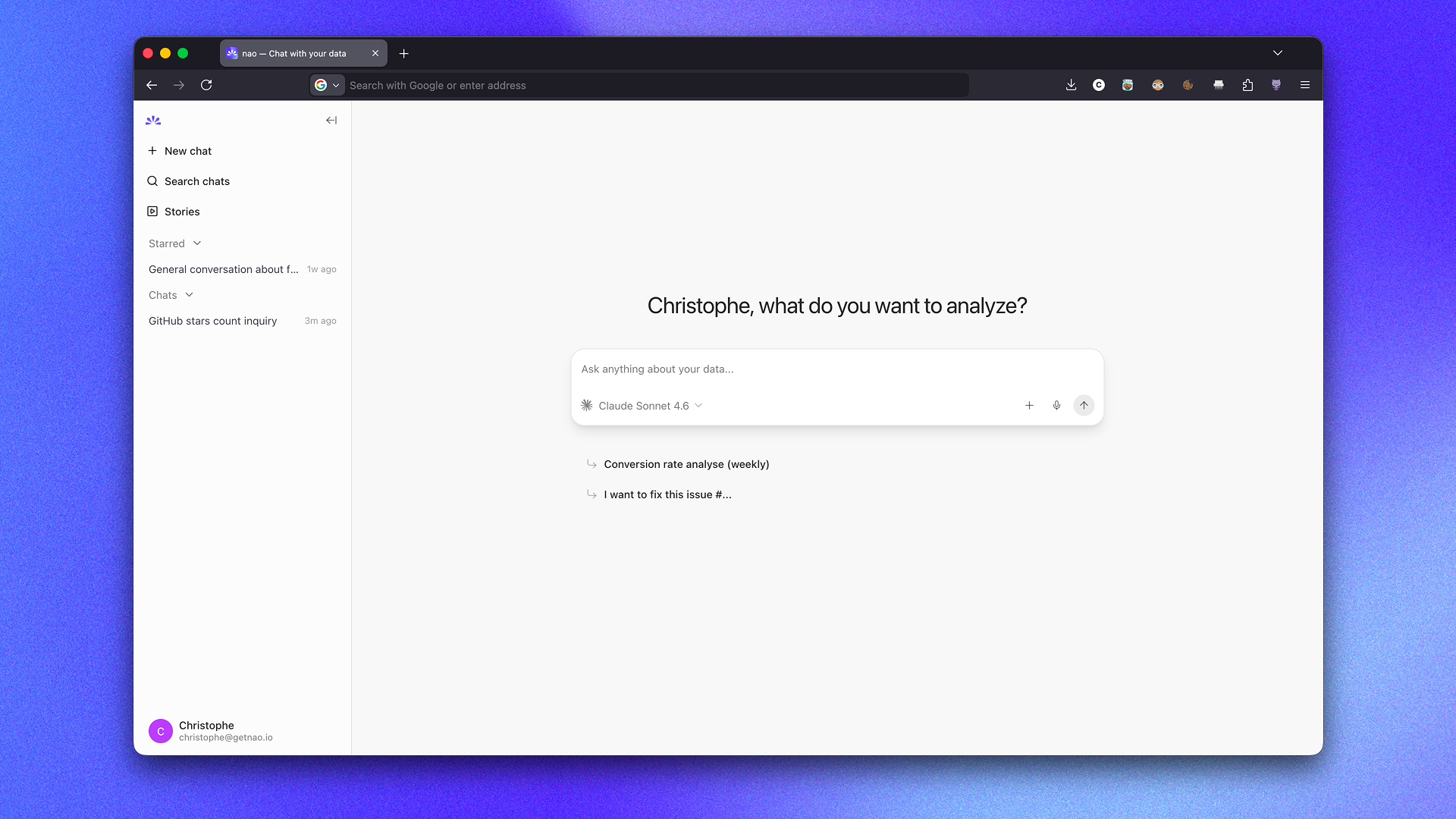
nao is a framework to build and deploy analytics agent.
Create the context of your analytics agent with nao-core cli: data, metadata, modeling, rules, etc.
Deploy a UI for anyone to chat with your agent and run analytics on your data.
For data teams:
For business users:
Step 1: Install nao-core package
pip install nao-core
Step 2: Initialize a nao project
nao init
It will ask you:
💡 You can skip any optional question and configure them later in your nao_config.yaml file.
This will create:
nao_config.yaml configuration fileRULES.md fileStep 3: Verify your setup
cd to the project folder and run:
nao debug
Step 4: Synchronize your context
nao sync
This will populate your context folder with your context files (data, metadata, repos, etc.)
Step 5: Launch the chat and ask questions
nao chat
This will start the nao chat UI. It will open the chat interface in your browser at http://localhost:5005.
From there, you can start asking questions to your agent.
Unit test your agent performance before deploying it to users. First, create a folder tests/ with questions and expected SQL in yaml.
Then, measure agent's performance on examples with nao test command:
nao test
View results in tests panel:
nao test server
nao --help
Usage: nao COMMAND

╭─ Commands ────────────────────────────────────────────────────────────────╮
│ chat         Start the nao chat UI.                                       │
│ init         Initialize a new nao project.                                │
│ sync         Sync context from your context sources (databases, repos)    │
│ test         Measure agent's performance on test examples.                │
│ debug        Debug and troubleshoot your nao setup.                       │
│ --help (-h)  Display this message and exit.                               │
│ --version    Display application version.                                 │
╰───────────────────────────────────────────────────────────────────────────╯
Pull the image from DockerHub:
docker pull getnao/nao:latest
Run nao chat with Docker using the example project bundled in the image:
docker run -d \
  --name nao \
  -p 5005:5005 \
  -e BETTER_AUTH_URL=http://localhost:5005 \
  getnao/nao:latest
Run nao chat with Docker using your local nao project:
docker run -d \
  --name nao \
  -p 5005:5005 \
  -e BETTER_AUTH_URL=http://localhost:5005 \
  -v /path/to/your/nao-project:/app/project \
  -e NAO_DEFAULT_PROJECT_PATH=/app/project \
  getnao/nao:latest
Access the UI at http://localhost:5005 (or at any URL you configured).
See the DockerHub page for more details.
For end-to-end self-hosted deployment (for example on Cloud Run with PostgreSQL), see the Deployment Guide.
Use nao skills to create your nao project and context with your favourite agent.
Install the nao skill pack:
npx skills add getnao/nao
Docs on nao skills: https://docs.getnao.io/nao-agent/context-engineering/skills
See CONTRIBUTING.md for development setup, commands, and guidelines.
Prerequisites:
Run the following commands:
npm run npm:pin
npm install
npm run db:migrate -w apps/backend
Create a .env file at the root of the repository and input environment variables
Minimum variables necessary are:
BETTER_AUTH_SECRET=#run `openssl rand -base64 32` to generate
# Public URL of your app (used for authentication, trusted origins, and Slack redirects)
BETTER_AUTH_URL=http://localhost:3000

# LLM providers
OPENAI_API_KEY=12345678

NAO_DEFAULT_PROJECT_PATH=#path to example folder
Run the following command:
npm run dev
Go to http://localhost:3000 on your browser
nao Labs is a proud Y Combinator company!
This project is licensed under the Apache 2.0 License - see the LICENSE file for details.
120 followers · starred May 2026
103 followers · starred Feb 2026
635 followers · starred Feb 2026
244 followers · starred Feb 2026
👾 nao is an open source analytics agent. (1) Create context with nao-core cli, (2) deploy nao chat interface for everyone
See the code
🌐 Website · 📚 Documentation · 💬 Slack
nao is a framework to build and deploy analytics agent.
Create the context of your analytics agent with nao-core cli: data, metadata, modeling, rules, etc.
Deploy a UI for anyone to chat with your agent and run analytics on your data.
For data teams:
For business users:
Step 1: Install nao-core package
pip install nao-core
Step 2: Initialize a nao project
nao init
It will ask you:
💡 You can skip any optional question and configure them later in your nao_config.yaml file.
This will create:
nao_config.yaml configuration fileRULES.md fileStep 3: Verify your setup
cd to the project folder and run:
nao debug
Step 4: Synchronize your context
nao sync
This will populate your context folder with your context files (data, metadata, repos, etc.)
Step 5: Launch the chat and ask questions
nao chat
This will start the nao chat UI. It will open the chat interface in your browser at http://localhost:5005.
From there, you can start asking questions to your agent.
Unit test your agent performance before deploying it to users. First, create a folder tests/ with questions and expected SQL in yaml.
Then, measure agent's performance on examples with nao test command:
nao test
View results in tests panel:
nao test server
nao --help
Usage: nao COMMAND

╭─ Commands ────────────────────────────────────────────────────────────────╮
│ chat         Start the nao chat UI.                                       │
│ init         Initialize a new nao project.                                │
│ sync         Sync context from your context sources (databases, repos)    │
│ test         Measure agent's performance on test examples.                │
│ debug        Debug and troubleshoot your nao setup.                       │
│ --help (-h)  Display this message and exit.                               │
│ --version    Display application version.                                 │
╰───────────────────────────────────────────────────────────────────────────╯
Pull the image from DockerHub:
docker pull getnao/nao:latest
Run nao chat with Docker using the example project bundled in the image:
docker run -d \
  --name nao \
  -p 5005:5005 \
  -e BETTER_AUTH_URL=http://localhost:5005 \
  getnao/nao:latest
Run nao chat with Docker using your local nao project:
docker run -d \
  --name nao \
  -p 5005:5005 \
  -e BETTER_AUTH_URL=http://localhost:5005 \
  -v /path/to/your/nao-project:/app/project \
  -e NAO_DEFAULT_PROJECT_PATH=/app/project \
  getnao/nao:latest
Access the UI at http://localhost:5005 (or at any URL you configured).
See the DockerHub page for more details.
For end-to-end self-hosted deployment (for example on Cloud Run with PostgreSQL), see the Deployment Guide.
Use nao skills to create your nao project and context with your favourite agent.
Install the nao skill pack:
npx skills add getnao/nao
Docs on nao skills: https://docs.getnao.io/nao-agent/context-engineering/skills
See CONTRIBUTING.md for development setup, commands, and guidelines.
Prerequisites:
Run the following commands:
npm run npm:pin
npm install
npm run db:migrate -w apps/backend
Create a .env file at the root of the repository and input environment variables
Minimum variables necessary are:
BETTER_AUTH_SECRET=#run `openssl rand -base64 32` to generate
# Public URL of your app (used for authentication, trusted origins, and Slack redirects)
BETTER_AUTH_URL=http://localhost:3000

# LLM providers
OPENAI_API_KEY=12345678

NAO_DEFAULT_PROJECT_PATH=#path to example folder
Run the following command:
npm run dev
Go to http://localhost:3000 on your browser
nao Labs is a proud Y Combinator company!
This project is licensed under the Apache 2.0 License - see the LICENSE file for details.
120 followers · starred May 2026
103 followers · starred Feb 2026
635 followers · starred Feb 2026
244 followers · starred Feb 2026