The Future of Data Engineering — A CLI SQL client for the modern data stack, enabling AI-native context engineering for data.
See the codeDatus · Open-Source Data Engineering Agent




Website · Docs · Quick Start · Dosi · Release Notes
English | 简体中文
Datus is the open-source data engineering agent for the modern data stack: one agent that connects your warehouse, catalog, semantic layer, and BI, grounded in an evolvable context engine your team owns.
Datus handles SQL authoring and validation, semantic model and metric construction, and the generation of pipelines, reports, and dashboards. Every run and every correction settles into context, which steadily raises the accuracy of its output. The whole stack stays open and flexible: databases, BI, schedulers, LLMs, and your team's own tools all connect through standard interfaces.
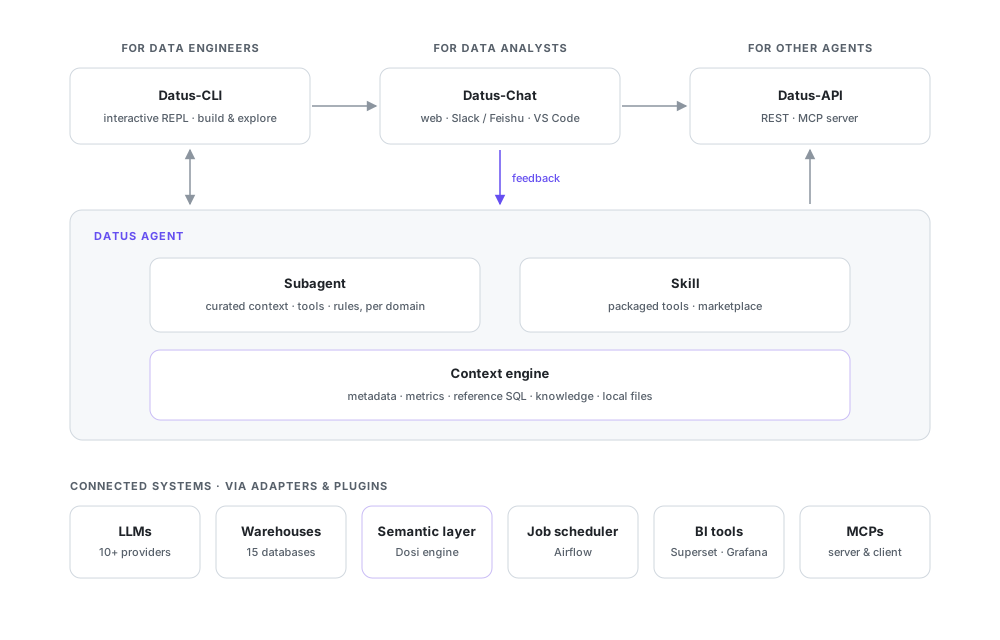
The diagram reads top to bottom: who uses Datus, what the agent is made of, and what it connects to.
datus-plugin.yml manifest declares CLI commands, skills, and prompt context, with per-project activation.Linux x86_64/aarch64 (glibc 2.28+) or Apple Silicon macOS:
curl -fsSL https://raw.githubusercontent.com/datus-ai/datus-agent/main/install.sh | sh
Open a new shell and run datus, then:
/model to configure an LLM/datasource to add a datasource/init (optional) to scan the current projectManual install works too: pip install datus-agent (Python 3.12+ on the supported platforms above); more install options are covered in the Quickstart. When pip spends minutes backtracking through litellm releases (versions up to 0.3.9 are affected), uv resolves the same set in seconds: pip install uv && uv pip install datus-agent --system. The end-to-end tutorial demonstrates the full flow on a sample dataset. Configuration has two levels: a global agent.yml for the main settings, and a per-project .datus/config.yml for overrides such as the active model and default datasource (see the configuration docs).
The examples below use a datasource named demo; create one first with /datasource.
| Interface | Command | Use Case |
|---|---|---|
| CLI (interactive REPL) | datus --datasource demo | Data engineers exploring data, building context, creating subagents |
| Web Chatbot (FastAPI + React) | datus --web --datasource demo | Analysts chatting with subagents via browser (http://localhost:8501) |
| REST API (FastAPI) | datus-api --datasource demo | Applications consuming data services via REST (http://localhost:8000) |
| MCP Server | datus-mcp --datasource demo | MCP-compatible clients (Claude Desktop, Cursor, etc.) |
| IM Gateway | datus-gateway | Analysts talking to subagents in Slack or Feishu/Lark |
| VS Code (Datus Studio) | connects to datus --web | Catalog explorer, chat panel, SQL results & AI charts in the IDE |
Tip: Print mode streams JSON to stdout for scripting and CI:
datus -p "your question" --datasource demo.
Start here to work on Datus itself: install dependencies with uv, then run the PR test harness and format checks before submitting.
uv sync                                                                    # Install dependencies
uv run python ci/run-pr-tests.py upstream/main                             # PR CI harness (no external deps)
uv run ruff format datus/ tests/ && uv run ruff check --fix datus/ tests/  # Lint & format
See CLAUDE.md for development conventions, architecture patterns, and testing rules.
Extending Datus does not require touching its core: declare CLI commands, skills, and prompt context in a datus-plugin.yml manifest, then pack it for distribution and per-project activation. The plugin development guide walks through the full flow.
46 followers · starred Dec 2025
159 followers · starred Dec 2025
168 followers · starred Nov 2025
323 followers · starred Nov 2025
The Future of Data Engineering — A CLI SQL client for the modern data stack, enabling AI-native context engineering for data.
See the codeDatus · Open-Source Data Engineering Agent
Website · Docs · Quick Start · Dosi · Release Notes
English | 简体中文
Datus is the open-source data engineering agent for the modern data stack: one agent that connects your warehouse, catalog, semantic layer, and BI, grounded in an evolvable context engine your team owns.
Datus handles SQL authoring and validation, semantic model and metric construction, and the generation of pipelines, reports, and dashboards. Every run and every correction settles into context, which steadily raises the accuracy of its output. The whole stack stays open and flexible: databases, BI, schedulers, LLMs, and your team's own tools all connect through standard interfaces.
The diagram reads top to bottom: who uses Datus, what the agent is made of, and what it connects to.
datus-plugin.yml manifest declares CLI commands, skills, and prompt context, with per-project activation.Linux x86_64/aarch64 (glibc 2.28+) or Apple Silicon macOS:
curl -fsSL https://raw.githubusercontent.com/datus-ai/datus-agent/main/install.sh | sh
Open a new shell and run datus, then:
/model to configure an LLM/datasource to add a datasource/init (optional) to scan the current projectManual install works too: pip install datus-agent (Python 3.12+ on the supported platforms above); more install options are covered in the Quickstart. When pip spends minutes backtracking through litellm releases (versions up to 0.3.9 are affected), uv resolves the same set in seconds: pip install uv && uv pip install datus-agent --system. The end-to-end tutorial demonstrates the full flow on a sample dataset. Configuration has two levels: a global agent.yml for the main settings, and a per-project .datus/config.yml for overrides such as the active model and default datasource (see the configuration docs).
The examples below use a datasource named demo; create one first with /datasource.
| Interface | Command | Use Case |
|---|---|---|
| CLI (interactive REPL) | datus --datasource demo | Data engineers exploring data, building context, creating subagents |
| Web Chatbot (FastAPI + React) | datus --web --datasource demo | Analysts chatting with subagents via browser (http://localhost:8501) |
| REST API (FastAPI) | datus-api --datasource demo | Applications consuming data services via REST (http://localhost:8000) |
| MCP Server | datus-mcp --datasource demo | MCP-compatible clients (Claude Desktop, Cursor, etc.) |
| IM Gateway | datus-gateway | Analysts talking to subagents in Slack or Feishu/Lark |
| VS Code (Datus Studio) | connects to datus --web | Catalog explorer, chat panel, SQL results & AI charts in the IDE |
Tip: Print mode streams JSON to stdout for scripting and CI:
datus -p "your question" --datasource demo.
Start here to work on Datus itself: install dependencies with uv, then run the PR test harness and format checks before submitting.
uv sync                                                                    # Install dependencies
uv run python ci/run-pr-tests.py upstream/main                             # PR CI harness (no external deps)
uv run ruff format datus/ tests/ && uv run ruff check --fix datus/ tests/  # Lint & format
See CLAUDE.md for development conventions, architecture patterns, and testing rules.
Extending Datus does not require touching its core: declare CLI commands, skills, and prompt context in a datus-plugin.yml manifest, then pack it for distribution and per-project activation. The plugin development guide walks through the full flow.
46 followers · starred Dec 2025
159 followers · starred Dec 2025
168 followers · starred Nov 2025
323 followers · starred Nov 2025



