a cross platfrom Go library to place an icon and menu in the notification area
Go
3,731
209 commits
updated Jul 3, 2024
systray is a cross-platform Go library to place an icon and menu in the notification area.
func main() {
	systray.Run(onReady, onExit)
}

func onReady() {
	systray.SetIcon(icon.Data)
	systray.SetTitle("Awesome App")
	systray.SetTooltip("Pretty awesome超级棒")
	mQuit := systray.AddMenuItem("Quit", "Quit the whole app")

	// Sets the icon of a menu item. Only available on Mac and Windows.
	mQuit.SetIcon(icon.Data)
}

func onExit() {
	// clean up here
}
See  as well as CHANGELOG.
Note: this package requires cgo, so make sure you set CGO_ENABLED=1 before building.
Have go v1.12+ or higher installed? Here's an example to get started on macOS:
git clone https://github.com/getlantern/systray
cd systray/example
env GO111MODULE=on go build
./example
On Windows, you should build like this:
env GO111MODULE=on go build -ldflags "-H=windowsgui"
Now look for Awesome App in your menu bar!
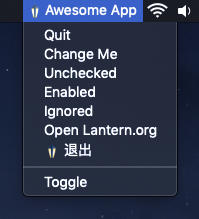
The code under webview_example is to demostrate how it can co-exist with other UI elements. Note that the example doesn't work on macOS versions older than 10.15 Catalina.
gtk3 and libayatana-appindicator3 development headers to be installed. For Debian or Ubuntu, you may install these using:sudo apt-get install gcc libgtk-3-dev libayatana-appindicator3-dev
On Linux Mint, libxapp-dev is also required.
If you need to support the older libappindicator3 library instead, you can pass the build flag legacy_appindicator
when building. For example:
go build -tags=legacy_appindicator
To build webview_example, you also need to install libwebkit2gtk-4.0-dev and remove webview_example/rsrc.syso which is required on Windows.
go build -ldflags -H=windowsgui
On macOS, you will need to create an application bundle to wrap the binary; simply folders with the following minimal structure and assets:
SystrayApp.app/
  Contents/
    Info.plist
    MacOS/
      go-executable
    Resources/
      SystrayApp.icns
When running as an app bundle, you may want to add one or both of the following to your Info.plist:
<!-- avoid having a blurry icon and text -->
	<key>NSHighResolutionCapable</key>
	<string>True</string>

	<!-- avoid showing the app on the Dock -->
	<key>LSUIElement</key>
	<string>1</string>
Consult the Official Apple Documentation here.
On macOS, it's possible to set the underlying
NSStatusItemBehavior
with systray.SetRemovalAllowed(true). When enabled, the user can cmd-drag the
icon off the menu bar.
Overall
Maintained
Code review
Go module
Latest release
Releases this year
(top 24 of 40)
613 followers · starred Mar 2022
401 followers · starred Apr 2019
408 followers · starred Sep 2020
1,247 followers · starred Jan 2019
a cross platfrom Go library to place an icon and menu in the notification area
Go
3,731
209 commits
updated Jul 3, 2024
systray is a cross-platform Go library to place an icon and menu in the notification area.
func main() {
	systray.Run(onReady, onExit)
}

func onReady() {
	systray.SetIcon(icon.Data)
	systray.SetTitle("Awesome App")
	systray.SetTooltip("Pretty awesome超级棒")
	mQuit := systray.AddMenuItem("Quit", "Quit the whole app")

	// Sets the icon of a menu item. Only available on Mac and Windows.
	mQuit.SetIcon(icon.Data)
}

func onExit() {
	// clean up here
}
See as well as CHANGELOG.
Note: this package requires cgo, so make sure you set CGO_ENABLED=1 before building.
Have go v1.12+ or higher installed? Here's an example to get started on macOS:
git clone https://github.com/getlantern/systray
cd systray/example
env GO111MODULE=on go build
./example
On Windows, you should build like this:
env GO111MODULE=on go build -ldflags "-H=windowsgui"
Now look for Awesome App in your menu bar!
The code under webview_example is to demostrate how it can co-exist with other UI elements. Note that the example doesn't work on macOS versions older than 10.15 Catalina.
gtk3 and libayatana-appindicator3 development headers to be installed. For Debian or Ubuntu, you may install these using:sudo apt-get install gcc libgtk-3-dev libayatana-appindicator3-dev
On Linux Mint, libxapp-dev is also required.
If you need to support the older libappindicator3 library instead, you can pass the build flag legacy_appindicator
when building. For example:
go build -tags=legacy_appindicator
To build webview_example, you also need to install libwebkit2gtk-4.0-dev and remove webview_example/rsrc.syso which is required on Windows.
go build -ldflags -H=windowsgui
On macOS, you will need to create an application bundle to wrap the binary; simply folders with the following minimal structure and assets:
SystrayApp.app/
  Contents/
    Info.plist
    MacOS/
      go-executable
    Resources/
      SystrayApp.icns
When running as an app bundle, you may want to add one or both of the following to your Info.plist:
<!-- avoid having a blurry icon and text -->
	<key>NSHighResolutionCapable</key>
	<string>True</string>

	<!-- avoid showing the app on the Dock -->
	<key>LSUIElement</key>
	<string>1</string>
Consult the Official Apple Documentation here.
On macOS, it's possible to set the underlying
NSStatusItemBehavior
with systray.SetRemovalAllowed(true). When enabled, the user can cmd-drag the
icon off the menu bar.
Overall
Maintained
Code review
Go module
Latest release
Releases this year
(top 24 of 40)
613 followers · starred Mar 2022
401 followers · starred Apr 2019
408 followers · starred Sep 2020
1,247 followers · starred Jan 2019