
README
system_tray

A Flutter package that enables support for system tray menu for desktop flutter apps. on Windows, macOS, and Linux.
Install
In the pubspec.yaml of your flutter project, add the following dependency:
dependencies:
  ...
  system_tray: ^2.0.3
In your library add the following import:
import 'package:system_tray/system_tray.dart';
Prerequisite
Linux
sudo apt-get install appindicator3-0.1 libappindicator3-dev
or
// For Ubuntu 22.04 or greater
sudo apt-get install libayatana-appindicator3-dev
Example App
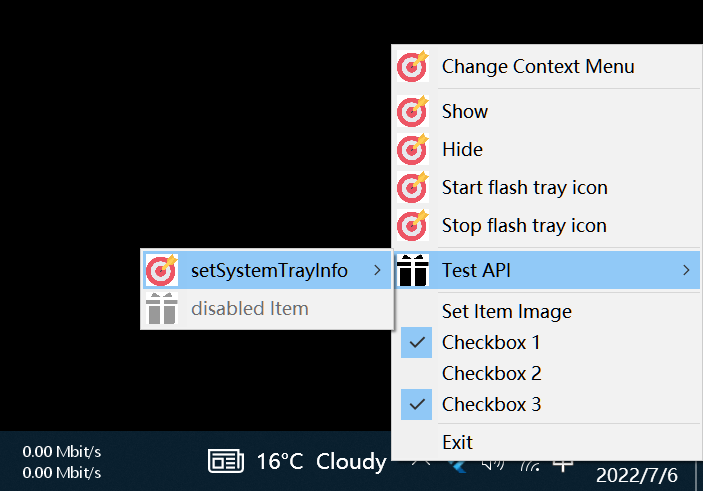
Windows
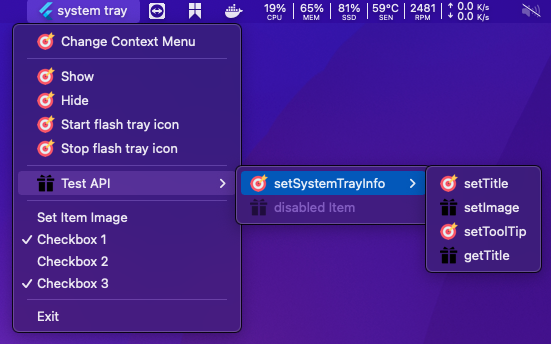
macOS
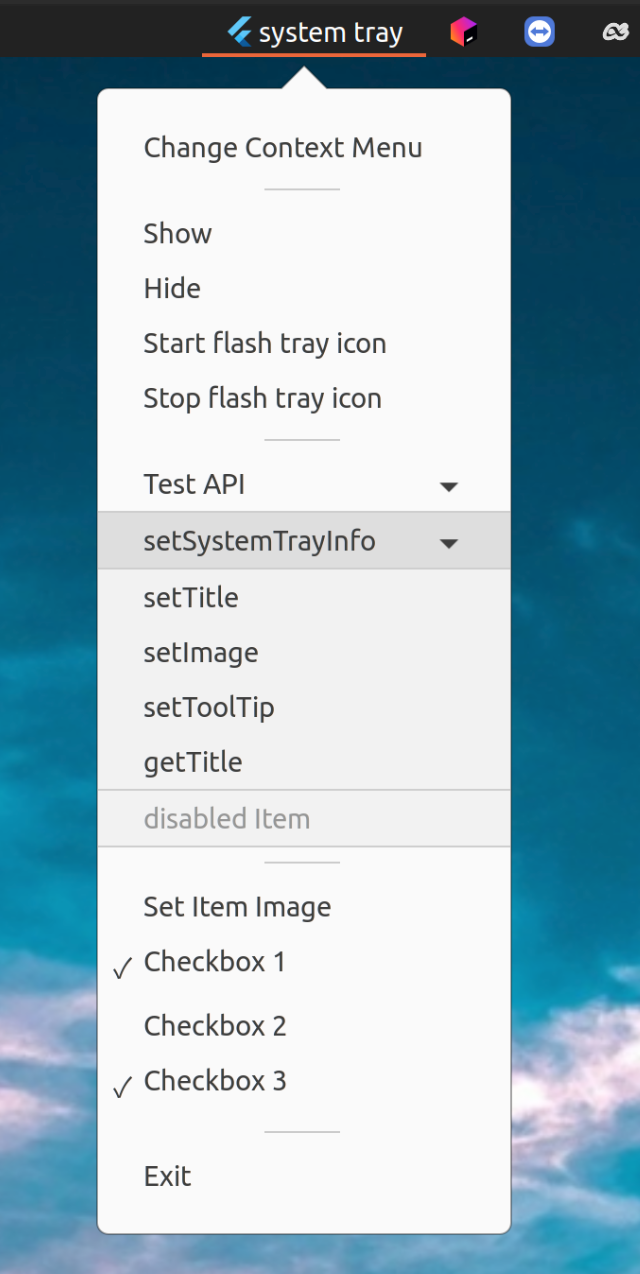
Linux
API
| Method | Description | Windows | macOS | Linux |
|---|---|---|---|---|
| initSystemTray | Initialize system tray | ✔️ | ✔️ | ✔️ |
| setSystemTrayInfo | Modify the tray info |
|
|
|
| setImage | Modify the tray image | ✔️ | ✔️ | ✔️ |
| setTooltip | Modify the tray tooltip | ✔️ | ✔️ | ➖ |
| setTitle / getTitle | Set / Get the tray title | ➖ | ✔️ | ➖ |
| setContextMenu | Set the tray context menu | ✔️ | ✔️ | ✔️ |
| popUpContextMenu | Popup the tray context menu | ✔️ | ✔️ | ➖ |
| destroy | Destroy the tray | ✔️ | ✔️ | ✔️ |
| registerSystemTrayEventHandler | Register system tray event |
|
| ➖ |
Menu
| Type | Description | Windows | macOS | Linux |
|---|---|---|---|---|
| MenuItemLabel | ✔️ | ✔️ | ✔️ | |
| MenuItemCheckbox | ✔️ | ✔️ | ✔️ | |
| SubMenu | ✔️ | ✔️ | ✔️ | |
| MenuSeparator | ✔️ | ✔️ | ✔️ |
Usage
Future<void> initSystemTray() async {
  String path =
      Platform.isWindows ? 'assets/app_icon.ico' : 'assets/app_icon.png';

  final AppWindow appWindow = AppWindow();
  final SystemTray systemTray = SystemTray();

  // We first init the systray menu
  await systemTray.initSystemTray(
    title: "system tray",
    iconPath: path,
  );

  // create context menu
  final Menu menu = Menu();
  await menu.buildFrom([
    MenuItemLabel(label: 'Show', onClicked: (menuItem) => appWindow.show()),
    MenuItemLabel(label: 'Hide', onClicked: (menuItem) => appWindow.hide()),
    MenuItemLabel(label: 'Exit', onClicked: (menuItem) => appWindow.close()),
  ]);

  // set context menu
  await systemTray.setContextMenu(menu);

  // handle system tray event
  systemTray.registerSystemTrayEventHandler((eventName) {
    debugPrint("eventName: $eventName");
    if (eventName == kSystemTrayEventClick) {
       Platform.isWindows ? appWindow.show() : systemTray.popUpContextMenu();
    } else if (eventName == kSystemTrayEventRightClick) {
       Platform.isWindows ? systemTray.popUpContextMenu() : appWindow.show();
    }
  });
}
Additional Resources
Recommended library that supports window control:
Q&A
-
Q: If you encounter the following compilation error
Undefined symbols for architecture x86_64:
  "___gxx_personality_v0", referenced from:
      ...
A: add libc++.tbd
1. open example/macos/Runner.xcodeproj
2. add 'libc++.tbd' to TARGET runner 'Link Binary With Libraries'
Contributors


Similar repos


Languages
C++
60.7%
Dart
16.1%
Swift
11.2%
CMake
9.5%
C
1.4%
Ruby
1.1%
README
system_tray
A Flutter package that enables support for system tray menu for desktop flutter apps. on Windows, macOS, and Linux.
Install
In the pubspec.yaml of your flutter project, add the following dependency:
dependencies:
  ...
  system_tray: ^2.0.3
In your library add the following import:
import 'package:system_tray/system_tray.dart';
Prerequisite
Linux
sudo apt-get install appindicator3-0.1 libappindicator3-dev
or
// For Ubuntu 22.04 or greater
sudo apt-get install libayatana-appindicator3-dev
Example App
Windows
macOS
Linux
API
| Method | Description | Windows | macOS | Linux |
|---|---|---|---|---|
| initSystemTray | Initialize system tray | ✔️ | ✔️ | ✔️ |
| setSystemTrayInfo | Modify the tray info |
|
|
|
| setImage | Modify the tray image | ✔️ | ✔️ | ✔️ |
| setTooltip | Modify the tray tooltip | ✔️ | ✔️ | ➖ |
| setTitle / getTitle | Set / Get the tray title | ➖ | ✔️ | ➖ |
| setContextMenu | Set the tray context menu | ✔️ | ✔️ | ✔️ |
| popUpContextMenu | Popup the tray context menu | ✔️ | ✔️ | ➖ |
| destroy | Destroy the tray | ✔️ | ✔️ | ✔️ |
| registerSystemTrayEventHandler | Register system tray event |
|
| ➖ |
Menu
| Type | Description | Windows | macOS | Linux |
|---|---|---|---|---|
| MenuItemLabel | ✔️ | ✔️ | ✔️ | |
| MenuItemCheckbox | ✔️ | ✔️ | ✔️ | |
| SubMenu | ✔️ | ✔️ | ✔️ | |
| MenuSeparator | ✔️ | ✔️ | ✔️ |
Usage
Future<void> initSystemTray() async {
  String path =
      Platform.isWindows ? 'assets/app_icon.ico' : 'assets/app_icon.png';

  final AppWindow appWindow = AppWindow();
  final SystemTray systemTray = SystemTray();

  // We first init the systray menu
  await systemTray.initSystemTray(
    title: "system tray",
    iconPath: path,
  );

  // create context menu
  final Menu menu = Menu();
  await menu.buildFrom([
    MenuItemLabel(label: 'Show', onClicked: (menuItem) => appWindow.show()),
    MenuItemLabel(label: 'Hide', onClicked: (menuItem) => appWindow.hide()),
    MenuItemLabel(label: 'Exit', onClicked: (menuItem) => appWindow.close()),
  ]);

  // set context menu
  await systemTray.setContextMenu(menu);

  // handle system tray event
  systemTray.registerSystemTrayEventHandler((eventName) {
    debugPrint("eventName: $eventName");
    if (eventName == kSystemTrayEventClick) {
       Platform.isWindows ? appWindow.show() : systemTray.popUpContextMenu();
    } else if (eventName == kSystemTrayEventRightClick) {
       Platform.isWindows ? systemTray.popUpContextMenu() : appWindow.show();
    }
  });
}
Additional Resources
Recommended library that supports window control:
Q&A
-
Q: If you encounter the following compilation error
Undefined symbols for architecture x86_64:
  "___gxx_personality_v0", referenced from:
      ...
A: add libc++.tbd
1. open example/macos/Runner.xcodeproj
2. add 'libc++.tbd' to TARGET runner 'Link Binary With Libraries'
Similar repos
Contributors
Languages
C++
60.7%
Dart
16.1%
Swift
11.2%
CMake
9.5%
C
1.4%
Ruby
1.1%