Declarative cross-platform UI framework for Rust that uses native controls
Rust
79
506 commits
updated Sep 9, 2024

A declarative, cross-platform UI framework for Rust that uses native controls.
| Crate | Description | Version | Docs |
|---|---|---|---|
| nuit | Umbrella crate for the framework |  |  |
| nuit-bridge-adwaita | Adwaita backend (Linux, macOS) |  |  |
| nuit-bridge-swiftui | SwiftUI backend (macOS, iOS) |  |  |
| nuit-core | Core structures and traits |  |  |
| nuit-derive | Derive macros |  |  |
The API takes inspiration from contemporary reactive frameworks like SwiftUI, Xilem and React. A central design goal is to avoid using too much macro magic and instead heavily leverage associated types, traits and generics.
A simple hello world program in Nuit takes only a single line:
nuit::run_app(Text::new("Hello world!"));
For a more elaborate example, check out the section below.
[!IMPORTANT] Nuit is still experimental with a rapidly evolving API. As such, treat this library as a sandbox rather than as a finished product, especially if you intend to write an app with it.
While the SwiftUI backend can be considered the reference implementation of the Nuit API, the Adwaita backend is still in early development and does not cover the full API surface yet.
The library also requires a nightly Rust toolchain due to its use of a number of unstable compiler features:
- impl Trait in type aliases
- associated type defaults
- macro metavariable expressions
letchains- reentrant locks
With
rustupthis can be configured conveniently on a per-directory basisrustup override set nightlyor, as in this repository, automatically with arust-toolchain.toml.
use nuit::{prelude::*, Button, Text, VStack};

#[derive(Bind, Default)]
struct CounterView {
    count: State<i32>,
}

impl View for CounterView {
    type Body = impl View;

    fn body(&self) -> Self::Body {
        let count = self.count.clone();
        VStack::from((
            Text::new(format!("Count: {}", count.get())),
            Button::with_text("Increment", move || {
                count.set(count.get() + 1);
            })
        ))
    }
}

fn main() {
    nuit::run_app(CounterView::default());
}
Running this example with
cargo run --example counter
will launch the app with the platform-specific default backend, e.g. SwiftUI on macOS:
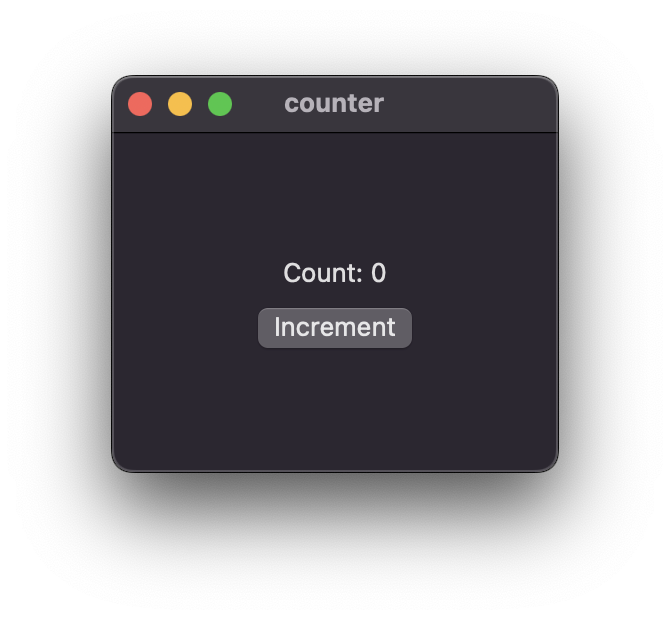
Using the Adwaita/GTK4 backend the app looks as follows:
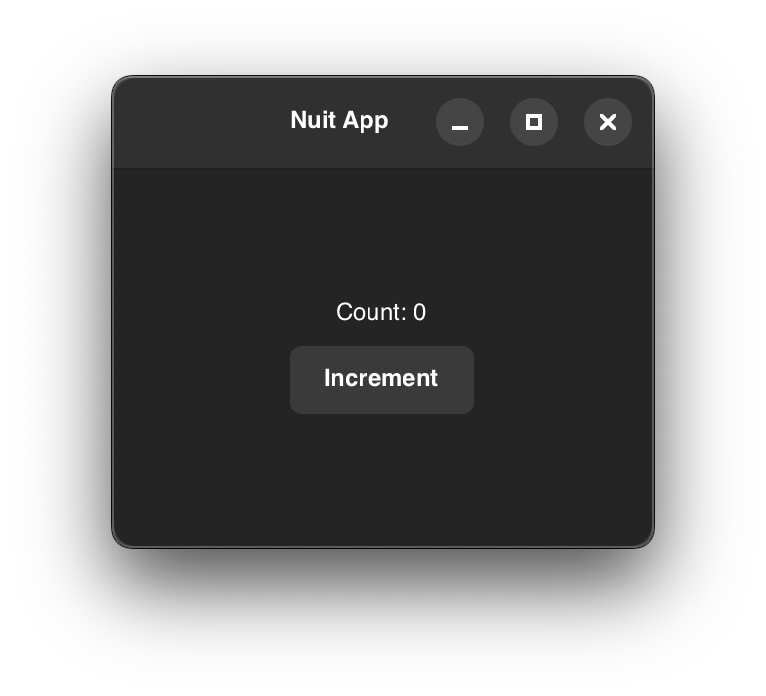
[!TIP] On platforms that support multiple backends (currently only macOS) you can explicitly choose a backend via the
NUIT_BACKENDenvironment variable:NUIT_BACKEND=adwaita cargo run --example counter
444 followers · starred Jan 2025
280 followers · starred Jun 2025
135 followers · starred Jan 2025
Declarative cross-platform UI framework for Rust that uses native controls
Rust
79
506 commits
updated Sep 9, 2024
A declarative, cross-platform UI framework for Rust that uses native controls.
| Crate | Description | Version | Docs |
|---|---|---|---|
| nuit | Umbrella crate for the framework | | |
| nuit-bridge-adwaita | Adwaita backend (Linux, macOS) | | |
| nuit-bridge-swiftui | SwiftUI backend (macOS, iOS) | | |
| nuit-core | Core structures and traits | | |
| nuit-derive | Derive macros | | |
The API takes inspiration from contemporary reactive frameworks like SwiftUI, Xilem and React. A central design goal is to avoid using too much macro magic and instead heavily leverage associated types, traits and generics.
A simple hello world program in Nuit takes only a single line:
nuit::run_app(Text::new("Hello world!"));
For a more elaborate example, check out the section below.
[!IMPORTANT] Nuit is still experimental with a rapidly evolving API. As such, treat this library as a sandbox rather than as a finished product, especially if you intend to write an app with it.
While the SwiftUI backend can be considered the reference implementation of the Nuit API, the Adwaita backend is still in early development and does not cover the full API surface yet.
The library also requires a nightly Rust toolchain due to its use of a number of unstable compiler features:
- impl Trait in type aliases
- associated type defaults
- macro metavariable expressions
letchains- reentrant locks
With
rustupthis can be configured conveniently on a per-directory basisrustup override set nightlyor, as in this repository, automatically with arust-toolchain.toml.
use nuit::{prelude::*, Button, Text, VStack};

#[derive(Bind, Default)]
struct CounterView {
    count: State<i32>,
}

impl View for CounterView {
    type Body = impl View;

    fn body(&self) -> Self::Body {
        let count = self.count.clone();
        VStack::from((
            Text::new(format!("Count: {}", count.get())),
            Button::with_text("Increment", move || {
                count.set(count.get() + 1);
            })
        ))
    }
}

fn main() {
    nuit::run_app(CounterView::default());
}
Running this example with
cargo run --example counter
will launch the app with the platform-specific default backend, e.g. SwiftUI on macOS:
Using the Adwaita/GTK4 backend the app looks as follows:
[!TIP] On platforms that support multiple backends (currently only macOS) you can explicitly choose a backend via the
NUIT_BACKENDenvironment variable:NUIT_BACKEND=adwaita cargo run --example counter
444 followers · starred Jan 2025
280 followers · starred Jun 2025
135 followers · starred Jan 2025



