
Animated pixel art above your Claude Code prompt that reacts while Claude works. Seven scenes, or your own image or GIF. Zero tokens.
TypeScript
0
27 commits
updated Sep 26, 2026
See what people are saying
README
pixelband
Pixel art above your Claude Code prompt that reacts while Claude works: your own image, or an animated scene.
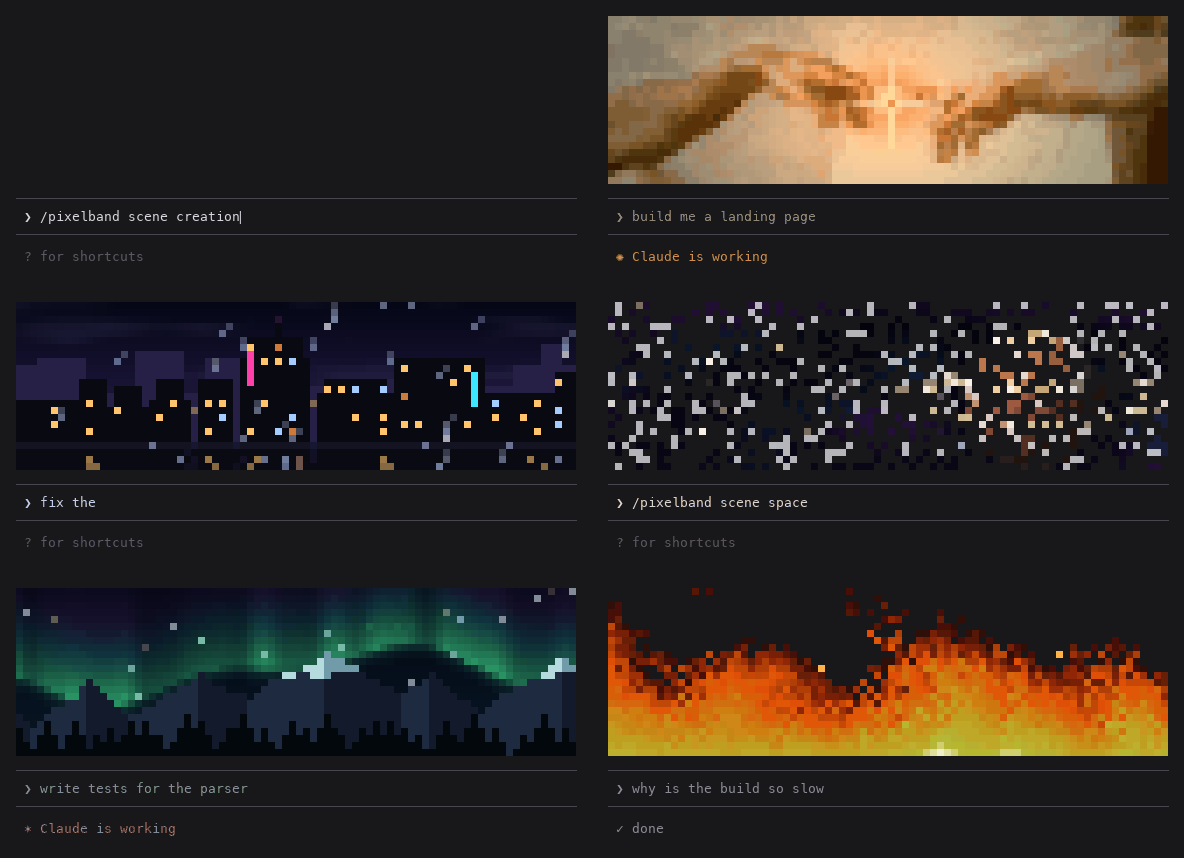
The scenes are pixelband's own output, rendered frame by frame. The prompt box and labels around it are a mock-up, and a real terminal will look slightly different depending on your font.
I spend a lot of hours in Claude Code, and it looks the same for everyone. So I wanted to make mine mine: a picture of my choosing sitting right above the prompt, one that actually knows what's going on. It shimmers while Claude is working, sparkles when a turn finishes, and glitches when something errors. It's a small thing, but it makes the terminal feel like your own space.
Try it
pixelband is a Claude Mod, built on the function hooks Anthropic is shipping for Claude Code. Install it from your shell:
claude plugin marketplace add furqan-khan07/pixelband
claude plugin install pixelband@pixelband
Mods are in preview right now, so start Claude Code with the preview flag:
CLAUDE_CODE_ENABLE_FUNCTION_HOOKS=1 claude
Then, inside Claude Code, type /pixelband to open the menu. Pick a scene, or drag an image into
the menu's image field (your newest downloads and screenshots are listed there too), and choose a
style, size and crop. Every change shows in the band straight away, and Undo changes puts it
all back.
If the menu doesn't respond to keys, press ctrl+x then tab to give it the keyboard. Tab and the arrow keys move around it; Enter picks.
Or skip the menu:
/pixelband scene city
/pixelband set ~/Pictures/cat.jpg
Once mods ship properly, the flag won't be needed.
Commands
/pixelband | open the menu |
/pixelband scene <name> | an animated scene: creation, city (rain on a city at night), space, aurora, fire, matrix or aquarium |
/pixelband set <image> | use an image: PNG, JPEG, HEIC (iPhone photos), WebP and more. Animated GIFs play, looping, with their own timing |
/pixelband set <image> --here | use it for this project only, so each repo gets its own banner |
/pixelband style <name> | original, gameboy, pico8, mono or sepia |
/pixelband move <up|down|left|right> [steps] | aim the crop at the part of the picture you want |
/pixelband zoom <in|out|reset> | zoom the crop in, up to 4x |
/pixelband layout <auto|banner|fit> | banner fills the whole width with a crop; fit shows the whole image, centred. auto picks fit for logos and sprites with see-through backgrounds |
/pixelband size <rows|auto> | how tall the band is, 2 to 24 rows (two pixels per row). auto, the default, is about a quarter of the terminal |
/pixelband working <slim|hide|full> | what the band does while Claude works: shrink to a 3-row strip (the default), hide, or stay full size |
/pixelband colors <n> | palette size for the original style, 2 to 32. Fewer colours reads more like pixel art |
/pixelband pixels <standard|fine> | fine puts four pixels in each character instead of two: sharper, and the right shape if pixels look wide (fonts with tight line spacing, like some macOS Terminal profiles). Saved per terminal app, since it depends on the font |
/pixelband colormode <auto|full|256> | full colour, or the 256 colours older terminals show; auto detects macOS Terminal |
/pixelband animate on|off | pause a scene or GIF (it still reacts to Claude) |
/pixelband on / off | show or hide it |
/pixelband clear [--here] | forget the image |
/pixelband demo <mood> | play working, done, error or intro on demand (good for screenshots) |
Staying out of the way
While Claude is working, the band slides down to a slim 3-row strip so the output gets the room,
and it grows back when the turn finishes. The effects still play in the strip. /pixelband working hide hides it during turns instead, and /pixelband working full keeps it full size. Claude Code
also lets you collapse the band any time with its [-] mark or ctrl+x ctrl+a.
Scenes
Each scene is drawn from code, not a video, and reacts to what Claude is doing:
| scene | idle | while Claude works | when it finishes |
|---|---|---|---|
creation | Michelangelo's hands, a spark glowing in the gap between the fingertips | the room dims and the spark blazes and crackles | light floods out in a ring |
city | rain, windows switching on and off, flickering neon, a wet street | the rain gets heavier | lightning |
space | stars drifting past a ringed planet | warp speed | a hyperspace flash |
aurora | northern lights over mountains and pines | brighter, faster curtains | a bright pulse |
fire | low flames over your terminal's own background | the flames climb | a burst of embers |
matrix | green code raining down | it pours | a bright scan sweeps down |
aquarium | fish, bubbles and swaying weed | the fish dart about and the bubbles pick up | a burst of bubbles |
creation is built from Michelangelo's The Creation of Adam (c. 1511), which is in the public
domain, via Wikimedia Commons.
The plugin ships only a small 256-colour strip of the arms, made by tools/make_creation.py.
The styles work on scenes too, so /pixelband scene city plus /pixelband style gameboy is a
four-green rainy city.
Why pixel art and not the actual photo?
Because terminals are bad at photos. Real pixels only show up in a couple of terminals (Kitty and
Ghostty); everywhere else, even a full-width band is only about 100×24 pixels, and a photo shrunk that far
just looks like a smudge. So pixelband leans into it on purpose: it crops the image to the band's
shape (you choose which part with move and zoom), gives the colours a bit of punch, and cuts
it down to a small palette, so every block looks deliberate. The retro styles go further and map
the image onto a fixed palette with ordered dithering, the way a Game Boy or PICO-8 game would.
Each terminal cell shows two stacked pixels (the ▀ character in one colour over a background in
another), or four with /pixelband pixels fine (quarter-block characters, two colours per cell).
See-through parts of a PNG or GIF let your terminal's background show through, so logos and
sprites blend right in.
How it works
- Everything runs locally. Nothing is uploaded anywhere.
- No dependencies. Mods run in a sandbox with no image decoders, no compression APIs and no WebAssembly, so pixelband decodes PNG itself (including the zlib decompression) in plain TypeScript.
- GIFs are decoded in the mod too, frames and timing and all, since macOS's
sipsonly returns a GIF's first frame. Frames are shrunk as they're read, long GIFs keep every second or third frame, and the loop is stored as one shared palette so it fits in Claude Code's store. - Photos go through your OS. For JPEG, HEIC, WebP and friends it asks macOS's built-in
sips(or ImageMagick on Linux) to convert and shrink the image first, so a 20 MB iPhone photo never gets pulled through the mod. - The animation is cheap. A timer swaps just the pixel grid 12 times a second, so nothing else
in Claude Code redraws. With a still image, the timer only runs while an effect plays; a scene or
GIF keeps it running (
/pixelband animate offstops it).
claude plugin validate lists everything a mod touches, and for pixelband that's:
hooks: session.start, turn.start, turn.complete, ui.render{component=AbovePrompt},
       ui.render{component=Pane, requestId=pixelband}, command.run{command=pixelband}
calls: $.clock.after, $.clock.every, $.command.register, $.env.get, $.fs.list, $.fs.read, $.fs.stat,
       $.process.run, $.session.root, $.store.delete, $.store.get, $.store.set, $.ui.blit, $.ui.close,
       $.ui.invalidate, $.ui.open, $.ui.panes, $.ui.resolve
env reads: COLORTERM, HOME, TERM_PROGRAM, TMPDIR
$.process.run is only ever sips, magick/convert (to convert a photo), split (to read a
GIF over 4 MB in pieces, since Claude Code reads at most 4 MB at once) and rm (to delete the
temporary files those make). $.fs.list and $.fs.stat only look at Downloads,
Desktop and Pictures, to list your newest images in the menu.
Limitations
- Mods are in preview. Anthropic says the API may change between releases, so pixelband might break on an update until mods ship for real.
- Non-PNG images need
sipsor ImageMagick. Every Mac hassips; on Linux, install ImageMagick or use a PNG. - Colours are best in a true-colour terminal (iTerm2, Ghostty, kitty, WezTerm, VS Code, and
macOS Terminal from macOS 26). Older macOS Terminal only shows 256 colours; pixelband spots it and
picks from those 256 itself, keeping hues that plain rounding would turn grey, but dark night
skies still come out greyer than they should.
/pixelband colormode full|256|autooverrides the detection. Through tmux, enable true colour there too. - Only your own turns animate it. Subagents working in the background don't.
Development
To hack on it, clone the repo and load it straight from the folder:
git clone https://github.com/furqan-khan07/pixelband
CLAUDE_CODE_ENABLE_FUNCTION_HOOKS=1 claude --plugin-dir ./pixelband
tools/validate.sh                                          # what the engine will load and refuse
CLAUDE_CODE_ENABLE_FUNCTION_HOOKS=1 claude plugin test .   # the test suite
python tests/fixtures/make_fixtures.py                     # rebuild the image fixtures (needs Pillow)
python tests/fixtures/make_gif_fixtures.py                 # rebuild the GIF fixtures
The PNG, BMP and GIF decoders are checked pixel for pixel against Pillow, and against real sips
output for the photo path. For editor types, run /plugin-types inside Claude Code once. It writes the
declarations to .claude/types, which tsconfig.json picks up.
If pixelband makes your terminal a bit nicer, a star on the repo helps other people find it.
MIT licensed, see LICENSE.
Contributors

27 commits
Similar repos


Languages
TypeScript
99.2%
Animated pixel art above your Claude Code prompt that reacts while Claude works. Seven scenes, or your own image or GIF. Zero tokens.
TypeScript
0
27 commits
updated Sep 26, 2026
See what people are saying
README
pixelband
Pixel art above your Claude Code prompt that reacts while Claude works: your own image, or an animated scene.
The scenes are pixelband's own output, rendered frame by frame. The prompt box and labels around it are a mock-up, and a real terminal will look slightly different depending on your font.
I spend a lot of hours in Claude Code, and it looks the same for everyone. So I wanted to make mine mine: a picture of my choosing sitting right above the prompt, one that actually knows what's going on. It shimmers while Claude is working, sparkles when a turn finishes, and glitches when something errors. It's a small thing, but it makes the terminal feel like your own space.
Try it
pixelband is a Claude Mod, built on the function hooks Anthropic is shipping for Claude Code. Install it from your shell:
claude plugin marketplace add furqan-khan07/pixelband
claude plugin install pixelband@pixelband
Mods are in preview right now, so start Claude Code with the preview flag:
CLAUDE_CODE_ENABLE_FUNCTION_HOOKS=1 claude
Then, inside Claude Code, type /pixelband to open the menu. Pick a scene, or drag an image into
the menu's image field (your newest downloads and screenshots are listed there too), and choose a
style, size and crop. Every change shows in the band straight away, and Undo changes puts it
all back.
If the menu doesn't respond to keys, press ctrl+x then tab to give it the keyboard. Tab and the arrow keys move around it; Enter picks.
Or skip the menu:
/pixelband scene city
/pixelband set ~/Pictures/cat.jpg
Once mods ship properly, the flag won't be needed.
Commands
/pixelband | open the menu |
/pixelband scene <name> | an animated scene: creation, city (rain on a city at night), space, aurora, fire, matrix or aquarium |
/pixelband set <image> | use an image: PNG, JPEG, HEIC (iPhone photos), WebP and more. Animated GIFs play, looping, with their own timing |
/pixelband set <image> --here | use it for this project only, so each repo gets its own banner |
/pixelband style <name> | original, gameboy, pico8, mono or sepia |
/pixelband move <up|down|left|right> [steps] | aim the crop at the part of the picture you want |
/pixelband zoom <in|out|reset> | zoom the crop in, up to 4x |
/pixelband layout <auto|banner|fit> | banner fills the whole width with a crop; fit shows the whole image, centred. auto picks fit for logos and sprites with see-through backgrounds |
/pixelband size <rows|auto> | how tall the band is, 2 to 24 rows (two pixels per row). auto, the default, is about a quarter of the terminal |
/pixelband working <slim|hide|full> | what the band does while Claude works: shrink to a 3-row strip (the default), hide, or stay full size |
/pixelband colors <n> | palette size for the original style, 2 to 32. Fewer colours reads more like pixel art |
/pixelband pixels <standard|fine> | fine puts four pixels in each character instead of two: sharper, and the right shape if pixels look wide (fonts with tight line spacing, like some macOS Terminal profiles). Saved per terminal app, since it depends on the font |
/pixelband colormode <auto|full|256> | full colour, or the 256 colours older terminals show; auto detects macOS Terminal |
/pixelband animate on|off | pause a scene or GIF (it still reacts to Claude) |
/pixelband on / off | show or hide it |
/pixelband clear [--here] | forget the image |
/pixelband demo <mood> | play working, done, error or intro on demand (good for screenshots) |
Staying out of the way
While Claude is working, the band slides down to a slim 3-row strip so the output gets the room,
and it grows back when the turn finishes. The effects still play in the strip. /pixelband working hide hides it during turns instead, and /pixelband working full keeps it full size. Claude Code
also lets you collapse the band any time with its [-] mark or ctrl+x ctrl+a.
Scenes
Each scene is drawn from code, not a video, and reacts to what Claude is doing:
| scene | idle | while Claude works | when it finishes |
|---|---|---|---|
creation | Michelangelo's hands, a spark glowing in the gap between the fingertips | the room dims and the spark blazes and crackles | light floods out in a ring |
city | rain, windows switching on and off, flickering neon, a wet street | the rain gets heavier | lightning |
space | stars drifting past a ringed planet | warp speed | a hyperspace flash |
aurora | northern lights over mountains and pines | brighter, faster curtains | a bright pulse |
fire | low flames over your terminal's own background | the flames climb | a burst of embers |
matrix | green code raining down | it pours | a bright scan sweeps down |
aquarium | fish, bubbles and swaying weed | the fish dart about and the bubbles pick up | a burst of bubbles |
creation is built from Michelangelo's The Creation of Adam (c. 1511), which is in the public
domain, via Wikimedia Commons.
The plugin ships only a small 256-colour strip of the arms, made by tools/make_creation.py.
The styles work on scenes too, so /pixelband scene city plus /pixelband style gameboy is a
four-green rainy city.
Why pixel art and not the actual photo?
Because terminals are bad at photos. Real pixels only show up in a couple of terminals (Kitty and
Ghostty); everywhere else, even a full-width band is only about 100×24 pixels, and a photo shrunk that far
just looks like a smudge. So pixelband leans into it on purpose: it crops the image to the band's
shape (you choose which part with move and zoom), gives the colours a bit of punch, and cuts
it down to a small palette, so every block looks deliberate. The retro styles go further and map
the image onto a fixed palette with ordered dithering, the way a Game Boy or PICO-8 game would.
Each terminal cell shows two stacked pixels (the ▀ character in one colour over a background in
another), or four with /pixelband pixels fine (quarter-block characters, two colours per cell).
See-through parts of a PNG or GIF let your terminal's background show through, so logos and
sprites blend right in.
How it works
- Everything runs locally. Nothing is uploaded anywhere.
- No dependencies. Mods run in a sandbox with no image decoders, no compression APIs and no WebAssembly, so pixelband decodes PNG itself (including the zlib decompression) in plain TypeScript.
- GIFs are decoded in the mod too, frames and timing and all, since macOS's
sipsonly returns a GIF's first frame. Frames are shrunk as they're read, long GIFs keep every second or third frame, and the loop is stored as one shared palette so it fits in Claude Code's store. - Photos go through your OS. For JPEG, HEIC, WebP and friends it asks macOS's built-in
sips(or ImageMagick on Linux) to convert and shrink the image first, so a 20 MB iPhone photo never gets pulled through the mod. - The animation is cheap. A timer swaps just the pixel grid 12 times a second, so nothing else
in Claude Code redraws. With a still image, the timer only runs while an effect plays; a scene or
GIF keeps it running (
/pixelband animate offstops it).
claude plugin validate lists everything a mod touches, and for pixelband that's:
hooks: session.start, turn.start, turn.complete, ui.render{component=AbovePrompt},
       ui.render{component=Pane, requestId=pixelband}, command.run{command=pixelband}
calls: $.clock.after, $.clock.every, $.command.register, $.env.get, $.fs.list, $.fs.read, $.fs.stat,
       $.process.run, $.session.root, $.store.delete, $.store.get, $.store.set, $.ui.blit, $.ui.close,
       $.ui.invalidate, $.ui.open, $.ui.panes, $.ui.resolve
env reads: COLORTERM, HOME, TERM_PROGRAM, TMPDIR
$.process.run is only ever sips, magick/convert (to convert a photo), split (to read a
GIF over 4 MB in pieces, since Claude Code reads at most 4 MB at once) and rm (to delete the
temporary files those make). $.fs.list and $.fs.stat only look at Downloads,
Desktop and Pictures, to list your newest images in the menu.
Limitations
- Mods are in preview. Anthropic says the API may change between releases, so pixelband might break on an update until mods ship for real.
- Non-PNG images need
sipsor ImageMagick. Every Mac hassips; on Linux, install ImageMagick or use a PNG. - Colours are best in a true-colour terminal (iTerm2, Ghostty, kitty, WezTerm, VS Code, and
macOS Terminal from macOS 26). Older macOS Terminal only shows 256 colours; pixelband spots it and
picks from those 256 itself, keeping hues that plain rounding would turn grey, but dark night
skies still come out greyer than they should.
/pixelband colormode full|256|autooverrides the detection. Through tmux, enable true colour there too. - Only your own turns animate it. Subagents working in the background don't.
Development
To hack on it, clone the repo and load it straight from the folder:
git clone https://github.com/furqan-khan07/pixelband
CLAUDE_CODE_ENABLE_FUNCTION_HOOKS=1 claude --plugin-dir ./pixelband
tools/validate.sh                                          # what the engine will load and refuse
CLAUDE_CODE_ENABLE_FUNCTION_HOOKS=1 claude plugin test .   # the test suite
python tests/fixtures/make_fixtures.py                     # rebuild the image fixtures (needs Pillow)
python tests/fixtures/make_gif_fixtures.py                 # rebuild the GIF fixtures
The PNG, BMP and GIF decoders are checked pixel for pixel against Pillow, and against real sips
output for the photo path. For editor types, run /plugin-types inside Claude Code once. It writes the
declarations to .claude/types, which tsconfig.json picks up.
If pixelband makes your terminal a bit nicer, a star on the repo helps other people find it.
MIT licensed, see LICENSE.
Similar repos
Contributors
27 commits
Languages
TypeScript
99.2%