
Turn reference images into pixel-art game assets,for indie game developers.
Python
3
29 commits
updated Sep 16, 2026
README
Picxel
English · 中文
Turn reference images into pixel-art game assets.



Picxel helps indie game developers redraw references as recognizable game assets. GPT interprets the subject and directs the redraw; local algorithms turn the result into a precise pixel grid. Developed and tested primarily with GPT-6 Astra in Codex.
Export transparent 32×32, 64×64 or 128×128 PNGs, with up to 16 colors per sprite. Use single-image reveal previews or batches of up to 20 images, in an English or Chinese panel.
Demo
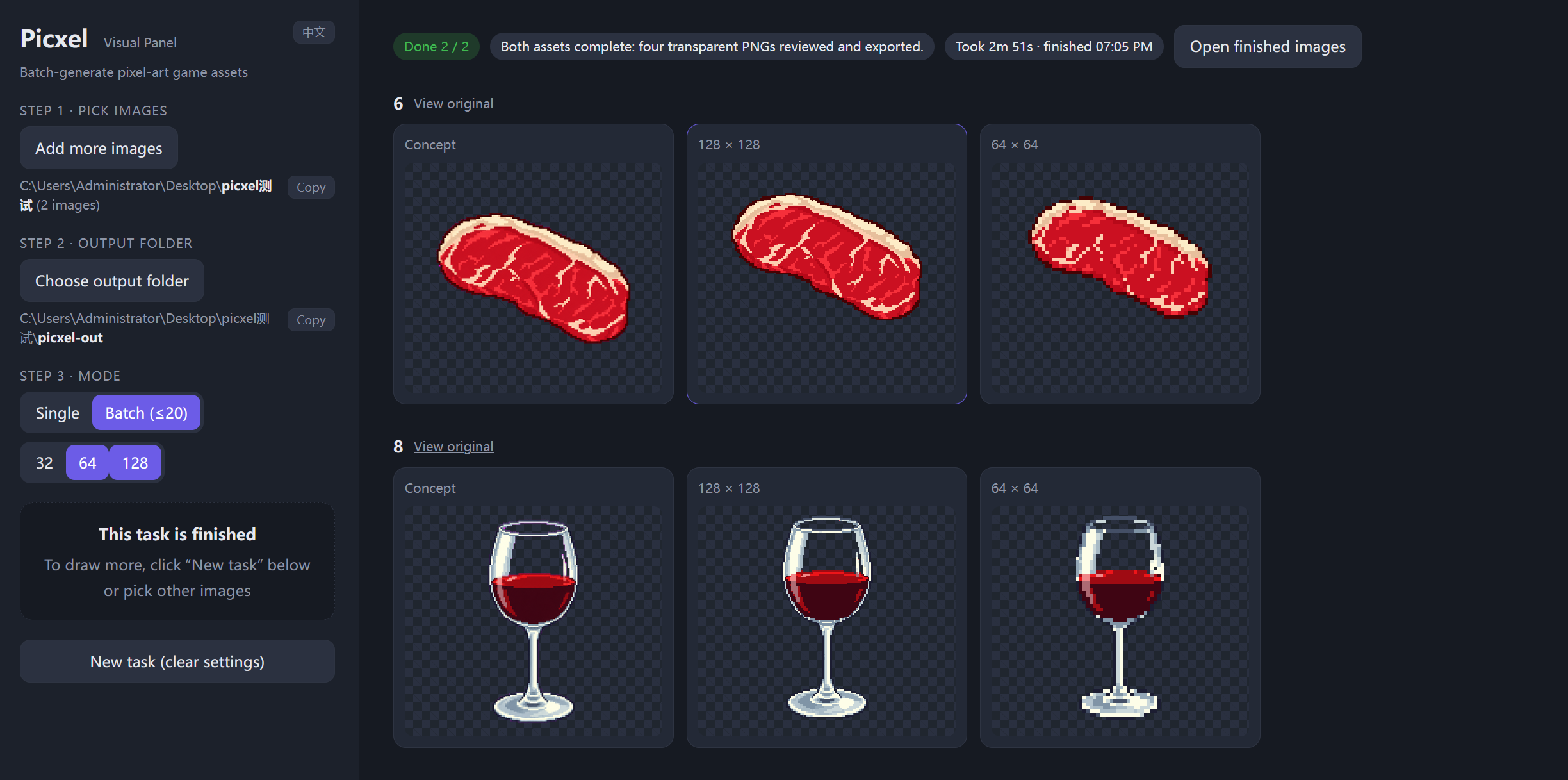
Watch the demo · 2:47 — From reference selection to transparent PNGs: a horse, followed by a two-image batch. Includes English subtitles and narration.
Get started
You need a Codex session with image-generation tools and Python 3.10+. Picxel uses that session's tools and quota; it does not require a separate API key.
- Ask Codex: “Install Picxel from https://github.com/See-Sol-Lab/Picxel and follow its SKILL.md to complete setup.” It should install the skill through the host's skill installer, prepare dependencies and show the panel.
- Once installed, ask for your assets: “Use $picxel to turn these references into game sprites.” Picxel's first step is to prepare and open the panel automatically. You do not need a separate request to open it.
- Choose images, an output folder and sizes; say “Start with the panel settings.” If you already supplied those choices in chat, the assistant can fill them in for you.
Click Open finished images to collect the concepts and PNGs. A batch uses one source folder; add images together or one at a time. Installing files alone does not run an idle assistant: setup or an asset request activates the workflow.
Already downloaded the repository? Open its folder in Codex and ask to create pixel-art assets; the project instructions route the assistant to the same workflow. If a newly installed skill is not listed, restart the Codex session. See Codex skill discovery.
How it works
flowchart LR
    A[Reference images] --> B[Read and plan]
    B --> C[Image-tool redraw]
    C --> D[Palette and pixel grid]
    D --> E[Review and touch up]
    E --> F[Transparent PNGs]
The skill coordinates the work. The image-processing code and targeted drawing rules improve specific stages:
| Stage | What Picxel improves |
|---|---|
| Before redrawing | A short keep/drop plan protects identity, pose and important details. Regional simplification reduces distracting texture when a preparation image is needed. |
| Background removal | Preserves real alpha. With an explicitly chosen key color, removes that background and narrowly cleans matching edge spill while protecting dark outlines. |
| Palette selection | Counts source colors at full resolution and compares perceived color differences in Oklab. Important regions get more weight; transparent pixels and uncertain edges get less. Selected colors come from the image. |
| Pixel conversion | Pads the visible silhouette and snaps colors before voting within each grid cell. Similar shades vote together; transparent coverage is counted separately, reducing broken shapes and color noise. |
| Local cleanup and faces | Merges close-colored specks while retaining high-contrast details. For complex faces, the assistant checks gaze and expression and applies constrained eye/mouth patches only when needed; eyebrows remain intact. |
| Efficient finishing | One concept and palette serve all requested sizes. Shared decoding and a combined review sheet reduce repeated work; only observed defects are repaired. |
Face interpretation is the assistant's visual judgment, not an automatic face detector. Grid alignment experiments are not enabled. You decide whether the final art fits your game.
Details: assistant workflow · technical specification · optional ComfyUI import/export nodes.
Feedback and contributions
Issues and PRs are welcome. Include reproduction steps, target sizes and comparison images you can share publicly.
Project code is licensed under GPL-3.0-only. Generated images do not become GPL-covered merely because you use this tool; commercial use still depends on the rights to your inputs and the image provider's terms.
Copyright © 2026 See-Sol-Lab contributors.
Contributors

29 commits
See what people are saying
Similar repos



Languages
Python
81.8%
HTML
16.8%
JavaScript
1.5%
Turn reference images into pixel-art game assets,for indie game developers.
Python
3
29 commits
updated Sep 16, 2026
README
Picxel
English · 中文
Turn reference images into pixel-art game assets.
Picxel helps indie game developers redraw references as recognizable game assets. GPT interprets the subject and directs the redraw; local algorithms turn the result into a precise pixel grid. Developed and tested primarily with GPT-6 Astra in Codex.
Export transparent 32×32, 64×64 or 128×128 PNGs, with up to 16 colors per sprite. Use single-image reveal previews or batches of up to 20 images, in an English or Chinese panel.
Demo
Watch the demo · 2:47 — From reference selection to transparent PNGs: a horse, followed by a two-image batch. Includes English subtitles and narration.
Get started
You need a Codex session with image-generation tools and Python 3.10+. Picxel uses that session's tools and quota; it does not require a separate API key.
- Ask Codex: “Install Picxel from https://github.com/See-Sol-Lab/Picxel and follow its SKILL.md to complete setup.” It should install the skill through the host's skill installer, prepare dependencies and show the panel.
- Once installed, ask for your assets: “Use $picxel to turn these references into game sprites.” Picxel's first step is to prepare and open the panel automatically. You do not need a separate request to open it.
- Choose images, an output folder and sizes; say “Start with the panel settings.” If you already supplied those choices in chat, the assistant can fill them in for you.
Click Open finished images to collect the concepts and PNGs. A batch uses one source folder; add images together or one at a time. Installing files alone does not run an idle assistant: setup or an asset request activates the workflow.
Already downloaded the repository? Open its folder in Codex and ask to create pixel-art assets; the project instructions route the assistant to the same workflow. If a newly installed skill is not listed, restart the Codex session. See Codex skill discovery.
How it works
flowchart LR
    A[Reference images] --> B[Read and plan]
    B --> C[Image-tool redraw]
    C --> D[Palette and pixel grid]
    D --> E[Review and touch up]
    E --> F[Transparent PNGs]
The skill coordinates the work. The image-processing code and targeted drawing rules improve specific stages:
| Stage | What Picxel improves |
|---|---|
| Before redrawing | A short keep/drop plan protects identity, pose and important details. Regional simplification reduces distracting texture when a preparation image is needed. |
| Background removal | Preserves real alpha. With an explicitly chosen key color, removes that background and narrowly cleans matching edge spill while protecting dark outlines. |
| Palette selection | Counts source colors at full resolution and compares perceived color differences in Oklab. Important regions get more weight; transparent pixels and uncertain edges get less. Selected colors come from the image. |
| Pixel conversion | Pads the visible silhouette and snaps colors before voting within each grid cell. Similar shades vote together; transparent coverage is counted separately, reducing broken shapes and color noise. |
| Local cleanup and faces | Merges close-colored specks while retaining high-contrast details. For complex faces, the assistant checks gaze and expression and applies constrained eye/mouth patches only when needed; eyebrows remain intact. |
| Efficient finishing | One concept and palette serve all requested sizes. Shared decoding and a combined review sheet reduce repeated work; only observed defects are repaired. |
Face interpretation is the assistant's visual judgment, not an automatic face detector. Grid alignment experiments are not enabled. You decide whether the final art fits your game.
Details: assistant workflow · technical specification · optional ComfyUI import/export nodes.
Feedback and contributions
Issues and PRs are welcome. Include reproduction steps, target sizes and comparison images you can share publicly.
Project code is licensed under GPL-3.0-only. Generated images do not become GPL-covered merely because you use this tool; commercial use still depends on the rights to your inputs and the image provider's terms.
Copyright © 2026 See-Sol-Lab contributors.
See what people are saying
Similar repos
Contributors
29 commits
Languages
Python
81.8%
HTML
16.8%
JavaScript
1.5%