
QR code generator for text terminals (ANSI color, Unicode, Sixel)
Go
405
84 commits
updated May 12, 2026
README
QR code generator for text terminals
- SPDX-FileCopyrightText: 2014-2026 SATOH Fumiyasu @ OSSTech Corp., Japan
- SPDX-License-Identifier: MIT
- Development home: https://github.com/fumiyas/qrc
- Author's home: https://fumiyas.github.io/
What's this?
This program generates QR codes in
ANSI colors,
Sixel or
Unicode Block Elements
format for
text terminals, e.g., console, xterm (with -ti 340 option to enable Sixel),
mlterm,
Windows command prompt and so on.
Use case
You can transfer data to smartphones with a QR code reader application from your terminal.
Usage
qrc program takes a text from command-line argument or standard
input (if no command-line argument) and encodes it to a QR code.
$ qrc --help
...
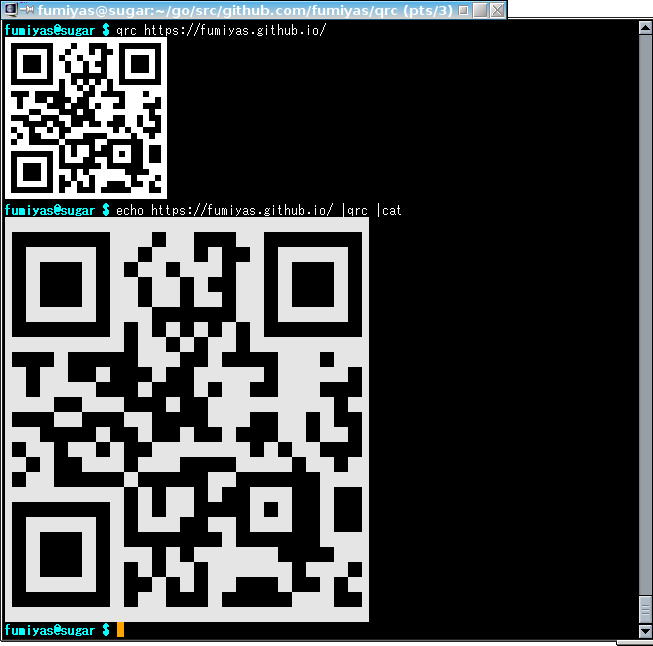
$ qrc https://fumiyas.github.io/
...
$ qrc 'WIFI:S:Our-ssid;T:WPA;P:secret;;'
...
You can get a QR code in Sixel graphics if the standard output is a terminal and it supports Sixel.
Download
Binary files are here for Linux, macOS and Windows:
Build from source codes
Install the latest released version of qrc directly with go install:
$ go install github.com/fumiyas/qrc/cmd/qrc@latest
Or, build from a local clone:
$ git clone https://github.com/fumiyas/qrc.git
$ cd qrc
$ make build       # build the qrc binary in the working tree
$ make test        # run unit tests
$ make vet         # run go vet
$ make cross       # cross-compile for Linux, macOS and Windows
TODO
- Add the following options:
--ansi-color-scheme <ansi|windows>--foreground-color R:G:B--background-color R:G:B--margin-color R:G:B
- Timeout for tty.GetDeviceAttributes1()
Contributors
- Hayaki Saito (@saitoha)
Similar products
- Go
- JavaScript (Node)
- Ruby
Contributors

84 commits
Similar repos


Languages
Go
98.4%
Makefile
1.6%
QR code generator for text terminals (ANSI color, Unicode, Sixel)
Go
405
84 commits
updated May 12, 2026
README
QR code generator for text terminals
- SPDX-FileCopyrightText: 2014-2026 SATOH Fumiyasu @ OSSTech Corp., Japan
- SPDX-License-Identifier: MIT
- Development home: https://github.com/fumiyas/qrc
- Author's home: https://fumiyas.github.io/
What's this?
This program generates QR codes in
ANSI colors,
Sixel or
Unicode Block Elements
format for
text terminals, e.g., console, xterm (with -ti 340 option to enable Sixel),
mlterm,
Windows command prompt and so on.
Use case
You can transfer data to smartphones with a QR code reader application from your terminal.
Usage
qrc program takes a text from command-line argument or standard
input (if no command-line argument) and encodes it to a QR code.
$ qrc --help
...
$ qrc https://fumiyas.github.io/
...
$ qrc 'WIFI:S:Our-ssid;T:WPA;P:secret;;'
...
You can get a QR code in Sixel graphics if the standard output is a terminal and it supports Sixel.
Download
Binary files are here for Linux, macOS and Windows:
Build from source codes
Install the latest released version of qrc directly with go install:
$ go install github.com/fumiyas/qrc/cmd/qrc@latest
Or, build from a local clone:
$ git clone https://github.com/fumiyas/qrc.git
$ cd qrc
$ make build       # build the qrc binary in the working tree
$ make test        # run unit tests
$ make vet         # run go vet
$ make cross       # cross-compile for Linux, macOS and Windows
TODO
- Add the following options:
--ansi-color-scheme <ansi|windows>--foreground-color R:G:B--background-color R:G:B--margin-color R:G:B
- Timeout for tty.GetDeviceAttributes1()
Contributors
- Hayaki Saito (@saitoha)
Similar products
- Go
- JavaScript (Node)
- Ruby
Similar repos
Contributors
84 commits
Languages
Go
98.4%
Makefile
1.6%