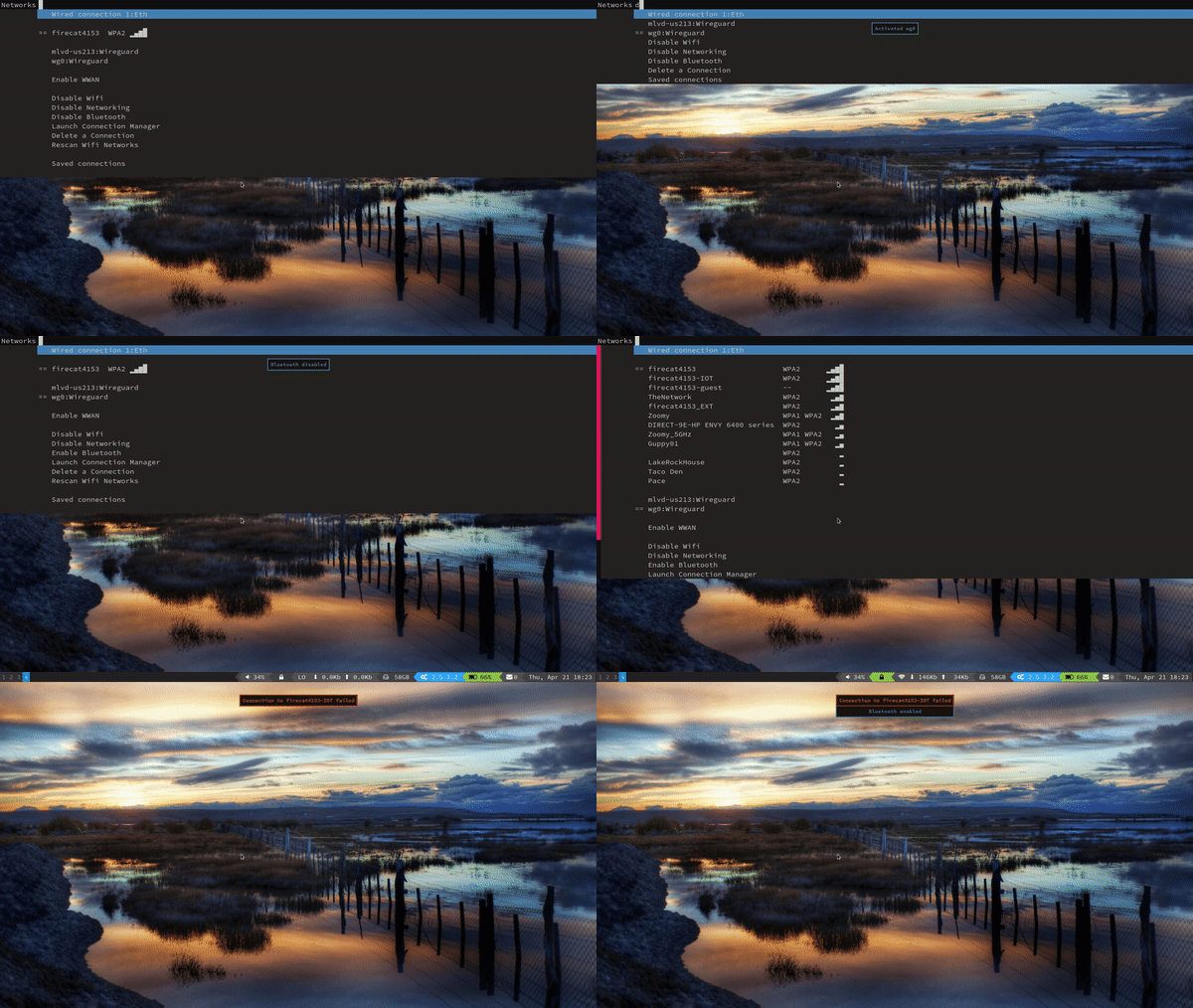
Manage NetworkManager connections with supported launchers instead of nm-applet.
Copy script somewhere into $PATH
Archlinux: Arch Packages
Gentoo: Woomy Overlay
Nix: Nix Packages
Run ./networkmanager_dmenu in your terminal to generate the config file.
./networkmanager_dmenu in your terminal to generate the config file.
Checks for installed launchers and terminals and prompts for selection. The
generated config file will be created at:
~/.config/networkmanager-dmenu/config.ini--config /path/to/config.iniNM_DMENU_CONFIG=/path/to/config.ini networkmanager_dmenudmenu_command
with the desired options, including things like -i for case insensitivity.
See config.ini.example for examples.
% is used in the config, it must be entered as %%.
See config.ini.example.[dmenu_passphrase] section of config.ini will set the normal foreground and
background colors to be the same to obscure the passphrase. The Suckless
password patch -P option is supported if that patch is installed. Rofi,
Wofi and Bemenu will use their respective flags for passphrase entry.show_pass to run nmcli dev wifi show-password in a terminal.
This may take some experimentation to determine what will work for your
terminal.list_saved = True under
[dmenu] in config.ini. If set to False, saved connections are still
accessible under a "Saved connections" sub-menu.If bluez is installed and the bluetooth service is running, no further action is needed.
If not, the user needs to have access to /dev/rfkill. On some distros
(e.g. Archlinux), /dev/rfkill belongs to a group such as rfkill. In this
case, ensure $USER belongs to that group. For other distros (e.g. Fedora),
you can use udev to ensure /dev/rfkill belongs to a group. For example,
create /etc/udev/rules.d/10-rfkill.rules:
KERNEL=="rfkill", GROUP="wheel", MODE="0664"
and then ensure $USER belongs to the wheel group.
| Section | Key | Default | Notes |
|---|---|---|---|
[dmenu] | compact | False | |
dmenu_command | dmenu | Command can include arguments | |
list_saved | False | ||
pinentry | None | ||
active_chars | == | Prefix of active connection | |
highlight | False | Only applicable to rofi / wofi | |
highlight_fg | None | Only applicable to wofi | |
highlight_bg | None | Only applicable to wofi | |
highlight_bold | True | Only applicable to wofi | |
prompt | Networks | ||
wifi_chars | None | String of 4 unicode characters | |
wifi_icons | None | String of icon characters | |
format | (depends on compact) | Python-style format string | |
[pinentry] | description | Get network password | |
prompt | Password: | ||
[dmenu_passphrase] | obscure | False | |
obscure_color | #222222 | Only applicable to dmenu | |
show_pass | See config.ini.example | CLI to run nmcli d wifi show-password | |
[editor] | gui_if_available | True | |
gui | nm-connection-editor | ||
terminal | xterm | Can include terminal arguments | |
[nmdm] | rescan_delay | 5 | Adjust delay in re-opening nmdm following rescan |
show_notifications | True | Set to False to disable notify-send messages | |
notification_timeout | 5 | Seconds a notify-send message stays on screen |
networkmanager_dmenu [-h] [-V] [--config CONFIG_PATH] <menu args>
nmcli device wifi hotspot ifname wlp0s20f3 ssid testing password pass123456 band a
nmcli connection up hotspot (or use networkmanager_dmenu to enable)
nmcli device wifi show-password
This may not work for your setup. Linux-wifi-hotspot is an option if straight NetworkManager WiFi sharing doesn't work for you. Unfortunately, these hotspots cannot be managed with networkmanager_dmenu.
uwsm app -- networkmanager_dmenusystemd --user service.The version is documented as __version__ in the script.
nix develop provides a shell with the needed dependencies on Nix or NixOS.
make release VERSION=x.y.z opens $EDITOR prefilled with one bullet per
commit since the last tag, creates an annotated tag, then prints the push
command. Github action in place to create a release for each tag push.
342 followers · starred Jul 2019
148 followers · starred Jun 2018
78 followers · starred Oct 2018
2,400 followers · starred Mar 2017
Manage NetworkManager connections with supported launchers instead of nm-applet.
Copy script somewhere into $PATH
Archlinux: Arch Packages
Gentoo: Woomy Overlay
Nix: Nix Packages
Run ./networkmanager_dmenu in your terminal to generate the config file.
./networkmanager_dmenu in your terminal to generate the config file.
Checks for installed launchers and terminals and prompts for selection. The
generated config file will be created at:
~/.config/networkmanager-dmenu/config.ini--config /path/to/config.iniNM_DMENU_CONFIG=/path/to/config.ini networkmanager_dmenudmenu_command
with the desired options, including things like -i for case insensitivity.
See config.ini.example for examples.
% is used in the config, it must be entered as %%.
See config.ini.example.[dmenu_passphrase] section of config.ini will set the normal foreground and
background colors to be the same to obscure the passphrase. The Suckless
password patch -P option is supported if that patch is installed. Rofi,
Wofi and Bemenu will use their respective flags for passphrase entry.show_pass to run nmcli dev wifi show-password in a terminal.
This may take some experimentation to determine what will work for your
terminal.list_saved = True under
[dmenu] in config.ini. If set to False, saved connections are still
accessible under a "Saved connections" sub-menu.If bluez is installed and the bluetooth service is running, no further action is needed.
If not, the user needs to have access to /dev/rfkill. On some distros
(e.g. Archlinux), /dev/rfkill belongs to a group such as rfkill. In this
case, ensure $USER belongs to that group. For other distros (e.g. Fedora),
you can use udev to ensure /dev/rfkill belongs to a group. For example,
create /etc/udev/rules.d/10-rfkill.rules:
KERNEL=="rfkill", GROUP="wheel", MODE="0664"
and then ensure $USER belongs to the wheel group.
| Section | Key | Default | Notes |
|---|---|---|---|
[dmenu] | compact | False | |
dmenu_command | dmenu | Command can include arguments | |
list_saved | False | ||
pinentry | None | ||
active_chars | == | Prefix of active connection | |
highlight | False | Only applicable to rofi / wofi | |
highlight_fg | None | Only applicable to wofi | |
highlight_bg | None | Only applicable to wofi | |
highlight_bold | True | Only applicable to wofi | |
prompt | Networks | ||
wifi_chars | None | String of 4 unicode characters | |
wifi_icons | None | String of icon characters | |
format | (depends on compact) | Python-style format string | |
[pinentry] | description | Get network password | |
prompt | Password: | ||
[dmenu_passphrase] | obscure | False | |
obscure_color | #222222 | Only applicable to dmenu | |
show_pass | See config.ini.example | CLI to run nmcli d wifi show-password | |
[editor] | gui_if_available | True | |
gui | nm-connection-editor | ||
terminal | xterm | Can include terminal arguments | |
[nmdm] | rescan_delay | 5 | Adjust delay in re-opening nmdm following rescan |
show_notifications | True | Set to False to disable notify-send messages | |
notification_timeout | 5 | Seconds a notify-send message stays on screen |
networkmanager_dmenu [-h] [-V] [--config CONFIG_PATH] <menu args>
nmcli device wifi hotspot ifname wlp0s20f3 ssid testing password pass123456 band a
nmcli connection up hotspot (or use networkmanager_dmenu to enable)
nmcli device wifi show-password
This may not work for your setup. Linux-wifi-hotspot is an option if straight NetworkManager WiFi sharing doesn't work for you. Unfortunately, these hotspots cannot be managed with networkmanager_dmenu.
uwsm app -- networkmanager_dmenusystemd --user service.The version is documented as __version__ in the script.
nix develop provides a shell with the needed dependencies on Nix or NixOS.
make release VERSION=x.y.z opens $EDITOR prefilled with one bullet per
commit since the last tag, creates an annotated tag, then prints the push
command. Github action in place to create a release for each tag push.
342 followers · starred Jul 2019
148 followers · starred Jun 2018
78 followers · starred Oct 2018
2,400 followers · starred Mar 2017