
README
bzmenu


About
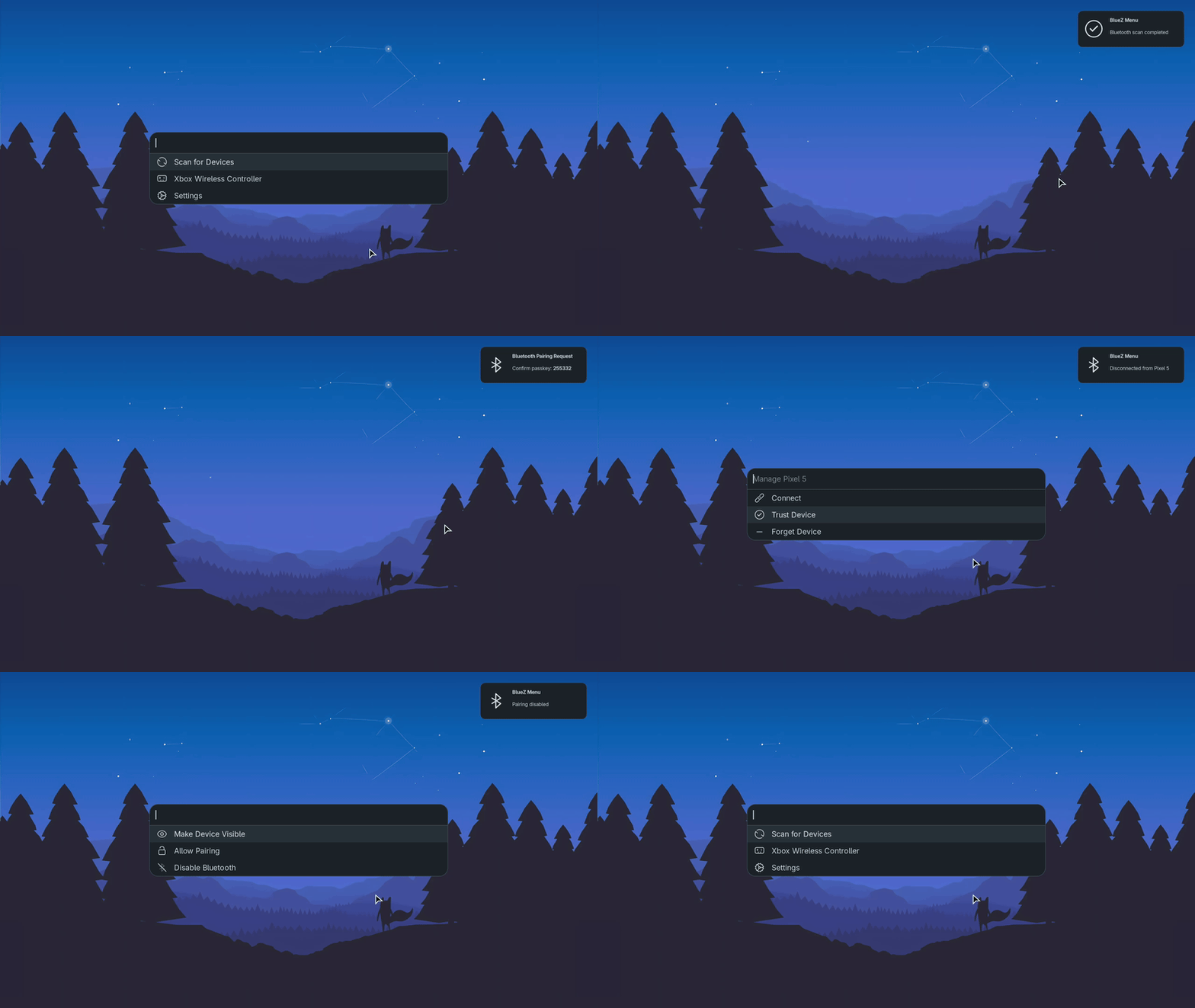
bzmenu (BlueZ Menu) manages Bluetooth through your launcher of choice.
Dependencies
Build
Rust(includescargo)pkg-config– For detecting required librariesdbus– For D-Bus integration headers
Runtime
bluetoothd– BlueZ daemondbus– For communicating withbluetoothd- A launcher with
stdinmode support - Notification daemon – For pairing confirmations and other system notifications (e.g.
dunst,fnott, included with DEs or can be installed manually)
Optional
- NerdFonts – For font-based icons (default mode)
- XDG icon theme – For image-based icons (used with
-i xdg, included with DEs or can be installed manually)
Compatibility
| Launcher | Font Icons | XDG Icons | Notes |
|---|---|---|---|
| Fuzzel | ✓ | ✓ | XDG icons supported since v1.13.0 |
| Rofi | ✓ | ⧖ | XDG icon support pending via PR #2122 |
| dmenu | ✓ | ✗ | No XDG icon support |
| bemenu | ✓ | ✗ | No XDG icon support |
| Custom (stdin) | ✓ | ? | Depends on launcher implementation |
[!TIP] If your preferred launcher isn't directly supported, use
custommode with appropriate command flags.
Installation
Build from source
Run the following commands:
git clone https://github.com/e-tho/bzmenu
cd bzmenu
cargo build --release
An executable file will be generated at target/release/bzmenu, which you can then copy to a directory in your $PATH.
Nix
Install from nixpkgs:
{ pkgs, ... }:
{
  environment.systemPackages = [ pkgs.bzmenu ];
}
Alternative: Install from flake
Add flake as an input:
inputs.bzmenu.url = "github:e-tho/bzmenu";
Install from flake:
{ inputs, ... }:
{
  environment.systemPackages = [ inputs.bzmenu.packages.${pkgs.system}.default ];
}
Alpine Linux
Install from the testing repository:
apk add bzmenu
Arch Linux
Install from AUR with your favorite helper:
paru -S bzmenu # or bzmenu-git
Gentoo Linux
Install from GURU repository:
eselect repository enable guru
emaint sync -r guru
emerge --ask net-wireless/bzmenu
Usage
Supported launchers
Specify an application using -l or --launcher flag.
bzmenu -l fuzzel
Custom launchers
Specify custom as the launcher and set your command using the --launcher-command flag. Ensure your launcher supports stdin mode, and that it is properly configured in the command.
bzmenu -l custom --launcher-command "my_custom_launcher --flag"
Prompt and Placeholder support
Use {hint} as the value for the relevant flag in your command; it will be substituted with the appropriate text as needed.
bzmenu -l custom --launcher-command "my_custom_launcher --placeholder-flag '{hint}'" # or --prompt-flag '{hint}:'
Example to enable all features
This example demonstrates enabling all available features in custom mode with fuzzel.
bzmenu -l custom --launcher-command "fuzzel -d --placeholder '{hint}'"
Available Options
| Flag | Description | Supported Values | Default Value |
|---|---|---|---|
-l, --launcher | Specify the launcher to use (required). | dmenu, rofi, fuzzel, bemenu, custom | None |
--launcher-command | Specify the command to use when custom launcher is set. | Any valid shell command | None |
-i, --icon | Specify the icon type to use. | font, xdg | font |
-s, --spaces | Specify icon to text space count (font icons only). | Any positive integer | 1 |
--scan-duration | Specify the duration of device discovery in seconds. | Any positive integer | 10 |
--interactive | Stay in menus after actions and return to previous menu on escape. | N/A | false |
Contributing
Please see CONTRIBUTING.md for contribution guidelines.
License
This project is licensed under the terms of the GNU General Public License version 3, or (at your option) any later version.
Support this project
If you find this project useful and would like to help me dedicate more time to its development, consider supporting my work.




Similar repos


Languages
Rust
98.1%
Nix
1.9%
README
bzmenu
About
bzmenu (BlueZ Menu) manages Bluetooth through your launcher of choice.
Dependencies
Build
Rust(includescargo)pkg-config– For detecting required librariesdbus– For D-Bus integration headers
Runtime
bluetoothd– BlueZ daemondbus– For communicating withbluetoothd- A launcher with
stdinmode support - Notification daemon – For pairing confirmations and other system notifications (e.g.
dunst,fnott, included with DEs or can be installed manually)
Optional
- NerdFonts – For font-based icons (default mode)
- XDG icon theme – For image-based icons (used with
-i xdg, included with DEs or can be installed manually)
Compatibility
| Launcher | Font Icons | XDG Icons | Notes |
|---|---|---|---|
| Fuzzel | ✓ | ✓ | XDG icons supported since v1.13.0 |
| Rofi | ✓ | ⧖ | XDG icon support pending via PR #2122 |
| dmenu | ✓ | ✗ | No XDG icon support |
| bemenu | ✓ | ✗ | No XDG icon support |
| Custom (stdin) | ✓ | ? | Depends on launcher implementation |
[!TIP] If your preferred launcher isn't directly supported, use
custommode with appropriate command flags.
Installation
Build from source
Run the following commands:
git clone https://github.com/e-tho/bzmenu
cd bzmenu
cargo build --release
An executable file will be generated at target/release/bzmenu, which you can then copy to a directory in your $PATH.
Nix
Install from nixpkgs:
{ pkgs, ... }:
{
  environment.systemPackages = [ pkgs.bzmenu ];
}
Alternative: Install from flake
Add flake as an input:
inputs.bzmenu.url = "github:e-tho/bzmenu";
Install from flake:
{ inputs, ... }:
{
  environment.systemPackages = [ inputs.bzmenu.packages.${pkgs.system}.default ];
}
Alpine Linux
Install from the testing repository:
apk add bzmenu
Arch Linux
Install from AUR with your favorite helper:
paru -S bzmenu # or bzmenu-git
Gentoo Linux
Install from GURU repository:
eselect repository enable guru
emaint sync -r guru
emerge --ask net-wireless/bzmenu
Usage
Supported launchers
Specify an application using -l or --launcher flag.
bzmenu -l fuzzel
Custom launchers
Specify custom as the launcher and set your command using the --launcher-command flag. Ensure your launcher supports stdin mode, and that it is properly configured in the command.
bzmenu -l custom --launcher-command "my_custom_launcher --flag"
Prompt and Placeholder support
Use {hint} as the value for the relevant flag in your command; it will be substituted with the appropriate text as needed.
bzmenu -l custom --launcher-command "my_custom_launcher --placeholder-flag '{hint}'" # or --prompt-flag '{hint}:'
Example to enable all features
This example demonstrates enabling all available features in custom mode with fuzzel.
bzmenu -l custom --launcher-command "fuzzel -d --placeholder '{hint}'"
Available Options
| Flag | Description | Supported Values | Default Value |
|---|---|---|---|
-l, --launcher | Specify the launcher to use (required). | dmenu, rofi, fuzzel, bemenu, custom | None |
--launcher-command | Specify the command to use when custom launcher is set. | Any valid shell command | None |
-i, --icon | Specify the icon type to use. | font, xdg | font |
-s, --spaces | Specify icon to text space count (font icons only). | Any positive integer | 1 |
--scan-duration | Specify the duration of device discovery in seconds. | Any positive integer | 10 |
--interactive | Stay in menus after actions and return to previous menu on escape. | N/A | false |
Contributing
Please see CONTRIBUTING.md for contribution guidelines.
License
This project is licensed under the terms of the GNU General Public License version 3, or (at your option) any later version.
Support this project
If you find this project useful and would like to help me dedicate more time to its development, consider supporting my work.
Similar repos
Languages
Rust
98.1%
Nix
1.9%