[EMNLP 2024: Demo Oral] RAGLAB: A Modular and Research-Oriented Unified Framework for Retrieval-Augmented Generation
See the code



dev environment:pytorch:2.0.1-py3.10-cuda11.8.0-devel-ubuntu22.04
git clone RAGLAB
https://github.com/fate-ubw/RAGLAB.git
create environment from yml file
cd RAGLAB
conda env create -f environment.yml
install flash-attn, en_core_web_sm, punkt manually
pip install flash-attn==2.2
python -m spacy download en_core_web_sm
python -m nltk.downloader punkt
cd RAGLAB
mkdir model
cd model
mkdir output_models
# retriever model
mkdir colbertv2.0
huggingface-cli download colbert-ir/colbertv2.0 --local-dir colbertv2.0/ --local-dir-use-symlinks False
mkdir contriever-msmarco
huggingface-cli download facebook/contriever-msmarco --local-dir contriever-msmarco/ --local-dir-use-symlinks False

# finetuned generator
# 8B model
mkdir Llama3-8B-baseline
huggingface-cli download RAGLAB/Llama3-8B-baseline --local-dir Llama3-8B-baseline/ --local-dir-use-symlinks False
mkdir selfrag_llama3_8b-epoch_0_1
huggingface-cli download RAGLAB/selfrag_llama3-8B --local-dir selfrag_llama3_8b-epoch_0_1/ --local-dir-use-symlinks False
# 70B model
mkdir Llama3-70B-baseline-adapter
huggingface-cli download RAGLAB/Llama3-70B-baseline-adapter --local-dir Llama3-70B-baseline-adapter/ --local-dir-use-symlinks False
mkdir selfrag_llama3_70B-adapter
huggingface-cli download RAGLAB/selfrag_llama3-70B-adapter --local-dir selfrag_llama3_70B-adapter/ --local-dir-use-symlinks False
mkdir Meta-Llama-3-70B
huggingface-cli download meta-llama/Meta-Llama-3-70B --local-dir Meta-Llama-3-70B/ --local-dir-use-symlinks False

# base model for finetune and LoRA
mkdir Meta-Llama-3-8B
huggingface-cli download meta-llama/Meta-Llama-3-8B --local-dir Meta-Llama-3-8B/ --local-dir-use-symlinks False


# ALCE Metric Models
mkdir gpt2-large
huggingface-cli download openai-community/gpt2-large --local-dir gpt2-large/ --local-dir-use-symlinks False
mkdir roberta-large-squad
huggingface-cli download gaotianyu1350/roberta-large-squad --local-dir roberta-large-squad/ --local-dir-use-symlinks False
mkdir t5_xxl_true_nli_mixture
huggingface-cli download google/t5_xxl_true_nli_mixture --local-dir t5_xxl_true_nli_mixture/ --local-dir-use-symlinks False

# factscore model we use gpt3.5 for evaluation, so no need to download local models

# models from official selfrag repo
mkdir selfrag_llama2_7b
huggingface-cli download selfrag/selfrag_llama2_7b --local-dir selfrag_llama2_7b/ --local-dir-use-symlinks False
# you can download other model as generator from huggingface
cd RAGLAB
huggingface-cli download RAGLAB/data --local-dir data --repo-type dataset
interact and evaluation. The test stage demonstrates in interact mode, just for demostration and eduction 🤗.[!NOTE]
- Due to colbert's requirement for absolute paths, you need to modify the index_dbPath and text_dbPath in the config file to use absolute paths.
index_dbPath and text_dbPath in config file:colbert_server-10samples.yaml
index_dbPath: /your_root_path/RAGLAB/data/retrieval/colbertv2.0_embedding/wiki2023-10samples
text_dbPath: /your_root_path/RAGLAB/data/retrieval/colbertv2.0_passages/wiki2023-10samples/enwiki-20230401-10samples.tsv
cd RAGLAB
sh run/colbert_server/colbert_server-10samples.sh
[!NOTE]
- At this point, colbert embedding will prompt that due to path errors, colbert embedding needs to be reprocessed. Please enter
yesand then raglab will automatically help you process the embedding and start the colbert server.
cd RAGLAB
sh run/colbert_server/ask_api.sh
cd RAGLAB
sh run/rag_inference/3-selfrag_reproduction-interact-short_form-adaptive_retrieval.sh
[!NOTE]
- remember download wiki2018 konwledge database and model before runing paper results
index_dbPath and text_dbPath in config file and process the wiki2018 embedding database
cd RAGLAB/config/colbert_server
vim colbert_server.yaml
index_dbPath: {your_root_path}/RAGLAB/data/retrieval/colbertv2.0_embedding/wiki2018
text_dbPath: {your_root_path}/RAGLAB/data/retrieval/colbertv2.0_passages/wiki2018/wiki2018.tsv
vim /data/retrieval/colbertv2.0_embedding/wiki2018/indexes/wiki2018/metadata.json
# change root path, other parameters do not need to be modified
"collection": "/{your_root_path}/RAGLAB/data/retrieval/colbertv2.0_passages/wiki2018/wiki2018.tsv",
"experiment": "/{your_root_path}/RAGLAB/data/retrieval/colbertv2.0_embedding/wiki2018",
cd RAGLAB
sh run/colbert_server/colbert_server.sh
cd RAGLAB
sh run/colbert_server/ask_api.sh
simple_gpu_scheduler
pip install simple_gpu_scheduler
cd RAGLAB
simple_gpu_scheduler --gpus 0,1,2,3,4,5,6,7 < auto_gpu_scheduling_scripts/auto_run-llama3_8b-baseline-scripts.txt
# Other scripts can be run using the same method
# auto_inference_selfreg-7b.txt
sh run/rag_inference/selfrag_reproduction/selfrag_reproduction-evaluation-short_form-PubHealth-adaptive_retrieval-pregiven_passages.sh
sh run/rag_inference/selfrag_reproduction/selfrag_reproduction-evaluation-short_form-PubHealth-always_retrieval-pregiven_passages.sh
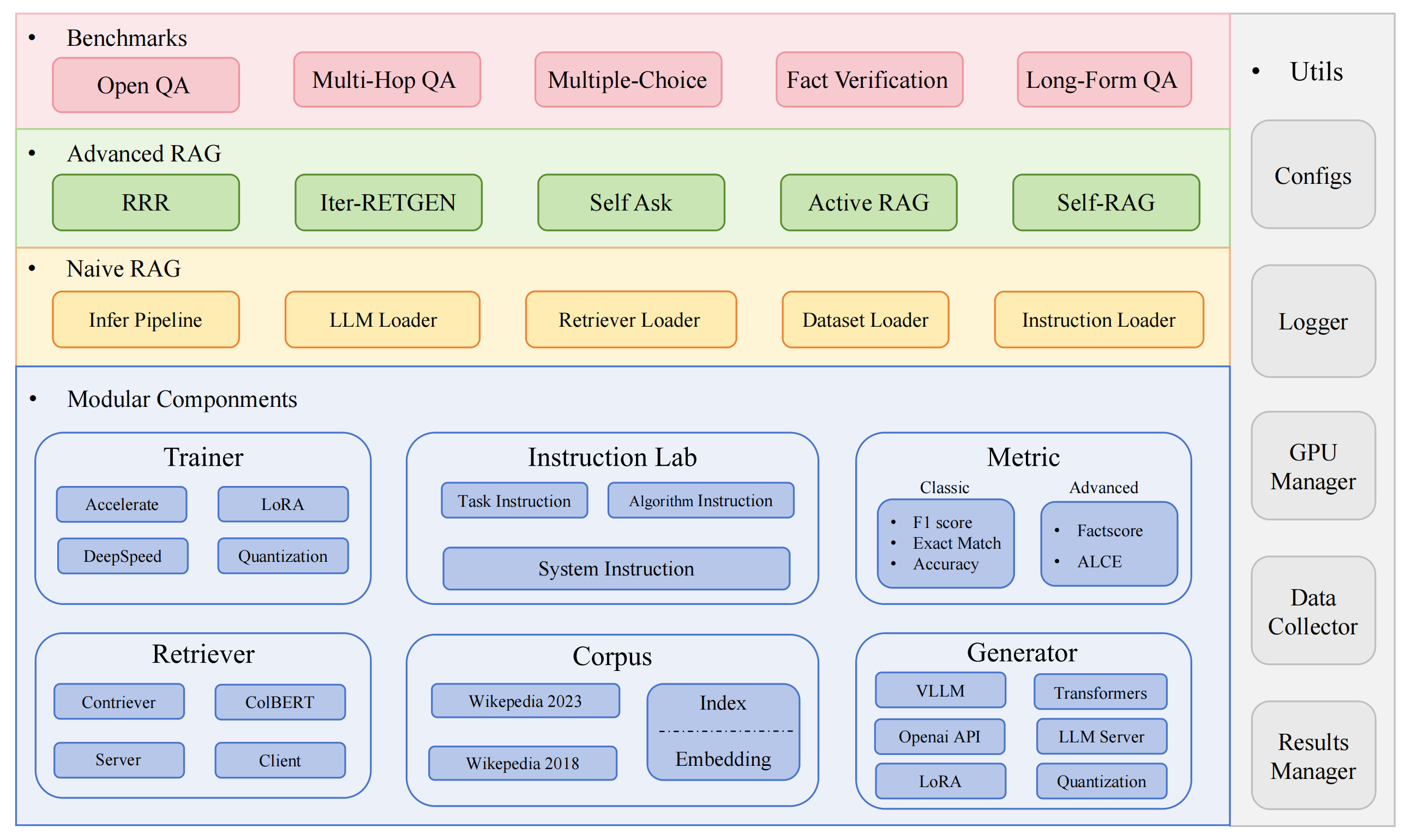
RAGLAB includes 3 classic evaluation methods: accuracy, F1, and EM (Exact Match). These 3 methods are simple to calculate, so they can be computed dynamically during the inference process. However, ALCE and Factscore, two advanced metrics, require the completion of the inference process before evaluation.
ALCE: RAGLAB has integrated the ALCE repository into RAGLAB. You only need to set the path for the inference results in the config file.
cd RAGLAB
cd run/ALCE/

# Change the path in each sh file for the inference generated files
# For example:
# python  ./ALCE/eval.py --f './data/eval_results/ASQA/{your_input_file_path}.jsonl' \
#     --mauve \
#     --qa

simple_gpu_scheduler --gpus 0,1,2,3,4,5,6,7 < auto_gpu_scheduling_scripts/auto_eval_ALCE.txt
The evaluation results will be in the same directory as the input file, with the file name suffix .score
Factscore: The Factscore environment requires installation of torch 1.13.1, which conflicts with the flash-attn version needed in RAGLAB's training and inference modules. Therefore, RAGLAB currently cannot integrate the Factscore environment, so users need to install the Factscore environment separately for evaluation.
After installing the Factscore environment, please modify the path of the inference results in the bash file
cd RAGLAB/run/Factscore/

# change the path in each sh file for the inference generated files
# For example:
# python  ./FActScore/factscore/factscorer.py  \
#  --input_path './data/eval_results/Factscore/{your_input_file_path}.jsonl' \
#   --model_name "retrieval+ChatGPT"\
#   --openai_key ./api_keys.txt \
#  --data_dir ./data/retrieval/colbertv2.0_passages/wiki2023 \
#  --verbose

simple_gpu_scheduler --gpus 0,1,2,3,4,5,6,7 < auto_gpu_scheduling_scripts/auto_eval_Factscore.txt
The evaluation results will be in the same directory as the input file, with the file name suffix _factscore_output.json
[!NOTE]
- During the Factscore evaluation process, we used GPT-3.5 as the evaluation model, so there's no need to download a local model. If you need to use a local model to evaluate Factscore, please refer to Factscore
If you find this repository useful, please cite our work.
@inproceedings{zhang-etal-2024-raglab,
    title = "{RAGLAB}: A Modular and Research-Oriented Unified Framework for Retrieval-Augmented Generation",
    author = "Zhang, Xuanwang and
      Song, Yunze and
      Wang, Yidong and
      Tang, Shuyun and
      others",
    booktitle = "Proceedings of the 2024 Conference on Empirical Methods in Natural Language Processing: System Demonstrations",
    month = dec,
    year = "2024",
    publisher = "Association for Computational Linguistics",
}
RAGLAB is licensed under the MIT License.
42 followers · starred Oct 2024
106 followers · starred Aug 2024
6 followers · starred Nov 2024
[EMNLP 2024: Demo Oral] RAGLAB: A Modular and Research-Oriented Unified Framework for Retrieval-Augmented Generation
See the code
dev environment:pytorch:2.0.1-py3.10-cuda11.8.0-devel-ubuntu22.04
git clone RAGLAB
https://github.com/fate-ubw/RAGLAB.git
create environment from yml file
cd RAGLAB
conda env create -f environment.yml
install flash-attn, en_core_web_sm, punkt manually
pip install flash-attn==2.2
python -m spacy download en_core_web_sm
python -m nltk.downloader punkt
cd RAGLAB
mkdir model
cd model
mkdir output_models
# retriever model
mkdir colbertv2.0
huggingface-cli download colbert-ir/colbertv2.0 --local-dir colbertv2.0/ --local-dir-use-symlinks False
mkdir contriever-msmarco
huggingface-cli download facebook/contriever-msmarco --local-dir contriever-msmarco/ --local-dir-use-symlinks False

# finetuned generator
# 8B model
mkdir Llama3-8B-baseline
huggingface-cli download RAGLAB/Llama3-8B-baseline --local-dir Llama3-8B-baseline/ --local-dir-use-symlinks False
mkdir selfrag_llama3_8b-epoch_0_1
huggingface-cli download RAGLAB/selfrag_llama3-8B --local-dir selfrag_llama3_8b-epoch_0_1/ --local-dir-use-symlinks False
# 70B model
mkdir Llama3-70B-baseline-adapter
huggingface-cli download RAGLAB/Llama3-70B-baseline-adapter --local-dir Llama3-70B-baseline-adapter/ --local-dir-use-symlinks False
mkdir selfrag_llama3_70B-adapter
huggingface-cli download RAGLAB/selfrag_llama3-70B-adapter --local-dir selfrag_llama3_70B-adapter/ --local-dir-use-symlinks False
mkdir Meta-Llama-3-70B
huggingface-cli download meta-llama/Meta-Llama-3-70B --local-dir Meta-Llama-3-70B/ --local-dir-use-symlinks False

# base model for finetune and LoRA
mkdir Meta-Llama-3-8B
huggingface-cli download meta-llama/Meta-Llama-3-8B --local-dir Meta-Llama-3-8B/ --local-dir-use-symlinks False


# ALCE Metric Models
mkdir gpt2-large
huggingface-cli download openai-community/gpt2-large --local-dir gpt2-large/ --local-dir-use-symlinks False
mkdir roberta-large-squad
huggingface-cli download gaotianyu1350/roberta-large-squad --local-dir roberta-large-squad/ --local-dir-use-symlinks False
mkdir t5_xxl_true_nli_mixture
huggingface-cli download google/t5_xxl_true_nli_mixture --local-dir t5_xxl_true_nli_mixture/ --local-dir-use-symlinks False

# factscore model we use gpt3.5 for evaluation, so no need to download local models

# models from official selfrag repo
mkdir selfrag_llama2_7b
huggingface-cli download selfrag/selfrag_llama2_7b --local-dir selfrag_llama2_7b/ --local-dir-use-symlinks False
# you can download other model as generator from huggingface
cd RAGLAB
huggingface-cli download RAGLAB/data --local-dir data --repo-type dataset
interact and evaluation. The test stage demonstrates in interact mode, just for demostration and eduction 🤗.[!NOTE]
- Due to colbert's requirement for absolute paths, you need to modify the index_dbPath and text_dbPath in the config file to use absolute paths.
index_dbPath and text_dbPath in config file:colbert_server-10samples.yaml
index_dbPath: /your_root_path/RAGLAB/data/retrieval/colbertv2.0_embedding/wiki2023-10samples
text_dbPath: /your_root_path/RAGLAB/data/retrieval/colbertv2.0_passages/wiki2023-10samples/enwiki-20230401-10samples.tsv
cd RAGLAB
sh run/colbert_server/colbert_server-10samples.sh
[!NOTE]
- At this point, colbert embedding will prompt that due to path errors, colbert embedding needs to be reprocessed. Please enter
yesand then raglab will automatically help you process the embedding and start the colbert server.
cd RAGLAB
sh run/colbert_server/ask_api.sh
cd RAGLAB
sh run/rag_inference/3-selfrag_reproduction-interact-short_form-adaptive_retrieval.sh
[!NOTE]
- remember download wiki2018 konwledge database and model before runing paper results
index_dbPath and text_dbPath in config file and process the wiki2018 embedding database
cd RAGLAB/config/colbert_server
vim colbert_server.yaml
index_dbPath: {your_root_path}/RAGLAB/data/retrieval/colbertv2.0_embedding/wiki2018
text_dbPath: {your_root_path}/RAGLAB/data/retrieval/colbertv2.0_passages/wiki2018/wiki2018.tsv
vim /data/retrieval/colbertv2.0_embedding/wiki2018/indexes/wiki2018/metadata.json
# change root path, other parameters do not need to be modified
"collection": "/{your_root_path}/RAGLAB/data/retrieval/colbertv2.0_passages/wiki2018/wiki2018.tsv",
"experiment": "/{your_root_path}/RAGLAB/data/retrieval/colbertv2.0_embedding/wiki2018",
cd RAGLAB
sh run/colbert_server/colbert_server.sh
cd RAGLAB
sh run/colbert_server/ask_api.sh
simple_gpu_scheduler
pip install simple_gpu_scheduler
cd RAGLAB
simple_gpu_scheduler --gpus 0,1,2,3,4,5,6,7 < auto_gpu_scheduling_scripts/auto_run-llama3_8b-baseline-scripts.txt
# Other scripts can be run using the same method
# auto_inference_selfreg-7b.txt
sh run/rag_inference/selfrag_reproduction/selfrag_reproduction-evaluation-short_form-PubHealth-adaptive_retrieval-pregiven_passages.sh
sh run/rag_inference/selfrag_reproduction/selfrag_reproduction-evaluation-short_form-PubHealth-always_retrieval-pregiven_passages.sh
RAGLAB includes 3 classic evaluation methods: accuracy, F1, and EM (Exact Match). These 3 methods are simple to calculate, so they can be computed dynamically during the inference process. However, ALCE and Factscore, two advanced metrics, require the completion of the inference process before evaluation.
ALCE: RAGLAB has integrated the ALCE repository into RAGLAB. You only need to set the path for the inference results in the config file.
cd RAGLAB
cd run/ALCE/

# Change the path in each sh file for the inference generated files
# For example:
# python  ./ALCE/eval.py --f './data/eval_results/ASQA/{your_input_file_path}.jsonl' \
#     --mauve \
#     --qa

simple_gpu_scheduler --gpus 0,1,2,3,4,5,6,7 < auto_gpu_scheduling_scripts/auto_eval_ALCE.txt
The evaluation results will be in the same directory as the input file, with the file name suffix .score
Factscore: The Factscore environment requires installation of torch 1.13.1, which conflicts with the flash-attn version needed in RAGLAB's training and inference modules. Therefore, RAGLAB currently cannot integrate the Factscore environment, so users need to install the Factscore environment separately for evaluation.
After installing the Factscore environment, please modify the path of the inference results in the bash file
cd RAGLAB/run/Factscore/

# change the path in each sh file for the inference generated files
# For example:
# python  ./FActScore/factscore/factscorer.py  \
#  --input_path './data/eval_results/Factscore/{your_input_file_path}.jsonl' \
#   --model_name "retrieval+ChatGPT"\
#   --openai_key ./api_keys.txt \
#  --data_dir ./data/retrieval/colbertv2.0_passages/wiki2023 \
#  --verbose

simple_gpu_scheduler --gpus 0,1,2,3,4,5,6,7 < auto_gpu_scheduling_scripts/auto_eval_Factscore.txt
The evaluation results will be in the same directory as the input file, with the file name suffix _factscore_output.json
[!NOTE]
- During the Factscore evaluation process, we used GPT-3.5 as the evaluation model, so there's no need to download a local model. If you need to use a local model to evaluate Factscore, please refer to Factscore
If you find this repository useful, please cite our work.
@inproceedings{zhang-etal-2024-raglab,
    title = "{RAGLAB}: A Modular and Research-Oriented Unified Framework for Retrieval-Augmented Generation",
    author = "Zhang, Xuanwang and
      Song, Yunze and
      Wang, Yidong and
      Tang, Shuyun and
      others",
    booktitle = "Proceedings of the 2024 Conference on Empirical Methods in Natural Language Processing: System Demonstrations",
    month = dec,
    year = "2024",
    publisher = "Association for Computational Linguistics",
}
RAGLAB is licensed under the MIT License.
42 followers · starred Oct 2024
106 followers · starred Aug 2024
6 followers · starred Nov 2024



