
Claude Code plugin: a live architecture diagram in a side pane that Claude draws and updates while you talk
TypeScript
0
27 commits
updated Oct 4, 2026
See what people are saying
README
archpane
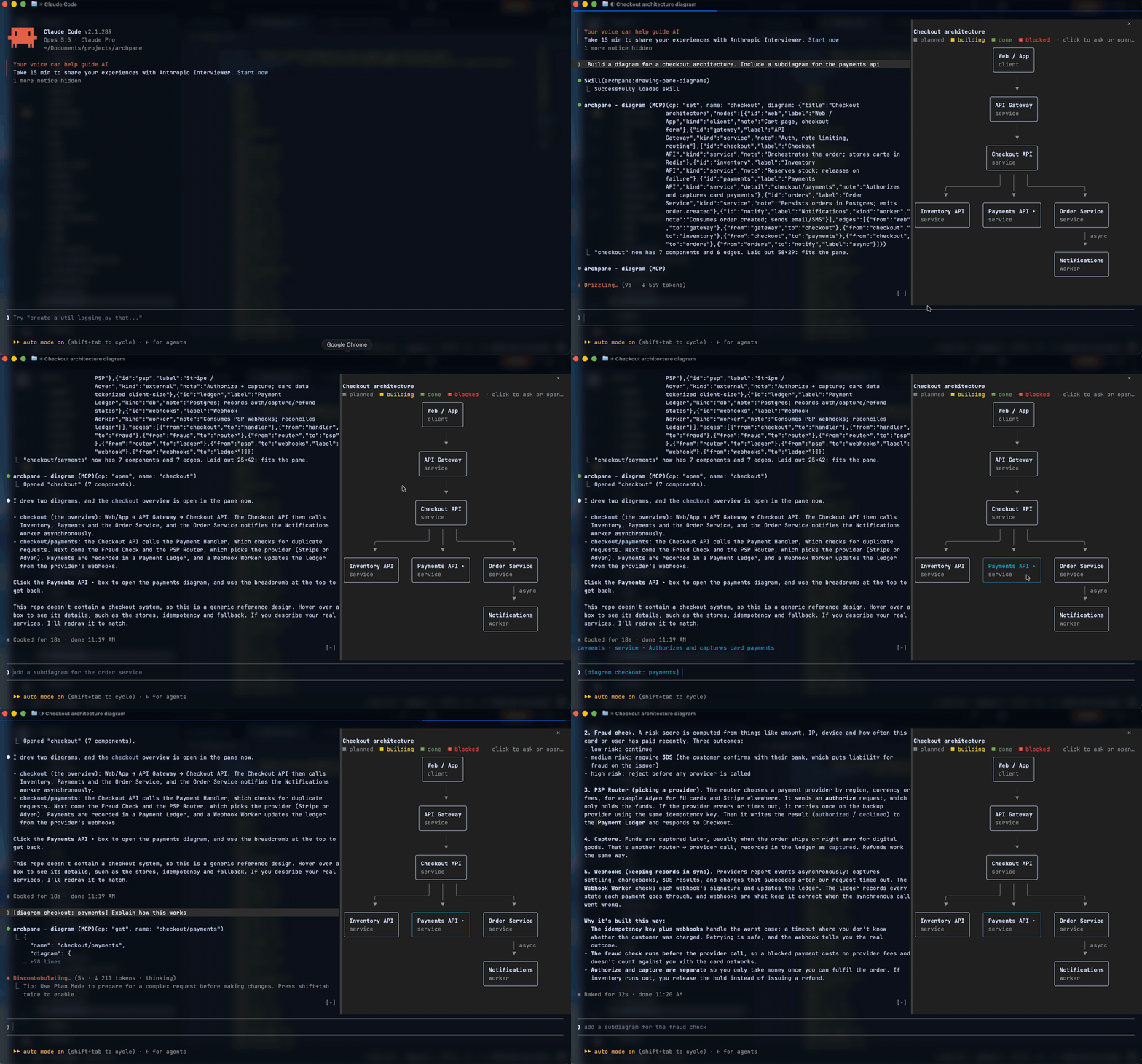
A live architecture diagram in a side pane of Claude Code. Ask Claude to diagram a system and it draws it next to the chat, then keeps it current while you talk.
What it does
- Claude draws the diagram, you keep talking. "Diagram how checkout works", then "add a fraud check before payment". The pane updates in place.
- Big systems become subdiagrams. A box marked ▸ opens a diagram of what happens inside it when you click it, and a breadcrumb leads back.
- Ask about any component. Click a box to put
[diagram <name>: <id>]in your prompt, then type your question. - Track a build. Components are
planned,building,doneorblocked, shown by color, and Claude updates them as the work lands. - Explore it with the mouse. Hover for details, right-click for a menu, drag to pan.
Requirements
- Claude Code 2.1.288 or newer. archpane is a Claude Code mod, and mods are an early-access feature whose API can change.
- A terminal that passes mouse events to Claude Code. Tested in Ghostty; reports from other terminals are welcome.
- For the docked pane: Claude Code's fullscreen layout, at least 110 columns wide. Narrower than that, it shows inline above the prompt.
Install
/plugin marketplace add facumarcet/archpane
/plugin install archpane@archpane
Restart Claude Code once if /diagram doesn't appear. To skip the permission prompt the first time Claude draws, add "mcp__archpane__diagram" to permissions.allow in ~/.claude/settings.json.
Use
/diagram              open the pane on this project's last diagram (or "main")
/diagram payments     switch to, or create, the diagram named "payments"
/diagram list         list this project's diagrams
Then ask Claude, for example: "diagram the services in this repo and how they talk to each other", or "we're about to build X: put the plan in the diagram and update it as we go".
How it works
A bundled skill teaches Claude to draw diagrams that read well in a narrow pane. After every edit, the tool tells Claude whether the diagram fits and what to fix if it doesn't. A diagram is plain JSON: nodes { id, label, kind, group, status, note, detail } and edges { from, to, label }.
Diagrams are saved on your machine, in Claude Code's plugin store, keyed by the directory Claude Code was started in. Nothing is written to your repository.
Details for contributors: docs/ARCHITECTURE.md.
Troubleshooting
- The pane opens inline instead of beside the chat. Use the fullscreen layout and widen the terminal to 110 columns or more.
- Clicks do nothing. Your terminal has to pass mouse events to Claude Code. tmux isn't tested; try outside it first.
- A dim
archpane: …error line appears after an update. Run/diagramonce to redraw. If it persists, please open an issue.
Limits
- Diagrams can't be shared with teammates yet, since they live on your machine.
- If two sessions edit the same diagram at once, the last save wins.
- Boxes can't be moved by hand yet.
- A diagram holds at most 100 components and 200 edges. Claude is told to split anything bigger.
Update and uninstall
/plugin marketplace update archpane
/plugin update archpane@archpane
/plugin uninstall archpane@archpane
Development
git clone https://github.com/facumarcet/archpane.git
claude --plugin-dir ./archpane/plugins/archpane   # hot-reloads on every edit
claude plugin test ./archpane/plugins/archpane
License
MIT
Similar repos


Languages
TypeScript
100.0%
Claude Code plugin: a live architecture diagram in a side pane that Claude draws and updates while you talk
TypeScript
0
27 commits
updated Oct 4, 2026
See what people are saying
README
archpane
A live architecture diagram in a side pane of Claude Code. Ask Claude to diagram a system and it draws it next to the chat, then keeps it current while you talk.
What it does
- Claude draws the diagram, you keep talking. "Diagram how checkout works", then "add a fraud check before payment". The pane updates in place.
- Big systems become subdiagrams. A box marked ▸ opens a diagram of what happens inside it when you click it, and a breadcrumb leads back.
- Ask about any component. Click a box to put
[diagram <name>: <id>]in your prompt, then type your question. - Track a build. Components are
planned,building,doneorblocked, shown by color, and Claude updates them as the work lands. - Explore it with the mouse. Hover for details, right-click for a menu, drag to pan.
Requirements
- Claude Code 2.1.288 or newer. archpane is a Claude Code mod, and mods are an early-access feature whose API can change.
- A terminal that passes mouse events to Claude Code. Tested in Ghostty; reports from other terminals are welcome.
- For the docked pane: Claude Code's fullscreen layout, at least 110 columns wide. Narrower than that, it shows inline above the prompt.
Install
/plugin marketplace add facumarcet/archpane
/plugin install archpane@archpane
Restart Claude Code once if /diagram doesn't appear. To skip the permission prompt the first time Claude draws, add "mcp__archpane__diagram" to permissions.allow in ~/.claude/settings.json.
Use
/diagram              open the pane on this project's last diagram (or "main")
/diagram payments     switch to, or create, the diagram named "payments"
/diagram list         list this project's diagrams
Then ask Claude, for example: "diagram the services in this repo and how they talk to each other", or "we're about to build X: put the plan in the diagram and update it as we go".
How it works
A bundled skill teaches Claude to draw diagrams that read well in a narrow pane. After every edit, the tool tells Claude whether the diagram fits and what to fix if it doesn't. A diagram is plain JSON: nodes { id, label, kind, group, status, note, detail } and edges { from, to, label }.
Diagrams are saved on your machine, in Claude Code's plugin store, keyed by the directory Claude Code was started in. Nothing is written to your repository.
Details for contributors: docs/ARCHITECTURE.md.
Troubleshooting
- The pane opens inline instead of beside the chat. Use the fullscreen layout and widen the terminal to 110 columns or more.
- Clicks do nothing. Your terminal has to pass mouse events to Claude Code. tmux isn't tested; try outside it first.
- A dim
archpane: …error line appears after an update. Run/diagramonce to redraw. If it persists, please open an issue.
Limits
- Diagrams can't be shared with teammates yet, since they live on your machine.
- If two sessions edit the same diagram at once, the last save wins.
- Boxes can't be moved by hand yet.
- A diagram holds at most 100 components and 200 edges. Claude is told to split anything bigger.
Update and uninstall
/plugin marketplace update archpane
/plugin update archpane@archpane
/plugin uninstall archpane@archpane
Development
git clone https://github.com/facumarcet/archpane.git
claude --plugin-dir ./archpane/plugins/archpane   # hot-reloads on every edit
claude plugin test ./archpane/plugins/archpane
License
MIT
Similar repos
Languages
TypeScript
100.0%