Your AI, on your own computer. OAIY is one desktop app with an agent that works in your projects and answers your business's phone, the models it runs on your GPU, a flow editor for automations, and the plugins and connections around them.
What it does · How the parts fit · Getting started · Repository layout · Documentation
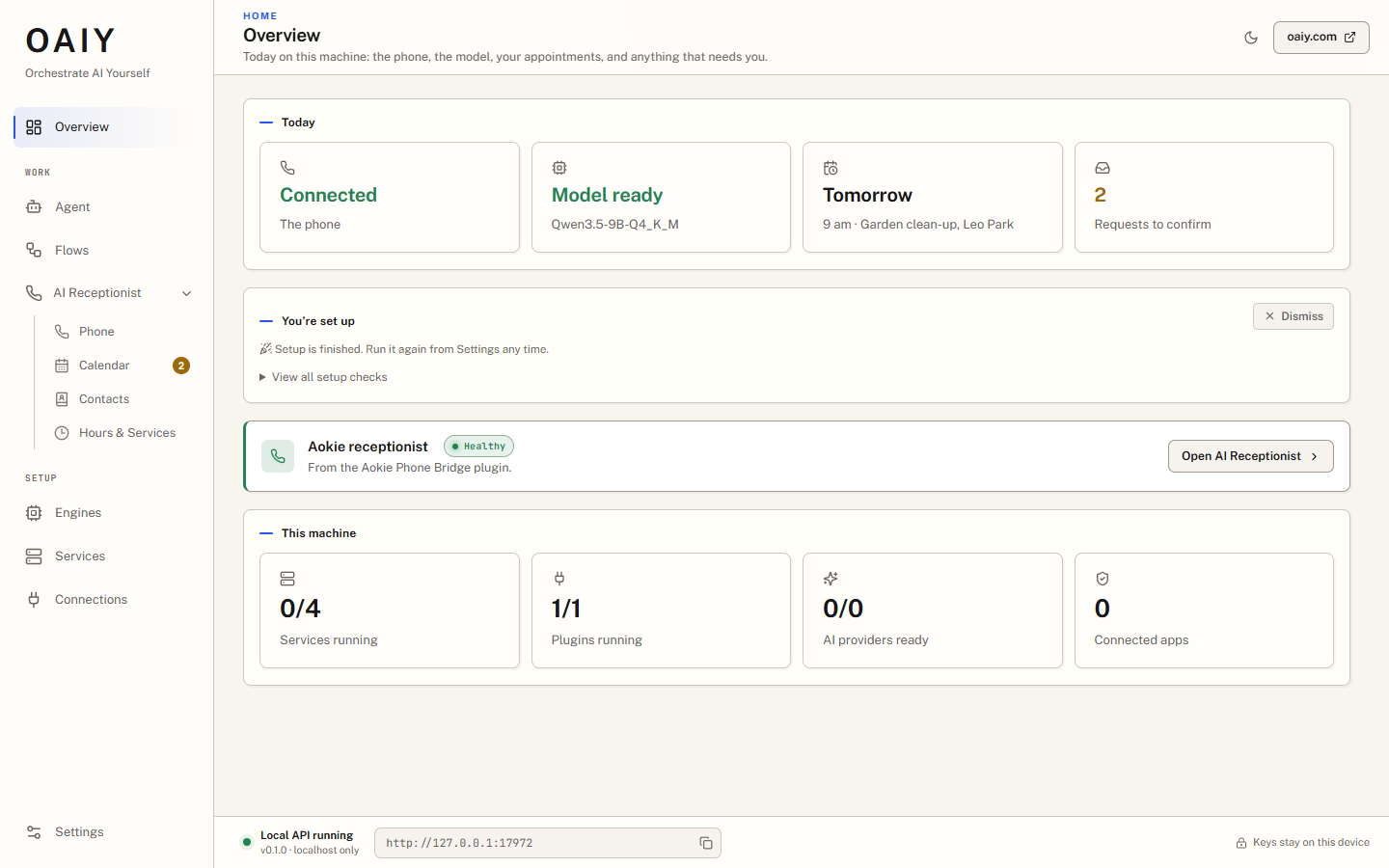 Overview. Today on this computer: the phone, the model, the next appointment, and what needs you. | 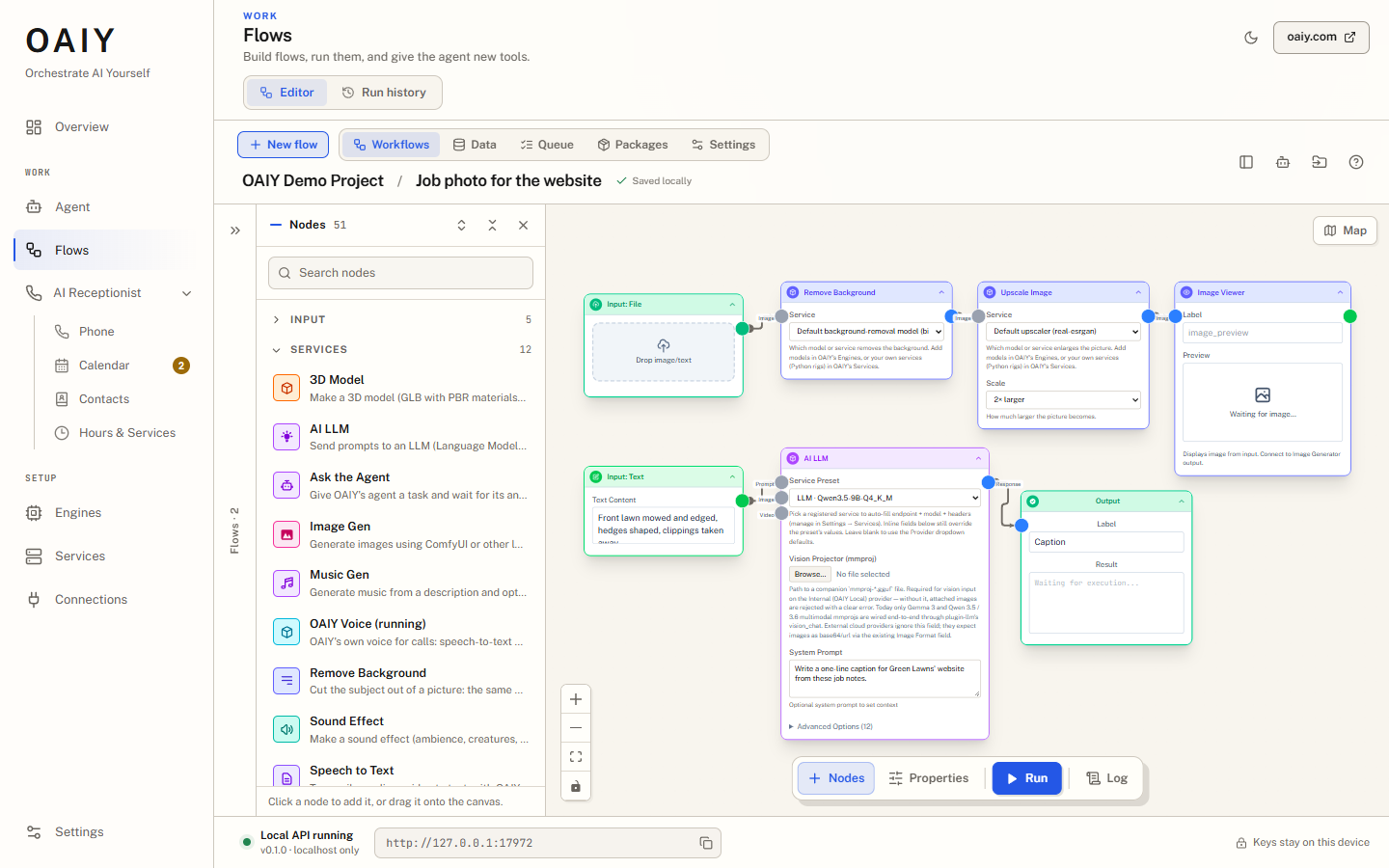 Flows. The flow editor, with the engine's models as typed nodes in the palette. |
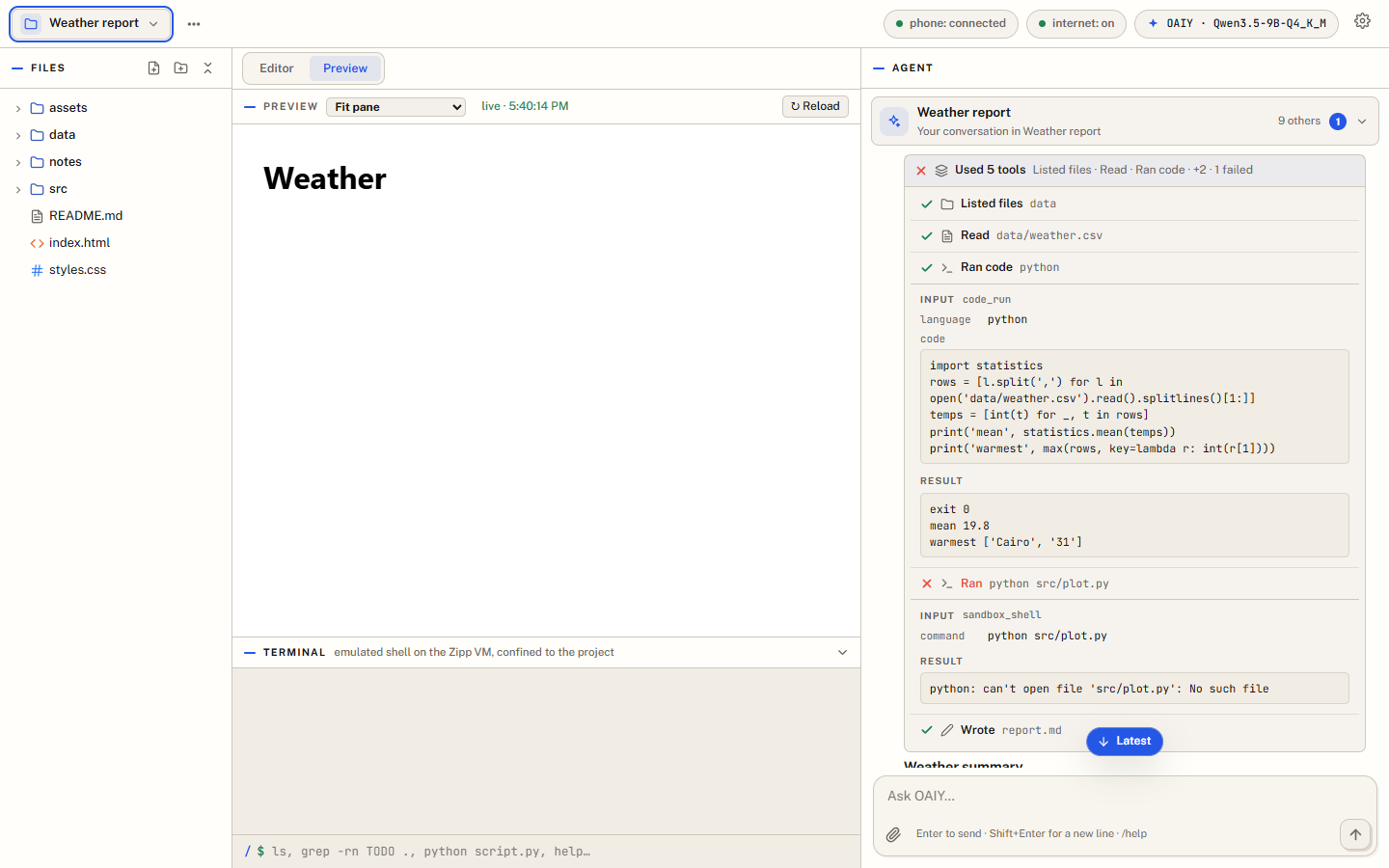 The Agent at work. Each tool it used, with its input and result. | 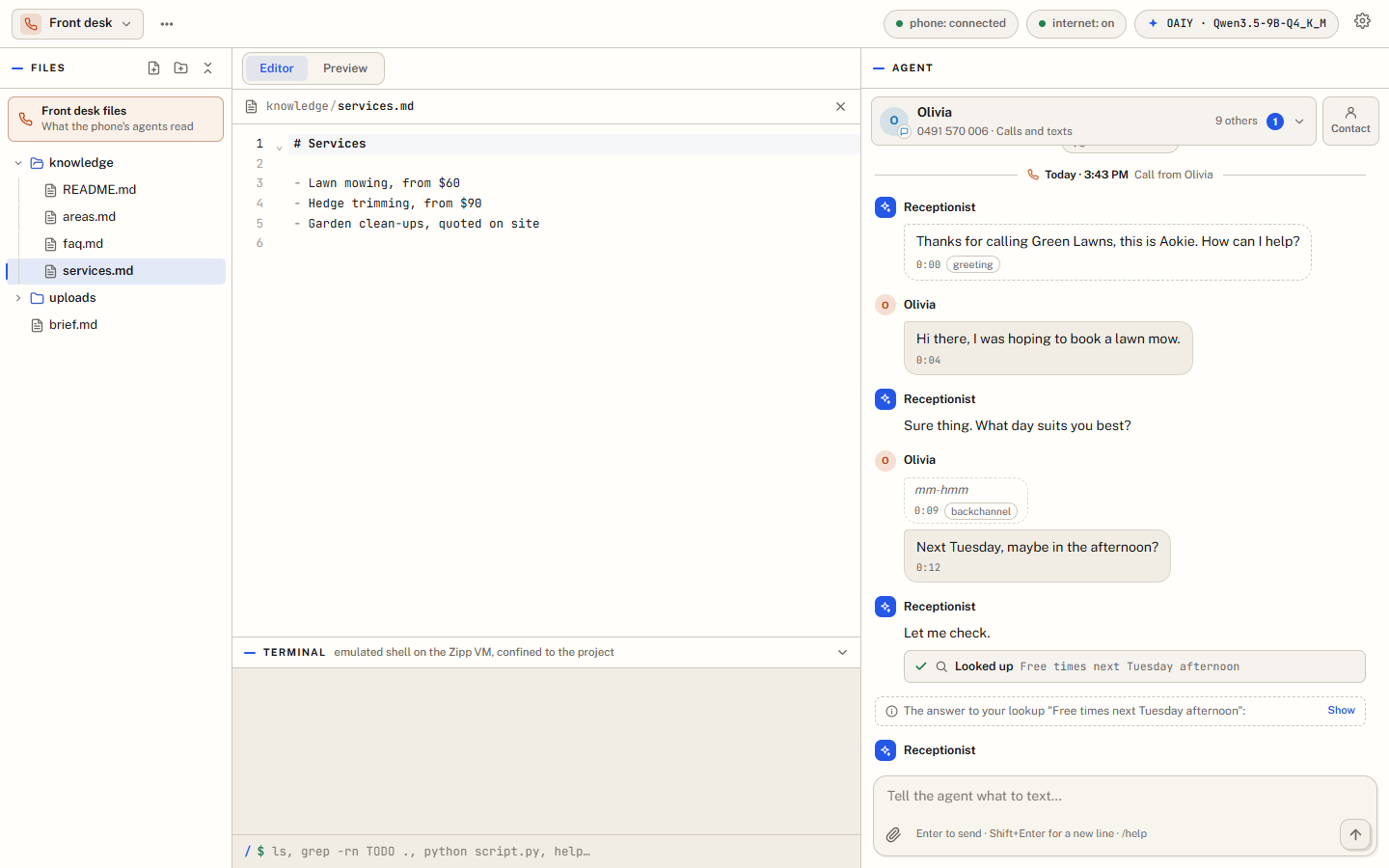 A call. The receptionist's side of a phone call, as it happens. |
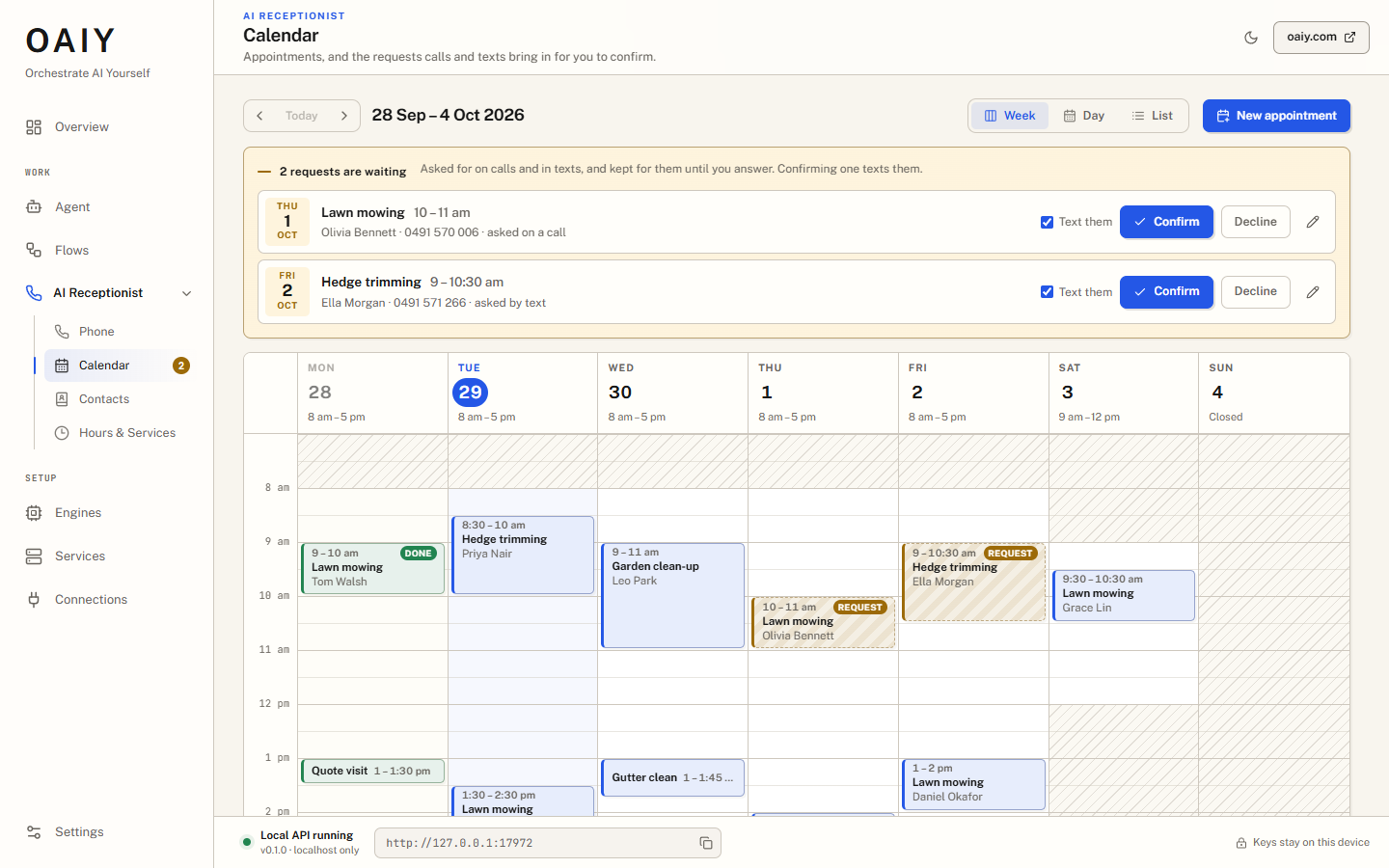 Calendar. Appointments, and the requests calls and texts bring in for you to confirm. | 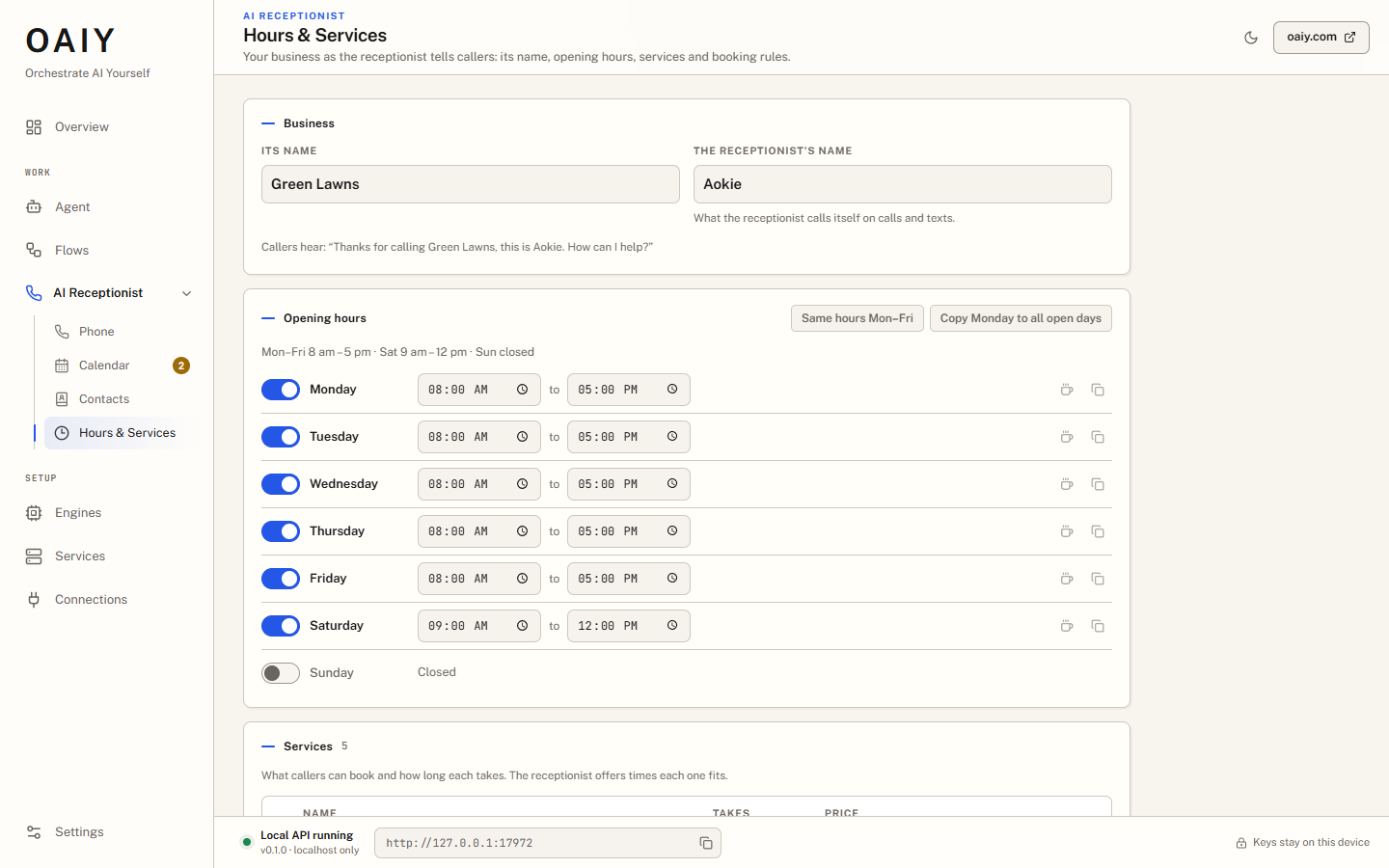 Hours & Services. The business as the receptionist tells callers. |
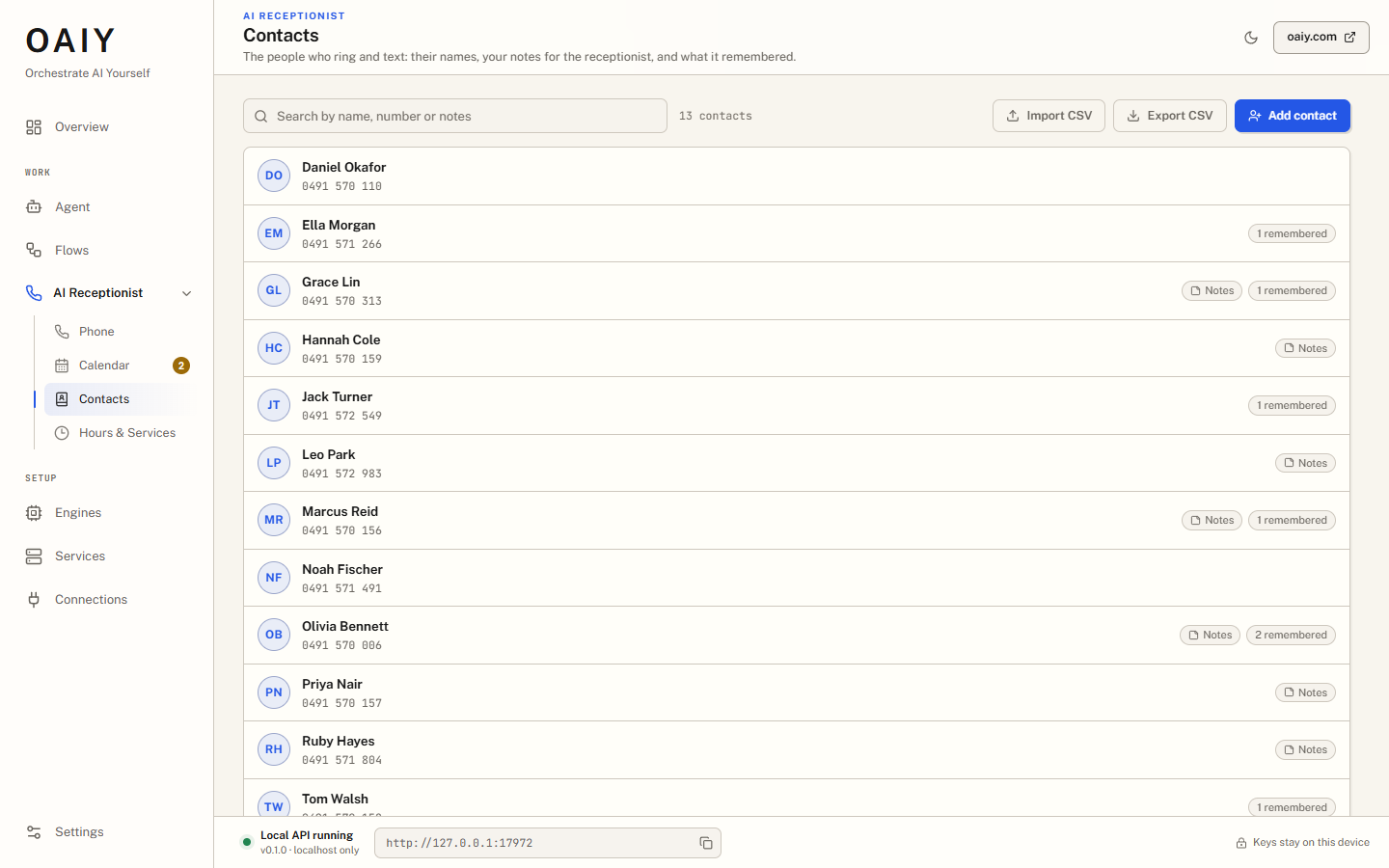 Contacts. Names, your notes, and what the receptionist remembered. | 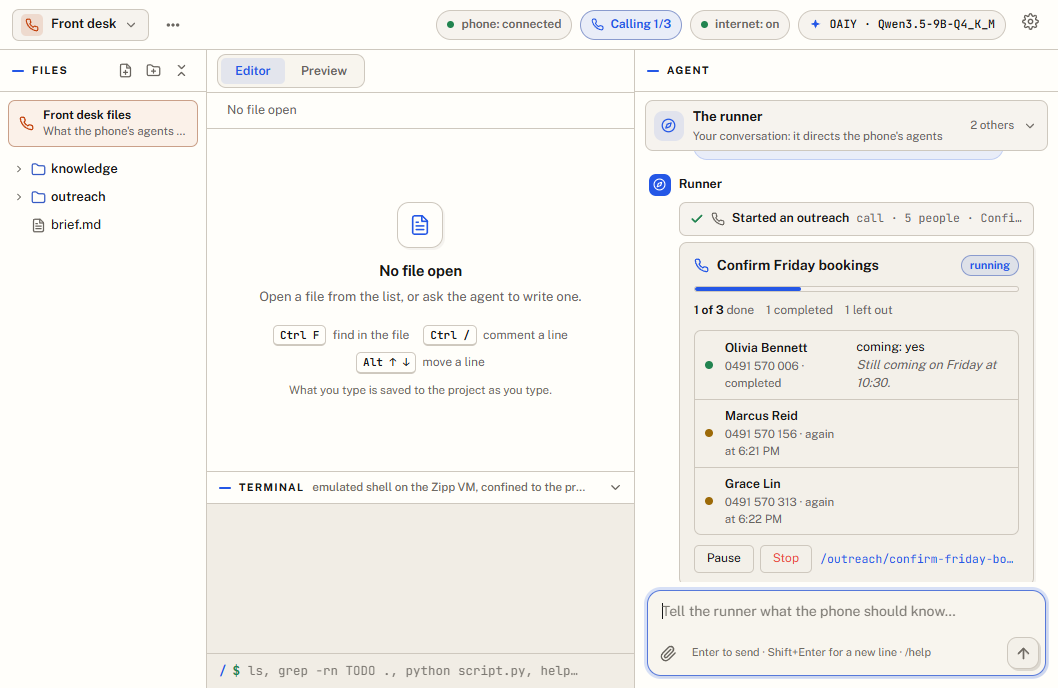 Outreach. Calls with an objective, worked down a list, with the results. |
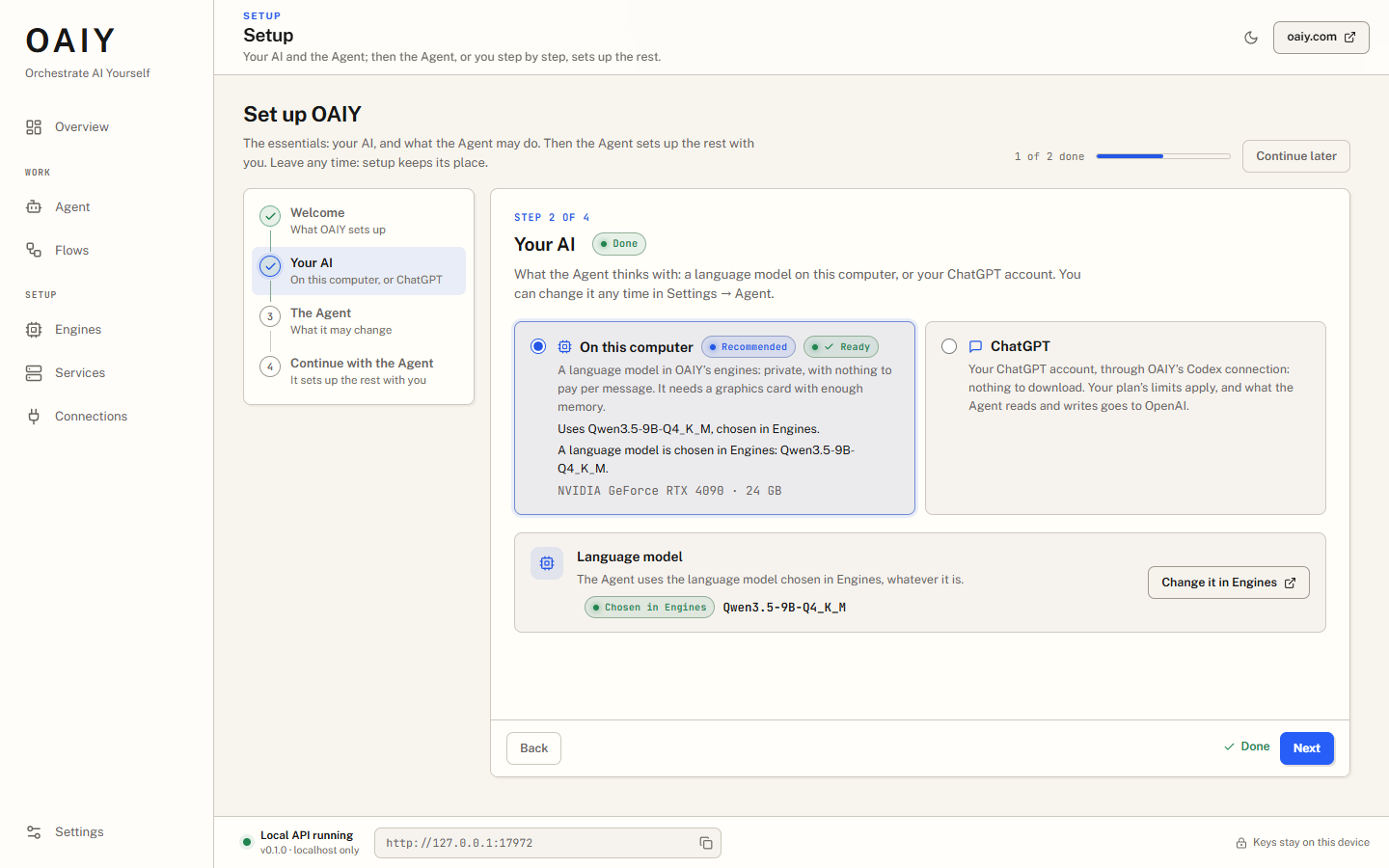 Setup. The essentials first: your AI, and what the Agent may change. | 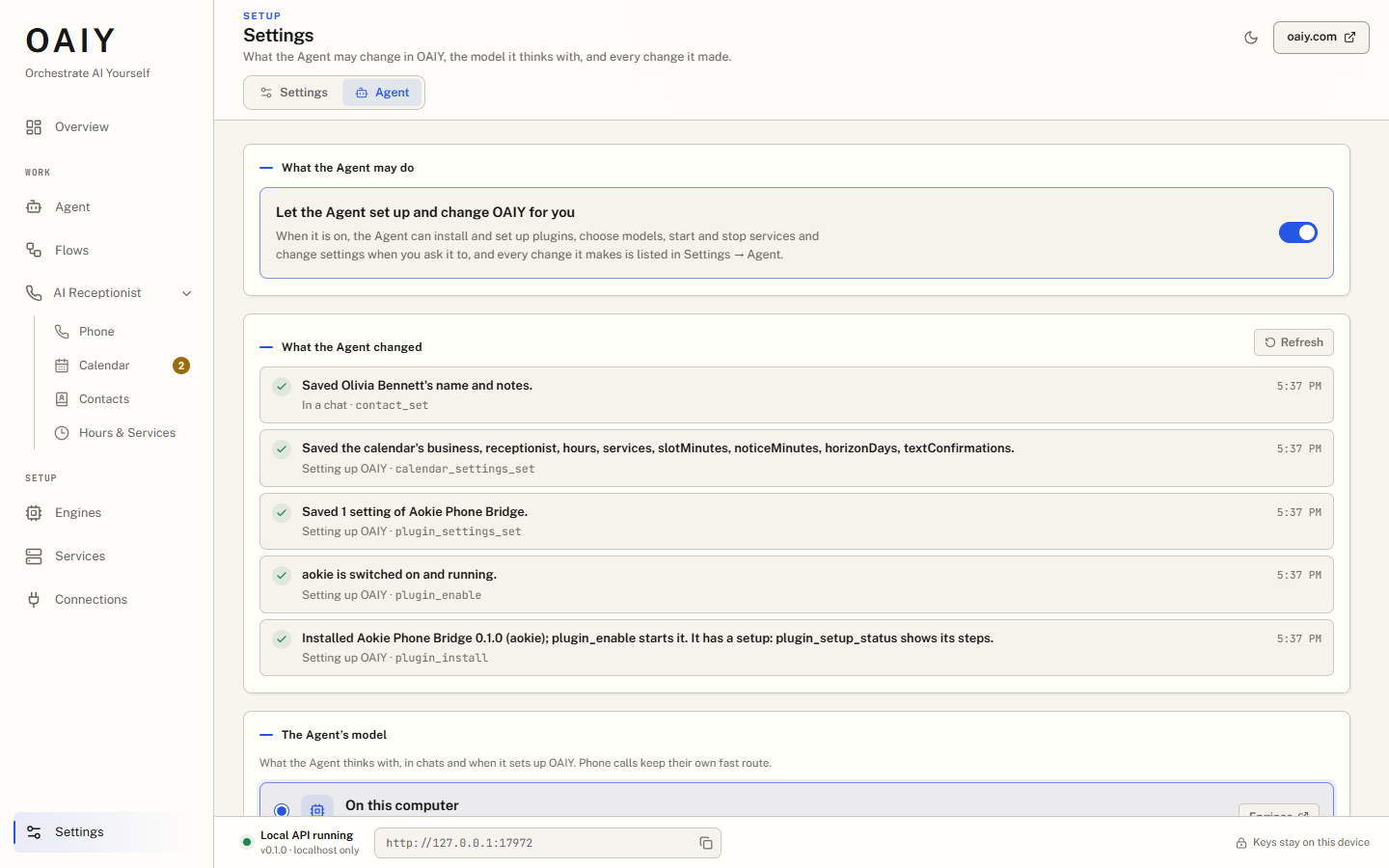 Settings → Agent. What the Agent may change, and everything it changed. |
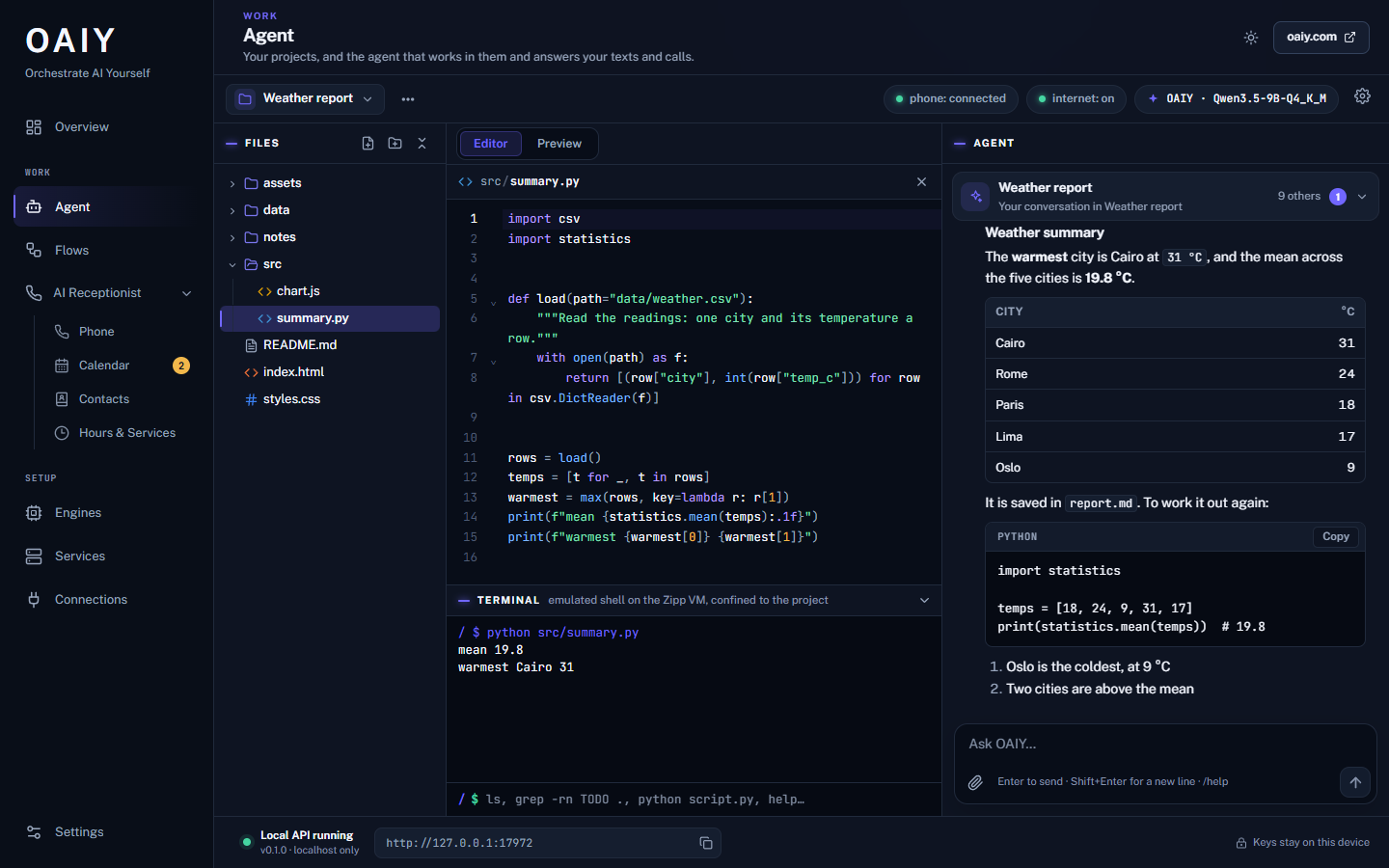
The dark theme.
The screenshots are from a demo setup: the business, the people and their numbers are made up (the numbers are ones the ACMA keeps for fiction), and the phone and the engines are stand-ins. See docs/README.md.
A Tauri 2 app for Windows, Linux and Macs with Apple silicon (the Windows installers are the better tested), with its HTTP API (axum) on 127.0.0.1:17972. Its sidebar:
The Agent, the flow editor and the engines' pages are webviews of their own, laid over the dashboard's content area, so the Agent's page can be cross-origin isolated for its code sandbox. The desktop starts the engines in its own process, supervises the plugins and services, and keeps the link to a FormLogic account.
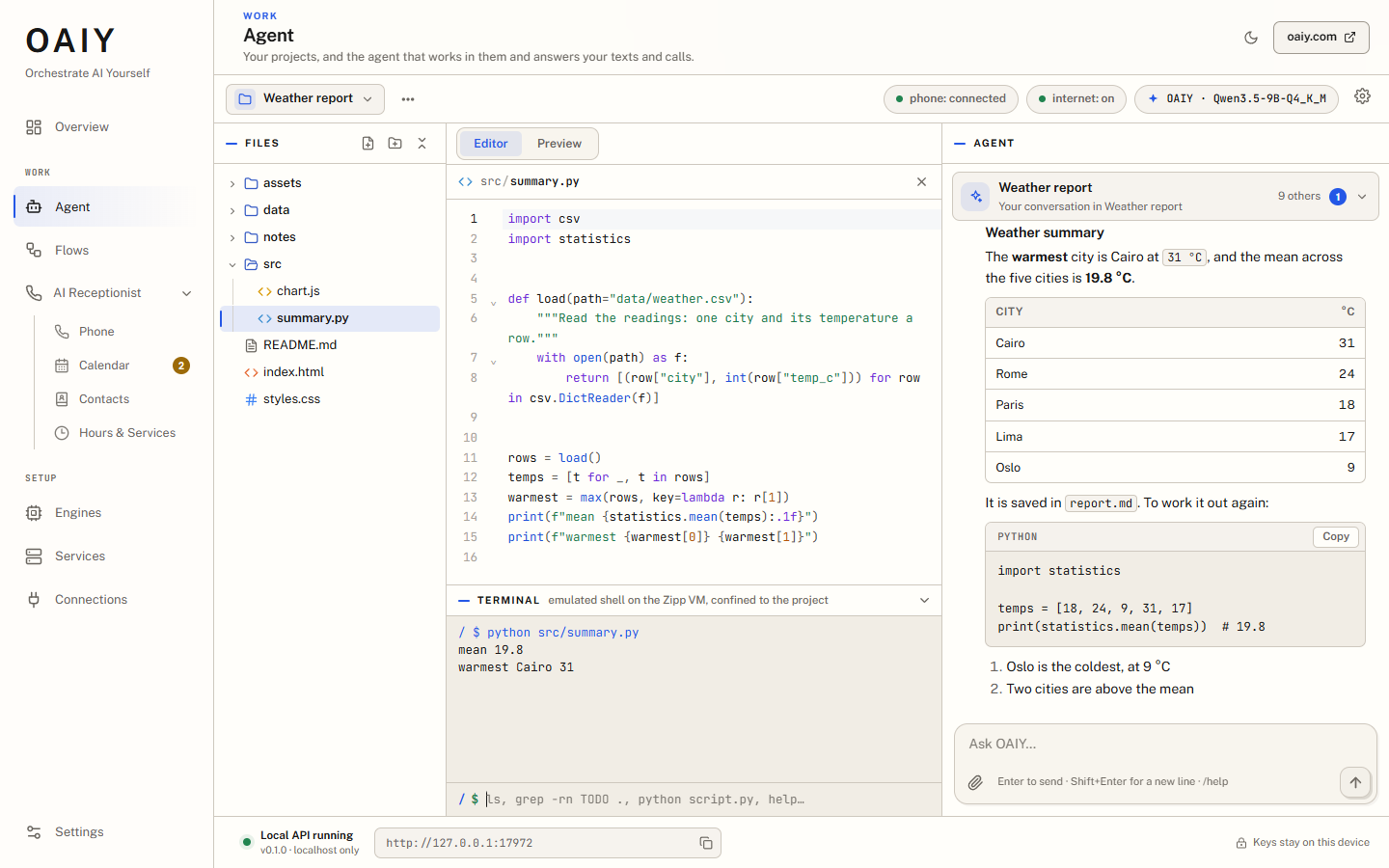
The Agent app (app/, which began as bot.computer) is a coding and
working agent:
git, node and python. Code the agent runs can reach the project and
nothing else, except what the network gate lets through.The Aokie Phone Bridge plugin connects the business's mobile phone to the PC over Bluetooth. OAIY hears and speaks with OAIY Voice (Parakeet speech-to-text and Qwen3-TTS, in Rust on the GPU), and the Agent decides what to say. It listens the whole call, takes turns like a person, keeps talking while a lookup runs, and records a booking as a request for you to confirm. The Calendar, Hours & Services, Contacts and Messages live on this computer and work offline; with a FormLogic account linked, the calendar syncs with it. When you turn it on under Transfers, a caller who asks for you makes your Companion ring, and a caller who cannot be put through can leave a message. See docs/RECEPTIONIST.md and docs/CALLS.md.
The flow editor (platform/ui) has Workflows (the canvas), Data, Queue,
Packages and Settings. The engine's models are typed nodes: image, video,
speech, music, sound effects, 3D models, background removal and upscaling, beside the
language model, speech-to-text and Ask the Agent. Python services added in OAIY's
Services are nodes too. A flow can be made a tool for the Agent, or run before or
instead of one of its own tools. Flows run on the ZIPP VM, in the editor and headless
through the oaiy CLI, which the desktop uses to run them.
oaiy-studio (in crates/) supervises oaiy-llm-server (language models: GGUF and
safetensors read in place, experts streamed from the NVMe through a RAM cache to the
GPU) and oaiy-media (Qwen Image, SDXL, LTX video, Qwen3-TTS and Breeze TTS 2, MiniMax
Music 3, MOSS-SoundEffect, Pixal3D, BiRefNet, Real-ESRGAN, on Candle). It serves an
OpenAI-style gateway (8080) and its control pages (7860), downloads ready-to-run
models from its catalog, and runs them on a GPU of any make through WebGPU, else on
the CPU. See
docs/ENGINES.md and docs/STUDIO.md.
oaiy-server: the desktop's API and services without a window, for a server.flowchart TB
subgraph desktop["OAIY Desktop · Tauri 2"]
direction LR
ui["Dashboard, Agent,<br/>flow editor"] --> api["HTTP API · 127.0.0.1:17972<br/>control MCP at /api/mcp"]
host["Plugin host"]
voice["Voice gateway<br/>127.0.0.1:17872"]
end
subgraph engines["Engines · oaiy-studio: gateway :8080, control :7860"]
direction LR
llm["oaiy-llm-server<br/>language models"]
media["oaiy-media<br/>pictures, video, speech,<br/>music, sound, 3D"]
end
subgraph phone["The phone"]
direction LR
aokie["Aokie Phone Bridge<br/>(plugin)"] <-->|Bluetooth| mobile["Business phone"]
end
api --> engines
api --> cli["oaiy CLI<br/>flows on the ZIPP VM"]
api <-->|"account link, relay"| fl["FormLogic"]
api --> chatgpt["ChatGPT<br/>through Codex"]
host <-->|"JSON-RPC over stdio"| aokie
aokie <-->|"call audio"| voice
voice --> ovoice["OAIY Voice<br/>Parakeet + Qwen3-TTS"]
Calls and texts come in as events on the desktop's event stream; the Agent's page
follows it and answers each in that person's conversation. The engines run in the
desktop's own process (oaiy_studio::launch); a debug build attaches to an
oaiy-studio you run yourself, so rebuilding the desktop does not unload the model.
| Port | What |
|---|---|
17972 | OAIY Desktop: the HTTP API, pairing, plugins, runs, the control MCP server |
17872 | The voice gateway: the AI gateway for plugins, and a call's audio |
8080 | The engines' OpenAI-style gateway |
7860 | The engines' control pages and API |
8783 | OAIY Voice |
Where another program holds 8080 or 7860 (or Windows keeps it reserved, or holds it a
minute after an OAIY that ended suddenly), the engines take the next free port of the 20
after it, else any free one, and say so in Engines → Logs. The window, the Engines page,
the Agent and the flows ask OAIY Desktop where they are (GET /api/engines's gatewayUrl),
so nothing needs changing; an address typed by hand elsewhere (a CLI's --backend, another
program's settings) does.
npm ci in app/ fetches and checks the Zipp engine (public/zipp/); the flow editor
and the CLI install theirs from a checksummed ZIPP release before they build or test.
# The host:
cargo build --release -p oaiy-studio -p oaiy-studio-tray

# The engines too: oaiy-media, oaiy-llm-server and the host
pwsh tools/qwen-image/build.ps1

target/release/oaiy-studio          # its control pages open in a browser window
A portable engines folder, its configuration and getting models are in docs/STUDIO.md.
The desktop shows the Agent and the flow editor from their builds, and ships the CLI that runs flows:
cd app && npm ci && npm run build:desktop && cd ..             # the Agent: app/dist (and the SoftN runtime its app preview needs)
cd platform/ui && npm ci && npm run build && cd ../..          # the flow editor: platform/ui/dist
cd platform/cli && npm ci && npm run build && cd ../..         # the flow runner

cd platform/desktop
npm ci
npm run sync-cli       # stages the CLI into src-tauri/resources/cli
npm run tauri:dev      # the dashboard on Vite (17973) and a debug build of the desktop
npm run tauri:build    # the installers, under src-tauri/target/release/bundle/
tauri:build first stages the Agent's and the flow editor's builds into
src-tauri/resources/app and resources/flows (npm run stage-pages), and the portable
language-model engine into resources/engines (npm run stage-engines; build it first
with cargo build --release -p oaiy-llm-server --no-default-features --features webgpu --bin oaiy-llm-server-webgpu), so the installers carry them, and it stops if any is
missing or incomplete. tauri:dev needs none of
that: it serves them from their build folders. docs/RELEASING.md says
what a release contains and how to make one.
The desktop listens on the same ports as an installed OAIY, so run one at a time. A
debug build uses an oaiy-studio that is already running; a release build starts the
engines itself, finding their programs beside it, in OAIY_ENGINES_DIR, or in the
repository's target/release. OAIY_APP_DIST and OAIY_FLOWS_DIST point the desktop
at other builds of the Agent and the flow editor.
cd platform/desktop/src-tauri
cargo build --release --no-default-features --features web --bin oaiy-server
export OAIY_SERVER_TOKEN="$(openssl rand -base64 32)"
./target/release/oaiy-server
curl http://127.0.0.1:17972/api/health
Without the gui feature there is no Tauri, WebView or GTK. The web feature is the web login
(the owner's password, the sign-in page, oaiy-server auth init): the release builds the server with it, and a
server put on a network needs it. It is configured by environment variables, among them:
| Variable | Default | What |
|---|---|---|
OAIY_DATA_DIR | ~/.oaiy-server | its data folder |
OAIY_SERVER_PORT | 17972 | the port |
OAIY_SERVER_BIND | loopback | lan listens on every interface, bearer tokens only, and needs an owner login first (oaiy-server auth init); or an address |
OAIY_PUBLIC_URL, OAIY_TRUSTED_PROXIES | none | https://<host> of the dashboard when a reverse proxy is in front, and the proxy's address or network (required with a bind beyond loopback) |
OAIY_SERVER_TOKEN | none | a bearer token for its protected routes: 32 to 256 characters, no common pattern (a guard against the obvious, not a strength meter: openssl rand -base64 32); one that has one stops the server (exit 78) |
OAIY_ENGINES_UI | none | an oaiy-studio control port to relay (http://127.0.0.1:7860) |
OAIY_VOICE_GATEWAY | on | off leaves 17872 alone, for a server run beside a desktop |
OAIY_PLUGIN_SOURCES | none | a folder of plugin folders the setup catalog offers |
OAIY_MODELS_DIR, OAIY_HF_TOKEN | where downloads go, and a Hugging Face token |
See platform/desktop/README.md.
cd platform/desktop && npm run dev   # the dashboard alone: Vite on 17973, API at 127.0.0.1:17972
cd app && npm run dev                # the Agent in a browser: http://localhost:5317
cd platform/ui && npm run dev        # the flow editor: http://localhost:5173/app.html
| Where | Command | What |
|---|---|---|
| root | cargo test | the engines' default crates; --workspace adds the Candle crates (media and speech). The tests that need a GPU or a model on disk are ignored |
app/ | npm test, npm run test:e2e | unit tests; the app in headless Chrome with a scripted model |
platform/desktop/ | npm test | the dashboard (Vitest) |
platform/desktop/src-tauri/ | cargo test --no-default-features, cargo test --features gui | the desktop's Rust, headless and with the GUI |
platform/ui/ | npm test | the flow editor: types, node contracts, the ZIPP engines |
platform/cli/ | npm run build && npm test | the CLI and its ZIPP guards |
web/ | npm test, npm run test:e2e, npm run test:mutations | the OAIY web app's providers origin: typecheck and unit tests (the CI gate runs these); real-browser tests and the mutation checks (by hand) |
platform/TESTING.md has the details. The CI and release workflows are in
.github/workflows; automatic CI is paused, so ci.yml is started by hand, and a
release is made by tagging a version: see docs/RELEASING.md.
| Folder | What |
|---|---|
crates/ | The engines, in Rust: oaiy-engine (the core), oaiy-llm-server (the language models: the GGUF ones and DeepSeek-V4.1) and oaiy-llm-cli, oaiy-media, oaiy-tts, oaiy-voice, oaiy-image, oaiy-studio and oaiy-studio-tray, and the GGUF stack (gguf, ggml-quants, ggml-rs, ggml-rs-wgpu, tokenizer) |
app/ | The Agent app (TypeScript, Vite) |
platform/desktop/ | OAIY Desktop: the dashboard (React), the Tauri 2 and axum host, and oaiy-server |
platform/ui/ | The flow editor and its bundled nodes |
platform/cli/ | oaiy, the headless flow runner |
platform/protocol/ | The OAIY Bridge Protocol, its schemas and a TypeScript client |
platform/api/ | An optional PHP API for shared flows and remote runs |
config/ | Example configurations for the engines |
tools/ | Build scripts, and reference tools for checking the engines |
docs/ | The documentation |
The repository joins three projects with their histories: the engines (formerly nrob)
at the root, the agent (bot.computer) in app/, and the previous OAIY in platform/.
git log -- <path> follows a file back into its project.
The documentation index lists everything by area. To start:
OAIY is in active development and its version is 0.1.0. Not done yet, among others: a
/v1/realtime endpoint, streaming speech-to-text on calls, the engines' pages moving
into the dashboard's own code, and flows kept as files in a project. The plan keeps the
current state: docs/OAIY_PLAN.md.
The engines are Apache-2.0 (LICENSE-APACHE, NOTICE), and the GGUF stack is
MIT OR Apache-2.0 (LICENSE-MIT); app/ and platform/ are Apache-2.0 (their own
LICENSE and NOTICE).
Your AI, on your own computer. OAIY is one desktop app with an agent that works in your projects and answers your business's phone, the models it runs on your GPU, a flow editor for automations, and the plugins and connections around them.
What it does · How the parts fit · Getting started · Repository layout · Documentation
Overview. Today on this computer: the phone, the model, the next appointment, and what needs you. | Flows. The flow editor, with the engine's models as typed nodes in the palette. |
The Agent at work. Each tool it used, with its input and result. | A call. The receptionist's side of a phone call, as it happens. |
Calendar. Appointments, and the requests calls and texts bring in for you to confirm. | Hours & Services. The business as the receptionist tells callers. |
Contacts. Names, your notes, and what the receptionist remembered. | Outreach. Calls with an objective, worked down a list, with the results. |
Setup. The essentials first: your AI, and what the Agent may change. | Settings → Agent. What the Agent may change, and everything it changed. |
The dark theme.
The screenshots are from a demo setup: the business, the people and their numbers are made up (the numbers are ones the ACMA keeps for fiction), and the phone and the engines are stand-ins. See docs/README.md.
A Tauri 2 app for Windows, Linux and Macs with Apple silicon (the Windows installers are the better tested), with its HTTP API (axum) on 127.0.0.1:17972. Its sidebar:
The Agent, the flow editor and the engines' pages are webviews of their own, laid over the dashboard's content area, so the Agent's page can be cross-origin isolated for its code sandbox. The desktop starts the engines in its own process, supervises the plugins and services, and keeps the link to a FormLogic account.
The Agent app (app/, which began as bot.computer) is a coding and
working agent:
git, node and python. Code the agent runs can reach the project and
nothing else, except what the network gate lets through.The Aokie Phone Bridge plugin connects the business's mobile phone to the PC over Bluetooth. OAIY hears and speaks with OAIY Voice (Parakeet speech-to-text and Qwen3-TTS, in Rust on the GPU), and the Agent decides what to say. It listens the whole call, takes turns like a person, keeps talking while a lookup runs, and records a booking as a request for you to confirm. The Calendar, Hours & Services, Contacts and Messages live on this computer and work offline; with a FormLogic account linked, the calendar syncs with it. When you turn it on under Transfers, a caller who asks for you makes your Companion ring, and a caller who cannot be put through can leave a message. See docs/RECEPTIONIST.md and docs/CALLS.md.
The flow editor (platform/ui) has Workflows (the canvas), Data, Queue,
Packages and Settings. The engine's models are typed nodes: image, video,
speech, music, sound effects, 3D models, background removal and upscaling, beside the
language model, speech-to-text and Ask the Agent. Python services added in OAIY's
Services are nodes too. A flow can be made a tool for the Agent, or run before or
instead of one of its own tools. Flows run on the ZIPP VM, in the editor and headless
through the oaiy CLI, which the desktop uses to run them.
oaiy-studio (in crates/) supervises oaiy-llm-server (language models: GGUF and
safetensors read in place, experts streamed from the NVMe through a RAM cache to the
GPU) and oaiy-media (Qwen Image, SDXL, LTX video, Qwen3-TTS and Breeze TTS 2, MiniMax
Music 3, MOSS-SoundEffect, Pixal3D, BiRefNet, Real-ESRGAN, on Candle). It serves an
OpenAI-style gateway (8080) and its control pages (7860), downloads ready-to-run
models from its catalog, and runs them on a GPU of any make through WebGPU, else on
the CPU. See
docs/ENGINES.md and docs/STUDIO.md.
oaiy-server: the desktop's API and services without a window, for a server.flowchart TB
subgraph desktop["OAIY Desktop · Tauri 2"]
direction LR
ui["Dashboard, Agent,<br/>flow editor"] --> api["HTTP API · 127.0.0.1:17972<br/>control MCP at /api/mcp"]
host["Plugin host"]
voice["Voice gateway<br/>127.0.0.1:17872"]
end
subgraph engines["Engines · oaiy-studio: gateway :8080, control :7860"]
direction LR
llm["oaiy-llm-server<br/>language models"]
media["oaiy-media<br/>pictures, video, speech,<br/>music, sound, 3D"]
end
subgraph phone["The phone"]
direction LR
aokie["Aokie Phone Bridge<br/>(plugin)"] <-->|Bluetooth| mobile["Business phone"]
end
api --> engines
api --> cli["oaiy CLI<br/>flows on the ZIPP VM"]
api <-->|"account link, relay"| fl["FormLogic"]
api --> chatgpt["ChatGPT<br/>through Codex"]
host <-->|"JSON-RPC over stdio"| aokie
aokie <-->|"call audio"| voice
voice --> ovoice["OAIY Voice<br/>Parakeet + Qwen3-TTS"]
Calls and texts come in as events on the desktop's event stream; the Agent's page
follows it and answers each in that person's conversation. The engines run in the
desktop's own process (oaiy_studio::launch); a debug build attaches to an
oaiy-studio you run yourself, so rebuilding the desktop does not unload the model.
| Port | What |
|---|---|
17972 | OAIY Desktop: the HTTP API, pairing, plugins, runs, the control MCP server |
17872 | The voice gateway: the AI gateway for plugins, and a call's audio |
8080 | The engines' OpenAI-style gateway |
7860 | The engines' control pages and API |
8783 | OAIY Voice |
Where another program holds 8080 or 7860 (or Windows keeps it reserved, or holds it a
minute after an OAIY that ended suddenly), the engines take the next free port of the 20
after it, else any free one, and say so in Engines → Logs. The window, the Engines page,
the Agent and the flows ask OAIY Desktop where they are (GET /api/engines's gatewayUrl),
so nothing needs changing; an address typed by hand elsewhere (a CLI's --backend, another
program's settings) does.
npm ci in app/ fetches and checks the Zipp engine (public/zipp/); the flow editor
and the CLI install theirs from a checksummed ZIPP release before they build or test.
# The host:
cargo build --release -p oaiy-studio -p oaiy-studio-tray

# The engines too: oaiy-media, oaiy-llm-server and the host
pwsh tools/qwen-image/build.ps1

target/release/oaiy-studio          # its control pages open in a browser window
A portable engines folder, its configuration and getting models are in docs/STUDIO.md.
The desktop shows the Agent and the flow editor from their builds, and ships the CLI that runs flows:
cd app && npm ci && npm run build:desktop && cd ..             # the Agent: app/dist (and the SoftN runtime its app preview needs)
cd platform/ui && npm ci && npm run build && cd ../..          # the flow editor: platform/ui/dist
cd platform/cli && npm ci && npm run build && cd ../..         # the flow runner

cd platform/desktop
npm ci
npm run sync-cli       # stages the CLI into src-tauri/resources/cli
npm run tauri:dev      # the dashboard on Vite (17973) and a debug build of the desktop
npm run tauri:build    # the installers, under src-tauri/target/release/bundle/
tauri:build first stages the Agent's and the flow editor's builds into
src-tauri/resources/app and resources/flows (npm run stage-pages), and the portable
language-model engine into resources/engines (npm run stage-engines; build it first
with cargo build --release -p oaiy-llm-server --no-default-features --features webgpu --bin oaiy-llm-server-webgpu), so the installers carry them, and it stops if any is
missing or incomplete. tauri:dev needs none of
that: it serves them from their build folders. docs/RELEASING.md says
what a release contains and how to make one.
The desktop listens on the same ports as an installed OAIY, so run one at a time. A
debug build uses an oaiy-studio that is already running; a release build starts the
engines itself, finding their programs beside it, in OAIY_ENGINES_DIR, or in the
repository's target/release. OAIY_APP_DIST and OAIY_FLOWS_DIST point the desktop
at other builds of the Agent and the flow editor.
cd platform/desktop/src-tauri
cargo build --release --no-default-features --features web --bin oaiy-server
export OAIY_SERVER_TOKEN="$(openssl rand -base64 32)"
./target/release/oaiy-server
curl http://127.0.0.1:17972/api/health
Without the gui feature there is no Tauri, WebView or GTK. The web feature is the web login
(the owner's password, the sign-in page, oaiy-server auth init): the release builds the server with it, and a
server put on a network needs it. It is configured by environment variables, among them:
| Variable | Default | What |
|---|---|---|
OAIY_DATA_DIR | ~/.oaiy-server | its data folder |
OAIY_SERVER_PORT | 17972 | the port |
OAIY_SERVER_BIND | loopback | lan listens on every interface, bearer tokens only, and needs an owner login first (oaiy-server auth init); or an address |
OAIY_PUBLIC_URL, OAIY_TRUSTED_PROXIES | none | https://<host> of the dashboard when a reverse proxy is in front, and the proxy's address or network (required with a bind beyond loopback) |
OAIY_SERVER_TOKEN | none | a bearer token for its protected routes: 32 to 256 characters, no common pattern (a guard against the obvious, not a strength meter: openssl rand -base64 32); one that has one stops the server (exit 78) |
OAIY_ENGINES_UI | none | an oaiy-studio control port to relay (http://127.0.0.1:7860) |
OAIY_VOICE_GATEWAY | on | off leaves 17872 alone, for a server run beside a desktop |
OAIY_PLUGIN_SOURCES | none | a folder of plugin folders the setup catalog offers |
OAIY_MODELS_DIR, OAIY_HF_TOKEN | where downloads go, and a Hugging Face token |
See platform/desktop/README.md.
cd platform/desktop && npm run dev   # the dashboard alone: Vite on 17973, API at 127.0.0.1:17972
cd app && npm run dev                # the Agent in a browser: http://localhost:5317
cd platform/ui && npm run dev        # the flow editor: http://localhost:5173/app.html
| Where | Command | What |
|---|---|---|
| root | cargo test | the engines' default crates; --workspace adds the Candle crates (media and speech). The tests that need a GPU or a model on disk are ignored |
app/ | npm test, npm run test:e2e | unit tests; the app in headless Chrome with a scripted model |
platform/desktop/ | npm test | the dashboard (Vitest) |
platform/desktop/src-tauri/ | cargo test --no-default-features, cargo test --features gui | the desktop's Rust, headless and with the GUI |
platform/ui/ | npm test | the flow editor: types, node contracts, the ZIPP engines |
platform/cli/ | npm run build && npm test | the CLI and its ZIPP guards |
web/ | npm test, npm run test:e2e, npm run test:mutations | the OAIY web app's providers origin: typecheck and unit tests (the CI gate runs these); real-browser tests and the mutation checks (by hand) |
platform/TESTING.md has the details. The CI and release workflows are in
.github/workflows; automatic CI is paused, so ci.yml is started by hand, and a
release is made by tagging a version: see docs/RELEASING.md.
| Folder | What |
|---|---|
crates/ | The engines, in Rust: oaiy-engine (the core), oaiy-llm-server (the language models: the GGUF ones and DeepSeek-V4.1) and oaiy-llm-cli, oaiy-media, oaiy-tts, oaiy-voice, oaiy-image, oaiy-studio and oaiy-studio-tray, and the GGUF stack (gguf, ggml-quants, ggml-rs, ggml-rs-wgpu, tokenizer) |
app/ | The Agent app (TypeScript, Vite) |
platform/desktop/ | OAIY Desktop: the dashboard (React), the Tauri 2 and axum host, and oaiy-server |
platform/ui/ | The flow editor and its bundled nodes |
platform/cli/ | oaiy, the headless flow runner |
platform/protocol/ | The OAIY Bridge Protocol, its schemas and a TypeScript client |
platform/api/ | An optional PHP API for shared flows and remote runs |
config/ | Example configurations for the engines |
tools/ | Build scripts, and reference tools for checking the engines |
docs/ | The documentation |
The repository joins three projects with their histories: the engines (formerly nrob)
at the root, the agent (bot.computer) in app/, and the previous OAIY in platform/.
git log -- <path> follows a file back into its project.
The documentation index lists everything by area. To start:
OAIY is in active development and its version is 0.1.0. Not done yet, among others: a
/v1/realtime endpoint, streaming speech-to-text on calls, the engines' pages moving
into the dashboard's own code, and flows kept as files in a project. The plan keeps the
current state: docs/OAIY_PLAN.md.
The engines are Apache-2.0 (LICENSE-APACHE, NOTICE), and the GGUF stack is
MIT OR Apache-2.0 (LICENSE-MIT); app/ and platform/ are Apache-2.0 (their own
LICENSE and NOTICE).



