Rich HTML apps: drop-in custom elements + Quark, a CSS-derived orchestration language. No components, no virtual DOM, no build.
See the code
Rich HTML apps - implementing the novel ASO architectural pattern.
https://nucleus.excom.dev/docs/<guide>.md and https://nucleus.excom.dev/<element>.mdYour HTML is the app! Drop-in custom elements that each have a single responsibility, then author CSS-derived rules that observe the page and react accordingly. The source of truth - your HTML - is what the browser paints.
No components, no virtual DOM, no second copy of application state tucked away in JS memory, and no build process.
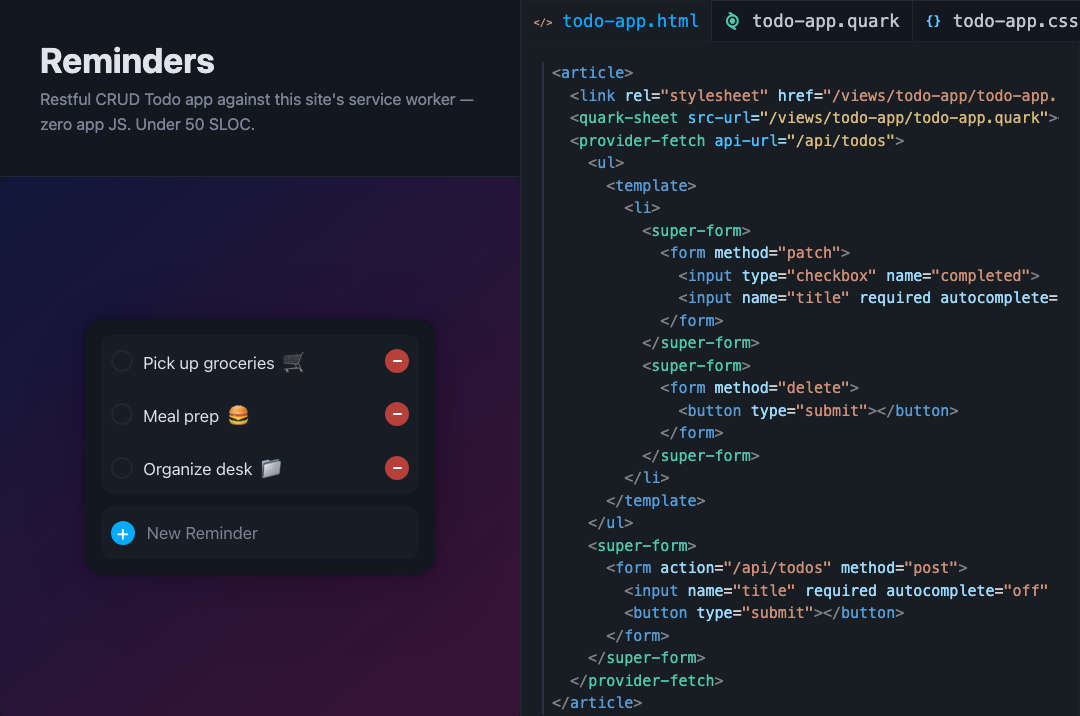
Live demo: fully RESTful Todo app - under 50 lines of code, zero app JS, no build process.
To see it running in a production-grade app, see Wrenfield - a fictional, full-featured ecommerce site with SSG, SPA, web AR/3d models, WebAuthn, View Transitions, touch gestures, and more. Try it on mobile to get a native-like experience. Wrenfield was built with no app JS and no UI build process.
Every piece stands alone. Use one element on an existing site, or compose the whole stack into a full single-page app. nucleus-kit bundles it all behind one import; if you find you only use a handful of elements, install those packages à la carte instead (@excom/content-drawer, @excom/quark-sheet, …) and skip the rest.
Every package in packages/ is published to npm under the @excom scope. The whole stack is one install:
npm install @excom/nucleus-kit
Then import "@excom/nucleus-kit" and @import "@excom/nucleus-kit/basic.css". No package manager? Load both from unpkg - see Quick Start.
<div> soups bound to untraceable JavaScript. Custom elements make for a beautifully declarative document. A page that is legible, addressable, and serializable is an ideal target for code generation, AI-assisted editing, and confident human auditing. Tools reason about the screen's exact state instead of inferring a component tree. Likewise, writing and debugging UI code by hand has never felt simpler.Content-rich sites, complex data-driven business rules, progressive enhancement of static/server-rendered pages, embedded user experiences. See Limitations for the edges.
The Nucleus Stack also opens up new possibilities that were not easily served by any UI technology before:
The docs site - including the complex bits, like the text editors - was built entirely using this UI stack alone. Due to the declarative design of these technologies, inspecting the document will give you a very strong understanding of the application's composition and features. Open your inspector! Installing Nucleus DevTools will also provide even stronger insight.
The Nucleus Stack is currently being used in production by partnering companies.
The Nucleus Stack is MIT licensed and will remain free and open source. This is made possible by its contributors and sponsors. Sponsor · Contribute
Rich HTML apps: drop-in custom elements + Quark, a CSS-derived orchestration language. No components, no virtual DOM, no build.
See the code
Rich HTML apps - implementing the novel ASO architectural pattern.
https://nucleus.excom.dev/docs/<guide>.md and https://nucleus.excom.dev/<element>.mdYour HTML is the app! Drop-in custom elements that each have a single responsibility, then author CSS-derived rules that observe the page and react accordingly. The source of truth - your HTML - is what the browser paints.
No components, no virtual DOM, no second copy of application state tucked away in JS memory, and no build process.
Live demo: fully RESTful Todo app - under 50 lines of code, zero app JS, no build process.
To see it running in a production-grade app, see Wrenfield - a fictional, full-featured ecommerce site with SSG, SPA, web AR/3d models, WebAuthn, View Transitions, touch gestures, and more. Try it on mobile to get a native-like experience. Wrenfield was built with no app JS and no UI build process.
Every piece stands alone. Use one element on an existing site, or compose the whole stack into a full single-page app. nucleus-kit bundles it all behind one import; if you find you only use a handful of elements, install those packages à la carte instead (@excom/content-drawer, @excom/quark-sheet, …) and skip the rest.
Every package in packages/ is published to npm under the @excom scope. The whole stack is one install:
npm install @excom/nucleus-kit
Then import "@excom/nucleus-kit" and @import "@excom/nucleus-kit/basic.css". No package manager? Load both from unpkg - see Quick Start.
<div> soups bound to untraceable JavaScript. Custom elements make for a beautifully declarative document. A page that is legible, addressable, and serializable is an ideal target for code generation, AI-assisted editing, and confident human auditing. Tools reason about the screen's exact state instead of inferring a component tree. Likewise, writing and debugging UI code by hand has never felt simpler.Content-rich sites, complex data-driven business rules, progressive enhancement of static/server-rendered pages, embedded user experiences. See Limitations for the edges.
The Nucleus Stack also opens up new possibilities that were not easily served by any UI technology before:
The docs site - including the complex bits, like the text editors - was built entirely using this UI stack alone. Due to the declarative design of these technologies, inspecting the document will give you a very strong understanding of the application's composition and features. Open your inspector! Installing Nucleus DevTools will also provide even stronger insight.
The Nucleus Stack is currently being used in production by partnering companies.
The Nucleus Stack is MIT licensed and will remain free and open source. This is made possible by its contributors and sponsors. Sponsor · Contribute



