edb is a cross-platform AArch32/x86/x86-64 debugger.
C++
2,974
3,085 commits
updated Oct 7, 2026





edb is a cross platform AArch32/x86/x86-64 debugger. It was inspired by Ollydbg, but aims to function on AArch32, x86, and x86-64 as well as multiple OS's. Linux is the only officially supported platform at the moment, but FreeBSD, OpenBSD, OSX and Windows ports are underway with varying degrees of functionality.
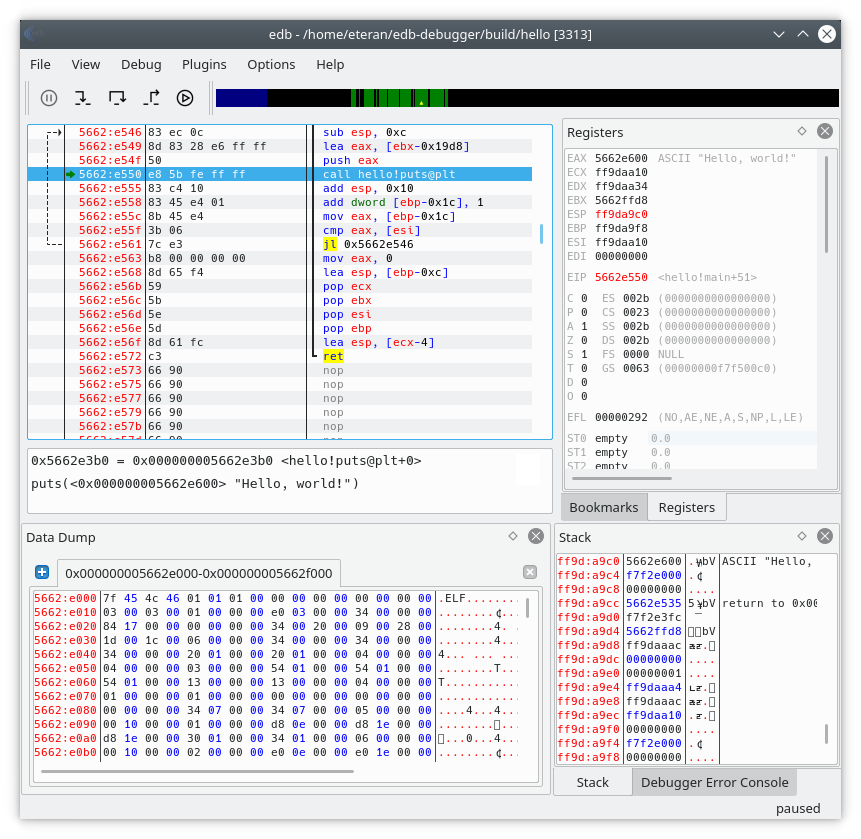
edb is available under the GPL 2 license, see the COPYING for details.
NOTE: version 1.5.0 is the last version to support linux kernels older than 3.0. New development will target 3.0 and newer, and will be 2.0.0 when released.
NOTE: This README now only covers the most essential documentation, for more complete documentation see the wiki
When cloning the repo, please use git's --recursive flag to ensure that the
sub-modules will be properly cloned and updated to the correct versions.
Here is an example:
git clone --recursive https://github.com/eteran/edb-debugger.git
Compiling edb is generally quite simple. The latest release of edb currently depends on the following packages:
| Dependency | Version Required |
|---|---|
| GCC/Clang | Supporting C++17 |
| Qt | >= 5.15 or >= 6.8 |
| Capstone | >= 3.0 |
| Graphviz | >= 2.38.0 (Optional) |
Many distributions already have packages that satisfy these. The wiki contains examples for some popular distributions:
Once you have the necessary dependencies installed, compilation is done with
cmake:
If you plan to just run edb out of the build directory, it's as simple as this:
$ mkdir build
$ cd build
$ cmake ..
$ make
$ ./edb
If you would like to properly install edb on the system for all users, it's only a little different:
$ mkdir build
$ cd build
$ cmake -DCMAKE_INSTALL_PREFIX=/usr/local/ ..
$ make
$ make install
$ edb
Basic installation is simple, you may run
$ make install
In which case the plugins will be installed in /usr/local/lib/edb and the
binaries will be installed in /usr/local/bin/.
(top 24 of 39)
379 followers · starred Feb 2025
206 followers · starred Jan 2017
629 followers · starred Dec 2023
802 followers · starred Jul 2020
edb is a cross-platform AArch32/x86/x86-64 debugger.
C++
2,974
3,085 commits
updated Oct 7, 2026
edb is a cross platform AArch32/x86/x86-64 debugger. It was inspired by Ollydbg, but aims to function on AArch32, x86, and x86-64 as well as multiple OS's. Linux is the only officially supported platform at the moment, but FreeBSD, OpenBSD, OSX and Windows ports are underway with varying degrees of functionality.
edb is available under the GPL 2 license, see the COPYING for details.
NOTE: version 1.5.0 is the last version to support linux kernels older than 3.0. New development will target 3.0 and newer, and will be 2.0.0 when released.
NOTE: This README now only covers the most essential documentation, for more complete documentation see the wiki
When cloning the repo, please use git's --recursive flag to ensure that the
sub-modules will be properly cloned and updated to the correct versions.
Here is an example:
git clone --recursive https://github.com/eteran/edb-debugger.git
Compiling edb is generally quite simple. The latest release of edb currently depends on the following packages:
| Dependency | Version Required |
|---|---|
| GCC/Clang | Supporting C++17 |
| Qt | >= 5.15 or >= 6.8 |
| Capstone | >= 3.0 |
| Graphviz | >= 2.38.0 (Optional) |
Many distributions already have packages that satisfy these. The wiki contains examples for some popular distributions:
Once you have the necessary dependencies installed, compilation is done with
cmake:
If you plan to just run edb out of the build directory, it's as simple as this:
$ mkdir build
$ cd build
$ cmake ..
$ make
$ ./edb
If you would like to properly install edb on the system for all users, it's only a little different:
$ mkdir build
$ cd build
$ cmake -DCMAKE_INSTALL_PREFIX=/usr/local/ ..
$ make
$ make install
$ edb
Basic installation is simple, you may run
$ make install
In which case the plugins will be installed in /usr/local/lib/edb and the
binaries will be installed in /usr/local/bin/.
(top 24 of 39)
379 followers · starred Feb 2025
206 followers · starred Jan 2017
629 followers · starred Dec 2023
802 followers · starred Jul 2020



