TUI Application to manage Obsidian notes directly from the terminal
See the code
TUI Application to manage Obsidian notes
TUI Application to manage Obsidian vaults and notes directly from the terminal ✨.
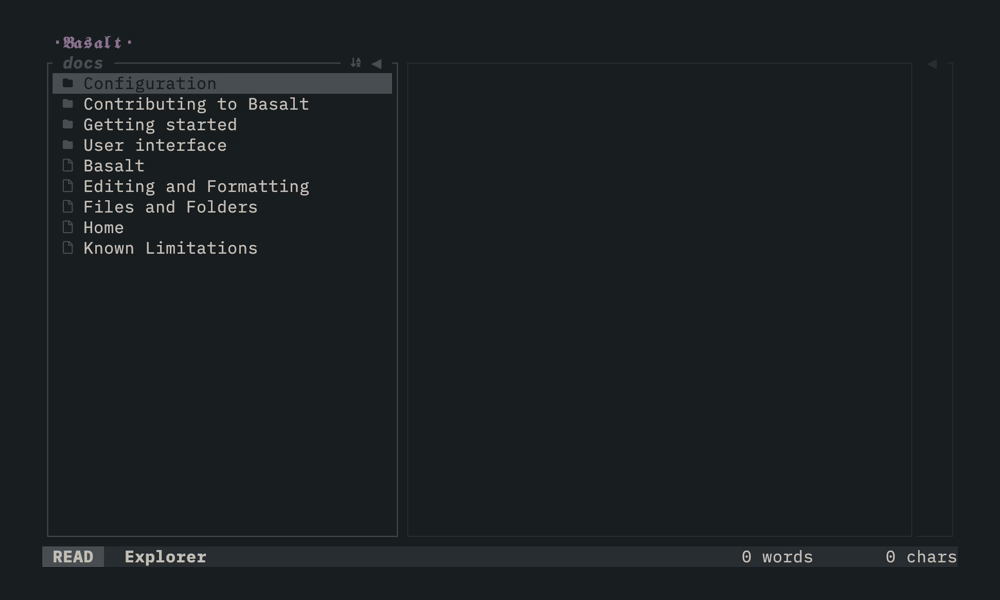
Basalt is a cross-platform TUI (Terminal User Interface) for managing Obsidian vaults and notes. It runs on Windows, macOS and Linux. Basalt is not a replacement for Obsidian. Instead, it provides a minimalist terminal interface with a WYSIWYG experience.
Using Homebrew:
brew install erikjuhani/tap/basalt
Using Cargo:
cargo install basalt-tui
Using aqua:
aqua g -i erikjuhani/basalt
Or download a pre-compiled binary from the latest release, extract it and move the basalt binary to a location in your PATH.
Nightly builds track the latest main commit. They are unstable and meant for testing. The nightly release always holds the newest build. A downloaded nightly binary reports a -nightly suffix in basalt --version. A build from source reports the commit hash instead.
Using Homebrew (builds from source):
brew install --HEAD erikjuhani/tap/basalt
Using Cargo (builds from source):
cargo install --git https://github.com/erikjuhani/basalt --branch main basalt-tui
Or download a pre-compiled binary from the nightly release.
Basalt can be customized using a TOML configuration file. The file does not exist by default. Create it manually when you want to override the defaults.
macOS and Linux:
$HOME/.basalt.toml$XDG_CONFIG_HOME/basalt/config.tomlWindows:
%USERPROFILE%\.basalt.toml%APPDATA%\basalt\config.tomlIf configuration files exist in multiple locations, only the first one found is used. The home directory configuration takes precedence.
[!WARNING]
This behavior may change in future versions to merge all found configurations instead.
See the full configuration reference for key mappings, custom commands and defaults.
The docs live at basalt.page. The sources are in docs/, written as an Obsidian vault, so read them on the site rather than on GitHub, where wiki-links and image embeds do not resolve.
Contributions are welcome, primarily for bug fixes. Feature work is considered on a case-by-case basis. Please open an issue first to discuss.
See CONTRIBUTING.md for development setup, code style and contribution guidelines.
Copyright (c) Erik Kinnunen.
Basalt spans three crates under two licenses:
basalt-tui (the application) is GPL-3.0-or-later. Distributed modifications must stay open under the same terms.basalt-core and basalt-widgets (the libraries) are Apache-2.0, so they stay reusable in other projects.Contributions are accepted under a Contributor License Agreement. See CONTRIBUTING.md.
(top 24 of 27)
207 followers · starred Feb 2026
37 followers · starred Apr 2025
122 followers · starred Apr 2025
327 followers · starred Mar 2025
TUI Application to manage Obsidian notes directly from the terminal
See the code
TUI Application to manage Obsidian notes
TUI Application to manage Obsidian vaults and notes directly from the terminal ✨.
Basalt is a cross-platform TUI (Terminal User Interface) for managing Obsidian vaults and notes. It runs on Windows, macOS and Linux. Basalt is not a replacement for Obsidian. Instead, it provides a minimalist terminal interface with a WYSIWYG experience.
Using Homebrew:
brew install erikjuhani/tap/basalt
Using Cargo:
cargo install basalt-tui
Using aqua:
aqua g -i erikjuhani/basalt
Or download a pre-compiled binary from the latest release, extract it and move the basalt binary to a location in your PATH.
Nightly builds track the latest main commit. They are unstable and meant for testing. The nightly release always holds the newest build. A downloaded nightly binary reports a -nightly suffix in basalt --version. A build from source reports the commit hash instead.
Using Homebrew (builds from source):
brew install --HEAD erikjuhani/tap/basalt
Using Cargo (builds from source):
cargo install --git https://github.com/erikjuhani/basalt --branch main basalt-tui
Or download a pre-compiled binary from the nightly release.
Basalt can be customized using a TOML configuration file. The file does not exist by default. Create it manually when you want to override the defaults.
macOS and Linux:
$HOME/.basalt.toml$XDG_CONFIG_HOME/basalt/config.tomlWindows:
%USERPROFILE%\.basalt.toml%APPDATA%\basalt\config.tomlIf configuration files exist in multiple locations, only the first one found is used. The home directory configuration takes precedence.
[!WARNING]
This behavior may change in future versions to merge all found configurations instead.
See the full configuration reference for key mappings, custom commands and defaults.
The docs live at basalt.page. The sources are in docs/, written as an Obsidian vault, so read them on the site rather than on GitHub, where wiki-links and image embeds do not resolve.
Contributions are welcome, primarily for bug fixes. Feature work is considered on a case-by-case basis. Please open an issue first to discuss.
See CONTRIBUTING.md for development setup, code style and contribution guidelines.
Copyright (c) Erik Kinnunen.
Basalt spans three crates under two licenses:
basalt-tui (the application) is GPL-3.0-or-later. Distributed modifications must stay open under the same terms.basalt-core and basalt-widgets (the libraries) are Apache-2.0, so they stay reusable in other projects.Contributions are accepted under a Contributor License Agreement. See CONTRIBUTING.md.
(top 24 of 27)
207 followers · starred Feb 2026
37 followers · starred Apr 2025
122 followers · starred Apr 2025
327 followers · starred Mar 2025



