a digital safe with multiple keys, held by people you trust
See the codeA digital safe with multiple keys, held by people you trust.
ReMemory protects your files and divides the key among people you choose. You decide how many must come together to open it. Each person gets a self-contained recovery tool that works offline, in any browser.*
* Time-locked archives need a brief internet connection at recovery time.
Each person receives a bundle containing recover.html — a browser-based recovery tool. No servers. No dependencies. No need for this project to exist when recovery happens.
Download demo bundles to try the recovery process yourself.
graph TB
    subgraph seal["① SEAL (you do this once)"]
        A[Your Files] --> B[Encrypt with age]
        B --> C[Split key into 5 pieces]
        C --> D1[Alice's bundle]
        C --> D2[Bob's bundle]
        C --> D3[Camila's bundle]
        C --> D4[Dominique's bundle]
        C --> D5[Elias's bundle]
    end

    subgraph recover["② RECOVER (friends do this together)"]
        R1[Alice opens recover.html] --> R2[Her piece is pre-loaded]
        R2 --> R3[Drags Bob's file]
        R3 --> R4[Drags Camila's file]
        R4 --> R5{3 of 5 pieces}
        R5 -->|Threshold met| R6[Files unlocked]
        R6 --> R7[Download files]
    end

    D1 -.-> R1
    D2 -.-> R3
    D3 -.-> R4
Any 3 pieces can reconstruct the key, but a single piece reveals nothing — not "very little," mathematically zero information.
The number of people and the threshold are up to you: 2-of-3 for a small circle, 3-of-5 for a wider group, or 2-of-2 for a couple.
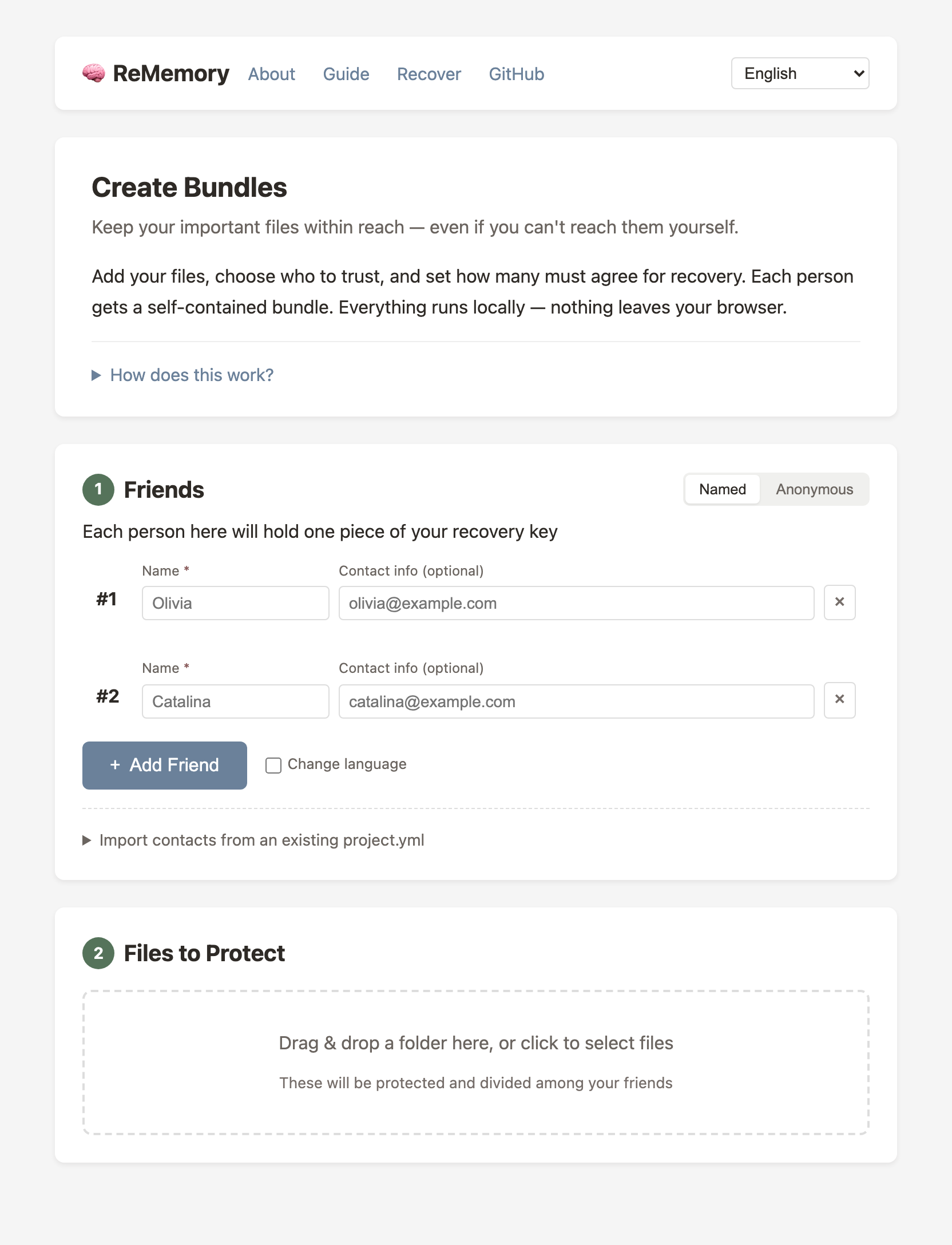
Create bundles in your browser — no installation required.
| Create Bundles | eljojo.github.io/rememory/maker.html |
| Documentation | eljojo.github.io/rememory/docs.html |
Everything runs locally. Your files never leave your device.
For automation, scripting, or if you prefer the terminal.
# macOS (Homebrew)
brew install eljojo/rememory/rememory

# Linux (x86_64)
curl -Lo rememory https://github.com/eljojo/rememory/releases/latest/download/rememory-linux-amd64
chmod +x rememory
sudo mv rememory /usr/local/bin/

# Docker (self-hosted)
docker run -d \
  --name rememory \
  -p 8080:8080 \
  -v rememory-data:/data \
  ghcr.io/eljojo/rememory:latest

# Nix
nix run github:eljojo/rememory
See the CLI User Guide or the Self-Hosted Guide for complete documentation.
Before protecting real secrets, try the recovery process:
bundle-alice/recover.html in your browserThis is the closest thing to what a real recovery feels like.
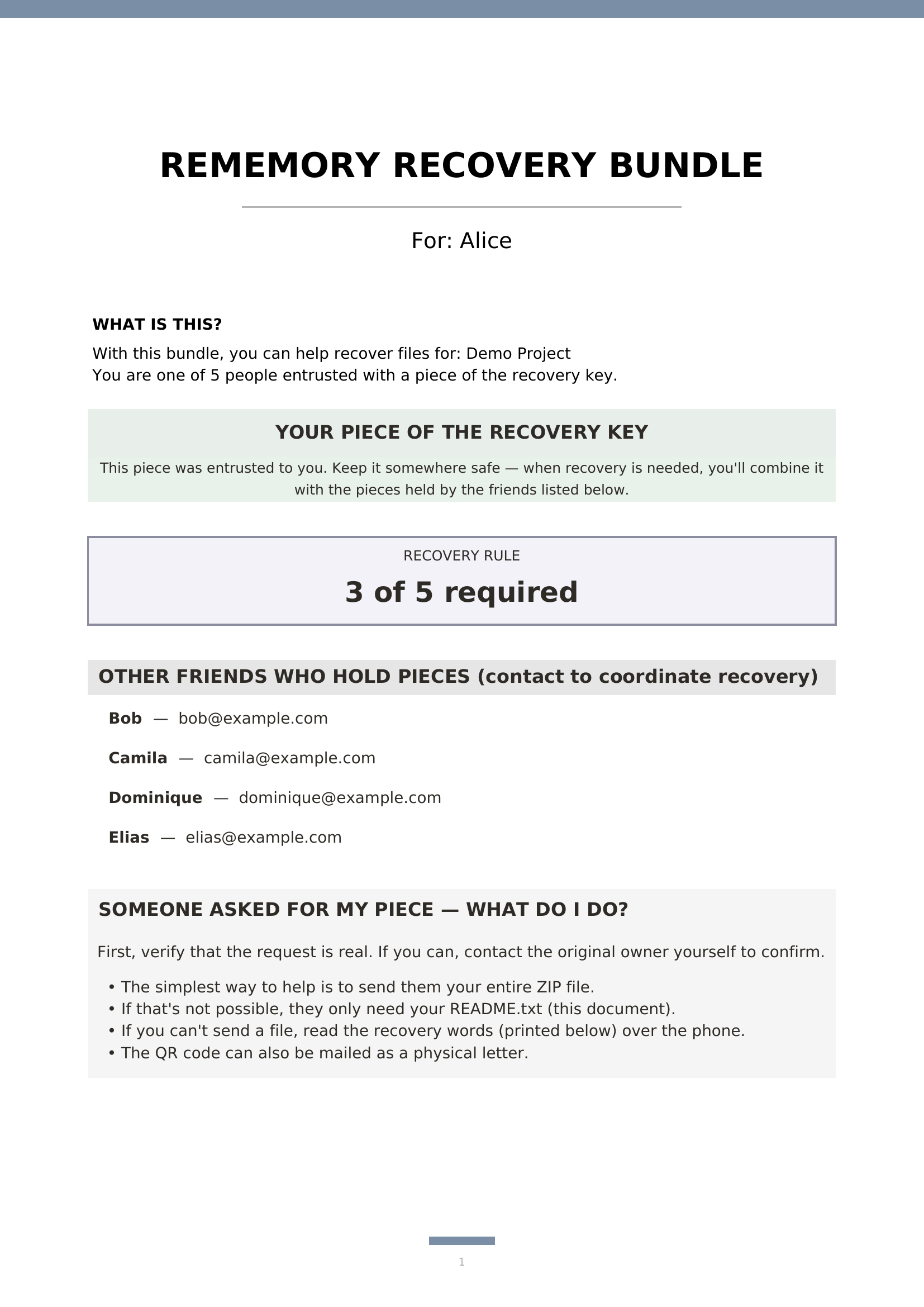
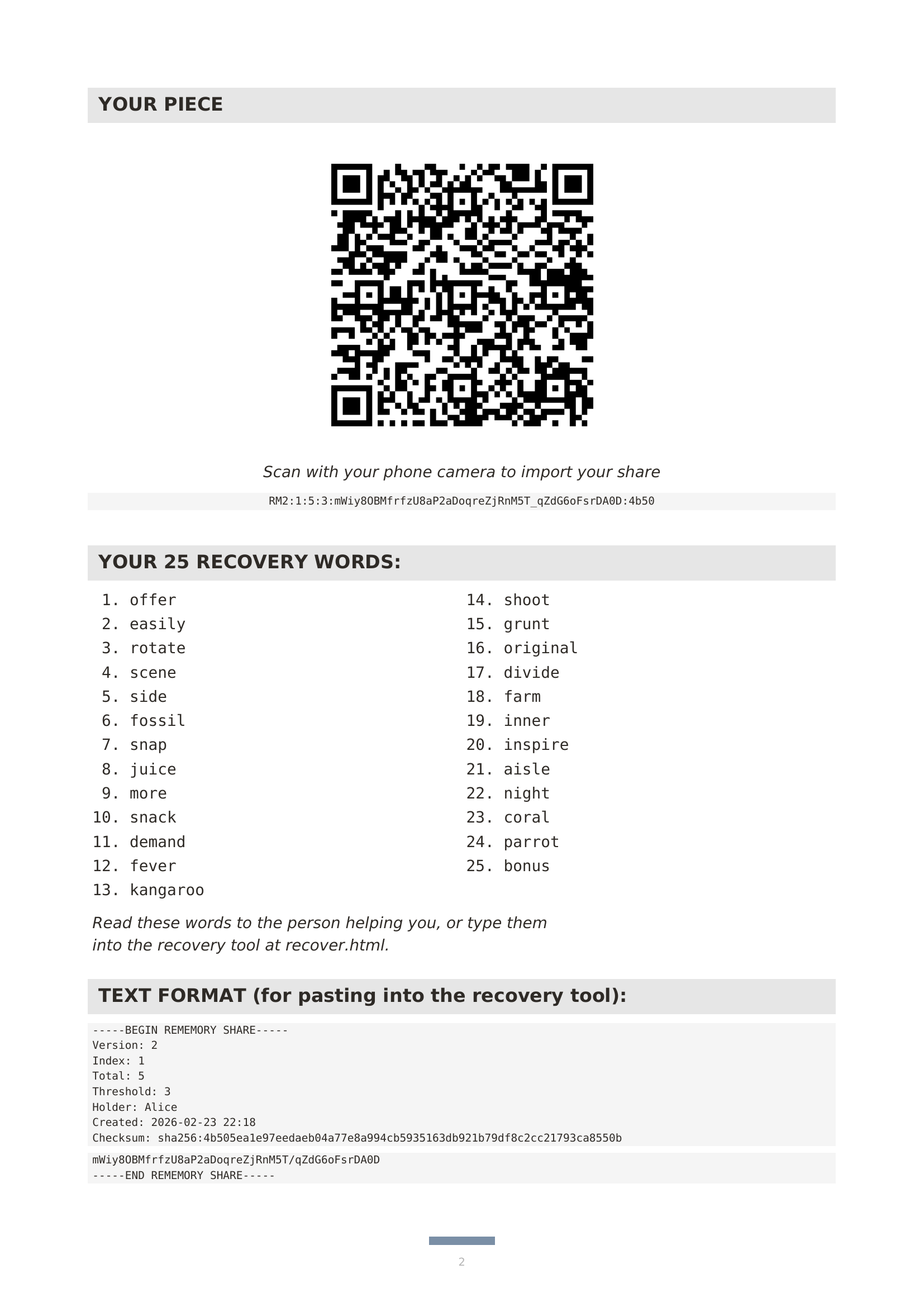
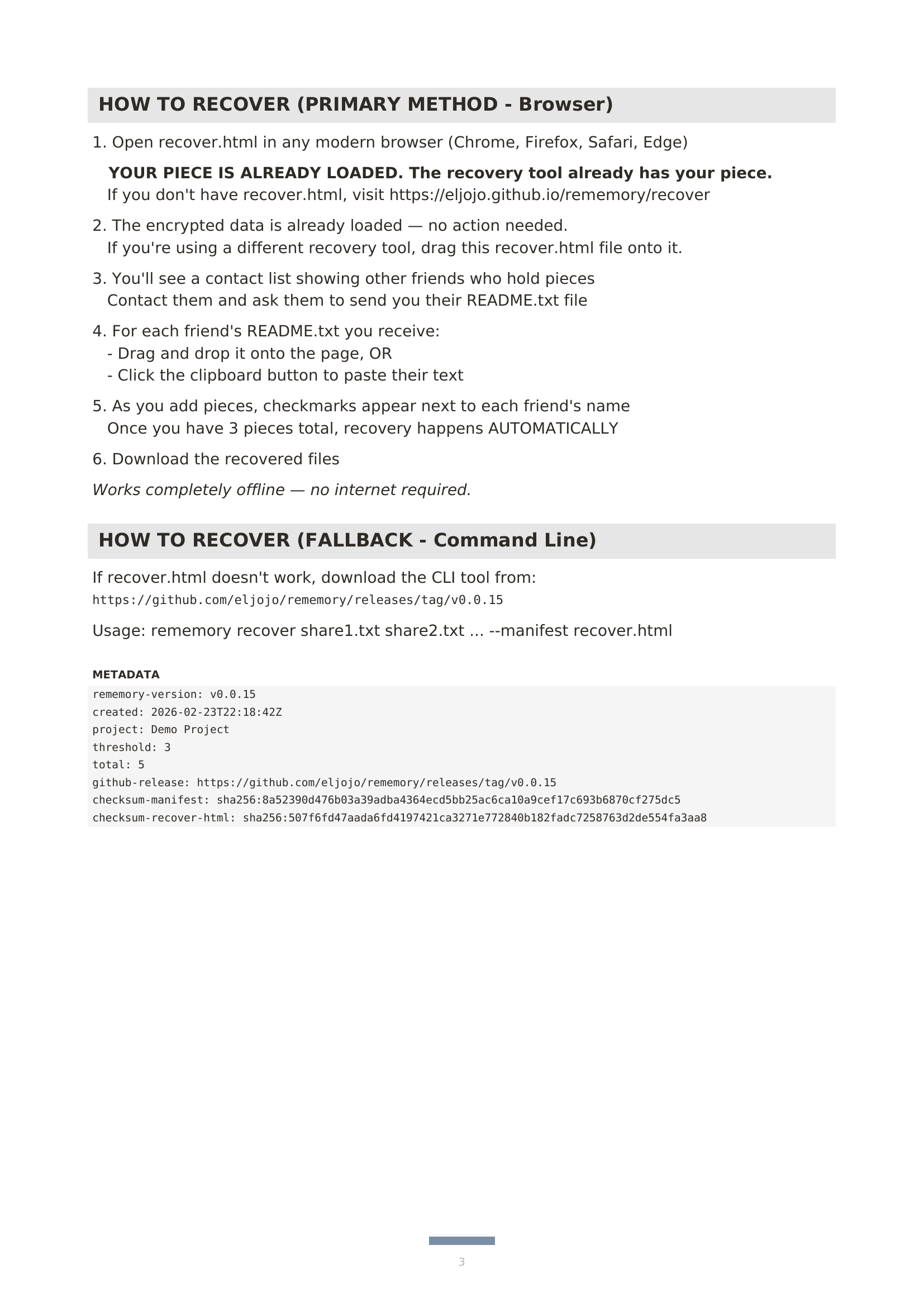
Each friend gets a ZIP bundle containing:
| File | Purpose |
|---|---|
README.txt | Instructions, their unique piece, contact list |
README.pdf | Same content, formatted for printing |
MANIFEST.age | Your encrypted files (only included separately when over 10 MB) |
recover.html | Recovery tool (~300 KB), runs in any browser. For smaller archives, everything is embedded — just open this file |
A single piece reveals nothing. But tell your friends to keep their bundle somewhere safe — it's their responsibility to you.
We all have digital secrets that matter: password manager recovery codes, cryptocurrency seeds, important documents, instructions for loved ones. What happens to these if you're suddenly unavailable?
Traditional approaches fail:
ReMemory takes a different approach:
Two things drove me to create ReMemory.
First, I watched a documentary about Clive Wearing, a man who has lived with a 7-second memory since 1985. Seeing how fragile memory can be made me think about what would happen to my digital life if something similar happened to me.
Second, I've had several concussions from cycling accidents. Each time, I've been lucky to recover fully. But each time, I've been reminded that our brains are more fragile than we like to think.
ReMemory is my answer: a way to ensure the people I trust can access what matters, even if I can't help them.
ReMemory assumes:
ReMemory does NOT rely on:
See the Security Review for details.
| Component | Algorithm |
|---|---|
| Encryption | age (scrypt passphrase mode) |
| Key derivation | scrypt (N=2²⁰, r=8, p=1) |
| Secret sharing | Shamir's Secret Sharing over GF(2⁸) |
| Integrity | SHA-256 checksums |
| Passphrase | 256 bits from crypto/rand |
| Time lock (optional) | drand tlock (BLS12-381 IBE, inner layer) |
A single piece reveals nothing about your secret. This is a mathematical guarantee of Shamir's Secret Sharing — any fewer than threshold pieces contain zero information about the original secret.
You can set a waiting period when creating bundles. Even with enough pieces, the files stay locked until the date you chose — for example, 30 days, 6 months, or a specific date.
This uses the League of Entropy (drand), a distributed randomness beacon run by organizations around the world. At recovery time, a brief internet connection is needed — not to send data, but to verify that enough time has passed.
CLI: rememory seal --timelock 30d (or 6m, 1y, 2027-06-15T00:00:00Z)
Web: Enable under "Advanced options" in the bundle creator.
Important caveats:
| What if... | Result |
|---|---|
| A friend loses their bundle? | Fine, as long as threshold friends remain |
| A friend leaks their piece publicly? | Harmless without threshold-1 other pieces |
| ReMemory disappears in 10 years? | recover.html still works — it's self-contained |
| Browsers change dramatically? | Pure JavaScript with no external dependencies |
| You forget how this works? | Each bundle's README.txt explains everything |
| Some friends can't be reached? | That's why you set threshold below total friends |
| Time lock used, but no internet at recovery? | Wait and try again — data is safe, just needs the beacon check |
| League of Entropy shuts down? | Time-locked archives become unrecoverable — only a risk if you use the time lock feature |
# Using Nix (recommended)
nix develop

# Install dependencies
npm install

# Build
make build

# Run tests
make test         # Unit tests
make test-e2e     # Browser tests (requires: npm install)

# Preview website locally
make serve        # Serves at http://localhost:8000
ReMemory isn't the first tool to use Shamir's Secret Sharing. Its focus is making recovery possible for non-technical people, without installing anything.
| Tool | Type | Input | Splitting Method | Output | Non-technical Recovery | Offline | Contact Details |
|---|---|---|---|---|---|---|---|
| eljojo/rememory | CLI + Web | Files & folders | Shamir's SSS | ZIP bundles with PDF instructions, recover.html, encrypted archive | Yes — open HTML in browser | Yes | Yes — included in each bundle |
| jesseduffield/horcrux | CLI | Files | Shamir's SSS | Encrypted file fragments | No — requires CLI | Yes | No |
| jefdaj/horcrux | CLI | Files (GPG) | Shamir's SSS (via ssss) | .key + .sig files, steganography in images/audio | No — requires CLI + GPG | Yes (TAILS recommended) | No |
| paritytech/banana_split | Web app | Text only | Shamir's SSS + NaCl | Printable QR codes | Partial — scan QR + type passphrase | Yes (self-contained HTML) | No |
| cyphar/paperback | CLI | Files | Shamir's SSS in GF(2^32) | Printable PDFs with QR codes + text fallback | Partial — scan QR or type text | Yes | No |
| simonfrey/s4 (site) | Web GUI + Go lib | Text/bytes | Shamir's SSS + AES | Text shares | No — copy/paste shares | Yes (save HTML locally) | No |
| xkortex/passcrux | CLI | Text/passphrases | Shamir's SSS | Text shares (hex/base32/base64) | No — requires CLI | Yes | No |
| ssss | CLI | Text (128 char max) | Shamir's SSS | Text shares | No — requires CLI | Yes | No |
| cedws/amnesia | CLI | Text/data streams | Shamir's SSS + argon2id | JSON file (Q&A-based, single user) | No — requires CLI | Yes | No |
| henrysdev/Haystack | CLI | Files | Shamir's SSS | Encrypted file fragments | No — requires CLI | Yes | No |
| antonio-ivanovski/shared-secret-encrypt (site) | Web app | Text only | Shamir's SSS + AES-GCM | Base58-encoded shares + encrypted message | Partial — web UI for decrypt | Yes (client-side, can save HTML) | No |
| MinorGlitch/ethernity | CLI (Python) | Files | Shamir's SSS + AES-256-GCM | Printable PDFs with QR codes + text fallback, bundled browser recovery kit | Partial — scan QR or type text | Yes | No |
| Tool | Type | Input | Method | Output | Non-technical Recovery | Offline | Contact Details |
|---|---|---|---|---|---|---|---|
| msolomon/keybearer (site) | Web app | Files | Layered encryption | Encrypted file download | Partial — web UI for decryption | Yes (client-side JS) | No |
| RobinWeitzel/secret_sharer (site) | Web app | Text only | Split-key AES-256 (fixed 2-of-2) | PDF with 2 QR codes + security code | Yes — scan QR codes | Yes (client-side) | No |
| Bitwarden Emergency Access | Web service | Vault items + attachments | RSA key exchange (1-of-1) | Live vault access (no file output) | Yes — web UI | No (server required) | Via Bitwarden accounts |
| Apple Digital Legacy | Built-in (Apple) | Apple Account data | Legacy Contact designation | iCloud data access (3-year window) | Yes — Apple handles it | No (Apple servers required) | Via Apple Account |
| potatoqualitee/eol-dr | Guide/checklist | N/A | N/A (not a tool) | Printable checklist covering accounts, finances, subscriptions, devices | N/A | Yes (print it) | Template fields |
Key takeaways:
recover.html) bundled with each piece — no installation, no internet, no CLI needed.Apache-2.0 — Copyright 2026 José Albornoz
Built on:
Translations by:
The protocol was originally designed in a Google Doc in 2023.
133 followers · starred Feb 2026
195 followers · starred Feb 2026
191 followers · starred Feb 2026
182 followers · starred Feb 2026
a digital safe with multiple keys, held by people you trust
See the codeA digital safe with multiple keys, held by people you trust.
ReMemory protects your files and divides the key among people you choose. You decide how many must come together to open it. Each person gets a self-contained recovery tool that works offline, in any browser.*
* Time-locked archives need a brief internet connection at recovery time.
Each person receives a bundle containing recover.html — a browser-based recovery tool. No servers. No dependencies. No need for this project to exist when recovery happens.
Download demo bundles to try the recovery process yourself.
graph TB
    subgraph seal["① SEAL (you do this once)"]
        A[Your Files] --> B[Encrypt with age]
        B --> C[Split key into 5 pieces]
        C --> D1[Alice's bundle]
        C --> D2[Bob's bundle]
        C --> D3[Camila's bundle]
        C --> D4[Dominique's bundle]
        C --> D5[Elias's bundle]
    end

    subgraph recover["② RECOVER (friends do this together)"]
        R1[Alice opens recover.html] --> R2[Her piece is pre-loaded]
        R2 --> R3[Drags Bob's file]
        R3 --> R4[Drags Camila's file]
        R4 --> R5{3 of 5 pieces}
        R5 -->|Threshold met| R6[Files unlocked]
        R6 --> R7[Download files]
    end

    D1 -.-> R1
    D2 -.-> R3
    D3 -.-> R4
Any 3 pieces can reconstruct the key, but a single piece reveals nothing — not "very little," mathematically zero information.
The number of people and the threshold are up to you: 2-of-3 for a small circle, 3-of-5 for a wider group, or 2-of-2 for a couple.
Create bundles in your browser — no installation required.
| Create Bundles | eljojo.github.io/rememory/maker.html |
| Documentation | eljojo.github.io/rememory/docs.html |
Everything runs locally. Your files never leave your device.
For automation, scripting, or if you prefer the terminal.
# macOS (Homebrew)
brew install eljojo/rememory/rememory

# Linux (x86_64)
curl -Lo rememory https://github.com/eljojo/rememory/releases/latest/download/rememory-linux-amd64
chmod +x rememory
sudo mv rememory /usr/local/bin/

# Docker (self-hosted)
docker run -d \
  --name rememory \
  -p 8080:8080 \
  -v rememory-data:/data \
  ghcr.io/eljojo/rememory:latest

# Nix
nix run github:eljojo/rememory
See the CLI User Guide or the Self-Hosted Guide for complete documentation.
Before protecting real secrets, try the recovery process:
bundle-alice/recover.html in your browserThis is the closest thing to what a real recovery feels like.
Each friend gets a ZIP bundle containing:
| File | Purpose |
|---|---|
README.txt | Instructions, their unique piece, contact list |
README.pdf | Same content, formatted for printing |
MANIFEST.age | Your encrypted files (only included separately when over 10 MB) |
recover.html | Recovery tool (~300 KB), runs in any browser. For smaller archives, everything is embedded — just open this file |
A single piece reveals nothing. But tell your friends to keep their bundle somewhere safe — it's their responsibility to you.
We all have digital secrets that matter: password manager recovery codes, cryptocurrency seeds, important documents, instructions for loved ones. What happens to these if you're suddenly unavailable?
Traditional approaches fail:
ReMemory takes a different approach:
Two things drove me to create ReMemory.
First, I watched a documentary about Clive Wearing, a man who has lived with a 7-second memory since 1985. Seeing how fragile memory can be made me think about what would happen to my digital life if something similar happened to me.
Second, I've had several concussions from cycling accidents. Each time, I've been lucky to recover fully. But each time, I've been reminded that our brains are more fragile than we like to think.
ReMemory is my answer: a way to ensure the people I trust can access what matters, even if I can't help them.
ReMemory assumes:
ReMemory does NOT rely on:
See the Security Review for details.
| Component | Algorithm |
|---|---|
| Encryption | age (scrypt passphrase mode) |
| Key derivation | scrypt (N=2²⁰, r=8, p=1) |
| Secret sharing | Shamir's Secret Sharing over GF(2⁸) |
| Integrity | SHA-256 checksums |
| Passphrase | 256 bits from crypto/rand |
| Time lock (optional) | drand tlock (BLS12-381 IBE, inner layer) |
A single piece reveals nothing about your secret. This is a mathematical guarantee of Shamir's Secret Sharing — any fewer than threshold pieces contain zero information about the original secret.
You can set a waiting period when creating bundles. Even with enough pieces, the files stay locked until the date you chose — for example, 30 days, 6 months, or a specific date.
This uses the League of Entropy (drand), a distributed randomness beacon run by organizations around the world. At recovery time, a brief internet connection is needed — not to send data, but to verify that enough time has passed.
CLI: rememory seal --timelock 30d (or 6m, 1y, 2027-06-15T00:00:00Z)
Web: Enable under "Advanced options" in the bundle creator.
Important caveats:
| What if... | Result |
|---|---|
| A friend loses their bundle? | Fine, as long as threshold friends remain |
| A friend leaks their piece publicly? | Harmless without threshold-1 other pieces |
| ReMemory disappears in 10 years? | recover.html still works — it's self-contained |
| Browsers change dramatically? | Pure JavaScript with no external dependencies |
| You forget how this works? | Each bundle's README.txt explains everything |
| Some friends can't be reached? | That's why you set threshold below total friends |
| Time lock used, but no internet at recovery? | Wait and try again — data is safe, just needs the beacon check |
| League of Entropy shuts down? | Time-locked archives become unrecoverable — only a risk if you use the time lock feature |
# Using Nix (recommended)
nix develop

# Install dependencies
npm install

# Build
make build

# Run tests
make test         # Unit tests
make test-e2e     # Browser tests (requires: npm install)

# Preview website locally
make serve        # Serves at http://localhost:8000
ReMemory isn't the first tool to use Shamir's Secret Sharing. Its focus is making recovery possible for non-technical people, without installing anything.
| Tool | Type | Input | Splitting Method | Output | Non-technical Recovery | Offline | Contact Details |
|---|---|---|---|---|---|---|---|
| eljojo/rememory | CLI + Web | Files & folders | Shamir's SSS | ZIP bundles with PDF instructions, recover.html, encrypted archive | Yes — open HTML in browser | Yes | Yes — included in each bundle |
| jesseduffield/horcrux | CLI | Files | Shamir's SSS | Encrypted file fragments | No — requires CLI | Yes | No |
| jefdaj/horcrux | CLI | Files (GPG) | Shamir's SSS (via ssss) | .key + .sig files, steganography in images/audio | No — requires CLI + GPG | Yes (TAILS recommended) | No |
| paritytech/banana_split | Web app | Text only | Shamir's SSS + NaCl | Printable QR codes | Partial — scan QR + type passphrase | Yes (self-contained HTML) | No |
| cyphar/paperback | CLI | Files | Shamir's SSS in GF(2^32) | Printable PDFs with QR codes + text fallback | Partial — scan QR or type text | Yes | No |
| simonfrey/s4 (site) | Web GUI + Go lib | Text/bytes | Shamir's SSS + AES | Text shares | No — copy/paste shares | Yes (save HTML locally) | No |
| xkortex/passcrux | CLI | Text/passphrases | Shamir's SSS | Text shares (hex/base32/base64) | No — requires CLI | Yes | No |
| ssss | CLI | Text (128 char max) | Shamir's SSS | Text shares | No — requires CLI | Yes | No |
| cedws/amnesia | CLI | Text/data streams | Shamir's SSS + argon2id | JSON file (Q&A-based, single user) | No — requires CLI | Yes | No |
| henrysdev/Haystack | CLI | Files | Shamir's SSS | Encrypted file fragments | No — requires CLI | Yes | No |
| antonio-ivanovski/shared-secret-encrypt (site) | Web app | Text only | Shamir's SSS + AES-GCM | Base58-encoded shares + encrypted message | Partial — web UI for decrypt | Yes (client-side, can save HTML) | No |
| MinorGlitch/ethernity | CLI (Python) | Files | Shamir's SSS + AES-256-GCM | Printable PDFs with QR codes + text fallback, bundled browser recovery kit | Partial — scan QR or type text | Yes | No |
| Tool | Type | Input | Method | Output | Non-technical Recovery | Offline | Contact Details |
|---|---|---|---|---|---|---|---|
| msolomon/keybearer (site) | Web app | Files | Layered encryption | Encrypted file download | Partial — web UI for decryption | Yes (client-side JS) | No |
| RobinWeitzel/secret_sharer (site) | Web app | Text only | Split-key AES-256 (fixed 2-of-2) | PDF with 2 QR codes + security code | Yes — scan QR codes | Yes (client-side) | No |
| Bitwarden Emergency Access | Web service | Vault items + attachments | RSA key exchange (1-of-1) | Live vault access (no file output) | Yes — web UI | No (server required) | Via Bitwarden accounts |
| Apple Digital Legacy | Built-in (Apple) | Apple Account data | Legacy Contact designation | iCloud data access (3-year window) | Yes — Apple handles it | No (Apple servers required) | Via Apple Account |
| potatoqualitee/eol-dr | Guide/checklist | N/A | N/A (not a tool) | Printable checklist covering accounts, finances, subscriptions, devices | N/A | Yes (print it) | Template fields |
Key takeaways:
recover.html) bundled with each piece — no installation, no internet, no CLI needed.Apache-2.0 — Copyright 2026 José Albornoz
Built on:
Translations by:
The protocol was originally designed in a Google Doc in 2023.
133 followers · starred Feb 2026
195 followers · starred Feb 2026
191 followers · starred Feb 2026
182 followers · starred Feb 2026



