Thanks for dropping by!
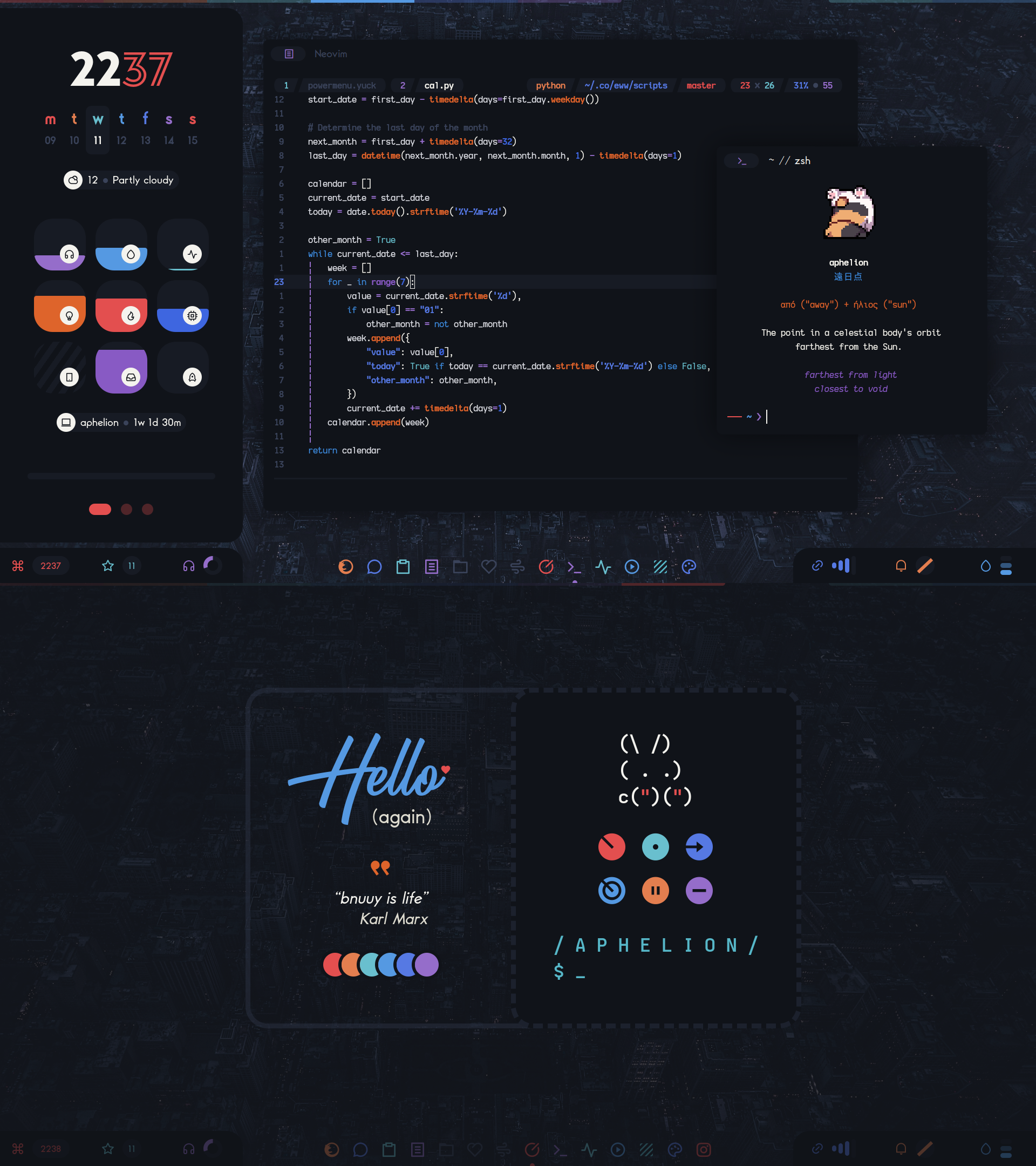
This is my personal collection of configuration files that forms the desktop you see on the right.
Here are some details about my current setup:
This is not a traditional desktop in any sense. It is highly opinionated, consists of what works for me and looks good for me and frequently disregards traditional desktop conventions and expectations. It has been evolving for about 8 years, spanning across several window managers and a migration from X11 to Wayland.
This desktop is:
AphelionFeatures:
.org filesAll interactive widgets can be controlled both with the mouse and the keyboard.
Install dependencies
The following packages need to be installed for all desktop functionality to work.
| Package | Purpose |
|---|---|
swayfx | Window manager / compositor |
i3ipc | Sway-related scripts |
eww | Widgets |
bash | Various scripts |
python | Various scripts |
rofi | Launchers and menus |
dunst | Notification daemon |
libnotify | Notification creation with notify-send |
notify-send.sh | notify-send wrapper for notification replacement |
jq | json parsing in various scripts |
inotify-tools | Reaction to file changes in various scripts |
light | Brightness control |
wget | Making HTTP requests in various scripts |
acpid | Battery charger state information |
swaybg | Wallpaper tool (Wayland) |
slurp | Screen region selection (Wayland) |
grim | Screenshot tool (Wayland) |
grimshot | grim and slurp wrapper |
playerctl | Media info |
imagemagick | Media art cropping |
gammastep | Screen color temperature tool |
kdeconnect | Phone battery information |
kitty | Terminal emulator |
iproute2 | Network events information |
iwd | Wireless daemon |
[!WARNING]
iwd: If you already have a different wireless daemon installed, do not install and enableiwd. Having more than one wireless daemon running at the same time might disconnect your current wireless connection or cause other network issues. Note thatiwdcan be used as a backend for NetworkManager.
[!NOTE] Depending on your distribution, the names of the above packages may slightly differ. Also, some of the packages might not be available in your distribution's repositories so you might have to build them from source.
Install fonts
The current setup uses the following fonts:
To save you time hunting for them online, I have uploaded a .zip file to Dropbox. Download the .zip and then:
# Assuming the .zip was saved in ~/Downloads
unzip -d ~/.local/share/fonts ~/Downloads/elenapan-dotfiles-fonts.zip
fc-cache -v
Install dotfiles
Backup first:
mkdir ~/config-backup
cp -r ~/.config/{sway,eww,dunst,fontconfig,kitty,rofi} ~/config-backup
Then clone the repo and install the relevant dotfiles:
git clone https://github.com/elenapan/dotfiles
cd dotfiles
cp -r config/{sway,eww,dunst,fontconfig,kitty,rofi} ~/.config
Tweak the last few settings
Set wallpaper:
cp /path/to/your/wallpaper ~/.local/share/wallpaper
Set location for the weather information widget:
Edit ~/.config/eww/scripts/daemons/weather.sh and set the location variable. For example:
location="Moscow,Russia"
Set lockscreen widget password:
Edit ~/.config/eww/globals.yuck and set the screen-lock-password variable. For example:
(defvar screen-lock-password "hunter2")
Set agenda widget .org files to watch:
Edit ~/.config/eww/scripts/daemons/agenda.sh and set the org_files variable. For example:
org_files=("$HOME/notes/todo.org" "$HOME/notes/birthdays.org" "$HOME/notes/finance.org")
To start the desktop, you may follow the steps in the "Starting" section of the Sway article in the Arch Wiki
[!NOTE] SwayFX is essentially Sway with extra features, which means Sway-related and i3-related resources also apply to SwayFX.
All keybinds are declared in the sway configuration directory in the following files:
Global keybinds: keys
Widget keybinds: eww
These keybinds, implemented using binding modes, are only active when the respective widget is visible.
(top 24 of 31)
68 followers · starred Apr 2022
13,961 followers · starred Jun 2021
77 followers · starred Mar 2021
76 followers · starred Nov 2019
Thanks for dropping by!
This is my personal collection of configuration files that forms the desktop you see on the right.
Here are some details about my current setup:
This is not a traditional desktop in any sense. It is highly opinionated, consists of what works for me and looks good for me and frequently disregards traditional desktop conventions and expectations. It has been evolving for about 8 years, spanning across several window managers and a migration from X11 to Wayland.
This desktop is:
AphelionFeatures:
.org filesAll interactive widgets can be controlled both with the mouse and the keyboard.
Install dependencies
The following packages need to be installed for all desktop functionality to work.
| Package | Purpose |
|---|---|
swayfx | Window manager / compositor |
i3ipc | Sway-related scripts |
eww | Widgets |
bash | Various scripts |
python | Various scripts |
rofi | Launchers and menus |
dunst | Notification daemon |
libnotify | Notification creation with notify-send |
notify-send.sh | notify-send wrapper for notification replacement |
jq | json parsing in various scripts |
inotify-tools | Reaction to file changes in various scripts |
light | Brightness control |
wget | Making HTTP requests in various scripts |
acpid | Battery charger state information |
swaybg | Wallpaper tool (Wayland) |
slurp | Screen region selection (Wayland) |
grim | Screenshot tool (Wayland) |
grimshot | grim and slurp wrapper |
playerctl | Media info |
imagemagick | Media art cropping |
gammastep | Screen color temperature tool |
kdeconnect | Phone battery information |
kitty | Terminal emulator |
iproute2 | Network events information |
iwd | Wireless daemon |
[!WARNING]
iwd: If you already have a different wireless daemon installed, do not install and enableiwd. Having more than one wireless daemon running at the same time might disconnect your current wireless connection or cause other network issues. Note thatiwdcan be used as a backend for NetworkManager.
[!NOTE] Depending on your distribution, the names of the above packages may slightly differ. Also, some of the packages might not be available in your distribution's repositories so you might have to build them from source.
Install fonts
The current setup uses the following fonts:
To save you time hunting for them online, I have uploaded a .zip file to Dropbox. Download the .zip and then:
# Assuming the .zip was saved in ~/Downloads
unzip -d ~/.local/share/fonts ~/Downloads/elenapan-dotfiles-fonts.zip
fc-cache -v
Install dotfiles
Backup first:
mkdir ~/config-backup
cp -r ~/.config/{sway,eww,dunst,fontconfig,kitty,rofi} ~/config-backup
Then clone the repo and install the relevant dotfiles:
git clone https://github.com/elenapan/dotfiles
cd dotfiles
cp -r config/{sway,eww,dunst,fontconfig,kitty,rofi} ~/.config
Tweak the last few settings
Set wallpaper:
cp /path/to/your/wallpaper ~/.local/share/wallpaper
Set location for the weather information widget:
Edit ~/.config/eww/scripts/daemons/weather.sh and set the location variable. For example:
location="Moscow,Russia"
Set lockscreen widget password:
Edit ~/.config/eww/globals.yuck and set the screen-lock-password variable. For example:
(defvar screen-lock-password "hunter2")
Set agenda widget .org files to watch:
Edit ~/.config/eww/scripts/daemons/agenda.sh and set the org_files variable. For example:
org_files=("$HOME/notes/todo.org" "$HOME/notes/birthdays.org" "$HOME/notes/finance.org")
To start the desktop, you may follow the steps in the "Starting" section of the Sway article in the Arch Wiki
[!NOTE] SwayFX is essentially Sway with extra features, which means Sway-related and i3-related resources also apply to SwayFX.
All keybinds are declared in the sway configuration directory in the following files:
Global keybinds: keys
Widget keybinds: eww
These keybinds, implemented using binding modes, are only active when the respective widget is visible.
(top 24 of 31)
68 followers · starred Apr 2022
13,961 followers · starred Jun 2021
77 followers · starred Mar 2021
76 followers · starred Nov 2019