Easily deployable and scalable backend server that efficiently converts various document formats (pdf, docx, pptx, html, images, etc) into Markdown. With support for both CPU and GPU processing, it is Ideal for large-scale workflows, it offers text/table extraction, OCR, and batch processing with sync/async endpoints.
Python
1,690
109 commits
updated Aug 4, 2026
[!IMPORTANT] This backend server is a robust, scalable solution for effortlessly converting a wide range of document formats—including PDF, DOCX, PPTX, CSV, HTML, JPG, PNG, TIFF, BMP, AsciiDoc, and Markdown—into Markdown. Powered by Docling (IBM's advanced document parser), this service is built with FastAPI, Celery, and Redis, ensuring fast, efficient processing. Optimized for both CPU and GPU modes, with GPU highly recommended for production environments, this solution offers high performance and flexibility, making it ideal for handling complex document processing at scale.
| Original PDF |
|---|
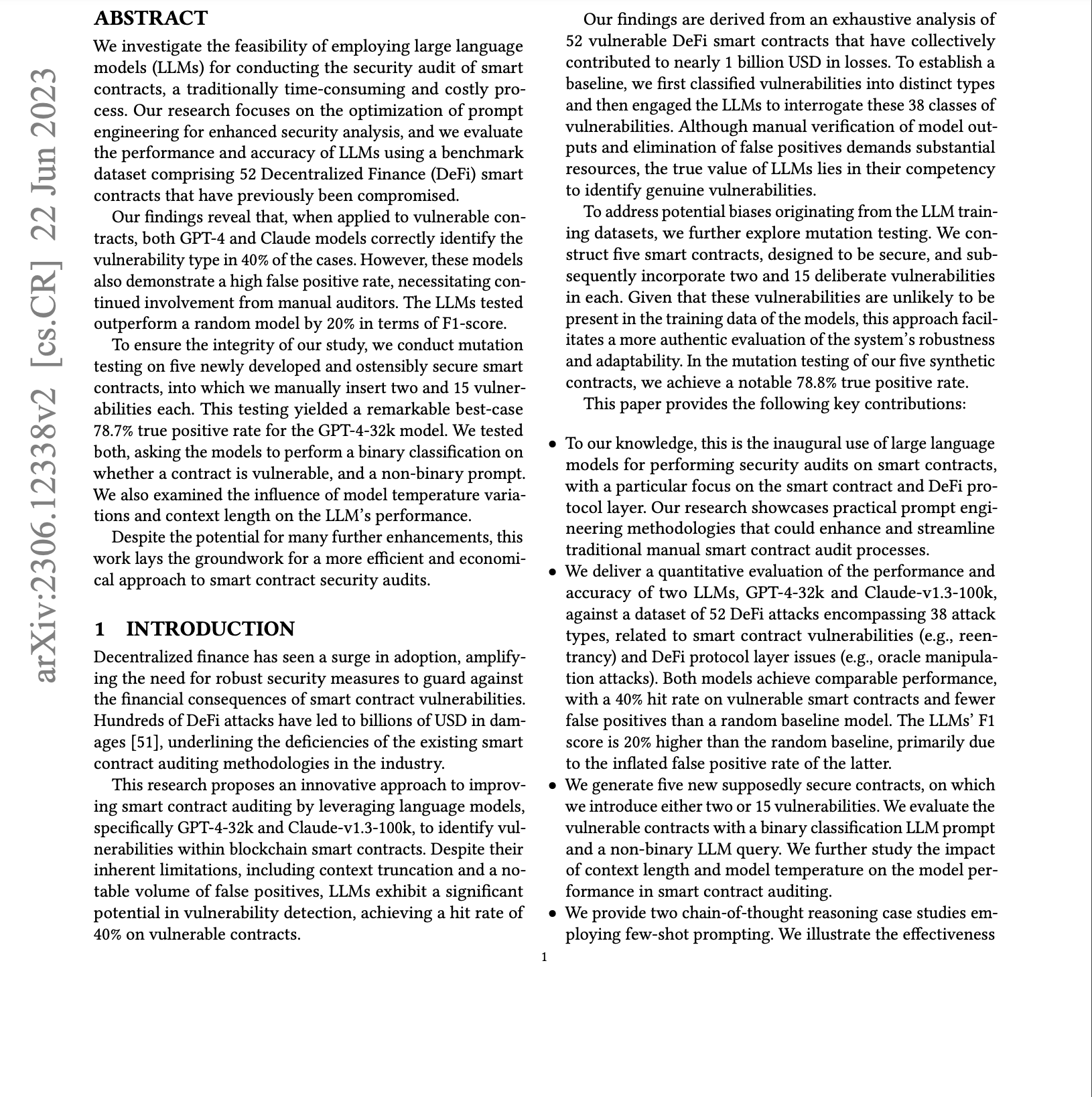 |
| Docling-API | Marker |
|---|---|
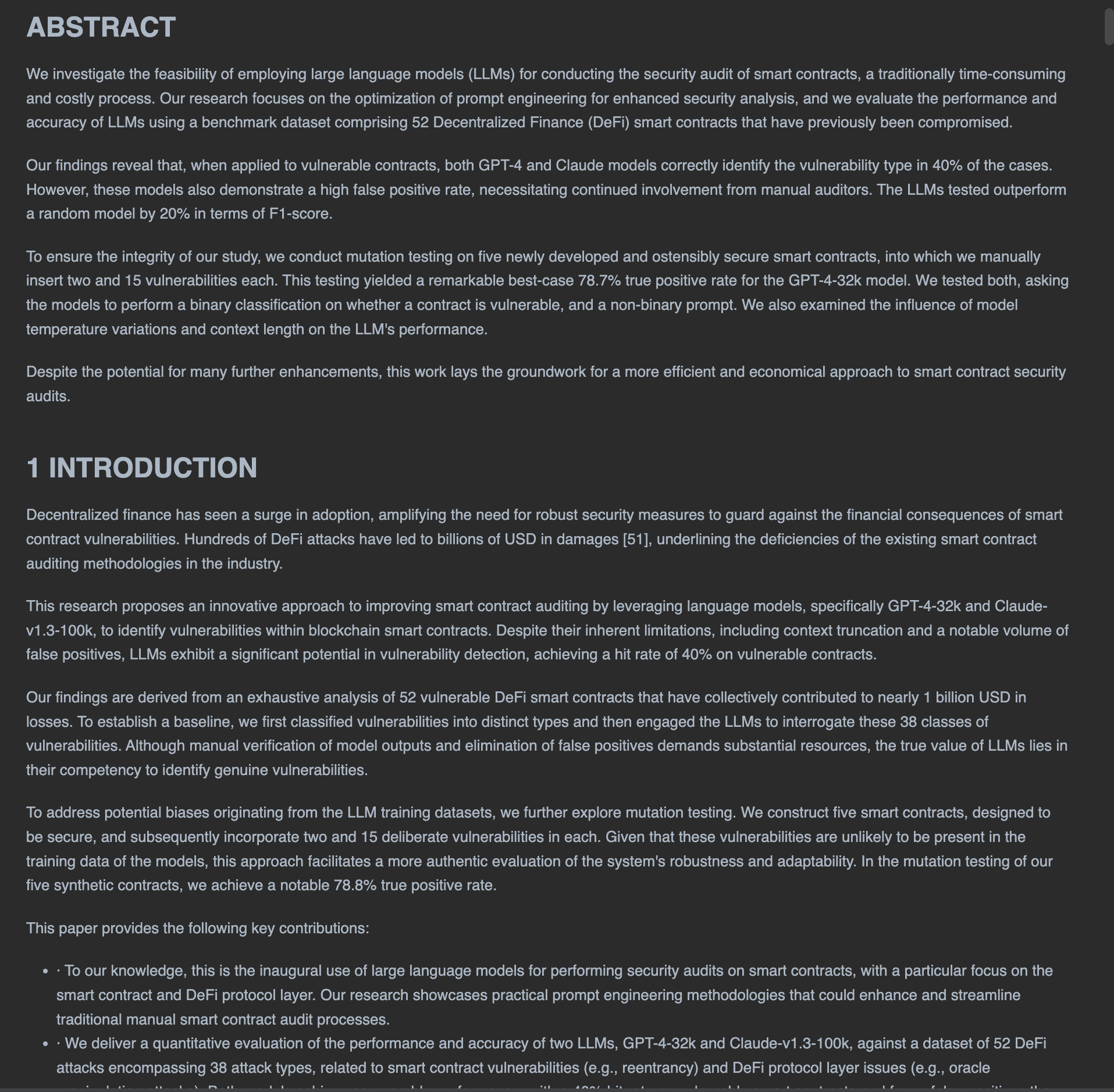 | 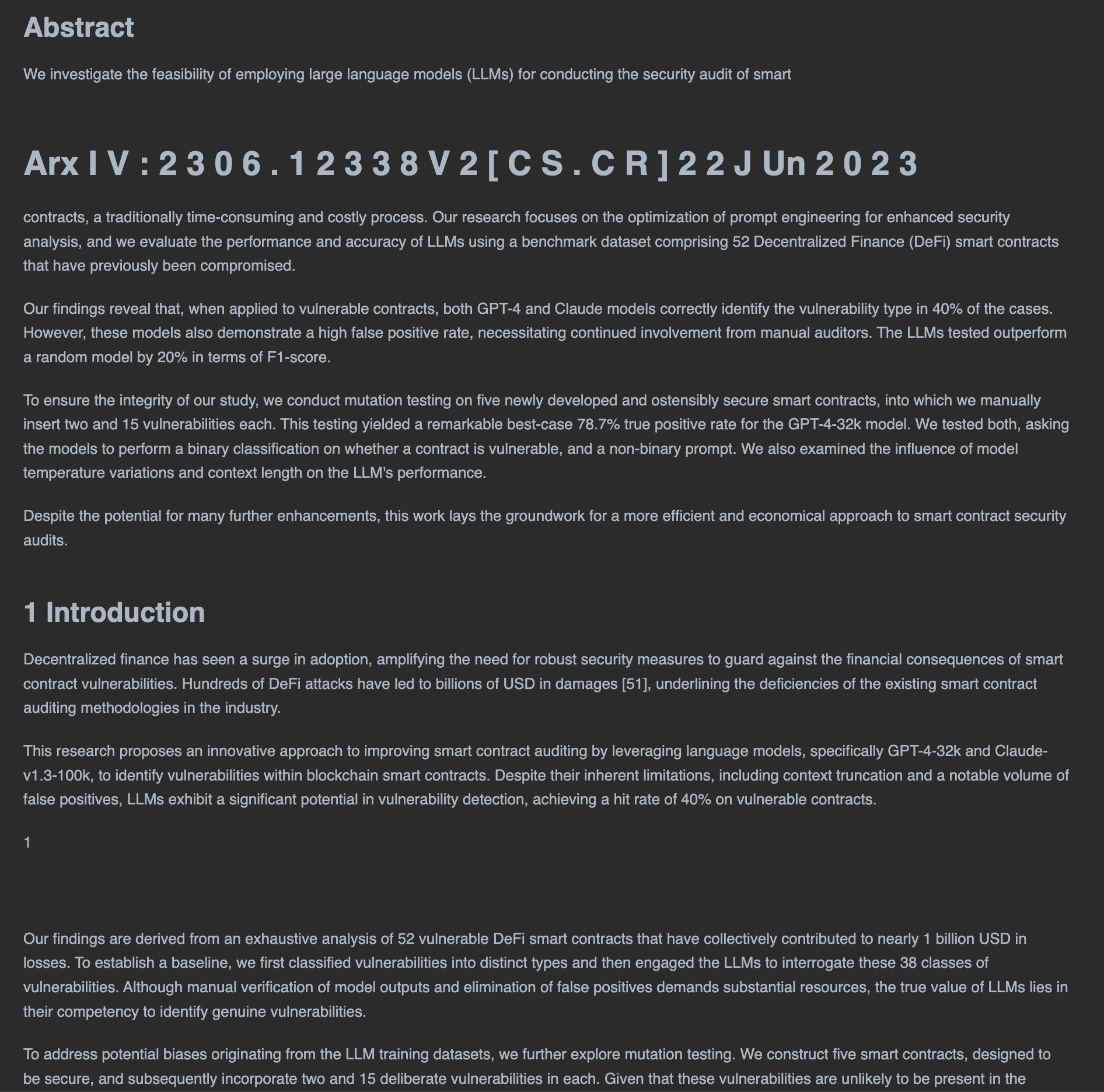 |
| PyPDF | PyMuPDF4LLM |
|---|---|
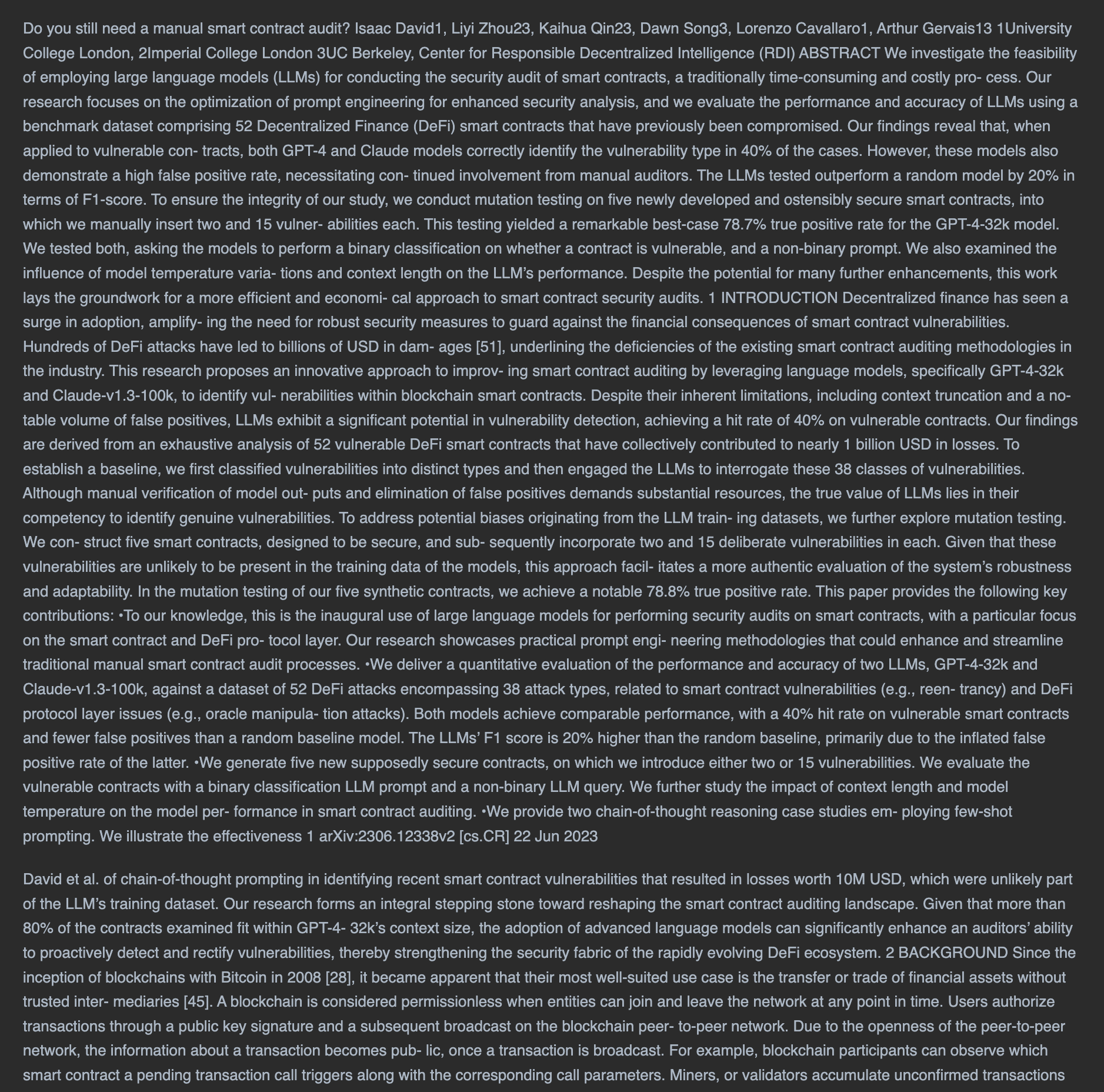 | 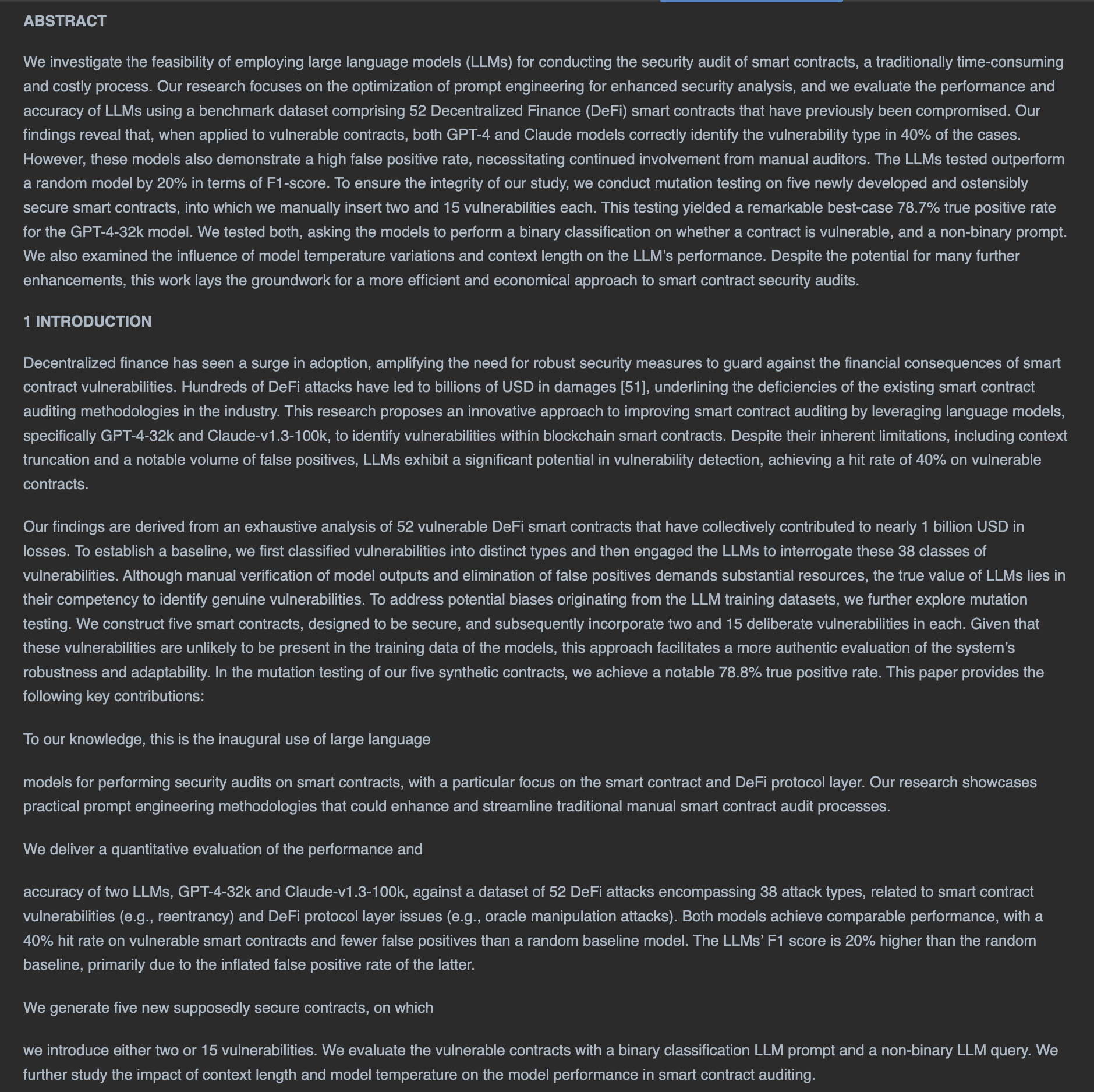 |
Multiple Format Support: Converts various document types including:
Conversion Capabilities:
API Endpoints:
Processing Modes:
curl -sSL https://install.python-poetry.org | python3 -
git clone https://github.com/drmingler/docling-api.git
cd docling-api
poetry install
Create a .env file in the project root:
REDIS_HOST=redis://localhost:6379/0
ENV=development
MAX_SIZE_PER_FILE_MB=100
MAX_BATCH_SIZE_MB=500
Start Redis locally (install if not already installed):
brew install redis
brew services start redis
sudo apt-get install redis-server
sudo service redis-server start
poetry run uvicorn main:app --reload --port 8080
poetry run celery -A worker.celery_config worker --pool=solo -n worker_primary --loglevel=info
poetry run celery -A worker.celery_config flower --port=5555
curl http://localhost:8080/health
curl -X POST "http://localhost:8080/documents/convert" \
  -H "accept: application/json" \
  -H "Content-Type: multipart/form-data" \
  -F "document=@/path/to/test.pdf"
For detailed Docker instructions, including CPU mode, GPU mode, service URLs, verification commands, configuration, and troubleshooting, see docs/docker.md.
git clone https://github.com/drmingler/docling-api.git
cd docling-api
.env file if you need to override the default Docker Redis connection:REDIS_HOST=redis://redis:6379/0
ENV=production
MAX_SIZE_PER_FILE_MB=100
MAX_BATCH_SIZE_MB=500
To start the service using CPU-only processing, use the following command. You can adjust the number of Celery workers by specifying the --scale option. In this example, 1 worker will be created:
docker compose up --build --scale celery_worker=1
For production, it is recommended to enable GPU acceleration, as it significantly improves performance. Use the command below to start the service with GPU support. You can also scale the number of Celery workers using the --scale option; here, 3 workers will be launched:
docker compose -f docker-compose.gpu.yml up --build --scale celery_worker=3
The service will start the following components:
Convert a single document immediately:
curl -X POST "http://localhost:8080/documents/convert" \
  -H "accept: application/json" \
  -H "Content-Type: multipart/form-data" \
  -F "document=@/path/to/document.pdf" \
  -F "extract_tables_as_images=true" \
  -F "image_resolution_scale=4"
curl -X POST "http://localhost:8080/conversion-jobs" \
  -H "accept: application/json" \
  -H "Content-Type: multipart/form-data" \
  -F "document=@/path/to/document.pdf"
curl -X GET "http://localhost:8080/conversion-jobs/{job_id}" \
  -H "accept: application/json"
Convert multiple documents asynchronously:
curl -X POST "http://localhost:8080/batch-conversion-jobs" \
  -H "accept: application/json" \
  -H "Content-Type: multipart/form-data" \
  -F "documents=@/path/to/document1.pdf" \
  -F "documents=@/path/to/document2.pdf"
image_resolution_scale: Control the resolution of extracted images (1-4)extract_tables_as_images: Extract tables as images (true/false)CPU_ONLY: Build argument to switch between CPU/GPU modesMAX_SIZE_PER_FILE_MB: Maximum size of each uploaded file in MB (default: 100)MAX_BATCH_SIZE_MB: Maximum combined size of files in a batch upload in MB (default: 500)CORS_ALLOW_ORIGINS: Comma-separated list of allowed origins (default: *). Credentials are only sent when explicit origins are configured.CELERY_BROKER_URL / CELERY_RESULT_BACKEND: Optional explicit Celery URLs. If unset, both fall back to REDIS_HOST.GET /health — liveness probe. Returns 200 {"status": "ok"} when the API process is up.GET /health/ready — readiness probe. Reports whether the Celery broker connection is reachable.The limits apply to both synchronous conversions and asynchronous conversion jobs. Uploads over either limit return 413 Payload Too Large.
The service uses a distributed architecture with the following components:
The codebase is under MIT license. See LICENSE for more information
1,349 followers · starred Mar 2025
448 followers · starred Nov 2024
189 followers · starred Mar 2025
31 followers · starred Nov 2024
Easily deployable and scalable backend server that efficiently converts various document formats (pdf, docx, pptx, html, images, etc) into Markdown. With support for both CPU and GPU processing, it is Ideal for large-scale workflows, it offers text/table extraction, OCR, and batch processing with sync/async endpoints.
Python
1,690
109 commits
updated Aug 4, 2026
[!IMPORTANT] This backend server is a robust, scalable solution for effortlessly converting a wide range of document formats—including PDF, DOCX, PPTX, CSV, HTML, JPG, PNG, TIFF, BMP, AsciiDoc, and Markdown—into Markdown. Powered by Docling (IBM's advanced document parser), this service is built with FastAPI, Celery, and Redis, ensuring fast, efficient processing. Optimized for both CPU and GPU modes, with GPU highly recommended for production environments, this solution offers high performance and flexibility, making it ideal for handling complex document processing at scale.
| Original PDF |
|---|
|
| Docling-API | Marker |
|---|---|
| |
| PyPDF | PyMuPDF4LLM |
|---|---|
| |
Multiple Format Support: Converts various document types including:
Conversion Capabilities:
API Endpoints:
Processing Modes:
curl -sSL https://install.python-poetry.org | python3 -
git clone https://github.com/drmingler/docling-api.git
cd docling-api
poetry install
Create a .env file in the project root:
REDIS_HOST=redis://localhost:6379/0
ENV=development
MAX_SIZE_PER_FILE_MB=100
MAX_BATCH_SIZE_MB=500
Start Redis locally (install if not already installed):
brew install redis
brew services start redis
sudo apt-get install redis-server
sudo service redis-server start
poetry run uvicorn main:app --reload --port 8080
poetry run celery -A worker.celery_config worker --pool=solo -n worker_primary --loglevel=info
poetry run celery -A worker.celery_config flower --port=5555
curl http://localhost:8080/health
curl -X POST "http://localhost:8080/documents/convert" \
  -H "accept: application/json" \
  -H "Content-Type: multipart/form-data" \
  -F "document=@/path/to/test.pdf"
For detailed Docker instructions, including CPU mode, GPU mode, service URLs, verification commands, configuration, and troubleshooting, see docs/docker.md.
git clone https://github.com/drmingler/docling-api.git
cd docling-api
.env file if you need to override the default Docker Redis connection:REDIS_HOST=redis://redis:6379/0
ENV=production
MAX_SIZE_PER_FILE_MB=100
MAX_BATCH_SIZE_MB=500
To start the service using CPU-only processing, use the following command. You can adjust the number of Celery workers by specifying the --scale option. In this example, 1 worker will be created:
docker compose up --build --scale celery_worker=1
For production, it is recommended to enable GPU acceleration, as it significantly improves performance. Use the command below to start the service with GPU support. You can also scale the number of Celery workers using the --scale option; here, 3 workers will be launched:
docker compose -f docker-compose.gpu.yml up --build --scale celery_worker=3
The service will start the following components:
Convert a single document immediately:
curl -X POST "http://localhost:8080/documents/convert" \
  -H "accept: application/json" \
  -H "Content-Type: multipart/form-data" \
  -F "document=@/path/to/document.pdf" \
  -F "extract_tables_as_images=true" \
  -F "image_resolution_scale=4"
curl -X POST "http://localhost:8080/conversion-jobs" \
  -H "accept: application/json" \
  -H "Content-Type: multipart/form-data" \
  -F "document=@/path/to/document.pdf"
curl -X GET "http://localhost:8080/conversion-jobs/{job_id}" \
  -H "accept: application/json"
Convert multiple documents asynchronously:
curl -X POST "http://localhost:8080/batch-conversion-jobs" \
  -H "accept: application/json" \
  -H "Content-Type: multipart/form-data" \
  -F "documents=@/path/to/document1.pdf" \
  -F "documents=@/path/to/document2.pdf"
image_resolution_scale: Control the resolution of extracted images (1-4)extract_tables_as_images: Extract tables as images (true/false)CPU_ONLY: Build argument to switch between CPU/GPU modesMAX_SIZE_PER_FILE_MB: Maximum size of each uploaded file in MB (default: 100)MAX_BATCH_SIZE_MB: Maximum combined size of files in a batch upload in MB (default: 500)CORS_ALLOW_ORIGINS: Comma-separated list of allowed origins (default: *). Credentials are only sent when explicit origins are configured.CELERY_BROKER_URL / CELERY_RESULT_BACKEND: Optional explicit Celery URLs. If unset, both fall back to REDIS_HOST.GET /health — liveness probe. Returns 200 {"status": "ok"} when the API process is up.GET /health/ready — readiness probe. Reports whether the Celery broker connection is reachable.The limits apply to both synchronous conversions and asynchronous conversion jobs. Uploads over either limit return 413 Payload Too Large.
The service uses a distributed architecture with the following components:
The codebase is under MIT license. See LICENSE for more information
1,349 followers · starred Mar 2025
448 followers · starred Nov 2024
189 followers · starred Mar 2025
31 followers · starred Nov 2024