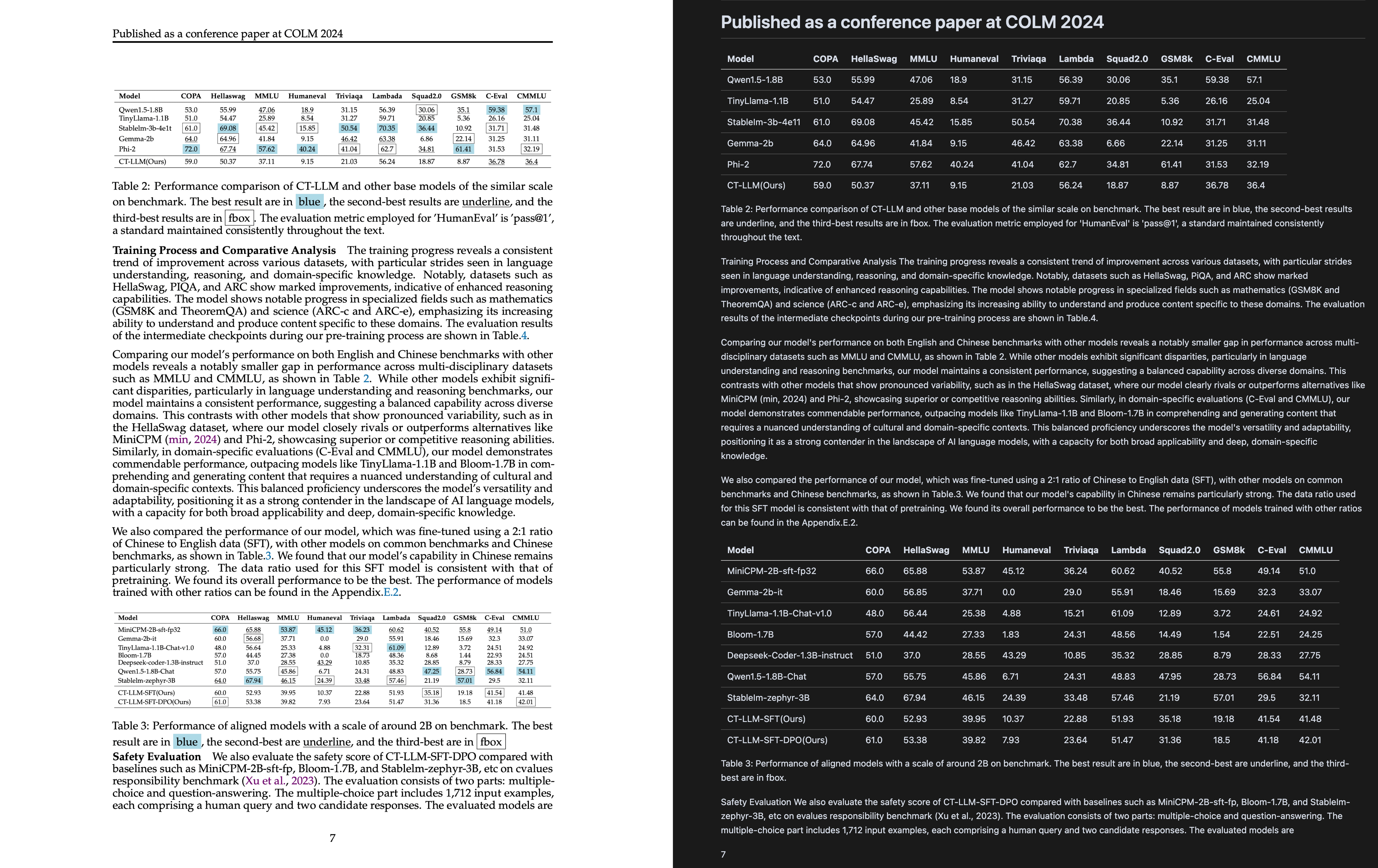
A high-quality PDF to Markdown tool based on large language model visual recognition. 一款基于大模型视觉识别的高质量PDF转Markdown工具
Python
2,295
79 commits
updated Sep 23, 2026
English | 中文 | 日本語 | Русский | فارسی | العربية


A powerful tool that leverages multimodal large language models to transcribe PDF files into Markdown format.
Want a GUI? Try our desktop application for a more user-friendly experience!
npx -y markpdfdown
MarkPDFDown is designed to simplify the process of converting PDF documents into clean, editable Markdown text. By utilizing advanced multimodal AI models through LiteLLM, it can accurately extract text, preserve formatting, and handle complex document structures including tables, formulas, and diagrams.
# Install uv if you haven't already
curl -LsSf https://astral.sh/uv/install.sh | sh

# Clone the repository
git clone https://github.com/MarkPDFdown/markpdfdown.git
cd markpdfdown

# Install dependencies and create virtual environment
uv sync

# Install the package in development mode
uv pip install -e .
conda create -n markpdfdown python=3.9
conda activate markpdfdown

# Clone the repository
git clone https://github.com/MarkPDFdown/markpdfdown.git
cd markpdfdown

# Install dependencies
pip install -e .
MarkPDFDown uses environment variables for configuration. Create a .env file in your project directory:
# Copy the sample configuration
cp .env.sample .env
Edit the .env file with your settings:
# Model Configuration
MODEL_NAME=gpt-4o

# API Keys (LiteLLM automatically detects these)
OPENAI_API_KEY=your-openai-api-key
# or for OpenRouter
OPENROUTER_API_KEY=your-openrouter-api-key
# or for Requesty
REQUESTY_API_KEY=your-requesty-api-key

# Optional Parameters
TEMPERATURE=0.3
MAX_TOKENS=8192
RETRY_TIMES=3
MODEL_NAME=gpt-4o
MODEL_NAME=gpt-4o-mini
MODEL_NAME=gpt-4-vision-preview
MODEL_NAME=openrouter/anthropic/claude-3.5-sonnet
MODEL_NAME=openrouter/google/gemini-pro-vision
MODEL_NAME=openrouter/meta-llama/llama-3.2-90b-vision
Get your API key at https://app.requesty.ai/api-keys
MODEL_NAME=requesty/openai/gpt-4o
MODEL_NAME=requesty/anthropic/claude-sonnet-4-5
# Basic conversion
markpdfdown --input document.pdf --output output.md

# Convert specific page range
markpdfdown --input document.pdf --output output.md --start 1 --end 10

# Convert image to markdown
markpdfdown --input image.png --output output.md

# Using python module
python -m markpdfdown --input document.pdf --output output.md
# PDF to markdown via pipe
markpdfdown < document.pdf > output.md

# Using python module
python -m markpdfdown < document.pdf > output.md
# Convert pages 5-15 of a PDF
markpdfdown --input large_document.pdf --output chapter.md --start 5 --end 15

# Process multiple files
for file in *.pdf; do
    markpdfdown --input "$file" --output "${file%.pdf}.md"
done
# Build the image (if needed)
docker build -t markpdfdown .

# Run with environment variables
docker run -i \
  -e MODEL_NAME=gpt-4o \
  -e OPENAI_API_KEY=your-api-key \
  markpdfdown < input.pdf > output.md

# Using OpenRouter
docker run -i \
  -e MODEL_NAME=openrouter/anthropic/claude-3.5-sonnet \
  -e OPENROUTER_API_KEY=your-openrouter-key \
  markpdfdown < input.pdf > output.md

# Using Requesty
docker run -i \
  -e MODEL_NAME=requesty/openai/gpt-4o \
  -e REQUESTY_API_KEY=your-requesty-key \
  markpdfdown < input.pdf > output.md
This project uses ruff for linting and formatting, and pre-commit for automated code quality checks.
# If using uv
uv sync --group dev

# If using pip
pip install -e ".[dev]"
# Install pre-commit hooks
pre-commit install

# Run pre-commit on all files (optional)
pre-commit run --all-files
# Format code with ruff
ruff format

# Run linting checks
ruff check

# Fix auto-fixable issues
ruff check --fix
pyproject.tomlThe project follows a modular architecture:
src/markpdfdown/
├── __init__.py          # Package initialization
├── __main__.py          # Entry point for python -m
├── cli.py               # Command line interface
├── main.py              # Core conversion logic
├── config.py            # Configuration management
└── core/                # Core modules
    ├── llm_client.py    # LiteLLM integration
    ├── file_worker.py   # File processing
    └── utils.py         # Utility functions
Contributions are welcome! Please feel free to submit a Pull Request.
git checkout -b feature/amazing-feature )uv sync --group dev
pre-commit install
ruff format
ruff check --fix
pre-commit run --all-files
git commit -m 'feat: Add some amazing feature' )git push origin feature/amazing-feature )Please ensure your code follows the project's coding standards by running the linting and formatting tools before submitting.
This project is licensed under the Apache License 2.0. See the LICENSE file for details.
94 followers · starred Jul 2026
664 followers · starred Jul 2025
521 followers · starred Jul 2025
222 followers · starred Mar 2026
A high-quality PDF to Markdown tool based on large language model visual recognition. 一款基于大模型视觉识别的高质量PDF转Markdown工具
Python
2,295
79 commits
updated Sep 23, 2026
English | 中文 | 日本語 | Русский | فارسی | العربية
A powerful tool that leverages multimodal large language models to transcribe PDF files into Markdown format.
Want a GUI? Try our desktop application for a more user-friendly experience!
npx -y markpdfdown
MarkPDFDown is designed to simplify the process of converting PDF documents into clean, editable Markdown text. By utilizing advanced multimodal AI models through LiteLLM, it can accurately extract text, preserve formatting, and handle complex document structures including tables, formulas, and diagrams.
# Install uv if you haven't already
curl -LsSf https://astral.sh/uv/install.sh | sh

# Clone the repository
git clone https://github.com/MarkPDFdown/markpdfdown.git
cd markpdfdown

# Install dependencies and create virtual environment
uv sync

# Install the package in development mode
uv pip install -e .
conda create -n markpdfdown python=3.9
conda activate markpdfdown

# Clone the repository
git clone https://github.com/MarkPDFdown/markpdfdown.git
cd markpdfdown

# Install dependencies
pip install -e .
MarkPDFDown uses environment variables for configuration. Create a .env file in your project directory:
# Copy the sample configuration
cp .env.sample .env
Edit the .env file with your settings:
# Model Configuration
MODEL_NAME=gpt-4o

# API Keys (LiteLLM automatically detects these)
OPENAI_API_KEY=your-openai-api-key
# or for OpenRouter
OPENROUTER_API_KEY=your-openrouter-api-key
# or for Requesty
REQUESTY_API_KEY=your-requesty-api-key

# Optional Parameters
TEMPERATURE=0.3
MAX_TOKENS=8192
RETRY_TIMES=3
MODEL_NAME=gpt-4o
MODEL_NAME=gpt-4o-mini
MODEL_NAME=gpt-4-vision-preview
MODEL_NAME=openrouter/anthropic/claude-3.5-sonnet
MODEL_NAME=openrouter/google/gemini-pro-vision
MODEL_NAME=openrouter/meta-llama/llama-3.2-90b-vision
Get your API key at https://app.requesty.ai/api-keys
MODEL_NAME=requesty/openai/gpt-4o
MODEL_NAME=requesty/anthropic/claude-sonnet-4-5
# Basic conversion
markpdfdown --input document.pdf --output output.md

# Convert specific page range
markpdfdown --input document.pdf --output output.md --start 1 --end 10

# Convert image to markdown
markpdfdown --input image.png --output output.md

# Using python module
python -m markpdfdown --input document.pdf --output output.md
# PDF to markdown via pipe
markpdfdown < document.pdf > output.md

# Using python module
python -m markpdfdown < document.pdf > output.md
# Convert pages 5-15 of a PDF
markpdfdown --input large_document.pdf --output chapter.md --start 5 --end 15

# Process multiple files
for file in *.pdf; do
    markpdfdown --input "$file" --output "${file%.pdf}.md"
done
# Build the image (if needed)
docker build -t markpdfdown .

# Run with environment variables
docker run -i \
  -e MODEL_NAME=gpt-4o \
  -e OPENAI_API_KEY=your-api-key \
  markpdfdown < input.pdf > output.md

# Using OpenRouter
docker run -i \
  -e MODEL_NAME=openrouter/anthropic/claude-3.5-sonnet \
  -e OPENROUTER_API_KEY=your-openrouter-key \
  markpdfdown < input.pdf > output.md

# Using Requesty
docker run -i \
  -e MODEL_NAME=requesty/openai/gpt-4o \
  -e REQUESTY_API_KEY=your-requesty-key \
  markpdfdown < input.pdf > output.md
This project uses ruff for linting and formatting, and pre-commit for automated code quality checks.
# If using uv
uv sync --group dev

# If using pip
pip install -e ".[dev]"
# Install pre-commit hooks
pre-commit install

# Run pre-commit on all files (optional)
pre-commit run --all-files
# Format code with ruff
ruff format

# Run linting checks
ruff check

# Fix auto-fixable issues
ruff check --fix
pyproject.tomlThe project follows a modular architecture:
src/markpdfdown/
├── __init__.py          # Package initialization
├── __main__.py          # Entry point for python -m
├── cli.py               # Command line interface
├── main.py              # Core conversion logic
├── config.py            # Configuration management
└── core/                # Core modules
    ├── llm_client.py    # LiteLLM integration
    ├── file_worker.py   # File processing
    └── utils.py         # Utility functions
Contributions are welcome! Please feel free to submit a Pull Request.
git checkout -b feature/amazing-feature )uv sync --group dev
pre-commit install
ruff format
ruff check --fix
pre-commit run --all-files
git commit -m 'feat: Add some amazing feature' )git push origin feature/amazing-feature )Please ensure your code follows the project's coding standards by running the linting and formatting tools before submitting.
This project is licensed under the Apache License 2.0. See the LICENSE file for details.
94 followers · starred Jul 2026
664 followers · starred Jul 2025
521 followers · starred Jul 2025
222 followers · starred Mar 2026