Turn an old jailbroken Kindle into a minimalist AI bedtime-story reader (Claude, E-Ink, Raspberry Pi backend)
Python
3
2 commits
updated Sep 26, 2026
Turn an old, jailbroken Kindle into a minimalist bedtime-story machine: pick a story type, age, length, theme, hero and mood with a few taps, and Claude writes a brand-new story that you read right on the E-Ink display.
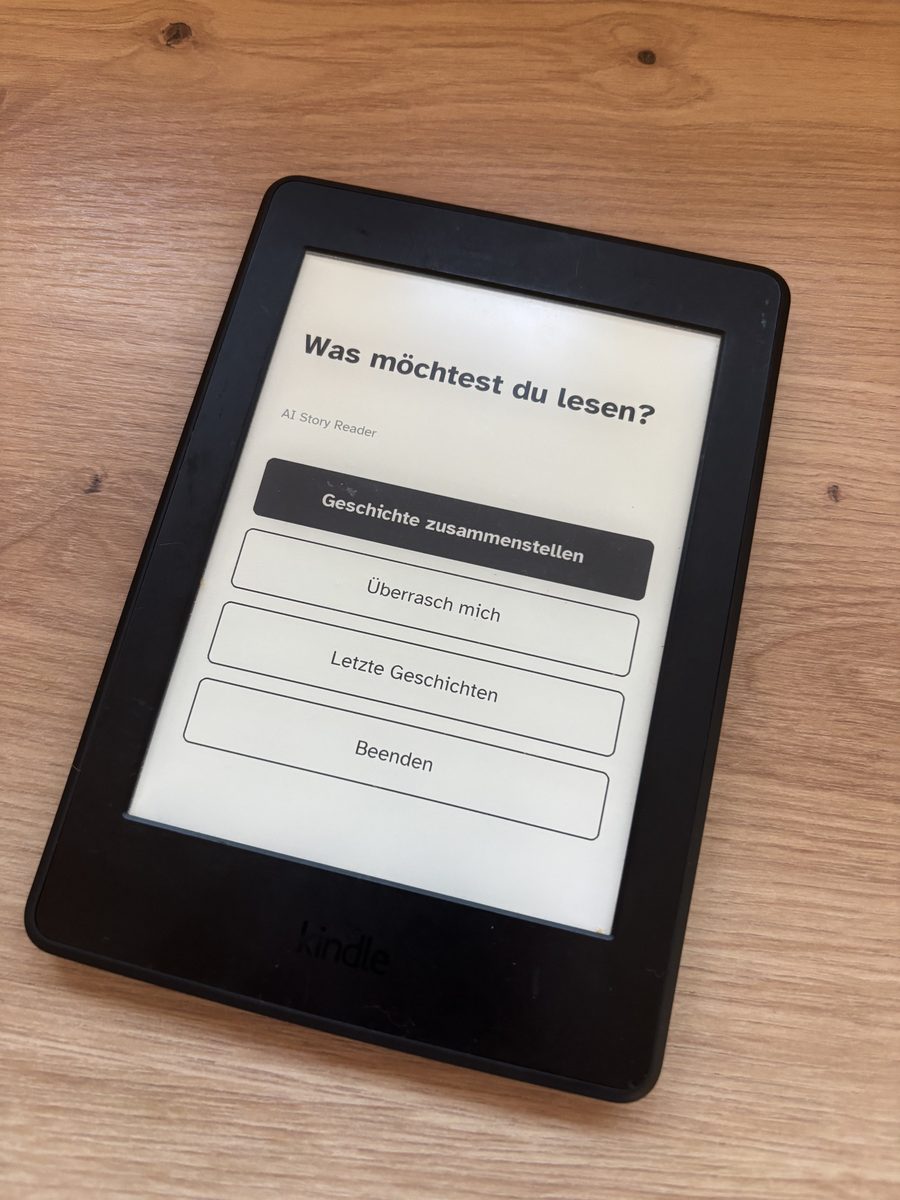
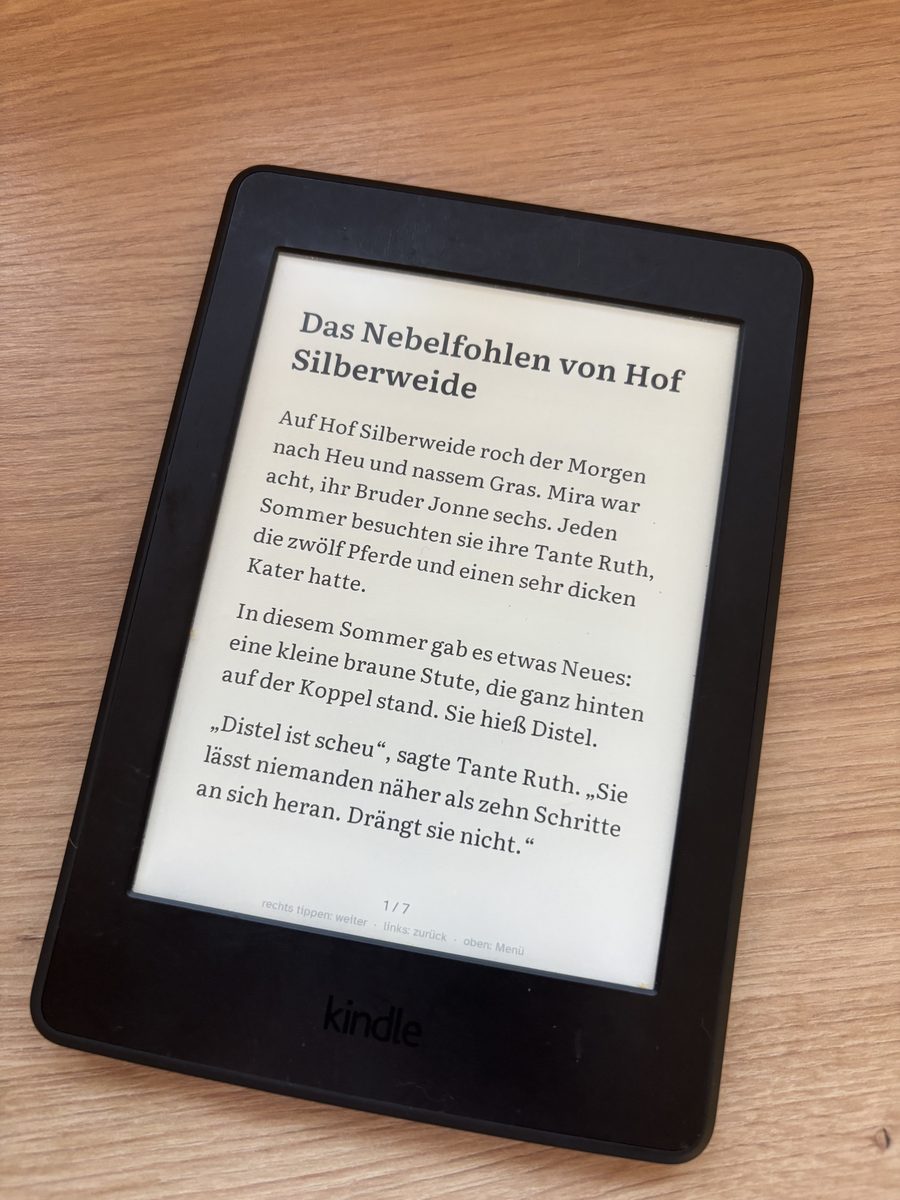
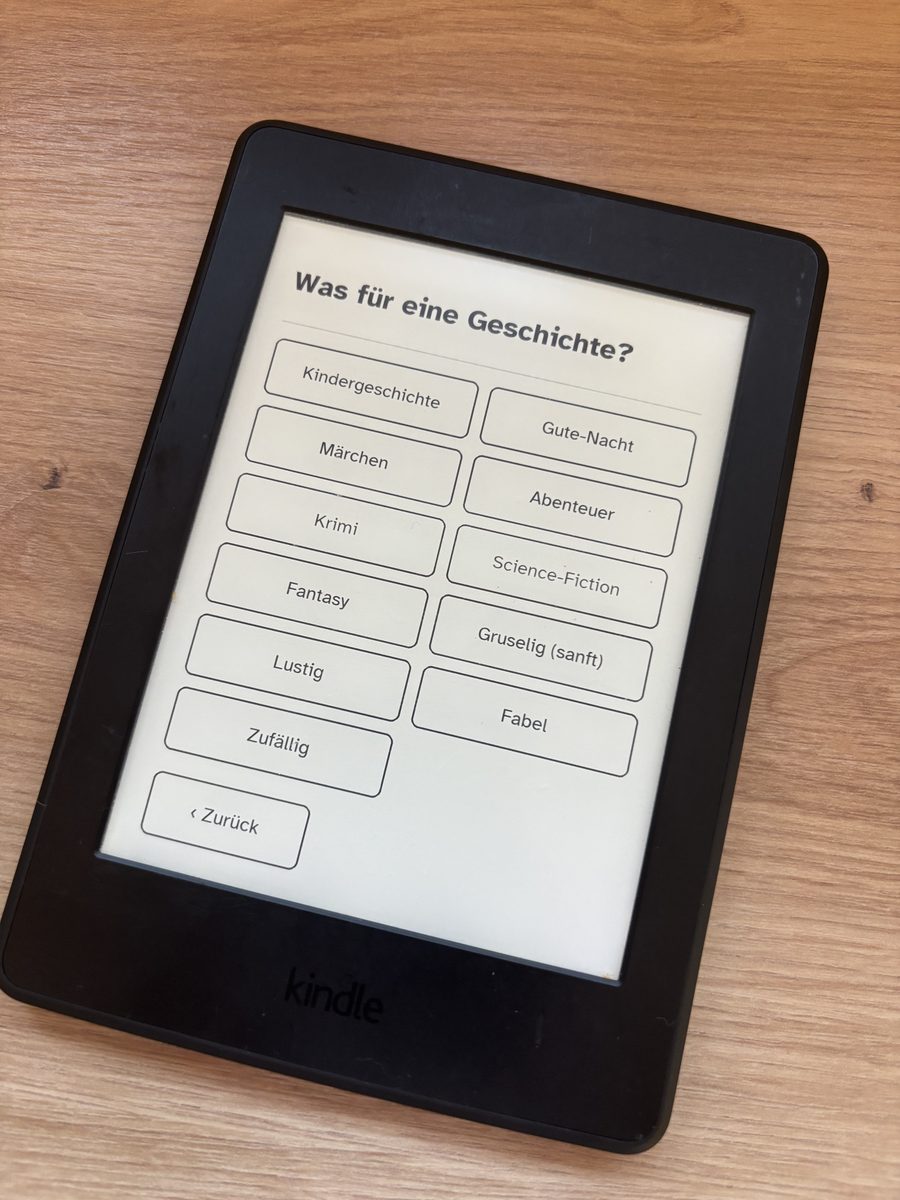
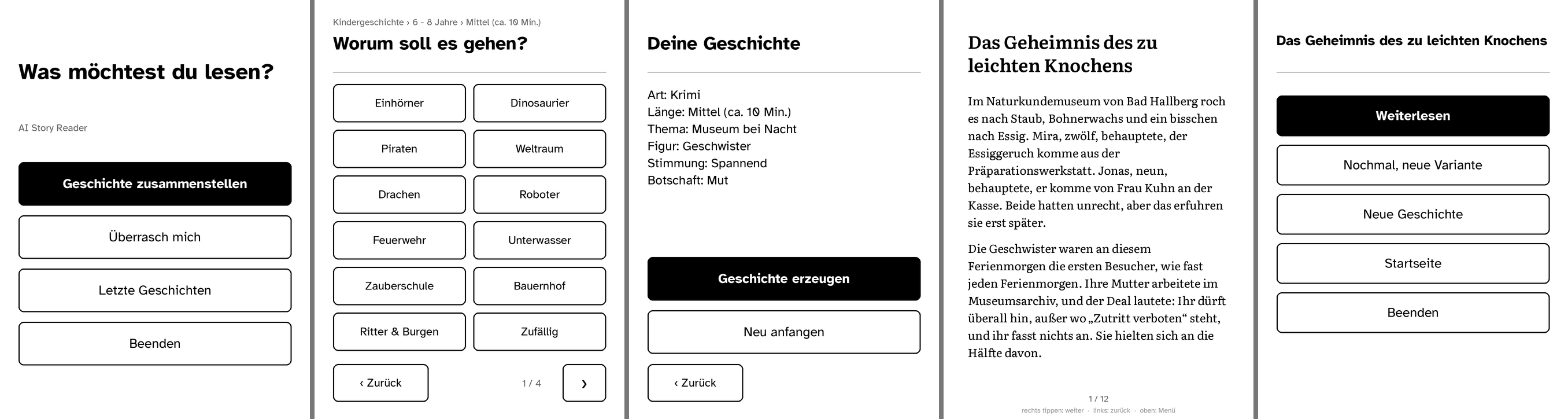
The UI and the stories are in German. Translating means editing
backend/app/wizard.json, the system prompt inbackend/app/llm.pyand the screen texts inbackend/app/screens.py. Code comments are in German as well.
Kindle (jailbroken)                         Server in your home network (e.g. Raspberry Pi)
┌──────────────────────────────┐            ┌─────────────────────────────────────────────┐
│ scriptlet "AI Story"         │  HTTP(S)   │ FastAPI backend (Docker)                    │
│  eips  – shows PNG screens   │ ─────────▶ │  renders screens/pages as 1072×1448 PNG     │
│  ktap  – reads touch (26 KB) │  + device  │  hit-tests taps, runs the configurator      │
│  curl  – talks to backend    │    token   │  claude -p  (no tools, no MCP, no session)  │
│  pages cached on /mnt/us     │ ◀───────── │  stories stored as JSON                     │
└──────────────────────────────┘            └─────────────────────────────────────────────┘
Details are in docs/ARCHITECTURE.md.
| Kindle | A jailbreakable Kindle with a touchscreen. Tested: Kindle Paperwhite 3 (7th gen), FW 5.13.7, WinterBreak. Other models will likely work but need their screen size in config.sh. |
| Server | Any always-on Linux machine with Docker in the same network. A Raspberry Pi 4/5 is ideal, about 300 MB RAM. A Mac or PC works for testing. |
| AI | A Claude subscription (Pro/Max, via the Claude Code CLI), or an Anthropic API key, or an OpenAI API key. |
| Computer | macOS or Linux with a USB cable to copy the app to the Kindle. |
| optional | Tailscale (remote access), Docker Desktop (only needed to rebuild the touch helper). |
The full step-by-step guide, with what you should see after each step, is in docs/SETUP.md.
# 1. Server: backend + Claude CLI in Docker
git clone https://github.com/donmb1/ai-story-generator.git && cd ai-story-generator/deploy/pi
cp env.example .env            # set DEVICE_TOKEN (openssl rand -hex 16) and LAN_IP
docker compose run --rm --no-deps story claude setup-token   # log in, paste the token into .env
docker compose up -d --build
curl http://<LAN_IP>:8787/health

# 2. Kindle: jailbreak (https://kindlemodding.org), connect via USB, then on your computer
#    (in your own clone of the repo):
cp backend/.env.example backend/.env   # same DEVICE_TOKEN, KINDLE_BACKEND_URLS="http://<LAN_IP>:8787"
./kindle/install.sh

# 3. On the Kindle: open "AI Story" from the library.
backend/                 FastAPI backend (Python 3.11+)
  app/wizard.json        configurator: steps, themes, names – customise here
  app/screens.py         screen states, hit-testing, tap → command
  app/render.py          PNG rendering (16 grey levels) and pagination
  app/llm.py             providers: claude_cli (default), anthropic, openai, fake
  app/main.py            HTTP API (JSON API + Kindle protocol)
  fonts/                 Literata + Atkinson Hyperlegible (SIL OFL)
  tests/                 pytest, including a full configurator run
  Dockerfile, run.sh
deploy/pi/               docker-compose.yml, env.example, deploy.sh
kindle/
  device/app/            → /mnt/us/aistory/app   (aistory.sh, ktap, config.sh)
  device/hello/          → /mnt/us/aistory/hello (hello world, system info, network test)
  scriptlets/            → /mnt/us/documents     (launchers that show up as "books")
  src/ktap.c             touch reader (evdev), build-ktap.sh builds it for ARMv7
  sim/                   runs the Kindle client in BusyBox against a local backend
  install.sh             copies everything to the Kindle via USB
docs/                    SETUP.md, ARCHITECTURE.md
claude_cli provider uses your personal Claude subscription through the official Claude Code CLI.
Make sure your usage fits Anthropic's terms for your plan. The anthropic provider with an API key is the alternative.MIT. Bundled fonts are under the SIL Open Font License 1.1.
Turn an old jailbroken Kindle into a minimalist AI bedtime-story reader (Claude, E-Ink, Raspberry Pi backend)
Python
3
2 commits
updated Sep 26, 2026
Turn an old, jailbroken Kindle into a minimalist bedtime-story machine: pick a story type, age, length, theme, hero and mood with a few taps, and Claude writes a brand-new story that you read right on the E-Ink display.
The UI and the stories are in German. Translating means editing
backend/app/wizard.json, the system prompt inbackend/app/llm.pyand the screen texts inbackend/app/screens.py. Code comments are in German as well.
Kindle (jailbroken)                         Server in your home network (e.g. Raspberry Pi)
┌──────────────────────────────┐            ┌─────────────────────────────────────────────┐
│ scriptlet "AI Story"         │  HTTP(S)   │ FastAPI backend (Docker)                    │
│  eips  – shows PNG screens   │ ─────────▶ │  renders screens/pages as 1072×1448 PNG     │
│  ktap  – reads touch (26 KB) │  + device  │  hit-tests taps, runs the configurator      │
│  curl  – talks to backend    │    token   │  claude -p  (no tools, no MCP, no session)  │
│  pages cached on /mnt/us     │ ◀───────── │  stories stored as JSON                     │
└──────────────────────────────┘            └─────────────────────────────────────────────┘
Details are in docs/ARCHITECTURE.md.
| Kindle | A jailbreakable Kindle with a touchscreen. Tested: Kindle Paperwhite 3 (7th gen), FW 5.13.7, WinterBreak. Other models will likely work but need their screen size in config.sh. |
| Server | Any always-on Linux machine with Docker in the same network. A Raspberry Pi 4/5 is ideal, about 300 MB RAM. A Mac or PC works for testing. |
| AI | A Claude subscription (Pro/Max, via the Claude Code CLI), or an Anthropic API key, or an OpenAI API key. |
| Computer | macOS or Linux with a USB cable to copy the app to the Kindle. |
| optional | Tailscale (remote access), Docker Desktop (only needed to rebuild the touch helper). |
The full step-by-step guide, with what you should see after each step, is in docs/SETUP.md.
# 1. Server: backend + Claude CLI in Docker
git clone https://github.com/donmb1/ai-story-generator.git && cd ai-story-generator/deploy/pi
cp env.example .env            # set DEVICE_TOKEN (openssl rand -hex 16) and LAN_IP
docker compose run --rm --no-deps story claude setup-token   # log in, paste the token into .env
docker compose up -d --build
curl http://<LAN_IP>:8787/health

# 2. Kindle: jailbreak (https://kindlemodding.org), connect via USB, then on your computer
#    (in your own clone of the repo):
cp backend/.env.example backend/.env   # same DEVICE_TOKEN, KINDLE_BACKEND_URLS="http://<LAN_IP>:8787"
./kindle/install.sh

# 3. On the Kindle: open "AI Story" from the library.
backend/                 FastAPI backend (Python 3.11+)
  app/wizard.json        configurator: steps, themes, names – customise here
  app/screens.py         screen states, hit-testing, tap → command
  app/render.py          PNG rendering (16 grey levels) and pagination
  app/llm.py             providers: claude_cli (default), anthropic, openai, fake
  app/main.py            HTTP API (JSON API + Kindle protocol)
  fonts/                 Literata + Atkinson Hyperlegible (SIL OFL)
  tests/                 pytest, including a full configurator run
  Dockerfile, run.sh
deploy/pi/               docker-compose.yml, env.example, deploy.sh
kindle/
  device/app/            → /mnt/us/aistory/app   (aistory.sh, ktap, config.sh)
  device/hello/          → /mnt/us/aistory/hello (hello world, system info, network test)
  scriptlets/            → /mnt/us/documents     (launchers that show up as "books")
  src/ktap.c             touch reader (evdev), build-ktap.sh builds it for ARMv7
  sim/                   runs the Kindle client in BusyBox against a local backend
  install.sh             copies everything to the Kindle via USB
docs/                    SETUP.md, ARCHITECTURE.md
claude_cli provider uses your personal Claude subscription through the official Claude Code CLI.
Make sure your usage fits Anthropic's terms for your plan. The anthropic provider with an API key is the alternative.MIT. Bundled fonts are under the SIL Open Font License 1.1.



