
Give ordinary ChatGPT chats tools, skills, and recovery checkpoints for local projects. macOS developer preview.
TypeScript
1
4 commits
updated Oct 2, 2026
See what people are saying
README
Chat2Local
Give ordinary ChatGPT chats tools for your local projects.
Choose a folder in the Chat2Local Mac app. Your chat can then read and edit files, run development commands, use a separate browser, and read relevant skills. Several chats can work in the same folder, with a separate checkpoint and work history for each chat.
Chat2Local 0.3.0 is a macOS developer preview under the MIT license. It requires ChatGPT developer-mode and Secure MCP Tunnel access. The npm installer has been tested locally but is not published. Mac preview builds use ad hoc signing and are not notarized. See installation and release verification.
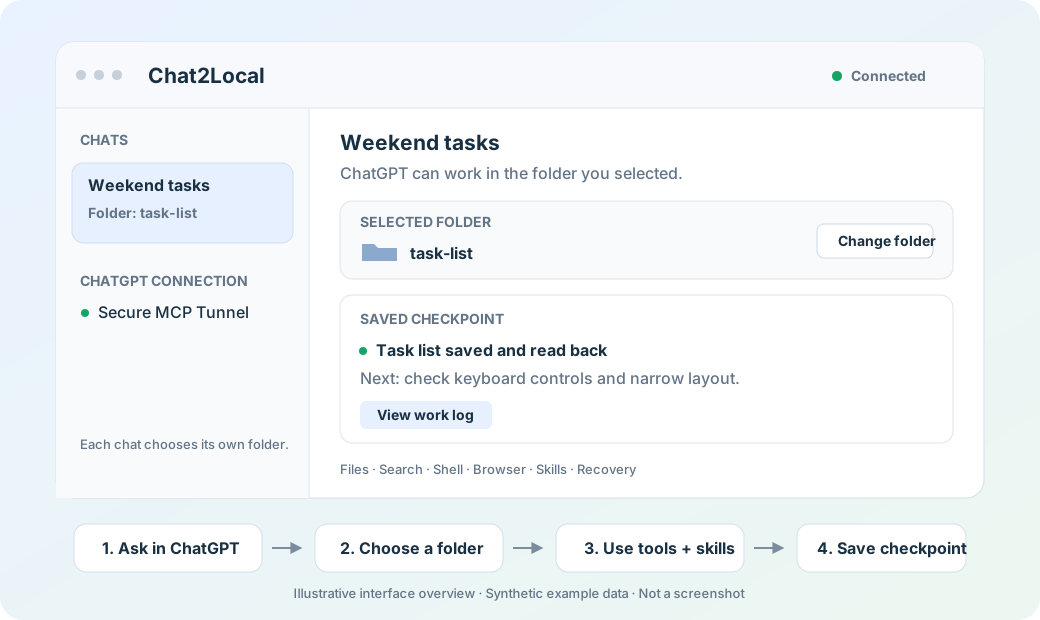
Interface illustration with synthetic example data; not a screenshot.
Quick start
1. Build and open the Mac app
Requires macOS 14+, Node.js 24+, npm, and Swift 6.2 with a compatible macOS SDK. Brave at /Applications/Brave Browser.app is needed only for browser tools.
npm ci
npm run robustness
npm run macos:package
open "dist/Chat2Local.app"
The app includes Node, its local tool service, and a pinned official OpenAI tunnel client with the required notices. A source build does not need a separate tunnel-client download. Closing the window leaves the app running; choose Quit in its menu to stop it.
2. Connect ChatGPT
See the visual connection guide for OpenAI's sanitized tunnel and ChatGPT setup screenshots, plus a diagram of the runtime-key field.
Create a Secure MCP Tunnel in your OpenAI Platform organization, associate it with your ChatGPT workspace, and obtain a runtime key authorized to use it. Enter the tunnel ID and runtime key in Chat2Local's ChatGPT connection settings, then choose Save and connect.
In ChatGPT, enable developer mode if your account supports it, create a tunnel connection, and select it in a chat. The installation guide explains these steps and the permissions they require. The runtime key is used for tunnel transport; Chat2Local does not use it for model-inference API calls.
3. Choose a folder and ask for real work
Copy examples/hello-local-dev somewhere convenient, including its hidden .agents directory. In an ordinary ChatGPT chat with the connection selected, send:
Use Chat2Local to build the small task list described in my local folder. Make it easy to use on my phone and laptop.
The chat returns a setup code such as LD-1234ABCD. Open Chat2Local, match that code, and choose your copy of the example folder. Reply connected in ChatGPT.
The assistant can now read briefing.md, check the project's skill, save a checkpoint, and create index.html. Open the file from Finder and try adding and completing tasks. A downloaded ChatGPT attachment alone does not prove a local file was saved; check the selected folder. See the demo walkthrough.
Each new chat chooses its own folder. A chat appears in the app after its first Chat2Local tool call; opening a conversation does not register it. No conversation address or exact chat title is needed.
Tools and skills
| Capability | What the chat can do |
|---|---|
| Files and search | Read, write, edit, list, and search inside its selected folder. |
| Development commands | Run bounded shell commands for builds and validation. |
| Skills | Discover and read installed Codex, agents, plugin, and project guides. |
| Browser and web | Use a separate Brave profile per chat, inspect pages, take screenshots, and read known web pages. |
| Images | Import an image explicitly supplied by the chat. |
| Recovery | Read private work history and save task checkpoints. |
The service requires a skill catalog check before file changes or commands after a folder selection or service restart. It also requires a checkpoint before actions that may have effects. Relevant skill text is read on demand; Chat2Local does not bundle your personal installed skills into a release. A recorded skill read or checkpoint cannot prove the model followed its instructions.
The 15-tool reference keeps the compatible local_dev_* action identifiers. The bundled workflow is in plugin/local-dev; installation explains when to install it.
Recover interrupted work
Open View work log on a chat card to review the last checkpoint and recorded actions. Ask the chat to read that history and inspect actual files before retrying a failed or uncertain action. Direct text writes use atomic replacement to resist incomplete saves.
To continue in a new chat, deliberately copy a recovery summary and paste it yourself, then choose a folder for that chat. The log does not back up the project, roll back effects, replay commands, or wake chats. Read the recovery guide for limits and retention.
Privacy and access
- You select one folder per chat in the native app; model tools cannot select it. File tools reject paths and symlinks that escape it.
- Requested file contents, skill text, page content, screenshots, and command results can be sent to ChatGPT. The whole folder is not uploaded automatically.
- Browser profiles are separate from your personal cookies. Shell commands can execute project code and use the network; they are not a virtual machine.
- Connections, checkpoints, and history stay in the private
~/.local-dev/chat-folders.sqlitedatabase. Tunnel credentials use macOS Keychain. Source and installer packages exclude this private state. - Chats sharing a folder share its files. Their folder grants and recovery histories remain separate; coordinate overlapping edits.
See security and privacy before connecting sensitive projects. The local service requires trusted per-chat MCP metadata and authenticated loopback access. These controls do not isolate it from other software running as the same macOS user.
Installation and release status
The installer source lives in packages/installer. Its chat2local command installs the prebuilt app into ~/Applications after checking the download, bundle, version, architecture, and signature. Installing a prebuilt app requires Node.js 20+ and does not require Swift or Xcode.
The npm package is unpublished. npx <published-package-name> install is a future command template, not an available registry command. Hosted assets and a public package name need a selected release destination. Public Mac distribution also requires Developer ID signing, notarization, and first-launch checks on another Mac. The installer does not bypass Gatekeeper or install certificates.
For building and checking releases, see npm release preparation. For ordinary setup and connection failures, see troubleshooting.
Contribute or share
npm run robustness
npm run release:check
npm run release:export
The source export uses an explicit inventory, secret-pattern scan, and file hashes. Dependencies, built apps, private credentials, browser profiles, and runtime state are excluded. Review the inventory; the scan is not a comprehensive security audit. Share the checked export rather than the whole development folder.
Read contributing and what changed. GitHub sharing is separate from ChatGPT's public plugin directory: this preview uses a private developer-mode connection. OpenAI Secure MCP Tunnel documentation.
Similar repos


Languages
TypeScript
50.2%
JavaScript
34.1%
Swift
13.7%
Shell
2.0%
Give ordinary ChatGPT chats tools, skills, and recovery checkpoints for local projects. macOS developer preview.
TypeScript
1
4 commits
updated Oct 2, 2026
See what people are saying
README
Chat2Local
Give ordinary ChatGPT chats tools for your local projects.
Choose a folder in the Chat2Local Mac app. Your chat can then read and edit files, run development commands, use a separate browser, and read relevant skills. Several chats can work in the same folder, with a separate checkpoint and work history for each chat.
Chat2Local 0.3.0 is a macOS developer preview under the MIT license. It requires ChatGPT developer-mode and Secure MCP Tunnel access. The npm installer has been tested locally but is not published. Mac preview builds use ad hoc signing and are not notarized. See installation and release verification.
Interface illustration with synthetic example data; not a screenshot.
Quick start
1. Build and open the Mac app
Requires macOS 14+, Node.js 24+, npm, and Swift 6.2 with a compatible macOS SDK. Brave at /Applications/Brave Browser.app is needed only for browser tools.
npm ci
npm run robustness
npm run macos:package
open "dist/Chat2Local.app"
The app includes Node, its local tool service, and a pinned official OpenAI tunnel client with the required notices. A source build does not need a separate tunnel-client download. Closing the window leaves the app running; choose Quit in its menu to stop it.
2. Connect ChatGPT
See the visual connection guide for OpenAI's sanitized tunnel and ChatGPT setup screenshots, plus a diagram of the runtime-key field.
Create a Secure MCP Tunnel in your OpenAI Platform organization, associate it with your ChatGPT workspace, and obtain a runtime key authorized to use it. Enter the tunnel ID and runtime key in Chat2Local's ChatGPT connection settings, then choose Save and connect.
In ChatGPT, enable developer mode if your account supports it, create a tunnel connection, and select it in a chat. The installation guide explains these steps and the permissions they require. The runtime key is used for tunnel transport; Chat2Local does not use it for model-inference API calls.
3. Choose a folder and ask for real work
Copy examples/hello-local-dev somewhere convenient, including its hidden .agents directory. In an ordinary ChatGPT chat with the connection selected, send:
Use Chat2Local to build the small task list described in my local folder. Make it easy to use on my phone and laptop.
The chat returns a setup code such as LD-1234ABCD. Open Chat2Local, match that code, and choose your copy of the example folder. Reply connected in ChatGPT.
The assistant can now read briefing.md, check the project's skill, save a checkpoint, and create index.html. Open the file from Finder and try adding and completing tasks. A downloaded ChatGPT attachment alone does not prove a local file was saved; check the selected folder. See the demo walkthrough.
Each new chat chooses its own folder. A chat appears in the app after its first Chat2Local tool call; opening a conversation does not register it. No conversation address or exact chat title is needed.
Tools and skills
| Capability | What the chat can do |
|---|---|
| Files and search | Read, write, edit, list, and search inside its selected folder. |
| Development commands | Run bounded shell commands for builds and validation. |
| Skills | Discover and read installed Codex, agents, plugin, and project guides. |
| Browser and web | Use a separate Brave profile per chat, inspect pages, take screenshots, and read known web pages. |
| Images | Import an image explicitly supplied by the chat. |
| Recovery | Read private work history and save task checkpoints. |
The service requires a skill catalog check before file changes or commands after a folder selection or service restart. It also requires a checkpoint before actions that may have effects. Relevant skill text is read on demand; Chat2Local does not bundle your personal installed skills into a release. A recorded skill read or checkpoint cannot prove the model followed its instructions.
The 15-tool reference keeps the compatible local_dev_* action identifiers. The bundled workflow is in plugin/local-dev; installation explains when to install it.
Recover interrupted work
Open View work log on a chat card to review the last checkpoint and recorded actions. Ask the chat to read that history and inspect actual files before retrying a failed or uncertain action. Direct text writes use atomic replacement to resist incomplete saves.
To continue in a new chat, deliberately copy a recovery summary and paste it yourself, then choose a folder for that chat. The log does not back up the project, roll back effects, replay commands, or wake chats. Read the recovery guide for limits and retention.
Privacy and access
- You select one folder per chat in the native app; model tools cannot select it. File tools reject paths and symlinks that escape it.
- Requested file contents, skill text, page content, screenshots, and command results can be sent to ChatGPT. The whole folder is not uploaded automatically.
- Browser profiles are separate from your personal cookies. Shell commands can execute project code and use the network; they are not a virtual machine.
- Connections, checkpoints, and history stay in the private
~/.local-dev/chat-folders.sqlitedatabase. Tunnel credentials use macOS Keychain. Source and installer packages exclude this private state. - Chats sharing a folder share its files. Their folder grants and recovery histories remain separate; coordinate overlapping edits.
See security and privacy before connecting sensitive projects. The local service requires trusted per-chat MCP metadata and authenticated loopback access. These controls do not isolate it from other software running as the same macOS user.
Installation and release status
The installer source lives in packages/installer. Its chat2local command installs the prebuilt app into ~/Applications after checking the download, bundle, version, architecture, and signature. Installing a prebuilt app requires Node.js 20+ and does not require Swift or Xcode.
The npm package is unpublished. npx <published-package-name> install is a future command template, not an available registry command. Hosted assets and a public package name need a selected release destination. Public Mac distribution also requires Developer ID signing, notarization, and first-launch checks on another Mac. The installer does not bypass Gatekeeper or install certificates.
For building and checking releases, see npm release preparation. For ordinary setup and connection failures, see troubleshooting.
Contribute or share
npm run robustness
npm run release:check
npm run release:export
The source export uses an explicit inventory, secret-pattern scan, and file hashes. Dependencies, built apps, private credentials, browser profiles, and runtime state are excluded. Review the inventory; the scan is not a comprehensive security audit. Share the checked export rather than the whole development folder.
Read contributing and what changed. GitHub sharing is separate from ChatGPT's public plugin directory: this preview uses a private developer-mode connection. OpenAI Secure MCP Tunnel documentation.
Similar repos
Languages
TypeScript
50.2%
JavaScript
34.1%
Swift
13.7%
Shell
2.0%