
Fast recursive detection and cleaning of rust projects with interactive TUI and filters. Find rust projects anywhere that meet conditions like "last used more than 3 days ago" or "freable size > 1GB" and then clean them in record time
Rust
290
77 commits
updated Aug 30, 2026
README
cargo-clean-all


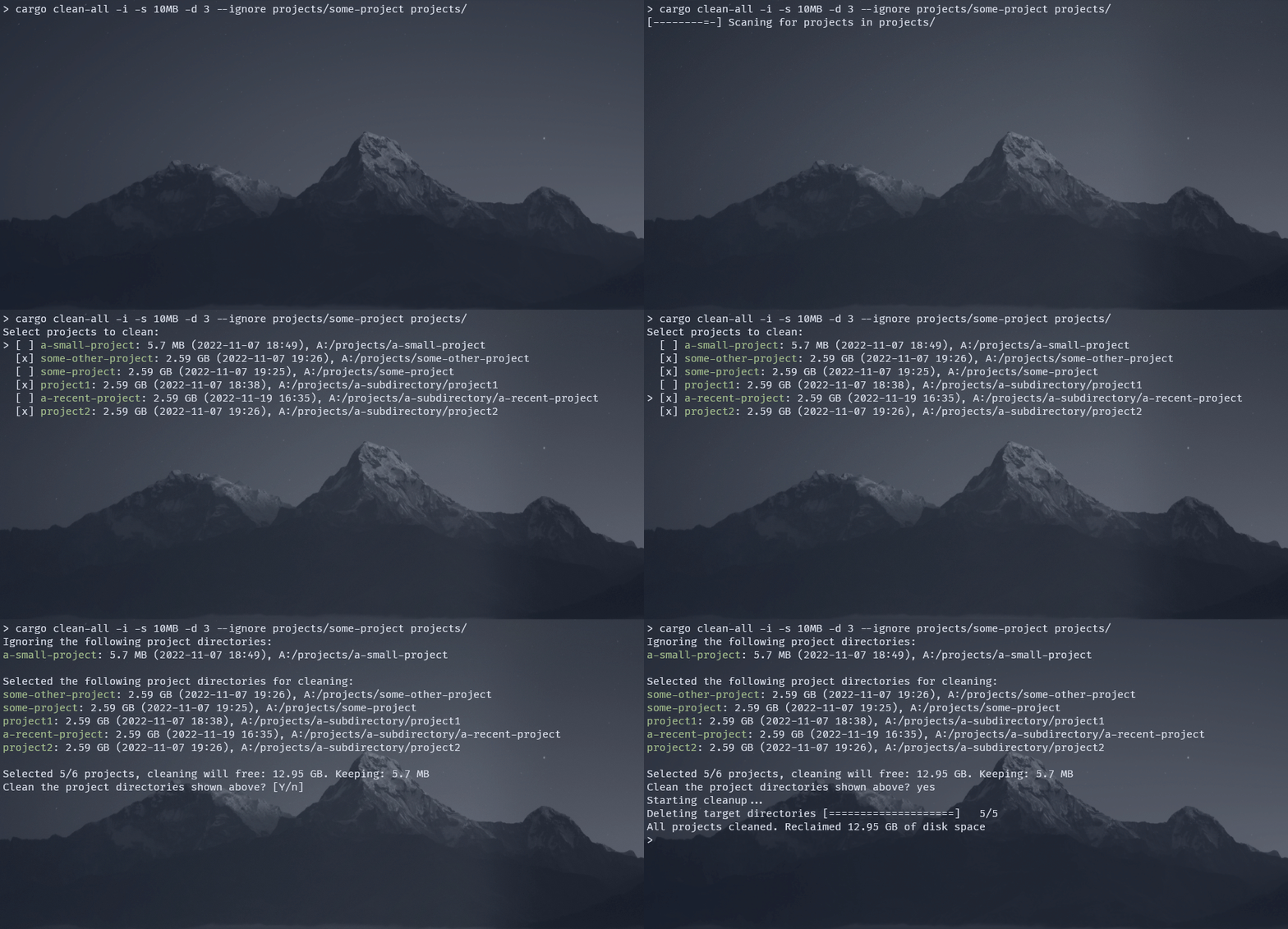
Why does it exist
I was a bit shocked when I realized that my rust target directories took up a total of over 50gb, so I developed this tool to help me clean up all the project target dirs. There is already cargo-clean-recursive which unfortunately doesn't support interactive selections or keeping recent files in order to not slow down the projects I'm currently working on.
What does it do
This is a custom cargo subcommand that searches all rust cargo projects in a given parent
directory and deletes the build artifacts (aka target directories). Before cleanup it shows the
amount of disk space that can be freed up. Specific projects can be excluded from cleaning using
an interactive selection, and/or CLI filters. The CLI filters can exclude projects that have been
compiled in the last X days, have a target directory that is smaller than X, or are specifically
ignored.
The actual cleaning consists of simply deleting the target directories from the detected projects,
which seems to be what cargo clean does by default.
Installation
Install using cargo:
cargo install cargo-clean-all
Usage
Clean all projects in the current working directory with the possibility to interactively deselect projects
cargo clean-all -i
Clean all projects in the home directory (and subdirectories) that haven't been compiled in the last 7 days without interactive mode. This will still show the projects and ask for confirmation, but won't show the manual selection dialog
cargo clean-all --keep-days 7 ~
Clean all projects in the home directory (and subdirectories) that take up more than 10MB with interactive mode.
cargo clean-all -i --keep-size 10MB ~
Clean all projects in the home directory (and subdirectories), excluding the Download and Documents directories. Since interactive mode is used, the projects in the ignored directories may still be manually added to the cleanup run.
cargo clean-all -i --ignore ~/Downloads --ignore ~/Documents ~
Alternatives
cargo-clean-recursive
| Feature | cargo-clean-all | cargo-clean-recursive |
|---|---|---|
| Clean projects under current dir | yes | yes |
| Clean projects under any dir | yes | no |
| Display freed up / reclaimable disk space | yes | no |
| Keep target dirs below a size threshold | yes | no |
| Keep target dirs with a last modified threshold | yes | no |
| Ask before cleaning | yes | no |
| Interactive selection of projects | yes | no |
Clean only release, debug or docs | no (not yet) | yes |
Real cargo clean command under the hood | no | yes |
| Keep executables in an extra directory | yes | no |
Note that cargo-clean-recursive uses the actual cargo clean command under the hood instead of
simply deleting the target directories. This makes the cleaning work exactly as intended by
the installed version of cargo, which can certainly be desirable in some cases.
Manual
Recursively clean all cargo projects in a given directory that match the specified criteria

Usage: cargo clean-all [OPTIONS] [DIR]

Arguments:
  [DIR]  The directory in which the projects will be searched [default: .]

Options:
  -y, --yes                       Don't ask for confirmation; Just clean all detected projects that are not excluded by other constraints
  -s, --keep-size <SIZE>          Ignore projects with a target dir size smaller than the specified value. The size can be specified using binary prefixes like "10MB" for 10_000_000 bytes, or "1KiB" for 1_024 bytes [default: 0]
  -d, --keep-days <DAYS>          Ignore projects that have been compiled in the last [DAYS] days. The last compilation time is inferred by the last modified time of the contents of target directory [default: 0]
      --dry-run                   Just collect the cleanable projects and list the reclaimable space, but don't delete anything
  -t, --threads <THREADS>         The number of threads to use for directory scanning. 0 automatically selects the number of threads [default: 0]
  -v, --verbose                   Show access errors that occur while scanning. By default those errors are hidden
  -i, --interactive               Use the interactive project selection. This will show a selection of all cleanable projects with the possibility to manually select or deselect
      --ignore <IGNORE>           Directories that should be ignored by default, including subdirectories. This will still detect the projects in those directories, but mark them to not be cleaned. To actually skip scanning directories, use --skip instead. The directories can be specified as absolute paths or relative to the workdir
  -e, --keep-executable           Keeping compiled executables in release, debug and cross-compilation directories. Moves the executable to a new folder outside of target
      --keep-executable-same-dir  Keeping compiled executables in release, debug and cross-compilation directories. This acts in the same way as `--keep-executable` but restores them to the same directory where they were before cleaning. So instead of getting moved to a separate new folder outside of target, the executables stay in the target directory
      --skip <SKIP>               Directories that should be fully skipped during scanning, including subdirectories. This will speed up the scanning time by not doing any reads for the specified directories. The directories can be specified as absolute paths or relative to the workdir
      --depth <DEPTH>             Maximum depth of subdirectories that should be scanned looking for the **`target/`**. This will speed up the scanning The option is for target/ dir, NOT for the project dir 0 means no limit [default: 0]
      --keep-empty-target         Keep the empty target dir and remove only the files and subdirectories inside instead of removing the directory itself
  -h, --help                      Print help
  -V, --version                   Print version
Contributors


Similar repos


Languages
Rust
100.0%
Fast recursive detection and cleaning of rust projects with interactive TUI and filters. Find rust projects anywhere that meet conditions like "last used more than 3 days ago" or "freable size > 1GB" and then clean them in record time
Rust
290
77 commits
updated Aug 30, 2026
README
cargo-clean-all
Why does it exist
I was a bit shocked when I realized that my rust target directories took up a total of over 50gb, so I developed this tool to help me clean up all the project target dirs. There is already cargo-clean-recursive which unfortunately doesn't support interactive selections or keeping recent files in order to not slow down the projects I'm currently working on.
What does it do
This is a custom cargo subcommand that searches all rust cargo projects in a given parent
directory and deletes the build artifacts (aka target directories). Before cleanup it shows the
amount of disk space that can be freed up. Specific projects can be excluded from cleaning using
an interactive selection, and/or CLI filters. The CLI filters can exclude projects that have been
compiled in the last X days, have a target directory that is smaller than X, or are specifically
ignored.
The actual cleaning consists of simply deleting the target directories from the detected projects,
which seems to be what cargo clean does by default.
Installation
Install using cargo:
cargo install cargo-clean-all
Usage
Clean all projects in the current working directory with the possibility to interactively deselect projects
cargo clean-all -i
Clean all projects in the home directory (and subdirectories) that haven't been compiled in the last 7 days without interactive mode. This will still show the projects and ask for confirmation, but won't show the manual selection dialog
cargo clean-all --keep-days 7 ~
Clean all projects in the home directory (and subdirectories) that take up more than 10MB with interactive mode.
cargo clean-all -i --keep-size 10MB ~
Clean all projects in the home directory (and subdirectories), excluding the Download and Documents directories. Since interactive mode is used, the projects in the ignored directories may still be manually added to the cleanup run.
cargo clean-all -i --ignore ~/Downloads --ignore ~/Documents ~
Alternatives
cargo-clean-recursive
| Feature | cargo-clean-all | cargo-clean-recursive |
|---|---|---|
| Clean projects under current dir | yes | yes |
| Clean projects under any dir | yes | no |
| Display freed up / reclaimable disk space | yes | no |
| Keep target dirs below a size threshold | yes | no |
| Keep target dirs with a last modified threshold | yes | no |
| Ask before cleaning | yes | no |
| Interactive selection of projects | yes | no |
Clean only release, debug or docs | no (not yet) | yes |
Real cargo clean command under the hood | no | yes |
| Keep executables in an extra directory | yes | no |
Note that cargo-clean-recursive uses the actual cargo clean command under the hood instead of
simply deleting the target directories. This makes the cleaning work exactly as intended by
the installed version of cargo, which can certainly be desirable in some cases.
Manual
Recursively clean all cargo projects in a given directory that match the specified criteria

Usage: cargo clean-all [OPTIONS] [DIR]

Arguments:
  [DIR]  The directory in which the projects will be searched [default: .]

Options:
  -y, --yes                       Don't ask for confirmation; Just clean all detected projects that are not excluded by other constraints
  -s, --keep-size <SIZE>          Ignore projects with a target dir size smaller than the specified value. The size can be specified using binary prefixes like "10MB" for 10_000_000 bytes, or "1KiB" for 1_024 bytes [default: 0]
  -d, --keep-days <DAYS>          Ignore projects that have been compiled in the last [DAYS] days. The last compilation time is inferred by the last modified time of the contents of target directory [default: 0]
      --dry-run                   Just collect the cleanable projects and list the reclaimable space, but don't delete anything
  -t, --threads <THREADS>         The number of threads to use for directory scanning. 0 automatically selects the number of threads [default: 0]
  -v, --verbose                   Show access errors that occur while scanning. By default those errors are hidden
  -i, --interactive               Use the interactive project selection. This will show a selection of all cleanable projects with the possibility to manually select or deselect
      --ignore <IGNORE>           Directories that should be ignored by default, including subdirectories. This will still detect the projects in those directories, but mark them to not be cleaned. To actually skip scanning directories, use --skip instead. The directories can be specified as absolute paths or relative to the workdir
  -e, --keep-executable           Keeping compiled executables in release, debug and cross-compilation directories. Moves the executable to a new folder outside of target
      --keep-executable-same-dir  Keeping compiled executables in release, debug and cross-compilation directories. This acts in the same way as `--keep-executable` but restores them to the same directory where they were before cleaning. So instead of getting moved to a separate new folder outside of target, the executables stay in the target directory
      --skip <SKIP>               Directories that should be fully skipped during scanning, including subdirectories. This will speed up the scanning time by not doing any reads for the specified directories. The directories can be specified as absolute paths or relative to the workdir
      --depth <DEPTH>             Maximum depth of subdirectories that should be scanned looking for the **`target/`**. This will speed up the scanning The option is for target/ dir, NOT for the project dir 0 means no limit [default: 0]
      --keep-empty-target         Keep the empty target dir and remove only the files and subdirectories inside instead of removing the directory itself
  -h, --help                      Print help
  -V, --version                   Print version
Similar repos
Contributors
Languages
Rust
100.0%