
MCP streamlit client with RAG support for tool search
Python
12
11 commits
updated Jun 30, 2025
README
RAG MCP
The RAG system is particularly well-designed, using sentence transformers to build rich contextual embeddings and performing semantic search to find the most relevant tools for each query. This makes the system much more robust than traditional keyword-based approaches.
What is MCP
MCP stands for Model Context protocol, it helps provide contexts to LLM model for tool-use.
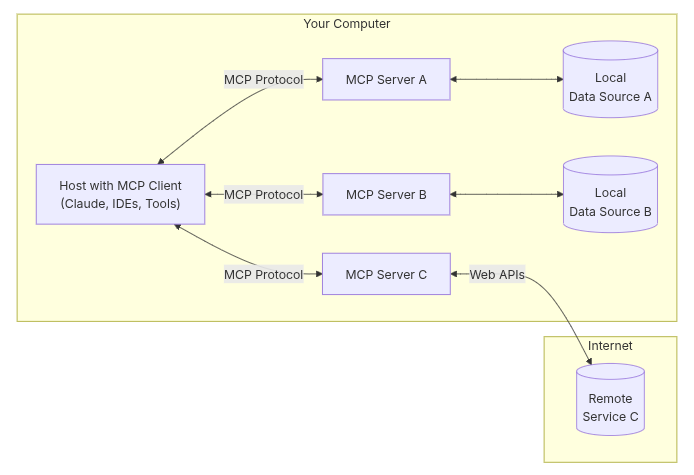
Architecture Diagram
MCP with RAG
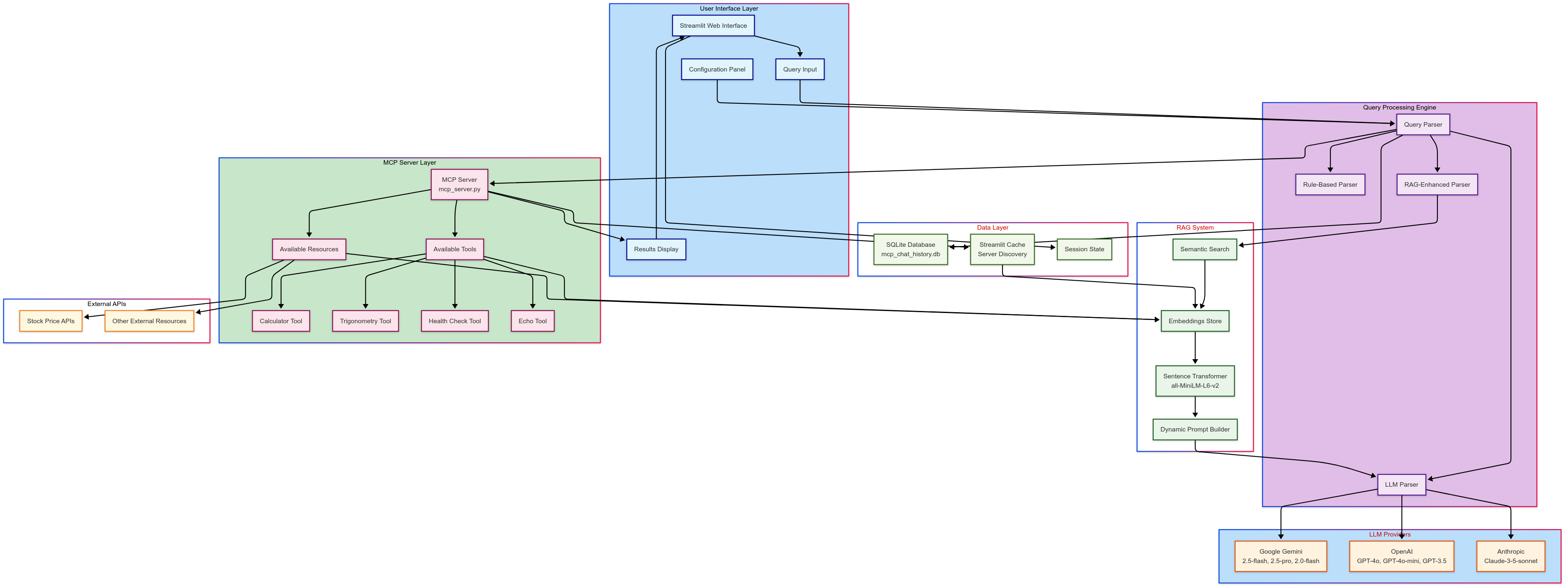
The Mermaid diagram illustrates:
- 7 Distinct Layers with color coding for easy understanding
- Complete Data Flow from user input through RAG processing to tool execution
- Decision Tree Logic showing how queries are routed through different parsing modes
- RAG Integration highlighting how semantic search enhances tool selection
- Multi-LLM Support showing integration with Google, OpenAI, and Anthropic
- MCP Server Integration with tool discovery and execution
- Data Persistence including SQLite storage and caching mechanisms
Key Features
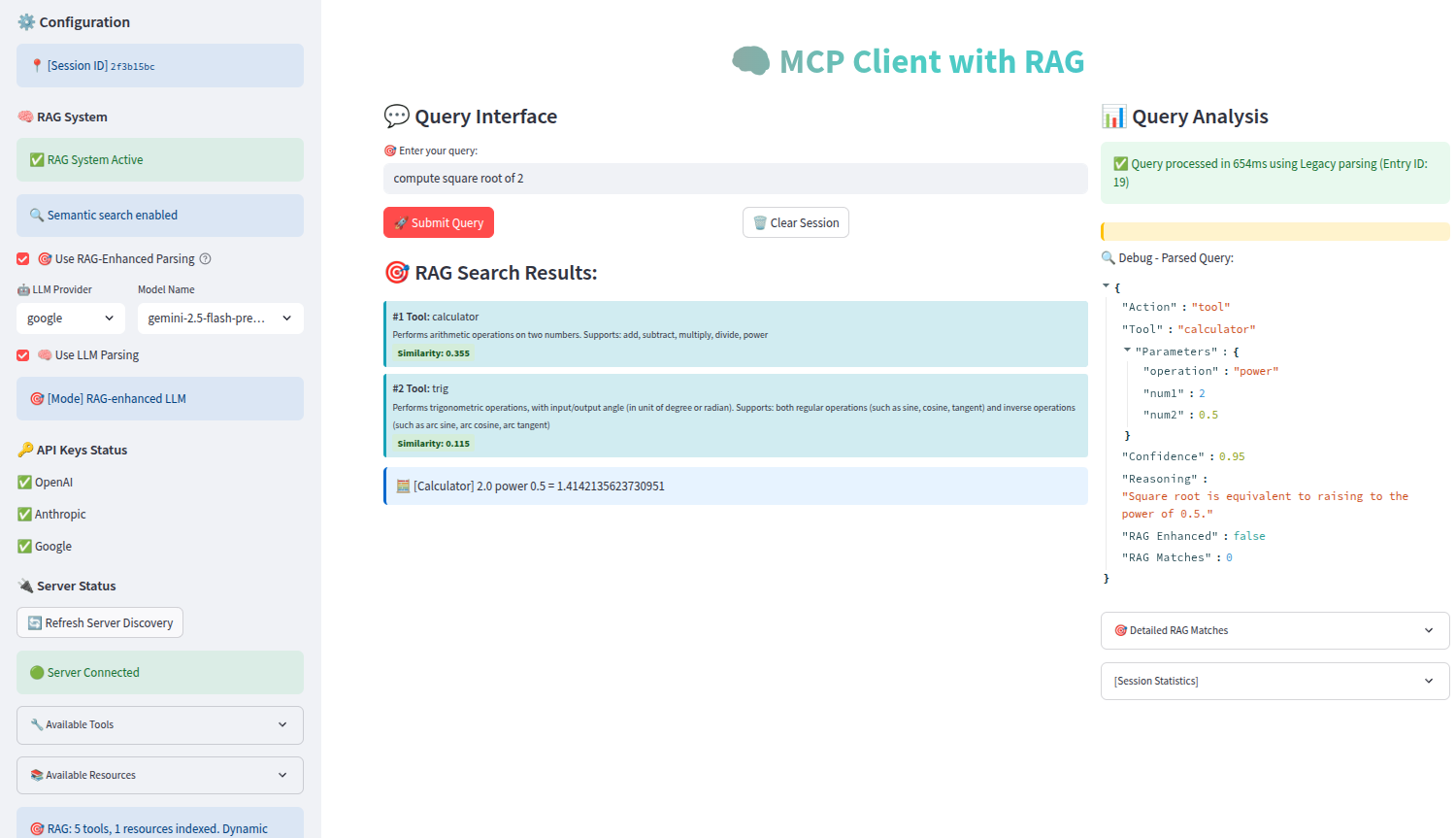
- Intelligent Tool Selection using RAG to find relevant tools dynamically
- Flexible Parsing Strategy with fallback mechanisms (RAG → LLM → Rule-based)
- Comprehensive Logging for debugging and performance analysis
- Caching Strategy for efficient server discovery
- Multi-Provider LLM Support for flexibility and redundancy
Setup
# create a virtual environment
conda create -n mcp
conda activate mcp

# obtain source code
git clone https://github.com/digital-duck/st_rag_mcp.git
cd st_rag_mcp
pip install -r requirements.txt

# open 1st terminal
cd src
python mcp_server.py

# in 2nd terminal
conda activate mcp
cd src
streamlit run mcp_client.py
Demo Video
References
Contributors

11 commits
Similar repos


Languages
Python
100.0%
MCP streamlit client with RAG support for tool search
Python
12
11 commits
updated Jun 30, 2025
README
RAG MCP
The RAG system is particularly well-designed, using sentence transformers to build rich contextual embeddings and performing semantic search to find the most relevant tools for each query. This makes the system much more robust than traditional keyword-based approaches.
What is MCP
MCP stands for Model Context protocol, it helps provide contexts to LLM model for tool-use.
Architecture Diagram
MCP with RAG
The Mermaid diagram illustrates:
- 7 Distinct Layers with color coding for easy understanding
- Complete Data Flow from user input through RAG processing to tool execution
- Decision Tree Logic showing how queries are routed through different parsing modes
- RAG Integration highlighting how semantic search enhances tool selection
- Multi-LLM Support showing integration with Google, OpenAI, and Anthropic
- MCP Server Integration with tool discovery and execution
- Data Persistence including SQLite storage and caching mechanisms
Key Features
- Intelligent Tool Selection using RAG to find relevant tools dynamically
- Flexible Parsing Strategy with fallback mechanisms (RAG → LLM → Rule-based)
- Comprehensive Logging for debugging and performance analysis
- Caching Strategy for efficient server discovery
- Multi-Provider LLM Support for flexibility and redundancy
Setup
# create a virtual environment
conda create -n mcp
conda activate mcp

# obtain source code
git clone https://github.com/digital-duck/st_rag_mcp.git
cd st_rag_mcp
pip install -r requirements.txt

# open 1st terminal
cd src
python mcp_server.py

# in 2nd terminal
conda activate mcp
cd src
streamlit run mcp_client.py
Demo Video
References
Similar repos
Contributors
11 commits
Languages
Python
100.0%