
README
Dynamic NPCs — AI Character Showcase
A Unity package for building fully local, offline AI companions and NPCs — a complete LLM + retrieval-augmented generation (RAG) + neural text-to-speech + character-animation pipeline that runs entirely on-device, with no cloud service, no API key, and no recurring cost.
Built as part of an M.Sc. thesis in Data Science at Università degli Studi di Milano-Bicocca, comparing this local pipeline against Convai, a leading commercial cloud platform, across latency, dialogue quality, voice quality, and knowledge-base capacity.
⚠️ Demo assets note: this repository includes the package and a reference demo scene. The demo scene's character model (VRoid Studio, imported via UniVRM) and animations (Mixamo).
✨ Features
- 100% local inference, zero recurring cost. A quantized LLM (Qwen3-4B-Thinking-2507, Q4_K_M, ~2.3 GB) runs via a bundled
llama.cppserver that the package launches and manages itself — no Ollama, no Python, no manual setup required by the end player. - Retrieval-augmented generation, built from scratch. A hybrid retriever combines semantic (embedding) search with a self-implemented Okapi BM25 ranking, fused via Reciprocal Rank Fusion — not a wrapper around a third-party RAG library.
- Neural text-to-speech with voice cloning. Powered by NeuTTS, which treats speech synthesis as a language-modeling problem (reusing the same
llama-serverinfrastructure as dialogue) and decodes the result in-engine via Unity's Inference Engine (Sentis) — no external TTS process, no cloud TTS API. - Streaming dialogue pipeline. The character starts speaking the first sentence of its reply while the rest is still being generated, instead of waiting for the full response.
- No-code character authoring. A new NPC — its personality, voice, and knowledge base — is defined entirely through Unity ScriptableObject assets (
NpcPersona,NpcVoice,RagSourceAsset), editable from the Inspector. - Full Editor tooling. An in-Editor Setup Wizard downloads the required binaries and models, a Test Console exercises the whole pipeline without entering Play Mode, and dedicated bakers precompute RAG indices and voice reference data offline.
- Cross-platform by design. Validated on desktop and on desktop-tethered VR (Meta Quest 3S). Fully standalone VR/AR is a known, documented limitation — see Limitations below.
🖼️ Screenshots
| Reference demo scene | Embedded Server Setup |
|---|---|
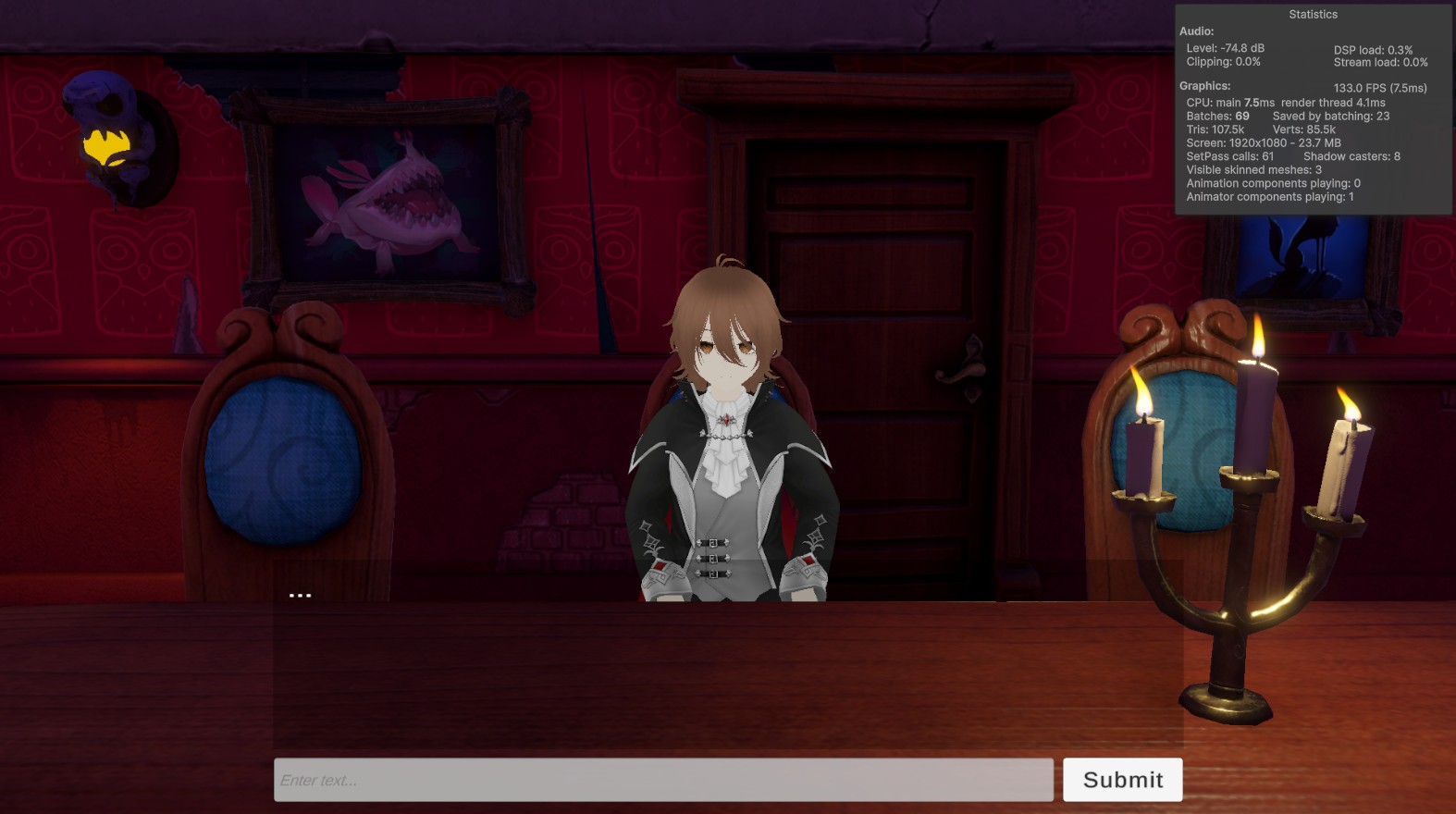 | 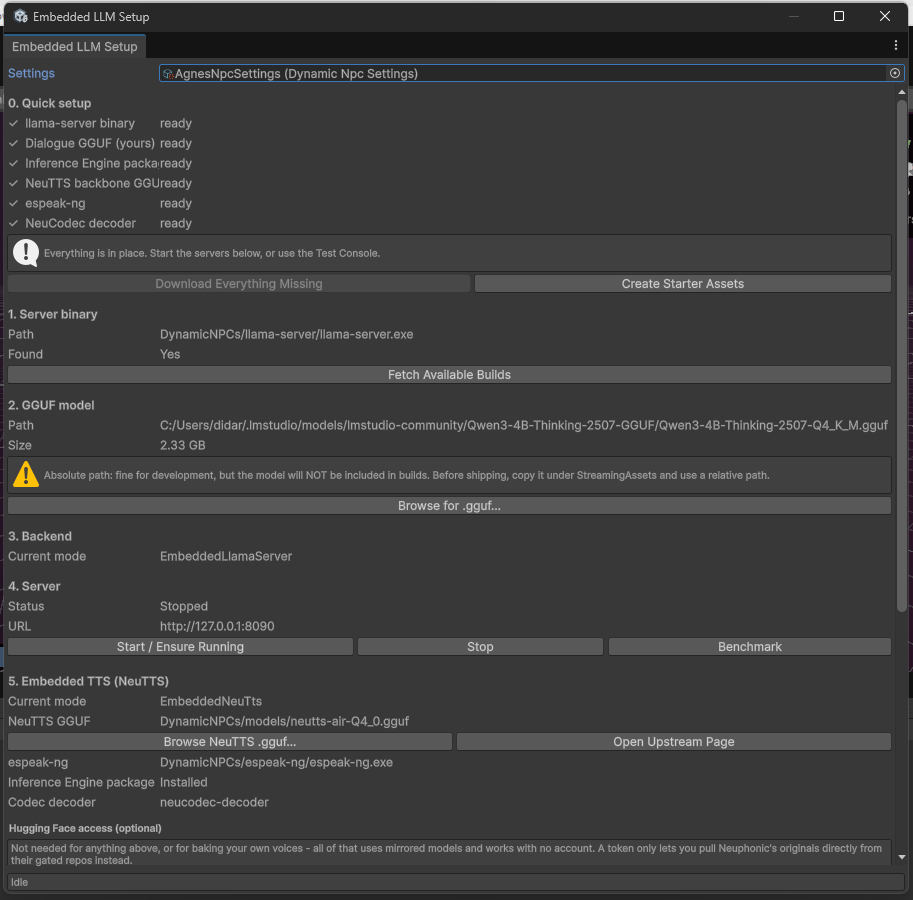 |
| Test Console | Character configuration (no code) |
|---|---|
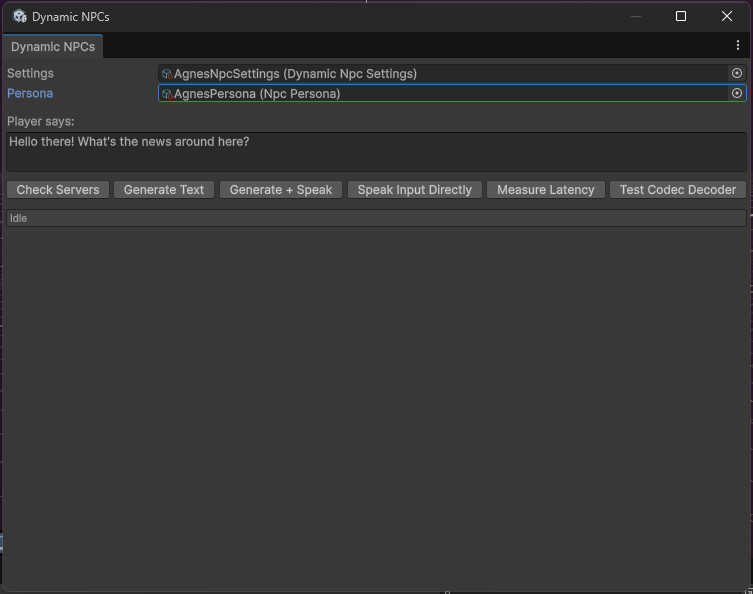 |  |
(Drop the corresponding image files into docs/images/ — see Adding the screenshots below.)
🏗️ Architecture
NPCDialogueAgent  (central orchestrator — exposes events only, no direct
                    dependency on UI/animation)
    │
    ├── LLM layer        LlmClient (OpenAI-compatible) + EmbeddedLlmServer /
    │                     LlamaServerHost (launches & supervises llama-server
    │                     as a managed child process)
    │
    ├── RAG layer         RagRetriever — hybrid semantic + BM25 search,
    │                     fused with Reciprocal Rank Fusion; indices are
    │                     baked offline in the Editor, never at runtime
    │
    ├── TTS layer         SpeechSynthesizer → NeuTtsClient (speech-as-
    │                     language-modeling via llama-server) → in-engine
    │                     NeuCodec decoder (ONNX via Sentis)
    │
    └── UnityEvents  →   NPCAnimController (Idle / Thinking / Talking state
                          machine), subtitle UI, or any other presentation
                          layer — fully decoupled from the backend in use
Configuration is entirely data-driven: DynamicNpcSettings (global connection/runtime settings), NpcPersona (personality, world context, attached RAG sources), NpcVoice (cloneable voice + baked reference codes), and RagSourceAsset (one knowledge source + its chunking parameters).
🚀 Getting Started
- Clone the repository and open it in Unity.
- Open Window → Dynamic NPCs → Embedded Server Setup.
- Click Download Everything Missing, then Create Starter Assets. This fetches the
llama-serverbinary, the dialogue GGUF model, the NeuTTS backbone and NeuCodec decoder, andespeak-ng. - Open the demo scene and press Play. Type a line into the input field and press Submit.
Platform note: the bundled binaries currently used in development are Windows builds (
llama-server.exe,espeak-ng.exe). If you need macOS/Linux support, you'll need to source or build compatible binaries for those platforms.
Creating your own character
- Create a new
NpcPersonaasset (Create → Dynamic NPCs → Persona) and fill in its name, personality, and world context. - Create an
NpcVoiceasset from a short (10–20s) reference audio sample and transcript, then bake it via the Voice Baker (requires a local Python environment, provisioned automatically). - (Optional) Create one or more
RagSourceAssets pointing at your own text files, set a chunk size/overlap, and bake the index via the RAG Baker. - Assign your
NpcPersonato anNPCDialogueAgentin your scene and you're done — no code required.
📁 Project Structure
Assets/
├── Scripts/
│   ├── NPCDialogueAgent.cs       # central orchestrator
│   ├── NPCAnimController.cs      # reference animation/presentation layer
│   ├── Runtime/
│   │   ├── Llm/                  # LlmClient, EmbeddedLlmServer, LlamaServerHost
│   │   ├── Rag/                  # RagRetriever, RagBm25Index, RagSourceAsset
│   │   ├── Tts/                  # SpeechSynthesizer, NeuTtsClient, NeuCodecDecoder
│   │   ├── Config/                # DynamicNpcSettings, NpcPersona, NpcVoice
│   │   └── Internal/              # SentenceChunker, WavUtility, SseDownloadHandler, ...
│   ├── Editor/                   # Setup Wizard, Test Console, bakers, diagnostics
│   └── Tools/                    # Python voice-baking script (dev-machine only)
└── ...
⚖️ Comparison: Local vs. Convai
As part of the accompanying thesis, this pipeline was compared against Convai, a commercial cloud-hosted conversational AI platform. Summary of findings:
| This project (local) | Convai (cloud) | |
|---|---|---|
| Latency | Comparable; faster on short exchanges, more variable on complex ones | Comparable; more consistent across question complexity |
| Voice quality | Judged more natural and expressive (subjective) | More monotone (subjective) |
| Knowledge base | No size limit (local, offline indexing) | 1 MB cap on Free tier; full feature gated behind Enterprise plan |
| Cost | One-time, offline | Subscription, usage-metered |
| Animation/lip-sync tooling | Basic (state-machine driven) | More polished out of the box |
| Standalone VR/AR | Not currently supported (see below) | Supported (cloud-mediated, no local inference needed) |
(Full methodology and results in the thesis.)
⚠️ Known Limitations
- Standalone VR/AR is not currently supported. The embedded pipeline launches
llama-serveras a child process viaSystem.Diagnostics.Process, which does not work on Android (the platform Meta Quest's OS is built on). ARemoteServerconfiguration — pointing a standalone build at allama-serverinstance running elsewhere on the local network — should work in principle (it only requiresUnityWebRequest, which is supported on Android) but has not yet been implemented or tested. - Text input only. There is no speech-to-text; the player types to the character. This was a deliberate scope decision, not a technical blocker.
- No fine-tuning. The package deploys an existing, instruction-tuned model as-is and relies on RAG for domain adaptation — by design, so that using the package requires no training step or ML expertise.
- Single-author evaluation. The Convai comparison above is a hands-on pilot study, not a blind or statistically validated experiment.
🙏 Acknowledgements / Third-Party Components
- llama.cpp — local LLM inference engine
- Qwen3 (Alibaba) — dialogue model, Apache 2.0
- NeuTTS / NeuCodec (Neuphonic) — neural TTS and audio codec, Apache 2.0
- espeak-ng — phonemization
- UniVRM — VRM character import (demo scene only)
- Character model authored in VRoid Studio; animations from Mixamo (demo scene only)
Similar repos


Languages
C#
94.2%
ShaderLab
4.2%
HLSL
1.3%
README
Dynamic NPCs — AI Character Showcase
A Unity package for building fully local, offline AI companions and NPCs — a complete LLM + retrieval-augmented generation (RAG) + neural text-to-speech + character-animation pipeline that runs entirely on-device, with no cloud service, no API key, and no recurring cost.
Built as part of an M.Sc. thesis in Data Science at Università degli Studi di Milano-Bicocca, comparing this local pipeline against Convai, a leading commercial cloud platform, across latency, dialogue quality, voice quality, and knowledge-base capacity.
⚠️ Demo assets note: this repository includes the package and a reference demo scene. The demo scene's character model (VRoid Studio, imported via UniVRM) and animations (Mixamo).
✨ Features
- 100% local inference, zero recurring cost. A quantized LLM (Qwen3-4B-Thinking-2507, Q4_K_M, ~2.3 GB) runs via a bundled
llama.cppserver that the package launches and manages itself — no Ollama, no Python, no manual setup required by the end player. - Retrieval-augmented generation, built from scratch. A hybrid retriever combines semantic (embedding) search with a self-implemented Okapi BM25 ranking, fused via Reciprocal Rank Fusion — not a wrapper around a third-party RAG library.
- Neural text-to-speech with voice cloning. Powered by NeuTTS, which treats speech synthesis as a language-modeling problem (reusing the same
llama-serverinfrastructure as dialogue) and decodes the result in-engine via Unity's Inference Engine (Sentis) — no external TTS process, no cloud TTS API. - Streaming dialogue pipeline. The character starts speaking the first sentence of its reply while the rest is still being generated, instead of waiting for the full response.
- No-code character authoring. A new NPC — its personality, voice, and knowledge base — is defined entirely through Unity ScriptableObject assets (
NpcPersona,NpcVoice,RagSourceAsset), editable from the Inspector. - Full Editor tooling. An in-Editor Setup Wizard downloads the required binaries and models, a Test Console exercises the whole pipeline without entering Play Mode, and dedicated bakers precompute RAG indices and voice reference data offline.
- Cross-platform by design. Validated on desktop and on desktop-tethered VR (Meta Quest 3S). Fully standalone VR/AR is a known, documented limitation — see Limitations below.
🖼️ Screenshots
| Reference demo scene | Embedded Server Setup |
|---|---|
| |
| Test Console | Character configuration (no code) |
|---|---|
| |
(Drop the corresponding image files into docs/images/ — see Adding the screenshots below.)
🏗️ Architecture
NPCDialogueAgent  (central orchestrator — exposes events only, no direct
                    dependency on UI/animation)
    │
    ├── LLM layer        LlmClient (OpenAI-compatible) + EmbeddedLlmServer /
    │                     LlamaServerHost (launches & supervises llama-server
    │                     as a managed child process)
    │
    ├── RAG layer         RagRetriever — hybrid semantic + BM25 search,
    │                     fused with Reciprocal Rank Fusion; indices are
    │                     baked offline in the Editor, never at runtime
    │
    ├── TTS layer         SpeechSynthesizer → NeuTtsClient (speech-as-
    │                     language-modeling via llama-server) → in-engine
    │                     NeuCodec decoder (ONNX via Sentis)
    │
    └── UnityEvents  →   NPCAnimController (Idle / Thinking / Talking state
                          machine), subtitle UI, or any other presentation
                          layer — fully decoupled from the backend in use
Configuration is entirely data-driven: DynamicNpcSettings (global connection/runtime settings), NpcPersona (personality, world context, attached RAG sources), NpcVoice (cloneable voice + baked reference codes), and RagSourceAsset (one knowledge source + its chunking parameters).
🚀 Getting Started
- Clone the repository and open it in Unity.
- Open Window → Dynamic NPCs → Embedded Server Setup.
- Click Download Everything Missing, then Create Starter Assets. This fetches the
llama-serverbinary, the dialogue GGUF model, the NeuTTS backbone and NeuCodec decoder, andespeak-ng. - Open the demo scene and press Play. Type a line into the input field and press Submit.
Platform note: the bundled binaries currently used in development are Windows builds (
llama-server.exe,espeak-ng.exe). If you need macOS/Linux support, you'll need to source or build compatible binaries for those platforms.
Creating your own character
- Create a new
NpcPersonaasset (Create → Dynamic NPCs → Persona) and fill in its name, personality, and world context. - Create an
NpcVoiceasset from a short (10–20s) reference audio sample and transcript, then bake it via the Voice Baker (requires a local Python environment, provisioned automatically). - (Optional) Create one or more
RagSourceAssets pointing at your own text files, set a chunk size/overlap, and bake the index via the RAG Baker. - Assign your
NpcPersonato anNPCDialogueAgentin your scene and you're done — no code required.
📁 Project Structure
Assets/
├── Scripts/
│   ├── NPCDialogueAgent.cs       # central orchestrator
│   ├── NPCAnimController.cs      # reference animation/presentation layer
│   ├── Runtime/
│   │   ├── Llm/                  # LlmClient, EmbeddedLlmServer, LlamaServerHost
│   │   ├── Rag/                  # RagRetriever, RagBm25Index, RagSourceAsset
│   │   ├── Tts/                  # SpeechSynthesizer, NeuTtsClient, NeuCodecDecoder
│   │   ├── Config/                # DynamicNpcSettings, NpcPersona, NpcVoice
│   │   └── Internal/              # SentenceChunker, WavUtility, SseDownloadHandler, ...
│   ├── Editor/                   # Setup Wizard, Test Console, bakers, diagnostics
│   └── Tools/                    # Python voice-baking script (dev-machine only)
└── ...
⚖️ Comparison: Local vs. Convai
As part of the accompanying thesis, this pipeline was compared against Convai, a commercial cloud-hosted conversational AI platform. Summary of findings:
| This project (local) | Convai (cloud) | |
|---|---|---|
| Latency | Comparable; faster on short exchanges, more variable on complex ones | Comparable; more consistent across question complexity |
| Voice quality | Judged more natural and expressive (subjective) | More monotone (subjective) |
| Knowledge base | No size limit (local, offline indexing) | 1 MB cap on Free tier; full feature gated behind Enterprise plan |
| Cost | One-time, offline | Subscription, usage-metered |
| Animation/lip-sync tooling | Basic (state-machine driven) | More polished out of the box |
| Standalone VR/AR | Not currently supported (see below) | Supported (cloud-mediated, no local inference needed) |
(Full methodology and results in the thesis.)
⚠️ Known Limitations
- Standalone VR/AR is not currently supported. The embedded pipeline launches
llama-serveras a child process viaSystem.Diagnostics.Process, which does not work on Android (the platform Meta Quest's OS is built on). ARemoteServerconfiguration — pointing a standalone build at allama-serverinstance running elsewhere on the local network — should work in principle (it only requiresUnityWebRequest, which is supported on Android) but has not yet been implemented or tested. - Text input only. There is no speech-to-text; the player types to the character. This was a deliberate scope decision, not a technical blocker.
- No fine-tuning. The package deploys an existing, instruction-tuned model as-is and relies on RAG for domain adaptation — by design, so that using the package requires no training step or ML expertise.
- Single-author evaluation. The Convai comparison above is a hands-on pilot study, not a blind or statistically validated experiment.
🙏 Acknowledgements / Third-Party Components
- llama.cpp — local LLM inference engine
- Qwen3 (Alibaba) — dialogue model, Apache 2.0
- NeuTTS / NeuCodec (Neuphonic) — neural TTS and audio codec, Apache 2.0
- espeak-ng — phonemization
- UniVRM — VRM character import (demo scene only)
- Character model authored in VRoid Studio; animations from Mixamo (demo scene only)
Similar repos
Languages
C#
94.2%
ShaderLab
4.2%
HLSL
1.3%