A combo editor for NV ITEM 00028874 (RFNV_LTE_CA_BW_CLASS_COMBO_I)
The file generated by this tool may brick your device. Make a backup of your EFS before doing anything else. I suggest you to always keep QRCT open, NSG closed and test your file as follows:
dmesg -w | grep failure and keep it running.
This will show all the modem errors that may happen if your file is invalid.go run cmd/main.go --help
Or build the binary:
go build -o ca-combos-editor cmd/main.go
./ca-combos-editor --help
ca-combos-editor [global flags] <command> [args]
| Flag | Short | Default | Description |
|---|---|---|---|
--log-level | -l | error | Set the logging level: debug, info, warn, error |
--mode | -m | 137 | Writer mode: 137 (legacy), 201 (MIMO), or 333 (antenna-aware) |
All flags can also be set via environment variables prefixed with CA_COMBOS_:
| Variable | Equivalent Flag | Example |
|---|---|---|
CA_COMBOS_LOG_LEVEL | --log-level | CA_COMBOS_LOG_LEVEL=debug |
CA_COMBOS_MODE | --mode | CA_COMBOS_MODE=201 |
CA_COMBOS_MODE | --mode | CA_COMBOS_MODE=333 |
A configuration file named ca-combos-editor.yaml (or one in $HOME/.config/ca-combos-editor) is also supported.
parse - Parse an uncompressed 00028874 payloadca-combos-editor decompress 00028874 extracted.bin
Or with zlib-flate:
zlib-flate --uncompress < 00028874 > extracted.bin
ca-combos-editor parse extracted.bin
With verbose logging:
ca-combos-editor --log-level debug parse extracted.bin
create - Create a 00028874 payload from a single bands filebands.txt file in the format shown in test/resources/2019-10-17/bands.txt (one combo per line)ca-combos-editor create bands.txt 00028874_uncompressed
ca-combos-editor compress 00028874_uncompressed 00028874
Or with the helper script:
./compress.sh 00028874_uncompressed
00028874 file to your modemUse writer mode 201 or 333 if needed:
ca-combos-editor --mode 201 create bands.txt 00028874_uncompressed
ca-combos-editor --mode 333 create bands.txt 00028874_uncompressed
create-dlul - Create a payload from separate downlink and uplink filesGiven two files, downlink.txt and uplink.txt, containing a list of downlink bands and uplink bands as follows:
1C
1A-1A
3C
3A-1A
1A
1A
3A
1A, 3A
The following records will be created:
DL: 1C
UL: 1A

DL: 1A-1A
UL: 1A

DL: 3C
UL: 3A

DL: 3A-1A
UL: 1A
UL: 3A
Generate the payload with:
ca-combos-editor create-dlul downlink.txt uplink.txt output
A new file output will be generated. Compress it with ca-combos-editor compress output 00028874
or with ./compress.sh output to get the final 00028874 file.
decompress / compress - Manage the zlib wrapper directlyThese commands wrap/unwrap the raw zlib layer without needing zlib-flate:
# Extract the payload from a raw 00028874 file
ca-combos-editor decompress 00028874 extracted.bin

# Create a raw 00028874 file from an extracted payload
ca-combos-editor compress extracted.bin 00028874
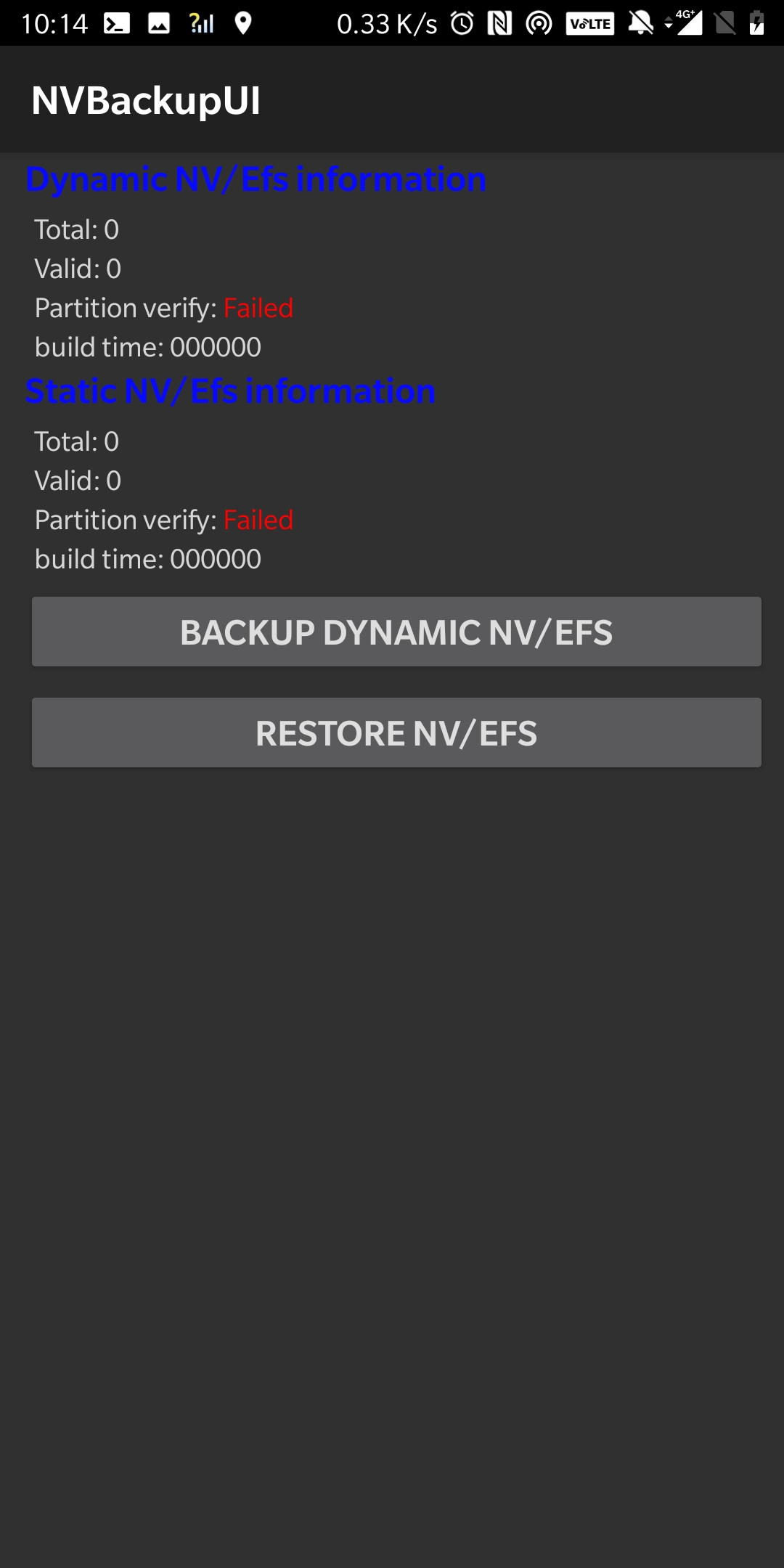
Oneplus does rewrite the NV Item files via its "NV Backup". Use a patched /vendor/bin/rmt_storage to avoid that
(extract it from any other device with an identical chipset). You can find the one I'm using on my OP5T on Android 9 (Oxygen OS 9.0.9)
in resources/rmt_storage_patch/op5t/oos/9.0.9/rmt_storage (see its checksum below).
This will completely disable the NV Backup and will allow
you to rewrite any NV item file without having it rewritten at every reboot. If the patch succeeds you'll have the
following output when you go to the dialer pad, write *#268# (2NV) and click "NV parameters":
2ebd9ab966f395f387c888c9c591c8a2b5720204abc2ba2619d2c10d6cc38506  rmt_storage (patched)
d02daf4725be98999a98b240010dabc0ab231b46e47c3d6824c4625d7cb5a87b  rmt_storage (original)
A combo editor for NV ITEM 00028874 (RFNV_LTE_CA_BW_CLASS_COMBO_I)
The file generated by this tool may brick your device. Make a backup of your EFS before doing anything else. I suggest you to always keep QRCT open, NSG closed and test your file as follows:
dmesg -w | grep failure and keep it running.
This will show all the modem errors that may happen if your file is invalid.go run cmd/main.go --help
Or build the binary:
go build -o ca-combos-editor cmd/main.go
./ca-combos-editor --help
ca-combos-editor [global flags] <command> [args]
| Flag | Short | Default | Description |
|---|---|---|---|
--log-level | -l | error | Set the logging level: debug, info, warn, error |
--mode | -m | 137 | Writer mode: 137 (legacy), 201 (MIMO), or 333 (antenna-aware) |
All flags can also be set via environment variables prefixed with CA_COMBOS_:
| Variable | Equivalent Flag | Example |
|---|---|---|
CA_COMBOS_LOG_LEVEL | --log-level | CA_COMBOS_LOG_LEVEL=debug |
CA_COMBOS_MODE | --mode | CA_COMBOS_MODE=201 |
CA_COMBOS_MODE | --mode | CA_COMBOS_MODE=333 |
A configuration file named ca-combos-editor.yaml (or one in $HOME/.config/ca-combos-editor) is also supported.
parse - Parse an uncompressed 00028874 payloadca-combos-editor decompress 00028874 extracted.bin
Or with zlib-flate:
zlib-flate --uncompress < 00028874 > extracted.bin
ca-combos-editor parse extracted.bin
With verbose logging:
ca-combos-editor --log-level debug parse extracted.bin
create - Create a 00028874 payload from a single bands filebands.txt file in the format shown in test/resources/2019-10-17/bands.txt (one combo per line)ca-combos-editor create bands.txt 00028874_uncompressed
ca-combos-editor compress 00028874_uncompressed 00028874
Or with the helper script:
./compress.sh 00028874_uncompressed
00028874 file to your modemUse writer mode 201 or 333 if needed:
ca-combos-editor --mode 201 create bands.txt 00028874_uncompressed
ca-combos-editor --mode 333 create bands.txt 00028874_uncompressed
create-dlul - Create a payload from separate downlink and uplink filesGiven two files, downlink.txt and uplink.txt, containing a list of downlink bands and uplink bands as follows:
1C
1A-1A
3C
3A-1A
1A
1A
3A
1A, 3A
The following records will be created:
DL: 1C
UL: 1A

DL: 1A-1A
UL: 1A

DL: 3C
UL: 3A

DL: 3A-1A
UL: 1A
UL: 3A
Generate the payload with:
ca-combos-editor create-dlul downlink.txt uplink.txt output
A new file output will be generated. Compress it with ca-combos-editor compress output 00028874
or with ./compress.sh output to get the final 00028874 file.
decompress / compress - Manage the zlib wrapper directlyThese commands wrap/unwrap the raw zlib layer without needing zlib-flate:
# Extract the payload from a raw 00028874 file
ca-combos-editor decompress 00028874 extracted.bin

# Create a raw 00028874 file from an extracted payload
ca-combos-editor compress extracted.bin 00028874
Oneplus does rewrite the NV Item files via its "NV Backup". Use a patched /vendor/bin/rmt_storage to avoid that
(extract it from any other device with an identical chipset). You can find the one I'm using on my OP5T on Android 9 (Oxygen OS 9.0.9)
in resources/rmt_storage_patch/op5t/oos/9.0.9/rmt_storage (see its checksum below).
This will completely disable the NV Backup and will allow
you to rewrite any NV item file without having it rewritten at every reboot. If the patch succeeds you'll have the
following output when you go to the dialer pad, write *#268# (2NV) and click "NV parameters":
2ebd9ab966f395f387c888c9c591c8a2b5720204abc2ba2619d2c10d6cc38506  rmt_storage (patched)
d02daf4725be98999a98b240010dabc0ab231b46e47c3d6824c4625d7cb5a87b  rmt_storage (original)



