
Channel State Information Extraction on Various Broadcom Wi-Fi Chips
C
475
42 commits
updated Jul 9, 2026
README

Nexmon Channel State Information Extractor
This project allows you to extract channel state information (CSI) of OFDM-modulated Wi-Fi frames (802.11a/(g)/n/ac) on a per frame basis with up to 80 MHz bandwidth on the Broadcom Wi-Fi Chips listed below.
| WiFi Chip | Firmware Version | Used in |
|---|---|---|
| bcm4339 | 6_37_34_43 | Nexus 5 |
| bcm43455c0 | 7_45_189 | Raspberry Pi 3B+/4B/5 |
| bcm4358 | 7_112_300_14_sta | Nexus 6P |
| bcm4366c0 | 10_10_122_20 | Asus RT-AC86U |
Be careful
Backwards incompatible changes were introduced by merging https://github.com/seemoo-lab/nexmon_csi/pull/256.
Usage
After following the getting started guide for your device below, you can begin extracting CSI by doing the following. The first step can be run locally or on the extraction device, all the subsequent steps shall be executed on the latter.
-
Use utils/makecsiparams/makecsiparams to generate a base64 encoded parameter string that can be used to configure the extractor. The following example call generates a parameter string that enables collection on channel 157 with 80 MHz bandwidth on the first core for the first spatial stream for frames starting with 0x88 originating from 00:11:22:33:44:55 or aa:bb:aa:bb:aa:bb:
makecsiparams -c 157/80 -C 1 -N 1 -m 00:11:22:33:44:55,aa:bb:aa:bb:aa:bb -b 0x88
m+IBEQGIAgAAESIzRFWqu6q7qrsAAAAAAAAAAAAAAAAAAA==
For a full list of possible parameters run
makecsiparams -h. -
bcm43455c0 only: make sure wpa_supplicant is not running:
pkill wpa_supplicant -
Make sure your interface is up:
ifconfig wlan0 up(replace wlan0 with your interface name) -
Configure the extractor using nexutil and the generated parameters (adapt the argument of -v with your parameters):
nexutil -Iwlan0 -s500 -b -l34 -vm+IBEQGIAgAAESIzRFWqu6q7qrsAAAAAAAAAAAAAAAAAAA== -
Enable monitor mode:
bcm4339,bcm4358:
nexutil -Iwlan0 -m1bcm43455c0:
iw phy `iw dev wlan0 info | gawk '/wiphy/ {printf "phy" $2}'` interface add mon0 type monitor ifconfig mon0 upbcm4366c0:
/usr/sbin/wl -i eth6 monitor 1 -
Collect CSI by listening on UDP socket 5500, e.g. by using tcpdump:
tcpdump -i wlan0 dst port 5500. There will be one UDP packet per configured core and spatial stream for each incoming frame matching the configured filter.
Analyzing the CSI
Each UDP packet containing collected CSI has 10.10.10.10 as source address and is destined to 255.255.255.255 on port 5500. The payload starts with four magic bytes 0x11111111 two magic bytes 0x1111 (change introduced in: https://github.com/seemoo-lab/nexmon_csi/pull/256), followed by the six byte source mac address as well as the two byte sequence number of the Wi-Fi frame that triggered the collection of the CSI contained in this packet. The next two bytes contain core and spatial stream number where the lowest three bits indicate the core and the next three bits the spatial stream number, e.g. 0x0019 (0b00011001) means core 0 and spatial stream 3. The chanspec used during extraction can be found in the subsequent two bytes. After two bytes identifying the chip version, the actual CSI data follows. Relative to using 20, 40, or 80 MHz wide channels those are 64, 128, or 256 times four bytes long. For the bcm4339 and bcm43455c0 the data contains interleaved int16 real and int16 imaginary parts for each complex CSI value. The bcm4358 and bcm4366c0 return values in a floating point format with one bit sign of the following nine or twelve bits of a real part and the same for an imaginary part, followed by an exponent of five or six bits. We provide matlab scripts under utils/matlab/ for reading and plotting both formats. Make sure to compile a mex file from utils/matlab/unpack_float.c before reading values of the bcm4358 or bcm4366c0 for the first time. Then fill in the configuration section in utils/matlab/csireader.m and run the script. There is an example capture file utils/matlab/example.pcap holding four UDPs of a capture on a bcm4358 for two cores and two spatial streams.
Example
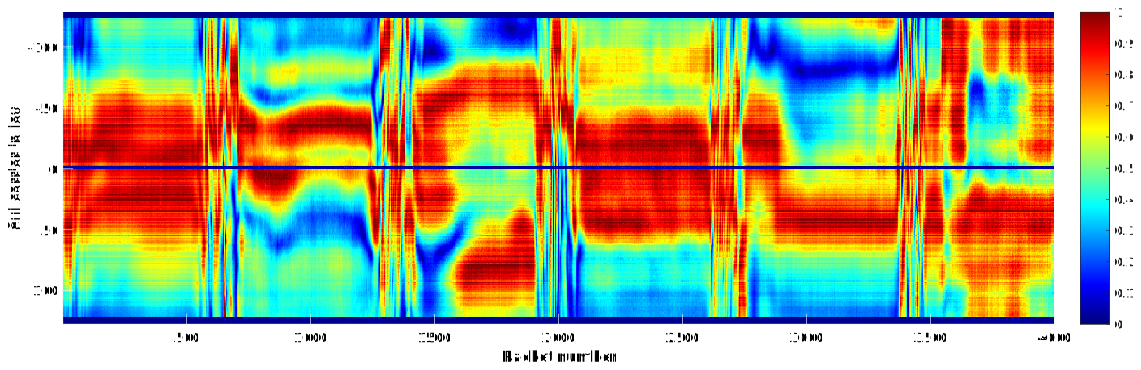
The figure below shows the amplitude of 80MHz CSI changing over time extracted for one core and one spatial stream on a bcm4366c0 (Asus RT-AC86U). Corresponding Wi-Fi frames were transmitted using frame injection on a Nexus 5 smartphone, enabled using nexmon. The quick and heavy alternations occuring in regular intervals result from shaking the transmitter. For the rest of the capture the transmitter was pretty much kept steady in one hand.
Getting Started
To compile the source code, you are required to first clone the original nexmon repository that contains our C-based patching framework for Wi-Fi firmwares. Then you clone this repository as one of the sub-projects in the corresponding patches sub-directory. This allows you to build and compile all the firmware patches required to extract CSI. The following guides you through the required procedure for the different platforms.
bcm4339, bcm4358
The following steps will get you started on Xubuntu 16.04 LTS:
- Install some dependencies:
sudo apt-get install git gawk qpdf adb flex bison xxd - Only necessary for x86_64 systems, install i386 libs:
sudo dpkg --add-architecture i386
sudo apt-get update
sudo apt-get install libc6:i386 libncurses5:i386 libstdc++6:i386
- Clone the nexmon base repository:
git clone https://github.com/seemoo-lab/nexmon.git. - Download and extract Android NDK r11c (use exactly this version!).
- Export the NDK_ROOT environment variable pointing to the location where you extracted the ndk so that it can be found by our build environment.
- Navigate to the previously cloned nexmon directory and execute
source setup_env.shto set a couple of environment variables. - Run
maketo extract ucode, templateram and flashpatches from the original firmwares. - Navigate to utilities and run
maketo build all utilities such as nexmon. - Attach your rooted Nexus 5 or Nexus 6P smartphone.
- Run
make installto install all the built utilities on your phone. - Navigate to patches/bcm43{39,58}/{6_37_34_43,7_112_300_14_sta}/ and clone this repository:
git clone https://github.com/seemoo-lab/nexmon_csi.git - Enter the created subdirectory nexmon_csi and run
make install-firmwareto compile our firmware patch and install it on the attached smartphone.
bcm43455c0
Update: We've added a Makefile (Makefile.rpi) dedicated to Raspberry Pi OS with recent kernel versions that no longer require a modified brcmfmac driver (that support vendor commands). A tutorial on using Nexmon CSI on recent kernel versions and additionally the Raspberry Pi 5 can be found in discussion #395.
For Raspbian / Raspberry Pi OS running kernel versions 4.19, 5.4, and 5.10 perform the following on your Raspberry Pi 3B+/4B:
- Make sure the following commands are executed as root:
sudo su - Upgrade your Raspbian installation:
apt-get update && apt-get upgrade - Install the kernel headers to build the driver and some dependencies:
      apt install raspberrypi-kernel-headers git libgmp3-dev gawk qpdf bison flex make xxd
      apt install automake autoconf libtool texinfo
      reboot
- Clone the nexmon base repository:
git clone https://github.com/seemoo-lab/nexmon.git. - Go into the root directory of the repository:
cd nexmon - Check if
/usr/lib/arm-linux-gnueabihf/libisl.so.10exists, if not, compile it from source:cd buildtools/isl-0.10,./configure,make,make install,ln -s /usr/local/lib/libisl.so /usr/lib/arm-linux-gnueabihf/libisl.so.10 - Check if
/usr/lib/arm-linux-gnueabihf/libmpfr.so.4exists, if not, compile it from source:cd buildtools/mpfr-3.1.4,autoreconf -f -i,./configure,make,make install,ln -s /usr/local/lib/libmpfr.so /usr/lib/arm-linux-gnueabihf/libmpfr.so.4 - Then you can setup the build environment for compiling firmware patches
-
Setup the build environment:
source setup_env.sh -
Run
maketo extract ucode, templateram and flashpatches from the original firmwares.
-
- Navigate to patches/bcm43455c0/7_45_189/ and clone this repository:
git clone https://github.com/seemoo-lab/nexmon_csi.git - Enter the created subdirectory nexmon_csi and run
make install-firmwareto compile our firmware patch and install it on the Raspberry Pi. - Install nexutil: from the nexmon root directory switch to the nexutil folder:
cd utilities/nexutil/. Compile and install nexutil:make && make install. - Optional: remove wpa_supplicant for better control over the WiFi interface:
apt-get remove wpasupplicant
bcm4366c0
This install instruction works only with devices based on ARM processors with 64 Bit, because the used compiler and the base-driver are chosen for this destination architecture. The following steps will get you started on Xubuntu 18.04.3 LTS:
- Install some dependencies:
sudo apt-get install git gawk qpdf flex bison xxd - Only necessary for x86_64 systems, install i386 libs:
sudo dpkg --add-architecture i386
sudo apt update
sudo apt install libc6:i386 libncurses5:i386 libstdc++6:i386
- Clone the nexmon base repository:
git clone https://github.com/seemoo-lab/nexmon.git. - Navigate to the previously cloned nexmon directory and execute
source setup_env.shto set a couple of environment variables. - Run
maketo extract ucode, templateram and flashpatches from the original firmwares. - Navigate to patches/bcm4366c0/10_10_122_20/ and clone this repository:
git clone https://github.com/seemoo-lab/nexmon_csi.git - Enter the created subdirectory nexmon_csi and run
make install-firmware REMOTEADDR=<address of your rt-ac86u>to compile our firmware patch and install it on your RT-AC86U router. - Clone the aarch64 toolchain repository:
git clone https://github.com/RMerl/am-toolchains.git. - Set the compile environment:
export AMCC=$(pwd)/am-toolchains/brcm-arm-hnd/crosstools-aarch64-gcc-5.3-linux-4.1-glibc-2.22-binutils-2.25/usr/bin/aarch64-buildroot-linux-gnu-
export LD_LIBRARY_PATH=$(pwd)/am-toolchains/brcm-arm-hnd/crosstools-aarch64-gcc-5.3-linux-4.1-glibc-2.22-binutils-2.25/usr/lib
- Go back to the nexmon repository root, compile and install nexutil:
cd utilities/libnexio
${AMCC}gcc -c libnexio.c -o libnexio.o -DBUILD_ON_RPI
${AMCC}ar rcs libnexio.a libnexio.o
cd ../nexutil
echo "typedef uint32_t uint;" > types.h
sed -i 's/argp-extern/argp/' nexutil.c
${AMCC}gcc -static -o nexutil nexutil.c bcmutils.c bcmwifi_channels.c b64-encode.c b64-decode.c -DBUILD_ON_RPI -DVERSION=0 -I. -I./include -I../libnexio -I../../patches/include -L../libnexio/ -lnexio
scp nexutil admin@<address of your rt-ac86u>:/jffs/nexutil
ssh admin@<address of your rt-ac86u> "/bin/chmod +x /jffs/nexutil"
Frequently Asked Questions
Why don't I see any CSI packets?
There are quite a few reasons why this might happen. Check the following points to avoid usual pitfalls.
- Make sure you are capturing (and transmitting) on the correct channel. Also check if the chip tuned to the chanspec given by
makecsiparams -cduring configuration of the extractor (after runningnexutil -s500 ...) by fetching the current chanspec withnexutil -k. If a wrong chanspec is returned you might need to add the desired chanspec tosrc/regulations.c: additional_valid_chanspecs[]first, to allow tuning to it. Returned chanspec0x6863 85/160probably means the chip or interface is not up. Also disable any other application that might try to change the channel, e.g.wpa_supplicant.- If using the MAC address filter option, confirm the correctness of the given addresses.
- If using the byte filter option, ensure the specified byte is not faulty.
- CSI are extracted on a per frame basis. Thus, traffic is required to make it work. We recommend using a device with frame injection (e.g. by using nexmon) as transmitter or to generate traffic between two connected devices over their WiFi interfaces e.g. with
iperf.- On Raspberry Pi 3B+ and 4B do not listen on the newly created interface
mon0butwlan0instead.
What MAC addresses shall be passed to makecsiparams -m?
The extractor will compare the second address in the 802.11 MAC header of every received Wi-Fi frame against the addresses provided by
makecsiparams -m. If there is a match, CSI are extracted. In most cases the second address represents the source address of the frame. If you are unsure what MAC address to use, you can capture your traffic in monitor mode (install firmwaremake install-firmare, set channel withnexutil -k<channel>/<bandwidth>, enable monitor modenexutil -m1, capture traffic with e.g.tcpdump) and inspect it with e.g.wiresharkto determine the value of the second address.
What value shall be passed to makecsiparams -b?
The extractor will compare the first byte of every incoming Wi-Fi frame to the byte provided by
makecsiparams -b. Only if they match CSI are extracted. If you are unsure what value to use, you can capture your traffic in monitor mode (install firmwaremake install-firmare, set channel withnexutil -k<channel>/<bandwidth>, enable monitor modenexutil -m1, capture traffic with e.g.tcpdump) and inspect it with e.g.wiresharkto determine the value of your frames first byte. The first byte of WiFi frames hold version, type, and subtype information.
Will this support device XYZ?
As of now the Wi-Fi chips
bcm4339,bcm43455c0,bcm4358, andbcm4365/4366c0are supported by this project. If your device features a Broadcom/Cypress Wi-Fi chip chances are high that this project can be ported to it. Feel free to contact us via email (jlink@seemoo.tu-darmstadt.de) for more information and/or requests.
Parts of extracted CSI are empty or look invalid. Am I doing anything wrong?
Unexpected results might be due to one of the following reasons:
- Extracted CSI hold values for all subcarriers including guard and null carriers, that are 64 for 20MHz, 128 for 40MHz and 256 for 80MHz. Guard and null carriers might contain arbitrary values. Especially when visualising CSI this might be disturbing. We recommend removing or setting them to zero. The corresponding subcarrier indices are mode and bandwidth dependent: 20MHz 802.11a/g
-32 to -27, 0, +27 to +31, 20MHz 802.11n/ac-32 to -29, 0, +29 to +31, 40MHz-64 to -59, -1 to +1, +59 to 63, and 80MHz-128 to -123, -1 to +1, +123 to 127.- If half or three quarters of extracted CSI for 40 or 80MHz are mostly empty or contain very low values it is very likely that you received a 20MHz frame inside a 40 or 80MHz wide channel. As 40 and 80MHz wide channels are just several bonded 20MHz channels this is totally possible and valid. One of the bonded 20MHz channels will be used as control channel to transmit control frames. Hence, you probably captured CSI of control frames or the transmitter is simply not using the available bandwidth.
- The data format of CSI extracted differ between chips. Make sure you are using the correct method to process the data. The formats are described in analyzing the csi and examples for processing can be found unter
utils/matlab.
How to control the extraction rate?
As the CSI extractor works per received Wi-Fi frame the rate can be controlled by the transmitter.
Extract from our License
Any use of the Software which results in an academic publication or other publication which includes a bibliography must include citations to the nexmon project a) and the paper cited under b):
a) "Matthias Schulz, Daniel Wegemer and Matthias Hollick. Nexmon: The C-based Firmware Patching Framework. https://nexmon.org"
b) "Francesco Gringoli, Matthias Schulz, Jakob Link, and Matthias Hollick. Free Your CSI: A Channel State Information Extraction Platform For Modern Wi-Fi Chipsets. In Proceedings of the 13th Workshop on Wireless Network Testbeds, Experimental evaluation & CHaracterization (WiNTECH 2019), October 2019."
@electronic{nexmon:project,
    author = {Schulz, Matthias and Wegemer, Daniel and Hollick, Matthias},
    title = {Nexmon: The C-based Firmware Patching Framework},
    url = {https://nexmon.org},
    year = {2017}
}

@inproceedings{10.1145/3349623.3355477,
    author = {Gringoli, Francesco and Schulz, Matthias and Link, Jakob and Hollick, Matthias},
    title = {Free Your CSI: A Channel State Information Extraction Platform For Modern Wi-Fi Chipsets},
    year = {2019},
    url = {https://doi.org/10.1145/3349623.3355477},
    booktitle = {Proceedings of the 13th International Workshop on Wireless Network Testbeds, Experimental Evaluation & Characterization},
    pages = {21–28},
    series = {WiNTECH ’19}
}
References
- Matthias Schulz, Daniel Wegemer and Matthias Hollick. Nexmon: The C-based Firmware Patching Framework. https://nexmon.org
- Francesco Gringoli, Matthias Schulz, Jakob Link, and Matthias Hollick. Free Your CSI: A Channel State Information Extraction Platform For Modern Wi-Fi Chipsets. In Proceedings of the 13th Workshop on Wireless Network Testbeds, Experimental evaluation & CHaracterization (WiNTECH 2019), October 2019. https://doi.org/10.1145/3349623.3355477
Contact
- Francesco Gringoli francesco.gringoli@unibs.it
- Matthias Schulz mschulz@seemoo.tu-darmstadt.de
- Jakob Link jlink@seemoo.tu-darmstadt.de
Powered By
Secure Mobile Networking Lab (SEEMOO)

Multi-Mechanisms Adaptation for the Future Internet (MAKI)

LOEWE centre emergenCITY

Technische Universität Darmstadt

University of Brescia

Contributors


Similar repos


Languages
C
72.6%
Batchfile
26.7%
Channel State Information Extraction on Various Broadcom Wi-Fi Chips
C
475
42 commits
updated Jul 9, 2026
README
Nexmon Channel State Information Extractor
This project allows you to extract channel state information (CSI) of OFDM-modulated Wi-Fi frames (802.11a/(g)/n/ac) on a per frame basis with up to 80 MHz bandwidth on the Broadcom Wi-Fi Chips listed below.
| WiFi Chip | Firmware Version | Used in |
|---|---|---|
| bcm4339 | 6_37_34_43 | Nexus 5 |
| bcm43455c0 | 7_45_189 | Raspberry Pi 3B+/4B/5 |
| bcm4358 | 7_112_300_14_sta | Nexus 6P |
| bcm4366c0 | 10_10_122_20 | Asus RT-AC86U |
Be careful
Backwards incompatible changes were introduced by merging https://github.com/seemoo-lab/nexmon_csi/pull/256.
Usage
After following the getting started guide for your device below, you can begin extracting CSI by doing the following. The first step can be run locally or on the extraction device, all the subsequent steps shall be executed on the latter.
-
Use utils/makecsiparams/makecsiparams to generate a base64 encoded parameter string that can be used to configure the extractor. The following example call generates a parameter string that enables collection on channel 157 with 80 MHz bandwidth on the first core for the first spatial stream for frames starting with 0x88 originating from 00:11:22:33:44:55 or aa:bb:aa:bb:aa:bb:
makecsiparams -c 157/80 -C 1 -N 1 -m 00:11:22:33:44:55,aa:bb:aa:bb:aa:bb -b 0x88
m+IBEQGIAgAAESIzRFWqu6q7qrsAAAAAAAAAAAAAAAAAAA==
For a full list of possible parameters run
makecsiparams -h. -
bcm43455c0 only: make sure wpa_supplicant is not running:
pkill wpa_supplicant -
Make sure your interface is up:
ifconfig wlan0 up(replace wlan0 with your interface name) -
Configure the extractor using nexutil and the generated parameters (adapt the argument of -v with your parameters):
nexutil -Iwlan0 -s500 -b -l34 -vm+IBEQGIAgAAESIzRFWqu6q7qrsAAAAAAAAAAAAAAAAAAA== -
Enable monitor mode:
bcm4339,bcm4358:
nexutil -Iwlan0 -m1bcm43455c0:
iw phy `iw dev wlan0 info | gawk '/wiphy/ {printf "phy" $2}'` interface add mon0 type monitor ifconfig mon0 upbcm4366c0:
/usr/sbin/wl -i eth6 monitor 1 -
Collect CSI by listening on UDP socket 5500, e.g. by using tcpdump:
tcpdump -i wlan0 dst port 5500. There will be one UDP packet per configured core and spatial stream for each incoming frame matching the configured filter.
Analyzing the CSI
Each UDP packet containing collected CSI has 10.10.10.10 as source address and is destined to 255.255.255.255 on port 5500. The payload starts with four magic bytes 0x11111111 two magic bytes 0x1111 (change introduced in: https://github.com/seemoo-lab/nexmon_csi/pull/256), followed by the six byte source mac address as well as the two byte sequence number of the Wi-Fi frame that triggered the collection of the CSI contained in this packet. The next two bytes contain core and spatial stream number where the lowest three bits indicate the core and the next three bits the spatial stream number, e.g. 0x0019 (0b00011001) means core 0 and spatial stream 3. The chanspec used during extraction can be found in the subsequent two bytes. After two bytes identifying the chip version, the actual CSI data follows. Relative to using 20, 40, or 80 MHz wide channels those are 64, 128, or 256 times four bytes long. For the bcm4339 and bcm43455c0 the data contains interleaved int16 real and int16 imaginary parts for each complex CSI value. The bcm4358 and bcm4366c0 return values in a floating point format with one bit sign of the following nine or twelve bits of a real part and the same for an imaginary part, followed by an exponent of five or six bits. We provide matlab scripts under utils/matlab/ for reading and plotting both formats. Make sure to compile a mex file from utils/matlab/unpack_float.c before reading values of the bcm4358 or bcm4366c0 for the first time. Then fill in the configuration section in utils/matlab/csireader.m and run the script. There is an example capture file utils/matlab/example.pcap holding four UDPs of a capture on a bcm4358 for two cores and two spatial streams.
Example
The figure below shows the amplitude of 80MHz CSI changing over time extracted for one core and one spatial stream on a bcm4366c0 (Asus RT-AC86U). Corresponding Wi-Fi frames were transmitted using frame injection on a Nexus 5 smartphone, enabled using nexmon. The quick and heavy alternations occuring in regular intervals result from shaking the transmitter. For the rest of the capture the transmitter was pretty much kept steady in one hand.
Getting Started
To compile the source code, you are required to first clone the original nexmon repository that contains our C-based patching framework for Wi-Fi firmwares. Then you clone this repository as one of the sub-projects in the corresponding patches sub-directory. This allows you to build and compile all the firmware patches required to extract CSI. The following guides you through the required procedure for the different platforms.
bcm4339, bcm4358
The following steps will get you started on Xubuntu 16.04 LTS:
- Install some dependencies:
sudo apt-get install git gawk qpdf adb flex bison xxd - Only necessary for x86_64 systems, install i386 libs:
sudo dpkg --add-architecture i386
sudo apt-get update
sudo apt-get install libc6:i386 libncurses5:i386 libstdc++6:i386
- Clone the nexmon base repository:
git clone https://github.com/seemoo-lab/nexmon.git. - Download and extract Android NDK r11c (use exactly this version!).
- Export the NDK_ROOT environment variable pointing to the location where you extracted the ndk so that it can be found by our build environment.
- Navigate to the previously cloned nexmon directory and execute
source setup_env.shto set a couple of environment variables. - Run
maketo extract ucode, templateram and flashpatches from the original firmwares. - Navigate to utilities and run
maketo build all utilities such as nexmon. - Attach your rooted Nexus 5 or Nexus 6P smartphone.
- Run
make installto install all the built utilities on your phone. - Navigate to patches/bcm43{39,58}/{6_37_34_43,7_112_300_14_sta}/ and clone this repository:
git clone https://github.com/seemoo-lab/nexmon_csi.git - Enter the created subdirectory nexmon_csi and run
make install-firmwareto compile our firmware patch and install it on the attached smartphone.
bcm43455c0
Update: We've added a Makefile (Makefile.rpi) dedicated to Raspberry Pi OS with recent kernel versions that no longer require a modified brcmfmac driver (that support vendor commands). A tutorial on using Nexmon CSI on recent kernel versions and additionally the Raspberry Pi 5 can be found in discussion #395.
For Raspbian / Raspberry Pi OS running kernel versions 4.19, 5.4, and 5.10 perform the following on your Raspberry Pi 3B+/4B:
- Make sure the following commands are executed as root:
sudo su - Upgrade your Raspbian installation:
apt-get update && apt-get upgrade - Install the kernel headers to build the driver and some dependencies:
      apt install raspberrypi-kernel-headers git libgmp3-dev gawk qpdf bison flex make xxd
      apt install automake autoconf libtool texinfo
      reboot
- Clone the nexmon base repository:
git clone https://github.com/seemoo-lab/nexmon.git. - Go into the root directory of the repository:
cd nexmon - Check if
/usr/lib/arm-linux-gnueabihf/libisl.so.10exists, if not, compile it from source:cd buildtools/isl-0.10,./configure,make,make install,ln -s /usr/local/lib/libisl.so /usr/lib/arm-linux-gnueabihf/libisl.so.10 - Check if
/usr/lib/arm-linux-gnueabihf/libmpfr.so.4exists, if not, compile it from source:cd buildtools/mpfr-3.1.4,autoreconf -f -i,./configure,make,make install,ln -s /usr/local/lib/libmpfr.so /usr/lib/arm-linux-gnueabihf/libmpfr.so.4 - Then you can setup the build environment for compiling firmware patches
-
Setup the build environment:
source setup_env.sh -
Run
maketo extract ucode, templateram and flashpatches from the original firmwares.
-
- Navigate to patches/bcm43455c0/7_45_189/ and clone this repository:
git clone https://github.com/seemoo-lab/nexmon_csi.git - Enter the created subdirectory nexmon_csi and run
make install-firmwareto compile our firmware patch and install it on the Raspberry Pi. - Install nexutil: from the nexmon root directory switch to the nexutil folder:
cd utilities/nexutil/. Compile and install nexutil:make && make install. - Optional: remove wpa_supplicant for better control over the WiFi interface:
apt-get remove wpasupplicant
bcm4366c0
This install instruction works only with devices based on ARM processors with 64 Bit, because the used compiler and the base-driver are chosen for this destination architecture. The following steps will get you started on Xubuntu 18.04.3 LTS:
- Install some dependencies:
sudo apt-get install git gawk qpdf flex bison xxd - Only necessary for x86_64 systems, install i386 libs:
sudo dpkg --add-architecture i386
sudo apt update
sudo apt install libc6:i386 libncurses5:i386 libstdc++6:i386
- Clone the nexmon base repository:
git clone https://github.com/seemoo-lab/nexmon.git. - Navigate to the previously cloned nexmon directory and execute
source setup_env.shto set a couple of environment variables. - Run
maketo extract ucode, templateram and flashpatches from the original firmwares. - Navigate to patches/bcm4366c0/10_10_122_20/ and clone this repository:
git clone https://github.com/seemoo-lab/nexmon_csi.git - Enter the created subdirectory nexmon_csi and run
make install-firmware REMOTEADDR=<address of your rt-ac86u>to compile our firmware patch and install it on your RT-AC86U router. - Clone the aarch64 toolchain repository:
git clone https://github.com/RMerl/am-toolchains.git. - Set the compile environment:
export AMCC=$(pwd)/am-toolchains/brcm-arm-hnd/crosstools-aarch64-gcc-5.3-linux-4.1-glibc-2.22-binutils-2.25/usr/bin/aarch64-buildroot-linux-gnu-
export LD_LIBRARY_PATH=$(pwd)/am-toolchains/brcm-arm-hnd/crosstools-aarch64-gcc-5.3-linux-4.1-glibc-2.22-binutils-2.25/usr/lib
- Go back to the nexmon repository root, compile and install nexutil:
cd utilities/libnexio
${AMCC}gcc -c libnexio.c -o libnexio.o -DBUILD_ON_RPI
${AMCC}ar rcs libnexio.a libnexio.o
cd ../nexutil
echo "typedef uint32_t uint;" > types.h
sed -i 's/argp-extern/argp/' nexutil.c
${AMCC}gcc -static -o nexutil nexutil.c bcmutils.c bcmwifi_channels.c b64-encode.c b64-decode.c -DBUILD_ON_RPI -DVERSION=0 -I. -I./include -I../libnexio -I../../patches/include -L../libnexio/ -lnexio
scp nexutil admin@<address of your rt-ac86u>:/jffs/nexutil
ssh admin@<address of your rt-ac86u> "/bin/chmod +x /jffs/nexutil"
Frequently Asked Questions
Why don't I see any CSI packets?
There are quite a few reasons why this might happen. Check the following points to avoid usual pitfalls.
- Make sure you are capturing (and transmitting) on the correct channel. Also check if the chip tuned to the chanspec given by
makecsiparams -cduring configuration of the extractor (after runningnexutil -s500 ...) by fetching the current chanspec withnexutil -k. If a wrong chanspec is returned you might need to add the desired chanspec tosrc/regulations.c: additional_valid_chanspecs[]first, to allow tuning to it. Returned chanspec0x6863 85/160probably means the chip or interface is not up. Also disable any other application that might try to change the channel, e.g.wpa_supplicant.- If using the MAC address filter option, confirm the correctness of the given addresses.
- If using the byte filter option, ensure the specified byte is not faulty.
- CSI are extracted on a per frame basis. Thus, traffic is required to make it work. We recommend using a device with frame injection (e.g. by using nexmon) as transmitter or to generate traffic between two connected devices over their WiFi interfaces e.g. with
iperf.- On Raspberry Pi 3B+ and 4B do not listen on the newly created interface
mon0butwlan0instead.
What MAC addresses shall be passed to makecsiparams -m?
The extractor will compare the second address in the 802.11 MAC header of every received Wi-Fi frame against the addresses provided by
makecsiparams -m. If there is a match, CSI are extracted. In most cases the second address represents the source address of the frame. If you are unsure what MAC address to use, you can capture your traffic in monitor mode (install firmwaremake install-firmare, set channel withnexutil -k<channel>/<bandwidth>, enable monitor modenexutil -m1, capture traffic with e.g.tcpdump) and inspect it with e.g.wiresharkto determine the value of the second address.
What value shall be passed to makecsiparams -b?
The extractor will compare the first byte of every incoming Wi-Fi frame to the byte provided by
makecsiparams -b. Only if they match CSI are extracted. If you are unsure what value to use, you can capture your traffic in monitor mode (install firmwaremake install-firmare, set channel withnexutil -k<channel>/<bandwidth>, enable monitor modenexutil -m1, capture traffic with e.g.tcpdump) and inspect it with e.g.wiresharkto determine the value of your frames first byte. The first byte of WiFi frames hold version, type, and subtype information.
Will this support device XYZ?
As of now the Wi-Fi chips
bcm4339,bcm43455c0,bcm4358, andbcm4365/4366c0are supported by this project. If your device features a Broadcom/Cypress Wi-Fi chip chances are high that this project can be ported to it. Feel free to contact us via email (jlink@seemoo.tu-darmstadt.de) for more information and/or requests.
Parts of extracted CSI are empty or look invalid. Am I doing anything wrong?
Unexpected results might be due to one of the following reasons:
- Extracted CSI hold values for all subcarriers including guard and null carriers, that are 64 for 20MHz, 128 for 40MHz and 256 for 80MHz. Guard and null carriers might contain arbitrary values. Especially when visualising CSI this might be disturbing. We recommend removing or setting them to zero. The corresponding subcarrier indices are mode and bandwidth dependent: 20MHz 802.11a/g
-32 to -27, 0, +27 to +31, 20MHz 802.11n/ac-32 to -29, 0, +29 to +31, 40MHz-64 to -59, -1 to +1, +59 to 63, and 80MHz-128 to -123, -1 to +1, +123 to 127.- If half or three quarters of extracted CSI for 40 or 80MHz are mostly empty or contain very low values it is very likely that you received a 20MHz frame inside a 40 or 80MHz wide channel. As 40 and 80MHz wide channels are just several bonded 20MHz channels this is totally possible and valid. One of the bonded 20MHz channels will be used as control channel to transmit control frames. Hence, you probably captured CSI of control frames or the transmitter is simply not using the available bandwidth.
- The data format of CSI extracted differ between chips. Make sure you are using the correct method to process the data. The formats are described in analyzing the csi and examples for processing can be found unter
utils/matlab.
How to control the extraction rate?
As the CSI extractor works per received Wi-Fi frame the rate can be controlled by the transmitter.
Extract from our License
Any use of the Software which results in an academic publication or other publication which includes a bibliography must include citations to the nexmon project a) and the paper cited under b):
a) "Matthias Schulz, Daniel Wegemer and Matthias Hollick. Nexmon: The C-based Firmware Patching Framework. https://nexmon.org"
b) "Francesco Gringoli, Matthias Schulz, Jakob Link, and Matthias Hollick. Free Your CSI: A Channel State Information Extraction Platform For Modern Wi-Fi Chipsets. In Proceedings of the 13th Workshop on Wireless Network Testbeds, Experimental evaluation & CHaracterization (WiNTECH 2019), October 2019."
@electronic{nexmon:project,
    author = {Schulz, Matthias and Wegemer, Daniel and Hollick, Matthias},
    title = {Nexmon: The C-based Firmware Patching Framework},
    url = {https://nexmon.org},
    year = {2017}
}

@inproceedings{10.1145/3349623.3355477,
    author = {Gringoli, Francesco and Schulz, Matthias and Link, Jakob and Hollick, Matthias},
    title = {Free Your CSI: A Channel State Information Extraction Platform For Modern Wi-Fi Chipsets},
    year = {2019},
    url = {https://doi.org/10.1145/3349623.3355477},
    booktitle = {Proceedings of the 13th International Workshop on Wireless Network Testbeds, Experimental Evaluation & Characterization},
    pages = {21–28},
    series = {WiNTECH ’19}
}
References
- Matthias Schulz, Daniel Wegemer and Matthias Hollick. Nexmon: The C-based Firmware Patching Framework. https://nexmon.org
- Francesco Gringoli, Matthias Schulz, Jakob Link, and Matthias Hollick. Free Your CSI: A Channel State Information Extraction Platform For Modern Wi-Fi Chipsets. In Proceedings of the 13th Workshop on Wireless Network Testbeds, Experimental evaluation & CHaracterization (WiNTECH 2019), October 2019. https://doi.org/10.1145/3349623.3355477
Contact
- Francesco Gringoli francesco.gringoli@unibs.it
- Matthias Schulz mschulz@seemoo.tu-darmstadt.de
- Jakob Link jlink@seemoo.tu-darmstadt.de
Powered By
Secure Mobile Networking Lab (SEEMOO)
Multi-Mechanisms Adaptation for the Future Internet (MAKI)
LOEWE centre emergenCITY
Technische Universität Darmstadt
University of Brescia
Similar repos
Contributors
Languages
C
72.6%
Batchfile
26.7%