
README
Speech


DemaConsulting.Speech is a cross-platform .NET library providing local, offline speech-to-text (STT) and text-to-speech (TTS) services for desktop applications.
Features
- 🎙️ Streaming speech-to-text recognition
- 🔊 Streaming text-to-speech synthesis
- 🧩 Mockable, cross-platform audio interfaces
- 📦 On-demand model download & verification
- 🏷️ Natural Language Audio Tag support
- ✍️ Casing & punctuation restoration
- 🎚️ Per-model tunable voice parameters
- 🖥️ Runs on Windows, Linux, macOS
- 🧵 Targets .NET 8, 9, and 10
- 🛡️ Degrades gracefully without hardware
Compliance evidence is generated automatically on every CI run, following the Continuous Compliance methodology.
Installation
Install the library using the .NET CLI:
dotnet add package DemaConsulting.Speech
PortAudio runtime support
The library references PortAudioSharp2, which in turn brings the following native runtime
packages transitively at restore time:
org.k2fsa.portaudio.runtime.win-x64org.k2fsa.portaudio.runtime.linux-x64org.k2fsa.portaudio.runtime.linux-aarch64org.k2fsa.portaudio.runtime.osx-x64org.k2fsa.portaudio.runtime.osx-arm64
No win-arm64 PortAudio runtime package is available through this dependency chain as of this
phase. On an unsupported RID, or if PortAudio fails to initialize on a machine, the library
still composes safely but reports audio devices as unavailable.
Speech engine runtime support
The library is designed for extensibility: each speech engine is a self-contained
IRecognitionModel/ISynthesisModel-backed class registered in SpeechModelCatalog.KnownModels,
so adding a new engine is a new model class, not a redesign. Native runtimes restore transitively
through the managed org.k2fsa.sherpa.onnx package; if one is missing for your target RID,
composition still succeeds and the factory reports the engine as unavailable instead of crashing.
None of the model bytes below are bundled with the library - SpeechModelCatalog.DownloadAsync
fetches each one on demand and verifies its SHA-256 checksum before installing it. It's safe to
call on every launch: for an already-installed model it's a cheap no-op, returning an Installed
result without touching the network. On first download it can instead return Failed (a
transport or I/O failure, with the underlying exception in SpeechModelDownloadResult.Error) or
ChecksumMismatch, or throw ArgumentException for an unrecognized model id.
This release ships four models:
| Model | Role | License |
|---|---|---|
SherpaOnnxZipformerEnRecognitionModel | Streaming STT | Apache-2.0 (likely) |
SherpaOnnxNemotronStreamingEnRecognitionModel | Streaming STT | NVIDIA Open Model License |
SherpaOnnxVitsLibriTtsEnglishSynthesisModel | TTS, 904 speakers | CC BY 4.0 |
SherpaOnnxKokoroEnglishSynthesisModel | TTS, 11 voices | Apache-2.0 |
The table above is a convenience view for at-a-glance browsing, not the sole source of license
information: every model also reports its license programmatically via
ISpeechModel.LicenseName/LicenseUrl (also available through SpeechModelCatalog.Enumerate()'s
SpeechModelDescriptor.LicenseName/LicenseUrl), so a host can discover licensing for any
installed or installable model without parsing DisplayName. See the
user guide for full model details, license rationale, and voice/speaker
selection.
Usage
There is no manual mono/stereo or sample-rate configuration to get wrong. Each model declares its
own required AudioFormat (recognition) or PreferredAudioFormat (synthesis hint), and passing
it to CreateCaptureDevice/CreatePlaybackDevice opens the device at that rate/channel-count
when the OS allows it. If a mismatch remains anyway, the library's own anti-aliased FIR resampler
bridges it transparently - you always get correct audio, never a manual format to configure.
The two examples below are complete, runnable programs: each downloads its model on first run
(into a per-user store under LocalApplicationData) and reuses it on every later run.
Speech-to-text
using DemaConsulting.Speech.AudioSubsystem;
using DemaConsulting.Speech.ModelManagementSubsystem;
using DemaConsulting.Speech.RecognitionSubsystem;

// 1. The catalog is the library's only "what models exist" entry point - nothing below names a
//    concrete model class, so new models added in a future release show up automatically.
using var catalog = new SpeechModelCatalog();

// 2. Pick a recognition model. Any model with the recognition role will do - this is the
//    idiomatic pattern for an app that just wants "a" speech-to-text model:
var descriptor = catalog.Enumerate().First(d => d.Role == SpeechModelRole.Recognition);
// To pick a *specific* model when more than one of the same role is installed, match on name
// instead: catalog.Enumerate().First(d => d.DisplayName.Contains("Zipformer"));
var model = (IRecognitionModel)descriptor.Model;

// 3. Ensure the chosen model is downloaded before first use. Safe to call unconditionally on
//    every launch - it's a cheap no-op once installed (see above for details).
await catalog.DownloadAsync(model.Id);

// 4. Create a capture device matching the model's own required audio format - there is no
//    manual mono/stereo or sample-rate configuration to get wrong.
var captureDevice = new AudioDeviceFactory().CreateCaptureDevice(
    AudioDeviceSelection.SystemDefault,
    model.AudioFormat);

// 5. Load the engine once, create a session bound to the capture device, and stream
//    recognized text as it arrives. LoadAsync never throws for an ordinary machine state
//    (model not installed, no microphone) - check IsAvailable instead.
await using var engine = await SpeechRecognizerFactory.LoadAsync(model, catalog);
if (engine.IsAvailable)
{
    await using var session = await engine.CreateSessionAsync(captureDevice);

    await session.StartAsync();
    Console.WriteLine("Listening - press any key to stop...");

    var resultsTask = Task.Run(async () =>
    {
        await foreach (var evt in session.GetResultsAsync())
        {
            var status = evt.Result.IsFinal ? "final" : "partial";
            Console.WriteLine($"{status}: {evt.Result.Text}");
        }
    });

    Console.ReadKey(intercept: true);
    await session.StopAsync();
    await resultsTask;
}
Text-to-speech
using DemaConsulting.Speech.AudioSubsystem;
using DemaConsulting.Speech.ModelManagementSubsystem;
using DemaConsulting.Speech.SynthesisSubsystem;

// 1. The catalog is the library's only "what models exist" entry point - nothing below names a
//    concrete model class, so new models added in a future release show up automatically.
using var catalog = new SpeechModelCatalog();

// 2. Pick a synthesis model. Any model with the synthesis role will do - this is the idiomatic
//    pattern for an app that just wants "a" text-to-speech model:
var descriptor = catalog.Enumerate().First(d => d.Role == SpeechModelRole.Synthesis);
// To pick a *specific* model when more than one of the same role is installed, match on name
// instead: catalog.Enumerate().First(d => d.DisplayName.Contains("Kokoro"));
var model = (ISynthesisModel)descriptor.Model;

// 3. Ensure the chosen model is downloaded before first use. Safe to call unconditionally on
//    every launch - it's a cheap no-op once installed.
await catalog.DownloadAsync(model.Id);

// 4. Create a playback device matching the model's own preferred audio format hint.
var playbackDevice = new AudioDeviceFactory().CreatePlaybackDevice(
    AudioDeviceSelection.SystemDefault,
    model.PreferredAudioFormat);

// 5. Load the engine and speak a one-shot phrase. LoadAsync never throws for an ordinary
//    machine state (model not installed, no speakers) - check IsAvailable instead.
await using var engine = await SpeechSynthesizerFactory.LoadAsync(model, catalog);
if (engine.IsAvailable)
{
    await engine.SpeakAsync(playbackDevice, "To be, or not to be. [short pause] That is the question.");
}
Both LoadAsync(...) factories never throw for an ordinary machine state: a model that isn't
installed, a machine with no microphone/speakers, and a missing speech-engine native runtime all
return IsAvailable == false instead of an exception. AudioDeviceFactory also exposes
RefreshDevices() to re-scan for hot-plugged hardware, surfacing AudioDeviceInUseException if a
device from the factory is currently active.
SpeakAsync recognizes Natural Language Audio Tags (such as [whispers], [short pause], or
[excited]), renders each one per the model's own declared capability, chunks narration into
sentence-sized pieces, and pipelines synthesis with playback - an earlier chunk plays while a
later chunk is still synthesizing. Passing a cancelled CancellationToken to SpeakAsync cancels
an in-flight call deterministically.
For a model that declares tunable parameters - such as Kokoro's voice choice or VITS/Piper's
numeric speaker id - pass a parameterValues bag keyed by each parameter's Id to LoadAsync(...):
await using var engine = await SpeechSynthesizerFactory.LoadAsync(
    model,
    catalog,
    parameterValues: new Dictionary<string, object> { ["voice"] = "af_bella" });
A parameterValues key that names a parameter not declared by the target model is silently
ignored (composition still succeeds, with only an Info-level diagnostic reported if a
diagnostics sink is wired up) - this deliberately keeps one settings dictionary reusable across
different models without breaking composition. A supplied value for a parameter the model does
declare, but that fails that parameter's own validation - the wrong CLR type, a number outside
its declared range, a fractional value for a whole-number-only parameter, or a string that
matches none of a ChoiceParameter's declared options - throws ArgumentException synchronously
from LoadAsync(...), naming the parameter, the model, and the reason the value is invalid. This
same rule applies to SpeechRecognizerFactory.LoadAsync's parameterValues argument.
See the user guide for the full API walkthrough, voice/speaker catalogs, and Natural Language Audio Tag vocabulary.
Automated tests in this repository verify selection logic, preferred-host filtering, fallback to host-API defaults, and degradation when PortAudio cannot initialize. They do not prove true end-to-end hardware I/O in CI, because CI runners cannot guarantee access to a real microphone or speaker. Opening a real device and moving audio through it remains a manual/local verification step. The recognition and synthesis pipelines are likewise verified against deterministic test engines rather than real speech, so recognition accuracy and synthesized speech quality are manual/local verification steps too.
Demo Application
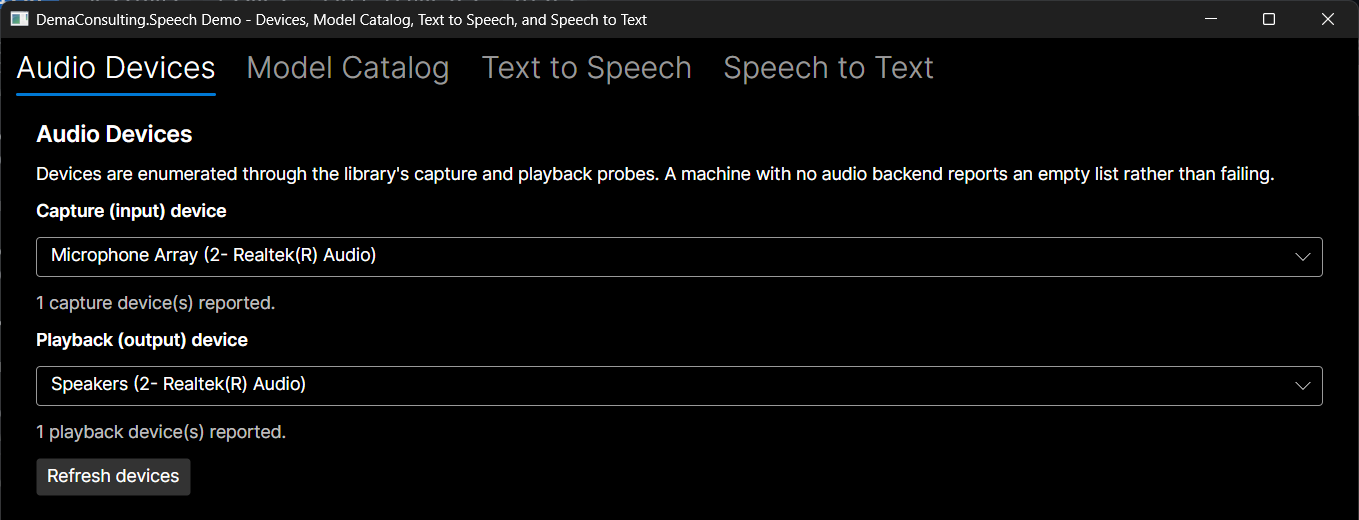
An Avalonia desktop demo exercises the library through its public API only - audio devices, model catalog/download, text-to-speech, and streaming speech-to-text, each in its own tab:
dotnet run --project src/DemaConsulting.Speech.Demo
Every panel reports its own honest state (no devices, no model installed, missing native runtime) instead of failing silently, and a shared Model Settings view renders whichever parameters the selected model declares (sliders/numeric up-downs, combo boxes, checkboxes) with no per-model code in the demo. Model pickers lock while a model is actively recording or playing, so you can't switch models mid-session.
SpeechCli
speech-cli is a cross-platform .NET global tool that exposes the library's model management,
audio device inspection, text-to-speech, and speech-to-text capabilities directly from the
command line - useful for scripting, CI smoke checks, or trying a model without writing any code.
dotnet tool install -g DemaConsulting.Speech.Cli
The tool targets .NET 10 and bundles the native inference runtime for win-x64, linux-x64,
and osx-arm64 only.
| Command | Purpose |
|---|---|
list-models | List known models, optionally filtered by role or download state |
model-info <modelId> | Show full detail for one known model |
download <modelId> [<modelId>...] | Download one or more models |
uninstall <modelId> | Remove a downloaded model's files, keeping its catalog entry |
clean <modelId> | Best-effort remove leftover partial-install artifacts for a model (not a full uninstall) |
list-devices / devices test / doctor | Inspect audio devices and overall environment health |
speak | Synthesize text to a real playback device or a WAV file |
recognize | Recognize speech from a WAV file or the microphone |
ask | Speak a prompt, then listen for the reply |
speech-cli download streaming-zipformer-en-2023-06-26
speech-cli recognize --stt-model streaming-zipformer-en-2023-06-26 --input meeting.wav
Run speech-cli --help for the full flag reference. See the
CLI package README and user guide for install details, the
full command reference, and worked examples.
Voice Conversation Example
speak and ask together are the intended integration pattern for an AI agent holding a
two-way voice conversation with a person through this CLI: speak for a one-way statement,
ask when a reply is expected. ask pre-warms (constructs and loads) its STT recognizer
concurrently with speaking the prompt, rather than only afterward, so the reply can be heard with
minimal added latency; see the user guide's "Hot TTS/STT" section for the same
low-latency create-once/reuse-many pattern applied inside a long-lived host process.
# Make a statement
speech-cli speak --tts-model vits-piper-en_US-libritts_r-medium --text "Backup finished successfully."

# Ask a question and read the reply, allowing up to 20 seconds to start speaking and
# ending the turn after 1.5 seconds of silence
speech-cli ask --tts-model vits-piper-en_US-libritts_r-medium --stt-model streaming-zipformer-en-2023-06-26 \
  --text "Do you want me to continue?" --start-timeout 20 --silence-timeout 1.5
Documentation
Generated documentation includes:
- API Reference: Gradual-disclosure Markdown API docs (index → namespace → type), packed
into the NuGet package's
api/folder for downstream tools and agents to consume - Build Notes: Release information and changes
- User Guide: Installation and usage guidance
- Code Quality Report: CodeQL and SonarCloud analysis results
- Requirements: Functional and non-functional requirements
- Requirements Justifications: Detailed requirement rationale
- Trace Matrix: Requirements-to-test traceability
Contributing
Contributions are welcome. See CONTRIBUTING.md for development setup, coding standards, and the pull request process.
License
Copyright (c) DEMA Consulting. Licensed under the MIT License. See LICENSE for details.
By contributing to this project, you agree that your contributions will be licensed under the MIT License.
Similar repos


Languages
C#
99.6%
README
Speech
DemaConsulting.Speech is a cross-platform .NET library providing local, offline speech-to-text (STT) and text-to-speech (TTS) services for desktop applications.
Features
- 🎙️ Streaming speech-to-text recognition
- 🔊 Streaming text-to-speech synthesis
- 🧩 Mockable, cross-platform audio interfaces
- 📦 On-demand model download & verification
- 🏷️ Natural Language Audio Tag support
- ✍️ Casing & punctuation restoration
- 🎚️ Per-model tunable voice parameters
- 🖥️ Runs on Windows, Linux, macOS
- 🧵 Targets .NET 8, 9, and 10
- 🛡️ Degrades gracefully without hardware
Compliance evidence is generated automatically on every CI run, following the Continuous Compliance methodology.
Installation
Install the library using the .NET CLI:
dotnet add package DemaConsulting.Speech
PortAudio runtime support
The library references PortAudioSharp2, which in turn brings the following native runtime
packages transitively at restore time:
org.k2fsa.portaudio.runtime.win-x64org.k2fsa.portaudio.runtime.linux-x64org.k2fsa.portaudio.runtime.linux-aarch64org.k2fsa.portaudio.runtime.osx-x64org.k2fsa.portaudio.runtime.osx-arm64
No win-arm64 PortAudio runtime package is available through this dependency chain as of this
phase. On an unsupported RID, or if PortAudio fails to initialize on a machine, the library
still composes safely but reports audio devices as unavailable.
Speech engine runtime support
The library is designed for extensibility: each speech engine is a self-contained
IRecognitionModel/ISynthesisModel-backed class registered in SpeechModelCatalog.KnownModels,
so adding a new engine is a new model class, not a redesign. Native runtimes restore transitively
through the managed org.k2fsa.sherpa.onnx package; if one is missing for your target RID,
composition still succeeds and the factory reports the engine as unavailable instead of crashing.
None of the model bytes below are bundled with the library - SpeechModelCatalog.DownloadAsync
fetches each one on demand and verifies its SHA-256 checksum before installing it. It's safe to
call on every launch: for an already-installed model it's a cheap no-op, returning an Installed
result without touching the network. On first download it can instead return Failed (a
transport or I/O failure, with the underlying exception in SpeechModelDownloadResult.Error) or
ChecksumMismatch, or throw ArgumentException for an unrecognized model id.
This release ships four models:
| Model | Role | License |
|---|---|---|
SherpaOnnxZipformerEnRecognitionModel | Streaming STT | Apache-2.0 (likely) |
SherpaOnnxNemotronStreamingEnRecognitionModel | Streaming STT | NVIDIA Open Model License |
SherpaOnnxVitsLibriTtsEnglishSynthesisModel | TTS, 904 speakers | CC BY 4.0 |
SherpaOnnxKokoroEnglishSynthesisModel | TTS, 11 voices | Apache-2.0 |
The table above is a convenience view for at-a-glance browsing, not the sole source of license
information: every model also reports its license programmatically via
ISpeechModel.LicenseName/LicenseUrl (also available through SpeechModelCatalog.Enumerate()'s
SpeechModelDescriptor.LicenseName/LicenseUrl), so a host can discover licensing for any
installed or installable model without parsing DisplayName. See the
user guide for full model details, license rationale, and voice/speaker
selection.
Usage
There is no manual mono/stereo or sample-rate configuration to get wrong. Each model declares its
own required AudioFormat (recognition) or PreferredAudioFormat (synthesis hint), and passing
it to CreateCaptureDevice/CreatePlaybackDevice opens the device at that rate/channel-count
when the OS allows it. If a mismatch remains anyway, the library's own anti-aliased FIR resampler
bridges it transparently - you always get correct audio, never a manual format to configure.
The two examples below are complete, runnable programs: each downloads its model on first run
(into a per-user store under LocalApplicationData) and reuses it on every later run.
Speech-to-text
using DemaConsulting.Speech.AudioSubsystem;
using DemaConsulting.Speech.ModelManagementSubsystem;
using DemaConsulting.Speech.RecognitionSubsystem;

// 1. The catalog is the library's only "what models exist" entry point - nothing below names a
//    concrete model class, so new models added in a future release show up automatically.
using var catalog = new SpeechModelCatalog();

// 2. Pick a recognition model. Any model with the recognition role will do - this is the
//    idiomatic pattern for an app that just wants "a" speech-to-text model:
var descriptor = catalog.Enumerate().First(d => d.Role == SpeechModelRole.Recognition);
// To pick a *specific* model when more than one of the same role is installed, match on name
// instead: catalog.Enumerate().First(d => d.DisplayName.Contains("Zipformer"));
var model = (IRecognitionModel)descriptor.Model;

// 3. Ensure the chosen model is downloaded before first use. Safe to call unconditionally on
//    every launch - it's a cheap no-op once installed (see above for details).
await catalog.DownloadAsync(model.Id);

// 4. Create a capture device matching the model's own required audio format - there is no
//    manual mono/stereo or sample-rate configuration to get wrong.
var captureDevice = new AudioDeviceFactory().CreateCaptureDevice(
    AudioDeviceSelection.SystemDefault,
    model.AudioFormat);

// 5. Load the engine once, create a session bound to the capture device, and stream
//    recognized text as it arrives. LoadAsync never throws for an ordinary machine state
//    (model not installed, no microphone) - check IsAvailable instead.
await using var engine = await SpeechRecognizerFactory.LoadAsync(model, catalog);
if (engine.IsAvailable)
{
    await using var session = await engine.CreateSessionAsync(captureDevice);

    await session.StartAsync();
    Console.WriteLine("Listening - press any key to stop...");

    var resultsTask = Task.Run(async () =>
    {
        await foreach (var evt in session.GetResultsAsync())
        {
            var status = evt.Result.IsFinal ? "final" : "partial";
            Console.WriteLine($"{status}: {evt.Result.Text}");
        }
    });

    Console.ReadKey(intercept: true);
    await session.StopAsync();
    await resultsTask;
}
Text-to-speech
using DemaConsulting.Speech.AudioSubsystem;
using DemaConsulting.Speech.ModelManagementSubsystem;
using DemaConsulting.Speech.SynthesisSubsystem;

// 1. The catalog is the library's only "what models exist" entry point - nothing below names a
//    concrete model class, so new models added in a future release show up automatically.
using var catalog = new SpeechModelCatalog();

// 2. Pick a synthesis model. Any model with the synthesis role will do - this is the idiomatic
//    pattern for an app that just wants "a" text-to-speech model:
var descriptor = catalog.Enumerate().First(d => d.Role == SpeechModelRole.Synthesis);
// To pick a *specific* model when more than one of the same role is installed, match on name
// instead: catalog.Enumerate().First(d => d.DisplayName.Contains("Kokoro"));
var model = (ISynthesisModel)descriptor.Model;

// 3. Ensure the chosen model is downloaded before first use. Safe to call unconditionally on
//    every launch - it's a cheap no-op once installed.
await catalog.DownloadAsync(model.Id);

// 4. Create a playback device matching the model's own preferred audio format hint.
var playbackDevice = new AudioDeviceFactory().CreatePlaybackDevice(
    AudioDeviceSelection.SystemDefault,
    model.PreferredAudioFormat);

// 5. Load the engine and speak a one-shot phrase. LoadAsync never throws for an ordinary
//    machine state (model not installed, no speakers) - check IsAvailable instead.
await using var engine = await SpeechSynthesizerFactory.LoadAsync(model, catalog);
if (engine.IsAvailable)
{
    await engine.SpeakAsync(playbackDevice, "To be, or not to be. [short pause] That is the question.");
}
Both LoadAsync(...) factories never throw for an ordinary machine state: a model that isn't
installed, a machine with no microphone/speakers, and a missing speech-engine native runtime all
return IsAvailable == false instead of an exception. AudioDeviceFactory also exposes
RefreshDevices() to re-scan for hot-plugged hardware, surfacing AudioDeviceInUseException if a
device from the factory is currently active.
SpeakAsync recognizes Natural Language Audio Tags (such as [whispers], [short pause], or
[excited]), renders each one per the model's own declared capability, chunks narration into
sentence-sized pieces, and pipelines synthesis with playback - an earlier chunk plays while a
later chunk is still synthesizing. Passing a cancelled CancellationToken to SpeakAsync cancels
an in-flight call deterministically.
For a model that declares tunable parameters - such as Kokoro's voice choice or VITS/Piper's
numeric speaker id - pass a parameterValues bag keyed by each parameter's Id to LoadAsync(...):
await using var engine = await SpeechSynthesizerFactory.LoadAsync(
    model,
    catalog,
    parameterValues: new Dictionary<string, object> { ["voice"] = "af_bella" });
A parameterValues key that names a parameter not declared by the target model is silently
ignored (composition still succeeds, with only an Info-level diagnostic reported if a
diagnostics sink is wired up) - this deliberately keeps one settings dictionary reusable across
different models without breaking composition. A supplied value for a parameter the model does
declare, but that fails that parameter's own validation - the wrong CLR type, a number outside
its declared range, a fractional value for a whole-number-only parameter, or a string that
matches none of a ChoiceParameter's declared options - throws ArgumentException synchronously
from LoadAsync(...), naming the parameter, the model, and the reason the value is invalid. This
same rule applies to SpeechRecognizerFactory.LoadAsync's parameterValues argument.
See the user guide for the full API walkthrough, voice/speaker catalogs, and Natural Language Audio Tag vocabulary.
Automated tests in this repository verify selection logic, preferred-host filtering, fallback to host-API defaults, and degradation when PortAudio cannot initialize. They do not prove true end-to-end hardware I/O in CI, because CI runners cannot guarantee access to a real microphone or speaker. Opening a real device and moving audio through it remains a manual/local verification step. The recognition and synthesis pipelines are likewise verified against deterministic test engines rather than real speech, so recognition accuracy and synthesized speech quality are manual/local verification steps too.
Demo Application
An Avalonia desktop demo exercises the library through its public API only - audio devices, model catalog/download, text-to-speech, and streaming speech-to-text, each in its own tab:
dotnet run --project src/DemaConsulting.Speech.Demo
Every panel reports its own honest state (no devices, no model installed, missing native runtime) instead of failing silently, and a shared Model Settings view renders whichever parameters the selected model declares (sliders/numeric up-downs, combo boxes, checkboxes) with no per-model code in the demo. Model pickers lock while a model is actively recording or playing, so you can't switch models mid-session.
SpeechCli
speech-cli is a cross-platform .NET global tool that exposes the library's model management,
audio device inspection, text-to-speech, and speech-to-text capabilities directly from the
command line - useful for scripting, CI smoke checks, or trying a model without writing any code.
dotnet tool install -g DemaConsulting.Speech.Cli
The tool targets .NET 10 and bundles the native inference runtime for win-x64, linux-x64,
and osx-arm64 only.
| Command | Purpose |
|---|---|
list-models | List known models, optionally filtered by role or download state |
model-info <modelId> | Show full detail for one known model |
download <modelId> [<modelId>...] | Download one or more models |
uninstall <modelId> | Remove a downloaded model's files, keeping its catalog entry |
clean <modelId> | Best-effort remove leftover partial-install artifacts for a model (not a full uninstall) |
list-devices / devices test / doctor | Inspect audio devices and overall environment health |
speak | Synthesize text to a real playback device or a WAV file |
recognize | Recognize speech from a WAV file or the microphone |
ask | Speak a prompt, then listen for the reply |
speech-cli download streaming-zipformer-en-2023-06-26
speech-cli recognize --stt-model streaming-zipformer-en-2023-06-26 --input meeting.wav
Run speech-cli --help for the full flag reference. See the
CLI package README and user guide for install details, the
full command reference, and worked examples.
Voice Conversation Example
speak and ask together are the intended integration pattern for an AI agent holding a
two-way voice conversation with a person through this CLI: speak for a one-way statement,
ask when a reply is expected. ask pre-warms (constructs and loads) its STT recognizer
concurrently with speaking the prompt, rather than only afterward, so the reply can be heard with
minimal added latency; see the user guide's "Hot TTS/STT" section for the same
low-latency create-once/reuse-many pattern applied inside a long-lived host process.
# Make a statement
speech-cli speak --tts-model vits-piper-en_US-libritts_r-medium --text "Backup finished successfully."

# Ask a question and read the reply, allowing up to 20 seconds to start speaking and
# ending the turn after 1.5 seconds of silence
speech-cli ask --tts-model vits-piper-en_US-libritts_r-medium --stt-model streaming-zipformer-en-2023-06-26 \
  --text "Do you want me to continue?" --start-timeout 20 --silence-timeout 1.5
Documentation
Generated documentation includes:
- API Reference: Gradual-disclosure Markdown API docs (index → namespace → type), packed
into the NuGet package's
api/folder for downstream tools and agents to consume - Build Notes: Release information and changes
- User Guide: Installation and usage guidance
- Code Quality Report: CodeQL and SonarCloud analysis results
- Requirements: Functional and non-functional requirements
- Requirements Justifications: Detailed requirement rationale
- Trace Matrix: Requirements-to-test traceability
Contributing
Contributions are welcome. See CONTRIBUTING.md for development setup, coding standards, and the pull request process.
License
Copyright (c) DEMA Consulting. Licensed under the MIT License. See LICENSE for details.
By contributing to this project, you agree that your contributions will be licensed under the MIT License.
Similar repos
Languages
C#
99.6%