
README
SwarmUI AudioLab
AudioLab turns SwarmUI into a full audio workstation: text to speech, speech to text, music and sound effect generation, voice conversion, stem separation, an always on wake word listener, and a multi track DAW for arranging what you generate.
Everything runs in process as pure C# on the HartsyInference engine, which ships with the extension as a NuGet dependency. There is no Python, no virtual environment, and no Docker, and nothing to install beyond the extension itself.
Contents
- Highlights
- Requirements
- Installation
- Quick start
- The Audio Backend
- Engines and models
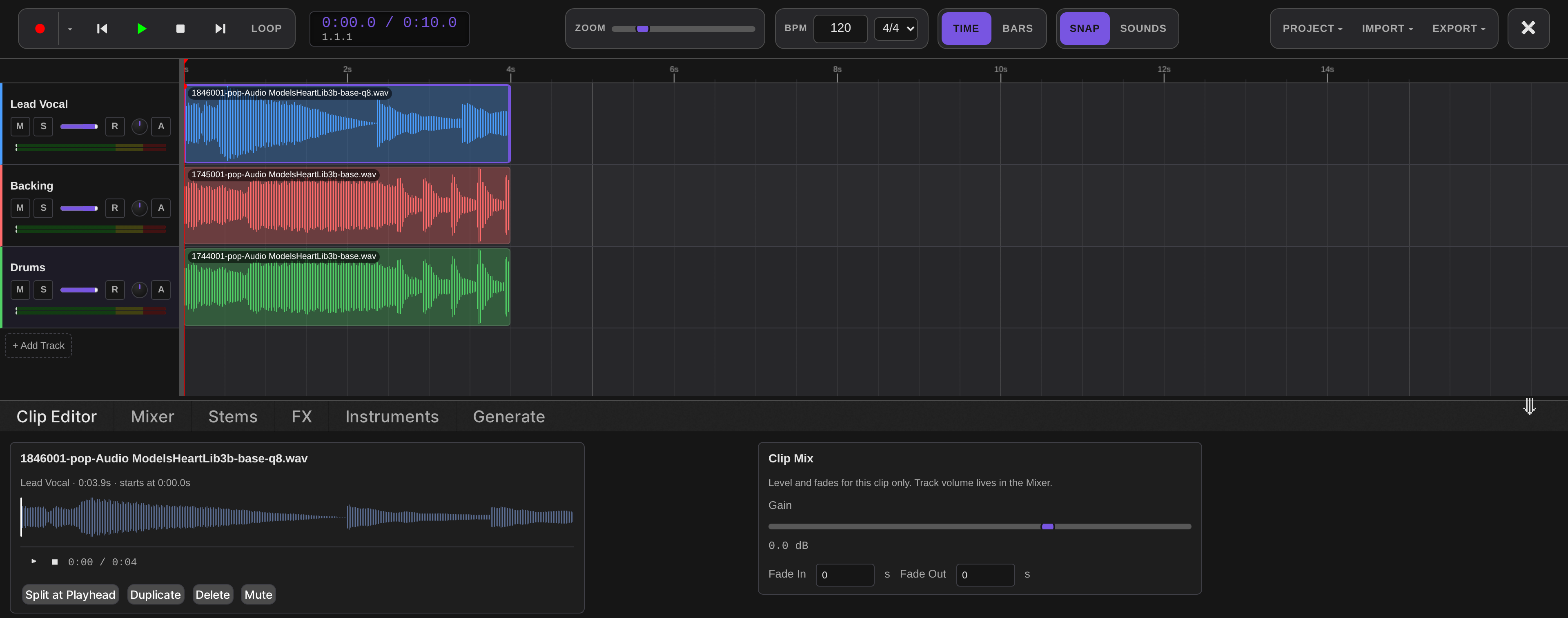
- The Audio Lab DAW
- Wake word listener
- Voice Agent
- API reference
- Permissions
- Network connections
- Roadmap
- Troubleshooting
- License and credits
Highlights
| 38 local engines, 79 models | 20 text to speech, 6 speech to text, 7 music and sound effect, 3 voice conversion, 2 audio processing |
| No Python | Models load and run inside the SwarmUI process on the HartsyInference C# engine |
| Install only what you want | Per model Install and Remove, with Download All for multi variant engines |
| Multi track DAW | Timeline, mixer, effect chains, stem separation, drum machine, in place generation, saved sessions |
| Wake word listener | Voice satellites stream microphone audio in; detections are published on a WebSocket other extensions can subscribe to |
| Voice Agent | A live, barge-in-capable phone call in your browser tab: your mic in, a spoken reply out, answered by LLMAssistant |
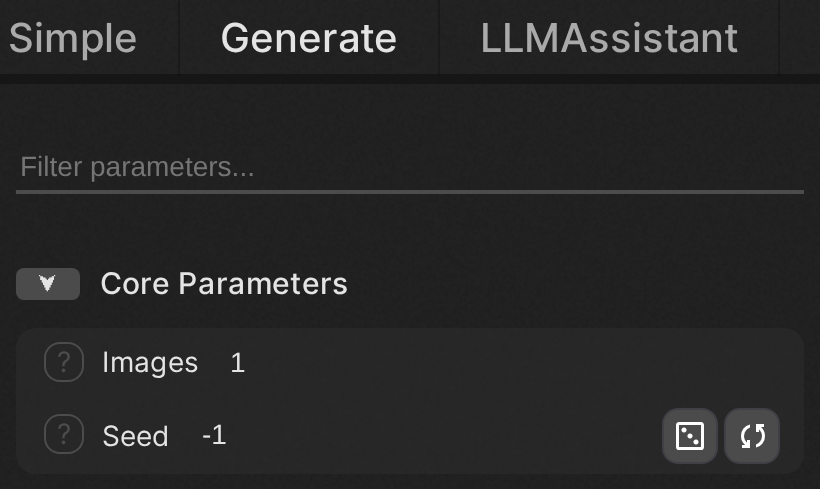
| Works like any Swarm model | Pick an audio model in the Generate tab, type a prompt, and the result lands in your output history |
| Streaming speech | Chunked text to speech plays back while it is still generating |
| Sheet music editing | Read back the score YuE2 plans, edit the notes and harmony, audition it in the browser, and render the change |
Requirements
- SwarmUI, installed and working.
ffmpegon your PATH, for audio decode and encode and for the video plus audio endpoints.- A CUDA or Vulkan GPU is recommended. Several models (Kokoro, Piper, Pocket TTS, Moonshine) run acceptably on CPU.
That is the whole list. The inference engine is a NuGet package AudioLab depends on directly, so it is restored and copied into the extension's own output when the extension builds. There is nothing to install alongside it, and no other extension to add.
Audio weights are stored under your Swarm model root, in <ModelRoot>/audio. There is no separate path setting to
keep in sync: AudioLab follows Server > Server Configuration > Paths > ModelRoot.
Installation
AudioLab is not on SwarmUI's built in extension list yet, so install it by hand:
cd /path/to/SwarmUI/src/Extensions/
git clone https://github.com/HartsyAI/SwarmUI-AudioLab.git
Then rebuild. Restarting alone is not enough, because extensions are compiled: run the update script in the Swarm
root, or launch with a launch-dev script, which rebuilds every time.
After the restart, open Server > Backends, press Audio Backend, and save. The backend registers itself with
no engines installed; you add those next.
Quick start
- Go to
Server>Backendsand expand the Audio Backend card. - Open a category, for example Text-to-Speech, and press Install on an engine. Kokoro TTS is a good first pick: about 200MB, roughly 1GB of VRAM, and fast enough to be pleasant.
- Switch to the Generate tab and select the model, for example
Audio Models/Kokoro/default. - Type what you want spoken into the prompt box and press Generate.
The result is a WAV in your normal output history, with the same metadata, sharing, and history behaviour as an image. Audio specific parameters appear automatically for whichever model you selected.
The Audio Backend
AudioLab adds one backend type, Audio Backend. Add a single instance; it routes every audio category.
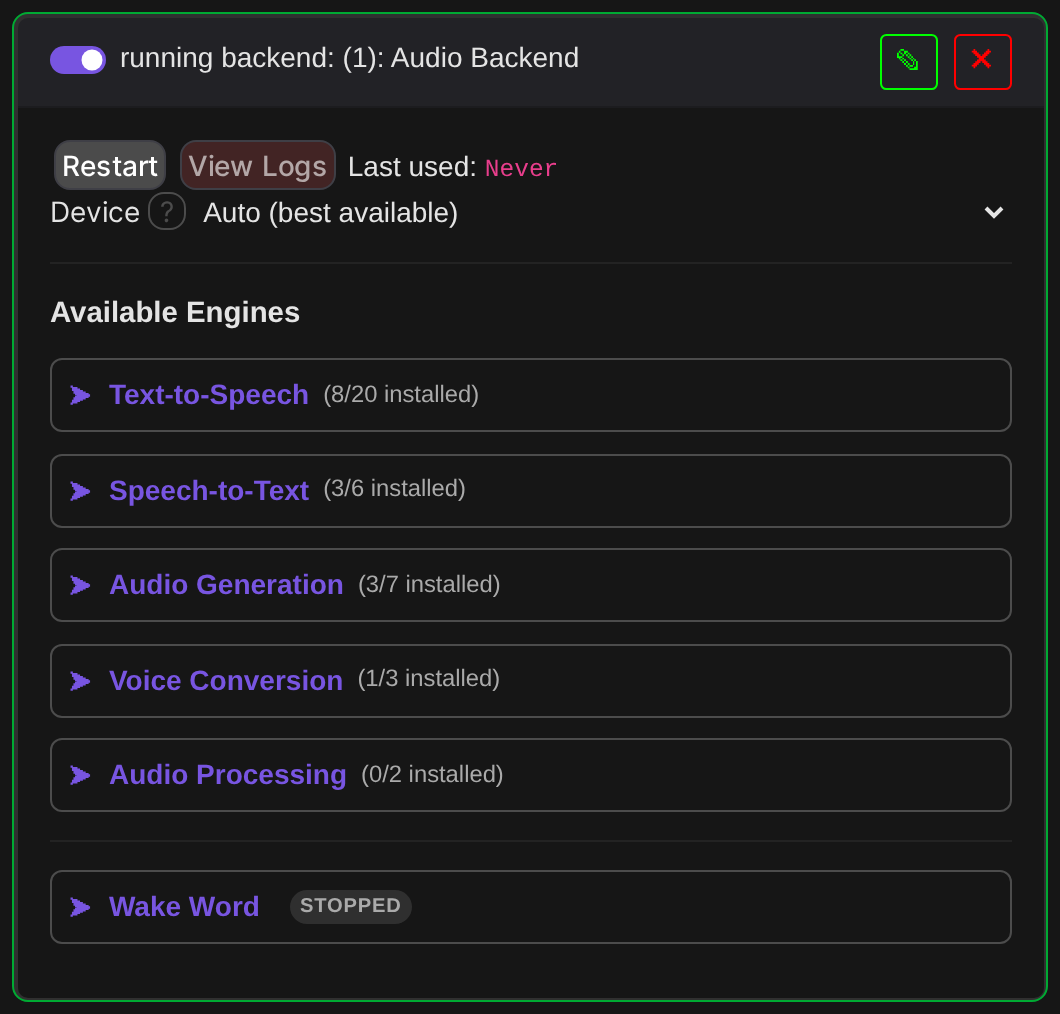
The card's main setting is Device, listing every compute backend the engine supports on your machine with one entry per GPU. The list is built from the engine itself, so a backend it gains later appears here automatically:
Auto (best available)
CPU only (very slow)
GPU 0: NVIDIA GeForce RTX 3060 (11.6 GB)
Vulkan 0: NVIDIA GeForce RTX 3060 (12.2 GB)
Vulkan 1: llvmpipe (LLVM 15.0.7, 256 bits) (31.3 GB, software)
GPU numbering is the engine's own enumeration, which is fastest first for CUDA and need not match the order
nvidia-smi prints. Software rasterizers are labelled as such so you do not pick one by accident. Auto is
correct unless you are deliberately steering audio off a card another backend is using.
One thing to know: audio shares a single engine instance for the whole process, so Device is not really a per
backend choice. Run one audio backend, and restart SwarmUI to change devices once audio has run.
A few more settings live on the same card (restart this backend, under Server > Backends, for a change to take effect):
- VRAM Mode — how hard the engine works to fit audio models in VRAM (
Auto/Performance/Balanced/Aggressive/Maximum). - Evict Below Gb — free host RAM, in GB, below which loading a new audio model unloads every other one.
0leaves the engine's own value (vram.audioEvictBelowGbin~/.config/hartsyinference/settings.json, else 14 GB); any other value overrides that file. - Keep Tts Stt Resident — keep the last-used TTS model and the last-used STT model resident instead of
letting the Evict Below Gb sweep unload whichever one isn't about to run. Off by default: without it, switching
back and forth between a TTS and an STT model under low free RAM reloads one of them from disk on every switch,
since the sweep still evicts the idle one even while protecting the one about to run. On, both stay warm as
long as the box has room for both — this trades some RAM/VRAM headroom for that warm-switch latency, and uses
the engine's
OpenSynthesizerAsync/OpenTranscriberAsyncleases rather than a coarser unload-everything step. - Coordinate Vram On Out Of Memory — on by default. AudioLab's engine is its own process-wide instance with
no coordination against SwarmUI's other backends (ComfyUI, HartsyInference image/video, ...) sharing the same
card, so a backend that still holds weights resident after a generation can leave an audio model with nowhere
to fit, even though that memory is just sitting idle. When a model load or a generation hits an out-of-VRAM
error, this reserves — exclusively, so two overlapping AudioLab recoveries (or an existing reservation from
elsewhere) can never both free the same backend at once — every OTHER local backend that is currently idle
(never one mid-generation, and never one a reservation catches picking up new work in the meantime) to free
its memory — the same action Server > Backends > Free Memory Now triggers — waits a moment for that to
actually land, then retries once. A second failure is reported as-is: the request genuinely does not fit.
This reacts to the error rather than predicting it ahead of a load. A remote SwarmUI backend is never a
candidate: its idle state can't be verified from here, and freeing it would hit that remote machine's own
/API/FreeBackendMemory, which frees unconditionally. AudioLab's own resident models are the engine's job, inside the lock its generations hold: switching to a model that is not loaded yet unloads the others first when free VRAM is under what the incoming model needs, and an out-of-VRAM error inside the engine unloads every other unpinned audio model and retries once there before it reaches this retry. A model pinned by Keep Tts Stt Resident is never evicted by either. Off restores the previous behavior (an out-of-VRAM error fails immediately); either way, a backend asked to free memory simply reloads its own models on its next generation, so nothing already running is ever interrupted. - Unload Idle Models After Minutes —
3by default;0turns it off. After this many minutes with no audio request, AudioLab releases its resident models and their device memory, the same release Server > Backends > Free Memory Now triggers.- Why. Audio models otherwise stay loaded after a generation. On a card shared with SwarmUI's image backend, that can leave an image generation no room until SwarmUI's own idle VRAM clear runs. The next audio request reloads its model, which costs that one request a few seconds.
- What is never released. The timer starts only once every audio request has finished; a stream counts until it stops. Each new request resets it. A model pinned by Keep Tts Stt Resident, an open Voice Agent call or a wake-word training run holds it off until it ends.
- Timing with new requests. A request that arrives while a release is running waits for it, then loads afresh.
- Wake listener. Its transcriptions reach the engine directly and are covered by the engine's own generation lock: one that is running finishes before the release, and one that starts after it reloads its model.
Installing engines
Expanding a category lists its engines with VRAM, license, download size, and a status dot: green for installed, grey for available.
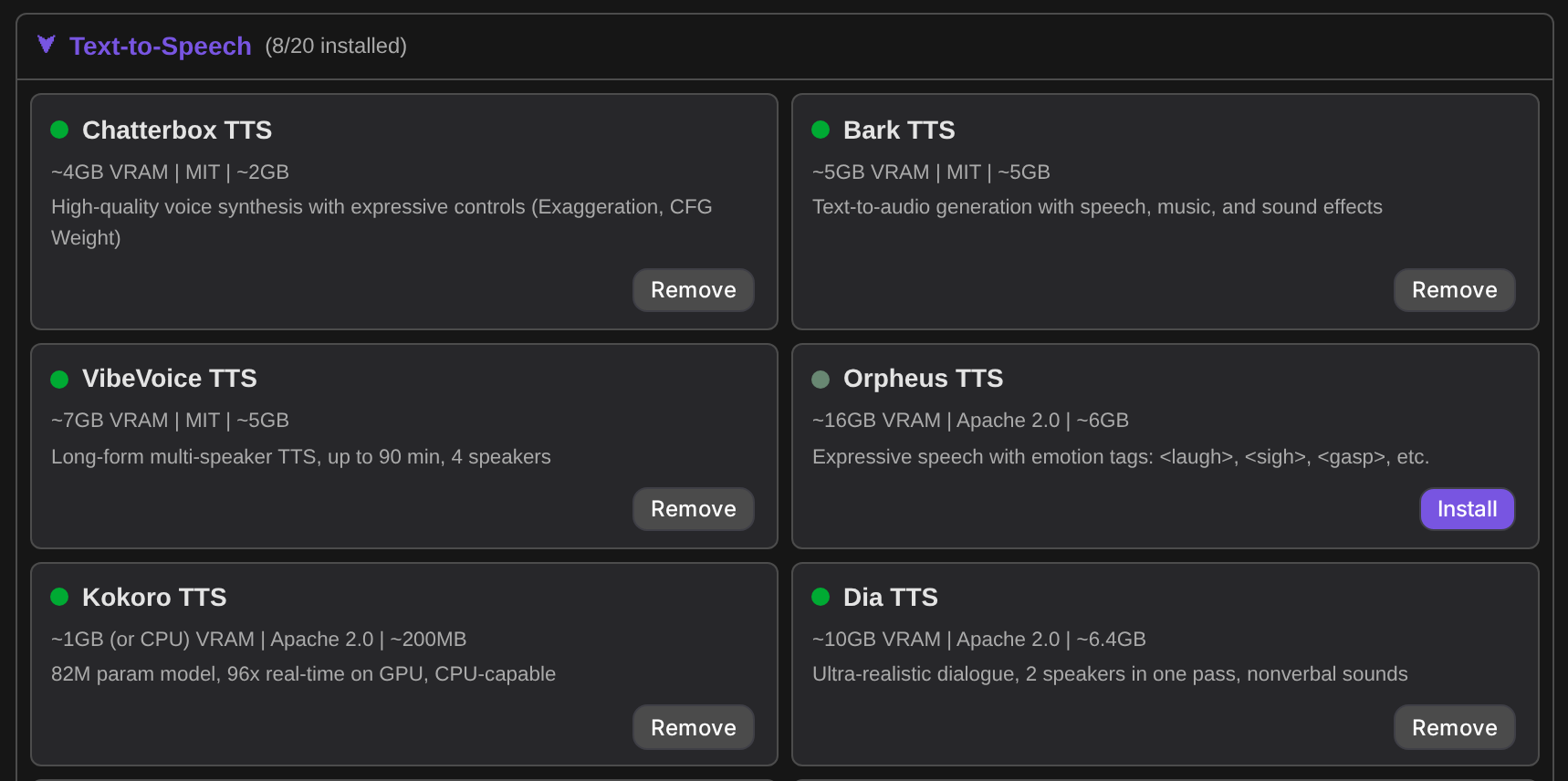
Engines that ship several checkpoints open a per model table, so you can take just the variant you want instead of every one. ACE-Step, for example, has nine:
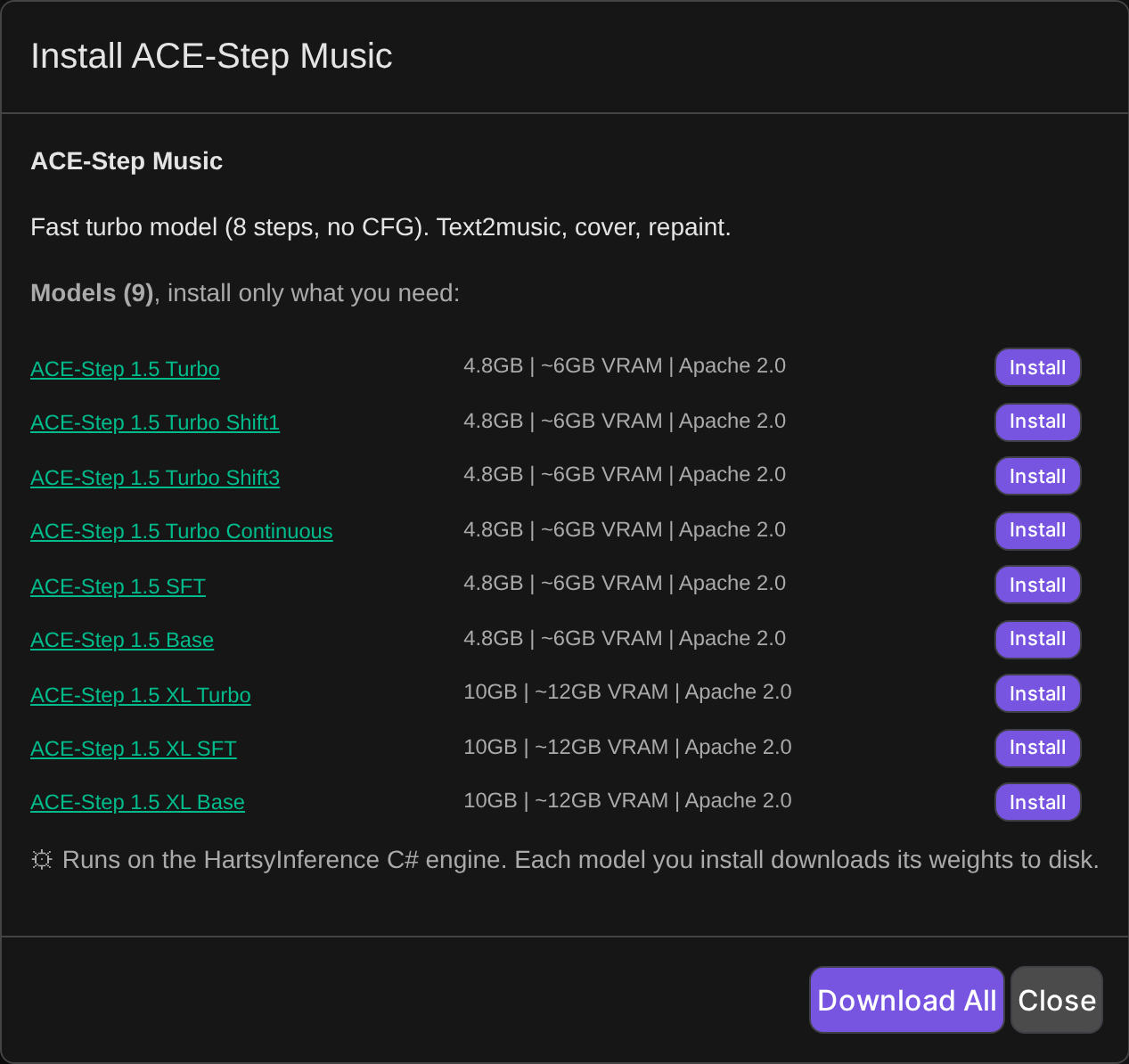
Most engines fetch their weights on first use. The ones that download discrete checkpoints get explicit Install and Remove buttons per model, plus Download All and Remove All.
Cloud API engines are currently disabled
AudioLab also carries definitions for 20 cloud providers (ElevenLabs, OpenAI, Google, Azure, Polly, Deepgram, Cartesia, Play.ht, Suno, Udio, AssemblyAI, Dolby.io and others). None of them are currently tested, so all of them are disabled. They appear greyed out, cannot be installed, and the server refuses install requests for them.
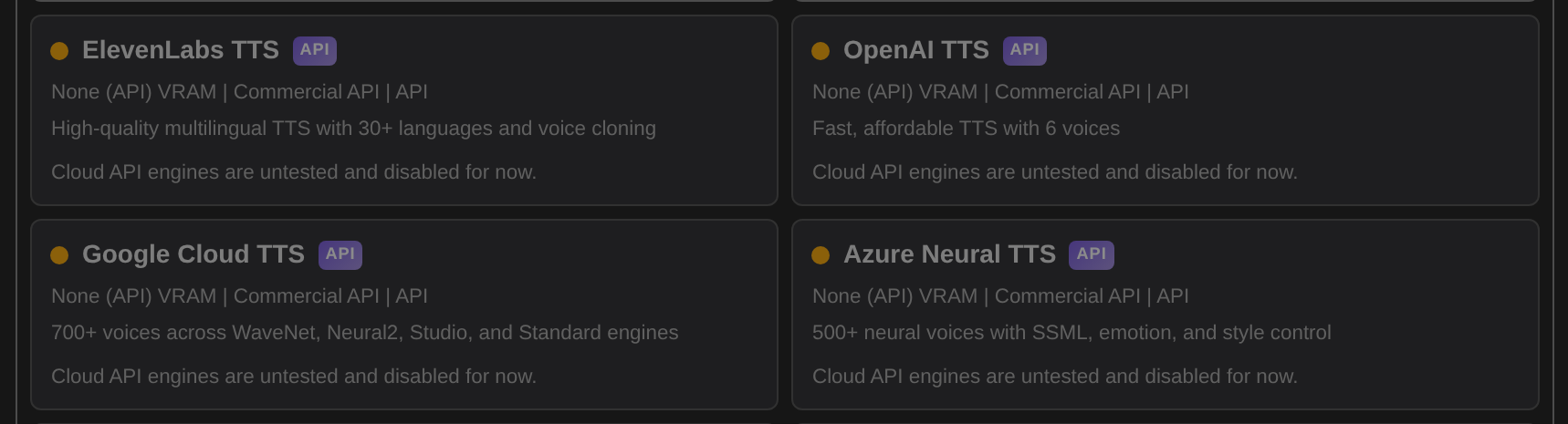
RealtimeSTT is disabled for a different reason: it has no C# engine implementation yet.
Engines and models
Generated from the running server, so this is what the extension actually offers, not a wish list. "Weights" says whether the engine downloads on first use or exposes per model installs.
Text to Speech (21 engines, 27 models)
| Engine | Models | VRAM | License | Weights |
|---|---|---|---|---|
| AuK | 2 | ~10GB | MIT (text encoder: Qwen Research License) | on first use |
| Bark TTS | 1 | ~5GB | MIT | on first use |
| Chatterbox TTS | 1 | ~4GB | MIT | on first use |
| CosyVoice TTS | 1 | ~8GB | Apache 2.0 | on first use |
| CSM Conversational | 1 | ~4.5GB | Apache 2.0 | on first use |
| Dia TTS | 1 | ~10GB | Apache 2.0 | on first use |
| F5-TTS | 1 | ~4GB | CC-BY-NC-4.0 | on first use |
| Fish Speech TTS | 1 | ~4GB | CC-BY-NC-SA-4.0 | on first use |
| Kokoro TTS | 1 | ~1GB (or CPU) | Apache 2.0 | on first use |
| Kyutai TTS | 1 | ~8 GB | CC-BY 4.0 | on first use |
| MeloTTS | 1 | ~1GB (or CPU) | MIT | on first use |
| NeuTTS Air | 1 | ~2GB (or CPU) | Apache 2.0 | on first use |
| Orpheus TTS | 1 | ~16GB | Apache 2.0 | on first use |
| Piper TTS | 1 | CPU only | MIT | on first use |
| Pocket TTS | 1 | CPU (no GPU needed) | CC-BY-4.0 | on first use |
| Qwen3 TTS | 5 | ~4GB, ~8GB | Apache 2.0 | on first use |
| Spark-TTS | 1 | ~4GB | CC-BY-NC-SA-4.0 | on first use |
| StyleTTS 2 | 1 | ~2GB | MIT | on first use |
| VibeVoice TTS | 1 | ~7GB | MIT | on first use |
| ZipVoice | 1 | ~2GB | Apache 2.0 | on first use |
| Zonos TTS | 2 | ~4GB | Apache 2.0 | on first use |
AuK (Tencent; variants flash and base) is unverified: there is no parity run against the reference implementation yet. AuK itself is MIT, but it also downloads the Qwen2.5-Omni-3B text encoder (~10GB), which is under the Qwen Research License. Flash uses a fixed 4 steps with no CFG, so the AuK Steps and AuK CFG settings only affect the base variant.
Speech to Text (7 engines, 18 models)
| Engine | Models | VRAM | License | Weights |
|---|---|---|---|---|
| Distil-Whisper STT | 2 | ~2GB | MIT | on first use |
| Kyutai STT | 2 | ~3 GB, ~6 GB | CC-BY 4.0 | on first use |
| Moonshine Streaming STT | 3 | ~1.5GB to ~2GB | MIT | on first use |
| Moonshine STT | 2 | CPU only, ~1GB (or CPU) | MIT | on first use |
| SheetSage2 Transcription | 1 | ~4GB | CC-BY-NC-4.0 | on first use |
| Whisper Streaming | 1 | ~1GB (or CPU) | MIT | on first use |
| Whisper STT | 7 | ~10GB to ~6GB | Apache 2.0 / MIT | on first use |
Audio Generation (7 engines, 30 models)
| Engine | Models | VRAM | License | Weights |
|---|---|---|---|---|
| ACE-Step Music | 9 | ~12GB, ~6GB | Apache 2.0 | installed per model |
| AudioGen SFX | 1 | ~4GB | CC-BY-NC-4.0 | on first use |
| HeartLib Music | 9 | ~12GB (lazy load) to ~7GB | Apache-2.0 | on first use |
| MiniMax Music 3 | 3 | ~10GB to ~22GB | CC-BY-NC-4.0 | on first use |
| MusicGen | 3 | ~10GB to ~6GB | CC-BY-NC-4.0 | on first use |
| Stable Audio Open Small | 1 | ~3GB | Stability AI Community License | on first use |
| YuE Music | 4 | ~16GB (fp16) | Apache-2.0 | installed per model |
| YuE2 Music | 1 | ~9GB (bf16) | CC-BY-NC-4.0 | on first use |
Voice Conversion (3 engines, 3 models)
| Engine | Models | VRAM | License | Weights |
|---|---|---|---|---|
| GPT-SoVITS | 1 | ~4GB | MIT | on first use |
| OpenVoice V2 | 1 | ~2GB | MIT | on first use |
| RVC Voice Conversion | 1 | ~4GB | MIT | installed per model |
Audio Processing (2 engines, 4 models)
| Engine | Models | VRAM | License | Weights |
|---|---|---|---|---|
| Demucs Separation | 2 | ~2GB | MIT | on first use |
| Resemble Enhance | 2 | ~2GB | MIT | on first use |
Verification status
Models are tested end to end through the SwarmUI API rather than in isolation: generate, decode the returned WAV, and for speech run a Whisper round trip to compare the transcript against the input text.
BENCHMARKS.md holds the detailed per model log: measured real time factors, VRAM peaks, word error rates, and the specific reason for anything that does not work yet. It is a running record with dates on each pass, so check it rather than assuming a model's state from this table.
The short version as of the most recent passes:
- Speech to text is uniformly solid. Every Whisper, Distil-Whisper, Moonshine and streaming variant transcribes on GPU at speeds in the faster-whisper reference range, with Moonshine tiny the fastest measured.
- Most text to speech engines work and are word correct. Kokoro, Chatterbox, Fish Speech, Kyutai TTS, Pocket TTS, Spark-TTS and StyleTTS 2 all produce intelligible, matching speech.
- A few have caveats worth knowing before you rely on them: Bark sounds staticy, F5-TTS is correct but slow,
VibeVoice is a long form model that destabilizes on short prompts, NeuTTS can append a garbled tail, and Dia
is a dialogue model, not a single-sentence narrator — start with
[S1]and alternate[S1]/[S2]per speaker turn, and give it roughly 5-20 seconds of speech worth of text; a short single sentence often comes back as non-speech rather than silence, confirmed as upstream Dia's own behavior (same input through the reference implementation fails the same way), not an engine bug. - Some are gated on engine work and refuse cleanly with a specific reason rather than failing at generation time: Piper, Zonos, MeloTTS and CosyVoice each need front end pieces the engine does not have yet.
- Music generation works across ACE-Step, MusicGen, AudioGen, HeartLib, YuE and YuE2, though the large autoregressive models are slow on consumer cards. YuE2 shares only its name with YuE: it plans an editable ABC score from your style tags and lyrics, then renders it to 48 kHz stereo, and its weights are non-commercial. Its duration is a hard token budget at 25 tokens a second, so a song asked for in under about 90 seconds usually stops mid-phrase — the UI says so when that happens.
Measured speed
A sample of recorded figures on an RTX 3060 12GB, warm (model already loaded). RTF is generated audio seconds per wall second, so above 1.0 is faster than real time. Full tables, rigs and methodology are in BENCHMARKS.md; these are not re-measured for this README.
| Model | Type | RTF (warm) |
|---|---|---|
| Moonshine tiny | STT | 12.7x |
| Whisper turbo | STT | 5.1x |
| Kokoro | TTS | 4.3x |
| Whisper large-v3 | STT | 3.8x |
| ACE-Step 1.5 turbo | Music | 1.33x |
| Qwen3 TTS 0.6B | TTS | 1.06x |
| Fish Speech 1.5 | TTS | 0.81x |
| Chatterbox | TTS | 0.50x |
The small speech models are launch bound rather than compute bound, so a faster GPU moves them very little.
Voice cloning models require a reference clip and will tell you so rather than guessing. Supply one through the Voice Reference parameter group.
The Audio Lab DAW
The Audio Lab tab is a multi track editor built around what you generate. Open it from the top tab bar, or from the Audio Lab button on any audio result.
The transport strip carries record, play, stop, loop, a time or bars ruler, zoom, BPM and time signature, snap, and the Project, Import and Export menus. Tracks have mute, solo, volume, pan, arm and a level meter; clips drag along the timeline, snap to the grid, and can be split, duplicated, muted or deleted.
Sessions
DAW work is saved three ways, and they are independent:
- Autosave. The current arrangement is continuously written to browser IndexedDB, including the audio itself, so a crashed tab or an accidental refresh does not lose work.
- Local quick saves. Named slots, also in IndexedDB, for fast checkpoints on the machine you are working on.
- Server side projects.
Project>Save,Save As, andOpenstore named projects against your SwarmUI user account through theAudioLabSaveProjectAPI, so they follow you between browsers and machines.
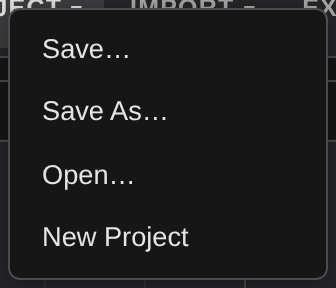
New Project clears the timeline and starts over.
Clip Editor
Per clip gain, fade in and fade out, a waveform preview with its own transport, and Split at Playhead, Duplicate, Delete and Mute. Track level volume stays in the Mixer, so clip gain and track gain do not fight each other.
Mixer
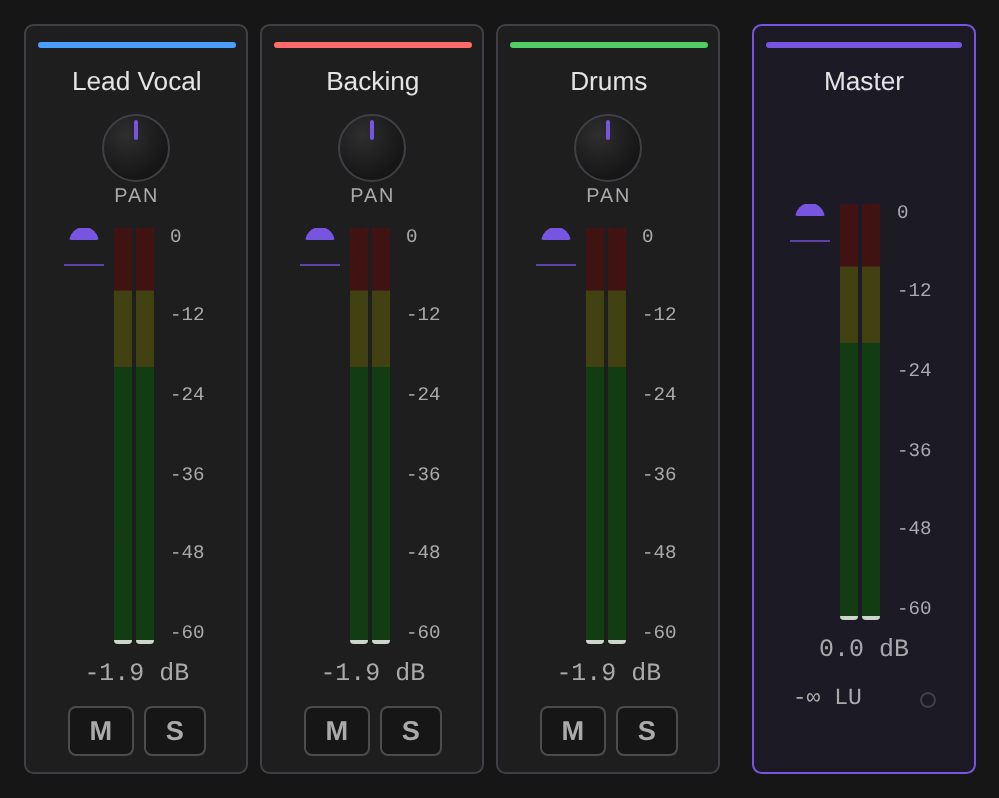
One strip per track plus a master strip, each with pan, fader, level meter, mute and solo.
FX
Per track effect chains built on the Web Audio API, so they are live and non destructive: EQ, Compressor, Reverb, Delay and Saturation. Effects can be bypassed individually, reordered, or removed, and a chain can be saved and loaded by name. There is a master limiter on the output.

Stems
Demucs source separation with presets for the common jobs: Full Split, Karaoke (vocals plus a combined instrumental), Acapella, Instrumental, or Custom to pick exactly which stems you keep. Each stem chosen becomes a new track in the arrangement.

Instruments
A 16 or 32 step drum machine with per lane gain, swing, audition, and Render to Track. Pads come from a generated one shot, an imported sample, or the currently selected clip.

Piano / Keys plays into the Score tab rather than rendering audio. Pick a voice, hit Record into score, play the on-screen keyboard, and Stop and write quantizes what you played onto the score's grid and
writes it in at the playhead bar, spelled for the current key. A MIDI keyboard is offered too, but only where the
browser allows it: Web MIDI needs a secure context, so a SwarmUI reached at a LAN address over plain HTTP will not
have it. The on-screen keys work either way.
Bass and synth appear as slots in the instrument browser and are not built yet; see Roadmap.
Score
YuE2 cannot edit audio — it has no audio input at all. What it does have is the ABC score it writes before it renders anything, and that score is editable. The Score tab is where you read it back, change it, and render the change.

An empty tab shows what it can start from rather than a sentence about it. New blank score writes eight empty
bars in the project's own meter and tempo and hands you the staff to click notes into — nothing is generated and no
model is needed. Load from the clip and Transcribe a recording name the selected clip, or say what to select
instead. Dropping works too: a clip dragged off the timeline onto the sheet loads the score it carries, or offers to
read one off it; an .abc or .txt file opens as a score; a .wav, .mp3 or .flac lands as a track and offers to
transcribe it.
A YuE2 generation made on the Generate tab carries its score too: Open score under the result opens the Audio Lab with that plan already loaded, rather than leaving it as text in the metadata panel.
Select a clip a YuE2 generation produced and press Load from clip; the plan it performed appears as two staves,
Vocal and Ins, with its chord symbols. Draft plan asks the model for a score without rendering audio, which
is seconds rather than minutes. Paste takes one from anywhere.
Transcribe clip reads the score out of a recording instead: SheetSage2 listens and writes the melody, the chord symbols, the key, the meter and the tempo. One listen returns two renderings — Melody, which is what a cover is rendered from, and Full, which keeps the harmony. They are not a substitution apart, so the toggle switches between the model's own two scores rather than deleting quoted text from one of them. Cover this clip runs the whole loop: transcribe, keep the melody, render it in your Style. Separate a song in the Stems tab first and Transcribe vocal stem reads the vocal alone, which is a cleaner melody than the mix. A long dense clip can fill the decoder's context, and it says so and asks for a shorter section. SheetSage2 is about 1.4 GB and stays loaded afterwards; Free audio models after drops it when the transcription finishes, which releases every resident audio model rather than only this one — the engine has no per-model unload. SheetSage2's weights are CC BY-NC 4.0, non-commercial only.

Everything is a text edit on the ABC, so there is one code path and one undo stack:
- Click a chord symbol to reharmonise it, click a note for its menu (length, split, merge, tie, accidental, octave, note to rest), or drag a note up and down to change its pitch.
- Sections come from the
%comment lines. The chips rename, duplicate, reorder and delete whole sections, which keeps both voices in step by construction; dragging one chip onto another reorders them directly. - Melody by degree takes
1155665 / 4433221and writes the bars. - Edit with an LLM rewrites the score to an instruction, with a scope and an invariant to hold fixed. It needs the LLMAssistant extension; without it the card says so.
- Align bars pads the source so the
VocalandInslines of a passage show the same bar in the same column, which makes a voice drifting out of step visible before the validator says so. It only ever adds spaces before a barline, so the score still says exactly what it did. - Every edit is validated against YuE2's dialect first: two voices under the right ids, matching bar counts per chunk, every bar summing to the meter. Render stays disabled while an error stands. A bar whose durations do not add up is marked on the staff as well as listed, so it does not have to be hunted for.
Play auditions the plan in the browser — chords comped, notes highlighted as they sound — so a reharmonisation
can be judged in seconds instead of a render. It pauses and resumes where it stood, the progress bar under the
staff seeks on click, and the loop and tempo boxes repeat the plan or stretch it without editing the score, so
two harmonies can be compared against each other rather than each from bar one. Double-click a note to hear the
score from there. Download samples fetches the piano samples once so that works without the internet; until
then they come from the host abcjs ships with. MIDI exports the plan, Save writes a .abc file.
Render sends the score back with your Style and Lyrics and lands the result as a new track. The planning mode is
derived from the score, not chosen: chord symbols present means full, none means melody, which is the setting
covers want. Render variants sends the same score under several style lines, or several seeds, at once.
Versions is every clip carrying a score, drawn as the tree their parent links describe. Pick two and it tells
you what actually differs — chord symbols, bar count, whether any note moved — and Solo A / Solo B compare
them through the mixer's own solo.
Apply to project sets the project tempo and time signature to what the score is written in, and a section chip jumps the playhead to that section in the clip the score came from — right-click still opens the section's menu.
Every field and control is named for a screen reader, the staff takes focus and shows it, and the validation list announces itself when it changes, so the tab is usable without a mouse.
The score is a plan the model performs, not a recording of it. Do not read exact note realisation out of it.
Generate
Generate straight into the arrangement without leaving the tab. Pick a category, pick one of your installed engines, and the result is added as a new track at the playhead and saved to your outputs like any other generation.

Categories are Text to Speech, Music, Sound FX and Speech to Text. The Speech to Text category transcribes the selected clip, which is also how the transcript field fills itself.
Export
Export renders the mixdown to WAV, MP3, OGG, FLAC or AAC, or straight back into your SwarmUI outputs.
Wake word listener
AudioLab can hold an always on wake word listener. Voice satellites keep a connection open and stream microphone audio; the engine scores it for the wake word, transcribes the command that follows, and identifies who spoke.
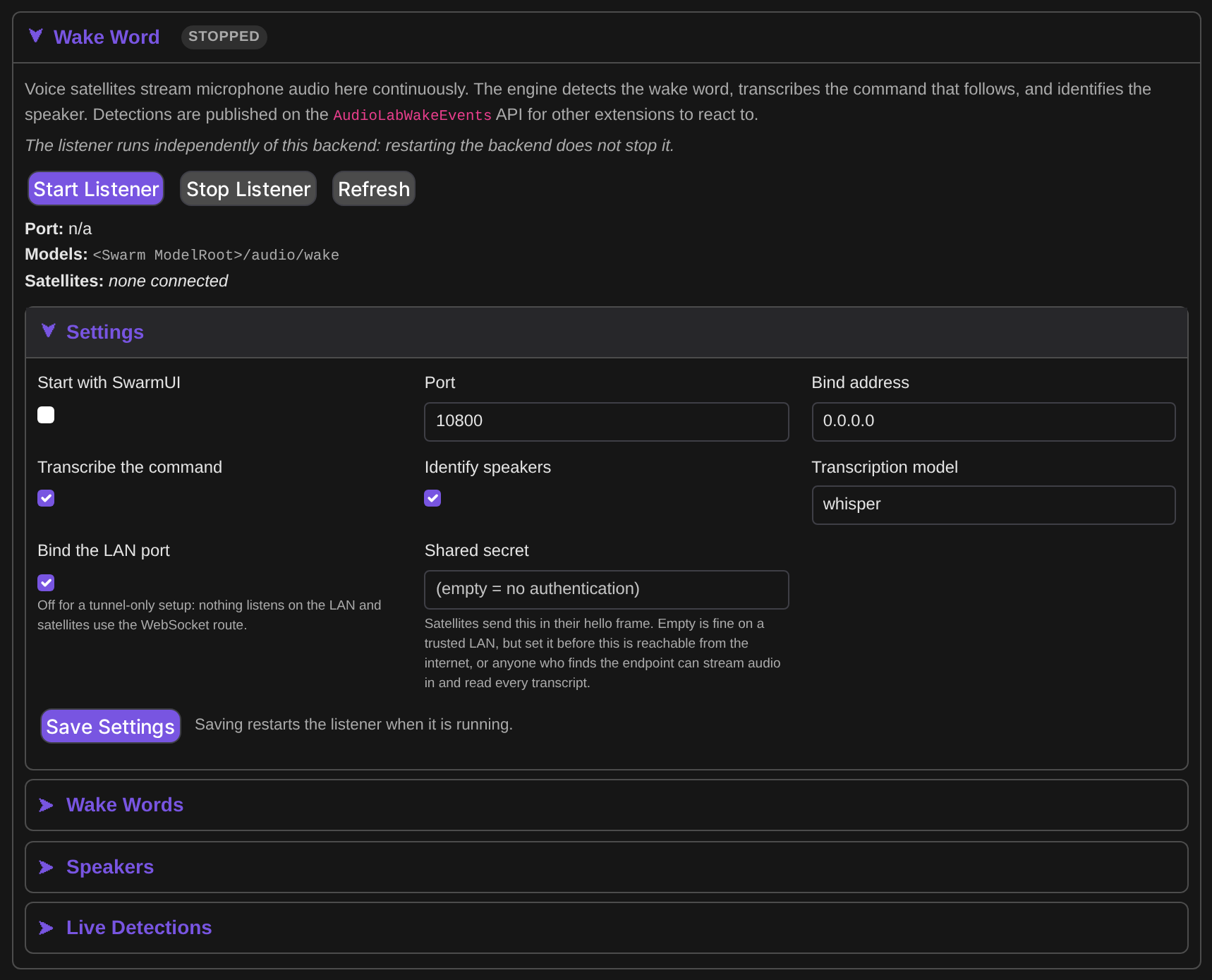
It is off by default. A SwarmUI install with no voice satellite never binds a port or holds a detection thread. It lives in the Wake Word section of the Audio Backend card, under the engine list, because it is set up once and then runs headless. Start it there, or set "Start with SwarmUI" to have it start with the server.
Its UI sits on the backend card, but the listener itself is not a backend and does not share that backend's lifecycle: restarting or disabling the Audio Backend leaves the listener running. It holds its own small CPU models, so it neither takes the shared generation lock nor competes for VRAM with audio generation.
Satellites
Satellites connect two ways, with the same wire protocol either way, so firmware only changes transport:
- Raw TCP on the configured port, 10800 by default. Turn off "Bind the LAN port" and nothing listens on the LAN.
- WebSocket, through the
AudioLabWakeIngestroute. This exists because an HTTPS reverse proxy or tunnel cannot carry raw TCP but does carry WebSockets, so a satellite reaches the listener on the same hostname as the web UI.
Set the shared secret before exposing this beyond a trusted LAN. Satellites send it in their hello frame. If it is empty the check is disabled, which is fine on a home network, but anyone who can reach the endpoint could otherwise stream audio in and read every detection, including transcripts of what was said.
Words and speakers
Train a new wake word from its text in the Wake Words group. Training reports recall, false accept rate, false accepts per hour and a suggested threshold, so you can judge a word before trusting it. Supply real room recordings as negative audio; with too few negatives the false accept rate is unreliable.
Each word carries its own threshold, smoothing window, refractory period, a route tag, and optionally a required
speaker. Enrolled speakers are listed in the Speakers group, and a word can be restricted to one of them.
Enrollment itself is API-only for now: it needs recorded utterances, which AudioLabWakeEnrollSpeaker accepts as
base64 clips.
Consuming detections
Detections are published for other extensions, which is the point of the feature. Each carries device_id, word,
score, route, transcript, speaker and detected_at.
AudioLabWakeEventsis a WebSocket that streams them live.AudioLabWakeRecentDetectionsreturns the recent buffer for consumers that cannot hold a socket open.WakeWordService.Detectedis a plain C# event, for in process consumers that would rather not open a socket back into their own process.- Configured webhook URLs receive a JSON POST per detection.
Voice Agent
The Voice Agent tab, at the bottom of the Audio Lab DAW next to Score, is a live phone-style call running in your browser: your microphone in, endpointed and transcribed on the server, a reply from your LLM assistant, and spoken audio back, with barge-in (talk over the reply to interrupt it).
It runs on the engine's HartsyInference.Voice package -- the same session shape the phone-call voice agent
uses -- but answers through LLMAssistant instead of a local model: every turn is a loopback call to
LLMAssistant's own streaming route on the same SwarmUI process, so your reply comes from your own configured
assistant, its tools, and its permissions. Installing LLMAssistant is required for this tab to answer (the
mic, transport and transcript still work without it; you will just get an error instead of a reply).
What is pinned per call and what is yours to pick:
- Speech recognition and synthesis are fixed: Whisper
small.enand Kokoro, one voice at a time, shared by every concurrent call on this server (HartsyInference.Voice's own model set, loaded once and kept warm). Switching the voice picker while a call is already using a different voice gets you a notice instead of a switch -- the model set is rebuilt for a new voice only once every call using the old one has ended. - The language model is yours to pick per call: an LLMAssistant model and, optionally, a specific assistant id and a system prompt override.
- Barge-in is on by default; the toggle turns it off for a call that should finish speaking uninterrupted.
The model set loads its Silero VAD and RNNoise (int8) from the same files folder the wake word listener uses, so installing one does not mean downloading the other's weights twice; the voice front end always denoises (at int8 precision), independent of the wake listener's own Float denoiser setting.
First call after a server start, or after a different voice needed a rebuild, takes a few seconds longer while
the models load and warm up. The model set is released five minutes after the last call ends, and immediately
-- ending any call still using it first -- whenever Server > Backends frees the Audio Backend's memory.
The wire protocol
AudioLabVoiceSession is a WebSocket (permission audio_process, same as every other audio route). The first
frame is the call's setup, and everything else streams after it:
// client -> server, first frame
{ "model": "...", "assistantId": "...", "voice": "af_heart", "systemPrompt": "...", "bargeIn": true, "inputRate": 48000 }
// client -> server, after that: binary mono PCM16 frames at inputRate, then a final
{ "end": true }
// server -> client: binary mono PCM16 reply audio at 24 kHz, each frame prefixed with a 4-byte little-endian
// turn id (0 outside any turn) -- the client uses it to drop queued audio for a turn a `bargein` event named.

// server -> client, JSON events, interleaved with that binary audio:
{ "state": "Listening" }                                   // Listening | Thinking | Speaking | ToolRunning | Warming | Ended
{ "transcript": { "role": "user", "text": "...", "turnId": 1 } }
{ "transcript": { "role": "assistant", "text": "...", "turnId": 1 } }
{ "bargein": { "turnId": 1 } }
{ "tool_call": { "id": "...", "name": "...", "arguments": "...", "turnId": 1 } }
{ "tool_result": { "id": "...", "name": "...", "result": "...", "turnId": 1 } }
{ "notice": "..." }                                         // eg tool calling unavailable for this model; the chosen voice unavailable mid-call
{ "metrics": { "turnId": 1, "kind": "utterance", "voice.stt.ms": 139.2, "voice.llm.ttft_ms": 65.2, "voice.tts.first_chunk_ms": 142.3, "voice.turn.total_ms": 1226.6, "...": "..." } }
{ "error": "..." }
API reference
AudioLab follows SwarmUI's API conventions exactly, so everything in the
SwarmUI API docs applies: routes are POST
to (your server)/API/(route) with JSON in and JSON out, every route except GetNewSession needs a session_id,
and routes marked WebSocket take a socket and stream progress.
Most responses carry success, plus error and error_code on failure.
Generating audio
You usually do not need these endpoints. The canonical path is Swarm's own GenerateText2Image, with the audio
model as model and your text as prompt. The result lands in output history like any generation:
# 1. Get a session
curl -s -H "Content-Type: application/json" -d '{}' \
  -X POST http://localhost:7801/API/GetNewSession
# {"session_id":"<ID>", ...}

# 2. Generate speech, exactly like generating an image
curl -s -H "Content-Type: application/json" -X POST http://localhost:7801/API/GenerateText2Image \
  -d '{"session_id":"<ID>","images":1,
       "model":"Audio Models/Kokoro/default",
       "prompt":"As she sells seashells by the seashore."}'
# {"images":["View/local/raw/2026-08-18/....wav"]}
The direct endpoints below exist for callers that want base64 audio back instead of a file in history.
# Text to speech, returning base64 WAV
curl -s -H "Content-Type: application/json" -X POST http://localhost:7801/API/ProcessTTS \
  -d '{"session_id":"<ID>","provider_id":"kokoro_tts",
       "text":"Hello from AudioLab.","voice":"af_heart","volume":0.8,
       "options":{"speed":1.0,"format":"wav"}}'
# {"success":true,"audio_data":"<base64 wav>", ...}

# Speech to text
curl -s -H "Content-Type: application/json" -X POST http://localhost:7801/API/ProcessSTT \
  -d '{"session_id":"<ID>","provider_id":"whisper_stt",
       "audio_data":"<base64 wav>","language":"en-US"}'
# {"success":true,"transcription":"hello from audiolab", ...}
Voice cloning engines take reference_audio (base64 WAV) and, where the model needs it, ref_text alongside the
usual ProcessTTS fields.
Routes
| Route | Kind | Permission | Parameters |
|---|---|---|---|
ProcessTTS | POST | audio_process | provider_id, text, voice, language, volume, options, reference_audio, ref_text |
ProcessSTT | POST | audio_process | provider_id, audio_data, language, options |
AudioLabTranscribeScore | POST | audio_process | audio_data (mono 24 kHz WAV), provider_id, model |
AudioLabPlanScore | POST | audio_process | style, lyrics, duration, seed, cot, abc, budget_only |
ProcessAudio | POST | audio_process | provider_id, args |
ProcessWorkflow | POST | audio_process | workflow steps |
ConvertAudioFormat | POST | audio_process | audio_data, format |
AudioLabTimeStretch | POST | audio_process | audio_data, rate, semitones |
CombineVideoAudio | POST | audio_process | video_data, audio_data, mode |
ExtractAudioFromVideo | POST | audio_process | video_data |
AudioLabListEngines | POST | audio_check_status | none |
GetAllProvidersStatus | POST | audio_check_status | none |
GetInstallationStatus | POST | audio_check_status | none |
AudioLabInstallEngine | WebSocket | audio_manage_backends | provider_id, model_id (optional) |
AudioLabInstallAllModels | WebSocket | audio_manage_backends | provider_id |
AudioLabUninstallEngine | POST | audio_manage_backends | provider_id, delete_weights, model_id |
AudioLabRemoveAllModels | POST | audio_manage_backends | provider_id |
AudioLabSaveProject | POST | audio_daw_projects | name, project_json |
AudioLabLoadProject | POST | audio_daw_projects | name |
AudioLabListProjects | POST | audio_daw_projects | none |
AudioLabDeleteProject | POST | audio_daw_projects | name |
AudioLabWakeStatus | POST | audio_wake_listen | none |
AudioLabWakeEvents | WebSocket | audio_wake_listen | none |
AudioLabWakeRecentDetections | POST | audio_wake_listen | none |
AudioLabWakeListWords | POST | audio_wake_listen | none |
AudioLabWakeListSpeakers | POST | audio_wake_listen | none |
AudioLabWakeIngest | WebSocket | audio_wake_listen | satellite protocol frames |
AudioLabWakeGetSettings | POST | audio_wake_manage | none |
AudioLabWakeSaveSettings | POST | audio_wake_manage | settings |
AudioLabWakeStart | POST | audio_wake_manage | none |
AudioLabWakeStop | POST | audio_wake_manage | none |
AudioLabWakeConfigureWord | POST | audio_wake_manage | word, threshold, smoothing_window, refractory_seconds, route, required_speaker |
AudioLabWakeTrainWord | WebSocket | audio_wake_manage | phrase, voices, negative_phrases, negative_audio, epochs |
AudioLabWakeEnrollSpeaker | POST | audio_wake_manage | name, clips (array of base64 WAV), phrase |
AudioLabWakeRemoveSpeaker | POST | audio_wake_manage | name |
AudioLabVoiceSession | WebSocket | audio_process | setup frame model, assistantId, voice, systemPrompt, bargeIn, inputRate, then binary PCM16 audio |
Reacting to wake detections from your own code is a WebSocket to AudioLabWakeEvents. It sends
{"subscribed":true, ...} on connect, then one {"detection":{...}} per hit, with a {"keepalive":true} every 30
seconds so an idle feed is not mistaken for a dead one.
Permissions
AudioLab registers its permissions in an AudioLab group, so you can grant them per role under
Server > Users.
| Permission | Default | Covers |
|---|---|---|
audio_process | Power users | Running audio through any provider |
audio_manage_backends | Power users | Installing and removing engines and model weights |
audio_check_status | Power users | Listing engines and reading provider status |
audio_daw_projects | Users | Saving and loading personal DAW projects |
audio_wake_listen | Users | Reading wake status and subscribing to detections |
audio_wake_manage | Power users | Starting and stopping the listener, training words, enrolling speakers |
audio_wake_listen is deliberately the lower bar: it is the permission another extension needs in order to react
to wake events.
Network connections
Per SwarmUI's extension standards, here is every outbound connection AudioLab makes and why:
| Connection | When | Avoidable |
|---|---|---|
| huggingface.co | Downloading model weights, on install or on first use | Yes, do not install engines. Nothing is fetched in the background otherwise |
| Meta's public CDN | Demucs stem separation weights, on first use | Yes, do not use stem separation |
| Webhook URLs you configure | One JSON POST per wake detection | Yes, leave the webhook list empty, which is the default |
| paulrosen.github.io | Piano samples for the Score tab's browser audition, one small mp3 per pitch | Yes, press Download samples once and they are served locally from then on |
| Cloud provider APIs | Not currently used at all, since every API engine is disabled | Not applicable |
No telemetry, no analytics, no update pings, no ads.
Roadmap
Known and planned, so you can tell missing from broken:
- More DAW instruments. The drum machine and Piano / Keys ship today. Bass and synth are visible slots in the instrument browser and are not implemented; selecting one says so rather than failing silently. The piano roll itself is still to come — keys currently capture as a played phrase, not an editable grid.
- Section markers on the timeline. The Score tab knows a song's sections; the ruler still only draws the playhead and the loop region.
- Cloud API engines. All 20 provider definitions exist but none are tested, so all are disabled. They get re-enabled per provider as each is verified.
- RealtimeSTT needs a C# engine implementation.
- AuK editing. Only AuK text-to-speech ships; a separate AuK editing provider is not built yet.
- Engine side gates. Piper, Zonos, MeloTTS and CosyVoice are wired up and waiting on front end pieces from the engine. They light up on their own once those land.
- Voice cloning for a few engines (Chatterbox, NeuTTS, Spark-TTS) is waiting on encoder support; the default voice works meanwhile.
- Performance. The large autoregressive music models are slow on consumer GPUs and are an active optimization target. See BENCHMARKS.md for measured numbers.
- LLM assisted music metadata. ACE-Step's planner parameters exist but wait on SwarmUI's
AbstractLLMBackend.
Troubleshooting
An engine says it is not installed but you installed it. Its weights are not on disk any more, most likely freed manually. AudioLab resets it to not installed and tells you; reinstall from the backend card.
Changing the Device setting did nothing. The audio engine is built once per process. Restart SwarmUI.
A model refuses with a specific message about a missing front end. That is an engine side gate, not a bug in your setup. See Roadmap; it will start working when the engine gains the piece it names.
Changes to the extension are not showing up. Extensions are compiled. Restarting SwarmUI is not enough on its
own unless you launch with a launch-dev script; otherwise run the update script.
Out of memory when switching between large models. AudioLab evicts other providers under memory pressure, but host RAM, not VRAM, is usually the limit with multi gigabyte models. Close other heavy processes.
Out of VRAM right after generating an image or video. An image/video backend sharing the card can still hold its weights resident. With Coordinate Vram On Out Of Memory on (the default), AudioLab retries automatically — see that setting above — so this should recover on its own; check the log for "Asking other idle backends to free memory" to confirm it did. If it still fails, the retry's one extra free was not enough: the other backend's model and the audio model you asked for do not fit on the card at the same time, and one of them needs to not be resident — close the other generation's tab/session, or use a smaller audio model.
License and credits
MIT. See LICENSE.
Built by Hartsy AI on top of SwarmUI by mcmonkey, and the HartsyInference engine.
Each model carries its own upstream license, shown on its card in the engine manager and in the tables above. Several are non commercial (F5-TTS, Fish Speech); check before shipping anything built with them.
The Score tab engraves with abcjs (MIT), vendored in Assets/lib/.
Its browser audition plays samples from paulrosen/midi-js-soundfonts,
the set abcjs points at by default. Those are pre-rendered General MIDI soundfonts from the
MIDI.js project, whose sets are released under Creative Commons Attribution
(FluidR3_GM) and Attribution-ShareAlike (MusyngKite, FatBoy) licenses; that repository's abcjs/ set carries no
license file of its own. None of it is redistributed here — Download samples fetches it to a gitignored folder on
your own machine, and the licence that comes with it is upstream's, not AudioLab's.
Similar repos


Languages
C#
60.6%
JavaScript
35.4%
CSS
3.8%
README
SwarmUI AudioLab
AudioLab turns SwarmUI into a full audio workstation: text to speech, speech to text, music and sound effect generation, voice conversion, stem separation, an always on wake word listener, and a multi track DAW for arranging what you generate.
Everything runs in process as pure C# on the HartsyInference engine, which ships with the extension as a NuGet dependency. There is no Python, no virtual environment, and no Docker, and nothing to install beyond the extension itself.
Contents
- Highlights
- Requirements
- Installation
- Quick start
- The Audio Backend
- Engines and models
- The Audio Lab DAW
- Wake word listener
- Voice Agent
- API reference
- Permissions
- Network connections
- Roadmap
- Troubleshooting
- License and credits
Highlights
| 38 local engines, 79 models | 20 text to speech, 6 speech to text, 7 music and sound effect, 3 voice conversion, 2 audio processing |
| No Python | Models load and run inside the SwarmUI process on the HartsyInference C# engine |
| Install only what you want | Per model Install and Remove, with Download All for multi variant engines |
| Multi track DAW | Timeline, mixer, effect chains, stem separation, drum machine, in place generation, saved sessions |
| Wake word listener | Voice satellites stream microphone audio in; detections are published on a WebSocket other extensions can subscribe to |
| Voice Agent | A live, barge-in-capable phone call in your browser tab: your mic in, a spoken reply out, answered by LLMAssistant |
| Works like any Swarm model | Pick an audio model in the Generate tab, type a prompt, and the result lands in your output history |
| Streaming speech | Chunked text to speech plays back while it is still generating |
| Sheet music editing | Read back the score YuE2 plans, edit the notes and harmony, audition it in the browser, and render the change |
Requirements
- SwarmUI, installed and working.
ffmpegon your PATH, for audio decode and encode and for the video plus audio endpoints.- A CUDA or Vulkan GPU is recommended. Several models (Kokoro, Piper, Pocket TTS, Moonshine) run acceptably on CPU.
That is the whole list. The inference engine is a NuGet package AudioLab depends on directly, so it is restored and copied into the extension's own output when the extension builds. There is nothing to install alongside it, and no other extension to add.
Audio weights are stored under your Swarm model root, in <ModelRoot>/audio. There is no separate path setting to
keep in sync: AudioLab follows Server > Server Configuration > Paths > ModelRoot.
Installation
AudioLab is not on SwarmUI's built in extension list yet, so install it by hand:
cd /path/to/SwarmUI/src/Extensions/
git clone https://github.com/HartsyAI/SwarmUI-AudioLab.git
Then rebuild. Restarting alone is not enough, because extensions are compiled: run the update script in the Swarm
root, or launch with a launch-dev script, which rebuilds every time.
After the restart, open Server > Backends, press Audio Backend, and save. The backend registers itself with
no engines installed; you add those next.
Quick start
- Go to
Server>Backendsand expand the Audio Backend card. - Open a category, for example Text-to-Speech, and press Install on an engine. Kokoro TTS is a good first pick: about 200MB, roughly 1GB of VRAM, and fast enough to be pleasant.
- Switch to the Generate tab and select the model, for example
Audio Models/Kokoro/default. - Type what you want spoken into the prompt box and press Generate.
The result is a WAV in your normal output history, with the same metadata, sharing, and history behaviour as an image. Audio specific parameters appear automatically for whichever model you selected.
The Audio Backend
AudioLab adds one backend type, Audio Backend. Add a single instance; it routes every audio category.
The card's main setting is Device, listing every compute backend the engine supports on your machine with one entry per GPU. The list is built from the engine itself, so a backend it gains later appears here automatically:
Auto (best available)
CPU only (very slow)
GPU 0: NVIDIA GeForce RTX 3060 (11.6 GB)
Vulkan 0: NVIDIA GeForce RTX 3060 (12.2 GB)
Vulkan 1: llvmpipe (LLVM 15.0.7, 256 bits) (31.3 GB, software)
GPU numbering is the engine's own enumeration, which is fastest first for CUDA and need not match the order
nvidia-smi prints. Software rasterizers are labelled as such so you do not pick one by accident. Auto is
correct unless you are deliberately steering audio off a card another backend is using.
One thing to know: audio shares a single engine instance for the whole process, so Device is not really a per
backend choice. Run one audio backend, and restart SwarmUI to change devices once audio has run.
A few more settings live on the same card (restart this backend, under Server > Backends, for a change to take effect):
- VRAM Mode — how hard the engine works to fit audio models in VRAM (
Auto/Performance/Balanced/Aggressive/Maximum). - Evict Below Gb — free host RAM, in GB, below which loading a new audio model unloads every other one.
0leaves the engine's own value (vram.audioEvictBelowGbin~/.config/hartsyinference/settings.json, else 14 GB); any other value overrides that file. - Keep Tts Stt Resident — keep the last-used TTS model and the last-used STT model resident instead of
letting the Evict Below Gb sweep unload whichever one isn't about to run. Off by default: without it, switching
back and forth between a TTS and an STT model under low free RAM reloads one of them from disk on every switch,
since the sweep still evicts the idle one even while protecting the one about to run. On, both stay warm as
long as the box has room for both — this trades some RAM/VRAM headroom for that warm-switch latency, and uses
the engine's
OpenSynthesizerAsync/OpenTranscriberAsyncleases rather than a coarser unload-everything step. - Coordinate Vram On Out Of Memory — on by default. AudioLab's engine is its own process-wide instance with
no coordination against SwarmUI's other backends (ComfyUI, HartsyInference image/video, ...) sharing the same
card, so a backend that still holds weights resident after a generation can leave an audio model with nowhere
to fit, even though that memory is just sitting idle. When a model load or a generation hits an out-of-VRAM
error, this reserves — exclusively, so two overlapping AudioLab recoveries (or an existing reservation from
elsewhere) can never both free the same backend at once — every OTHER local backend that is currently idle
(never one mid-generation, and never one a reservation catches picking up new work in the meantime) to free
its memory — the same action Server > Backends > Free Memory Now triggers — waits a moment for that to
actually land, then retries once. A second failure is reported as-is: the request genuinely does not fit.
This reacts to the error rather than predicting it ahead of a load. A remote SwarmUI backend is never a
candidate: its idle state can't be verified from here, and freeing it would hit that remote machine's own
/API/FreeBackendMemory, which frees unconditionally. AudioLab's own resident models are the engine's job, inside the lock its generations hold: switching to a model that is not loaded yet unloads the others first when free VRAM is under what the incoming model needs, and an out-of-VRAM error inside the engine unloads every other unpinned audio model and retries once there before it reaches this retry. A model pinned by Keep Tts Stt Resident is never evicted by either. Off restores the previous behavior (an out-of-VRAM error fails immediately); either way, a backend asked to free memory simply reloads its own models on its next generation, so nothing already running is ever interrupted. - Unload Idle Models After Minutes —
3by default;0turns it off. After this many minutes with no audio request, AudioLab releases its resident models and their device memory, the same release Server > Backends > Free Memory Now triggers.- Why. Audio models otherwise stay loaded after a generation. On a card shared with SwarmUI's image backend, that can leave an image generation no room until SwarmUI's own idle VRAM clear runs. The next audio request reloads its model, which costs that one request a few seconds.
- What is never released. The timer starts only once every audio request has finished; a stream counts until it stops. Each new request resets it. A model pinned by Keep Tts Stt Resident, an open Voice Agent call or a wake-word training run holds it off until it ends.
- Timing with new requests. A request that arrives while a release is running waits for it, then loads afresh.
- Wake listener. Its transcriptions reach the engine directly and are covered by the engine's own generation lock: one that is running finishes before the release, and one that starts after it reloads its model.
Installing engines
Expanding a category lists its engines with VRAM, license, download size, and a status dot: green for installed, grey for available.
Engines that ship several checkpoints open a per model table, so you can take just the variant you want instead of every one. ACE-Step, for example, has nine:
Most engines fetch their weights on first use. The ones that download discrete checkpoints get explicit Install and Remove buttons per model, plus Download All and Remove All.
Cloud API engines are currently disabled
AudioLab also carries definitions for 20 cloud providers (ElevenLabs, OpenAI, Google, Azure, Polly, Deepgram, Cartesia, Play.ht, Suno, Udio, AssemblyAI, Dolby.io and others). None of them are currently tested, so all of them are disabled. They appear greyed out, cannot be installed, and the server refuses install requests for them.
RealtimeSTT is disabled for a different reason: it has no C# engine implementation yet.
Engines and models
Generated from the running server, so this is what the extension actually offers, not a wish list. "Weights" says whether the engine downloads on first use or exposes per model installs.
Text to Speech (21 engines, 27 models)
| Engine | Models | VRAM | License | Weights |
|---|---|---|---|---|
| AuK | 2 | ~10GB | MIT (text encoder: Qwen Research License) | on first use |
| Bark TTS | 1 | ~5GB | MIT | on first use |
| Chatterbox TTS | 1 | ~4GB | MIT | on first use |
| CosyVoice TTS | 1 | ~8GB | Apache 2.0 | on first use |
| CSM Conversational | 1 | ~4.5GB | Apache 2.0 | on first use |
| Dia TTS | 1 | ~10GB | Apache 2.0 | on first use |
| F5-TTS | 1 | ~4GB | CC-BY-NC-4.0 | on first use |
| Fish Speech TTS | 1 | ~4GB | CC-BY-NC-SA-4.0 | on first use |
| Kokoro TTS | 1 | ~1GB (or CPU) | Apache 2.0 | on first use |
| Kyutai TTS | 1 | ~8 GB | CC-BY 4.0 | on first use |
| MeloTTS | 1 | ~1GB (or CPU) | MIT | on first use |
| NeuTTS Air | 1 | ~2GB (or CPU) | Apache 2.0 | on first use |
| Orpheus TTS | 1 | ~16GB | Apache 2.0 | on first use |
| Piper TTS | 1 | CPU only | MIT | on first use |
| Pocket TTS | 1 | CPU (no GPU needed) | CC-BY-4.0 | on first use |
| Qwen3 TTS | 5 | ~4GB, ~8GB | Apache 2.0 | on first use |
| Spark-TTS | 1 | ~4GB | CC-BY-NC-SA-4.0 | on first use |
| StyleTTS 2 | 1 | ~2GB | MIT | on first use |
| VibeVoice TTS | 1 | ~7GB | MIT | on first use |
| ZipVoice | 1 | ~2GB | Apache 2.0 | on first use |
| Zonos TTS | 2 | ~4GB | Apache 2.0 | on first use |
AuK (Tencent; variants flash and base) is unverified: there is no parity run against the reference implementation yet. AuK itself is MIT, but it also downloads the Qwen2.5-Omni-3B text encoder (~10GB), which is under the Qwen Research License. Flash uses a fixed 4 steps with no CFG, so the AuK Steps and AuK CFG settings only affect the base variant.
Speech to Text (7 engines, 18 models)
| Engine | Models | VRAM | License | Weights |
|---|---|---|---|---|
| Distil-Whisper STT | 2 | ~2GB | MIT | on first use |
| Kyutai STT | 2 | ~3 GB, ~6 GB | CC-BY 4.0 | on first use |
| Moonshine Streaming STT | 3 | ~1.5GB to ~2GB | MIT | on first use |
| Moonshine STT | 2 | CPU only, ~1GB (or CPU) | MIT | on first use |
| SheetSage2 Transcription | 1 | ~4GB | CC-BY-NC-4.0 | on first use |
| Whisper Streaming | 1 | ~1GB (or CPU) | MIT | on first use |
| Whisper STT | 7 | ~10GB to ~6GB | Apache 2.0 / MIT | on first use |
Audio Generation (7 engines, 30 models)
| Engine | Models | VRAM | License | Weights |
|---|---|---|---|---|
| ACE-Step Music | 9 | ~12GB, ~6GB | Apache 2.0 | installed per model |
| AudioGen SFX | 1 | ~4GB | CC-BY-NC-4.0 | on first use |
| HeartLib Music | 9 | ~12GB (lazy load) to ~7GB | Apache-2.0 | on first use |
| MiniMax Music 3 | 3 | ~10GB to ~22GB | CC-BY-NC-4.0 | on first use |
| MusicGen | 3 | ~10GB to ~6GB | CC-BY-NC-4.0 | on first use |
| Stable Audio Open Small | 1 | ~3GB | Stability AI Community License | on first use |
| YuE Music | 4 | ~16GB (fp16) | Apache-2.0 | installed per model |
| YuE2 Music | 1 | ~9GB (bf16) | CC-BY-NC-4.0 | on first use |
Voice Conversion (3 engines, 3 models)
| Engine | Models | VRAM | License | Weights |
|---|---|---|---|---|
| GPT-SoVITS | 1 | ~4GB | MIT | on first use |
| OpenVoice V2 | 1 | ~2GB | MIT | on first use |
| RVC Voice Conversion | 1 | ~4GB | MIT | installed per model |
Audio Processing (2 engines, 4 models)
| Engine | Models | VRAM | License | Weights |
|---|---|---|---|---|
| Demucs Separation | 2 | ~2GB | MIT | on first use |
| Resemble Enhance | 2 | ~2GB | MIT | on first use |
Verification status
Models are tested end to end through the SwarmUI API rather than in isolation: generate, decode the returned WAV, and for speech run a Whisper round trip to compare the transcript against the input text.
BENCHMARKS.md holds the detailed per model log: measured real time factors, VRAM peaks, word error rates, and the specific reason for anything that does not work yet. It is a running record with dates on each pass, so check it rather than assuming a model's state from this table.
The short version as of the most recent passes:
- Speech to text is uniformly solid. Every Whisper, Distil-Whisper, Moonshine and streaming variant transcribes on GPU at speeds in the faster-whisper reference range, with Moonshine tiny the fastest measured.
- Most text to speech engines work and are word correct. Kokoro, Chatterbox, Fish Speech, Kyutai TTS, Pocket TTS, Spark-TTS and StyleTTS 2 all produce intelligible, matching speech.
- A few have caveats worth knowing before you rely on them: Bark sounds staticy, F5-TTS is correct but slow,
VibeVoice is a long form model that destabilizes on short prompts, NeuTTS can append a garbled tail, and Dia
is a dialogue model, not a single-sentence narrator — start with
[S1]and alternate[S1]/[S2]per speaker turn, and give it roughly 5-20 seconds of speech worth of text; a short single sentence often comes back as non-speech rather than silence, confirmed as upstream Dia's own behavior (same input through the reference implementation fails the same way), not an engine bug. - Some are gated on engine work and refuse cleanly with a specific reason rather than failing at generation time: Piper, Zonos, MeloTTS and CosyVoice each need front end pieces the engine does not have yet.
- Music generation works across ACE-Step, MusicGen, AudioGen, HeartLib, YuE and YuE2, though the large autoregressive models are slow on consumer cards. YuE2 shares only its name with YuE: it plans an editable ABC score from your style tags and lyrics, then renders it to 48 kHz stereo, and its weights are non-commercial. Its duration is a hard token budget at 25 tokens a second, so a song asked for in under about 90 seconds usually stops mid-phrase — the UI says so when that happens.
Measured speed
A sample of recorded figures on an RTX 3060 12GB, warm (model already loaded). RTF is generated audio seconds per wall second, so above 1.0 is faster than real time. Full tables, rigs and methodology are in BENCHMARKS.md; these are not re-measured for this README.
| Model | Type | RTF (warm) |
|---|---|---|
| Moonshine tiny | STT | 12.7x |
| Whisper turbo | STT | 5.1x |
| Kokoro | TTS | 4.3x |
| Whisper large-v3 | STT | 3.8x |
| ACE-Step 1.5 turbo | Music | 1.33x |
| Qwen3 TTS 0.6B | TTS | 1.06x |
| Fish Speech 1.5 | TTS | 0.81x |
| Chatterbox | TTS | 0.50x |
The small speech models are launch bound rather than compute bound, so a faster GPU moves them very little.
Voice cloning models require a reference clip and will tell you so rather than guessing. Supply one through the Voice Reference parameter group.
The Audio Lab DAW
The Audio Lab tab is a multi track editor built around what you generate. Open it from the top tab bar, or from the Audio Lab button on any audio result.
The transport strip carries record, play, stop, loop, a time or bars ruler, zoom, BPM and time signature, snap, and the Project, Import and Export menus. Tracks have mute, solo, volume, pan, arm and a level meter; clips drag along the timeline, snap to the grid, and can be split, duplicated, muted or deleted.
Sessions
DAW work is saved three ways, and they are independent:
- Autosave. The current arrangement is continuously written to browser IndexedDB, including the audio itself, so a crashed tab or an accidental refresh does not lose work.
- Local quick saves. Named slots, also in IndexedDB, for fast checkpoints on the machine you are working on.
- Server side projects.
Project>Save,Save As, andOpenstore named projects against your SwarmUI user account through theAudioLabSaveProjectAPI, so they follow you between browsers and machines.
New Project clears the timeline and starts over.
Clip Editor
Per clip gain, fade in and fade out, a waveform preview with its own transport, and Split at Playhead, Duplicate, Delete and Mute. Track level volume stays in the Mixer, so clip gain and track gain do not fight each other.
Mixer
One strip per track plus a master strip, each with pan, fader, level meter, mute and solo.
FX
Per track effect chains built on the Web Audio API, so they are live and non destructive: EQ, Compressor, Reverb, Delay and Saturation. Effects can be bypassed individually, reordered, or removed, and a chain can be saved and loaded by name. There is a master limiter on the output.
Stems
Demucs source separation with presets for the common jobs: Full Split, Karaoke (vocals plus a combined instrumental), Acapella, Instrumental, or Custom to pick exactly which stems you keep. Each stem chosen becomes a new track in the arrangement.
Instruments
A 16 or 32 step drum machine with per lane gain, swing, audition, and Render to Track. Pads come from a generated one shot, an imported sample, or the currently selected clip.
Piano / Keys plays into the Score tab rather than rendering audio. Pick a voice, hit Record into score, play the on-screen keyboard, and Stop and write quantizes what you played onto the score's grid and
writes it in at the playhead bar, spelled for the current key. A MIDI keyboard is offered too, but only where the
browser allows it: Web MIDI needs a secure context, so a SwarmUI reached at a LAN address over plain HTTP will not
have it. The on-screen keys work either way.
Bass and synth appear as slots in the instrument browser and are not built yet; see Roadmap.
Score
YuE2 cannot edit audio — it has no audio input at all. What it does have is the ABC score it writes before it renders anything, and that score is editable. The Score tab is where you read it back, change it, and render the change.
An empty tab shows what it can start from rather than a sentence about it. New blank score writes eight empty
bars in the project's own meter and tempo and hands you the staff to click notes into — nothing is generated and no
model is needed. Load from the clip and Transcribe a recording name the selected clip, or say what to select
instead. Dropping works too: a clip dragged off the timeline onto the sheet loads the score it carries, or offers to
read one off it; an .abc or .txt file opens as a score; a .wav, .mp3 or .flac lands as a track and offers to
transcribe it.
A YuE2 generation made on the Generate tab carries its score too: Open score under the result opens the Audio Lab with that plan already loaded, rather than leaving it as text in the metadata panel.
Select a clip a YuE2 generation produced and press Load from clip; the plan it performed appears as two staves,
Vocal and Ins, with its chord symbols. Draft plan asks the model for a score without rendering audio, which
is seconds rather than minutes. Paste takes one from anywhere.
Transcribe clip reads the score out of a recording instead: SheetSage2 listens and writes the melody, the chord symbols, the key, the meter and the tempo. One listen returns two renderings — Melody, which is what a cover is rendered from, and Full, which keeps the harmony. They are not a substitution apart, so the toggle switches between the model's own two scores rather than deleting quoted text from one of them. Cover this clip runs the whole loop: transcribe, keep the melody, render it in your Style. Separate a song in the Stems tab first and Transcribe vocal stem reads the vocal alone, which is a cleaner melody than the mix. A long dense clip can fill the decoder's context, and it says so and asks for a shorter section. SheetSage2 is about 1.4 GB and stays loaded afterwards; Free audio models after drops it when the transcription finishes, which releases every resident audio model rather than only this one — the engine has no per-model unload. SheetSage2's weights are CC BY-NC 4.0, non-commercial only.
Everything is a text edit on the ABC, so there is one code path and one undo stack:
- Click a chord symbol to reharmonise it, click a note for its menu (length, split, merge, tie, accidental, octave, note to rest), or drag a note up and down to change its pitch.
- Sections come from the
%comment lines. The chips rename, duplicate, reorder and delete whole sections, which keeps both voices in step by construction; dragging one chip onto another reorders them directly. - Melody by degree takes
1155665 / 4433221and writes the bars. - Edit with an LLM rewrites the score to an instruction, with a scope and an invariant to hold fixed. It needs the LLMAssistant extension; without it the card says so.
- Align bars pads the source so the
VocalandInslines of a passage show the same bar in the same column, which makes a voice drifting out of step visible before the validator says so. It only ever adds spaces before a barline, so the score still says exactly what it did. - Every edit is validated against YuE2's dialect first: two voices under the right ids, matching bar counts per chunk, every bar summing to the meter. Render stays disabled while an error stands. A bar whose durations do not add up is marked on the staff as well as listed, so it does not have to be hunted for.
Play auditions the plan in the browser — chords comped, notes highlighted as they sound — so a reharmonisation
can be judged in seconds instead of a render. It pauses and resumes where it stood, the progress bar under the
staff seeks on click, and the loop and tempo boxes repeat the plan or stretch it without editing the score, so
two harmonies can be compared against each other rather than each from bar one. Double-click a note to hear the
score from there. Download samples fetches the piano samples once so that works without the internet; until
then they come from the host abcjs ships with. MIDI exports the plan, Save writes a .abc file.
Render sends the score back with your Style and Lyrics and lands the result as a new track. The planning mode is
derived from the score, not chosen: chord symbols present means full, none means melody, which is the setting
covers want. Render variants sends the same score under several style lines, or several seeds, at once.
Versions is every clip carrying a score, drawn as the tree their parent links describe. Pick two and it tells
you what actually differs — chord symbols, bar count, whether any note moved — and Solo A / Solo B compare
them through the mixer's own solo.
Apply to project sets the project tempo and time signature to what the score is written in, and a section chip jumps the playhead to that section in the clip the score came from — right-click still opens the section's menu.
Every field and control is named for a screen reader, the staff takes focus and shows it, and the validation list announces itself when it changes, so the tab is usable without a mouse.
The score is a plan the model performs, not a recording of it. Do not read exact note realisation out of it.
Generate
Generate straight into the arrangement without leaving the tab. Pick a category, pick one of your installed engines, and the result is added as a new track at the playhead and saved to your outputs like any other generation.
Categories are Text to Speech, Music, Sound FX and Speech to Text. The Speech to Text category transcribes the selected clip, which is also how the transcript field fills itself.
Export
Export renders the mixdown to WAV, MP3, OGG, FLAC or AAC, or straight back into your SwarmUI outputs.
Wake word listener
AudioLab can hold an always on wake word listener. Voice satellites keep a connection open and stream microphone audio; the engine scores it for the wake word, transcribes the command that follows, and identifies who spoke.
It is off by default. A SwarmUI install with no voice satellite never binds a port or holds a detection thread. It lives in the Wake Word section of the Audio Backend card, under the engine list, because it is set up once and then runs headless. Start it there, or set "Start with SwarmUI" to have it start with the server.
Its UI sits on the backend card, but the listener itself is not a backend and does not share that backend's lifecycle: restarting or disabling the Audio Backend leaves the listener running. It holds its own small CPU models, so it neither takes the shared generation lock nor competes for VRAM with audio generation.
Satellites
Satellites connect two ways, with the same wire protocol either way, so firmware only changes transport:
- Raw TCP on the configured port, 10800 by default. Turn off "Bind the LAN port" and nothing listens on the LAN.
- WebSocket, through the
AudioLabWakeIngestroute. This exists because an HTTPS reverse proxy or tunnel cannot carry raw TCP but does carry WebSockets, so a satellite reaches the listener on the same hostname as the web UI.
Set the shared secret before exposing this beyond a trusted LAN. Satellites send it in their hello frame. If it is empty the check is disabled, which is fine on a home network, but anyone who can reach the endpoint could otherwise stream audio in and read every detection, including transcripts of what was said.
Words and speakers
Train a new wake word from its text in the Wake Words group. Training reports recall, false accept rate, false accepts per hour and a suggested threshold, so you can judge a word before trusting it. Supply real room recordings as negative audio; with too few negatives the false accept rate is unreliable.
Each word carries its own threshold, smoothing window, refractory period, a route tag, and optionally a required
speaker. Enrolled speakers are listed in the Speakers group, and a word can be restricted to one of them.
Enrollment itself is API-only for now: it needs recorded utterances, which AudioLabWakeEnrollSpeaker accepts as
base64 clips.
Consuming detections
Detections are published for other extensions, which is the point of the feature. Each carries device_id, word,
score, route, transcript, speaker and detected_at.
AudioLabWakeEventsis a WebSocket that streams them live.AudioLabWakeRecentDetectionsreturns the recent buffer for consumers that cannot hold a socket open.WakeWordService.Detectedis a plain C# event, for in process consumers that would rather not open a socket back into their own process.- Configured webhook URLs receive a JSON POST per detection.
Voice Agent
The Voice Agent tab, at the bottom of the Audio Lab DAW next to Score, is a live phone-style call running in your browser: your microphone in, endpointed and transcribed on the server, a reply from your LLM assistant, and spoken audio back, with barge-in (talk over the reply to interrupt it).
It runs on the engine's HartsyInference.Voice package -- the same session shape the phone-call voice agent
uses -- but answers through LLMAssistant instead of a local model: every turn is a loopback call to
LLMAssistant's own streaming route on the same SwarmUI process, so your reply comes from your own configured
assistant, its tools, and its permissions. Installing LLMAssistant is required for this tab to answer (the
mic, transport and transcript still work without it; you will just get an error instead of a reply).
What is pinned per call and what is yours to pick:
- Speech recognition and synthesis are fixed: Whisper
small.enand Kokoro, one voice at a time, shared by every concurrent call on this server (HartsyInference.Voice's own model set, loaded once and kept warm). Switching the voice picker while a call is already using a different voice gets you a notice instead of a switch -- the model set is rebuilt for a new voice only once every call using the old one has ended. - The language model is yours to pick per call: an LLMAssistant model and, optionally, a specific assistant id and a system prompt override.
- Barge-in is on by default; the toggle turns it off for a call that should finish speaking uninterrupted.
The model set loads its Silero VAD and RNNoise (int8) from the same files folder the wake word listener uses, so installing one does not mean downloading the other's weights twice; the voice front end always denoises (at int8 precision), independent of the wake listener's own Float denoiser setting.
First call after a server start, or after a different voice needed a rebuild, takes a few seconds longer while
the models load and warm up. The model set is released five minutes after the last call ends, and immediately
-- ending any call still using it first -- whenever Server > Backends frees the Audio Backend's memory.
The wire protocol
AudioLabVoiceSession is a WebSocket (permission audio_process, same as every other audio route). The first
frame is the call's setup, and everything else streams after it:
// client -> server, first frame
{ "model": "...", "assistantId": "...", "voice": "af_heart", "systemPrompt": "...", "bargeIn": true, "inputRate": 48000 }
// client -> server, after that: binary mono PCM16 frames at inputRate, then a final
{ "end": true }
// server -> client: binary mono PCM16 reply audio at 24 kHz, each frame prefixed with a 4-byte little-endian
// turn id (0 outside any turn) -- the client uses it to drop queued audio for a turn a `bargein` event named.

// server -> client, JSON events, interleaved with that binary audio:
{ "state": "Listening" }                                   // Listening | Thinking | Speaking | ToolRunning | Warming | Ended
{ "transcript": { "role": "user", "text": "...", "turnId": 1 } }
{ "transcript": { "role": "assistant", "text": "...", "turnId": 1 } }
{ "bargein": { "turnId": 1 } }
{ "tool_call": { "id": "...", "name": "...", "arguments": "...", "turnId": 1 } }
{ "tool_result": { "id": "...", "name": "...", "result": "...", "turnId": 1 } }
{ "notice": "..." }                                         // eg tool calling unavailable for this model; the chosen voice unavailable mid-call
{ "metrics": { "turnId": 1, "kind": "utterance", "voice.stt.ms": 139.2, "voice.llm.ttft_ms": 65.2, "voice.tts.first_chunk_ms": 142.3, "voice.turn.total_ms": 1226.6, "...": "..." } }
{ "error": "..." }
API reference
AudioLab follows SwarmUI's API conventions exactly, so everything in the
SwarmUI API docs applies: routes are POST
to (your server)/API/(route) with JSON in and JSON out, every route except GetNewSession needs a session_id,
and routes marked WebSocket take a socket and stream progress.
Most responses carry success, plus error and error_code on failure.
Generating audio
You usually do not need these endpoints. The canonical path is Swarm's own GenerateText2Image, with the audio
model as model and your text as prompt. The result lands in output history like any generation:
# 1. Get a session
curl -s -H "Content-Type: application/json" -d '{}' \
  -X POST http://localhost:7801/API/GetNewSession
# {"session_id":"<ID>", ...}

# 2. Generate speech, exactly like generating an image
curl -s -H "Content-Type: application/json" -X POST http://localhost:7801/API/GenerateText2Image \
  -d '{"session_id":"<ID>","images":1,
       "model":"Audio Models/Kokoro/default",
       "prompt":"As she sells seashells by the seashore."}'
# {"images":["View/local/raw/2026-08-18/....wav"]}
The direct endpoints below exist for callers that want base64 audio back instead of a file in history.
# Text to speech, returning base64 WAV
curl -s -H "Content-Type: application/json" -X POST http://localhost:7801/API/ProcessTTS \
  -d '{"session_id":"<ID>","provider_id":"kokoro_tts",
       "text":"Hello from AudioLab.","voice":"af_heart","volume":0.8,
       "options":{"speed":1.0,"format":"wav"}}'
# {"success":true,"audio_data":"<base64 wav>", ...}

# Speech to text
curl -s -H "Content-Type: application/json" -X POST http://localhost:7801/API/ProcessSTT \
  -d '{"session_id":"<ID>","provider_id":"whisper_stt",
       "audio_data":"<base64 wav>","language":"en-US"}'
# {"success":true,"transcription":"hello from audiolab", ...}
Voice cloning engines take reference_audio (base64 WAV) and, where the model needs it, ref_text alongside the
usual ProcessTTS fields.
Routes
| Route | Kind | Permission | Parameters |
|---|---|---|---|
ProcessTTS | POST | audio_process | provider_id, text, voice, language, volume, options, reference_audio, ref_text |
ProcessSTT | POST | audio_process | provider_id, audio_data, language, options |
AudioLabTranscribeScore | POST | audio_process | audio_data (mono 24 kHz WAV), provider_id, model |
AudioLabPlanScore | POST | audio_process | style, lyrics, duration, seed, cot, abc, budget_only |
ProcessAudio | POST | audio_process | provider_id, args |
ProcessWorkflow | POST | audio_process | workflow steps |
ConvertAudioFormat | POST | audio_process | audio_data, format |
AudioLabTimeStretch | POST | audio_process | audio_data, rate, semitones |
CombineVideoAudio | POST | audio_process | video_data, audio_data, mode |
ExtractAudioFromVideo | POST | audio_process | video_data |
AudioLabListEngines | POST | audio_check_status | none |
GetAllProvidersStatus | POST | audio_check_status | none |
GetInstallationStatus | POST | audio_check_status | none |
AudioLabInstallEngine | WebSocket | audio_manage_backends | provider_id, model_id (optional) |
AudioLabInstallAllModels | WebSocket | audio_manage_backends | provider_id |
AudioLabUninstallEngine | POST | audio_manage_backends | provider_id, delete_weights, model_id |
AudioLabRemoveAllModels | POST | audio_manage_backends | provider_id |
AudioLabSaveProject | POST | audio_daw_projects | name, project_json |
AudioLabLoadProject | POST | audio_daw_projects | name |
AudioLabListProjects | POST | audio_daw_projects | none |
AudioLabDeleteProject | POST | audio_daw_projects | name |
AudioLabWakeStatus | POST | audio_wake_listen | none |
AudioLabWakeEvents | WebSocket | audio_wake_listen | none |
AudioLabWakeRecentDetections | POST | audio_wake_listen | none |
AudioLabWakeListWords | POST | audio_wake_listen | none |
AudioLabWakeListSpeakers | POST | audio_wake_listen | none |
AudioLabWakeIngest | WebSocket | audio_wake_listen | satellite protocol frames |
AudioLabWakeGetSettings | POST | audio_wake_manage | none |
AudioLabWakeSaveSettings | POST | audio_wake_manage | settings |
AudioLabWakeStart | POST | audio_wake_manage | none |
AudioLabWakeStop | POST | audio_wake_manage | none |
AudioLabWakeConfigureWord | POST | audio_wake_manage | word, threshold, smoothing_window, refractory_seconds, route, required_speaker |
AudioLabWakeTrainWord | WebSocket | audio_wake_manage | phrase, voices, negative_phrases, negative_audio, epochs |
AudioLabWakeEnrollSpeaker | POST | audio_wake_manage | name, clips (array of base64 WAV), phrase |
AudioLabWakeRemoveSpeaker | POST | audio_wake_manage | name |
AudioLabVoiceSession | WebSocket | audio_process | setup frame model, assistantId, voice, systemPrompt, bargeIn, inputRate, then binary PCM16 audio |
Reacting to wake detections from your own code is a WebSocket to AudioLabWakeEvents. It sends
{"subscribed":true, ...} on connect, then one {"detection":{...}} per hit, with a {"keepalive":true} every 30
seconds so an idle feed is not mistaken for a dead one.
Permissions
AudioLab registers its permissions in an AudioLab group, so you can grant them per role under
Server > Users.
| Permission | Default | Covers |
|---|---|---|
audio_process | Power users | Running audio through any provider |
audio_manage_backends | Power users | Installing and removing engines and model weights |
audio_check_status | Power users | Listing engines and reading provider status |
audio_daw_projects | Users | Saving and loading personal DAW projects |
audio_wake_listen | Users | Reading wake status and subscribing to detections |
audio_wake_manage | Power users | Starting and stopping the listener, training words, enrolling speakers |
audio_wake_listen is deliberately the lower bar: it is the permission another extension needs in order to react
to wake events.
Network connections
Per SwarmUI's extension standards, here is every outbound connection AudioLab makes and why:
| Connection | When | Avoidable |
|---|---|---|
| huggingface.co | Downloading model weights, on install or on first use | Yes, do not install engines. Nothing is fetched in the background otherwise |
| Meta's public CDN | Demucs stem separation weights, on first use | Yes, do not use stem separation |
| Webhook URLs you configure | One JSON POST per wake detection | Yes, leave the webhook list empty, which is the default |
| paulrosen.github.io | Piano samples for the Score tab's browser audition, one small mp3 per pitch | Yes, press Download samples once and they are served locally from then on |
| Cloud provider APIs | Not currently used at all, since every API engine is disabled | Not applicable |
No telemetry, no analytics, no update pings, no ads.
Roadmap
Known and planned, so you can tell missing from broken:
- More DAW instruments. The drum machine and Piano / Keys ship today. Bass and synth are visible slots in the instrument browser and are not implemented; selecting one says so rather than failing silently. The piano roll itself is still to come — keys currently capture as a played phrase, not an editable grid.
- Section markers on the timeline. The Score tab knows a song's sections; the ruler still only draws the playhead and the loop region.
- Cloud API engines. All 20 provider definitions exist but none are tested, so all are disabled. They get re-enabled per provider as each is verified.
- RealtimeSTT needs a C# engine implementation.
- AuK editing. Only AuK text-to-speech ships; a separate AuK editing provider is not built yet.
- Engine side gates. Piper, Zonos, MeloTTS and CosyVoice are wired up and waiting on front end pieces from the engine. They light up on their own once those land.
- Voice cloning for a few engines (Chatterbox, NeuTTS, Spark-TTS) is waiting on encoder support; the default voice works meanwhile.
- Performance. The large autoregressive music models are slow on consumer GPUs and are an active optimization target. See BENCHMARKS.md for measured numbers.
- LLM assisted music metadata. ACE-Step's planner parameters exist but wait on SwarmUI's
AbstractLLMBackend.
Troubleshooting
An engine says it is not installed but you installed it. Its weights are not on disk any more, most likely freed manually. AudioLab resets it to not installed and tells you; reinstall from the backend card.
Changing the Device setting did nothing. The audio engine is built once per process. Restart SwarmUI.
A model refuses with a specific message about a missing front end. That is an engine side gate, not a bug in your setup. See Roadmap; it will start working when the engine gains the piece it names.
Changes to the extension are not showing up. Extensions are compiled. Restarting SwarmUI is not enough on its
own unless you launch with a launch-dev script; otherwise run the update script.
Out of memory when switching between large models. AudioLab evicts other providers under memory pressure, but host RAM, not VRAM, is usually the limit with multi gigabyte models. Close other heavy processes.
Out of VRAM right after generating an image or video. An image/video backend sharing the card can still hold its weights resident. With Coordinate Vram On Out Of Memory on (the default), AudioLab retries automatically — see that setting above — so this should recover on its own; check the log for "Asking other idle backends to free memory" to confirm it did. If it still fails, the retry's one extra free was not enough: the other backend's model and the audio model you asked for do not fit on the card at the same time, and one of them needs to not be resident — close the other generation's tab/session, or use a smaller audio model.
License and credits
MIT. See LICENSE.
Built by Hartsy AI on top of SwarmUI by mcmonkey, and the HartsyInference engine.
Each model carries its own upstream license, shown on its card in the engine manager and in the tables above. Several are non commercial (F5-TTS, Fish Speech); check before shipping anything built with them.
The Score tab engraves with abcjs (MIT), vendored in Assets/lib/.
Its browser audition plays samples from paulrosen/midi-js-soundfonts,
the set abcjs points at by default. Those are pre-rendered General MIDI soundfonts from the
MIDI.js project, whose sets are released under Creative Commons Attribution
(FluidR3_GM) and Attribution-ShareAlike (MusyngKite, FatBoy) licenses; that repository's abcjs/ set carries no
license file of its own. None of it is redistributed here — Download samples fetches it to a gitignored folder on
your own machine, and the licence that comes with it is upstream's, not AudioLab's.
Similar repos
Languages
C#
60.6%
JavaScript
35.4%
CSS
3.8%