
README
pi-box
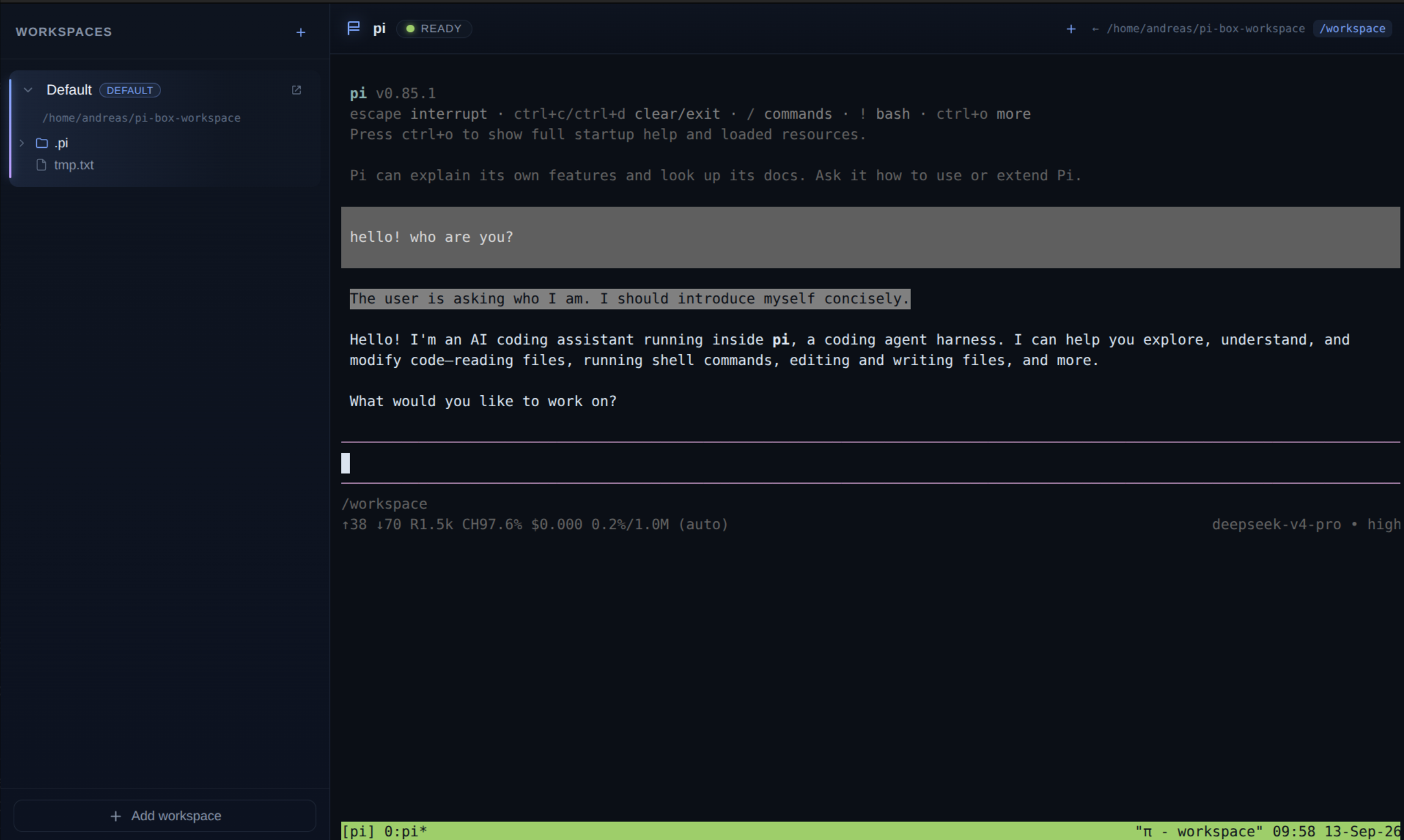
Native desktop app for macOS, Linux and Windows that wraps AgentVM — a lightweight WASM-based Alpine Linux VM with the pi coding agent installed — and gives you:
- a terminal that boots straight into the pi coding agent (inside tmux),
- extra shell sessions via tmux windows (a “new shell” button sends
Ctrl+B c), - a full-featured terminal: truecolor, inline images (kitty protocol), clickable OSC 8 hyperlinks, and clipboard copy/paste (keyboard + right-click menu),
- workspaces: host folders that are mounted into the VM,
- a per-workspace
.pidirectory so pi's model config, credentials and sessions live in the workspace and survive reboots, - a per-workspace
.pi-box/configstartup file for power users (extra env vars or a custom tmux config), - a file tree view of each workspace, with a per-file edit action that
opens the file in
viinside a new tmux window, - an open in file manager action (
open/xdg-open/ Explorer depending on OS), - a collapsible workspaces sidebar and a restart button in the terminal header,
- network controls: runtime on/off toggle, TCP port forwarding, and outbound firewall rules (via the gear menu in the terminal header),
- a persistent root filesystem per workspace, so guest-root changes (
apk add,/etc,/root,/tmp, caches) survive restarts.

Startup note: booting to a shell is fast because the VM is snapshotted with Wizer, but launching
piitself (a Node/V8 process inside the emulated RISC-V VM) is currently slow — expect roughly a minute before the splash screen hands over to pi. We setPI_OFFLINE=1at startup so pi skips its slow network downloads (fd/ripgrep, catalog refresh), which keeps this as fast as possible.
Download
Latest release · v0.2.0
- macOS (Apple Silicon): pi-box-0.2.0-arm64.dmg
- macOS (Intel): pi-box-0.2.0.dmg
- Linux (AppImage): pi-box-0.2.0.AppImage
- Linux (deb): pi-box_0.2.0_amd64.deb
- Windows (installer): pi-box.Setup.0.2.0.exe
- Windows (portable): pi-box.0.2.0.exe
macOS / Windows note: these builds are unsigned and not notarized, and may still have issues (Gatekeeper prompts or odd errors). If a binary misbehaves, running from source is usually smoother:
npm install
npm run dev
On macOS, if Gatekeeper blocks the app on first launch, you can also remove the quarantine attribute:
xattr -dr com.apple.quarantine /Applications/pi-box.app(adjust the path if you moved the app elsewhere).
Network & persistence
Built on deepclause-agentvm 0.3.0:
- Network on/off — toggle guest networking at runtime (header button or gear menu).
- Port forwarding — expose guest TCP servers on host ports; add/remove at runtime.
- Firewall — ordered outbound allow/deny rules, live-editable in the gear menu.
- Persistent root filesystem — a per-workspace ext4 overlay (guest-root changes
like
apk add,/etc,/root,/tmp, and pi's caches survive restarts). The overlay image lives at<workspace>/.agentvm/upper.img.
Design
Framework choice
| Option | Verdict |
|---|---|
| Electron | ✅ chosen |
| Tauri | ❌ AgentVM is a Node.js library (worker_threads, node:wasi, SharedArrayBuffer); Tauri would need a sidecar Node process |
| Neutralino / others | ❌ less mature, weaker Node integration |
AgentVM runs in a Node worker thread and needs real Node built-ins
(node:wasi, worker_threads, net, dgram, dns). Electron's main process
is Node, so we can instantiate AgentVM directly with zero IPC plumbing to an
external runtime.
On top of Electron:
- electron-vite — build tooling for main/preload/renderer with HMR.
- React + TypeScript — UI.
- @xterm/xterm + @xterm/addon-fit + @xterm/addon-image — terminal emulator (resize, inline images).
- No backend/server — renderer talks to the main process over Electron IPC.
Process model
┌─────────────────────────── Electron ───────────────────────────┐
│                                                                │
│  main process (Node)          preload           renderer (React)│
│  ┌──────────────────┐   contextBridge/ipc    ┌───────────────┐  │
│  │ WorkspaceStore   │◄──────────────────────►│  Sidebar      │  │
│  │  workspaces.json │                        │  (tree view)  │  │
│  ├──────────────────┤                        ├───────────────┤  │
│  │ VmManager        │   pibox:output         │  TerminalView │  │
│  │  AgentVM worker  │◄──────────────────────►│  (xterm.js)   │  │
│  └──────────────────┘   pibox:termInput      └───────────────┘  │
└────────────────────────────────────────────────────────────────┘
VmManagerowns a singleAgentVMinstance in interactive/raw mode.onStdout/onStderrare forwarded to the renderer as decoded strings; keystrokes from xterm are written back withvm.writeToStdin(). Once the VM console shell is up, VmManager injects a startup script that sources the workspace's.pi-box/config(power-user env/tmux overrides), starts a tiny resize daemon (applies the host-written.pi/tty-sizevia TIOCSWINSZ) and then launches tmux withpiin the first window. tmux handles terminal multiplexing natively, so extra shells are just new tmux windows (Ctrl+B c), and window resizes propagate to pi through tmux.WorkspaceStorepersists workspaces to<userData>/workspaces.json, builds the file tree lazily per directory, and seeds each workspace with.pi/settings.json,.pi/sessions/,.pi/tmux.confand.pi/tty-resize-daemon.py.- The active workspace is mounted at
/workspaceinside the VM. Switching workspaces restarts the VM with the new mount (simple by design). - With
persistentRootenabled, AgentVM mounts an ext4-overlay root backed by<workspace>/.agentvm/upper.imgbefore the startup script runs, so guest-root changes persist across restarts.
Startup flow
- App opens → loading screen with the DeepClause logo.
- Main process boots
AgentVMwith the last used workspace mounted at/workspace(status: “Booting AgentVM…”). With persistence enabled, AgentVM mounts the ext4 overlay root first. - When the shell prompt appears, the startup script launches tmux running
pi(status: “Starting pi…”). - When pi's TUI has rendered (detected via its “Press ctrl+o” startup hint), the loading overlay disappears and the terminal shows pi inside tmux.
Project structure
pi-box-app/
├── package.json
├── electron.vite.config.ts
├── tsconfig*.json
├── scripts/
│   └── ev.mjs                 # dev/preview launcher (sets NO_SANDBOX on Linux)
└── src/
    ├── shared/types.ts          # types shared across processes
    ├── main/
    │   ├── index.ts             # app bootstrap, window, VM wiring
    │   ├── vm.ts                # VmManager (AgentVM lifecycle)
    │   ├── workspaces.ts        # WorkspaceStore (persistence + tree)
    │   ├── ipc.ts               # IPC handlers
    │   └── agentvm.d.ts         # type declarations for deepclause-agentvm
    ├── preload/
    │   ├── index.ts             # contextBridge API (window.pibox)
    │   └── index.d.ts
    └── renderer/
        ├── index.html
        ├── public/logo.png      # DeepClause logo (loading screen)
        └── src/
            ├── App.tsx
            ├── styles.css
            └── components/
                ├── LoadingScreen.tsx
                ├── NetworkSettings.tsx
                ├── WorkspaceSidebar.tsx
                ├── FileTree.tsx
                ├── icons.tsx
                └── TerminalView.tsx
Development
Requirements: Node ≥ 22, npm.
cd pi-box-app
npm install
npm run dev
deepclause-agentvmis an exact npm pin (currently0.3.0), so the app uses the published package (including its ~322 MBagentvm-alpine-python.wasmimage).
Linux sandbox note
On Linux containers/CI the Chromium SUID sandbox helper is often not configured
(chrome-sandbox is not root:root mode 4755). npm run dev and npm run start
now set NO_SANDBOX=1 only on Linux via scripts/ev.mjs, so Electron runs
with --no-sandbox there. macOS and Windows are unaffected.
If you prefer to run the raw commands, you can pass the flag manually:
npx electron-vite dev --noSandbox
Useful scripts
npm run dev          # start with HMR
npm run build        # production build into out/
npm run start        # preview the production build
npm run typecheck    # type-check main + renderer
npm run dist:dir     # package an unpacked build locally (fast check)
npm run dist:linux   # build AppImage + deb
npm run dist:mac     # build dmg + zip (macOS only)
npm run dist:win     # build NSIS + portable (Windows only)
Release binaries are built by GitHub Actions on every published release — see
.github/workflows/release.yml and docs/release-pipeline-proposal.md.
Implementation plan / roadmap
- v0.1 scaffold — loading screen, pi auto-start with splash until
ready, per-workspace
.pi(config + sessions), workspace list + lazy file tree, default workspace, add/remove/switch workspaces, open folder in OS file manager, last workspace restored on launch, extra shell sessions via tmux windows. - Packaging — electron-builder releases for macOS (dmg), Windows (nsis/portable) and Linux (AppImage/deb) via GitHub Actions.
- Terminal fidelity — truecolor, inline images (kitty protocol), OSC 8 hyperlinks, clipboard copy/paste, extended keys.
- Per-file actions — editing in
viis done; open/rename/delete in the tree are still pending. - Workspace settings UI — edit
.pi/settings.json, pick provider/model, manage sessions from the sidebar. - VM controls — restart button, network on/off toggle, TCP port forwarding, outbound firewall rules, and a persistent root filesystem.
Known limitations
- pi runs inside tmux on the VM's serial console; tmux provides PTYs and
SIGWINCHpropagation for its panes. - The AgentVM host mount is served over 9p/WASI, which has no
chmodin WASI preview1: mode changes (fs.chmod/fs.fchmod) returnEPROTOand creation mode bits are dropped. pi's auth save path is unaffected, but downloaded helper binaries (fd/ripgrep) and extension temp folders rely on chmod. - pi runs with
PI_OFFLINE=1, so it skips its startup network downloads; fd and ripgrep are therefore not downloaded by default (pi shows an offline warning) until offline mode is disabled. - Switching the active workspace restarts the VM (and therefore pi).
- The ~322 MB wasm image must be read into memory on every boot (that's what the loading screen is for).
- AgentVM itself is experimental (see its README disclaimer).
- Persistence uses a 512 MB sparse ext4 overlay image per workspace
(
<workspace>/.agentvm/upper.img); the first boot of a workspace is slower because the guest formats it withmkfs.ext4.
Contributors

24 commits
See what people are saying
Similar repos


Languages
TypeScript
80.7%
CSS
17.7%
JavaScript
1.1%
README
pi-box
Native desktop app for macOS, Linux and Windows that wraps AgentVM — a lightweight WASM-based Alpine Linux VM with the pi coding agent installed — and gives you:
- a terminal that boots straight into the pi coding agent (inside tmux),
- extra shell sessions via tmux windows (a “new shell” button sends
Ctrl+B c), - a full-featured terminal: truecolor, inline images (kitty protocol), clickable OSC 8 hyperlinks, and clipboard copy/paste (keyboard + right-click menu),
- workspaces: host folders that are mounted into the VM,
- a per-workspace
.pidirectory so pi's model config, credentials and sessions live in the workspace and survive reboots, - a per-workspace
.pi-box/configstartup file for power users (extra env vars or a custom tmux config), - a file tree view of each workspace, with a per-file edit action that
opens the file in
viinside a new tmux window, - an open in file manager action (
open/xdg-open/ Explorer depending on OS), - a collapsible workspaces sidebar and a restart button in the terminal header,
- network controls: runtime on/off toggle, TCP port forwarding, and outbound firewall rules (via the gear menu in the terminal header),
- a persistent root filesystem per workspace, so guest-root changes (
apk add,/etc,/root,/tmp, caches) survive restarts.
Startup note: booting to a shell is fast because the VM is snapshotted with Wizer, but launching
piitself (a Node/V8 process inside the emulated RISC-V VM) is currently slow — expect roughly a minute before the splash screen hands over to pi. We setPI_OFFLINE=1at startup so pi skips its slow network downloads (fd/ripgrep, catalog refresh), which keeps this as fast as possible.
Download
Latest release · v0.2.0
- macOS (Apple Silicon): pi-box-0.2.0-arm64.dmg
- macOS (Intel): pi-box-0.2.0.dmg
- Linux (AppImage): pi-box-0.2.0.AppImage
- Linux (deb): pi-box_0.2.0_amd64.deb
- Windows (installer): pi-box.Setup.0.2.0.exe
- Windows (portable): pi-box.0.2.0.exe
macOS / Windows note: these builds are unsigned and not notarized, and may still have issues (Gatekeeper prompts or odd errors). If a binary misbehaves, running from source is usually smoother:
npm install
npm run dev
On macOS, if Gatekeeper blocks the app on first launch, you can also remove the quarantine attribute:
xattr -dr com.apple.quarantine /Applications/pi-box.app(adjust the path if you moved the app elsewhere).
Network & persistence
Built on deepclause-agentvm 0.3.0:
- Network on/off — toggle guest networking at runtime (header button or gear menu).
- Port forwarding — expose guest TCP servers on host ports; add/remove at runtime.
- Firewall — ordered outbound allow/deny rules, live-editable in the gear menu.
- Persistent root filesystem — a per-workspace ext4 overlay (guest-root changes
like
apk add,/etc,/root,/tmp, and pi's caches survive restarts). The overlay image lives at<workspace>/.agentvm/upper.img.
Design
Framework choice
| Option | Verdict |
|---|---|
| Electron | ✅ chosen |
| Tauri | ❌ AgentVM is a Node.js library (worker_threads, node:wasi, SharedArrayBuffer); Tauri would need a sidecar Node process |
| Neutralino / others | ❌ less mature, weaker Node integration |
AgentVM runs in a Node worker thread and needs real Node built-ins
(node:wasi, worker_threads, net, dgram, dns). Electron's main process
is Node, so we can instantiate AgentVM directly with zero IPC plumbing to an
external runtime.
On top of Electron:
- electron-vite — build tooling for main/preload/renderer with HMR.
- React + TypeScript — UI.
- @xterm/xterm + @xterm/addon-fit + @xterm/addon-image — terminal emulator (resize, inline images).
- No backend/server — renderer talks to the main process over Electron IPC.
Process model
┌─────────────────────────── Electron ───────────────────────────┐
│                                                                │
│  main process (Node)          preload           renderer (React)│
│  ┌──────────────────┐   contextBridge/ipc    ┌───────────────┐  │
│  │ WorkspaceStore   │◄──────────────────────►│  Sidebar      │  │
│  │  workspaces.json │                        │  (tree view)  │  │
│  ├──────────────────┤                        ├───────────────┤  │
│  │ VmManager        │   pibox:output         │  TerminalView │  │
│  │  AgentVM worker  │◄──────────────────────►│  (xterm.js)   │  │
│  └──────────────────┘   pibox:termInput      └───────────────┘  │
└────────────────────────────────────────────────────────────────┘
VmManagerowns a singleAgentVMinstance in interactive/raw mode.onStdout/onStderrare forwarded to the renderer as decoded strings; keystrokes from xterm are written back withvm.writeToStdin(). Once the VM console shell is up, VmManager injects a startup script that sources the workspace's.pi-box/config(power-user env/tmux overrides), starts a tiny resize daemon (applies the host-written.pi/tty-sizevia TIOCSWINSZ) and then launches tmux withpiin the first window. tmux handles terminal multiplexing natively, so extra shells are just new tmux windows (Ctrl+B c), and window resizes propagate to pi through tmux.WorkspaceStorepersists workspaces to<userData>/workspaces.json, builds the file tree lazily per directory, and seeds each workspace with.pi/settings.json,.pi/sessions/,.pi/tmux.confand.pi/tty-resize-daemon.py.- The active workspace is mounted at
/workspaceinside the VM. Switching workspaces restarts the VM with the new mount (simple by design). - With
persistentRootenabled, AgentVM mounts an ext4-overlay root backed by<workspace>/.agentvm/upper.imgbefore the startup script runs, so guest-root changes persist across restarts.
Startup flow
- App opens → loading screen with the DeepClause logo.
- Main process boots
AgentVMwith the last used workspace mounted at/workspace(status: “Booting AgentVM…”). With persistence enabled, AgentVM mounts the ext4 overlay root first. - When the shell prompt appears, the startup script launches tmux running
pi(status: “Starting pi…”). - When pi's TUI has rendered (detected via its “Press ctrl+o” startup hint), the loading overlay disappears and the terminal shows pi inside tmux.
Project structure
pi-box-app/
├── package.json
├── electron.vite.config.ts
├── tsconfig*.json
├── scripts/
│   └── ev.mjs                 # dev/preview launcher (sets NO_SANDBOX on Linux)
└── src/
    ├── shared/types.ts          # types shared across processes
    ├── main/
    │   ├── index.ts             # app bootstrap, window, VM wiring
    │   ├── vm.ts                # VmManager (AgentVM lifecycle)
    │   ├── workspaces.ts        # WorkspaceStore (persistence + tree)
    │   ├── ipc.ts               # IPC handlers
    │   └── agentvm.d.ts         # type declarations for deepclause-agentvm
    ├── preload/
    │   ├── index.ts             # contextBridge API (window.pibox)
    │   └── index.d.ts
    └── renderer/
        ├── index.html
        ├── public/logo.png      # DeepClause logo (loading screen)
        └── src/
            ├── App.tsx
            ├── styles.css
            └── components/
                ├── LoadingScreen.tsx
                ├── NetworkSettings.tsx
                ├── WorkspaceSidebar.tsx
                ├── FileTree.tsx
                ├── icons.tsx
                └── TerminalView.tsx
Development
Requirements: Node ≥ 22, npm.
cd pi-box-app
npm install
npm run dev
deepclause-agentvmis an exact npm pin (currently0.3.0), so the app uses the published package (including its ~322 MBagentvm-alpine-python.wasmimage).
Linux sandbox note
On Linux containers/CI the Chromium SUID sandbox helper is often not configured
(chrome-sandbox is not root:root mode 4755). npm run dev and npm run start
now set NO_SANDBOX=1 only on Linux via scripts/ev.mjs, so Electron runs
with --no-sandbox there. macOS and Windows are unaffected.
If you prefer to run the raw commands, you can pass the flag manually:
npx electron-vite dev --noSandbox
Useful scripts
npm run dev          # start with HMR
npm run build        # production build into out/
npm run start        # preview the production build
npm run typecheck    # type-check main + renderer
npm run dist:dir     # package an unpacked build locally (fast check)
npm run dist:linux   # build AppImage + deb
npm run dist:mac     # build dmg + zip (macOS only)
npm run dist:win     # build NSIS + portable (Windows only)
Release binaries are built by GitHub Actions on every published release — see
.github/workflows/release.yml and docs/release-pipeline-proposal.md.
Implementation plan / roadmap
- v0.1 scaffold — loading screen, pi auto-start with splash until
ready, per-workspace
.pi(config + sessions), workspace list + lazy file tree, default workspace, add/remove/switch workspaces, open folder in OS file manager, last workspace restored on launch, extra shell sessions via tmux windows. - Packaging — electron-builder releases for macOS (dmg), Windows (nsis/portable) and Linux (AppImage/deb) via GitHub Actions.
- Terminal fidelity — truecolor, inline images (kitty protocol), OSC 8 hyperlinks, clipboard copy/paste, extended keys.
- Per-file actions — editing in
viis done; open/rename/delete in the tree are still pending. - Workspace settings UI — edit
.pi/settings.json, pick provider/model, manage sessions from the sidebar. - VM controls — restart button, network on/off toggle, TCP port forwarding, outbound firewall rules, and a persistent root filesystem.
Known limitations
- pi runs inside tmux on the VM's serial console; tmux provides PTYs and
SIGWINCHpropagation for its panes. - The AgentVM host mount is served over 9p/WASI, which has no
chmodin WASI preview1: mode changes (fs.chmod/fs.fchmod) returnEPROTOand creation mode bits are dropped. pi's auth save path is unaffected, but downloaded helper binaries (fd/ripgrep) and extension temp folders rely on chmod. - pi runs with
PI_OFFLINE=1, so it skips its startup network downloads; fd and ripgrep are therefore not downloaded by default (pi shows an offline warning) until offline mode is disabled. - Switching the active workspace restarts the VM (and therefore pi).
- The ~322 MB wasm image must be read into memory on every boot (that's what the loading screen is for).
- AgentVM itself is experimental (see its README disclaimer).
- Persistence uses a 512 MB sparse ext4 overlay image per workspace
(
<workspace>/.agentvm/upper.img); the first boot of a workspace is slower because the guest formats it withmkfs.ext4.
See what people are saying
Similar repos
Contributors
24 commits
Languages
TypeScript
80.7%
CSS
17.7%
JavaScript
1.1%