davidferguson/pibakery

The blocks based, easy to use setup tool for Raspberry Pi
JavaScript

1,490

86 commits

updated Oct 26, 2020

See the code

See what people are saying

SourceMessageScoreDate

what do you think of the visual programming in unreal engine similar for unity? have never used it, but supposedly you can go back and forth between c++ and the drag-and-drop interface i really like scratch, have started using this tool called pibakery that has a similar block-based interface:…

on An introductory course in computer programming (1965)

0

Mar 16, 2017

Check out PiBakery, it allows you to take a stock image and do some post-startup config, including setting up keys for SSH and changing passwords. http://www.pibakery.org/

on Raspberry Pi Zero W, with Wi-Fi and Bluetooth, priced at $10

0

Feb 28, 2017

I've purchased a number of Pi's across the years. In most cases they have been used for projects or given to people that have a need for them. But in full disclosure, there are three Zeros and three Pi-3's waiting for their turn on the bench. Oh and a hoard of 64Gb SD cards from a really amazing…

on Ten million Raspberry Pis

0

Sep 8, 2016

I didn't find the repo for the website (I even checked for the gh-pages branches), but if I had found it I would have opened a PR to fix http://www.pibakery.org/contribute.html where there is a 200px Octocat but using an 800px image. One can actually watch it draw in as it loads. That's not only…

on PiBakery – a blocks based, easy to use setup tool for Raspberry Pi

0

Sep 8, 2016

It's not a block I had previously considered, but any block can be added in! What exactly do you mean by encrypted pi? The entire SD encrypted, one partition encrypted, or something else? If you have a script that does something like this, feel free to submit a block for it (guide at…

on PiBakery – a blocks based, easy to use setup tool for Raspberry Pi

0

Sep 7, 2016

First, pretty cool idea! I have to try it, but it looks good at the first glance. I think you should add a bigger "Download" button to your download documentation (i.e. here: http://www.pibakery.org/docs/install-mac.html). It's good to have the explanation for beginners, but for people that just…

on PiBakery – a blocks based, easy to use setup tool for Raspberry Pi

0

Sep 7, 2016

PiBakery – a blocks based, easy to use setup tool for Raspberry Pi

291

Sep 7, 2016

PiBakery, the easist way to set up a Raspberry Pi

3

Sep 6, 2016

README

PiBakery

Dependency Status devDependency Status

The blocks based, easy to use setup tool for Raspberry Pi

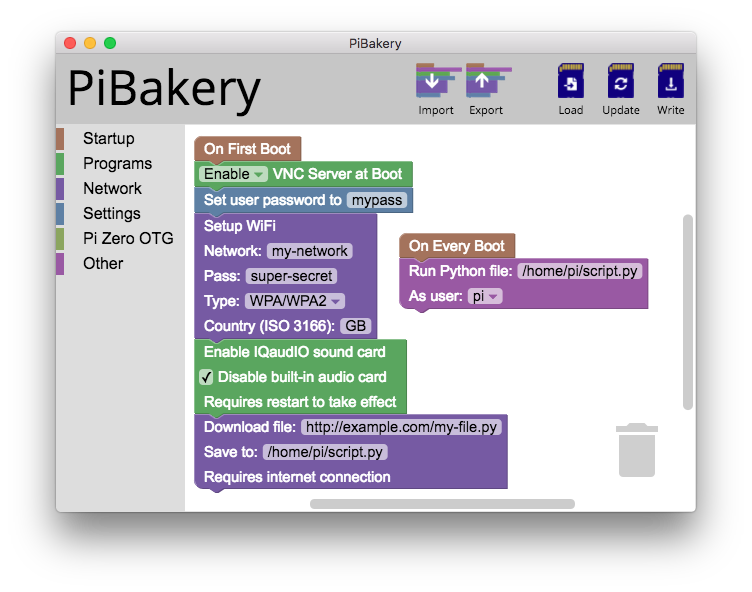
PiBakery demo screen

PiBakery is a a blocks based drag and drop tool that allows you to customise and edit your Raspberry Pi without powering the Pi on. Simply insert your SD card into your computer, choose which features you want on your Pi, and hit Write. PiBakery will write the latest version of Raspbian to your SD card, with your customisations added too.

For more information see www.PiBakery.org or follow @PiBakery on Twitter.


Installing from source

While it is recommended to install PiBakery from one of the downloads on www.PiBakery.org/download.html, you can also install PiBakery from source if you want to see how it works, or edit PiBakery in any way.

To install PiBakery from source, you'll need NodeJS and npm installed. Once you have them installed, clone the GitHub repository with
git clone https://github.com/davidferguson/pibakery.git

Change into the newly downloaded directory with
cd pibakery

And install the required node modules using
npm install
This will take a few minutes to complete.

You can then run PiBakery using
npm start

PiBakery on Linux

PiBakery should run on Linux if you build from source, however you will need to have kpartx installed. Most distributions have these in package repositories, and in Debian/Ubuntu can be installed with sudo apt-get install kpartx


PiBakery v2

The latest version of PiBakery, PiBakery v2, is a complete re-write of the original application, with many additional features, including:

  • PiBakery no longer bundles .img files in the installer/program. Instead, the user must supply their own Raspbian .img file. This means that any Raspbian-based .img can be used, with the possibility of other distros in the future
  • Ability to edit any Raspbian SD card, not just ones that have been written with PiBakery
  • More robust Linux support
  • Ability to add multiple block sources, so the user can maintain their own block repo with their own custom blocks
  • Importing of recipes (.xml files) created with older versions of PiBakery no longer fail, instead they are converted automatically into the new format
  • The entire program no longer runs as root/admin. Instead, just the writer process is elevated when needed to be
  • Modularised code to increase readability, and add option for command line mode in the future

Legal

PiBakery is Copyright (c) 2018 David Ferguson, and is licenced under the GNU General Public License version 3 or later; please see the file COPYING for details.

This project uses and distributes a binary of Busybox version 1.27.2 taken from Raspbian Stretch's busybox-static package, the source code of which can be found here.

davidferguson/pibakery

The blocks based, easy to use setup tool for Raspberry Pi

JavaScript

1,490

86 commits

updated Oct 26, 2020

See the code

See what people are saying

SourceMessageScoreDate

what do you think of the visual programming in unreal engine similar for unity? have never used it, but supposedly you can go back and forth between c++ and the drag-and-drop interface i really like scratch, have started using this tool called pibakery that has a similar block-based interface:…

on An introductory course in computer programming (1965)

0

Mar 16, 2017

Check out PiBakery, it allows you to take a stock image and do some post-startup config, including setting up keys for SSH and changing passwords. http://www.pibakery.org/

on Raspberry Pi Zero W, with Wi-Fi and Bluetooth, priced at $10

0

Feb 28, 2017

I've purchased a number of Pi's across the years. In most cases they have been used for projects or given to people that have a need for them. But in full disclosure, there are three Zeros and three Pi-3's waiting for their turn on the bench. Oh and a hoard of 64Gb SD cards from a really amazing…

on Ten million Raspberry Pis

0

Sep 8, 2016

I didn't find the repo for the website (I even checked for the gh-pages branches), but if I had found it I would have opened a PR to fix http://www.pibakery.org/contribute.html where there is a 200px Octocat but using an 800px image. One can actually watch it draw in as it loads. That's not only…

on PiBakery – a blocks based, easy to use setup tool for Raspberry Pi

0

Sep 8, 2016

It's not a block I had previously considered, but any block can be added in! What exactly do you mean by encrypted pi? The entire SD encrypted, one partition encrypted, or something else? If you have a script that does something like this, feel free to submit a block for it (guide at…

on PiBakery – a blocks based, easy to use setup tool for Raspberry Pi

0

Sep 7, 2016

First, pretty cool idea! I have to try it, but it looks good at the first glance. I think you should add a bigger "Download" button to your download documentation (i.e. here: http://www.pibakery.org/docs/install-mac.html). It's good to have the explanation for beginners, but for people that just…

on PiBakery – a blocks based, easy to use setup tool for Raspberry Pi

0

Sep 7, 2016

PiBakery – a blocks based, easy to use setup tool for Raspberry Pi

291

Sep 7, 2016

PiBakery, the easist way to set up a Raspberry Pi

3

Sep 6, 2016

README

PiBakery

Dependency Status devDependency Status

The blocks based, easy to use setup tool for Raspberry Pi

PiBakery demo screen

PiBakery is a a blocks based drag and drop tool that allows you to customise and edit your Raspberry Pi without powering the Pi on. Simply insert your SD card into your computer, choose which features you want on your Pi, and hit Write. PiBakery will write the latest version of Raspbian to your SD card, with your customisations added too.

For more information see www.PiBakery.org or follow @PiBakery on Twitter.


Installing from source

While it is recommended to install PiBakery from one of the downloads on www.PiBakery.org/download.html, you can also install PiBakery from source if you want to see how it works, or edit PiBakery in any way.

To install PiBakery from source, you'll need NodeJS and npm installed. Once you have them installed, clone the GitHub repository with
git clone https://github.com/davidferguson/pibakery.git

Change into the newly downloaded directory with
cd pibakery

And install the required node modules using
npm install
This will take a few minutes to complete.

You can then run PiBakery using
npm start

PiBakery on Linux

PiBakery should run on Linux if you build from source, however you will need to have kpartx installed. Most distributions have these in package repositories, and in Debian/Ubuntu can be installed with sudo apt-get install kpartx


PiBakery v2

The latest version of PiBakery, PiBakery v2, is a complete re-write of the original application, with many additional features, including:

  • PiBakery no longer bundles .img files in the installer/program. Instead, the user must supply their own Raspbian .img file. This means that any Raspbian-based .img can be used, with the possibility of other distros in the future
  • Ability to edit any Raspbian SD card, not just ones that have been written with PiBakery
  • More robust Linux support
  • Ability to add multiple block sources, so the user can maintain their own block repo with their own custom blocks
  • Importing of recipes (.xml files) created with older versions of PiBakery no longer fail, instead they are converted automatically into the new format
  • The entire program no longer runs as root/admin. Instead, just the writer process is elevated when needed to be
  • Modularised code to increase readability, and add option for command line mode in the future

Legal

PiBakery is Copyright (c) 2018 David Ferguson, and is licenced under the GNU General Public License version 3 or later; please see the file COPYING for details.

This project uses and distributes a binary of Busybox version 1.27.2 taken from Raspbian Stretch's busybox-static package, the source code of which can be found here.

Significant stargazers

Ruan YiFeng

87,835 followers · starred Sep 2016

Alex Bevilacqua

116 followers · starred May 2018

Sam Kim

31 followers · starred Nov 2016

PalmerAL

149 followers · starred Jan 2017