
A PBX written by rust
See the codeREADME
RustPBX - Secure Software-Defined PBX

RustPBX is a high-performance, secure software-defined PBX (Private Branch Exchange) system implemented in Rust, designed to support AI-powered communication pipelines and modern voice applications.
Note: The Voice Agent functionality has been moved to a separate repository: Active Call. This repository now focuses on the SIP Proxy and PBX features.
🚀 Key Features
SIP PBX Core
- Full SIP Stack: Complete SIP proxy server with registration, authentication, and call routing
- Media Proxy: Advanced RTP/RTCP media proxying with NAT traversal support
- Multi-Transport: UDP, TCP, and WebSocket transport support
- SipFlow Recording: 🔥 Advanced unified SIP+RTP recording system with superior I/O performance
- Two backends: Local (file system + SQLite with date-based organization), Remote (distributed)
- Open-write-close pattern to avoid file descriptor exhaustion
- Query API for on-demand playback and analysis
- Call Recording: Traditional call recording with multiple storage backends (legacy)
- User Management: Flexible user authentication and registration system
📖 Documentation
For detailed configuration and usage instructions, please refer to:
- Configuration Guide: Complete reference for platform settings, SIP proxy, auth, routing, and more.
- SipFlow Configuration: Detailed guide for the unified SIP+RTP recording system.
🎯 SipFlow - Advanced Recording System
SipFlow is a next-generation unified SIP+RTP recording system that provides superior I/O performance compared to traditional call recording:
Key Advantages:
- Better I/O Performance: Open-write-close pattern avoids file descriptor exhaustion in high-concurrency scenarios
- Unified Storage: SIP messages and RTP packets stored together for complete call analysis
- Date-Based Organization: Automatic YYYYMMDD/HH directory structure for efficient archival
- Flexible Backends: Choose between Local (file system + SQLite) or Remote (distributed) based on your needs
- Query API: On-demand media generation from RTP packets, saving storage space
Comparison with Traditional Call Recording:
| Feature | SipFlow (New) | Call Recording (Legacy) |
|---|---|---|
| I/O Pattern | Open-write-close | Keep file handles open |
| Scalability | High (1000+ concurrent) | Limited by FD limits |
| SIP Messages | ✅ Full capture | ❌ Not included |
| RTP Packets | ✅ Captured | ❌ Only audio |
| Query Speed | Fast (indexed) | Slow (file scan) |
| Storage | Efficient (on-demand decode) | Full WAV files |
Configuration Example:
[sipflow]
type = "local"         # Local storage with SQLite indexing
root = "./config/cdr"
subdirs = "hourly"     # "hourly" | "daily" | "none" - organize by hour for better archival
See docs/sipflow-config.md for complete configuration guide.
🐳 Docker Deployment
Quick Start with Docker
-
Pull the Docker Image
-
Option 1: Commerce Docker image (With
wholesalefeatures):docker pull docker.cnb.cool/miuda.ai/rustpbx:latest -
Option 2: Community Docker image:
docker pull ghcr.io/restsend/rustpbx:latest
-
-
Create config.toml:
Minimal configuration example (save as
config.toml):http_addr = "0.0.0.0:8080" database_url = "sqlite://rustpbx.sqlite3" [console] base_path = "/console" # allow self-service administrator signup after the first account allow_registration = false # set to true to force Secure cookie attribute, otherwise it is auto-detected based on request secure_cookie = false [proxy] addr = "0.0.0.0" udp_port = 5060 # Basic modules: Authentication, Registration, Call handling modules = ["auth", "registrar", "call"] # Add a test user in memory [[proxy.user_backends]] type = "memory" users = [ { username = "1001", password = "password" } ] # SipFlow: Unified SIP+RTP recording (recommended for better I/O performance) [sipflow] type = "local" # "local" (file system + SQLite) or "remote" (distributed) root = "./config/cdr" subdirs = "hourly" # "hourly" | "daily" | "none"See the Configuration Guide for all available options.
-
Run with Docker:
Default time zone is UTC, run with your time zone with
-e TZ=Asia/Shanghai.
```bash
docker run -d \
  --name rustpbx \
  --net host \
  --env-file .env \
  -v $(pwd)/db:/app/db \
  -v $(pwd)/config.toml:/app/config.toml \
  -v $(pwd)/config:/app/config \
  -v $(pwd)/recorders:/tmp/recorders \
  ghcr.io/restsend/rustpbx:latest \
  --conf /app/config.toml
```

- Create super user via cli(**optional**)

  ```bash
  docker exec rustpbx /app/rustpbx --conf /app/config.toml --super-username=YOUR --super-password=PASS
  ```
4. Access the service:
- Web Interface: <http://localhost:8080/console/>
  - Login via `YOUR` + `PASS`
- SIP Proxy: localhost:15060
🛠 Quick Start
Prerequisites
- Rust 1.75 or later
- Cargo package manager
pkg-config,libasound2-dev
Linux:
apt-get install -y cmake libasound2-dev
macOS:
brew install cmake
Install & Build
git clone https://github.com/restsend/rustpbx
cd rustpbx
cargo build --release
For a minimal footprint you can disable heavy features:
cargo build -r --no-default-features --features vad_webrtc,console
PBX Quick Start (SQLite + console admin)
-
Create a PBX configuration (
config.pbx.toml) pointing to SQLite and enabling call records:http_addr = "0.0.0.0:8080" log_level = "debug" #log_file = "/tmp/rustpbx.log" database_url = "sqlite://rustpbx.sqlite3" [console] #session_secret = "please_change_me_to_a_random_secret" base_path = "/console" # allow self-service administrator signup after the first account allow_registration = false # set to true to force Secure cookie attribute, otherwise it is auto-detected based on request secure_cookie = false [proxy] modules = ["acl", "auth", "registrar", "call"] addr = "0.0.0.0" udp_port = 15060 registrar_expires = 60 ws_handler = "/ws" media_proxy = "auto" # Base directory for generated routing/trunk/ACL files generated_dir = "./config" routes_files = ["config/routes/*.toml"] trunks_files = ["config/trunks/*.toml"] # ACL rules acl_rules = [ # "allow 10.0.0.0/8", # "deny 0.123.4.0/16", "allow all", "deny all", ] acl_files = ["config/acl/*.toml"] # external IP address for SIP signaling and media # if server is behind NAT, set your public IP here (without port) # external_ip = "1.2.3.4" [[proxy.user_backends]] type = "memory" users = [ { username = "bob", password = "123456" }, { username = "alice", password = "123456" }, ] [[proxy.user_backends]] type = "extension" database_url = "sqlite://rustpbx.sqlite3" [recording] enabled = true auto_start = true [callrecord] type = "local" root = "./config/cdr" # SipFlow: Advanced unified SIP+RTP recording (recommended) # Better I/O performance with date-based file organization [sipflow] type = "local" # "local" (file system + SQLite) | "remote" (distributed) root = "./config/cdr" subdirs = "hourly" # "hourly" | "daily" | "none" EOF -
Launch the PBX:
cargo run --bin rustpbx -- --conf config.pbx.toml -
In a separate shell create your first super admin for the console:
cargo run --bin rustpbx -- --conf config.pbx.toml \ --super-username admin --super-password change-me-now -
Sign in at
http://localhost:8080/console/, add extensions, and register your SIP endpoints againstudp://localhost:15060. -
Verify call recordings and transcripts under Call Records once calls complete.
Console Screenshots
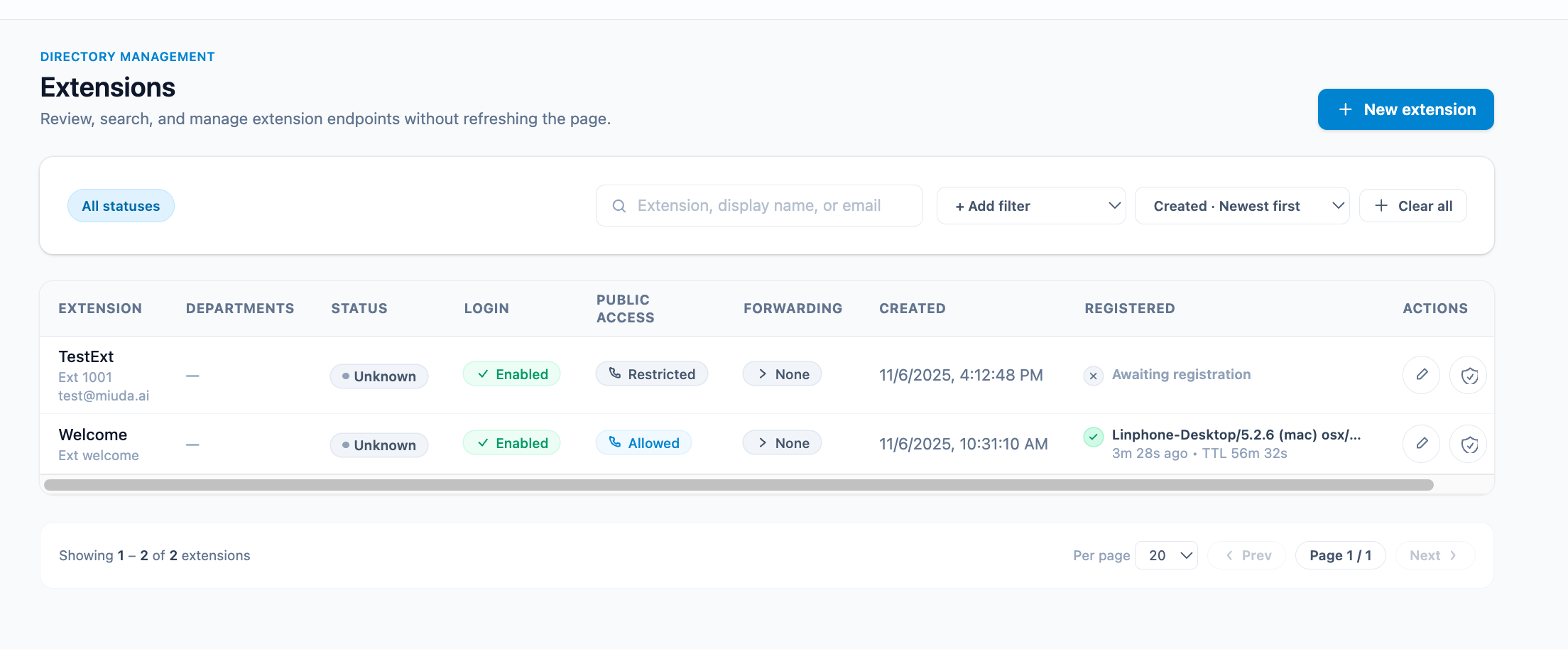
extensions
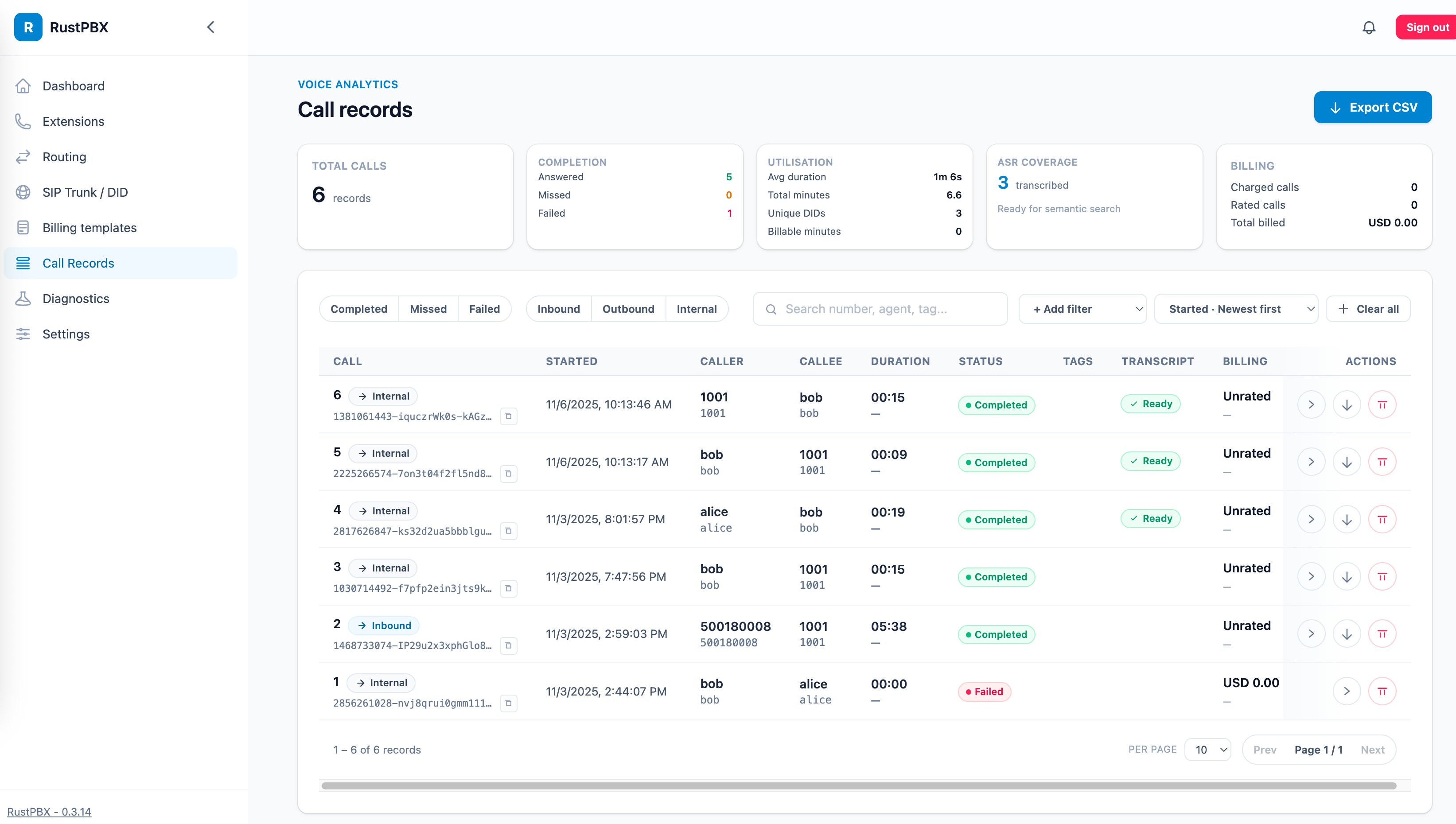
call records
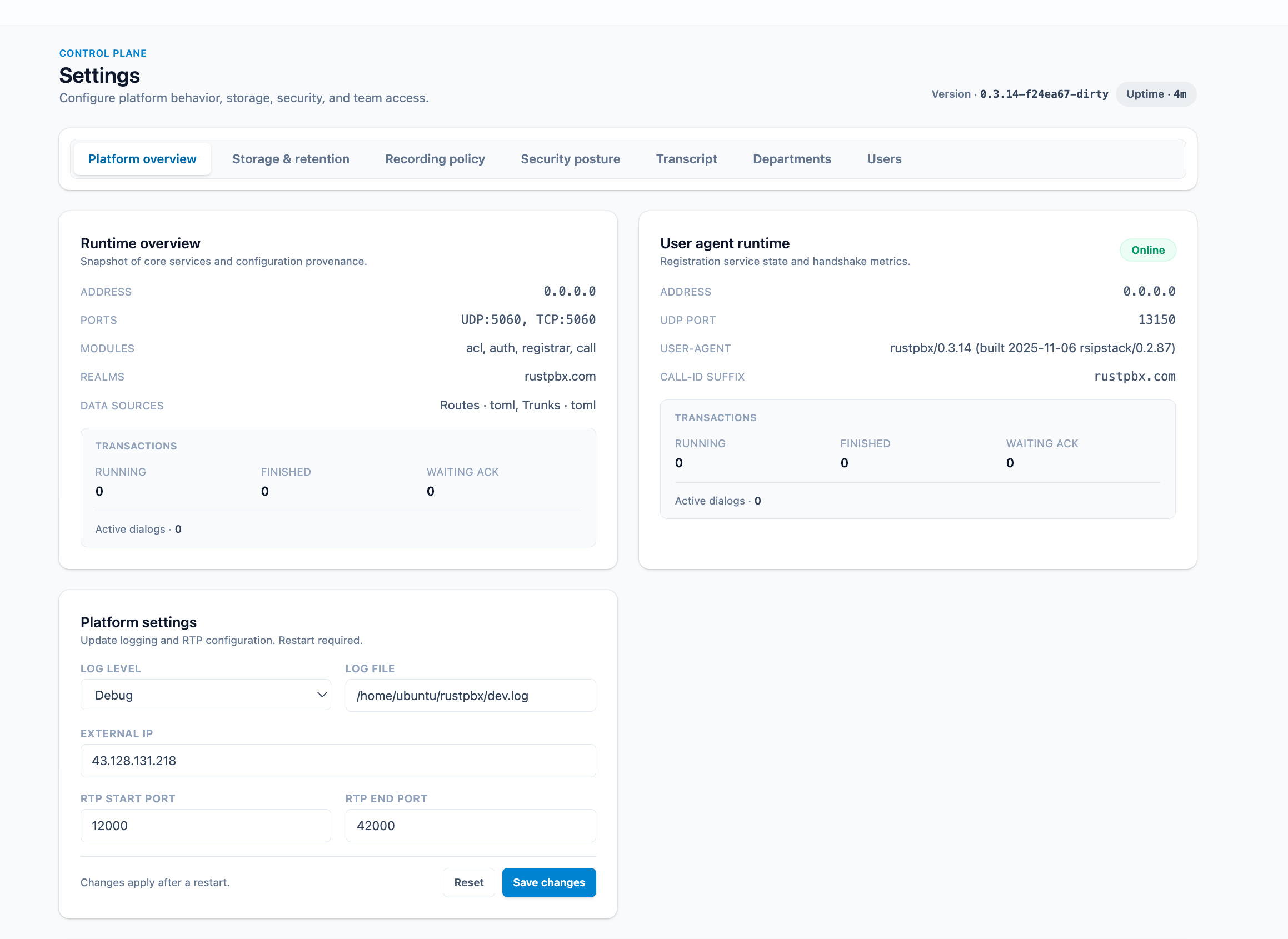
settings
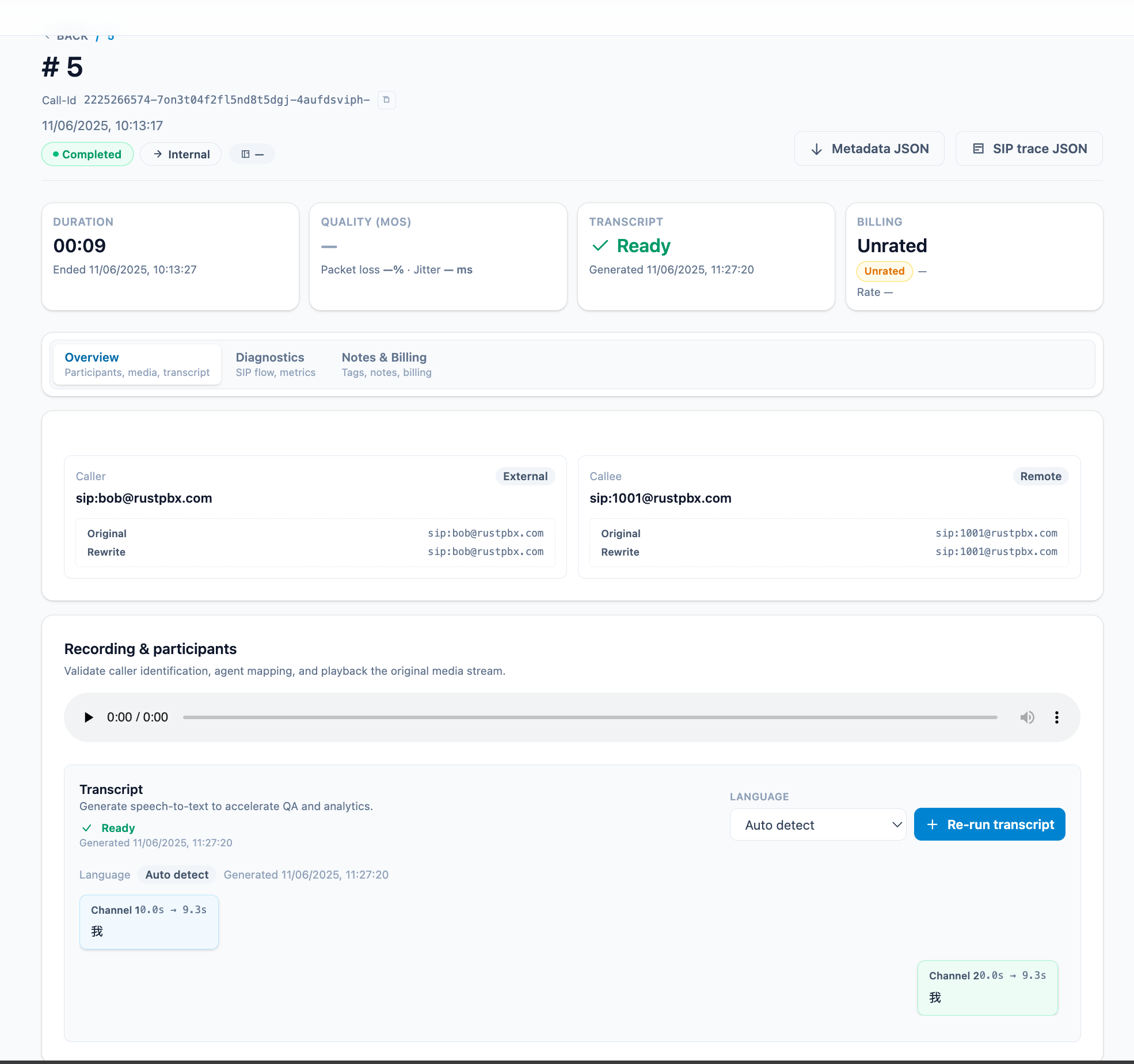
call record with transcript
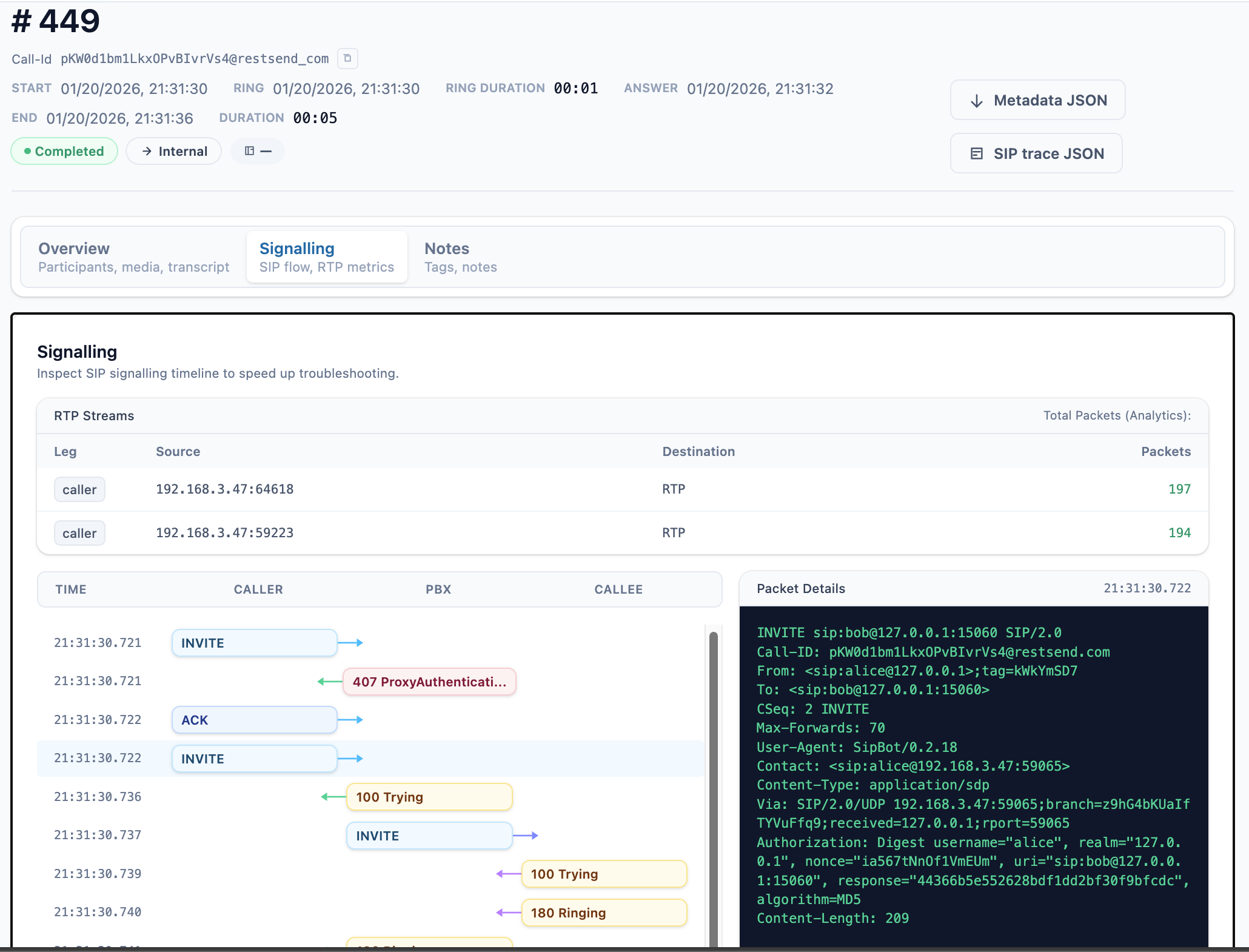
call record with message flow
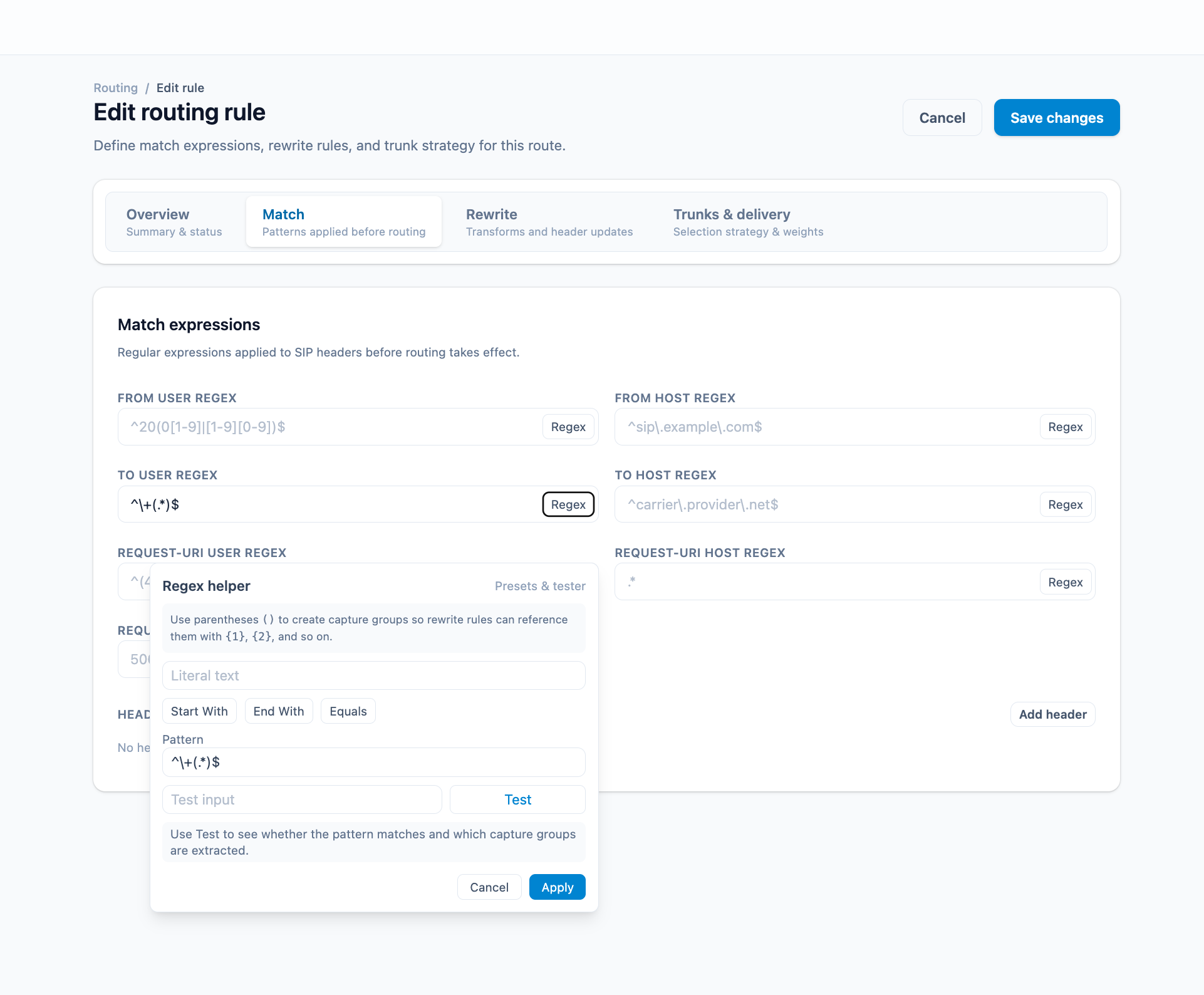
route editor
webrtc phone
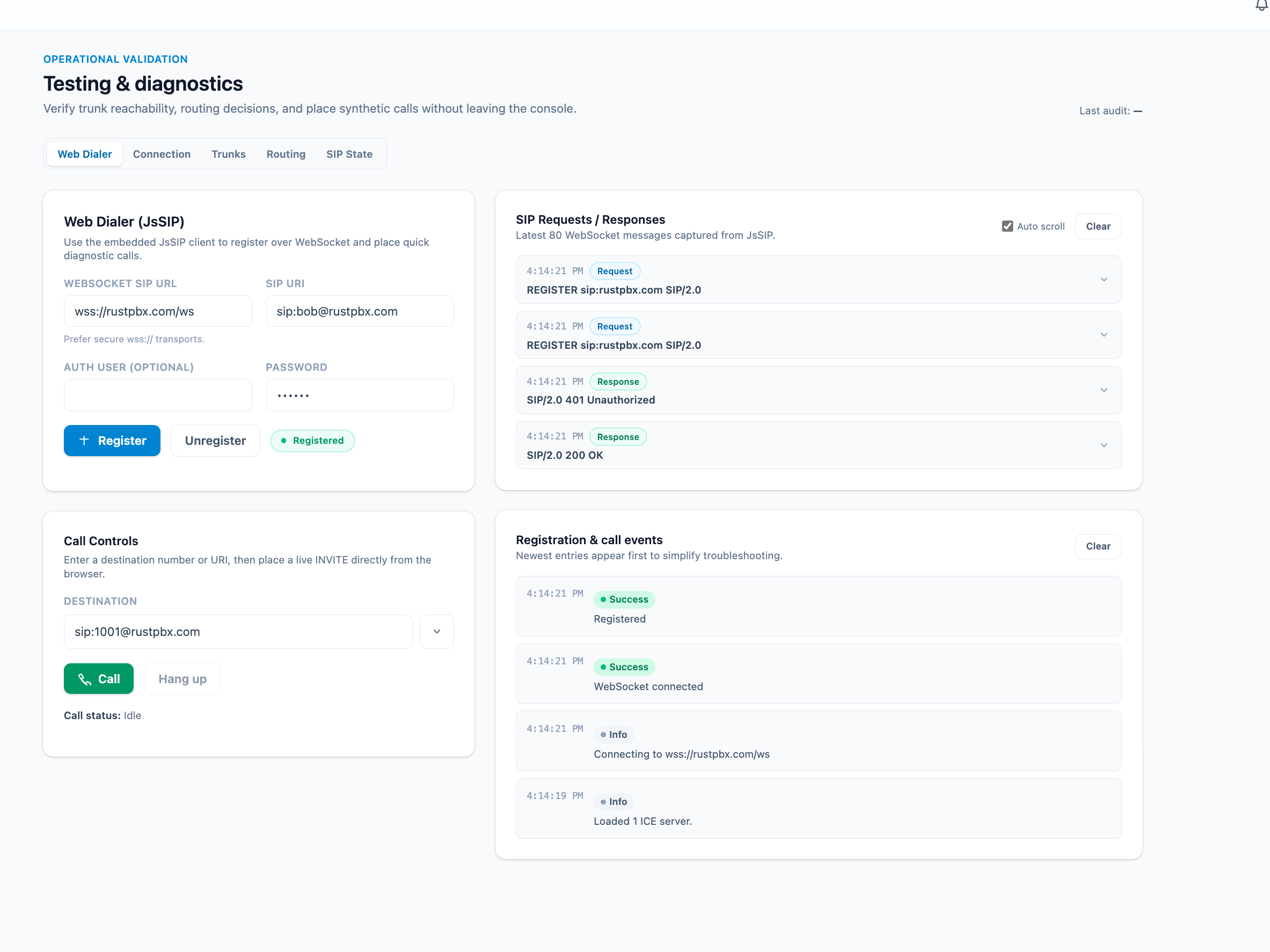
🔧 Configuration Features
SIP Proxy
- Modular proxy architecture with pluggable modules
- User authentication and registration
- Call routing and forwarding
- CDR (Call Detail Records) generation
Media Proxy
- Automatic NAT detection and media proxying
- Configurable RTP port ranges
- Support for multiple codecs
- Real-time media relay
🛠 Troubleshooting
SIP Registration 401 Unauthorized (Docker/NAT)
If you are running RustPBX in a Docker container or behind NAT and encounter a 401 Unauthorized error during SIP registration, it may be caused by a mismatch in the SIP realm. You may need to explicitly set proxy.realms to the correct IP address and port that your SIP clients are connecting to.
[proxy]
realms = ["your-server-ip:15060"]
🤝 Contributing
This project is currently in active development. We welcome contributions and feedback from the community.
📄 License
MIT License - see LICENSE file for details.
🏗 Project Status
Work in Progress - Core functionality is implemented and being actively refined. The system is suitable for development and testing environments.
Contributors


Similar repos


Languages
Rust
59.0%
HTML
27.7%
Python
11.3%
A PBX written by rust
See the codeREADME
RustPBX - Secure Software-Defined PBX
RustPBX is a high-performance, secure software-defined PBX (Private Branch Exchange) system implemented in Rust, designed to support AI-powered communication pipelines and modern voice applications.
Note: The Voice Agent functionality has been moved to a separate repository: Active Call. This repository now focuses on the SIP Proxy and PBX features.
🚀 Key Features
SIP PBX Core
- Full SIP Stack: Complete SIP proxy server with registration, authentication, and call routing
- Media Proxy: Advanced RTP/RTCP media proxying with NAT traversal support
- Multi-Transport: UDP, TCP, and WebSocket transport support
- SipFlow Recording: 🔥 Advanced unified SIP+RTP recording system with superior I/O performance
- Two backends: Local (file system + SQLite with date-based organization), Remote (distributed)
- Open-write-close pattern to avoid file descriptor exhaustion
- Query API for on-demand playback and analysis
- Call Recording: Traditional call recording with multiple storage backends (legacy)
- User Management: Flexible user authentication and registration system
📖 Documentation
For detailed configuration and usage instructions, please refer to:
- Configuration Guide: Complete reference for platform settings, SIP proxy, auth, routing, and more.
- SipFlow Configuration: Detailed guide for the unified SIP+RTP recording system.
🎯 SipFlow - Advanced Recording System
SipFlow is a next-generation unified SIP+RTP recording system that provides superior I/O performance compared to traditional call recording:
Key Advantages:
- Better I/O Performance: Open-write-close pattern avoids file descriptor exhaustion in high-concurrency scenarios
- Unified Storage: SIP messages and RTP packets stored together for complete call analysis
- Date-Based Organization: Automatic YYYYMMDD/HH directory structure for efficient archival
- Flexible Backends: Choose between Local (file system + SQLite) or Remote (distributed) based on your needs
- Query API: On-demand media generation from RTP packets, saving storage space
Comparison with Traditional Call Recording:
| Feature | SipFlow (New) | Call Recording (Legacy) |
|---|---|---|
| I/O Pattern | Open-write-close | Keep file handles open |
| Scalability | High (1000+ concurrent) | Limited by FD limits |
| SIP Messages | ✅ Full capture | ❌ Not included |
| RTP Packets | ✅ Captured | ❌ Only audio |
| Query Speed | Fast (indexed) | Slow (file scan) |
| Storage | Efficient (on-demand decode) | Full WAV files |
Configuration Example:
[sipflow]
type = "local"         # Local storage with SQLite indexing
root = "./config/cdr"
subdirs = "hourly"     # "hourly" | "daily" | "none" - organize by hour for better archival
See docs/sipflow-config.md for complete configuration guide.
🐳 Docker Deployment
Quick Start with Docker
-
Pull the Docker Image
-
Option 1: Commerce Docker image (With
wholesalefeatures):docker pull docker.cnb.cool/miuda.ai/rustpbx:latest -
Option 2: Community Docker image:
docker pull ghcr.io/restsend/rustpbx:latest
-
-
Create config.toml:
Minimal configuration example (save as
config.toml):http_addr = "0.0.0.0:8080" database_url = "sqlite://rustpbx.sqlite3" [console] base_path = "/console" # allow self-service administrator signup after the first account allow_registration = false # set to true to force Secure cookie attribute, otherwise it is auto-detected based on request secure_cookie = false [proxy] addr = "0.0.0.0" udp_port = 5060 # Basic modules: Authentication, Registration, Call handling modules = ["auth", "registrar", "call"] # Add a test user in memory [[proxy.user_backends]] type = "memory" users = [ { username = "1001", password = "password" } ] # SipFlow: Unified SIP+RTP recording (recommended for better I/O performance) [sipflow] type = "local" # "local" (file system + SQLite) or "remote" (distributed) root = "./config/cdr" subdirs = "hourly" # "hourly" | "daily" | "none"See the Configuration Guide for all available options.
-
Run with Docker:
Default time zone is UTC, run with your time zone with
-e TZ=Asia/Shanghai.
```bash
docker run -d \
  --name rustpbx \
  --net host \
  --env-file .env \
  -v $(pwd)/db:/app/db \
  -v $(pwd)/config.toml:/app/config.toml \
  -v $(pwd)/config:/app/config \
  -v $(pwd)/recorders:/tmp/recorders \
  ghcr.io/restsend/rustpbx:latest \
  --conf /app/config.toml
```

- Create super user via cli(**optional**)

  ```bash
  docker exec rustpbx /app/rustpbx --conf /app/config.toml --super-username=YOUR --super-password=PASS
  ```
4. Access the service:
- Web Interface: <http://localhost:8080/console/>
  - Login via `YOUR` + `PASS`
- SIP Proxy: localhost:15060
🛠 Quick Start
Prerequisites
- Rust 1.75 or later
- Cargo package manager
pkg-config,libasound2-dev
Linux:
apt-get install -y cmake libasound2-dev
macOS:
brew install cmake
Install & Build
git clone https://github.com/restsend/rustpbx
cd rustpbx
cargo build --release
For a minimal footprint you can disable heavy features:
cargo build -r --no-default-features --features vad_webrtc,console
PBX Quick Start (SQLite + console admin)
-
Create a PBX configuration (
config.pbx.toml) pointing to SQLite and enabling call records:http_addr = "0.0.0.0:8080" log_level = "debug" #log_file = "/tmp/rustpbx.log" database_url = "sqlite://rustpbx.sqlite3" [console] #session_secret = "please_change_me_to_a_random_secret" base_path = "/console" # allow self-service administrator signup after the first account allow_registration = false # set to true to force Secure cookie attribute, otherwise it is auto-detected based on request secure_cookie = false [proxy] modules = ["acl", "auth", "registrar", "call"] addr = "0.0.0.0" udp_port = 15060 registrar_expires = 60 ws_handler = "/ws" media_proxy = "auto" # Base directory for generated routing/trunk/ACL files generated_dir = "./config" routes_files = ["config/routes/*.toml"] trunks_files = ["config/trunks/*.toml"] # ACL rules acl_rules = [ # "allow 10.0.0.0/8", # "deny 0.123.4.0/16", "allow all", "deny all", ] acl_files = ["config/acl/*.toml"] # external IP address for SIP signaling and media # if server is behind NAT, set your public IP here (without port) # external_ip = "1.2.3.4" [[proxy.user_backends]] type = "memory" users = [ { username = "bob", password = "123456" }, { username = "alice", password = "123456" }, ] [[proxy.user_backends]] type = "extension" database_url = "sqlite://rustpbx.sqlite3" [recording] enabled = true auto_start = true [callrecord] type = "local" root = "./config/cdr" # SipFlow: Advanced unified SIP+RTP recording (recommended) # Better I/O performance with date-based file organization [sipflow] type = "local" # "local" (file system + SQLite) | "remote" (distributed) root = "./config/cdr" subdirs = "hourly" # "hourly" | "daily" | "none" EOF -
Launch the PBX:
cargo run --bin rustpbx -- --conf config.pbx.toml -
In a separate shell create your first super admin for the console:
cargo run --bin rustpbx -- --conf config.pbx.toml \ --super-username admin --super-password change-me-now -
Sign in at
http://localhost:8080/console/, add extensions, and register your SIP endpoints againstudp://localhost:15060. -
Verify call recordings and transcripts under Call Records once calls complete.
Console Screenshots
extensions
call records
settings
call record with transcript
call record with message flow
route editor
webrtc phone
🔧 Configuration Features
SIP Proxy
- Modular proxy architecture with pluggable modules
- User authentication and registration
- Call routing and forwarding
- CDR (Call Detail Records) generation
Media Proxy
- Automatic NAT detection and media proxying
- Configurable RTP port ranges
- Support for multiple codecs
- Real-time media relay
🛠 Troubleshooting
SIP Registration 401 Unauthorized (Docker/NAT)
If you are running RustPBX in a Docker container or behind NAT and encounter a 401 Unauthorized error during SIP registration, it may be caused by a mismatch in the SIP realm. You may need to explicitly set proxy.realms to the correct IP address and port that your SIP clients are connecting to.
[proxy]
realms = ["your-server-ip:15060"]
🤝 Contributing
This project is currently in active development. We welcome contributions and feedback from the community.
📄 License
MIT License - see LICENSE file for details.
🏗 Project Status
Work in Progress - Core functionality is implemented and being actively refined. The system is suitable for development and testing environments.
Similar repos
Contributors
Languages
Rust
59.0%
HTML
27.7%
Python
11.3%