
README

AI PBX
Open-Source Enterprise IP PBX Management Portal & Unified Communications
Asterisk 22 · PHP 8 · MariaDB · WebRTC · Instant Messaging · Android & iOS Apps
🌐 Official Website & Documentation: mahirgul.github.io/AiPBX







Quick Install • Features • Architecture • Website • Contributing
Quick Install
# Clone the repository
git clone https://github.com/mahirgul/AiPBX.git /opt/aipbx
cd /opt/aipbx

# Run the installer as root
sudo bash install.sh
The installer will:
- Ask for your FQDN (domain name) — or use your IP with a self-signed cert
- Generate strong random passwords for all services automatically
- Install and configure everything (Asterisk, MariaDB, Apache2, coturn, Chat service)
- Display all credentials at the end and save them to
/root/aipbx-credentials.txt
Requirements: Ubuntu 22.04 / 24.04 / 26.04 LTS · 2 GB RAM · 10 GB disk · root access
After install, open https://<your-server> in your browser and log in with the credentials shown.
Features
📞 PBX Management
- Extension management — PJSIP-based, dual-endpoint (SIP + WebRTC)
- Trunk management — dynamic PJSIP trunk configuration
- Call routing — DID mapping, outbound routes, time conditions
- IVR — multi-level voice menus with time-based routing
- Queue management — call queues, dynamic agent login/logout, hold music
- Feature codes —
*81queue login (all or*81<queue>),*80queue logout,*72call forward,*60DND,*43intercom,*88spy/whisper - In-band disconnect supervision — cadence-based disconnect tone detection (
from-trunk-kapanma-tonu) for analog/legacy trunks without out-of-band hangup signaling - Auto-rollback — failed Asterisk reloads are automatically reverted
📠 Fax System
- Inbound/outbound fax — T.38 and G.711 (res_fax + SpanDSP)
- WYSIWYG fax editor — compose rich-text faxes directly in the browser
- PDF upload & send
- Fax retry
- Email notification — incoming faxes forwarded by email automatically
📊 Call Center
- Real-time agent panel — live queue status, active calls, agent break selector
- Dynamic queue login/logout — via star codes (
*81/*80) with audio confirmation (queue-agentlogin-success/ beeps) or web UI - Intelligent call transfer — bridge-traversal caller preservation (
findCallerChannelForAgent) prevents dropped lines during attended transfer - Auto-desk navigation — answering incoming queue calls in WebRTC automatically shifts SPA view to agent CRM/notes (
/cc-agent) - CDR reporting — detailed call records, filtering, export
- Call recording playback — listen to recordings in the browser
🌐 WebRTC Softphone
- In-browser SIP phone — zero-install browser phone embedded directly in topbar
- Resilient TURN/STUN — 30-minute automatic credential renewal eliminates silent audio on extended shifts
- Opus + DTLS-SRTP — high-quality, end-to-end encrypted audio
💬 Real-Time Messaging & Group Chat
- 1-to-1 & Multi-user Group Rooms — Real-time team messaging powered by high-performance Go WebSocket daemon (
aipbx-chat) - Rich Group Management — Create groups, assign admin roles, invite/remove participants (up to 256 members per group)
- Media & File Sharing — Image compression, thumbnail generation, and secure attachment delivery
- System Audit Trail — System-generated messages for member additions, removals, and role updates
- Presence & Delivery Receipts — Real-time typing indicators, read receipts, and online status tracking
- FCM Push Notifications — Background notifications with conversation grouping for both direct and group messages
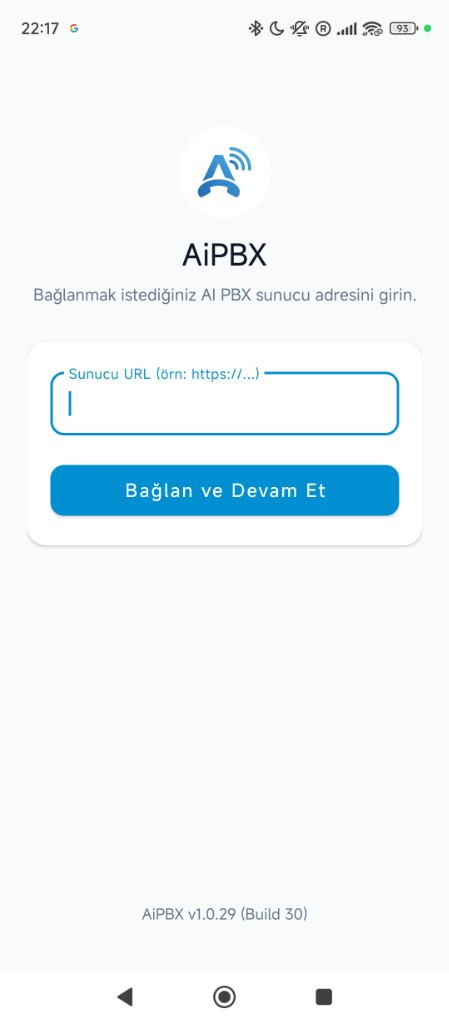
📱 Android App (Build 33 · v1.0.32)
- Native Kotlin application with zero external cloud dependencies
- PJSIP + WebRTC dual engine with Opus HD audio & DTLS-SRTP encryption
- FCM Push & Persistent Foreground Service — instantaneous wake-up for incoming calls
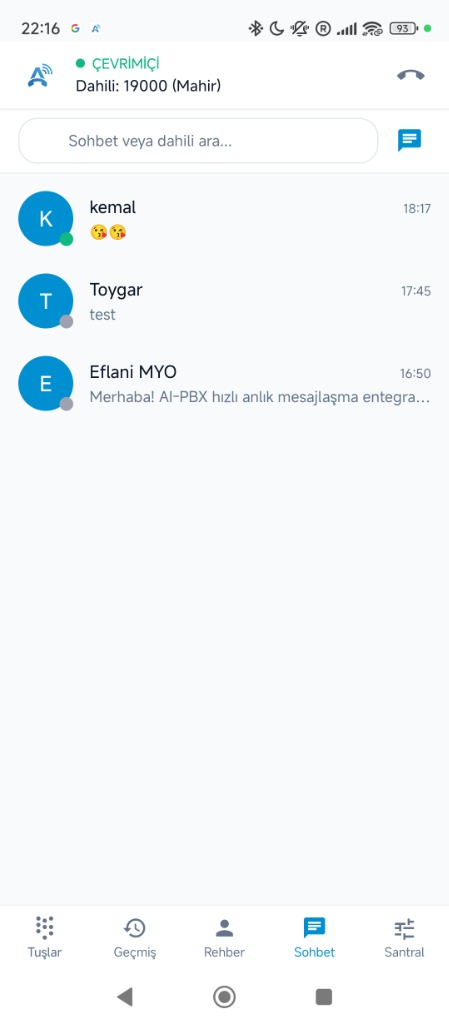
- Full Group Chat & Instant Messaging — Direct 1-to-1 messaging, multi-user group chat rooms, quick group creation (
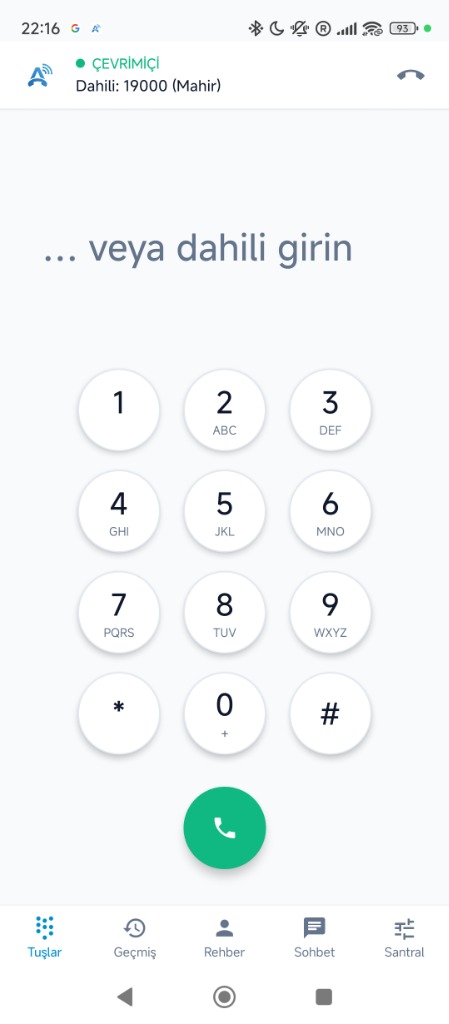
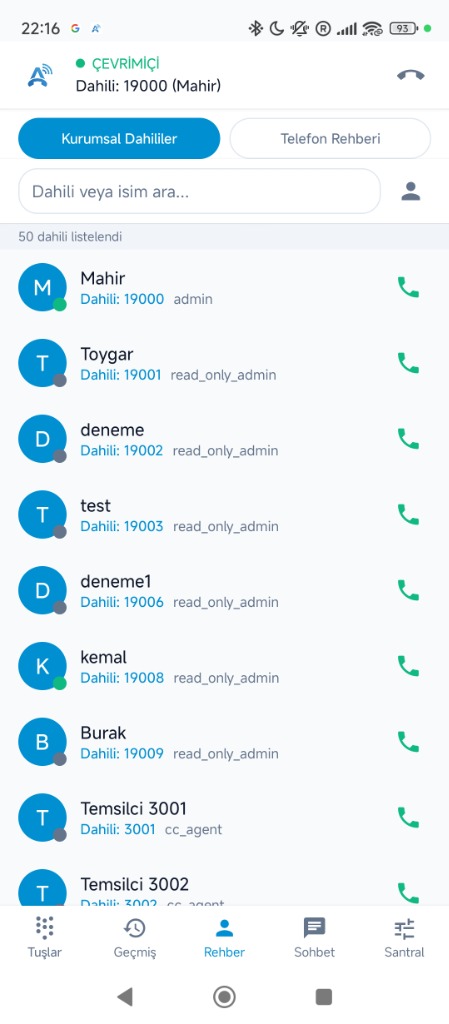
+ Yeni Grup), conversation filter chips (All, Direct, Groups), participant management, admin roles, and real-time WebSocket updates - Corporate Directory & Live Presence — 50+ extensions with live status & 1-tap dialing
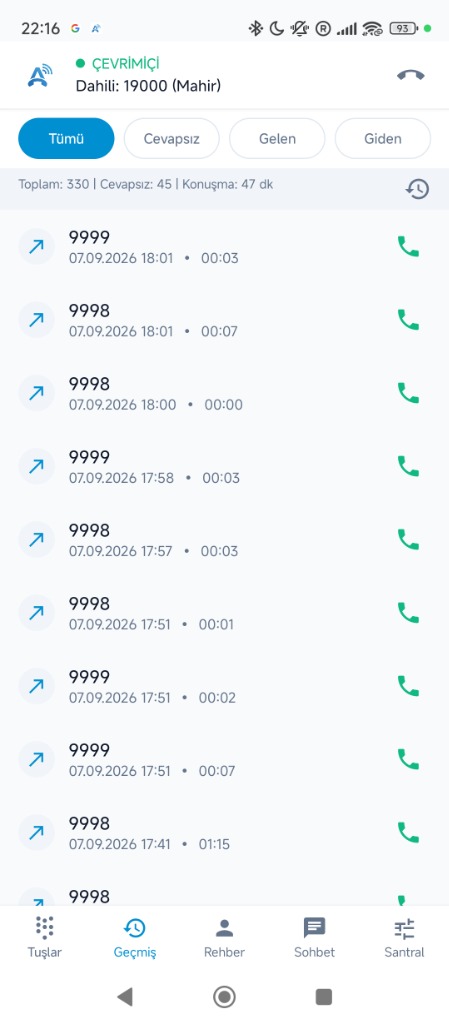
- Detailed Call History & In-App Log Viewer — full diagnostics and call filtering
- Available on Google Play Console — automated Closed Testing track pipeline and direct signed APK downloads
🍎 iOS App (SwiftUI & CallKit)
- Native SwiftUI modern application for iPhone & iPad (iOS 16.0+)
- Embedded WebRTC Voice Engine with zero external cloud dependencies
- CallKit & AudioSession Integration — Native iOS lock-screen incoming calls, audio routing, speaker and mute
- Full Group Chat & Direct Messaging — Instant messaging, multi-party group rooms, contact picker, and real-time WebSocket communication
- Corporate Directory & Live Presence — 50+ extensions with live presence indicators and 1-tap call/chat
- PBX Features & In-App Diagnostics — DND, Call Forwarding, live log viewer, and log sharing via iOS ShareSheet
- Automated GitHub Actions CI/CD — compiled automatically on macOS runners into unsigned
.ipaand Simulator.zipartifacts
📲 Mobile-First Web Management Portal
- WhatsApp/Telegram-Style Master-Detail Chat — Fluid responsive navigation on smartphones (
<= 768px) with hardware/browser back-button popstate support - Optimized Mobile Views — Touch-friendly responsive layouts for My Phone (
/my_phone), Role Permission Matrix (/roles), Mobile Push Settings (/push-settings), and Pending Sync (/pending-sync)
⚡ Ingress & Reverse Proxy (Nginx & Apache)
- High-concurrency Nginx support — event-driven WebSocket multiplexer, TLS 1.3, PHP-FPM FastCGI
- Native Apache 2.4 support —
mod_proxy_wstunneland.htaccesscompatibility - Unified Port 443 — multiplexes Asterisk WebRTC SIP (
/ws) and Go Chat (/chat/ws) - Ready-to-use Nginx template — available in
conf/nginx/aipbx.conf.example
🔒 Security
- Granular RBAC — modular role-permission matrix (
sys_role_permissions) with strict read-only viewer mode, includingmy_phoneandchatcontrols - Math CAPTCHA + brute-force lockout (5 failures → 15-min IP ban)
- CSRF protection — token on every POST form
- fail2ban integration
- Firewall management — control firewalld/fail2ban from the web UI
- Credentials served via API — never embedded in page source
🌍 Multi-language
- Turkish 🇹🇷 and English 🇬🇧 (1,300+ translation keys)
- Easy to extend with the
t()function
Architecture
AiPBX/
├── conf/                   # Nginx & web server production templates
│   └── nginx/aipbx.conf.example
│
├── web/                    # PHP MVC Web Portal
│   ├── src/
│   │   ├── controllers/    # 35 page controllers
│   │   ├── services/       # 24 business logic services
│   │   ├── repositories/   # 28 database repositories
│   │   └── sync/           # 13 Asterisk config generators
│   ├── templates/views/    # 34 PHP view templates
│   ├── api/                # REST API layer
│   ├── assets/             # CSS, JS, fonts
│   ├── lang/               # Language files (tr/en)
│   └── db/migrations/      # Phinx database migrations
│
├── android/                # Kotlin Android App
│   └── app/src/main/
│       └── java/com/mhrgl/aipbx/
│
├── ios/                    # Swift & SwiftUI iOS App (GitHub Actions CI/CD)
│   ├── AiPBX/              # App, Models, Services, Views, Resources
│   └── AiPBX.xcodeproj/    # Xcode project & schemes
│
├── chat/                   # Go WebSocket Chat Service
│   ├── main.go
│   ├── hub.go              # WebSocket hub
│   ├── handlers.go         # HTTP/WS handlers
│   └── db.go               # Database layer
│
├── asterisk-config/        # Asterisk reference configuration
│   └── pbx/                # Modular dialplan, PJSIP, queue files
│
├── db/                     # Database schema
│   ├── schema.sql          # Table definitions
│   └── seed.sql            # Initial seed data
│
├── install.sh              # One-command installer
└── README.md
Technology Stack
| Layer | Technology |
|---|---|
| PBX | Asterisk 22 (PJSIP, res_fax, AMI, ODBC) |
| Web Backend | PHP 8.x, strict MVC, Composer |
| Web Frontend | Vanilla JS + CSS (no framework) |
| Database | MariaDB (Phinx migrations) |
| Chat | Go + gorilla/websocket |
| Android | Kotlin, PJSIP, WebRTC, FCM |
| iOS | Swift 5.9, SwiftUI, WebKit, CallKit, Combine |
| WebRTC | coturn TURN/STUN, DTLS-SRTP, Opus |
| Security | fail2ban, RBAC, CSRF, CAPTCHA |
Post-Install
All credentials (admin password, DB passwords, AMI key, TURN secret) are generated randomly during install and saved to /root/aipbx-credentials.txt.
You can change all passwords later from Admin Panel → Settings → System.
To add a real TLS certificate after install (if you skipped Let's Encrypt):
certbot --apache -d your-domain.com
Contributing
Contributions are welcome! Please check out our Contributing Guidelines for details on code style, commit conventions, and sandbox testing.
- Fork the repository
- Create a feature branch (
git checkout -b feat/my-feature) - Commit your changes (
git commit -m 'feat: add awesome feature') - Push to the branch (
git push origin feat/my-feature) - Open a Pull Request
License
This project is licensed under the MIT License.
Author & Creator
Contributors

46 commits
See what people are saying
Similar repos


Languages
PHP
63.4%
Kotlin
12.5%
JavaScript
7.2%
Swift
5.3%
Go
3.3%
Python
3.0%
HTML
2.1%
CSS
1.9%
Shell
1.2%
README
AI PBX
Open-Source Enterprise IP PBX Management Portal & Unified Communications
Asterisk 22 · PHP 8 · MariaDB · WebRTC · Instant Messaging · Android & iOS Apps
🌐 Official Website & Documentation: mahirgul.github.io/AiPBX
Quick Install • Features • Architecture • Website • Contributing
Quick Install
# Clone the repository
git clone https://github.com/mahirgul/AiPBX.git /opt/aipbx
cd /opt/aipbx

# Run the installer as root
sudo bash install.sh
The installer will:
- Ask for your FQDN (domain name) — or use your IP with a self-signed cert
- Generate strong random passwords for all services automatically
- Install and configure everything (Asterisk, MariaDB, Apache2, coturn, Chat service)
- Display all credentials at the end and save them to
/root/aipbx-credentials.txt
Requirements: Ubuntu 22.04 / 24.04 / 26.04 LTS · 2 GB RAM · 10 GB disk · root access
After install, open https://<your-server> in your browser and log in with the credentials shown.
Features
📞 PBX Management
- Extension management — PJSIP-based, dual-endpoint (SIP + WebRTC)
- Trunk management — dynamic PJSIP trunk configuration
- Call routing — DID mapping, outbound routes, time conditions
- IVR — multi-level voice menus with time-based routing
- Queue management — call queues, dynamic agent login/logout, hold music
- Feature codes —
*81queue login (all or*81<queue>),*80queue logout,*72call forward,*60DND,*43intercom,*88spy/whisper - In-band disconnect supervision — cadence-based disconnect tone detection (
from-trunk-kapanma-tonu) for analog/legacy trunks without out-of-band hangup signaling - Auto-rollback — failed Asterisk reloads are automatically reverted
📠 Fax System
- Inbound/outbound fax — T.38 and G.711 (res_fax + SpanDSP)
- WYSIWYG fax editor — compose rich-text faxes directly in the browser
- PDF upload & send
- Fax retry
- Email notification — incoming faxes forwarded by email automatically
📊 Call Center
- Real-time agent panel — live queue status, active calls, agent break selector
- Dynamic queue login/logout — via star codes (
*81/*80) with audio confirmation (queue-agentlogin-success/ beeps) or web UI - Intelligent call transfer — bridge-traversal caller preservation (
findCallerChannelForAgent) prevents dropped lines during attended transfer - Auto-desk navigation — answering incoming queue calls in WebRTC automatically shifts SPA view to agent CRM/notes (
/cc-agent) - CDR reporting — detailed call records, filtering, export
- Call recording playback — listen to recordings in the browser
🌐 WebRTC Softphone
- In-browser SIP phone — zero-install browser phone embedded directly in topbar
- Resilient TURN/STUN — 30-minute automatic credential renewal eliminates silent audio on extended shifts
- Opus + DTLS-SRTP — high-quality, end-to-end encrypted audio
💬 Real-Time Messaging & Group Chat
- 1-to-1 & Multi-user Group Rooms — Real-time team messaging powered by high-performance Go WebSocket daemon (
aipbx-chat) - Rich Group Management — Create groups, assign admin roles, invite/remove participants (up to 256 members per group)
- Media & File Sharing — Image compression, thumbnail generation, and secure attachment delivery
- System Audit Trail — System-generated messages for member additions, removals, and role updates
- Presence & Delivery Receipts — Real-time typing indicators, read receipts, and online status tracking
- FCM Push Notifications — Background notifications with conversation grouping for both direct and group messages
📱 Android App (Build 33 · v1.0.32)
- Native Kotlin application with zero external cloud dependencies
- PJSIP + WebRTC dual engine with Opus HD audio & DTLS-SRTP encryption
- FCM Push & Persistent Foreground Service — instantaneous wake-up for incoming calls
- Full Group Chat & Instant Messaging — Direct 1-to-1 messaging, multi-user group chat rooms, quick group creation (
+ Yeni Grup), conversation filter chips (All, Direct, Groups), participant management, admin roles, and real-time WebSocket updates - Corporate Directory & Live Presence — 50+ extensions with live status & 1-tap dialing
- Detailed Call History & In-App Log Viewer — full diagnostics and call filtering
- Available on Google Play Console — automated Closed Testing track pipeline and direct signed APK downloads
🍎 iOS App (SwiftUI & CallKit)
- Native SwiftUI modern application for iPhone & iPad (iOS 16.0+)
- Embedded WebRTC Voice Engine with zero external cloud dependencies
- CallKit & AudioSession Integration — Native iOS lock-screen incoming calls, audio routing, speaker and mute
- Full Group Chat & Direct Messaging — Instant messaging, multi-party group rooms, contact picker, and real-time WebSocket communication
- Corporate Directory & Live Presence — 50+ extensions with live presence indicators and 1-tap call/chat
- PBX Features & In-App Diagnostics — DND, Call Forwarding, live log viewer, and log sharing via iOS ShareSheet
- Automated GitHub Actions CI/CD — compiled automatically on macOS runners into unsigned
.ipaand Simulator.zipartifacts
📲 Mobile-First Web Management Portal
- WhatsApp/Telegram-Style Master-Detail Chat — Fluid responsive navigation on smartphones (
<= 768px) with hardware/browser back-button popstate support - Optimized Mobile Views — Touch-friendly responsive layouts for My Phone (
/my_phone), Role Permission Matrix (/roles), Mobile Push Settings (/push-settings), and Pending Sync (/pending-sync)
⚡ Ingress & Reverse Proxy (Nginx & Apache)
- High-concurrency Nginx support — event-driven WebSocket multiplexer, TLS 1.3, PHP-FPM FastCGI
- Native Apache 2.4 support —
mod_proxy_wstunneland.htaccesscompatibility - Unified Port 443 — multiplexes Asterisk WebRTC SIP (
/ws) and Go Chat (/chat/ws) - Ready-to-use Nginx template — available in
conf/nginx/aipbx.conf.example
🔒 Security
- Granular RBAC — modular role-permission matrix (
sys_role_permissions) with strict read-only viewer mode, includingmy_phoneandchatcontrols - Math CAPTCHA + brute-force lockout (5 failures → 15-min IP ban)
- CSRF protection — token on every POST form
- fail2ban integration
- Firewall management — control firewalld/fail2ban from the web UI
- Credentials served via API — never embedded in page source
🌍 Multi-language
- Turkish 🇹🇷 and English 🇬🇧 (1,300+ translation keys)
- Easy to extend with the
t()function
Architecture
AiPBX/
├── conf/                   # Nginx & web server production templates
│   └── nginx/aipbx.conf.example
│
├── web/                    # PHP MVC Web Portal
│   ├── src/
│   │   ├── controllers/    # 35 page controllers
│   │   ├── services/       # 24 business logic services
│   │   ├── repositories/   # 28 database repositories
│   │   └── sync/           # 13 Asterisk config generators
│   ├── templates/views/    # 34 PHP view templates
│   ├── api/                # REST API layer
│   ├── assets/             # CSS, JS, fonts
│   ├── lang/               # Language files (tr/en)
│   └── db/migrations/      # Phinx database migrations
│
├── android/                # Kotlin Android App
│   └── app/src/main/
│       └── java/com/mhrgl/aipbx/
│
├── ios/                    # Swift & SwiftUI iOS App (GitHub Actions CI/CD)
│   ├── AiPBX/              # App, Models, Services, Views, Resources
│   └── AiPBX.xcodeproj/    # Xcode project & schemes
│
├── chat/                   # Go WebSocket Chat Service
│   ├── main.go
│   ├── hub.go              # WebSocket hub
│   ├── handlers.go         # HTTP/WS handlers
│   └── db.go               # Database layer
│
├── asterisk-config/        # Asterisk reference configuration
│   └── pbx/                # Modular dialplan, PJSIP, queue files
│
├── db/                     # Database schema
│   ├── schema.sql          # Table definitions
│   └── seed.sql            # Initial seed data
│
├── install.sh              # One-command installer
└── README.md
Technology Stack
| Layer | Technology |
|---|---|
| PBX | Asterisk 22 (PJSIP, res_fax, AMI, ODBC) |
| Web Backend | PHP 8.x, strict MVC, Composer |
| Web Frontend | Vanilla JS + CSS (no framework) |
| Database | MariaDB (Phinx migrations) |
| Chat | Go + gorilla/websocket |
| Android | Kotlin, PJSIP, WebRTC, FCM |
| iOS | Swift 5.9, SwiftUI, WebKit, CallKit, Combine |
| WebRTC | coturn TURN/STUN, DTLS-SRTP, Opus |
| Security | fail2ban, RBAC, CSRF, CAPTCHA |
Post-Install
All credentials (admin password, DB passwords, AMI key, TURN secret) are generated randomly during install and saved to /root/aipbx-credentials.txt.
You can change all passwords later from Admin Panel → Settings → System.
To add a real TLS certificate after install (if you skipped Let's Encrypt):
certbot --apache -d your-domain.com
Contributing
Contributions are welcome! Please check out our Contributing Guidelines for details on code style, commit conventions, and sandbox testing.
- Fork the repository
- Create a feature branch (
git checkout -b feat/my-feature) - Commit your changes (
git commit -m 'feat: add awesome feature') - Push to the branch (
git push origin feat/my-feature) - Open a Pull Request
License
This project is licensed under the MIT License.
Author & Creator
See what people are saying
Similar repos
Contributors
46 commits
Languages
PHP
63.4%
Kotlin
12.5%
JavaScript
7.2%
Swift
5.3%
Go
3.3%
Python
3.0%
HTML
2.1%
CSS
1.9%
Shell
1.2%