League of Legends ping wheel for your Windows desktop. Hold Alt, drag, and ping anywhere, with the original animations and sounds.
TypeScript
1,706
123 commits
updated Oct 19, 2026

English | 简体中文
League of Legends pings and emotes for your whole desktop, on Windows and macOS.
Hold Alt (⌥ Option on a Mac), drag, and let go on a ping. The animation pops and the sound plays on top of any app, on any monitor.
Hold Ctrl (⌃ Control on a Mac) and drag for the emote wheel: League's emotes, or your own images.
Download for Windows · Download for Mac (Apple Silicon, experimental)



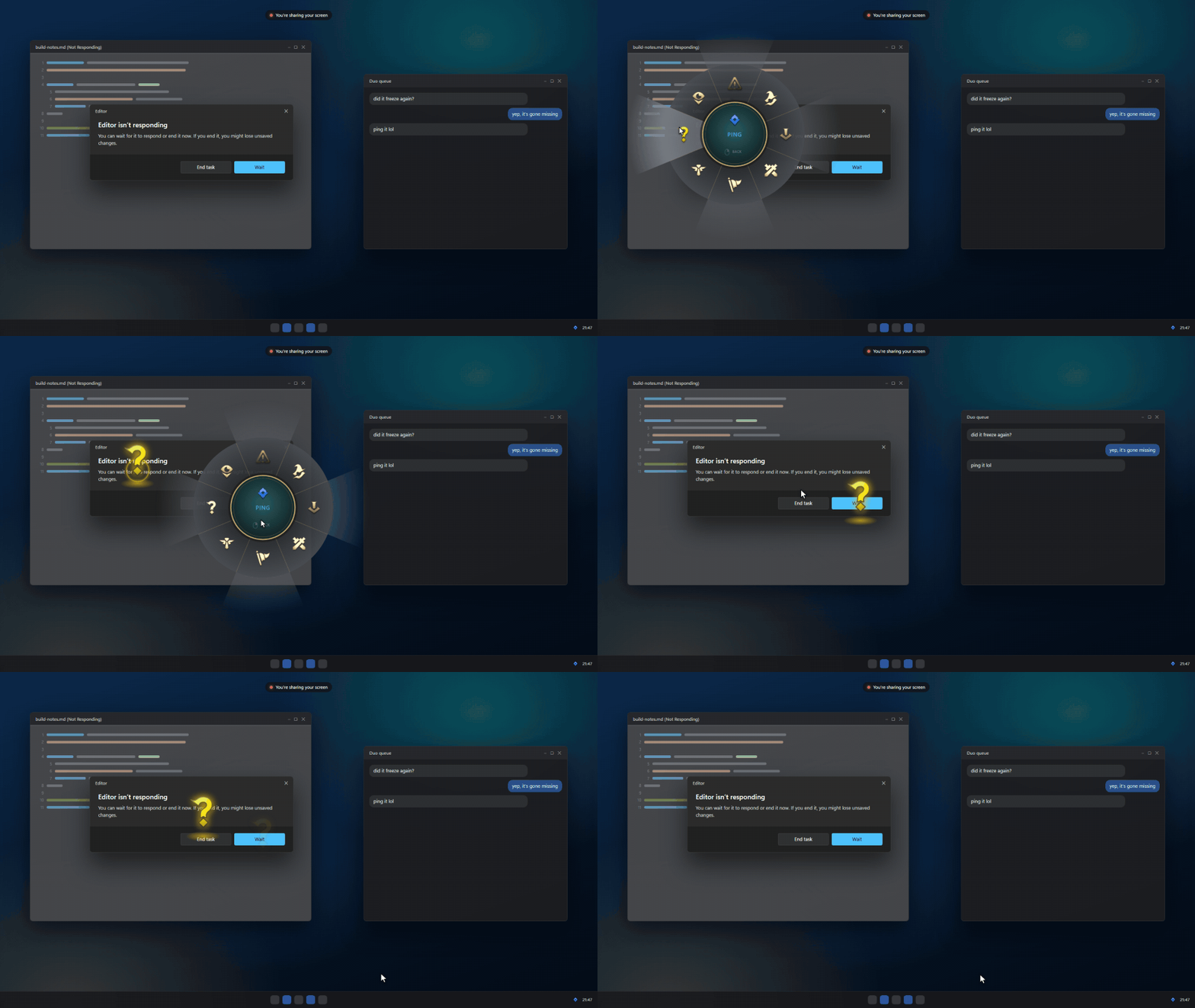
Pings and emotes show up in whole-screen capture, so friends watching your Discord or OBS stream see them too. lolPing is a desktop toy: it doesn't read, change or hook into League itself.
This source tree includes an X11 Linux port, with AppImage and Debian package targets. It requires a genuine X11 session, XInput 2.1/XTest and a compositor. Wayland sessions, including XWayland inside Wayland, are not supported yet. Caps Lock triggers and automatic fullscreen-game detection are not available on Linux. Build with Node.js 22.12+, a C++20 compiler and libx11-dev libxi-dev libxtst-dev, then run npm ci and npm run dist:linux.
See Linux build, installation and testing instructions for package usage, desktop shortcut conflicts, tray requirements, HiDPI behavior and manual updates. Upstream releases may not yet contain this port.
lolPing-Setup-<version>.exe from the latest release.lolPing is built for Windows 11, 64-bit. Windows 10 may work, but it isn't tested.
The Mac version needs an Apple Silicon Mac (M1 or later) and macOS 13 or later. It is built and tested automatically, but hasn't had much use on real Macs yet. Please report anything that doesn't work.
lolPing-<version>-arm64.dmg from the latest release, open it, and drag lolPing into Applications.xattr -dr com.apple.quarantine /Applications/lolPing.app in Terminal and open it again.After every update, macOS forgets the Accessibility permission, because the app isn't signed with a fixed developer identity. In Privacy & Security → Accessibility, select lolPing, remove it with –, then turn it on again. The settings window walks you through it.
Updating from v0.4 or earlier: download the new version by hand once. From v0.5 on, lolPing updates itself (see Updates).
| To | Do this |
|---|---|
| Ping | Hold Alt, drag, and let go on a slice |
| Emote | Hold Ctrl, drag, and let go on an emote |
| Cancel | Let go in the centre, right-click, or press Esc |
| Pause or resume pinging | Ctrl + Alt + P |
| Type a line to the room (in a room) | Alt + T, type, then press Enter |
| Show who is in the room (in a room) | Hold Tab |
| Open settings | Click the tray icon |
| Quit, or restart the input helper | Right-click the tray icon |
On a Mac, use ⌥ Option instead of Alt, ⌃ Control instead of Ctrl for emotes, ⌃⌥P to pause, and the ping icon in the menu bar instead of the tray icon.
The wheel, from the top going clockwise: Danger, Push, On My Way, All In, Assist Me, Need Vision, Enemy Missing, Enemy Vision. You can rearrange it and add Bait, Vision Cleared or an upside-down Enemy Missing ("¿") in settings. The emote wheel has 8 slots too, and you pick its emotes in settings. Each imported image plays its own signature effect (a spin, a bounce, a heartbeat...), picked by right-clicking it in the settings window from a grid where every effect plays live on that image.
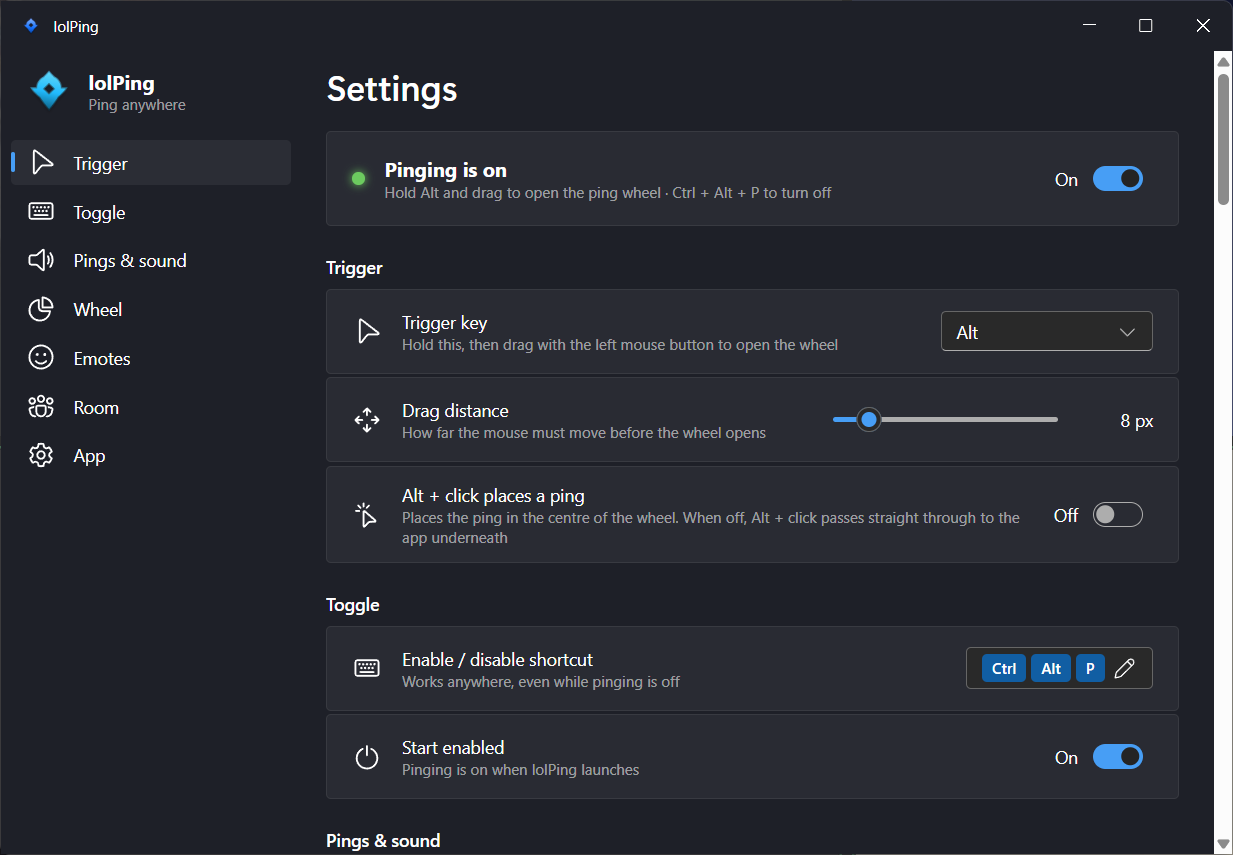
Settings are saved in %APPDATA%\lolPing\settings.json on Windows and ~/Library/Application Support/lolPing/settings.json on a Mac.
lolPing checks GitHub for a new version 10 seconds after it starts, then every 6 hours. When there is one, you get a notice on screen, and the tray menu and Settings → App → About offer Update. It asks first: nothing downloads until you click.
Join a room and everyone in it sees your pings on their own screen, at the same spot (scaled to their resolution), with your name under them. Their pings show up on yours. It works between Windows and Mac.
PING-7KQ4M-2HXTR, and send it to friends./ff, /noff and /ready work as in League's chat and are not sent as text./ff or the Surrender button on the panel starts a surrender vote. It passes when 70% of the people in the room say yes (4 of 5), and ends early once the result is clear. Ready check needs everyone to accept. Kick (the button on a person's row) removes someone when more than half of the others say yes. Votes last 60 seconds, a ready check 15. A missing answer counts as no. Answer a surrender or kick vote with the ✓ and ✗ at the right edge of your screen, and a ready check with Accept or Decline in the centre, which plays League's ready check sounds at your ping volume; they take clicks without taking focus from your game or app.You need Node 22.12 or later, plus:
xcode-select --install). Allow Accessibility for the app that runs npm run dev (for example Terminal) so the helper can read input.npm install
npx install-electron
npm run build:helper
npm run dev
npx install-electron downloads the Electron binary that npm run dev needs.
| Command | What it does |
|---|---|
npm test | TypeScript tests, including a protocol test that runs the real helper in --simulate mode |
npm run test:helper | Builds the helper and runs its C++ tests |
npm run typecheck | Type-checks everything |
npm run dist | Builds the Windows installer into release/ |
npm run dist:mac | Builds the Mac disk image into release/ (on a Mac) |
npm run dev:site | Serves a browser demo of the wheel (site/) |
npm run media | Re-records docs/media/demo.gif and docs/media/og.png from that demo (needs ffmpeg) |
node tools/room-peer/run.mjs <code> | Joins a room as a fake member that pings at random, to try rooms with one computer; --relay joins through the relays and --emotes also sends emotes (see tools/room-peer) |
node tools/relay-probe/run.mjs | Tests which public Nostr relays can carry rooms; it chose the list in src/main/relays.ts (see tools/relay-probe) |
Bump version in package.json, commit, then push a matching tag such as v0.2.0. The Release workflow creates the GitHub release as a draft. The Windows job attaches the installer, latest.yml and the installer's .blockmap, and the Mac job attaches the disk image. electron-updater needs both latest.yml and the .blockmap to update installed copies. A last job publishes the release once everything is attached.
native/hook-helper is a small C++ process that owns the low-level mouse and keyboard hooks on Windows, or an event tap on macOS. It swallows the Alt + drag so the app underneath never sees it, and talks to Electron in JSON lines over stdin and stdout.src/renderer/overlay), and plays the sounds through Web Audio.src/main/roomManager.ts keeps the room's members and encrypts every message (AES-256-GCM, key from scrypt over the room code). src/main/lanTransport.ts carries the encrypted packets over UDP on the local network, and src/main/relayTransport.ts through public Nostr relays as ephemeral events.src/main/updater.ts runs the schedule and the state the tray and settings show. src/main/updateWin.ts updates through electron-updater and the latest.yml on the release, and src/main/updateMac.ts reads the GitHub releases API and checks the disk image against its SHA-256.src/renderer/settings) with Mica on Windows, restyled like System Settings on macOS.site runs the same overlay code in the browser, with a small input shim in place of the helper. The README GIF is recorded from it.Pull requests and ideas are welcome. Before you start:
CLAUDE.md, and most other agents read AGENTS.md on their own.fix(helper): keep clicks in order after a cancelled wheel. Pull requests are squash-merged, so the title becomes the commit on main.The icons in assets/textures and the sounds in assets/sounds come from a local League of Legends install. tools/extract-assets explains how to extract them again after a patch. The emote animations, icons and sounds in assets/emotes are © Riot Games too, and tools/extract-assets --emotes bakes them from the same install.
The code is under the MIT license. The ping and emote icons, animations and sounds are © Riot Games and aren't covered by it. If you represent Riot Games and want something removed, please open an issue.
lolPing isn't endorsed by Riot Games and doesn't reflect the views or opinions of Riot Games or anyone officially involved in producing or managing Riot Games properties. Riot Games, and all associated properties are trademarks or registered trademarks of Riot Games, Inc.
7 followers · starred Oct 2026
18 followers · starred Oct 2026
241 followers · starred Oct 2026
League of Legends ping wheel for your Windows desktop. Hold Alt, drag, and ping anywhere, with the original animations and sounds.
TypeScript
1,706
123 commits
updated Oct 19, 2026
English | 简体中文
League of Legends pings and emotes for your whole desktop, on Windows and macOS.
Hold Alt (⌥ Option on a Mac), drag, and let go on a ping. The animation pops and the sound plays on top of any app, on any monitor.
Hold Ctrl (⌃ Control on a Mac) and drag for the emote wheel: League's emotes, or your own images.
Download for Windows · Download for Mac (Apple Silicon, experimental)
Pings and emotes show up in whole-screen capture, so friends watching your Discord or OBS stream see them too. lolPing is a desktop toy: it doesn't read, change or hook into League itself.
This source tree includes an X11 Linux port, with AppImage and Debian package targets. It requires a genuine X11 session, XInput 2.1/XTest and a compositor. Wayland sessions, including XWayland inside Wayland, are not supported yet. Caps Lock triggers and automatic fullscreen-game detection are not available on Linux. Build with Node.js 22.12+, a C++20 compiler and libx11-dev libxi-dev libxtst-dev, then run npm ci and npm run dist:linux.
See Linux build, installation and testing instructions for package usage, desktop shortcut conflicts, tray requirements, HiDPI behavior and manual updates. Upstream releases may not yet contain this port.
lolPing-Setup-<version>.exe from the latest release.lolPing is built for Windows 11, 64-bit. Windows 10 may work, but it isn't tested.
The Mac version needs an Apple Silicon Mac (M1 or later) and macOS 13 or later. It is built and tested automatically, but hasn't had much use on real Macs yet. Please report anything that doesn't work.
lolPing-<version>-arm64.dmg from the latest release, open it, and drag lolPing into Applications.xattr -dr com.apple.quarantine /Applications/lolPing.app in Terminal and open it again.After every update, macOS forgets the Accessibility permission, because the app isn't signed with a fixed developer identity. In Privacy & Security → Accessibility, select lolPing, remove it with –, then turn it on again. The settings window walks you through it.
Updating from v0.4 or earlier: download the new version by hand once. From v0.5 on, lolPing updates itself (see Updates).
| To | Do this |
|---|---|
| Ping | Hold Alt, drag, and let go on a slice |
| Emote | Hold Ctrl, drag, and let go on an emote |
| Cancel | Let go in the centre, right-click, or press Esc |
| Pause or resume pinging | Ctrl + Alt + P |
| Type a line to the room (in a room) | Alt + T, type, then press Enter |
| Show who is in the room (in a room) | Hold Tab |
| Open settings | Click the tray icon |
| Quit, or restart the input helper | Right-click the tray icon |
On a Mac, use ⌥ Option instead of Alt, ⌃ Control instead of Ctrl for emotes, ⌃⌥P to pause, and the ping icon in the menu bar instead of the tray icon.
The wheel, from the top going clockwise: Danger, Push, On My Way, All In, Assist Me, Need Vision, Enemy Missing, Enemy Vision. You can rearrange it and add Bait, Vision Cleared or an upside-down Enemy Missing ("¿") in settings. The emote wheel has 8 slots too, and you pick its emotes in settings. Each imported image plays its own signature effect (a spin, a bounce, a heartbeat...), picked by right-clicking it in the settings window from a grid where every effect plays live on that image.
Settings are saved in %APPDATA%\lolPing\settings.json on Windows and ~/Library/Application Support/lolPing/settings.json on a Mac.
lolPing checks GitHub for a new version 10 seconds after it starts, then every 6 hours. When there is one, you get a notice on screen, and the tray menu and Settings → App → About offer Update. It asks first: nothing downloads until you click.
Join a room and everyone in it sees your pings on their own screen, at the same spot (scaled to their resolution), with your name under them. Their pings show up on yours. It works between Windows and Mac.
PING-7KQ4M-2HXTR, and send it to friends./ff, /noff and /ready work as in League's chat and are not sent as text./ff or the Surrender button on the panel starts a surrender vote. It passes when 70% of the people in the room say yes (4 of 5), and ends early once the result is clear. Ready check needs everyone to accept. Kick (the button on a person's row) removes someone when more than half of the others say yes. Votes last 60 seconds, a ready check 15. A missing answer counts as no. Answer a surrender or kick vote with the ✓ and ✗ at the right edge of your screen, and a ready check with Accept or Decline in the centre, which plays League's ready check sounds at your ping volume; they take clicks without taking focus from your game or app.You need Node 22.12 or later, plus:
xcode-select --install). Allow Accessibility for the app that runs npm run dev (for example Terminal) so the helper can read input.npm install
npx install-electron
npm run build:helper
npm run dev
npx install-electron downloads the Electron binary that npm run dev needs.
| Command | What it does |
|---|---|
npm test | TypeScript tests, including a protocol test that runs the real helper in --simulate mode |
npm run test:helper | Builds the helper and runs its C++ tests |
npm run typecheck | Type-checks everything |
npm run dist | Builds the Windows installer into release/ |
npm run dist:mac | Builds the Mac disk image into release/ (on a Mac) |
npm run dev:site | Serves a browser demo of the wheel (site/) |
npm run media | Re-records docs/media/demo.gif and docs/media/og.png from that demo (needs ffmpeg) |
node tools/room-peer/run.mjs <code> | Joins a room as a fake member that pings at random, to try rooms with one computer; --relay joins through the relays and --emotes also sends emotes (see tools/room-peer) |
node tools/relay-probe/run.mjs | Tests which public Nostr relays can carry rooms; it chose the list in src/main/relays.ts (see tools/relay-probe) |
Bump version in package.json, commit, then push a matching tag such as v0.2.0. The Release workflow creates the GitHub release as a draft. The Windows job attaches the installer, latest.yml and the installer's .blockmap, and the Mac job attaches the disk image. electron-updater needs both latest.yml and the .blockmap to update installed copies. A last job publishes the release once everything is attached.
native/hook-helper is a small C++ process that owns the low-level mouse and keyboard hooks on Windows, or an event tap on macOS. It swallows the Alt + drag so the app underneath never sees it, and talks to Electron in JSON lines over stdin and stdout.src/renderer/overlay), and plays the sounds through Web Audio.src/main/roomManager.ts keeps the room's members and encrypts every message (AES-256-GCM, key from scrypt over the room code). src/main/lanTransport.ts carries the encrypted packets over UDP on the local network, and src/main/relayTransport.ts through public Nostr relays as ephemeral events.src/main/updater.ts runs the schedule and the state the tray and settings show. src/main/updateWin.ts updates through electron-updater and the latest.yml on the release, and src/main/updateMac.ts reads the GitHub releases API and checks the disk image against its SHA-256.src/renderer/settings) with Mica on Windows, restyled like System Settings on macOS.site runs the same overlay code in the browser, with a small input shim in place of the helper. The README GIF is recorded from it.Pull requests and ideas are welcome. Before you start:
CLAUDE.md, and most other agents read AGENTS.md on their own.fix(helper): keep clicks in order after a cancelled wheel. Pull requests are squash-merged, so the title becomes the commit on main.The icons in assets/textures and the sounds in assets/sounds come from a local League of Legends install. tools/extract-assets explains how to extract them again after a patch. The emote animations, icons and sounds in assets/emotes are © Riot Games too, and tools/extract-assets --emotes bakes them from the same install.
The code is under the MIT license. The ping and emote icons, animations and sounds are © Riot Games and aren't covered by it. If you represent Riot Games and want something removed, please open an issue.
lolPing isn't endorsed by Riot Games and doesn't reflect the views or opinions of Riot Games or anyone officially involved in producing or managing Riot Games properties. Riot Games, and all associated properties are trademarks or registered trademarks of Riot Games, Inc.
7 followers · starred Oct 2026
18 followers · starred Oct 2026
241 followers · starred Oct 2026



