Control your Windows PC from your phone - free, open-source wireless mouse, keyboard & volume remote over Wi-Fi. No app to install on the phone.
See the code



LocalTV Remote is a free, open-source app that turns your phone into a wireless mouse, keyboard, and volume remote for any Windows 10/11 PC or laptop — over your local Wi-Fi.
You only install it on the PC. Your phone just opens a web page (a PWA in the browser), so there's nothing to install on the phone — or on any other device you use to control the PC. No app store, no second download.
Multiple people can control one PC at the same time — everyone uses their own phone as their own remote, so there's no single remote to pass around the room. It's LAN-only: no cloud relay, no accounts, and your data never leaves your network. The PC runs a single Node process at ~25–40 MB RAM with no bundled Chromium.
LocalTV Remote is the open-source, remote-only companion to LocalTV. It contains no Chromium, no DRM, and no TV/streaming mode — just the remote-control daemon.
| 1. Connect | 2. Open Help | 3. Save as a PWA |
|---|---|---|
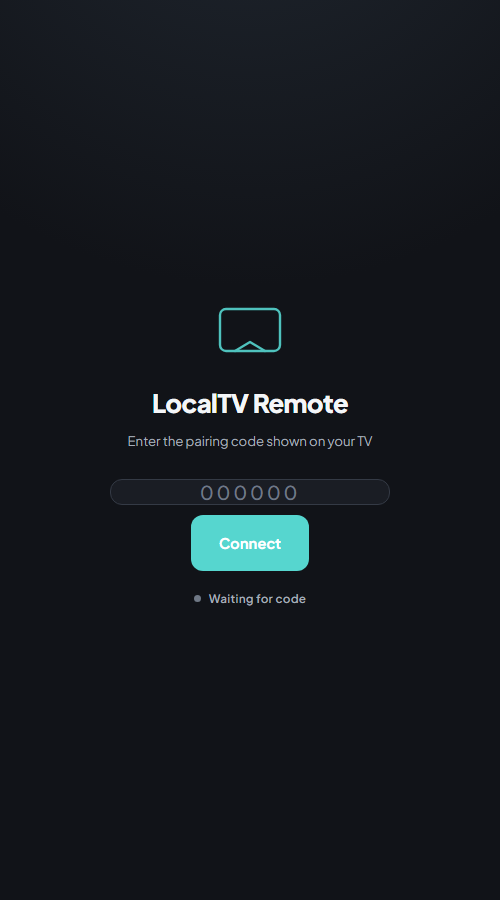 | 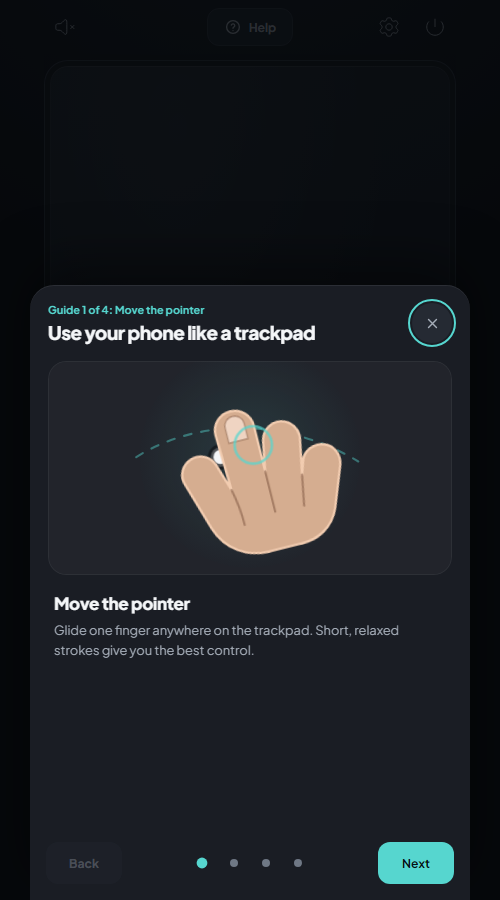 | 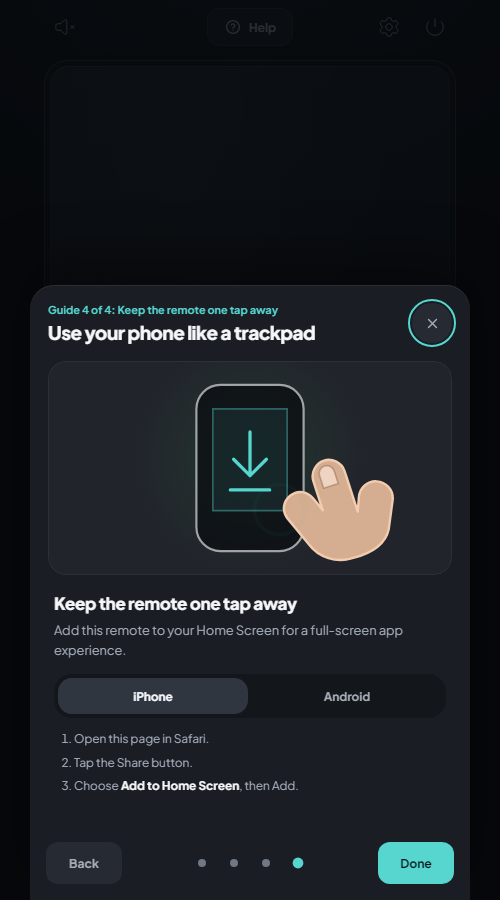 |
| Enter the six-digit pairing code. | Tap Help for visual gesture guides. | Choose iPhone or Android and add it to your Home Screen. |
Looking for a free, open-source alternative to Unified Remote or Remote Mouse? Most phone-as-remote apps make you install a companion app on both your phone and your PC, lock features behind a paid tier, or route input through their cloud. LocalTV Remote doesn't.
| LocalTV Remote | Typical alternatives* | |
|---|---|---|
| Price | ✅ Free & open-source (Apache 2.0) | 💰 Freemium / paid Pro |
| App to install on your phone | ✅ None — opens in the browser (PWA) | 📲 Companion app required |
| Control one PC from several phones at once | ✅ Yes | ⚠️ Usually one device / limited |
| Secure pairing built in (QR + PIN) | ✅ Yes | ⚠️ Varies |
| Cloud / account required | ✅ No — LAN-only, private | ☁️ Often cloud-assisted |
| Footprint on the PC | ✅ ~27 MB, no Chromium | 📦 Often heavier |
| Source code you can audit | ✅ Yes | ❌ Closed-source |
*Reflects common free tiers of popular alternatives; their features may change. Compare for yourself.
| 🖱️ Phone as a wireless mouse | Move, click, right-click, scroll — a phone trackpad with DPI-aware scaling |
| ⌨️ Phone as a keyboard | Type text and send key combos to your PC from your phone |
| 🔊 Volume remote | Control Windows system volume from your phone via Core Audio (COM) |
| 📱 No app to install | Phone opens a web page (PWA), installs as a home-screen app — no app store |
| 👥 Multi-user control | Several phones can control one PC at once, each paired separately |
| 🔗 QR + PIN pairing | Scan once, token is remembered for future sessions |
| 🔒 LAN-only & private | No cloud relay, no accounts, no data leaves your network |
| 🪶 Tiny footprint | ~27 MB installer, ~25–40 MB RAM at idle, no Chromium |
| 🖥️ System tray | Sits in the tray; optional start-on-login toggle |
| 🔌 Auto port | Free-port fallback if 6776 is occupied — QR auto-updates |
Now available on the Windows Package Manager — installs without the SmartScreen prompt:
Open Terminal/PowerShell and Paste:
winget install LocalTV.Remote
Latest release: v1.1.4 · Windows 10/11 · ~27 MB. Download the installer, run it, and you're paired in under a minute. Already installed? Grab the link above to update to the latest version.
The setup wizard will:
%ProgramFiles%\LocalTV RemoteFirst run shows a Windows SmartScreen "unknown publisher" notice (the installer isn't code-signed yet). Click More info → Run anyway to continue.
Your phone remembers the pairing token — next time it reconnects automatically.
Phone browser (PWA)
      │  WebSocket + HTTP  (LAN)
      ▼
LocalTVRemote.exe  ←── Express + ws server on 0.0.0.0:6776
      │
      ├── Mouse / Keyboard → koffi → Win32 SendInput
      ├── Volume           → PowerShell COM → IAudioEndpointVolume
      └── Pairing window   → WebView2 (system runtime, not bundled Chromium)
SendInput — works in any app including games and full-screen windows0.0.0.0 for control but restricts pairing routes (/host, /api/state) to loopback, so the PIN is never served to other devices on the networkRequirements: Node.js 22+, Windows 10/11
git clone https://github.com/creationsofm7/localtv-remote
cd localtv-remote
npm install
Dev mode (TypeScript, no build step):
npm run dev
Full production build (SEA exe + payload):
npm run dist        # typecheck + bundle + branded exe + payload
npm run installer   # compile Inno Setup → release/LocalTVRemote-Setup-x.y.z.exe
Environment variables:
| Variable | Default | Description |
|---|---|---|
LOCALTV_REMOTE_PORT | 6776 | Preferred server port (auto-increments if occupied) |
LOCALTV_REMOTE_STATIC_DIR | public/control | Override the controller PWA directory |
src/
├── core/
│   ├── server/          # Express + WebSocket control server
│   ├── main/
│   │   ├── audio/       # Persistent PowerShell Core Audio host
│   │   ├── input/       # SystemInputRouter + Win32 SendInput backend
│   │   └── native/      # koffi FFI bindings, native-require loader
│   └── shared/          # Protocol types, pairing logic
└── daemon/
    ├── index.ts         # Entry: daemon mode or --webview child mode
    ├── tray.ts          # systray2 tray icon + menu
    └── startup.ts       # Run-at-login registry toggle

public/control/          # Phone controller PWA (HTML/CSS/JS + SW + manifest)
scripts/
├── bundle.mjs           # esbuild → build/localtv-remote.cjs
├── build-sea.mjs        # Node SEA blob + rcedit + PE subsystem flip
├── assemble-payload.mjs # release/app/ with koffi stripped to win32_x64
└── build-installer.mjs  # Inno Setup compile → release/LocalTVRemote-Setup-*.exe
installer/
└── localtv-remote.iss   # Inno Setup script
Windows is the only supported target today. The input layer is abstracted behind SystemInputBackend (src/core/main/input/backends/input-backend.ts). Adding macOS/Linux means implementing that interface — contributions welcome.
npm install && npm run devnpm run typecheck to verifyInstall LocalTV Remote on your Windows PC (it's the only device that needs anything installed). Launch it, scan the QR code with your phone's camera, and your phone's browser opens a controller page — a trackpad, keyboard, and volume remote. Nothing to install on the phone, no app store, no account.
Yes. Several phones can connect at once, and everyone uses their own phone as their own remote — so there's no single remote to toss around the room. Each phone pairs independently and securely. Handy for a shared screen, a meeting room, or a media PC.
LocalTV Remote is exactly that: free, Apache-2.0 open-source, with no companion app required on the phone and no paid tier. See the comparison above.
It's LAN-only — input never leaves your local network and there's no cloud relay or account. Pairing requires a 6-digit PIN derived from machine identity, WebSocket connections are origin-checked, traffic is rate-limited, and the pairing PIN is only served to the PC itself, never to other devices. See Security.
Yes. Input is injected OS-wide via Win32 SendInput, so it works in any app, including games and full-screen windows.
Apache 2.0 — see LICENSE.
Copyright 2026 Mudit Pandey.
Control your Windows PC from your phone - free, open-source wireless mouse, keyboard & volume remote over Wi-Fi. No app to install on the phone.
See the code
LocalTV Remote is a free, open-source app that turns your phone into a wireless mouse, keyboard, and volume remote for any Windows 10/11 PC or laptop — over your local Wi-Fi.
You only install it on the PC. Your phone just opens a web page (a PWA in the browser), so there's nothing to install on the phone — or on any other device you use to control the PC. No app store, no second download.
Multiple people can control one PC at the same time — everyone uses their own phone as their own remote, so there's no single remote to pass around the room. It's LAN-only: no cloud relay, no accounts, and your data never leaves your network. The PC runs a single Node process at ~25–40 MB RAM with no bundled Chromium.
LocalTV Remote is the open-source, remote-only companion to LocalTV. It contains no Chromium, no DRM, and no TV/streaming mode — just the remote-control daemon.
| 1. Connect | 2. Open Help | 3. Save as a PWA |
|---|---|---|
| | |
| Enter the six-digit pairing code. | Tap Help for visual gesture guides. | Choose iPhone or Android and add it to your Home Screen. |
Looking for a free, open-source alternative to Unified Remote or Remote Mouse? Most phone-as-remote apps make you install a companion app on both your phone and your PC, lock features behind a paid tier, or route input through their cloud. LocalTV Remote doesn't.
| LocalTV Remote | Typical alternatives* | |
|---|---|---|
| Price | ✅ Free & open-source (Apache 2.0) | 💰 Freemium / paid Pro |
| App to install on your phone | ✅ None — opens in the browser (PWA) | 📲 Companion app required |
| Control one PC from several phones at once | ✅ Yes | ⚠️ Usually one device / limited |
| Secure pairing built in (QR + PIN) | ✅ Yes | ⚠️ Varies |
| Cloud / account required | ✅ No — LAN-only, private | ☁️ Often cloud-assisted |
| Footprint on the PC | ✅ ~27 MB, no Chromium | 📦 Often heavier |
| Source code you can audit | ✅ Yes | ❌ Closed-source |
*Reflects common free tiers of popular alternatives; their features may change. Compare for yourself.
| 🖱️ Phone as a wireless mouse | Move, click, right-click, scroll — a phone trackpad with DPI-aware scaling |
| ⌨️ Phone as a keyboard | Type text and send key combos to your PC from your phone |
| 🔊 Volume remote | Control Windows system volume from your phone via Core Audio (COM) |
| 📱 No app to install | Phone opens a web page (PWA), installs as a home-screen app — no app store |
| 👥 Multi-user control | Several phones can control one PC at once, each paired separately |
| 🔗 QR + PIN pairing | Scan once, token is remembered for future sessions |
| 🔒 LAN-only & private | No cloud relay, no accounts, no data leaves your network |
| 🪶 Tiny footprint | ~27 MB installer, ~25–40 MB RAM at idle, no Chromium |
| 🖥️ System tray | Sits in the tray; optional start-on-login toggle |
| 🔌 Auto port | Free-port fallback if 6776 is occupied — QR auto-updates |
Now available on the Windows Package Manager — installs without the SmartScreen prompt:
Open Terminal/PowerShell and Paste:
winget install LocalTV.Remote
Latest release: v1.1.4 · Windows 10/11 · ~27 MB. Download the installer, run it, and you're paired in under a minute. Already installed? Grab the link above to update to the latest version.
The setup wizard will:
%ProgramFiles%\LocalTV RemoteFirst run shows a Windows SmartScreen "unknown publisher" notice (the installer isn't code-signed yet). Click More info → Run anyway to continue.
Your phone remembers the pairing token — next time it reconnects automatically.
Phone browser (PWA)
      │  WebSocket + HTTP  (LAN)
      ▼
LocalTVRemote.exe  ←── Express + ws server on 0.0.0.0:6776
      │
      ├── Mouse / Keyboard → koffi → Win32 SendInput
      ├── Volume           → PowerShell COM → IAudioEndpointVolume
      └── Pairing window   → WebView2 (system runtime, not bundled Chromium)
SendInput — works in any app including games and full-screen windows0.0.0.0 for control but restricts pairing routes (/host, /api/state) to loopback, so the PIN is never served to other devices on the networkRequirements: Node.js 22+, Windows 10/11
git clone https://github.com/creationsofm7/localtv-remote
cd localtv-remote
npm install
Dev mode (TypeScript, no build step):
npm run dev
Full production build (SEA exe + payload):
npm run dist        # typecheck + bundle + branded exe + payload
npm run installer   # compile Inno Setup → release/LocalTVRemote-Setup-x.y.z.exe
Environment variables:
| Variable | Default | Description |
|---|---|---|
LOCALTV_REMOTE_PORT | 6776 | Preferred server port (auto-increments if occupied) |
LOCALTV_REMOTE_STATIC_DIR | public/control | Override the controller PWA directory |
src/
├── core/
│   ├── server/          # Express + WebSocket control server
│   ├── main/
│   │   ├── audio/       # Persistent PowerShell Core Audio host
│   │   ├── input/       # SystemInputRouter + Win32 SendInput backend
│   │   └── native/      # koffi FFI bindings, native-require loader
│   └── shared/          # Protocol types, pairing logic
└── daemon/
    ├── index.ts         # Entry: daemon mode or --webview child mode
    ├── tray.ts          # systray2 tray icon + menu
    └── startup.ts       # Run-at-login registry toggle

public/control/          # Phone controller PWA (HTML/CSS/JS + SW + manifest)
scripts/
├── bundle.mjs           # esbuild → build/localtv-remote.cjs
├── build-sea.mjs        # Node SEA blob + rcedit + PE subsystem flip
├── assemble-payload.mjs # release/app/ with koffi stripped to win32_x64
└── build-installer.mjs  # Inno Setup compile → release/LocalTVRemote-Setup-*.exe
installer/
└── localtv-remote.iss   # Inno Setup script
Windows is the only supported target today. The input layer is abstracted behind SystemInputBackend (src/core/main/input/backends/input-backend.ts). Adding macOS/Linux means implementing that interface — contributions welcome.
npm install && npm run devnpm run typecheck to verifyInstall LocalTV Remote on your Windows PC (it's the only device that needs anything installed). Launch it, scan the QR code with your phone's camera, and your phone's browser opens a controller page — a trackpad, keyboard, and volume remote. Nothing to install on the phone, no app store, no account.
Yes. Several phones can connect at once, and everyone uses their own phone as their own remote — so there's no single remote to toss around the room. Each phone pairs independently and securely. Handy for a shared screen, a meeting room, or a media PC.
LocalTV Remote is exactly that: free, Apache-2.0 open-source, with no companion app required on the phone and no paid tier. See the comparison above.
It's LAN-only — input never leaves your local network and there's no cloud relay or account. Pairing requires a 6-digit PIN derived from machine identity, WebSocket connections are origin-checked, traffic is rate-limited, and the pairing PIN is only served to the PC itself, never to other devices. See Security.
Yes. Input is injected OS-wide via Win32 SendInput, so it works in any app, including games and full-screen windows.
Apache 2.0 — see LICENSE.
Copyright 2026 Mudit Pandey.



